
Repairit Video Repair Online and EditTools Repair Video both aim to repair corrupted or unplayable videos directly in the browser, but they serve slightly different users. Repairit Video Repair Online focuses on a guided cloud video repair workflow, while EditTools Repair Video positions itself as a more configurable browser video repair utility for corrupted MP4 and MOV files. Understanding how each tool handles uploads, configuration, and repair depth helps you decide which one fits your real-world damaged video files.
In this article
- Repairit Video Repair Online vs EditTools Repair Video: Quick Verdict
- Repairit Video Repair Online vs EditTools Repair Video: Key Differences
- Repairit Video Repair Online vs EditTools Repair Video: Comparison Table
- What Repairit Video Repair Online and EditTools Repair Video Are Best For
- Repairit Video Repair Online vs EditTools Repair Video: Online Video Repair Capabilities
- Repairit Video Repair Online vs EditTools Repair Video: Supported Video Formats and Use Cases
- Repairit Video Repair Online vs EditTools Repair Video: Upload Workflow and Ease of Use
- Repairit Video Repair Online vs EditTools Repair Video: Cloud Repair, Privacy, and File Handling
- Repairit Video Repair Online vs EditTools Repair Video: Repair Quality and Limitations
- Who Should Choose Repairit Video Repair Online Video Repair Online Video Repair Online
- Who Should Choose EditTools Repair Video
- Pros and Cons of Repairit Video Repair Online and EditTools Repair Video
- How to Repair Corrupted Videos Online After Choosing the Right Tool
Repairit Video Repair Online vs EditTools Repair Video: Quick Verdict
The key difference is that Repairit Video Repair Online is more suitable when you want a guided, less technical way to repair corrupted or unplayable videos online, while EditTools Repair Video may be enough if you prefer configurable repair options and understand video settings.
In most real-world cases where you just need to fix a broken MP4 or MOV from a phone or camera, Repairit Video Repair Online offers a clearer path from upload to repaired download. EditTools Repair Video leans toward users willing to adjust parameters around index rebuilding and stream-level fixes.
Repairit Video Repair Online vs EditTools Repair Video: Key Differences
The main difference is how each tool balances ease of use against technical control during online video repair. Repairit Video Repair Online focuses on a streamlined cloud workflow with minimal configuration, while EditTools Repair Video provides more options for users who are comfortable tuning how corrupted MP4 and MOV files are processed.
- Online workflow: Repairit Video Repair Online uses guided steps to upload, repair, and download, while EditTools Repair Video follows a structure of upload corrupted video, configure repair settings, export repaired file.
- Repair depth: Repairit Video Repair Online targets common corruption patterns in everyday clips, whereas EditTools Repair Video highlights index rebuilding and targeted stream handling for users who know when to use those options.
- User skill level: Repairit Video Repair Online prioritizes non-technical users, while EditTools Repair Video is more comfortable for people who understand video and audio stream concepts.
- Decision factors: Your choice often comes down to whether you prefer a simple, cloud-guided repair or are ready to invest time in manual adjustments to try to recover tricky corrupted footage.
Repairit Video Repair Online vs EditTools Repair Video: Comparison Table
This comparison table summarizes how Repairit Video Repair Online and EditTools Repair Video differ across common decision factors such as workflow, repair capability, and ease of use.
| Dimension | Repairit Video Repair Online | EditTools Repair Video |
|---|---|---|
| Best for | Users who want a guided, user-friendly online workflow to repair corrupted or unplayable videos with minimal manual configuration. | Users wanting configurable online repair options and more technical control over corrupted MP4 and MOV files. |
| Online workflow | Streamlined upload, automatic online analysis, and guided repair steps focused on simplicity. | Structured workflow of upload corrupted video, configure repair settings, export repaired file for those comfortable tuning options. |
| Repair capability | Designed for general corrupted, broken, or unplayable video repair with guided settings. | Supports rebuilding indexes and fixing damaged video and audio streams for users who can adjust technical parameters. |
| Ease of use | Prioritizes clarity and guided prompts, suitable for non-technical users. | Interface is more technical and less beginner friendly, better for users who understand video settings. |
| Privacy and file handling | Uses a cloud video repair workflow where files are uploaded for processing; users should review online terms before using sensitive content. | Processes videos in the browser-based workflow; users should review its upload and privacy terms before sending confidential files. |
| Strengths | Accessible online repair, clear steps, and a workflow designed to fix unplayable videos without deep technical knowledge. | Strong for configurable repairs, especially when rebuilding indexes or adjusting how damaged video and audio streams are fixed. |
| Weaknesses | Less focused on fine-grained manual controls, which may limit technical tuning for advanced users. | More technical interface and options can feel complex, and may slow down beginners who just want a quick online repair. |
What Repairit Video Repair Online and EditTools Repair Video Are Best For
Repairit Video Repair Online is a stronger choice for users who want to upload a corrupted file, follow simple on-screen guidance, and let a cloud video repair workflow handle the technical work, while EditTools Repair Video may be enough if you prefer to tune how your damaged MP4 or MOV is processed.
According to the overview, EditTools Repair Video is a browser video repair utility focused on corrupted MP4 and MOV files, best for users comfortable with technical settings, especially around rebuilding indexes and fixing damaged video and audio streams. In contrast, Repairit Video Repair Online emphasizes accessible steps that suit people dealing with broken phone or camera clips who do not want to worry about low-level parameters.
In most real-world cases, users who just discovered that a recording is unplayable will appreciate the guided nature of Repairit Video Repair Online, while users with more experience in video formats might choose EditTools Repair Video when they want to experiment with different repair configurations.
Repairit Video Repair Online vs EditTools Repair Video: Online Video Repair Capabilities
The main difference in online video repair capabilities is that Repairit Video Repair Online focuses on a smoother, less technical experience, while EditTools Repair Video leans into configurable repair options such as index rebuilding and stream-level fixes.
Both tools aim to repair corrupted videos online, but they present their capabilities differently.
- Repairit Video Repair Online capabilities:
- Guided online repair flow designed to fix unplayable or corrupted videos without requiring deep technical knowledge.
- Browser-based upload and repair that focuses on common corruption scenarios users hit with everyday recordings.
- Workflow optimized for clarity so users can move from upload to repaired download with minimal configuration.
- EditTools Repair Video capabilities:
- Supports rebuilding indexes in corrupted MP4 and MOV files when the structure prevents normal playback.
- Can target damaged video and audio streams, which matters if specific tracks have issues while others seem intact.
- Follows a workflow of upload corrupted video, configure repair settings, export repaired file, giving technical users more manual control.
This means Repairit Video Repair Online is more suitable when you want the service to make most decisions for you, while EditTools Repair Video may be enough if you already understand what index rebuilding or stream-targeted repair might accomplish for a severely corrupted file.
Repairit Video Repair Online vs EditTools Repair Video: Supported Video Formats and Use Cases
The key difference in supported use cases is that Repairit Video Repair Online is framed around everyday camera, phone, and social media videos, while EditTools Repair Video is positioned primarily around corrupted MP4 and MOV files in a browser-based workflow.
Repairit Video Repair Online is designed to handle common formats used in cameras, phones, and social media, such as MP4, MOV, or similar everyday containers. EditTools Repair Video specifically positions itself around corrupted MP4 and MOV files but can also fit general browser-based repair needs. In most real-world cases, users bring in footage from phones, action cams, screen recordings, or camera cards, often in MP4, MOV, AVI, MKV, or 3GP.
For users mainly dealing with phone clips, exported screen recordings, or social media drafts, the broad everyday focus of Repairit Video Repair Online is helpful. If your main issue is a stubborn MP4 or MOV whose index seems broken or whose streams appear out of sync, EditTools Repair Video may be a better match, assuming you are comfortable with its more technical options.
Repairit Video Repair Online vs EditTools Repair Video: Upload Workflow and Ease of Use
The key difference in workflow is that Repairit Video Repair Online streamlines upload and repair into a guided process, while EditTools Repair Video expects users to configure more repair settings between upload and export.
Repairit Video Repair Online focuses on a straightforward upload and repair experience, where users typically choose a corrupted file, follow guided prompts, and let the cloud workflow handle most decisions. This is useful when a clip from a phone or camera suddenly becomes unplayable and you do not have time to learn technical jargon.
EditTools Repair Video uses a more technical workflow: upload corrupted video, configure repair settings, export repaired file. This becomes important when deciding whether you want simplicity or more control over how the repair runs. Users often notice that a more configurable workflow can require trial and error, while a guided online repair can feel quicker when you just want a working file again.
Repairit Video Repair Online vs EditTools Repair Video: Cloud Repair, Privacy, and File Handling
The main privacy consideration is that both tools rely on online or browser-based processing where your corrupted videos leave your local environment, so users should review each service terms before uploading sensitive footage.
Both tools rely on an online or browser-based workflow where corrupted videos are uploaded for processing, so files temporarily leave your device. In most real-world cases this is fine for normal recordings, but it matters if you are working with private or confidential footage.
Because specific policies are not detailed here, users should review each tool upload, storage, and privacy terms carefully before submitting sensitive videos. Repairit Video Repair Online uses a cloud video repair workflow where processing happens after upload, while EditTools Repair Video describes a browser-based workflow that still involves handling your files online. For highly confidential material, this decision factor can be just as important as repair capability.
Repairit Video Repair Online vs EditTools Repair Video: Repair Quality and Limitations
The key limitation for both tools is that repair quality depends heavily on how badly your video file is corrupted, regardless of whether you choose a guided or configurable workflow.
Repair quality for both tools depends heavily on how badly the file is damaged. EditTools Repair Video offers technical options like rebuilding indexes and targeting damaged video and audio streams, but results can still vary. Repairit Video Repair Online focuses on accessible repair for common corruption.
A common limitation is that severe corruption, missing metadata, interrupted recordings, or very damaged files may only partially repair or remain unplayable. In practice, this means:
- Repairit Video Repair Online can be a strong first stop for typical broken MP4 or MOV files from phones or cameras.
- EditTools Repair Video may be worth trying when you suspect index-level issues or specific stream problems and are ready to experiment with settings.
Neither approach can guarantee that every corrupted video becomes fully playable again, so users should manage expectations, especially with footage from interrupted recordings or storage errors.
Who Should Choose Repairit Video Repair Online
Repairit Video Repair Online is more suitable when you want a simple, guided way to repair corrupted, damaged, broken, or unplayable videos online without adjusting advanced parameters.
- Users who want a guided online workflow to repair corrupted or unplayable videos with minimal setup.
- People who feel uncomfortable adjusting technical video parameters or stream-level settings.
- Anyone needing a simple browser-based way to repair broken MP4 or MOV files from phones or cameras.
- Users who value clear, step-by-step prompts over deep manual control during online video repair.
In most real-world cases, if you have a single MP4 or MOV that suddenly refuses to play and you just want it working again, starting with Repairit Video Repair Online will usually feel more straightforward than diving into technical controls.
Who Should Choose EditTools Repair Video
EditTools Repair Video may be enough if you are comfortable with more technical browser-based video repair and want to tweak how your corrupted MP4 or MOV is processed.
- Users wanting configurable online repair options and willing to tweak technical settings.
- People repairing corrupted MP4 and MOV files where rebuilding indexes might help restore playback.
- More advanced or curious users who understand video and audio stream concepts and want granular control.
- Those comfortable with a more technical, less beginner friendly interface in exchange for deeper tuning.
This tool can be a better fit when you are troubleshooting a stubborn file, suspect stream-level corruption, and do not mind experimenting with different repair configurations instead of relying only on fully automated decisions.
Pros and Cons of Repairit Video Repair Online and EditTools Repair Video
The key difference in pros and cons is that Repairit Video Repair Online emphasizes simplicity and guidance, while EditTools Repair Video emphasizes configurability and technical depth.
Repairit Video Repair Online Pros and Cons
EditTools Repair Video Pros and Cons
How to Repair Corrupted Videos Online After Choosing the Right Tool
After comparing Repairit Video Repair Online and EditTools Repair Video, the next step is actually running an online repair on your corrupted, damaged, or unplayable clips so you can see whether they become playable again.
For many users, Repairit Video Repair Online offers a practical guided option: you upload the broken file, let the cloud workflow analyze it, and then download any repaired output. This section walks through how that looks in a typical browser-based repair session.
Key Features
In most real-world cases, these features are what matter when you discover a video has become unplayable:
- Online video repair workflow designed to fix unplayable or corrupted clips with clear on-screen guidance.
- Browser-based interface that focuses on simplicity so users can upload, repair, and download without complex tuning.
- Cloud processing that handles typical corruption scenarios for everyday camera, phone, or screen recordings.
Step-by-step guide
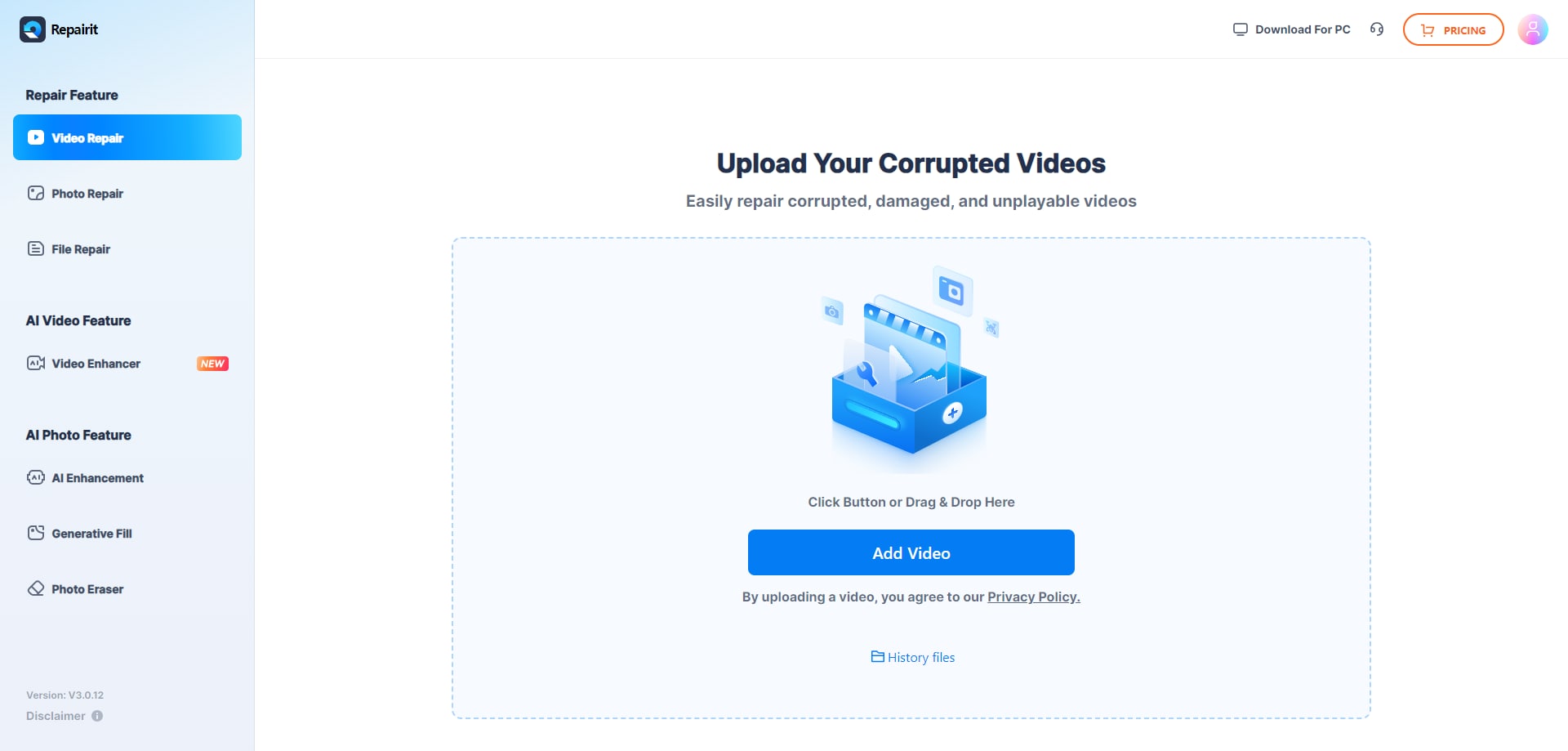
Step 1. Upload the damaged or unplayable videos you want to repair through Repairit Video Repair Online.
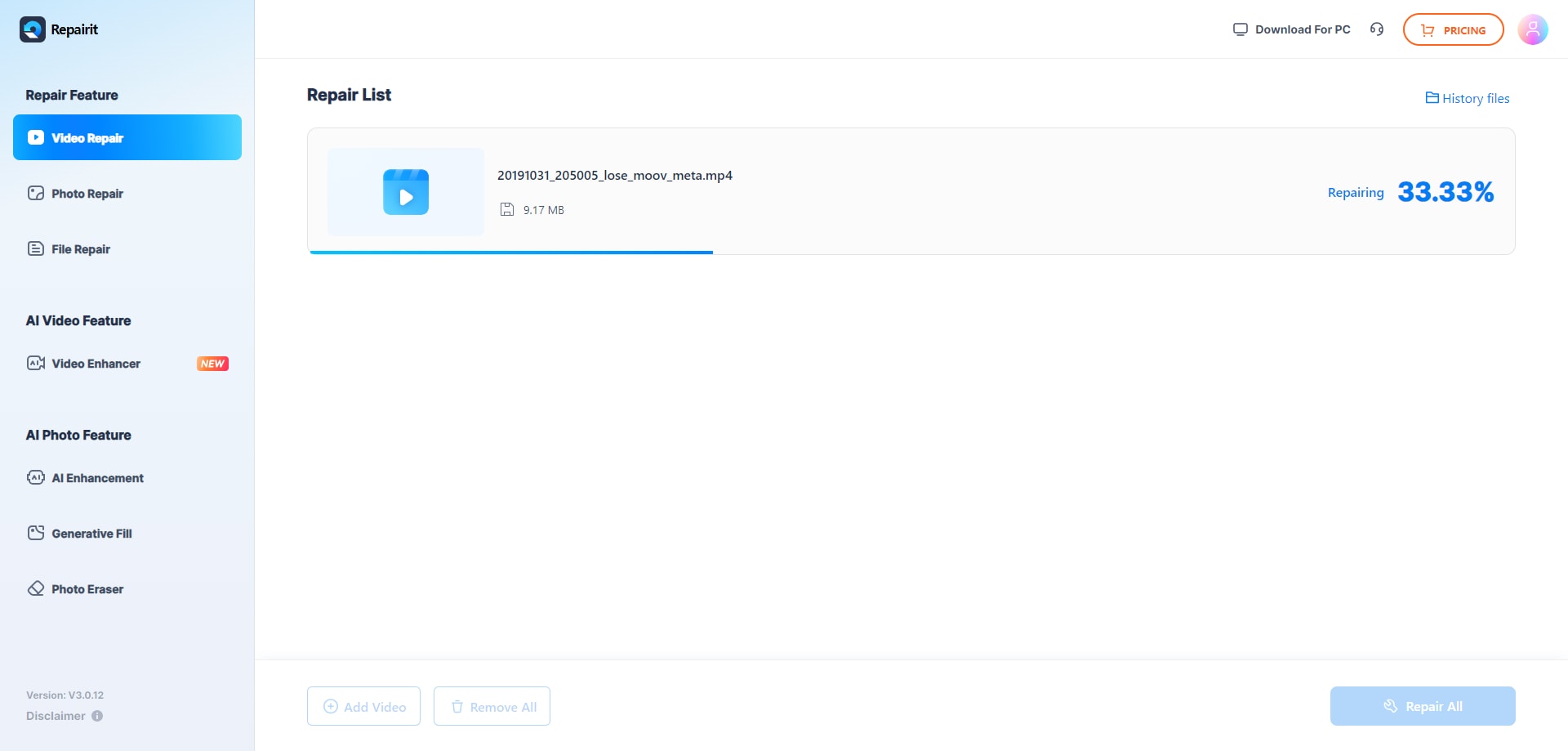
Step 2. Start the online repair process and let Repairit Video Repair Online analyze the corrupted video files.
Step 3. Preview the repaired video result when available, then save the repaired videos to your device.
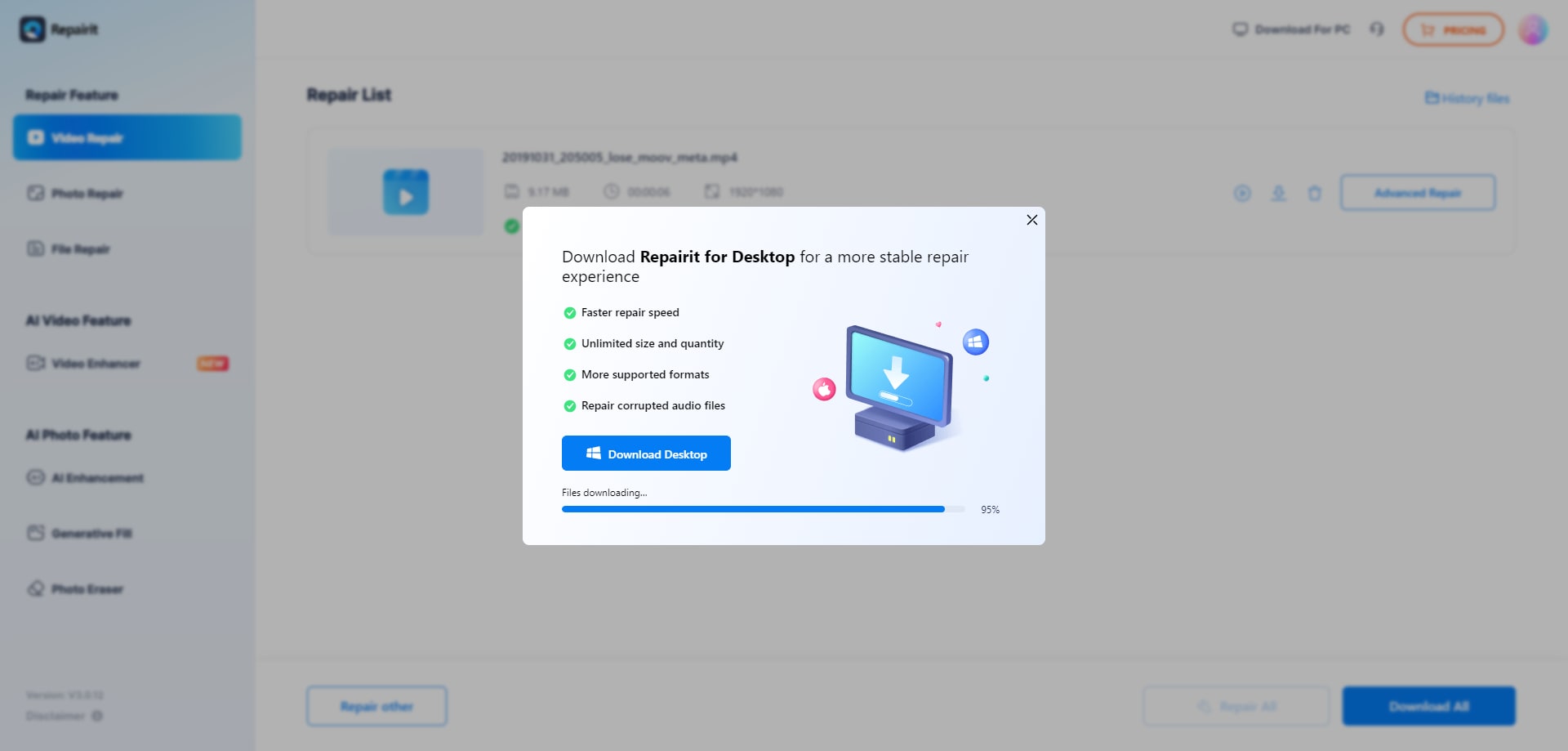
This simple upload, repair, preview, and save loop helps you quickly test whether your corrupted MP4 or MOV can be repaired online before trying more complex, technical approaches.
Final Verdict
The key difference between Repairit Video Repair Online and EditTools Repair Video is how much guidance versus configuration you want in an online repair workflow.
Repairit Video Repair Online is more suitable when you need a clear, cloud-based process to repair corrupted or unplayable clips without worrying about technical details. Its guided browser workflow is helpful for phone videos, camera recordings, and exported clips that suddenly refuse to play.
EditTools Repair Video may be enough if you already understand video concepts and want configurable online repair options, especially around rebuilding indexes and adjusting how damaged video and audio streams are handled. This can be valuable for advanced users facing complex MP4 or MOV corruption.
Choosing between them comes down to how technical you are, how badly the file is corrupted, and whether you prefer a guided experience or manual control when repairing broken MP4 or MOV files online.
Next: Repairit Video Repair Online vs Soouya Online Video Repair
FAQ
-
1. Which is better for most users: Repairit Video Repair Online or EditTools Repair Video?
For most non-technical users, Repairit Video Repair Online is more suitable because of its guided, cloud video repair workflow. EditTools Repair Video may be enough if you are comfortable configuring technical settings for corrupted MP4 and MOV files. -
2. Can both tools repair corrupted MP4 and MOV files online?
Yes, both aim to repair broken MP4 or MOV files in a browser-based environment. Repairit Video Repair Online emphasizes a simpler guided process, while EditTools Repair Video focuses on configurable options like index rebuilding and stream-level adjustments. -
3. What is the difference between online video repair, video recovery, and video enhancement?
Online video repair focuses on fixing corrupted or unplayable files you still have. Video recovery deals with finding or restoring lost or deleted files, while video enhancement or upscaling changes quality, resolution, or appearance rather than repairing corruption. -
4. When does EditTools Repair Video make more sense than Repairit Video Repair Online?
EditTools Repair Video may be more suitable when you want configurable online repair options, particularly if you need to experiment with rebuilding indexes or targeting damaged video and audio streams and you are comfortable with a more technical interface. -
5. Is Repairit Video Repair Online only for MP4 and MOV files?
Repairit Video Repair Online is designed around common formats from phones, cameras, and social platforms, including MP4 and MOV, and can also help with similar everyday containers often used for recordings and exports.




