
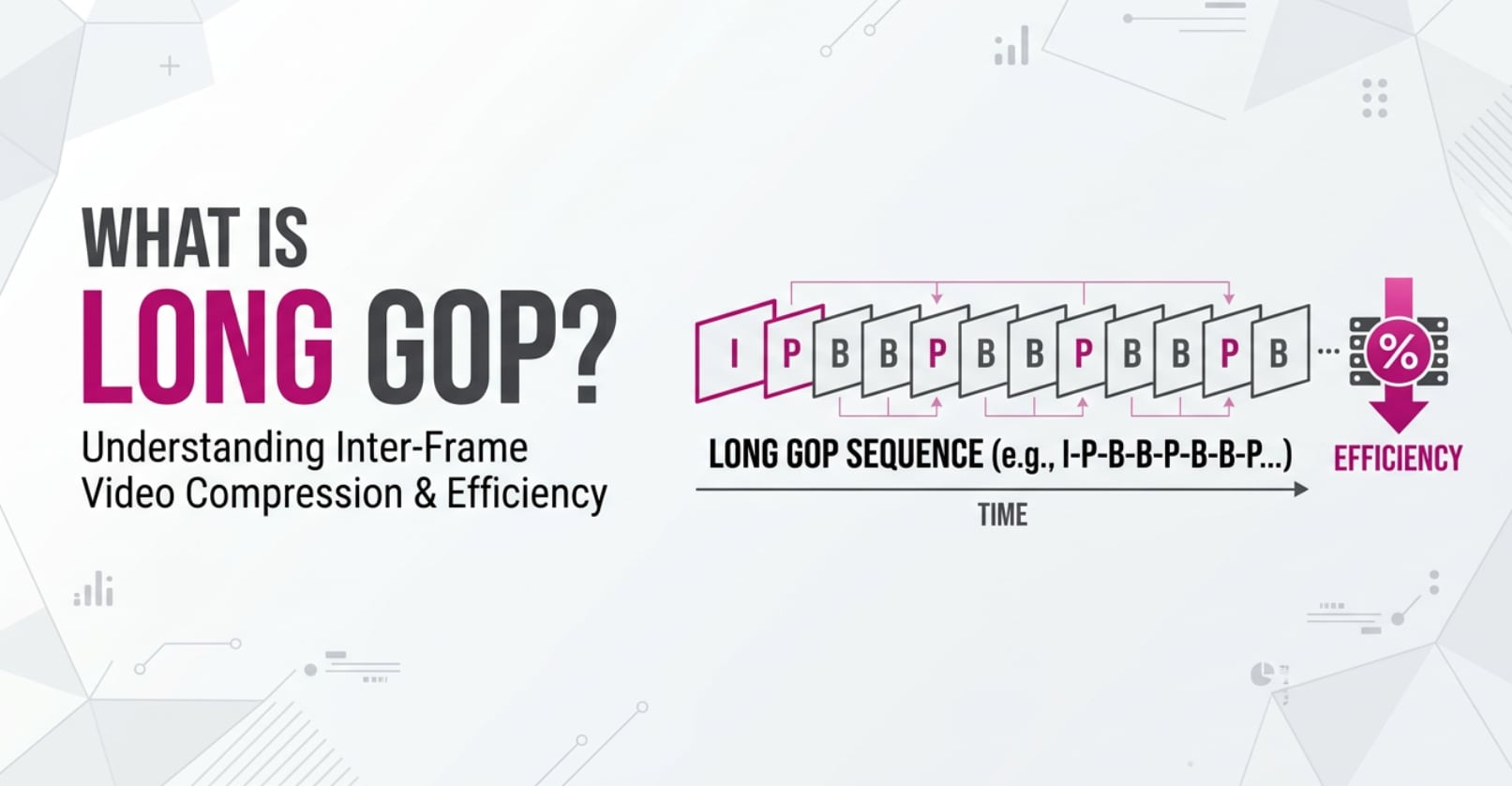
When you record, edit, or stream video, you will often see terms like Long GOP, GOP length, or IPB frames in camera menus and encoder settings. Understanding Long GOP helps you balance file size, quality, and editing performance so your footage plays smoothly on platforms like YouTube, social media, and OTT services without wasting storage or bandwidth.
Repair Corrupted Files To Save Your Data
 Security Verified. Over 7,302,189 people have downloaded it.
In this article
What Is Long GOP?
Long GOP (Long Group of Pictures) is a type of interframe video compression structure. Instead of saving every frame as a complete image, it stores a full reference frame occasionally and records only the changes between frames in between.
Technically, Long GOP compression is a GOP structure and prediction method used in codecs such as H.264/AVC, H.265/HEVC, and some MPEG formats. It combines I-frames (intra), P-frames (predicted), and often B-frames (bi-predicted) in one sequence.
In the encoding pipeline, long gop video decides how frames are grouped and referenced. This structure directly affects how efficiently your encoder can pack visual information into a given bitrate while maintaining acceptable image quality.
Why Is Long GOP Important in Video Compression?
The main problem video compression tries to solve is how to deliver high-quality motion images without massive file sizes or overwhelming network bandwidth. Long gop compression addresses this by exploiting similarities between neighboring frames.
Because only differences between frames are encoded, Long GOP:
- Improves bitrate efficiency, letting you get higher visual quality at the same bitrate compared with All-Intra.
- Reduces storage needs on cameras, memory cards, and drives.
- Helps streaming platforms deliver smoother playback at lower connection speeds.
However, this structure also introduces limitations:
- Decoding complexity is higher, since multiple frames may need to be read to show one moment on the timeline.
- Editing can feel sluggish, especially for multicam or effects-heavy projects.
- Long gop artifacts such as blocking, smearing, or motion glitches can become visible if the bitrate is too low or GOP length is too long.
- Corruption in one key reference frame can affect many dependent frames, making damage more obvious.
In short, Long GOP trades easier editing and robustness for much better compression efficiency, which is why it dominates cameras, streaming, and delivery formats.
How Does Long GOP Work in the Encoding Workflow?
In a typical encoding workflow, the encoder analyzes the incoming frames, decides which ones will be I, P, or B frames, and builds a gop structure that repeats over time. This decision happens after color conversion and motion analysis, but before entropy coding and final multiplexing.
A simplified Long GOP sequence might look like:
I - B - B - P - B - B - P - B - B - I ...
Here is how each frame type fits in:
- I-frame (intra): a complete self-contained picture used as a reset/anchor point.
- P-frame (predicted): references a previous I or P frame and encodes only differences.
- B-frame (bi-predicted): references surrounding frames (both past and future) for even more efficient compression.
The "Long" in Long GOP means the distance between I-frames (GOP length) can be quite large, sometimes spanning half a second, one second, or even more in low-bitrate modes.
Long GOP in cameras and recorders
Most mirrorless cameras, DSLRs, camcorders, action cams, and drones use long gop video modes for internal recording. In menus you may see terms such as:
- IPB or IPB-L (Long GOP) vs All-I (Intra-only).
- GOP length or keyframe interval settings.
- Bitrate modes that silently change the GOP structure.
When you choose a Long GOP profile, the camera firmware sets a specific GOP pattern and interval to balance quality, card speed, and recording time. Long GOP lets you store long takes on affordable SD cards without filling them immediately.
Long GOP in software and hardware encoders
During exporting, streaming, or transcoding, you will see Long GOP options in tools like:
- FFmpeg / x264 / x265: parameters such as
-g(GOP size),-keyint, or presets that imply Long GOP. - OBS Studio: "keyframe interval" and encoder presets for live streaming.
- HandBrake: GOP length, B-frames count, and reference frame settings under video tab.
- Adobe Premiere Pro / Media Encoder: H.264/H.265 presets with keyframe distance and profile/level options.
- Hardware encoders (NVIDIA, Intel Quick Sync, Apple hardware, broadcast encoders): often default to Long GOP with configurable keyframe interval for VOD and live.
In these workflows, Long GOP interacts with:
- Bitrate control (CBR/VBR): the encoder spreads bits more efficiently across frames.
- Motion estimation: Long GOP depends on accurate motion analysis between frames.
- Entropy coding: once frame predictions are made, residual data is further compressed.
As the GOP gets longer, compression becomes more efficient but more fragile. Shorter GOPs behave closer to All-Intra, with larger files but easier seeking and editing.
When Should You Care About Long GOP? Common Mistakes and Quick Tips
Not everyone needs to tweak GOP settings, but some creators should watch them closely.
Who should care most?
- Video editors working with long-form or multicam timelines.
- Colorists and VFX artists pushing footage heavily in post.
- Live streamers using OBS, hardware encoders, or RTMP services.
- Content creators who batch-export for YouTube, TikTok, and OTT platforms.
When Long GOP really matters
- When playback in Premiere, DaVinci Resolve, or Final Cut becomes choppy.
- When exports show macroblocking, ghosting, or "muddy" motion in fast scenes.
- When a camera-recorded Long GOP file becomes corrupted and many seconds look broken.
- When platforms like YouTube require regular keyframes for ad insertion or seeking.
Common misunderstandings about Long GOP vs Intra
- "Long GOP always looks worse." – At the same bitrate, Long GOP often looks better; quality problems usually come from too-low bitrate or extreme GOP length.
- "All-Intra is always the best choice." – It is better for heavy editing, but wastes storage and bandwidth for simple projects or delivery files.
- "Keyframes do not affect streaming." – Irregular or very long keyframe intervals can hurt seekability and cause buffering on some players.
Quick tips for practical use
- For camera recording destined for heavy post-production, choose All-Intra or a short-GOP option if storage allows.
- For live streaming, keep keyframe interval at 1–2 seconds as many platforms recommend.
- When exporting for YouTube/VOD, use a reasonable bitrate and a standard GOP (e.g., 2 seconds at 25/30 fps) to help re-encoding.
- If Long GOP clips stutter on your timeline, create intraframe proxies or transcode to an editing-friendly codec (ProRes, DNxHR, CineForm).
- When a Long GOP file is corrupted, avoid re-encoding it directly; repair the file first with a dedicated tool.
Takeaway: use Long GOP for efficient recording, streaming, and delivery, but switch to shorter GOPs or intra-frame formats for complex editing or mission-critical work.
How to Use Repairit to Fix a Corrupted Video File
Because long gop video spreads image information across many frames, corruption can ripple through entire sections of a clip. Wondershare Repairit is built specifically to handle these structural issues so you can restore unplayable or glitchy files without needing to understand every detail of long gop vs intra encoding. Visit the Repairit official website to download the latest version for your system.
Key features of Wondershare Repairit
- Repairs multiple corrupted long gop compression files at once to save time in large projects.
- Supports popular formats from cameras, phones, and editors, including many Long GOP-based codecs.
- Provides an easy preview window so you can confirm the repaired result before exporting.
Step-by-step guide to repair Long GOP videos
- Add corrupted video files

Open Wondershare Repairit and choose the Video Repair feature. Click the add button in the interface, then browse to the folder that contains your damaged Long GOP recordings. Select one or more files and load them into the repair list so the program can analyze them.
- Repair video files

After the clips appear in the list, start the repair process with a single click. Repairit scans the internal structure, including GOP headers and frame references, to identify what is broken. When the first pass is complete, use the built-in player to preview the repaired Long GOP video and confirm that playback, audio, and motion look normal.
- Save the repaired video files

If the preview looks good, click the save option, choose a secure destination folder, and export the fixed files. The repaired Long GOP clips can then be imported back into your NLE, uploaded to a platform, or archived without the glitches and playback errors you had before.
Conclusion
Long GOP is a space-saving way to compress video by distributing image information across a sequence of interdependent frames. It offers excellent bitrate efficiency, making it ideal for camera recording, web delivery, and streaming, but it can slow down editing and make artifacts or corruption more visible when problems occur.
By understanding how long gop video behaves in your camera, encoder, and editing software, you can choose appropriate settings for each project, avoid common mistakes, and know when to switch to shorter GOPs or intra-only formats. If a Long GOP file becomes damaged or will not play, Wondershare Repairit provides a straightforward workflow to recover your footage and keep your production on track.
Next: Open Gop
FAQ
-
1. What is Long GOP in video compression?
Long GOP, or Long Group of Pictures, is a video compression structure where only some frames are stored as full images and the rest record changes relative to those reference frames. It is a form of interframe compression that reduces file size and bitrate requirements. -
2. What is the difference between Long GOP and intra frame (All Intra)?
Long GOP uses I, P, and often B frames across a sequence so many frames depend on each other, resulting in smaller files but heavier decoding for editing. Intra frame (All Intra) encodes every frame independently, which increases file size but improves timeline responsiveness and limits the impact of any single corrupted frame. -
3. Why are Long GOP files harder to edit?
Editing software must decode several neighboring frames to reconstruct a single Long GOP frame because frames reference each other. This extra processing can slow down scrubbing, real-time playback, and effects, especially on less powerful systems or in complex multicam timelines. -
4. Can Long GOP cause lower video quality?
Long GOP itself does not automatically mean lower quality. Quality problems usually appear when the bitrate is too low or the GOP is too long, leading to artifacts like blocking, smearing, or ghosting in fast motion. Using a higher bitrate and a reasonable GOP length helps preserve detail. -
5. How can I fix a corrupted Long GOP video file?
If a Long GOP file becomes corrupted, avoid repeatedly transcoding it because this may worsen the damage or quality. Instead, use a repair tool such as Wondershare Repairit to scan the structure, fix GOP-level errors, and export a playable version while keeping as much original quality as possible.




