
Group of Pictures (GOP) is a behind-the-scenes setting that controls how frames are grouped and compressed in digital video. You will see GOP in video settings on cameras, capture cards, streaming encoders, and export panels in editors like Premiere Pro or Final Cut. Understanding it helps you balance video quality, file size, editing ease, and playback stability across devices and platforms.
Repair Corrupted Files To Save Your Data
 Security Verified. Over 7,302,189 people have downloaded it.
In this article
What is Group of Pictures (GOP)?
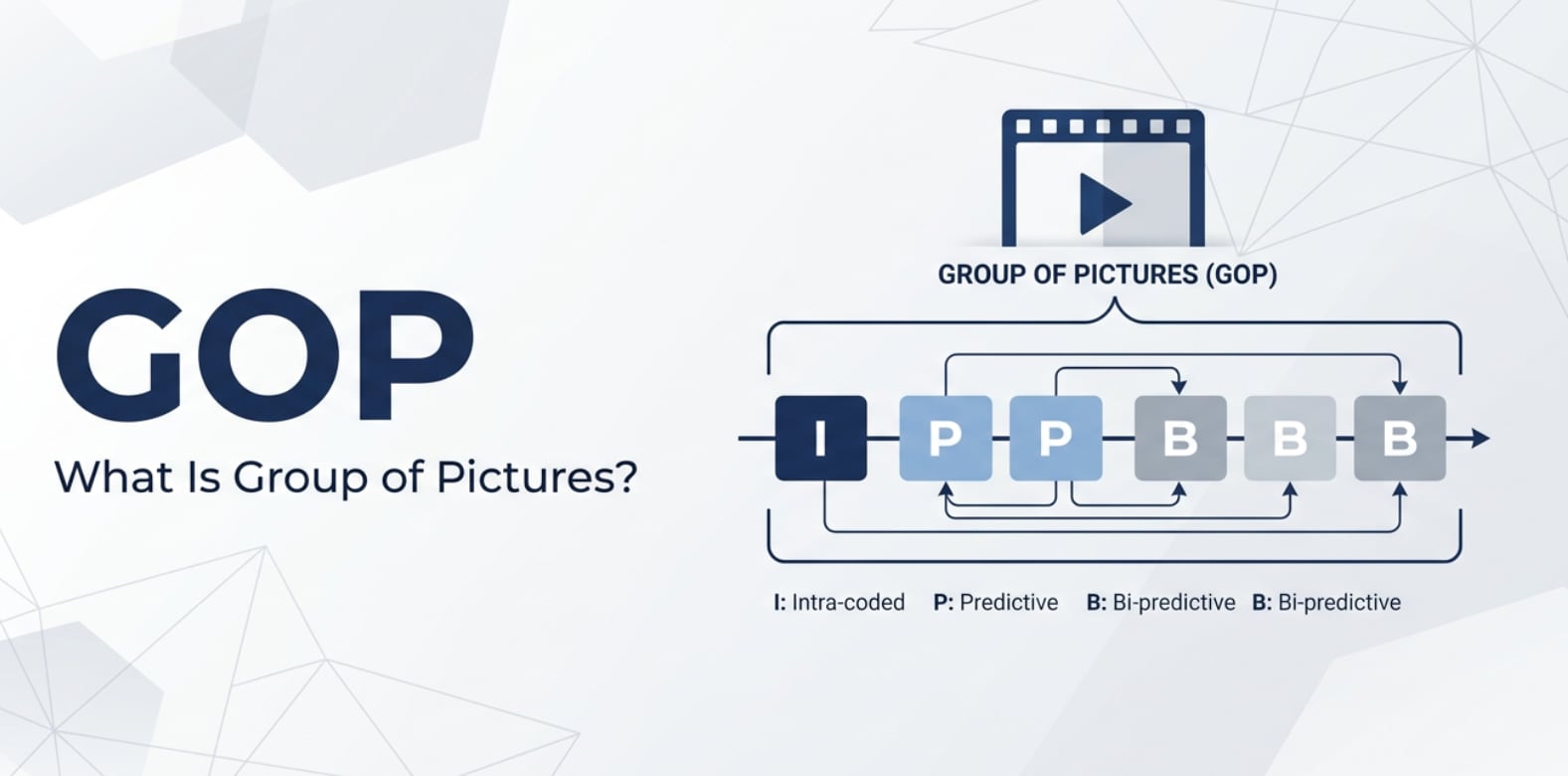
A Group of Pictures (GOP) is a sequence of video frames that an encoder treats as a unit when compressing video. It is a video compression and encoding parameter that defines how many frames are grouped between keyframes and how different frame types (I, P, and B frames) are arranged.
In a typical GOP structure, the sequence starts with an I-frame (a full image), followed by P-frames (predicted from earlier frames) and sometimes B-frames (predicted from both earlier and later frames). Together, these frames form one GOP. When people talk about GOP length or keyframe interval, they are usually referring to how many frames are in this group.
Because GOP is a core part of interframe compression, you will see it in camera menus, hardware encoders, software encoders like x264/x265, and in export presets for H.264, H.265/HEVC, AV1, and similar codecs.
What Does Group of Pictures (GOP) Affect?
Impact on quality, bitrate, and file size
The way you set your GOP length has a direct impact on video quality, bitrate behavior, and final file size.
- Short GOP (frequent I-frames). More I-frames mean more full images are stored. This makes the video easier to decode and more robust, but it also increases bitrate and file size because I-frames are large compared to P/B frames.
- Long GOP (fewer I-frames). Fewer I-frames allow the encoder to rely more on predictive compression, usually giving better compression efficiency and smaller files at the same average bitrate. However, artifacts can be more visible if motion is complex or the bitrate is low.
- Visual stability at a given bitrate. At constant bitrate, a very long GOP in video can look cleaner in static scenes but struggle in fast motion. A shorter GOP may look more stable in motion but cost you more bits overall.
In streaming, GOP also affects how well variable bitrate algorithms work. Encoders often adjust bitrate dynamically based on scene complexity within each GOP, so the structure influences how smoothly quality is distributed over time.
Impact on editing, seeking, and errors
GOP is not just about compression; it also determines how your video behaves when edited or played back.
- Seeking and scrubbing. Media players can only decode from the nearest I-frame, then reconstruct dependent P/B frames. Shorter keyframe interval (short GOP) gives more precise, snappy seeking; longer GOP can make scrubbing feel sluggish or imprecise.
- Editing accuracy. When cutting long-GOP footage, editors may need to re-encode more frames to create clean cuts on non-I frames. Shorter GOPs make frame-accurate editing and smart rendering easier.
- Error propagation. If part of a GOP is damaged (e.g., transmission errors or corrupted file), every frame that depends on the broken reference can glitch until the next I-frame. Long GOPs can mean several seconds of blocky or frozen video; shorter GOPs contain the damage more effectively.
- Device and platform compatibility. Some broadcast and streaming platforms require a specific GOP structure (for example, 2-second GOP with a fixed pattern) for smooth segmenting, ad insertion, and multi-bitrate switching.
How Does Group of Pictures (GOP) Work in Real Use?
In actual workflows, GOP shows up in menus and presets, even if it is not spelled out as "Group of Pictures." Here are some common areas where you will encounter it.
- Cameras and recorders. Many DSLR, mirrorless, and cinema cameras using H.264/H.265 have fixed or semi-fixed GOP structures. Some higher-end models let you choose "Long GOP" vs "All-I" recording. All-I effectively uses a GOP of 1 (every frame is an I-frame), giving easier editing but larger files.
- Streaming encoders. Tools like OBS Studio, hardware encoders, or cloud-based services usually expose a "Keyframe interval" setting measured in seconds. For example, at 30 fps:
- Keyframe interval 2 seconds → GOP length 60 frames
- Keyframe interval 1 second → GOP length 30 frames
- Video editors and export presets. In Adobe Premiere Pro, DaVinci Resolve, or similar, H.264/H.265 export settings often include "Keyframe distance," "Max GOP," or a checkbox like "Use closed GOP." These define how frames are grouped for the exported file.
- Transcoding tools. CLI tools such as FFmpeg let you set GOP parameters explicitly, for example:
-g 60 -keyint_min 60 -sc_threshold 0to enforce a fixed GOP of 60 frames. This level of control is often used for broadcast or strict streaming specs. - Playback on different devices. Some older or low-power devices struggle with very complex GOP structure (lots of B-frames, extremely long GOPs). Simpler patterns with moderate GOP length help maximize compatibility.
Common Mistakes and Quick Tips
- Assuming "longer is always better." A very long GOP might reduce file size, but it can hurt seeking, increase visible artifacts during heavy motion, and magnify the impact of any errors.
- Ignoring platform guidelines. Streaming services often publish recommended video encoding settings, including GOP length. Ignoring these can cause ingest issues or poor playback.
- Using All-I when it is not needed. All-I recording creates huge files and demands more storage and bandwidth. For many online videos, a well-tuned long GOP offers a better quality–size balance.
- Mixing wildly different GOP settings in one project. Combining clips with radically different GOP structures can slow down editing or cause inconsistent export quality.
- Not testing on target devices. A GOP that works fine on your workstation may stutter on smart TVs or mobile devices if it is too complex.
Quick takeaways:
- For web streaming at 25–30 fps, a 2-second GOP (50–60 frames) is a solid default.
- For heavy editing or VFX, consider shorter GOPs or All-I for camera originals.
- For archival exports, use reasonable GOP length plus a higher bitrate rather than maxing out GOP length.
How to Use Repairit to Fix a Corrupted Video File
If a bad GOP in video structure, sudden power loss, or transfer error leaves your footage frozen, blocky, or unplayable, a specialized repair tool can save the day. Wondershare Repairit is designed exactly for these situations. It analyzes damaged files, rebuilds headers and frame structure, and lets you preview the fixed result before saving. You can explore everything it can do on the Repairit official website.
Key features of Repairit
- Video compression-related issues fixed: repairs clips with playback errors, visual artifacts, or broken GOP structure caused by interrupted recording, bad transfers, or encoding glitches.
- Broad format support: works with videos from cameras, drones, action cams, smartphones, and screen recorders in many popular container and codec combinations.
- Simple workflow: user-friendly interface with batch repair and instant preview so you can quickly confirm that your video quality and audio are restored.
Step-by-step: repair corrupted video files
- Add corrupted video files
=Click the button to add files, then locate the folder that contains your damaged clips. =

- Repair video files
Once your clips are queued, start the repair with a single click. Repairit scans each file, checks headers, timestamps, and GOP structure, and then reconstructs readable video and audio streams.

- Save the repaired video files
When you are satisfied with the previews, select the videos you want to keep and click Save. =

Conclusion
The Group of Pictures parameter is a fundamental part of how modern codecs compress video. By deciding how I, P, and B frames are arranged and how long each group is, it shapes quality, file size, editing flexibility, seeking behavior, and robustness against errors.
When you understand GOP length, GOP structure, and related video encoding settings, you can configure cameras, stream encoders, and export presets with more confidence. And if a bad GOP or damaged header leaves your footage unplayable, Wondershare Repairit provides a practical way to rebuild the file and recover your work.
Next: What is Variable Bitrate (Vbr)?
FAQ
-
1. What is a Group of Pictures (GOP) in video compression?
A Group of Pictures (GOP) is a sequence of frames that starts with a keyframe (I-frame) and contains predicted frames (P and sometimes B frames). Encoders compress these frames together to reduce file size while keeping the video looking close to the original. -
2. How does GOP length affect video quality and editing?
A shorter GOP (more I-frames) usually makes editing and seeking smoother and limits how far errors can spread, but it increases bitrate and file size. A longer GOP is more efficient and produces smaller files, but random access is less precise and artifacts from any damage can last longer. -
3. What is a typical GOP length for streaming video?
Many streaming platforms recommend a GOP of about 2 seconds. That means around 60 frames at 30 fps or 48 frames at 24 fps. Always check the specific encoding guidelines of your target service to match their expectations. -
4. Can a bad GOP structure cause video playback problems?
Yes. If the GOP structure is corrupted or keyframes are missing, video players may show green frames, heavy blockiness, stuttering, or may not open the file at all. Because P and B frames depend on earlier frames, a small error in a keyframe can affect many subsequent frames. -
5. How can I fix a video with corrupted GOP frames?
You can try re-encoding the file in an editor or with a tool like FFmpeg to rebuild the frame chain. If the damage is deeper and simple transcoding does not help, use a dedicated repair tool such as Wondershare Repairit, which analyzes and reconstructs the GOP and other structural elements to restore playable video.




