
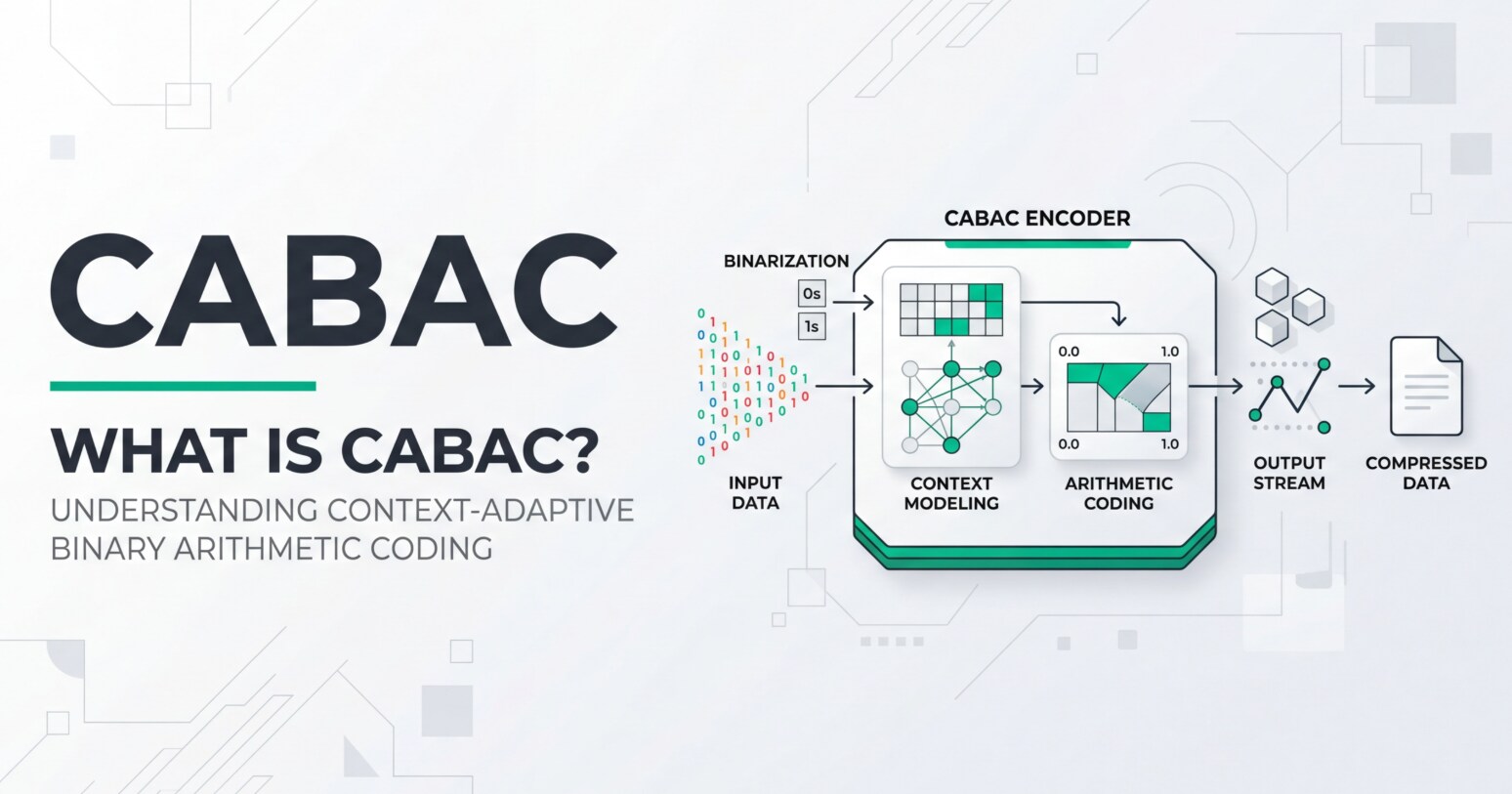
Context-Adaptive Binary Arithmetic Coding, or cabac, pops up whenever you dive into H.264 or H.265 settings in cameras, NLEs, encoders, or streaming tools. It is a behind-the-scenes coding method that decides how efficiently your video is packed into bits, affecting file size, upload time, and streaming stability. Understanding the basics of video compression and video codec features like CABAC helps you choose better recording, editing, and export settings, and also gives you clues when highly compressed clips become hard to play or get corrupted.
Repair Corrupted Files To Save Your Data
 Security Verified. Over 7,302,189 people have downloaded it.
In this article
What Is CABAC?
CABAC stands for Context-Adaptive Binary Arithmetic Coding. It is an entropy coding method, which means it is the final step that turns already compressed video information into a very compact bitstream.
In standards like h.264/AVC and h.265/hevc, CABAC belongs to the category of lossless coding: it does not change pixels directly, but encodes the symbols (like motion vectors, transform coefficients, and prediction modes) in a smarter way so they use fewer bits.
Within a modern video encoding chain, CABAC is a specific type of entropy coding that operates after prediction, transform, and quantization. Its role is to squeeze down the remaining data as efficiently as possible, which directly impacts how small your compressed video files become and how much bandwidth is needed for streaming and playback.
Why Is CABAC Important in Video Compression?
The main problem CABAC solves is bitrate efficiency: how to represent the same visual information using fewer bits. Traditional methods like CAVLC (Context-Adaptive Variable Length Coding) are simpler but less flexible in matching real-world symbol probabilities.
With CABAC, the encoder converts all syntax elements into binary decisions and then uses arithmetic coding that adapts to context. For you, this means:
- Smaller file sizes at the same quality when exporting h.264 or h.265 footage.
- Better looking streams at a given bitrate on platforms that support hevc or high-profile video codec settings.
- More efficient use of storage when archiving or delivering projects.
However, CABAC has some trade-offs:
- Higher decoding complexity: Devices need more processing power to decode a CABAC stream compared with CAVLC, which can matter on older phones, low-power players, cameras, or set-top boxes.
- Less editing-friendly: Because symbols are tightly packed and contexts are adaptive, bitstream errors and random cuts inside the stream can cause more noticeable failures, complicating post-production conforming and troubleshooting.
- Slower software encoding/decoding: On CPUs without good hardware acceleration, CABAC can be heavier, which affects live encoding (streaming) and batch exporting on weaker systems.
Despite these limitations, CABAC is widely used because the compression gain is often 10–15% (or more) compared to CAVLC in many video encoding scenarios, especially at higher resolutions and bitrates.
How Does CABAC Work in the Encoding Workflow?
To understand CABAC in context, it helps to see where it sits in a typical camera, editor, or streaming encoder pipeline covering recording, editing, exporting, streaming, and playback.
CABAC in H.264/H.265 pipelines
In a simplified H.264/H.265 workflow, the steps look like this:
- Raw frames are captured from a sensor, timeline, or rendered output.
- The encoder performs intra- or inter-prediction to estimate pixels from neighboring frames or blocks.
- The difference is transformed (DCT-like transforms) and quantized, which is where most of the visual loss happens.
- All this information becomes syntax elements (coefficients, motion vectors, prediction modes, etc.).
- Now cabac steps in as the entropy coder.
Inside CABAC itself, there are three broad stages:
- Binarization: Values are broken into sequences of binary symbols (0/1).
- Context modeling: The encoder predicts the probability of each bit based on its local context (nearby symbols, block types, or modes).
- Arithmetic coding: These bits are packed into a single fractional interval in a way that shortens common patterns and lengthens rare ones, producing a compact bitstream.
This process is fully lossless relative to the already quantized data. The result is a highly compressed segment of the compressed video stream that a decoder later unpacks during playback.
Where you see CABAC in real tools
In practice, you encounter CABAC in several places across recording, editing, exporting, and streaming workflows:
- FFmpeg: For H.264 (libx264) and H.265 (libx265), CABAC is used by default with higher profiles. You might see options controlling profiles, levels, or fast/slow presets that indirectly change CABAC complexity.
- x264/x265: These CLI encoders always include CABAC in high and main profiles. Tuning for speed vs quality will affect how heavy the CABAC process is.
- OBS Studio: When streaming using x264 or hardware encoders that support H.264/H.265, enabling "High" profiles generally means cabac is in use, giving more efficient bitrate usage for Twitch, YouTube, or other platforms.
- HandBrake: Advanced tab and encoder options allow you to pick profiles and presets that implicitly control CABAC behavior; slower presets usually squeeze more out of CABAC.
- Premiere Pro / Media Encoder: When you choose H.264 or HEVC and set Profile to Main/High, CABAC is typically enabled under the hood for better compression on exported files for web upload or client delivery.
- Hardware encoders (GPUs, cameras, recorders): Many professional cameras and HDMI recorders use CABAC in their H.264/H.265 implementations to keep bitrates manageable for 4K and above.
On the playback side, your player (VLC, hardware decoders in TVs, set-top boxes, phones, etc.) must support CABAC to handle these bitstreams. Most modern hardware does, but very old or minimal decoders may only handle simpler profiles without CABAC.
When Should You Care About CABAC? Common Mistakes and Quick Tips
Not everyone needs to worry about CABAC daily, but several groups benefit from understanding it:
- Video editors and colorists: Working with long-GOP h.264/h.265 footage that uses CABAC can be heavier to decode on the timeline. Proxies or intraframe codecs are often more editing-friendly.
- Streamers and broadcasters: CABAC helps push higher quality at a fixed upload bitrate. But if your streaming rig or audience devices are weak, decoding complexity might cause stutters.
- Encoding specialists and post houses: CABAC tuning within x264/x265 presets affects export time vs delivery size, crucial for VOD platforms.
- Archivists and content creators: For long-term storage, CABAC-based video compression offers big space savings but may be harder to recover if the bitstream is damaged.
Common misunderstandings include:
- "CABAC lowers image quality." – CABAC is lossless coding; it does not directly alter pixels. Visual loss comes from earlier steps like quantization, not from CABAC itself.
- "CABAC always improves playback." – While it improves bandwidth efficiency, it can increase decoder load, which may hurt real-time playback on older devices.
- "If a CABAC file is corrupt, nothing can be done." – Corruption is harder to handle, but tools specialized in video repair, such as Wondershare Repairit, can often rebuild headers, fix structural issues, and restore usable playback.
Practical quick tips:
- For web exports, leave CABAC enabled (via High/Main profile) to keep streams efficient for platforms like YouTube or Vimeo.
- For smooth editing, transcode stressful CABAC-heavy H.264/H.265 footage into intraframe codecs (ProRes, DNxHR, etc.).
- For live streaming on modest hardware, test different encoder presets; a slightly higher bitrate with less heavy compression may be more stable than pushing CABAC to the limit.
- When a CABAC-encoded video file fails to open, avoid repeatedly re-saving or re-transcoding it; use a dedicated repair tool first to prevent further damage.
The takeaway: CABAC is a powerful entropy coding method that boosts compression efficiency, but you must balance its benefits against decoding complexity, device compatibility, and ease of repair.
How to Use Repairit to Fix a Corrupted Video File
Because cabac-based streams in h.264 and h.265 are tightly packed, corruption in headers or bitstreams can quickly break playback in editors, players, and streaming platforms. Repairit official website offers Wondershare Repairit, a dedicated video repair solution that understands modern codecs and can reconstruct damaged structures, fix playback errors, and restore sync so you can reopen, edit, and export problematic clips without requiring deep codec knowledge.
Key features of Wondershare Repairit for CABAC videos
- video compression-aware repair that supports various devices and formats, including heavily compressed video codec streams using CABAC in h.264/hevc.
- Handles multiple corruption scenarios such as broken headers, missing metadata, playback failures, and audio/video desynchronization in compressed video files.
- Simple workflow with preview options, allowing you to verify repaired clips before saving and reusing them in editing, exporting, or streaming pipelines.
Step-by-step guide: Repair a corrupted CABAC video with Repairit
- Add corrupted video files
Install and launch Wondershare Repairit, then choose the Video Repair module on the main screen. Click the add button to import the damaged clips that refuse to play or report errors in your media player or NLE. You can add individual files or a batch of video files recorded from cameras, screen captures, or streaming downloads in one go.

- Repair video files
After the corrupted compressed video clips have been listed, start the repair process. Repairit analyzes the structure of each file, including headers and entropy coding segments like CABAC regions, to locate and rebuild problematic parts. When the repair finishes, use the preview option to play back the result, checking video, audio, and sync before committing to save.

- Save the repaired video files
If you are satisfied with the preview, choose an output folder that is different from the source location to avoid overwriting the original. Confirm to export, and Repairit will save the repaired files as new video files. You can then import them back into Premiere, Media Encoder, OBS, or your preferred player for editing, exporting, streaming, or archiving without the previous playback issues.

Conclusion
CABAC is a core part of modern video compression in h.264 and h.265/hevc, allowing encoders to pack more visual detail into fewer bits. As an advanced entropy coding method, it improves bitrate efficiency without changing image content, which directly benefits recording, exporting, streaming, and long-term storage workflows.
At the same time, the very density that makes CABAC powerful can make corrupted compressed video files harder to handle. When playback breaks or editors refuse to import CABAC-encoded clips, a specialized video repair tool such as Wondershare Repairit can often restore structures and recover usable footage. By understanding where CABAC fits and how to repair damaged files, you can enjoy its compression advantages without sacrificing reliability or workflow stability.
Next: Cavlc
FAQ
-
1. What is CABAC in video compression?
CABAC (Context-Adaptive Binary Arithmetic Coding) is a lossless entropy coding technique used in h.264/AVC and h.265/hevc video codecs. It converts syntax elements (like motion vectors and transform coefficients) into compact binary streams, improving compression efficiency without changing the visual content itself. -
2. Does CABAC affect video quality?
CABAC does not directly affect video quality because it is a lossless coding step. Visual quality is determined earlier by prediction, transform, and quantization. CABAC simply allows the encoder to represent that information using fewer bits, enabling better quality at a given bitrate or smaller files at the same quality. -
3. Why is CABAC harder to decode than CAVLC?
CABAC relies on adaptive context models and arithmetic operations, which are more computationally intensive than the simpler tables used in CAVLC. This extra complexity increases the workload on decoders, particularly on older hardware, low-power devices, or software-only players handling high-resolution compressed video. -
4. Can CABAC cause or worsen video file corruption?
CABAC itself does not cause corruption, but its tightly packed bitstreams are less tolerant of errors. A small bit error can propagate across multiple symbols, leading to severe artifacts or playback failure. In such cases, a specialized video repair tool like Wondershare Repairit can often reconstruct headers and repair structures so that the player or editor can open the file again. -
5. Should I disable CABAC when exporting or streaming?
For most modern workflows, you should keep CABAC enabled because it significantly improves bitrate efficiency. Disabling it might help only when targeting very old or limited devices that cannot decode CABAC, or when troubleshooting specific compatibility problems. If playback issues arise on certain players, try a different profile, bitrate, or re-encode rather than automatically turning CABAC off.




