
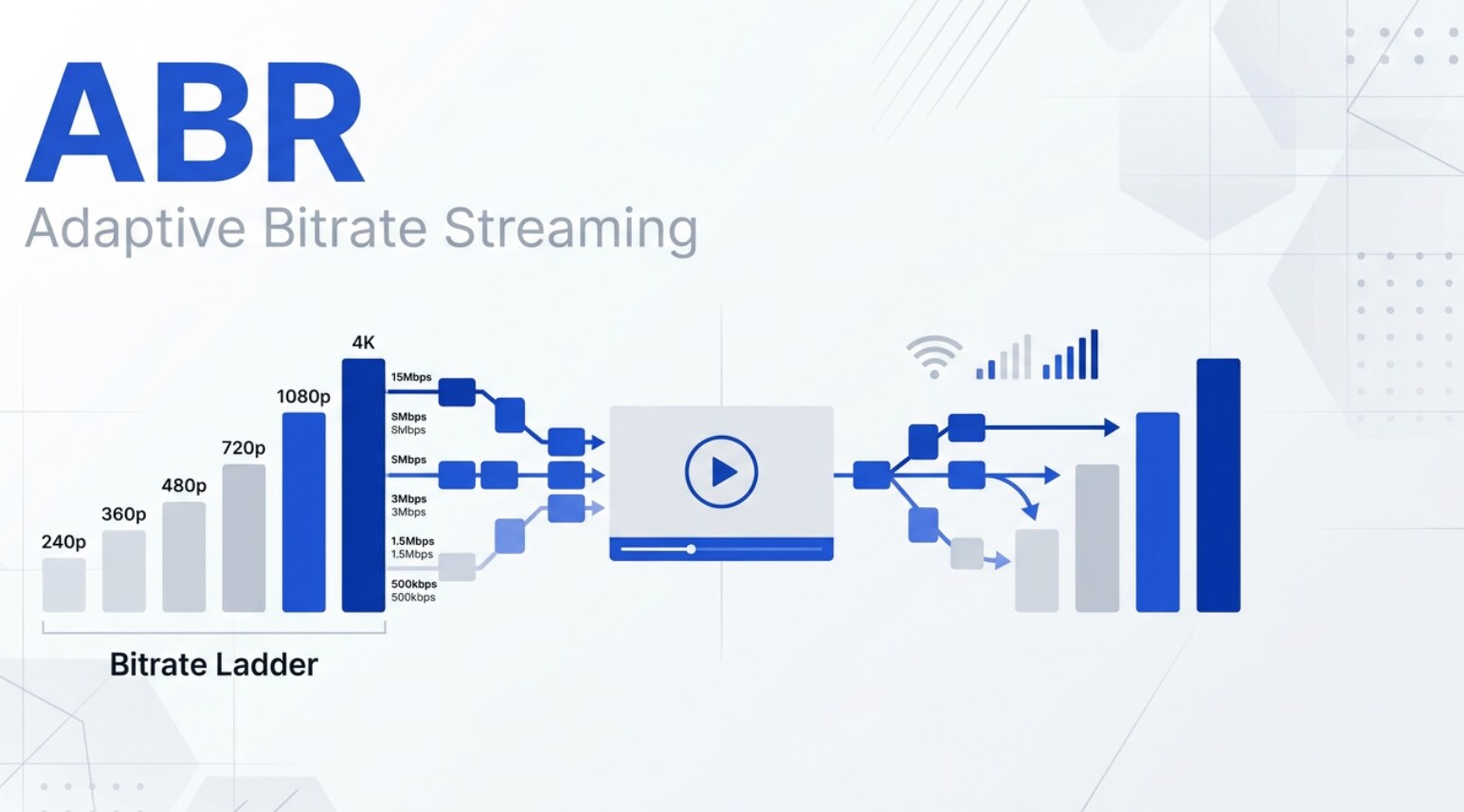
Adaptive bitrate streaming (ABR streaming) is the technology that lets Netflix, YouTube, and other OTT platforms smoothly adjust video quality as your internet speed changes. You might notice the resolution shifting during playback but the stream rarely stops to buffer. Understanding how adaptive bitrate streaming works helps creators, editors, and streaming engineers deliver stable viewing experiences and prepare files correctly from recording to final playback.
Repair Corrupted Files To Save Your Data
 Security Verified. Over 7,302,189 people have downloaded it.
In this article
What Is Adaptive Bitrate Streaming (ABR)?
Adaptive bitrate streaming is a technique where video is encoded into multiple quality levels and delivered in small segments over the internet. During playback, the video player continuously measures your bandwidth and device performance, then chooses the most suitable bitrate and resolution segment for each moment.
Instead of a single fixed file, ABR streaming creates a ladder of versions, such as 240p, 480p, 720p, and 1080p, at different bitrates. Protocols like HLS and DASH use a manifest or playlist that lists all these renditions. The player reads this manifest and switches between renditions to avoid buffering and keep the stream stable.
This approach is crucial for modern video streaming because viewers watch on phones, TVs, and laptops over wildly different networks. Without ABR, platforms would have to choose between buffering, poor quality, or separate files for every connection type.
How Does Adaptive Bitrate Streaming (ABR) Work in the Real Workflow?
In real-world production, adaptive bitrate streaming spans the entire chain: recording the source, encoding and packaging into ABR formats, and finally delivering to apps and browsers that dynamically select the best stream.
ABR in recording, editing, and export
The ABR workflow starts long before a viewer presses play. Camera operators and editors capture and prepare a high-quality master, then export it for streaming.
- Recording the master: Cameras, phones, or capture cards record high-bitrate footage (often in codecs like ProRes, DNxHD, or high-bitrate H.264/H.265). This master file is the source for the entire ABR streaming ladder.
- Editing and color grading: Editors in tools like Adobe Premiere Pro, Final Cut Pro, or DaVinci Resolve cut, grade, and mix audio, always working from the highest-quality sources to preserve detail.
- Export for streaming: Instead of exporting every resolution manually, editors usually export a single high-quality mezzanine file. This file is handed to an encoder or OTT pipeline which generates the full multi-bitrate set.
At this stage, if your master or mezzanine file becomes corrupted due to disk errors or transfer issues, it can break the entire video streaming ladder, because all ABR renditions depend on that one file.
ABR in packaging, delivery, and playback
Once your master is ready, the ABR-specific processing starts.
- Multi-bitrate encoding: A transcoder (FFmpeg, cloud encoders, or commercial OTT systems) creates several outputs at different resolutions and bitrates, such as 360p at 800 kbps, 720p at 3 Mbps, and 1080p at 5 Mbps. This is your ABR ladder.
- Segmenting and manifest creation: For HLS and DASH, each rendition is sliced into short segments (typically 2–10 seconds). A manifest (M3U8 for HLS, MPD for DASH) lists all renditions and their segment URLs. This is where core streaming protocols define how players find and switch streams.
- CDN distribution: Segments and manifests are pushed to a CDN so viewers around the world can access them with low latency. This is common in OTT streaming platforms like subscription services and live sports apps.
- Player logic and adaptation: When a viewer starts a video, the player:
- Downloads the manifest.
- Starts with a safe, often lower, bitrate.
- Measures throughput, buffer health, and CPU load.
- Switches to higher or lower bitrate renditions based on current conditions.
Because all of this depends on valid segment files, any corruption during packaging or distribution can cause playback errors, glitches, or failures in ABR sessions.
Where Is Adaptive Bitrate Streaming (ABR) Commonly Used?
Adaptive bitrate streaming is the backbone of most modern online video experiences, across both on-demand and live workflows.
- OTT streaming services: Subscription platforms, TV-everywhere apps, and movie rental services rely on ABR streaming via HLS or DASH to serve millions of users with different bandwidth levels.
- Social and user-generated platforms: Sites and apps that host short-form clips, vlogs, and live sessions use ABR so uploads from creators can play smoothly on any device, even in spotty mobile networks.
- Live events and sports: Live encoders feed real-time video into an ABR pipeline, which packages it for video streaming at multiple bitrates so fans can watch without constant buffering.
- Corporate, education, and training: Webinars, virtual classrooms, and internal video portals use ABR streaming to reach remote staff and students with consistent quality, even on shared office or campus Wi-Fi.
- Smart TV and set-top box apps: Connected TVs, game consoles, and media boxes rely on ABR-aware players to display content with the best possible streaming quality for each home connection.
How to Use Repairit to Fix a Corrupted Video File
Why use Repairit for streaming and production files
ABR workflows depend on healthy masters, mezzanine files, and encoded outputs. If any of these become corrupted, your abr streaming ladder can fail, causing freezes, missing segments, or complete playback errors. Wondershare Repairit is designed to fix corrupted, unplayable, or damaged video files so you can restore critical assets before encoding, repackaging, or re-uploading them.
You can explore all features and get the latest version from the Repairit official website. It supports common camera formats, mobile clips, and exported files from professional NLEs, making it suitable for both small channels and large video streaming operations.
Key features of Repairit for video
- Repair multiple corrupted video files in a single batch to quickly restore damaged assets for OTT streaming or editing.
- Support for popular formats created by cameras, phones, and streaming exports, aligning with typical HLS and DASH encoding sources.
- Preview repaired results before saving so you only keep files that play back correctly and are ready for your streaming protocols pipeline.
Step-by-step: Repair corrupted video files
- Add corrupted video files

- Repair video files

- Save the repaired video files

Conclusion
Adaptive bitrate streaming has become a core building block of modern video streaming. By encoding content at multiple bitrates and resolutions, then letting players adapt in real time, ABR keeps buffering low and viewing quality as high as each connection allows. Protocols like HLS and DASH make it possible for OTT platforms, live-streaming services, and educational portals to serve audiences worldwide.
However, the whole ABR chain depends on reliable media files at every stage. When masters, exports, or distributed assets become corrupted, your streaming quality and viewer experience suffer. Using a dedicated repair tool like Wondershare Repairit helps you quickly restore damaged videos so your encoding, packaging, and playback pipelines stay stable and ready for the next stream.
Next: Secure Reliable Transport (Srt)
FAQ
-
1. What is the main benefit of adaptive bitrate streaming (ABR)?
The main benefit of adaptive bitrate streaming is smoother playback with fewer interruptions. By dynamically switching between different bitrate renditions, ABR keeps video playing even when your network speed fluctuates, instead of pausing to buffer. -
2. Which streaming protocols are most often used for ABR?
The most common ABR-ready streaming protocols are HLS (HTTP Live Streaming) and MPEG-DASH. Some platforms also use Smooth Streaming or CMAF-based workflows, all of which support multi-bitrate ladders and manifest files for abr streaming. -
3. Does ABR guarantee the highest possible video quality?
No. ABR optimizes for stability first, not maximum resolution. It delivers the best streaming quality that your current connection and device can handle without constant buffering. On weak networks, this may mean a lower resolution to keep playback smooth. -
4. How can video files get corrupted in an ABR workflow?
Video files can be damaged by interrupted uploads or downloads, power loss during encoding, faulty storage, or crashes while saving. Even if your ABR ladder and OTT streaming setup are correct, corrupted source or segment files can still cause playback errors. -
5. How do I fix a corrupted video used in my streaming pipeline?
Use a specialized repair tool like Wondershare Repairit. Import the corrupted file, run the repair process, preview the fixed result, and save it to a safe location. You can then re-encode or re-upload the repaired clip into your video streaming or abr streaming workflow.




