
 TL;DR:
⚡ Quick Fix: Repairit Video Repair Online vs EaseUS Online Video Repair
● Choose Repairit for Beginners: Repairit Video Repair Online offers a clear guided workflow, making it easier for beginners to upload, repair, preview, and download corrupted videos online.
● Repair Faster with Higher Success: Repairit is better suited for users who want a quicker and more reliable repair process for corrupted, damaged, broken, or unplayable videos.
● Use EaseUS for Simple Cases: EaseUS Online Video Repair can be considered for basic MP4 or MOV issues, but it is less ideal for complex, severely damaged, or professional footage.
● Preview Before Saving: Repairit lets users preview repaired videos before downloading, so they can confirm playback, image quality, and usability before saving the fixed file.
Ask AI for a summary
 ChatGPT
 Perplexity
 Gemini
 Claude
 Grok
Grok
When a video refuses to play, an online video repair tool is often the fastest way to get it working again without installing extra software. This guide compares Repairit Video Repair Online with EaseUS Online Video Repair so you can decide which browser based workflow fits your needs for repairing corrupted, damaged, broken, or unplayable clips.
We focus on beginners fixing unplayable MP4 or MOV videos online, how each tool handles uploads, previews, and downloads, and where lighter tools can struggle with severely corrupted footage. In most real world cases, these details matter more than technical specs because they determine how smoothly you can repair a broken video when you are under time pressure.
In this article
- Repairit Video Repair Online vs EaseUS Online Video Repair: Quick Verdict
- Repairit Video Repair Online vs EaseUS Online Video Repair: Key Differences
- Repairit Video Repair Online vs EaseUS Online Video Repair: Comparison Table
- What Repairit Video Repair Online and EaseUS Online Video Repair Are Best For
- Repairit Video Repair Online vs EaseUS Online Video Repair: Online Video Repair Capabilities
- Repairit Video Repair Online vs EaseUS Online Video Repair: Supported Formats and Use Cases
- Repairit Video Repair Online vs EaseUS Online Video Repair: Upload Workflow and Ease of Use
- Repairit Video Repair Online vs EaseUS Online Video Repair: Cloud Repair, Privacy, and File Handling
- Repairit Video Repair Online vs EaseUS Online Video Repair: Repair Quality and Limitations
- Who Should Choose Repairit Video Repair Online
- Who Should Choose EaseUS Online Video Repair
- Pros and Cons of Repairit Video Repair Online and EaseUS Online Video Repair
- How to Repair Corrupted Videos Online After Choosing the Right Tool
Repairit Video Repair Online vs EaseUS Online Video Repair: Quick Verdict
The main difference is that Repairit Video Repair Online focuses on a guided cloud workflow for a wider range of everyday corrupted or unplayable videos, while EaseUS Online Video Repair is positioned as a lightweight browser tool mainly for beginners fixing simple MP4 or MOV issues.
Repairit Video Repair Online is more suitable when you want step by step prompts that explain each part of the online video repair process, from upload to preview and download. Users often find this guidance helpful when they are not sure why a clip will not open or keeps freezing.
EaseUS Online Video Repair may be enough if you just need to repair a few unplayable MP4 or MOV videos with a very minimal interface. Its simple upload, repair, preview, and download sequence caters to straightforward corruption rather than complex, heavily damaged files.
Repairit Video Repair Online vs EaseUS Online Video Repair: Key Differences
The key difference is how each tool balances guidance versus simplicity when repairing corrupted, damaged, broken, or unplayable clips online. This affects which one feels more comfortable when you are under pressure to fix a video quickly.
- Guided vs lightweight workflow:Repairit Video Repair Online offers more explicit, step based guidance in the browser, while EaseUS Online Video Repair emphasizes a streamlined, lightweight flow with minimal options.
- Range of everyday issues:Repairit Video Repair Online is described as handling a broader variety of common problems like videos not opening, freezing, or failing to play correctly, whereas EaseUS Online Video Repair is framed around typical unplayable MP4 or MOV cases.
- User type: Both are beginner friendly, but Repairit Video Repair Online is aimed at users who want more direction, and EaseUS Online Video Repair at users who prefer the quickest possible path with fewer decisions.
- Handling severe corruption: Both tools can struggle with severely corrupted or partially recorded files, and EaseUS Online Video Repair is specifically described as less effective for such complex footage.
Repairit Video Repair Online vs EaseUS Online Video Repair: Comparison Table
This side by side comparison table summarizes how Repairit Video Repair Online and EaseUS Online Video Repair differ on the most important factors for online video repair.
| Dimension | Repairit Video Repair Online | EaseUS Online Video Repair |
|---|---|---|
| Best for | Users who want a guided browser based workflow to repair a range of corrupted or unplayable videos online. | Beginners fixing unplayable MP4 or MOV videos online with a lightweight repair process. |
| Online workflow | Step by step cloud video repair with clear guidance from upload through preview and download. | Simple upload, repair online, preview, and download sequence aimed at straightforward cases. |
| Repair capability | Designed for online repair of many common corruption symptoms in everyday video files. | More oriented to common corrupted video issues and may be less effective for severely damaged footage. |
| Ease of use | Beginner friendly interface with prompts that walk users through each repair step. | Very easy to use with a streamlined browser based repair process and minimal options. |
| Privacy and file handling | Uses a cloud video repair workflow where files are processed online and then downloaded. | Relies on online uploading and cloud processing; users should review its terms before sending sensitive clips. |
| Strengths | Guided workflow, flexible online repair options, suitable for users who want more direction. | Lightweight tool, simple workflow, browser based repair, especially for unplayable MP4 or MOV videos. |
| Weaknesses | Like most online tools, may struggle with extremely damaged or partially recorded files. | Less effective for severely corrupted or professional footage that needs deeper reconstruction. |
What Repairit Video Repair Online and EaseUS Online Video Repair Are Best For
Both tools are best for users who want to repair corrupted videos online rather than install desktop software, but they excel in slightly different scenarios.
EaseUS Online Video Repair is positioned as a lightweight online repair tool aimed at beginners who need to fix common corrupted video issues. It is especially described as best for users repairing unplayable MP4 or MOV clips through a simple browser workflow.
Repairit Video Repair Online focuses on a more guided cloud video repair experience for a wider range of everyday corruption problems. This can be helpful if you regularly deal with clips from phones, cameras, or social media exports and prefer clear explanations as you move from upload to preview.
Repairit Video Repair Online vs EaseUS Online Video Repair: Online Video Repair Capabilities
The key difference is that EaseUS Online Video Repair focuses on simple, lightweight online repairs, while Repairit Video Repair Online aims to guide users through more varied corruption scenarios using a structured cloud workflow.
Repairit Video Repair Online capabilities include:
- Repairs corrupted, damaged, or unplayable videos online through a guided browser based workflow.
- Helps users handle a variety of common video issues such as videos not opening, freezing, or failing to play properly.
- Provides a step by step process that makes online video repair approachable even for non technical users.
EaseUS Online Video Repair capabilities include:
- Targets common corrupted video issues for beginners who want to fix unplayable MP4 or MOV files online.
- Uses a lightweight browser based repair process that focuses on quick, straightforward fixes.
- Follows a simple online sequence of upload, repair, preview, and download for typical corruption problems.
In most real world cases, both tools can help when a clip refuses to open or behaves oddly, but the extra guidance in Repairit Video Repair Online can make a difference if you are unsure what to do at each step.
Repairit Video Repair Online vs EaseUS Online Video Repair: Supported Video Formats and Use Cases
Both tools are designed around common formats and everyday recording scenarios you are likely to encounter on phones and cameras. This matters if you regularly move clips between devices and just need them to play again.
Both Repairit Video Repair Online and EaseUS Online Video Repair are designed for common formats like MP4, MOV, AVI, MKV, or 3GP in everyday situations such as phone recordings, camera clips, or social media videos. EaseUS Online Video Repair is positioned especially around unplayable MP4 or MOV files, while Repairit Video Repair Online is suited to users who want a guided online workflow across a broader mix of typical video use cases.
Because neither tool is described as targeting highly specialized formats or advanced production workflows, they are better viewed as practical options for typical consumer and creator clips rather than niche professional pipelines.
Repairit Video Repair Online vs EaseUS Online Video Repair: Upload Workflow and Ease of Use
The main difference in workflow is how much explanation you get while uploading, repairing, and downloading your videos online. This directly affects how comfortable beginners feel when dealing with corrupted clips.
EaseUS Online Video Repair emphasizes a very simple browser sequence: upload the corrupted video, repair online, preview the result, and then download the repaired file. Users who prefer minimal choices and just want to click through the process may appreciate this straightforward path.
Repairit Video Repair Online uses a similarly straightforward cloud video repair workflow but adds more guidance during each step, which often helps beginners understand what is happening when they fix broken or unplayable clips. In many cases, this guided approach reduces confusion if an upload takes time or a preview behaves differently than expected.
Repairit Video Repair Online vs EaseUS Online Video Repair: Cloud Repair, Privacy, and File Handling
Both tools rely on cloud processing, so your corrupted videos leave your device during repair, which is important to understand before uploading sensitive content.
Both tools rely on cloud video repair, meaning you upload your corrupted file to their servers, the repair runs online, and you then download the fixed version. This is convenient for quick repairs because you do not need local processing power, but it also means your footage is temporarily stored and handled elsewhere.
Because exact policies can change, users should always review each platform's upload, privacy, and retention terms carefully before submitting sensitive or confidential videos. Repairit Video Repair Online and EaseUS Online Video Repair both process videos online, so the real decision factor becomes how comfortable you are with each provider's current policies and how sensitive your footage is.
Repairit Video Repair Online vs EaseUS Online Video Repair: Repair Quality and Limitations
In most real world cases, both tools can help you get a playable version of a corrupted or unplayable clip, but they share common limitations with other browser based repair services.
In most real world cases, both tools can help when a video will not open, keeps freezing, or shows as corrupted, but some files are simply too damaged for full repair. EaseUS Online Video Repair is described as less effective for severely corrupted or professional footage, and the same general limitation applies to browser tools when metadata is missing, the recording was interrupted, or the file is heavily damaged.
Repairit Video Repair Online is designed for online repair of many common corruption symptoms in everyday video files, but it also cannot bypass fundamental damage such as incomplete recordings or severely broken streams. This becomes important when you decide whether an online approach is enough or a more advanced, manual workflow might be required.
Who Should Choose Repairit Video Repair Online
Repairit Video Repair Online is more suitable when you value a guided workflow and frequently deal with a mix of corrupted, damaged, broken, or unplayable videos from different devices.
- Users who want a guided cloud workflow to repair various corrupted or unplayable videos online.
- People who regularly handle clips from different devices and need a clear, repeatable repair process.
- Beginners who prefer step by step prompts instead of a bare bones upload and repair interface.
- Creators who want an online tool focused on repairing damaged files rather than enhancing or editing videos.
For these users, the extra guidance and structured steps in Repairit Video Repair Online can reduce guesswork and make it easier to repeat successful repairs in the future.
Who Should Choose EaseUS Online Video Repair
EaseUS Online Video Repair may be enough if you only need a lightweight way to fix a few unplayable MP4 or MOV videos online without many decisions or options.
- Beginners who only need to fix a few unplayable MP4 or MOV videos online with minimal setup.
- Users who prefer a lightweight, browser based repair tool focused on common corrupted video issues.
- People who want a straightforward upload, repair, preview, and download sequence without extra options.
- Anyone dealing with relatively simple corruption rather than severely damaged or complex professional footage.
This kind of streamlined approach suits users who prioritize speed and simplicity over detailed control or extensive guidance.
Pros and Cons of Repairit Video Repair Online and EaseUS Online Video Repair
This section summarizes the main pros and cons of each tool so you can quickly weigh trade offs for your own online video repair needs.
Repairit Video Repair Online Pros and Cons
EaseUS Online Video Repair Pros and Cons
How to Repair Corrupted Videos Online After Choosing the Right Tool
Once you have compared Repairit Video Repair Online and EaseUS Online Video Repair, the next step is actually running an online video repair on your corrupted or unplayable clips. The comparison above helps you pick a workflow; this section shows how that choice turns into practical steps.
For users who want a guided, browser based experience, Repairit Video Repair Online provides a clear sequence from upload to preview and download. This makes it a practical option when you want your first repair attempt to follow a structured cloud video repair workflow rather than guesswork.
Key Features
The following features matter most when you are trying to fix corrupted or unplayable clips quickly through your browser.
- Online video repair that runs entirely in the browser without installing software.
- Step by step guidance for fixing corrupted, broken, or unplayable video files.
- Preview of repaired clips before downloading so you can confirm the result.
Step-by-step guide
Here is how to use Repairit Video Repair Online in a typical cloud workflow for repairing corrupted, damaged, or unplayable videos.
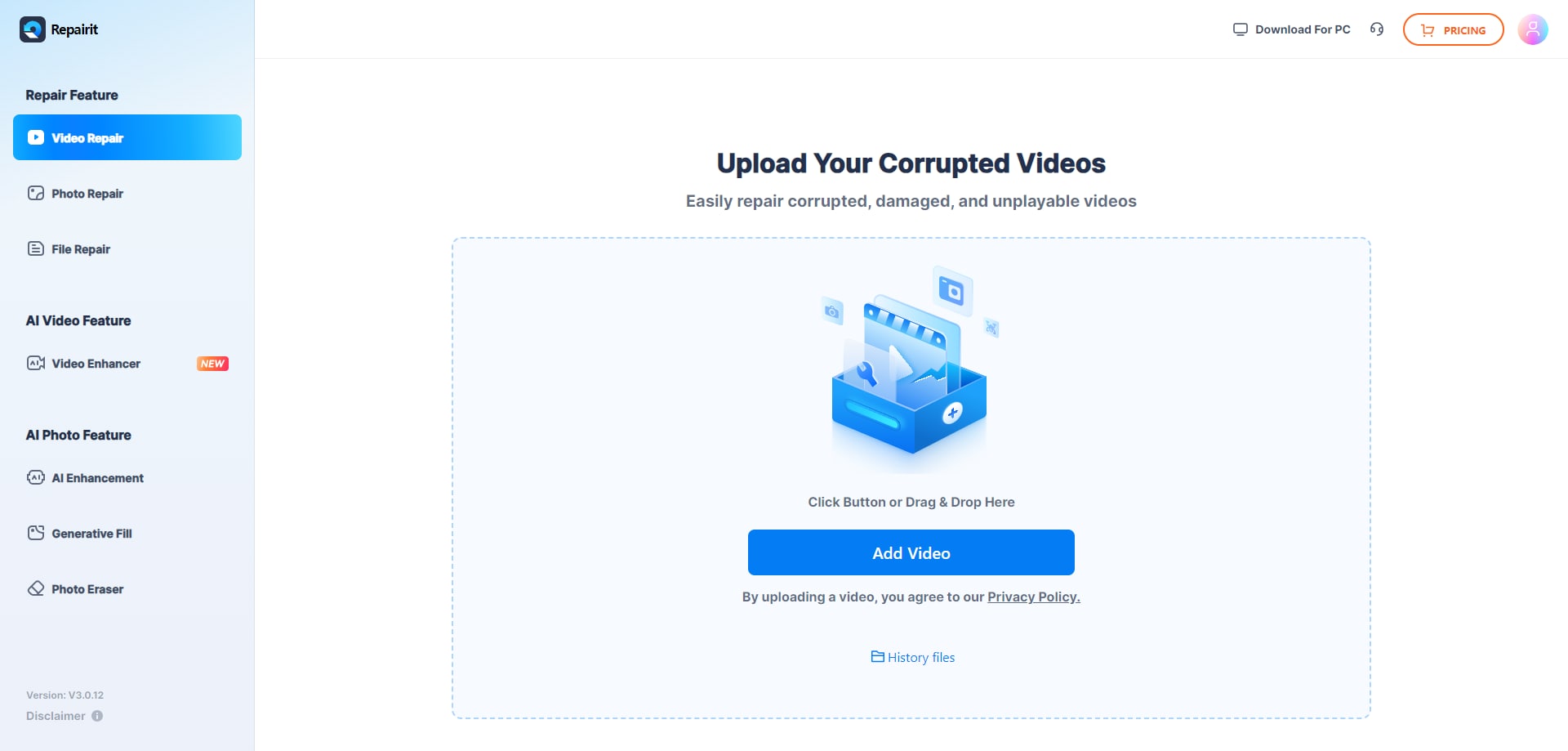
Step 1. Upload the damaged or unplayable videos you want to repair through Repairit Video Repair Online.
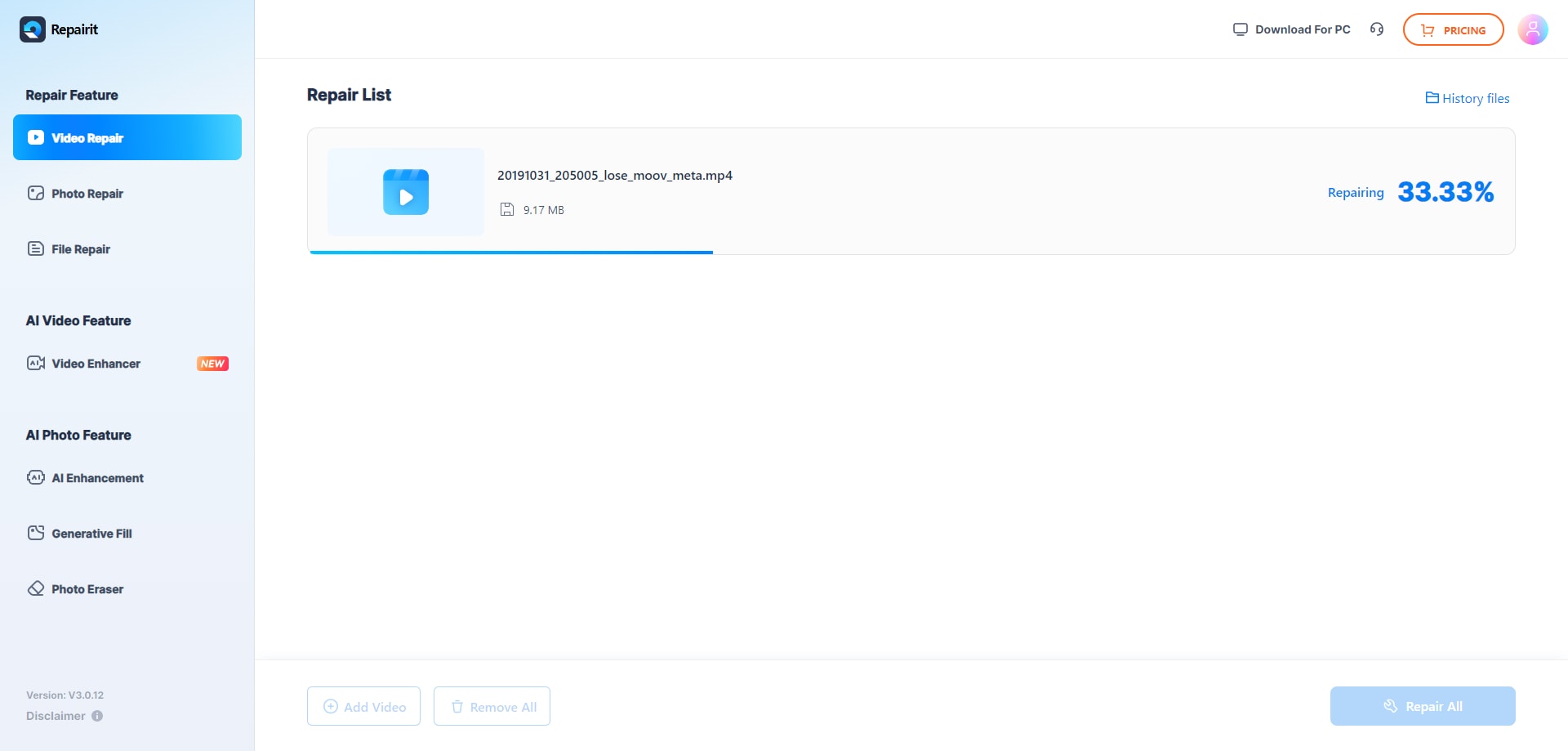
Step 2. Start the online repair process and let Repairit Video Repair Online analyze the corrupted video files.
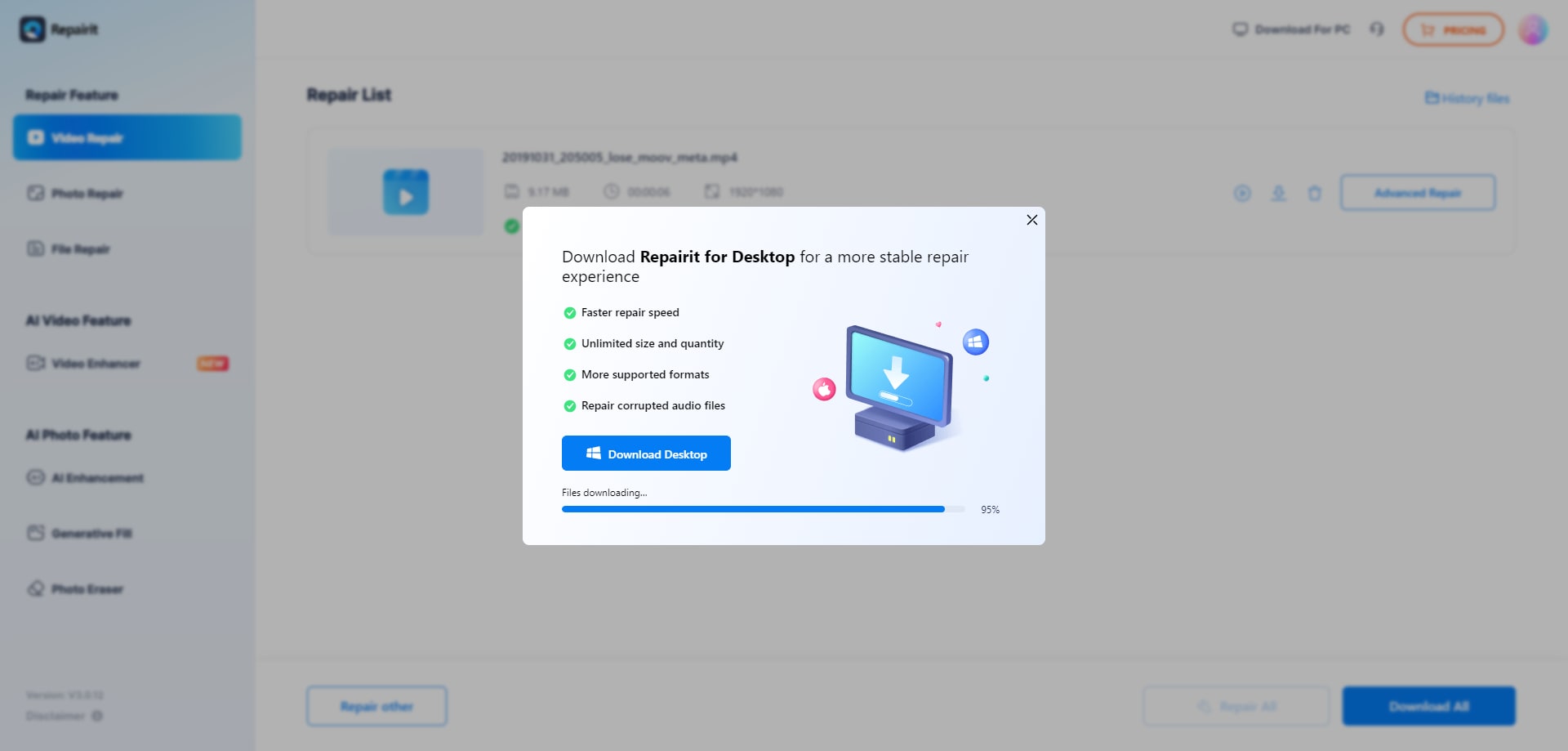
Step 3. Preview the repaired video result when available, then save the repaired videos to your device.
In most real world cases, following these steps gives beginners a clear path from a non playable file to a previewable, downloadable version, without needing to understand low level video structures.
Final Verdict
The main difference between these tools is how much guidance you want and how complex your corrupted videos are. Repairit Video Repair Online is more suitable when you need a structured cloud workflow to repair various damaged, broken, or unplayable clips and prefer clear steps from upload through preview.
EaseUS Online Video Repair may be enough if you are a beginner dealing with a few unplayable MP4 or MOV files and just want a lightweight, straightforward browser based repair. For quick fixes on simple corruption, its simple workflow can work well. For more varied real world issues and a more guided experience, Repairit Video Repair Online becomes the stronger choice.
In practice, many users keep both options in mind: trying a lightweight repair first for basic problems and using a more guided online repair tool when files are more stubborn or when they want clearer feedback during the process. Whichever you choose, remembering that these are online video repair tools rather than recovery or enhancement services helps set realistic expectations.
Next: Repairit Video Repair Online vs Fix.Video
FAQ
-
1. What is the main difference between Repairit Video Repair Online and EaseUS Online Video Repair?
The key difference is that Repairit Video Repair Online focuses on a guided, step by step cloud workflow for a variety of corrupted videos, while EaseUS Online Video Repair is positioned as a lightweight tool mainly for beginners fixing common issues in unplayable MP4 or MOV files. -
2. When should I use EaseUS Online Video Repair instead of Repairit Video Repair Online?
EaseUS Online Video Repair may be enough if you are a beginner with a small number of unplayable MP4 or MOV clips and want a very simple upload, repair, preview, and download process without many additional options. -
3. Can these tools fix severely corrupted or professional footage online?
Both tools are designed primarily for common corrupted video issues, and a common limitation is that severely corrupted or highly complex professional footage may not repair fully, especially when metadata is missing or recordings were badly interrupted.




