
When a recording from your camera, drone, or phone becomes corrupted or unplayable, you need an online tool that actually repairs the video instead of just re-encoding it. This comparison looks at Repairit Video Repair Online and Fix.video side by side, focusing on browser-based video repair workflows, how they handle severely damaged clips, and what matters when you must rely on reference sample videos for accurate repairs.
In most real-world cases, users decide between these services based on how easily they can upload broken MP4 or MOV files, how guided the cloud repair flow feels, and whether they are comfortable providing reference videos for more complicated corruption. Understanding these differences helps you choose the right tool the next time an important recording refuses to play.
In this article
- Repairit Video Repair Online vs Fix.video: Quick Verdict
- Repairit Video Repair Online vs Fix.video: Key Differences
- Repairit Video Repair Online vs Fix.video: Comparison Table
- What Repairit Video Repair Online and Fix.video Are Best For
- Repairit Video Repair Online vs Fix.video: Online Video Repair Capabilities
- Repairit Video Repair Online vs Fix.video: Supported Video Formats and Use Cases
- Repairit Video Repair Online vs Fix.video: Upload Workflow and Ease of Use
- Repairit Video Repair Online vs Fix.video: Cloud Repair, Privacy, and File Handling
- Repairit Video Repair Online vs Fix.video: Repair Quality and Limitations
- Who Should Choose Repairit Video Repair Online
- Who Should Choose Fix.video
- Pros and Cons of Repairit Video Repair Online and Fix.video
- How to Repair Corrupted Videos Online After Choosing the Right Tool
Repairit Video Repair Online vs Fix.video: Quick Verdict
The main difference is that Repairit Video Repair Online offers a guided browser-based repair flow, while Fix.video emphasizes a mostly automatic cloud repair pipeline that can use optional reference files for damaged camera or drone recordings.
Repairit Video Repair Online is more suitable when you want clear on-screen guidance from upload to preview and download, particularly for everyday corrupted or unplayable clips. Fix.video may be enough if you are repairing interrupted or truncated camera and drone footage and are comfortable adding reference samples when the workflow recommends it.
Repairit Video Repair Online vs Fix.video: Key Differences
The key difference is how each service balances guidance versus automation in its online video repair process.
- Workflow style: Repairit Video Repair Online uses a step-by-step browser interface, whereas Fix.video runs an automated cloud repair flow that can lean on reference videos.
- Reference usage: Repairit Video Repair Online focuses on repairing corrupted structure without needing sample videos in most cases, while Fix.video can increase accuracy when a suitable reference clip is available.
- User skill level: Repairit Video Repair Online suits less technical users who want clear instructions; Fix.video better fits users who already understand when reference files might help.
- Typical footage: Repairit Video Repair Online is oriented around common personal and professional clips, while Fix.video is tuned for interrupted or truncated camera and drone recordings.
Repairit Video Repair Online vs Fix.video: Comparison Table
This side-by-side comparison highlights how each tool handles online workflows, ease of use, and typical corrupted video scenarios.
| Dimension | Repairit Video Repair Online | Fix.video |
|---|---|---|
| Best for | Users who want a guided browser-based workflow to repair corrupted, damaged, or unplayable videos with clear steps. | Users repairing interrupted, truncated, or corrupted recordings from cameras and drones in an automated online platform. |
| Online workflow | Step-by-step online repair flow designed to walk users from upload to preview and export. | Automated cloud video repair workflow that runs from upload through export with minimal interaction. |
| Repair capability | Focused on repairing corrupted video structure and playback issues through guided online repair. | Optimized for damaged recordings where the platform can leverage reference behavior and structure to fix issues. |
| Ease of use | Simple browser interface that suits less technical users who want clear instructions. | Straightforward process, though users may need to understand when and how to upload optional reference files. |
| Privacy and file handling | Uses a cloud video repair workflow where videos are processed online; users should review terms before uploading sensitive clips. | Processes videos through an online platform; users should check upload and privacy details for important or private footage. |
| Strengths | Guided repair experience aimed at fixing corrupted or unplayable videos directly in the browser. | Supports many devices and formats, offers an automatic repair flow, and is optimized for damaged camera and drone recordings. |
| Weaknesses | Like most online tools, results depend on how severely the file is damaged and may not fully repair every clip. | Repair quality can depend on available reference files, so results may be weaker if no good sample is provided. |
What Repairit Video Repair Online and Fix.video Are Best For
Repairit Video Repair Online is a stronger choice for users who want to repair corrupted or unplayable clips through a clearly guided browser-based video repair flow, while Fix.video is aimed at damaged camera and drone recordings that benefit from automated, reference-aware processing.
According to the provided overview, Fix.video is an automated online video repair platform best for interrupted, truncated, or corrupted camera and drone footage. It emphasizes broad device support, a mostly automatic repair flow, and cases where damaged recordings can be improved using optional reference material.
Repairit Video Repair Online, by contrast, focuses on giving non-technical users a simple way to upload broken MP4, MOV, or similar clips, let the service fix structural playback issues in the cloud, and then Preview and save repaired videos repaired versions without worrying about reference configuration.
Repairit Video Repair Online vs Fix.video: Online Video Repair Capabilities
Both tools focus on online video repair, but they differ in how they approach severe corruption and reference-based workflows.
The summary notes that the main difference is how guided the process feels and how much you rely on sample videos. This matters if you are deciding whether to supply a separate reference clip or simply upload the broken file and follow on-screen steps.
- Repairit Video Repair Online capabilities:
- Designed for users who want a structured browser-based workflow to repair corrupted, damaged, or unplayable videos without deep technical knowledge.
- Emphasizes fixing broken playback, errors, and structural corruption for common personal and professional clips through an online process.
- Works well when you need a clear path from upload to preview and export instead of manually tuning reference-based repair steps.
- Fix.video capabilities:
- Positions itself as an automated online video repair platform tuned for interrupted or truncated camera and drone recordings.
- Supports many devices and formats and is optimized for damaged recordings that still contain enough structure to be automatically repaired.
- Relies on an upload workflow with optional reference files, where repair accuracy can improve when a suitable sample video is available.
In most real-world cases, users who do not want to think about reference files lean toward Repairit Video Repair Online, while those who already manage batches of similar camera recordings may prefer how Fix.video can reuse sample clips.
Repairit Video Repair Online vs Fix.video: Supported Video Formats and Use Cases
Both services are designed to repair typical corrupted recordings rather than focus on niche formats, which is what matters for most users facing broken or unplayable footage.
The provided information notes that both Repairit Video Repair Online and Fix.video target general corrupted video repair scenarios, such as fixing broken MP4, MOV, AVI, MKV, or 3GP files from common cameras, drones, and mobile devices. In practice, users tend to care less about exhaustive format lists and more about whether a platform can turn an unplayable recording into a viewable clip again.
Because precise format or codec lists are not specified, it is safer to treat both tools as general-purpose options for typical consumer and creator workflows: phone videos, camera files, drone footage, and exported clips that fail to play properly in standard players.
Repairit Video Repair Online vs Fix.video: Upload Workflow and Ease of Use
The main difference in ease of use is that Repairit Video Repair Online guides you step by step, while Fix.video expects you to decide when a reference file is needed.
Repairit Video Repair Online focuses on a guided upload and repair flow where you add corrupted clips, run the online repair, and then preview the results before saving. This structure helps less technical users understand exactly what is happening at each stage.
Fix.video follows an upload workflow where you submit the corrupted file, can optionally upload a reference file, let the automatic repair run in the cloud, and then export the repaired video. This becomes important when deciding how many decisions you want to make for each broken clip and how comfortable you are with reference-based workflows.
Users often notice that a step-by-step interface like Repairit Video Repair Online reduces guesswork, while Fix.video can feel more streamlined once you understand when a reference clip might improve results.
Repairit Video Repair Online vs Fix.video: Cloud Repair, Privacy, and File Handling
Both tools rely on a cloud video repair workflow, so your corrupted videos are uploaded to remote servers before you download the repaired versions.
The shared behavior is that files must travel over your internet connection, which means upload size and bandwidth strongly affect how long it takes to repair a clip. Users often notice that large, high-resolution footage can take more time to upload than to process.
The provided description explains that both services process videos online and that users should carefully review each tool privacy and retention terms before uploading sensitive or confidential footage. Because specific policies and storage durations are not detailed here, you should check the latest terms on each official site whenever privacy is a deciding factor.
Repairit Video Repair Online vs Fix.video: Repair Quality and Limitations
Repair quality for both platforms depends heavily on how badly the file is damaged and whether enough usable data remains to reconstruct playback.
Fix.video highlights that its results can depend on available reference files, so having a clean sample with similar settings can matter. This can be an advantage when you manage repeated recordings from the same device and can keep a known-good clip handy.
Repairit Video Repair Online, like most online tools, may struggle with extreme corruption, missing metadata, or heavily interrupted recordings where large chunks of data are lost. In such cases, no online video repair service can fully restore content that is simply not present in the file.
This means the choice between the two should be influenced by the condition of your footage: if you have damaged but structurally similar clips and reference samples, Fix.video may be enough; if you mostly work with standalone corrupted files and want a guided attempt to fix them, Repairit Video Repair Online is more suitable.
Who Should Choose Repairit Video Repair Online
Repairit Video Repair Online is more suitable when you want a structured, guided approach to fixing corrupted or unplayable videos directly in your browser.
- Users who want a guided, step-by-step browser workflow to repair corrupted or unplayable videos with minimal guesswork.
- Creators who regularly fix broken MP4 or MOV files and prefer clear preview and export stages in one interface.
- Less technical users who would rather follow on-screen repair instructions than design their own reference-based setup.
- Anyone comparing online tools who values a structured repair process over a heavily automated but reference-driven approach.
If you need to fix individual clips from phones, cameras, or exported projects and do not maintain a library of reference samples, this type of guided cloud repair is often easier to use consistently.
Who Should Choose Fix.video
Fix.video may be enough if your main goal is to repair interrupted or truncated recordings from cameras and drones, especially when you can provide reference clips.
- Camera and drone owners dealing with interrupted or truncated recordings that still contain enough structure for automatic repair.
- Users who want an automated online video repair platform that supports many devices and formats with minimal manual steps.
- People comfortable providing optional reference files when needed to help the service better understand the intended video structure.
- Those who mainly repair batches of damaged recordings from similar devices and can reuse reference clips to guide the repair.
This profile fits users who routinely shoot similar footage and are willing to upload both a corrupted file and a good sample when the workflow indicates that this can improve results.
Pros and Cons of Repairit Video Repair Online and Fix.video
The key tradeoff is between a clearly guided interface and more reference-driven automation, which shows up in each product pros and cons.
Repairit Video Repair Online Pros and Cons
Fix.video Pros and Cons
How to Repair Corrupted Videos Online After Choosing the Right Tool
After comparing Repairit Video Repair Online and Fix.video, the next step is actually running an online repair on your corrupted or unplayable footage.
If you prefer a guided browser-based flow that walks you from upload to preview and saving the result, Repairit Video Repair Online offers a practical way to put these ideas into action without dealing with complex reference setups. You simply upload broken files, let the cloud service attempt to fix structural issues, and then check the output.
Key Features
Repairit Video Repair Online focuses on a clear, accessible workflow for repairing corrupted, damaged, or unplayable clips in your browser.
- Online repair of corrupted or unplayable videos without installing desktop software.
- Guided workflow from upload to preview that is friendly to non-technical users.
- Cloud-based processing that focuses on fixing structural and playback issues in damaged video files.
Step-by-step guide
This step-by-step guide shows how to repair corrupted videos online with Repairit Video Repair Online.
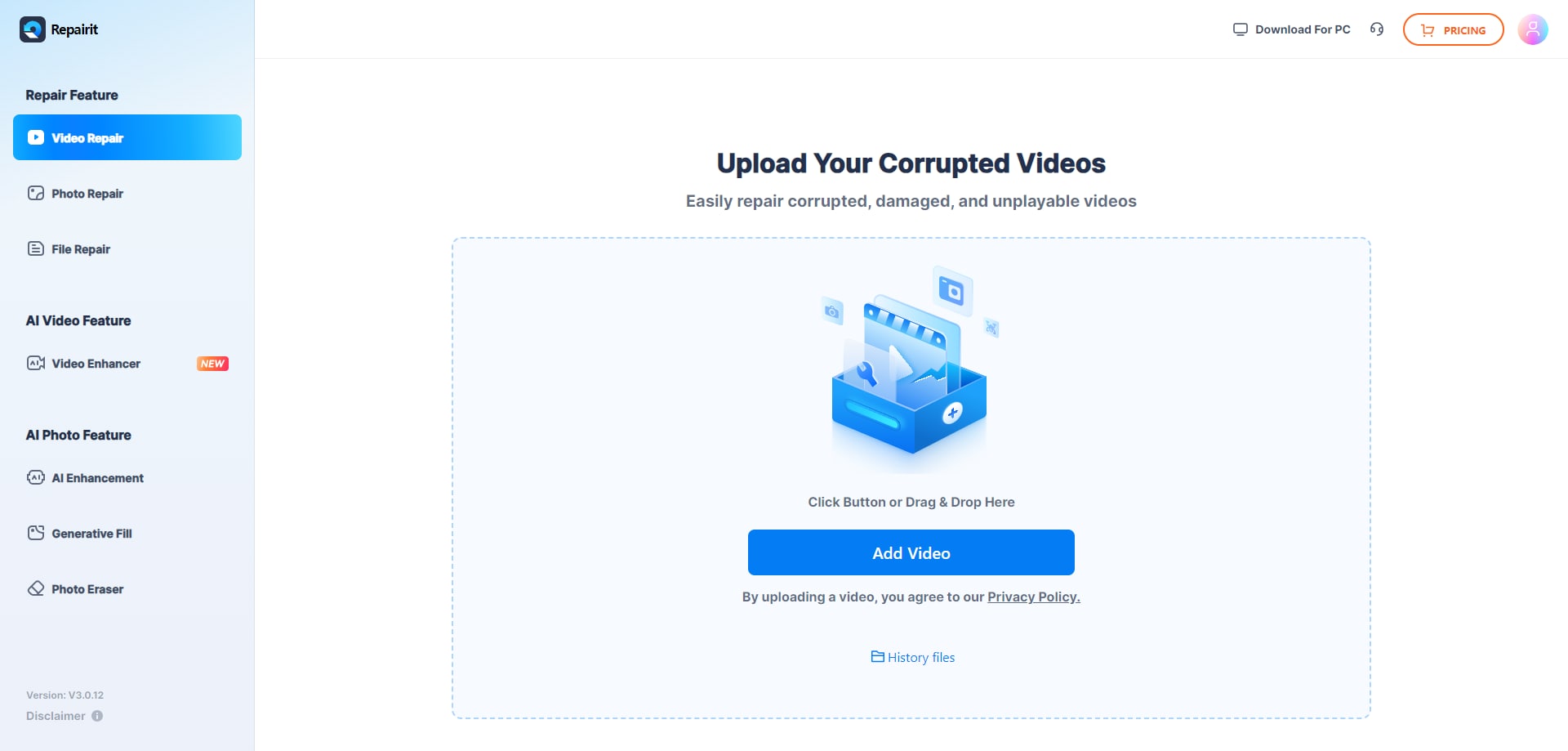
Step 1. Upload the damaged or unplayable videos you want to repair through Repairit Video Repair Online.
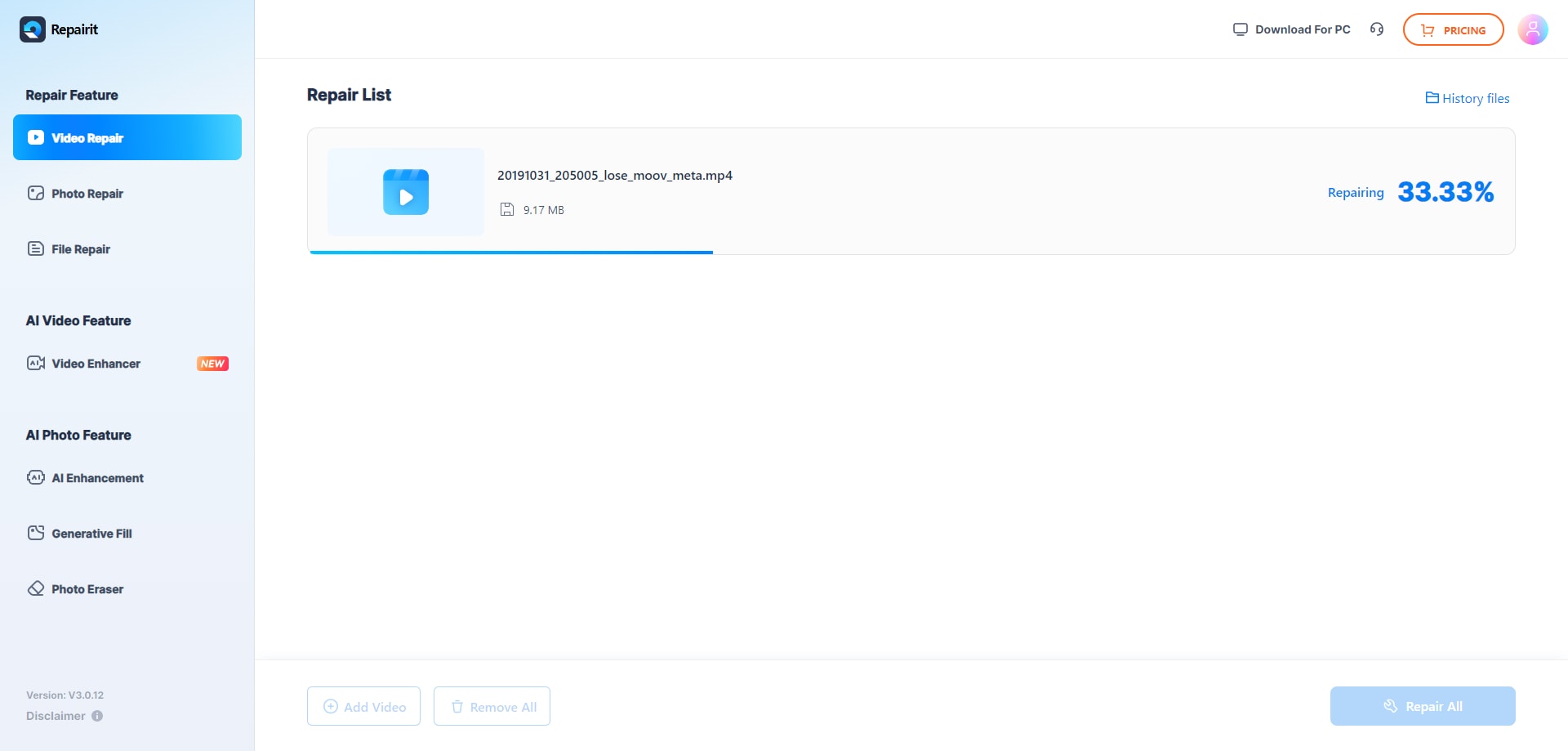
Step 2. Start the online repair process and let Repairit Video Repair Online analyze the corrupted video files.
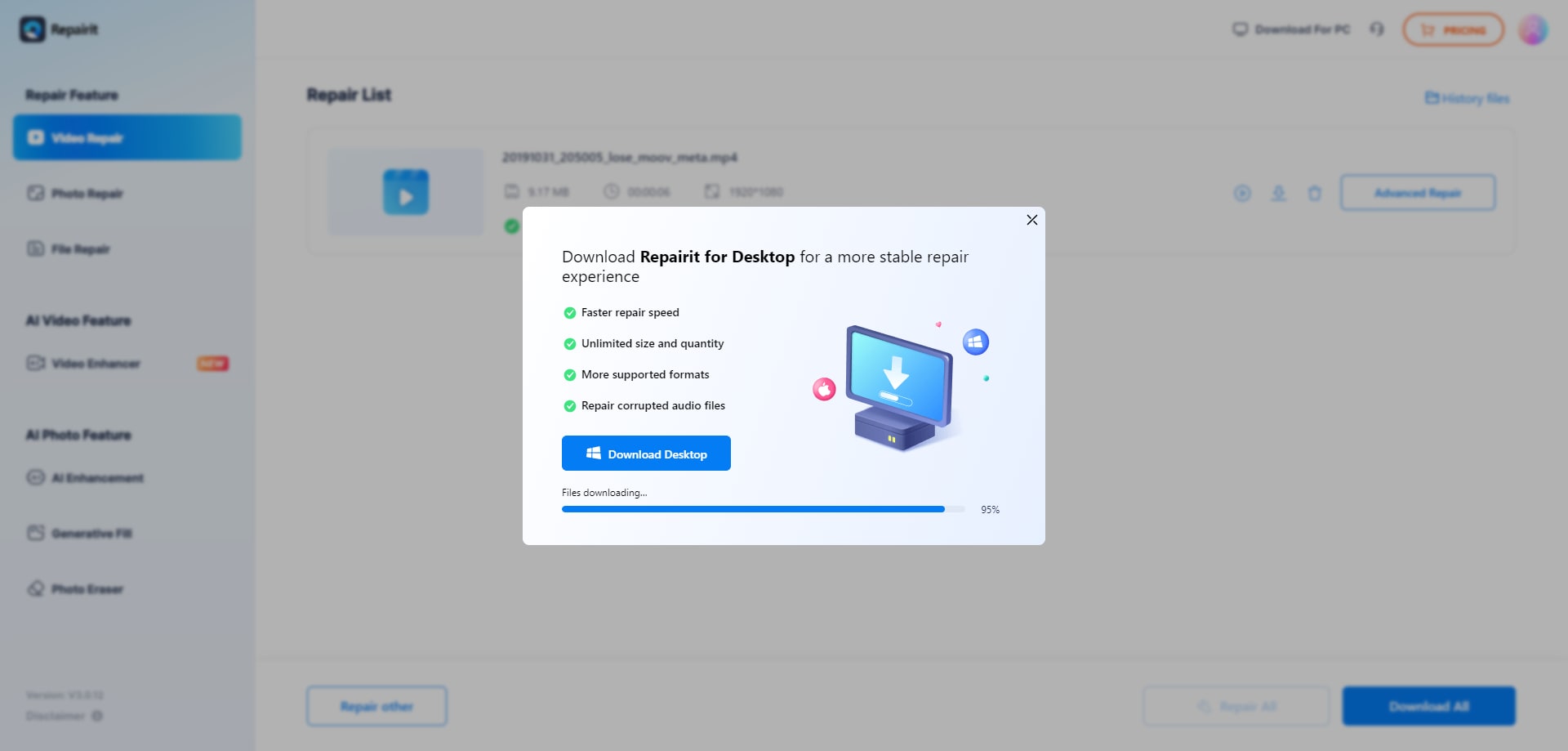
Step 3. Preview the repaired video result when available, then save the repaired videos to your device.
In most real-world cases, this simple upload, repair, preview, and save loop is enough to turn many unplayable MP4 or MOV files from phones, cameras, or drones back into viewable clips.
Final Verdict
The key difference between Repairit Video Repair Online and Fix.video is the balance between guided workflow and automated, reference-aware processing.
Repairit Video Repair Online is more suitable when you want a structured, guided online workflow to repair corrupted, damaged, or unplayable videos without managing reference clips yourself. It fits users who value clear steps from upload through preview and download, and who often deal with standalone broken files from phones, cameras, or exported projects.
Fix.video may be enough if you mainly handle interrupted or truncated recordings from cameras and drones and are comfortable providing optional reference files when available. The key difference is how strongly the Fix.video workflow leans on automated, reference-aware repair versus the more guided approach of Repairit Video Repair Online.
Ultimately, the better choice depends on your footage and working style: choose Repairit Video Repair Online for a clearer, instruction-driven browser experience, or Fix.video if your camera and drone projects align well with an automated, reference-optional platform.
Next: Repairit Video Repair Online vs Stellar Online Video Repair
FAQ
-
1. What is the main difference between Repairit Video Repair Online and Fix.video?
The key difference is workflow: Repairit Video Repair Online focuses on a guided browser-based repair process, while Fix.video is an automated online video repair platform optimized for interrupted or truncated camera and drone recordings that can sometimes benefit from optional reference files. -
2. Which tool is better for severely corrupted or unplayable videos?
For severely corrupted or unplayable clips, your results depend on how much usable data remains. Repairit Video Repair Online is more suitable if you want a guided process to try repairing different uploads, while Fix.video may help when you have damaged camera or drone footage plus a good reference sample. -
3. How does online video repair differ from video recovery or enhancement tools?
Online video repair focuses on fixing corrupted or unplayable video files you already have, such as broken MP4 or MOV clips. Recovery tools target deleted or lost files, and enhancement or upscaling tools change quality or resolution rather than repairing structural corruption that causes playback errors. -
4. Is it safe to upload private videos to Repairit Video Repair Online or Fix.video?
Both services rely on a cloud video repair workflow, so your files are processed on remote servers. This is convenient in most cases, but if the footage is sensitive you should carefully review each service upload, privacy, and retention terms before submitting your videos. -
5. When should I use a reference video for online repair?
You may consider a reference video when using Fix.video and working with interrupted or truncated camera and drone recordings that have a similar clean clip available. Repairit Video Repair Online does not typically require references, so it is often preferred when you only have the corrupted file and want a straightforward browser-based repair attempt.




