
Repairing corrupted or unplayable videos online is often faster than reinstalling codecs or learning complex tools, especially when you just want a broken clip to play again. This comparison between Repairit Video Repair Online vs Clever Online Video Repair explains how each browser-based service approaches repairing damaged files, which one fits reference-based workflows with sample videos, and what to expect when trying to repair broken MP4 or MOV files from cameras, drones, dashcams, or smartphones.
In this article
- Repairit Video Repair Online vs Clever Online Video Repair: Quick Verdict
- Repairit Video Repair Online vs Clever Online Video Repair: Key Differences
- Repairit Video Repair Online vs Clever Online Video Repair: Comparison Table
- What Repairit Video Repair Online and Clever Online Video Repair Are Best ForBest For
- Repairit Video Repair Online vs Clever Online Video Repair: Online Repair Capabilities
- Repairit Video Repair Online vs Clever Online Video Repair: Supported Formats and Use Cases
- Repairit Video Repair Online vs Clever Online Video Repair: Upload Workflow and Ease of Use
- Repairit Video Repair Online vs Clever Online Video Repair: Cloud Repair, Privacy, and File Handling
- Repairit Video Repair Online vs Clever Online Video Repair: Repair Quality and Limitations
- Who Should Choose Repairit Video Repair Online
- Who Should Choose Clever Online Video Repair
- Pros and Cons of Repairit Video Repair Online and Clever Online Video Repair
- How to Repair Corrupted Videos Online After Choosing the Right Tool
Repairit Video Repair Online vs Clever Online Video Repair: Quick Verdict
The key difference between Repairit Video Repair Online and Clever Online Video Repair is how straightforward you want your online video repair workflow to be versus how much you are willing to rely on reference-based repairs with sample clips.
Repairit Video Repair Online is more suitable when you want a guided browser-based process to repair corrupted or unplayable videos online with minimal configuration. Clever Online Video Repair may be enough if you are working with camera, drone, dashcam, or smartphone footage and are comfortable uploading a healthy sample from the same device to assist with tougher corruption cases.
Repairit Video Repair Online vs Clever Online Video Repair: Key Differences
The main difference is that Repairit Video Repair Online focuses on a simple upload, cloud repair, and download flow, while Clever Online Video Repair leans more into reference-based repair for larger MP4 and MOV recordings from specific devices.
In most real-world cases, users who want to fix a broken file quickly in their browser gravitate toward the streamlined Repairit Video Repair Online interface, whereas users handling problematic footage from cameras, drones, dashcams, or smartphones may consider Clever Online Video Repair when they have a suitable healthy sample.
Repairit Video Repair Online vs Clever Online Video Repair: Comparison Table
This comparison table summarizes how each service approaches browser-based video repair so you can match their strengths to your situation.
| Dimension | Repairit Video Repair Online | Clever Online Video Repair |
|---|---|---|
| Best for | Users who want a guided browser-based workflow to repair corrupted or unplayable videos with clear steps from upload to download. | Users repairing corrupted camera, drone, dashcam, or smartphone videos who need a professional online corrupted video repair service. |
| Online workflow | Web-based interface that focuses on uploading broken files, running cloud video repair, and downloading the fixed versions. | Upload corrupted video, optionally upload a healthy sample from the same device, let the cloud analysis run, then download the repaired file. |
| Repair capability | Designed to repair damaged or broken videos online, with workflows that can help in many real-world corruption cases. | Emphasizes reliable corruption repair for a wide range of MP4 and MOV issues, especially when paired with a suitable reference file. |
| Ease of use | Simple steps and a streamlined layout help less technical users move through the repair process with fewer choices to manage. | Still browser-based, but adding a healthy sample file introduces extra steps that may feel more advanced for some users. |
| Privacy and file handling | Uses a cloud video repair workflow, where files are uploaded, processed online, and then made available for download. | Also relies on cloud analysis, which means corrupted and reference videos are uploaded and processed on remote servers. |
| Strengths | Clear online repair steps, web-based convenience, and a focus on fixing unplayable or corrupted videos without complex configuration. | Large file support, broad MP4 and MOV repair coverage, and reliable corruption repair, especially for device-specific files. |
| Weaknesses | Like most online tools, extremely damaged or partially recorded videos may not be fully repairable. | Advanced repairs may require a healthy sample file from the same device, adding complexity and extra preparation steps. |
What Repairit Video Repair Online and Clever Online Video Repair Are Best For
Repairit Video Repair Online is a stronger choice for users who want to repair corrupted videos online using a simple browser interface, while Clever Online Video Repair may be enough if you work mainly with device-specific camera or drone recordings and have healthy sample clips available.
According to the overview, Clever Online Video Repair positions itself as a professional online corrupted video repair service focused on camera, drone, dashcam, and smartphone videos, especially where large files and broad MP4 and MOV repair coverage matter. Repairit Video Repair Online, on the other hand, suits a broader mix of everyday recordings, including travel footage, family events, and social videos that suddenly become unplayable.
Repairit Video Repair Online vs Clever Online Video Repair: Online Video Repair Capabilities
The key difference in online repair capabilities is that both tools target corrupted or unplayable videos in the browser, but Clever Online Video Repair goes deeper into reference-based repairs while Repairit Video Repair Online prioritizes a guided, one-file-focused workflow.
The summary explains that both tools revolve around browser-based workflows to repair corrupted or unplayable videos, but they differ in how heavily they rely on healthy samples.
Repairit Video Repair Online capabilities:
- Repairs corrupted or unplayable videos online through a guided, step-by-step cloud workflow.
- Helps users fix broken video files without requiring deep technical knowledge or complex manual settings.
- Handles many everyday corruption scenarios where metadata, headers, or structure issues stop videos from playing correctly.
Clever Online Video Repair capabilities:
- Targets professional-level corrupted video repair for camera, drone, dashcam, and smartphone footage.
- Supports a reference-based repair approach, where users can optionally upload a healthy sample from the same device to guide repairs.
- Offers large file handling and broad MP4 and MOV repair coverage, which matters when dealing with high-resolution or long recordings.
In practice, this means Repairit Video Repair Online is more suitable when you want quick online repair rather than advanced file reconstruction, while Clever Online Video Repair may be enough if you are ready to prepare and upload extra sample clips for more challenging damage.
Repairit Video Repair Online vs Clever Online Video Repair: Supported Video Formats and Use Cases
The main difference in supported use cases is that Repairit Video Repair Online is framed around everyday corrupted recordings, while Clever Online Video Repair is framed around professional-style camera and device footage, particularly MP4 and MOV.
In most real-world cases, users of both tools are trying to repair broken MP4 or MOV files, though other common formats like AVI, MKV, or 3GP may also be involved depending on the service. Clever Online Video Repair is positioned for camera, drone, dashcam, and smartphone clips, where you might be dealing with longer or higher bitrate files that became unplayable. Repairit Video Repair Online is described as fitting a wide mix of recordings such as travel videos, family clips, and social content that suddenly refuse to play, which is a frequent scenario for phone and consumer camera users.
If your priority is to repair broken MP4 or MOV files online from day-to-day recording devices, Repairit Video Repair Online can be a more natural fit. If your focus is more on camera or drone workflows, and especially if you are comfortable managing large MP4 or MOV footage, Clever Online Video Repair may align better with those use cases.
Repairit Video Repair Online vs Clever Online Video Repair: Upload Workflow and Ease of Use
The key difference in workflow is that Repairit Video Repair Online generally asks you to upload only the corrupted file, whereas Clever Online Video Repair may add an extra step for uploading a healthy sample, which can make the process feel more advanced.
Clever Online Video Repair follows a clear online workflow: upload the corrupted video, optionally add a healthy reference from the same device, wait for cloud analysis, then download the repaired file. This structure can help in tough corruption scenarios but requires extra preparation and an additional upload step.
Repairit Video Repair Online keeps things straightforward by centering on uploading the damaged file, starting the online repair, and then saving the fixed version. For users who do not have a suitable sample clip or who are not interested in fine-tuning reference-based repair, this simpler path often feels more approachable.
In terms of ease of use, Repairit Video Repair Online is more suitable when you prefer fewer decisions and clearer on-screen guidance. Clever Online Video Repair may be enough if you do not mind managing extra files and steps to potentially improve results on very problematic footage.
Repairit Video Repair Online vs Clever Online Video Repair: Cloud Repair, Privacy, and File Handling
The main similarity is that both tools rely on a cloud video repair workflow, but users still need to evaluate each service individually for privacy and file-handling details.
Both services ask you to upload corrupted clips to remote servers, where the repair process runs before you download the results. This is convenient because it offloads processing to the cloud and avoids installing heavy software, but it also means your footage leaves your device during analysis.
The description for both tools emphasizes this cloud-based model but does not include specific policies or retention details. Because those aspects are not covered here, users should always review each tool s upload terms and privacy information before sending sensitive or confidential videos, whether they choose Repairit Video Repair Online or Clever Online Video Repair.
For many users repairing travel, social, or personal clips without strict confidentiality requirements, the convenience of browser-based repair can outweigh the extra step of uploading files. In higher-risk environments, checking privacy documents and possibly anonymizing footage becomes more important.
Repairit Video Repair Online vs Clever Online Video Repair: Repair Quality and Limitations
The key factor for both tools is the condition of your file: neither Repairit Video Repair Online nor Clever Online Video Repair can guarantee full recovery if the video is severely damaged or incomplete.
Repair results for both tools depend heavily on how badly the video is corrupted. Severe damage, missing metadata, incomplete recordings, or files that stopped mid-write may only be partially repairable or not repairable at all. This is a common limitation of online video repair in general, not just these two services.
Clever Online Video Repair can use a healthy sample file from the same device for advanced cases. This becomes important when the service needs a reference to infer how headers, codecs, or tracks should look, although this extra step still cannot guarantee success. Repairit Video Repair Online likewise performs best when core video data is still present, even if the file will not play.
In practice, users often notice that slightly corrupted or structurally damaged clips have a better chance of being repaired online than files that were never fully written or where large parts of the data are missing. Choosing between these tools is less about absolute quality and more about whether you want a simple guided flow or a reference-based approach.
Who Should Choose Repairit Video Repair Online
Repairit Video Repair Online is more suitable when you want to repair corrupted videos online using a guided, low-friction workflow that does not require sample clips or technical tuning.
- Users who want a simple, guided browser-based process to fix unplayable videos with minimal configuration.
- People who are new to online video repair and prefer clear steps instead of advanced reference-based workflows.
- Users who mainly deal with everyday corrupted recordings, such as personal clips, social media videos, or common camera footage.
- Anyone who values a quick upload-repair-download cycle without preparing extra sample videos from the same device.
If your priority is to get a damaged MP4 or MOV playing again and you are not interested in managing healthy reference files, Repairit Video Repair Online aligns well with that expectation.
Who Should Choose Clever Online Video Repair
Clever Online Video Repair may be enough if you typically work with camera, drone, dashcam, or smartphone recordings and are willing to use a healthy sample file to help repair more severely corrupted videos.
- Users repairing corrupted camera, drone, dashcam, or smartphone videos who need a professional online service.
- Creators handling larger video files or longer recordings that need broad MP4 and MOV repair coverage.
- Users willing to upload a healthy sample from the same device to improve repair accuracy on tough corruption cases.
- People who are comfortable following a cloud analysis workflow with extra steps for reference-based repairs.
This approach matters if your workflow already includes controlled test clips from each device, or you can easily capture and upload a short healthy reference file when a recording becomes unplayable.
Pros and Cons of Repairit Video Repair Online and Clever Online Video Repair
This section summarizes the practical pros and cons of each service so you can quickly see how they differ in terms of online workflow and expectations.
Repairit Video Repair Online Pros and Cons
Clever Online Video Repair Pros and Cons
How to Repair Corrupted Videos Online After Choosing the Right Tool
After comparing Repairit Video Repair Online and Clever Online Video Repair, the next step is actually attempting to fix your unplayable videos online using a workflow that matches your comfort level and file situation.
For users who want a practical, guided online option without preparing reference clips, Repairit Video Repair Online offers a straightforward upload, repair, and download process that fits many everyday corruption cases.
Key Features
- Online workflow that focuses on fixing corrupted or unplayable videos directly in your browser.
- Guided steps that help non-technical users move from upload to repair without complicated settings.
- Cloud-based processing so you do not need to install software to attempt repairing broken video files.
Step-by-step guide
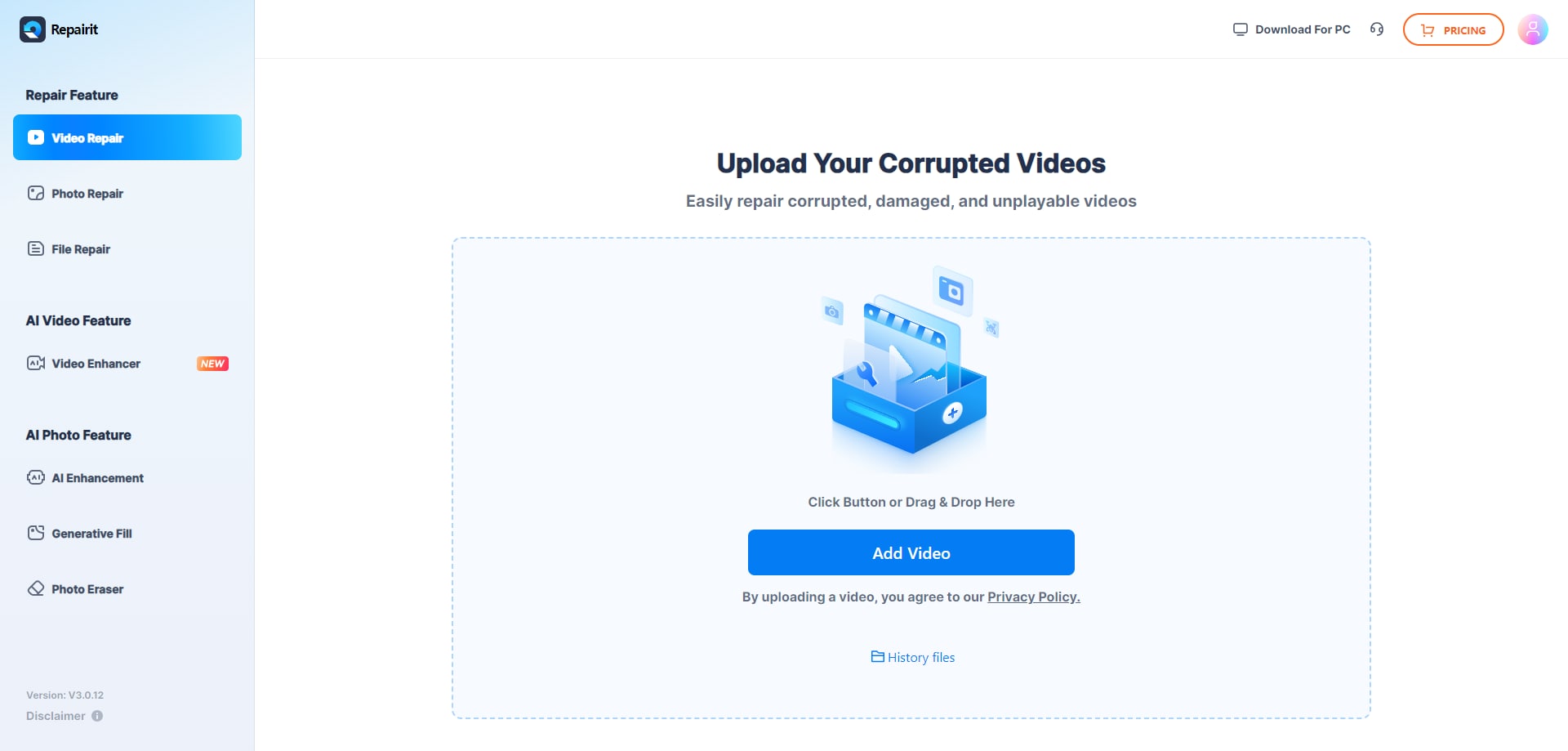
Step 1. Upload the damaged or unplayable videos you want to repair through Repairit Video Repair Online.
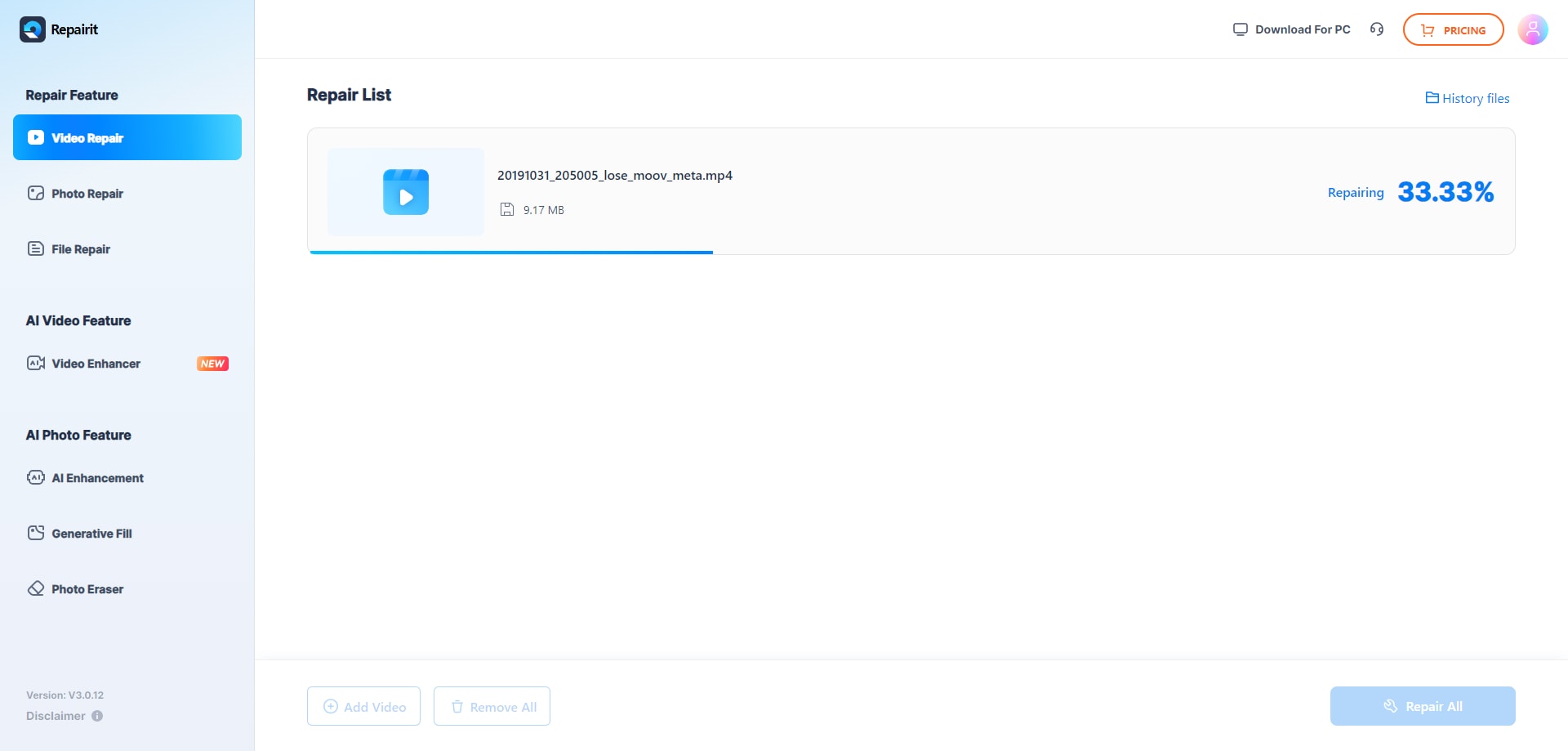
Step 2. Start the online repair process and let Repairit Video Repair Online analyze the corrupted video files.
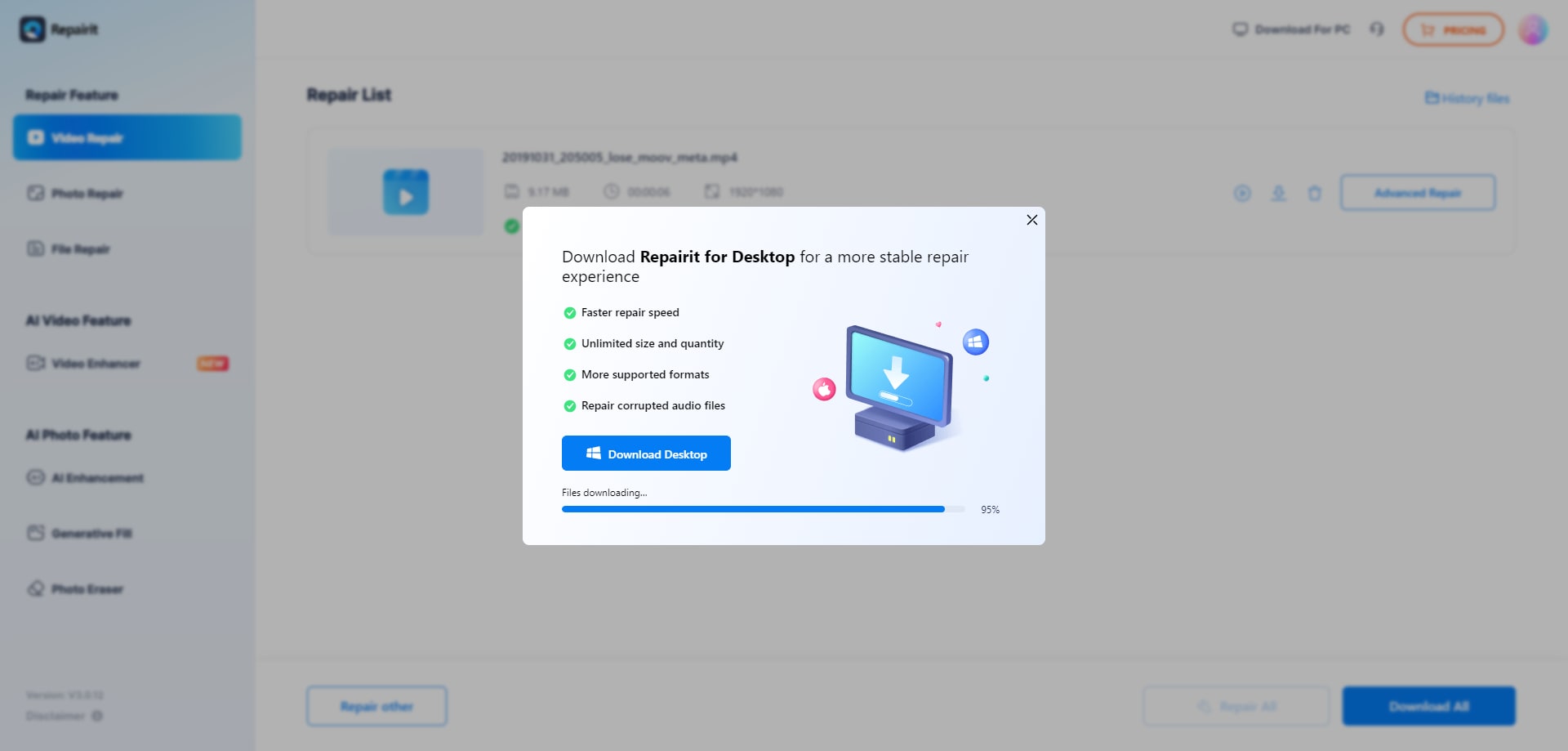
Step 3. Preview the repaired video result when available, then save the repaired videos to your device.
Final Verdict
Repairit Video Repair Online is more suitable when you want a guided, streamlined cloud video repair workflow that focuses on uploading corrupted files, running the repair online, and downloading playable results with minimal complexity. It fits users who prefer clear steps and do not want to manage extra sample videos.
Clever Online Video Repair may be enough if you work with larger MP4 or MOV recordings from cameras, drones, dashcams, or smartphones and are comfortable with a more professional, reference-based approach. When you have a healthy sample from the same device, its extra step of uploading that file can help guide repairs on more severely corrupted clips.
Next: Repairit Video Repair Online vs Restore.Media
FAQ
-
1. Which is better for fixing unplayable videos: Repairit Video Repair Online or Clever Online Video Repair?
Neither tool is universally better, because results depend on how your video is corrupted and how much effort you want to put into the workflow. Repairit Video Repair Online is more suitable when you want a straightforward upload-repair-download process without preparing sample clips, while Clever Online Video Repair may be enough if you handle camera, drone, dashcam, or smartphone footage and are willing to use healthy sample files for more advanced repairs. -
2. When does using a sample video with Clever Online Video Repair actually help?
Using a healthy sample from the same device can help Clever Online Video Repair better understand the expected structure of your footage. This becomes important when corruption is severe and the service needs a reference to infer how headers, codecs, or tracks should look, although final results still depend on how badly the original file is damaged. -
3. How does the online workflow of Repairit Video Repair Online compare to Clever Online Video Repair?
Repairit Video Repair Online usually keeps things as simple as uploading the corrupted file, running the repair online, and saving the result, which suits users who want a guided browser-based flow. Clever Online Video Repair follows a similar pattern but adds an optional step of uploading a healthy reference file, which can improve accuracy in some cases but requires extra preparation and slightly more user involvement.




