
When a critical recording turns unplayable, choosing the right browser-based video repair tool matters. This guide compares Repairit Video Repair Online and Restore.Media so you can decide which workflow fits your corrupted or broken clips, from quick MP4 and MOV fixes to more technical repairs that may rely on sample files and reference-based reconstruction in the cloud.
In this article
- Repairit Video Repair Online vs Restore.Media: Quick Verdict
- Repairit Video Repair Online vs Restore.Media: Key Differences
- Repairit Video Repair Online vs Restore.Media: Comparison Table
- What Repairit Video Repair Online and Restore.Media Are Best For
- Repairit Video Repair Online vs Restore.Media: Online Video Repair Capabilities
- Repairit Video Repair Online vs Restore.Media: Supported Video Formats and Use Cases
- Repairit Video Repair Online vs Restore.Media: Upload Workflow and Ease of Use
- Repairit Video Repair Online vs Restore.Media: Cloud Repair, Privacy, and File Handling
- Repairit Video Repair Online vs Restore.Media: Repair Quality and Limitations
- Who Should Choose Repairit Video Repair Online
- Who Should Choose Restore.Media
- Pros and Cons of Repairit Video Repair Online and Restore.Media
- How to Repair Corrupted Videos Online After Choosing the Right Tool
Repairit Video Repair Online vs Restore.Media: Quick Verdict
The key difference is that Repairit Video Repair Online focuses on a guided, beginner-friendly way to repair corrupted or unplayable videos online, while Restore.Media leans toward professional, sample-based cloud workflows for demanding recordings.
Repairit Video Repair Online is more suitable when you want to upload a broken MP4 or MOV file, follow simple prompts in your browser, and quickly get a playable result without dealing with technical settings or reference clips.
Restore.Media may be enough if you work with camera or drone footage, can prepare suitable sample files, and are comfortable with a more technical process aimed at accurate repair for complex recordings.
Repairit Video Repair Online vs Restore.Media: Key Differences
The main difference is how much technical setup each platform expects from you before repairing corrupted or unplayable videos online.
- Online workflow: Repairit Video Repair Online emphasizes a straightforward browser-based upload and guided repair, while Restore.Media often asks you to upload both the damaged file and a matching sample to drive its cloud repair workflow.
- Repair depth and control: Repairit Video Repair Online focuses on common corruption and playback issues with an automatic flow, whereas Restore.Media targets more advanced, reference-based reconstruction for damaged professional footage.
- Ease of use: For non-technical users who just want a clip to play again, Repairit Video Repair Online tends to feel simpler. Restore.Media can fit users who understand camera settings and file structures and do not mind extra steps.
- Typical users: Repairit Video Repair Online aligns with everyday creators and people handling phone, action cam, or exported videos. Restore.Media is positioned more for camera operators, drone pilots, and studios with MXF, MOV, or MP4 workflows.
- Privacy considerations: Both use a cloud video repair workflow, so corrupted clips leave your device. Users should check each services upload and retention terms before sending confidential or client footage.
Repairit Video Repair Online vs Restore.Media: Comparison Table
This comparison table summarizes how Repairit Video Repair Online and Restore.Media differ across key online video repair factors.
| Dimension | Repairit Video Repair Online | Restore.Media |
|---|---|---|
| Best for | Users wanting a guided online workflow to repair corrupted or unplayable videos with minimal setup. | Professionals repairing broken camera, drone, and MXF, MOV, or MP4 recordings who can provide sample files. |
| Online workflow | Straightforward browser-based upload, automatic analysis, and guided repair steps. | Upload damaged file, optionally upload a sample, then run a more technical cloud repair and download results. |
| Repair capability | Suited for common corruption issues and fixing unplayable clips in a simple online flow. | Designed as a professional online video repair platform focused on accurate repair for damaged recordings with reference-based workflows. |
| Ease of use | More beginner friendly, with fewer technical decisions during repair. | Workflow is more technical and often requires understanding and providing suitable sample files. |
| Privacy and file handling | Handles repairs in the cloud; users should review online terms before uploading sensitive footage. | Uses a cloud repair workflow with uploaded and sample files; users should review privacy and upload policies for professional footage. |
| Strengths | Guided online repair, accessible interface, and quick workflow for many everyday corrupted clips. | Supports professional codecs and formats, uses advanced repair algorithms, and lets users preview results before payment. |
| Weaknesses | Browser-based repair may not fix every severely damaged or partially recorded file. | Workflow can feel complex, and the need for sample files adds extra steps that some users may find demanding. |
What Repairit Video Repair Online and Restore.Media Are Best For
The key difference is that Repairit Video Repair Online aims at simple, guided repair for everyday corrupted clips, while Restore.Media targets more specialized, professional recording scenarios.
In most real-world cases, people arrive with broken MP4 or MOV videos from phones, action cameras, or exports that suddenly refuse to play. Repairit Video Repair Online is a stronger choice when you want to fix those unplayable videos quickly in your browser and avoid technical setup.
Restore.Media, by contrast, is positioned as a professional online video repair platform aimed at damaged and unplayable recordings from cameras and drones, especially MXF, MOV, and MP4 workflows. It can be a better fit when you can provide reference clips and you are comfortable with a more technical, sample-based cloud process.
Repairit Video Repair Online vs Restore.Media: Online Video Repair Capabilities
The main difference is how each tool approaches online video repair and how much it relies on reference-based reconstruction.
Both tools focus on online repair of corrupted or unplayable videos, but they differ in how much technical setup they expect and how they approach reference-based reconstruction.
- Repairit Video Repair Online online capabilities:
- Guides users through a streamlined browser-based flow to repair corrupted or unplayable clips without requiring deep technical knowledge.
- Focuses on practical online repair for common issues such as broken playback, errors when opening files, or minor file structure problems.
- Helps users fix unplayable videos quickly when they prefer an automatic process instead of manually managing reference or sample files.
- Restore.Media online capabilities:
- Targets damaged and unplayable recordings using a professional cloud video repair workflow that can leverage reference-based methods.
- Supports professional codecs and formats and applies advanced repair algorithms that aim at accurate reconstruction for demanding camera and drone footage.
- Allows users to preview repaired output before payment so professionals can verify if the repair quality meets their expectations.
This matters if you need either a quick online repair with minimal decisions or a more controlled approach that can take advantage of reference clips for complex damage.
Repairit Video Repair Online vs Restore.Media: Supported Video Formats and Use Cases
The key difference is that Repairit Video Repair Online focuses on common consumer-style formats and workflows, while Restore.Media leans into professional camera and drone recordings.
In most real-world cases, users bring MP4, MOV, AVI, MKV, or 3GP clips from cameras, drones, or mobile devices. Repairit Video Repair Online focuses on giving these users a simple way to repair broken MP4 or MOV files and similar everyday formats, keeping the workflow accessible for non-technical creators.
Restore.Media positions itself for professional recordings, including complex MXF, MOV, and MP4 workflows that may demand precise reconstruction. This can be important if you are handling multi-camera shoots, higher-end cameras, or drone footage where matching sample clips and codec details can meaningfully influence repair results.
Repairit Video Repair Online vs Restore.Media: Upload Workflow and Ease of Use
The main difference is that Repairit Video Repair Online streamlines upload and repair into a guided flow, whereas Restore.Media often adds steps around sample files and technical context.
Repairit Video Repair Online emphasizes a simple online workflow with direct upload and guided steps. You choose your corrupted or unplayable videos, let the browser send them to the cloud, and follow prompts to complete the repair. Users often notice that this feels straightforward even if they have never dealt with file structures or codecs.
Restore.Media follows a more technical path: users upload the damaged file, optionally add a sample from the same device or settings, let the platform run its cloud repair process, then preview and download the result. The extra steps can improve repair accuracy in some situations, but they also mean you need to understand which sample clip is appropriate and keep it available during the repair.
This becomes important when you are deciding who will run the repair. If it is a non-technical client or teammate, Repairit Video Repair Online may be easier to hand off. If it is a technician or camera operator who already manages media workflows, Restore.Media may fit their habits.
Repairit Video Repair Online vs Restore.Media: Cloud Repair, Privacy, and File Handling
The key difference is not that one is local and one is cloud-based, but how each handles cloud workflows and what that means for users with sensitive footage.
Both tools use cloud video repair workflows, meaning corrupted clips are uploaded to remote servers for analysis and fixing. Users often notice that this is faster than setting up local tools, but it also means sensitive footage leaves their own devices.
Repairit Video Repair Online handles repairs in the cloud with a guided browser interface. Before uploading confidential or client-related recordings, users should review its online terms, especially around upload, retention, and how long repaired videos remain accessible.
Restore.Media similarly relies on uploaded damaged files and, in many cases, sample clips from the same camera or drone. For professional or commercial footage, users should pay close attention to its privacy, upload, and retention policies to decide whether this workflow aligns with their obligations to clients or studios.
In practice, the decision factor is often how sensitive your material is. If you handle high-profile or regulated content, you may need internal approval and a clear understanding of each services file handling approach before proceeding with any online video repair.
Repairit Video Repair Online vs Restore.Media: Repair Quality and Limitations
The main difference is how each platform tries to improve repair quality when files are severely damaged or recorded under complex conditions.
Repair quality in any online tool depends heavily on how badly the file is damaged. Repairit Video Repair Online keeps things simple and focuses on repairing corrupted, damaged, or unplayable videos so that they can open and play again in typical players. A common limitation is that very severe corruption, missing metadata, or partially recorded files may not be fully repairable through a fast browser-based flow.
Restore.Media leans on advanced algorithms and, when available, reference-based sample files to improve accuracy. By comparing the broken clip with a sample from the same device or settings, it can, in some cases, better infer structure or timing information. However, this technical workflow and the need to manage sample files can slow down the process and may require more expertise.
This matters if you are dealing with once-in-a-lifetime footage that is badly damaged. For quick online repair rather than advanced file reconstruction, Repairit Video Repair Online is a strong candidate. When you have professional footage, suitable samples, and time to follow a more technical path, Restore.Media may offer more nuanced reconstruction options.
Who Should Choose Repairit Video Repair Online
Repairit Video Repair Online is more suitable when you want a straightforward browser-based workflow that minimizes technical decisions while you repair corrupted or unplayable videos online.
- Users who want a straightforward browser-based workflow to repair corrupted or unplayable videos without technical steps.
- Creators who need to quickly fix broken MP4 or MOV clips for sharing or publishing with minimal setup.
- People who prefer guided online repair instead of managing sample or reference files themselves.
- Users who value a clean interface and simple decisions over a more specialized, technical repair process.
If you prioritize speed, clarity, and a low learning curve, Repairit Video Repair Online fits those needs especially well.
Who Should Choose Restore.Media
Restore.Media can be a better fit when you are handling professional recordings and are prepared for a more involved, sample-driven repair workflow.
- Professionals repairing broken camera or drone MXF, MOV, and MP4 recordings who can provide matching sample clips.
- Users who prioritize repair accuracy on demanding footage and are comfortable with more technical, reference-based workflows.
- Studios and operators working with professional codecs and formats that may exceed typical consumer workflows.
- Cases where previewing repair quality before paying is critical for client-facing or commercial projects.
This direction makes sense if you work closely with cameras, know how to gather suitable sample clips, and can invest time in a detailed cloud video repair workflow.
Pros and Cons of Repairit Video Repair Online and Restore.Media
The key difference in pros and cons is that Repairit Video Repair Online trades deep technical control for simplicity, while Restore.Media trades simplicity for professional-oriented capabilities.
Repairit Video Repair Online Pros and Cons
Restore.Media Pros and Cons
How to Repair Corrupted Videos Online After Choosing the Right Tool
After comparing Repairit Video Repair Online and Restore.Media, the next step is actually repairing your corrupted or unplayable videos using the workflow that fits your skills and file type.
If you prefer a practical, guided online option that minimizes technical configuration, Repairit Video Repair Online offers a clear path from upload to preview and download. You can access it directly at Repairit Video Repair Online and start fixing broken clips without installing extra software.
Key Features
- Online repair of corrupted or unplayable videos with a guided, step-by-step workflow.
- Browser-based access that works without complicated configuration or technical knowledge.
- Built-in preview so you can quickly check if repaired clips look and play as expected.
Step-by-step guide
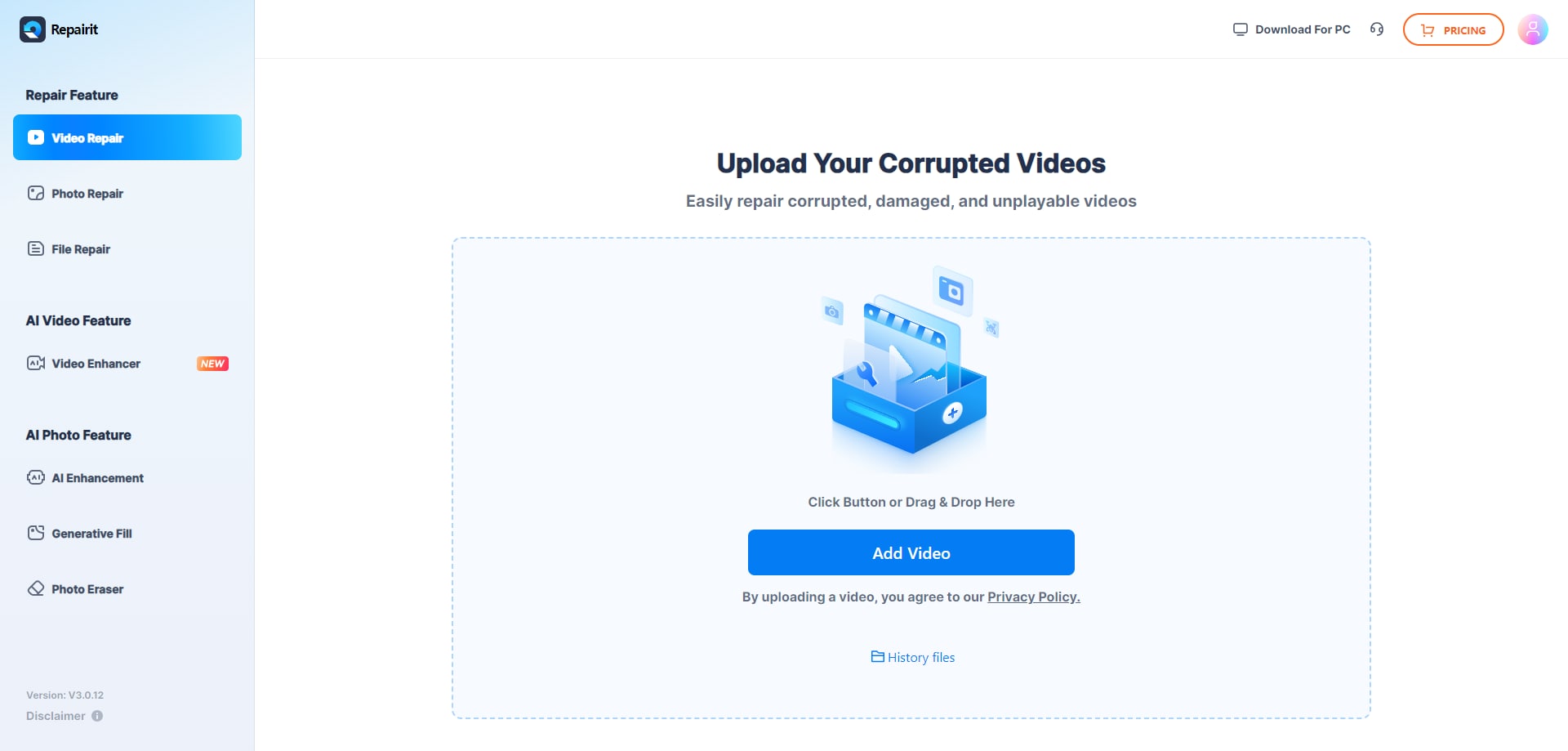
Step 1. Upload the damaged or unplayable videos you want to repair through Repairit Video Repair Online.
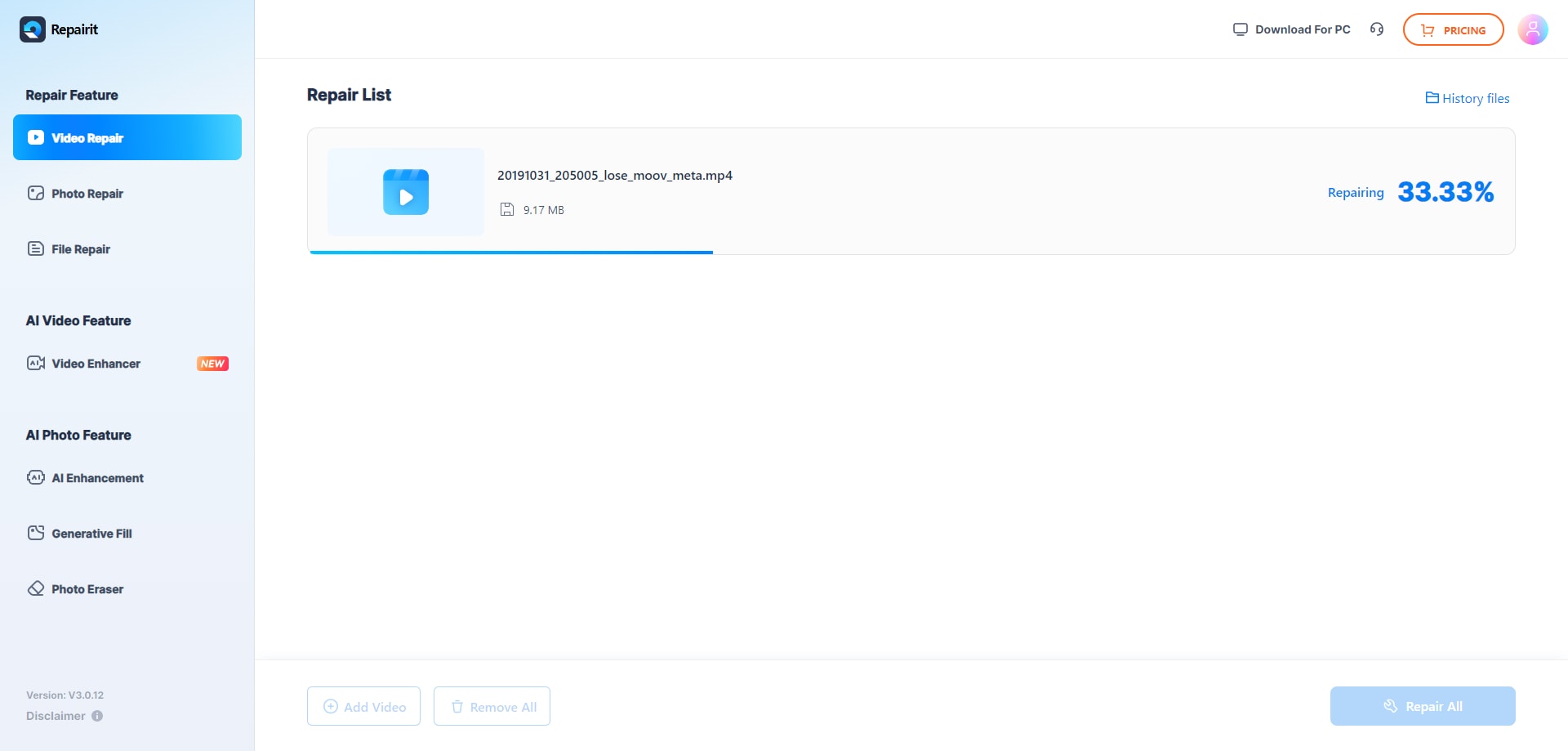
Step 2. Start the online repair process and let Repairit Video Repair Online analyze the corrupted video files.
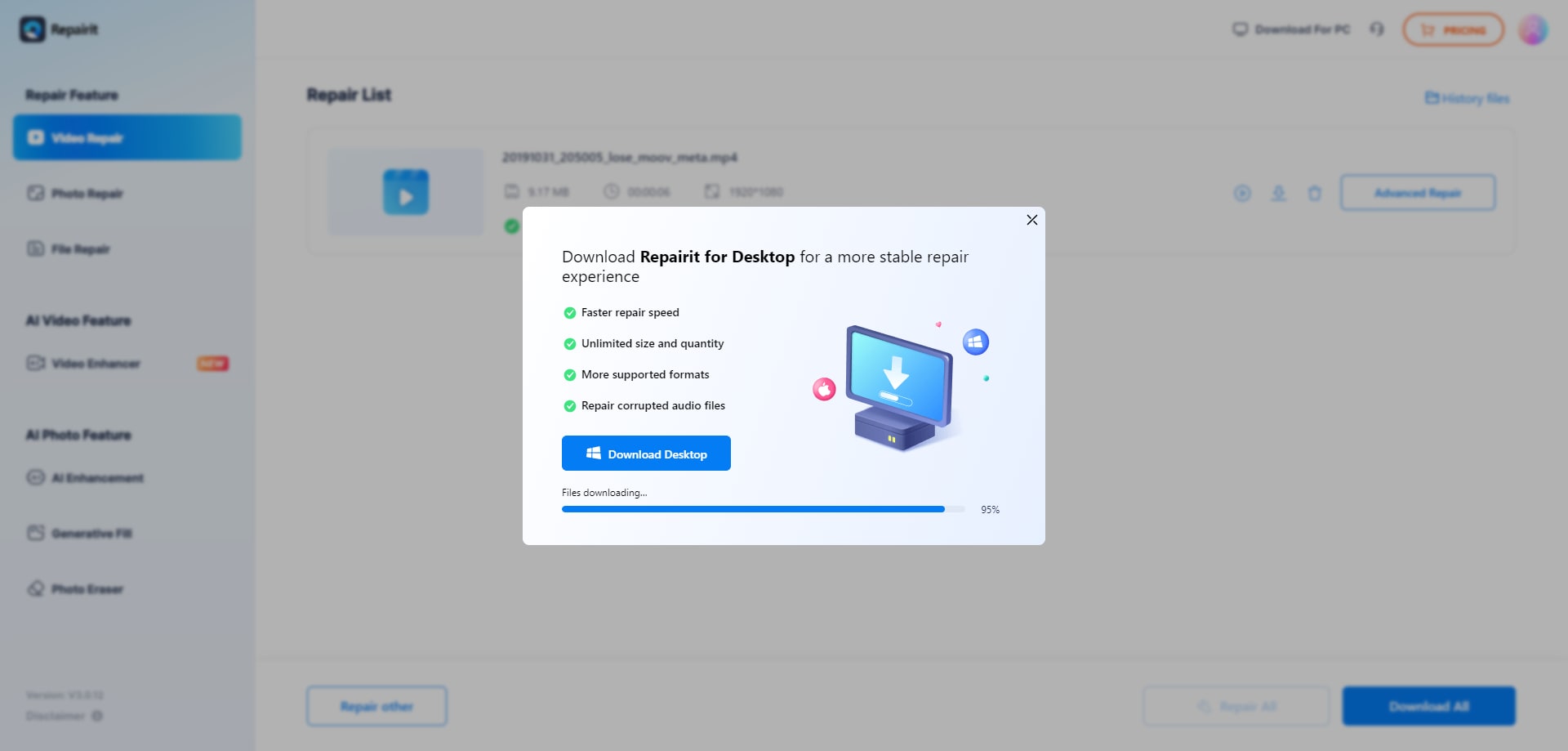
Step 3. Preview the repaired video result when available, then save the repaired videos to your device.
Final Verdict
The key difference between these tools is how they balance guidance and technical control for online video repair.
Repairit Video Repair Online is more suitable when you want a straightforward browser workflow to repair corrupted or unplayable videos and do not want to manage reference clips or complex options. It focuses on common issues like broken playback, errors when opening files, and other corruption that can often be resolved through an automatic cloud process.
Restore.Media may be enough if you work with professional camera or drone footage, can provide suitable sample files, and are comfortable with a more technical, reference-based process aimed at repair accuracy. In those situations, the ability to work with MXF, MOV, and MP4 professional workflows and preview results before payment becomes important.
Choosing between them comes down to how damaged your files are, how technical you want the workflow to be, and whether speed or fine-grained control matters more for your projects. For many everyday corrupted or unplayable videos, starting with Repairit Video Repair Online offers a practical and accessible first step.
Next: Repairit Video Repair Online vs Easeus Online Video Repair
FAQ
-
1. Which is better for repairing severely corrupted videos: Repairit Video Repair Online or Restore.Media?
Neither tool is automatically better in every case. Repairit Video Repair Online is more suitable when you want a guided, quick browser-based fix, while Restore.Media can fit professionals who can provide sample files and are ready to work through a more technical, reference-based workflow for difficult recordings. -
2. Do I need sample files to repair corrupted videos with Restore.Media or Repairit Video Repair Online?
Repairit Video Repair Online typically focuses on automatic repair without requiring users to manage sample files. Restore.Media often works best when you can upload a suitable sample from the same camera or drone, which can improve repair accuracy but adds extra steps. -
3. How is online video repair different from video recovery or video enhancement?
Online video repair tools like Repairit Video Repair Online and Restore.Media focus on fixing corrupted, damaged, or unplayable files so they can open and play again. Video recovery deals with finding lost or deleted files, while video enhancement or upscaling focuses on improving visual quality, which is a separate process from repairing file corruption.




