
When you need to repair corrupted photos online, it is important to choose a browser based tool that focuses on fixing damaged image files instead of changing how they look. Repairit Photo Repair Online and Soouya Photo Repair Online both run in the browser and aim to repair photos that have become broken, unreadable, or visually distorted.
This comparison looks at how each service handles damaged, unreadable, or broken photos, how simple the workflow feels, and what happens when the corruption is more serious, especially for camera files and RAW style images. In many real world cases, the right choice depends on how badly the photo is damaged and how much guidance you want while repairing it online.
In this article
- Repairit Photo Repair Online vs Soouya Photo Repair Online: Quick Verdict
- Repairit Photo Repair Online vs Soouya Photo Repair Online: Key Differences
- Repairit Photo Repair Online vs Soouya Photo Repair Online: Comparison Table
- What Repairit Photo Repair Online and Soouya Photo Repair Online Are Best For
- Repairit Photo Repair Online vs Soouya Photo Repair Online: Photo Repair Capabilities
- Repairit Photo Repair Online vs Soouya Photo Repair Online: Supported Image Formats and Repair Scenarios
- Repairit Photo Repair Online vs Soouya Photo Repair Online: Upload Workflow and Ease of Use
- Repairit Photo Repair Online vs Soouya Photo Repair Online: Cloud Repair, Privacy, and File Handling
- Repairit Photo Repair Online vs Soouya Photo Repair Online: Repair Quality and Limitations
- Who Should Choose Repairit Photo Repair Online
- Who Should Choose Soouya Photo Repair Online
- Pros and Cons of Repairit Photo Repair Online and Soouya Photo Repair Online
- How to Repair Corrupted Photos Online After Choosing the Right Tool
Repairit Photo Repair Online vs Soouya Photo Repair Online: Quick Verdict
The main takeaway is that Repairit Photo Repair Online is more suitable when your photos are badly corrupted or unreadable, while Soouya Photo Repair Online may be enough if your files are only mildly damaged and you want a very simple workflow. Both are browser based, but they lean toward different levels of repair depth and user expectations.
In many real world cases, users who deal with broken camera files, RAW style images, or photos that refuse to open benefit more from the guided approach of Repairit Photo Repair Online. Casual users with slightly broken JPG or PNG snapshots often find Soouya Photo Repair Online easier to try first because it focuses on quick upload and repair with minimal steps.
Repairit Photo Repair Online vs Soouya Photo Repair Online: Key Differences
The key difference is that Repairit Photo Repair Online emphasizes structured corrupted photo repair, while Soouya Photo Repair Online emphasizes a lightweight, straightforward browser workflow. This matters if you are deciding between depth of repair and pure simplicity.
- Repair depth: Repairit Photo Repair Online is described as more suited to complex corruption and unreadable camera images, whereas Soouya Photo Repair Online is aimed at lighter damage that still lets files open.
- Workflow style: Repairit Photo Repair Online uses a step based, guided online repair process, while Soouya Photo Repair Online keeps things minimal for quick upload and repair.
- Target users: Repairit Photo Repair Online often fits users comfortable with a guided browser process and dealing with RAW style or structurally damaged photos; Soouya Photo Repair Online leans toward casual users wanting a simple check on damaged files.
- Expectations: Users typically approach Repairit Photo Repair Online when basic tools fail, while Soouya Photo Repair Online feels like a fast first attempt for moderate corruption.
Repairit Photo Repair Online vs Soouya Photo Repair Online: Comparison Table
This comparison table summarizes how each browser based tool approaches online photo repair for corrupted or damaged images so you can quickly match them to your situation.
| Dimension | Repairit Photo Repair Online | Soouya Photo Repair Online |
|---|---|---|
| Best for | Users who need guided corrupted photo repair for broken or unreadable camera images and potentially damaged RAW style files. | Casual users repairing damaged image files who want a straightforward browser based experience. |
| Online workflow | Step based browser workflow focused on uploading corrupted photos, repairing them online, then downloading results. | Very simple browser based upload and repair workflow with minimal steps. |
| Repair capability | Designed for deeper corrupted photo repair and handling more complex damage in many real world cases. | Suited to lighter damage; limited advanced repair capability for severely corrupted photos. |
| Ease of use | Guided, with options that may suit users who can follow a clear online repair process. | High ease of use with simple upload and repair actions for non technical users. |
| Privacy and file handling | Uses a cloud based repair approach where users upload, repair online, then download; details may depend on current service policies. | Also browser based; images are uploaded for online processing, with specifics depending on Soouya Photo Repair Online policies. |
| Strengths | More suitable when you need structured corrupted image repair and want to attempt recovery of unreadable or broken photos online. | Strong for quick, lightweight browser based repair when damage is limited and files still mostly open. |
| Weaknesses | May feel more complex than basic tools for casual users with only minor damage to fix. | Limited advanced repair capability, so severely corrupted or structurally broken images may not repair well. |
What Repairit Photo Repair Online and Soouya Photo Repair Online Are Best For
Repairit Photo Repair Online is a stronger choice for users who care most about repairing heavily corrupted, unreadable, or structurally broken photos online, while Soouya Photo Repair Online may be enough if you just need to quickly check whether a slightly damaged file can be repaired in the browser. Both are browser based, but they serve different comfort levels and file conditions.
According to the overview, both tools can be applied to damaged image files in JPG, PNG, and in many cases camera focused formats like RAW, HEIC, or TIFF. Users often notice that Repairit Photo Repair Online feels more reassuring when images fail to open at all, whereas Soouya Photo Repair Online fits better when photos open but show glitches, blocks, or odd artifacts.
- Choose Repairit Photo Repair Online if you need a more guided process and are troubleshooting unreadable or broken camera images.
- Choose Soouya Photo Repair Online if you want a lightweight, low effort workflow for mildly corrupted photos.
Repairit Photo Repair Online vs Soouya Photo Repair Online: Photo Repair Capabilities
The main difference in capabilities is that Repairit Photo Repair Online focuses more on deeper corrupted photo repair, while Soouya Photo Repair Online focuses on straightforward repair attempts that suit lighter damage. This becomes important when photos refuse to open or show extreme artifacts.
Overall, the summary notes that your choice should depend on how badly your files are corrupted and how much guidance you expect during repair. In many real world cases, users with unreadable camera photos lean toward Repairit Photo Repair Online, while users with still viewable but slightly broken images may try Soouya Photo Repair Online first.
Repairit Photo Repair Online capabilities include:
- May repair corrupted photos that fail to open or display heavy artifacts in common image formats.
- Often used to fix broken or unreadable camera images where headers or structures are partially damaged.
- Can support more detailed online repair steps, which matters for damaged RAW style or HEIC photos in many cases.
Soouya Photo Repair Online capabilities include:
- Provides a simple browser based way to upload damaged photos and attempt repairs online.
- Best for casual users whose images are only moderately damaged but still largely viewable.
- Limited advanced repair capability, so it may not fully handle severe corruption or complex structural damage.
Repairit Photo Repair Online vs Soouya Photo Repair Online: Supported Image Formats and Repair Scenarios
Both tools can often be used on common photo formats like JPG, PNG, and camera oriented files such as RAW or HEIC, but Repairit Photo Repair Online is more commonly chosen when the corruption is severe enough that photos do not open at all. Soouya Photo Repair Online typically fits scenarios where the file still opens but looks obviously broken.
As described, both services act as browser based repair platforms that users apply to:
- Everyday JPG or PNG photos that show artifacts or partial corruption.
- Camera style formats such as RAW, HEIC, or TIFF when the format support applies.
- Real world cases where previews look scrambled or metadata errors cause images to misbehave.
Users should treat Repairit Photo Repair Online as better aligned with more serious breakage, while Soouya Photo Repair Online can be a quick attempt for lighter damage before deciding whether deeper repair is needed.
Repairit Photo Repair Online vs Soouya Photo Repair Online: Upload Workflow and Ease of Use
The key difference in workflow is that Repairit Photo Repair Online offers a guided, step based process, whereas Soouya Photo Repair Online emphasizes a minimal, almost one shot upload and repair experience. This affects how comfortable different users feel when handling corrupted photos.
According to the description, Soouya Photo Repair Online centers on a simple path: upload damaged photos, trigger repair, and wait for the result with very few decisions to make. Repairit Photo Repair Online still uses drag and drop or file selection in a browser, but adds clearer steps that help when you are repairing unreadable camera images or slightly more complex file issues.
- Repairit Photo Repair Online: better if you want guidance when handling multiple broken images or RAW style photos.
- Soouya Photo Repair Online: better if you are non technical and want to click as little as possible to see whether a quick browser repair helps.
Repairit Photo Repair Online vs Soouya Photo Repair Online: Cloud Repair, Privacy, and File Handling
Both tools use a cloud style repair model where you upload corrupted photos, repair them online, and then download results, so privacy and file handling depend largely on each provider s current policies. Users should always decide which images they are comfortable uploading.
The description explains that this approach is convenient because the heavy lifting happens on remote servers instead of your device. At the same time, it also notes that you may want to avoid extremely sensitive images if you are not sure about retention or security practices and instead focus on photos you are fine processing online.
- Repairit Photo Repair Online and Soouya Photo Repair Online both rely on browser uploads and downloads rather than local offline processing.
- Users often weigh convenience against privacy by selecting only necessary files for online repair.
- It is a good idea to check each service s current terms or help pages before uploading critical images.
Repairit Photo Repair Online vs Soouya Photo Repair Online: Repair Quality and Limitations
In many real world cases, Repairit Photo Repair Online is described as going deeper on corrupted photo repair than a very basic browser tool, while Soouya Photo Repair Online works best for simpler issues. Neither tool can fully fix every possible broken or incomplete image.
The guidance notes that Soouya Photo Repair Online is more comfortable with limited corruption and may struggle when images are structurally broken. Repairit Photo Repair Online can handle more complex damage in many scenarios, but there are still limits when data is missing, metadata is badly damaged, or the file structure is beyond repair.
- Severely corrupted files may end up only partially repaired or still unreadable on both tools.
- Issues like missing image data, broken metadata, and heavily damaged structures remain common pain points.
- Users should treat any online photo repair tool as an attempt to salvage what is still available, not as a guarantee.
Who Should Choose Repairit Photo Repair Online
Repairit Photo Repair Online is more suitable when you need a focused, guided workflow for corrupted, unreadable, or broken camera photos. It is aimed at users who are willing to follow a step based online process to give damaged images a realistic chance of opening again.
- Users with corrupted camera photos that no longer open or show severe artifacts.
- Photographers or advanced hobbyists needing structured online repair for damaged RAW style images.
- People comfortable following a guided browser workflow for deeper corrupted photo repair.
- Anyone comparing several failed images and wanting a focused tool for unreadable or broken photos.
In practice, users often turn to Repairit Photo Repair Online after lighter tools fail to fix their damaged files.
Who Should Choose Soouya Photo Repair Online
Soouya Photo Repair Online may be enough if you are a casual user dealing with mildly damaged photos that still open and you prefer a very simple browser experience. It fits users who mainly want to see whether a quick repair attempt helps without learning extra options.
- Casual users who want a very simple upload and repair experience in the browser.
- People dealing with mildly damaged image files that still open but look slightly broken.
- Users who prefer minimal controls and just want to see if a fast online fix helps.
- Anyone testing a lightweight browser based repair before moving to more advanced options.
This approach keeps the barrier to entry low but may not be enough for files with deep structural corruption.
Pros and Cons of Repairit Photo Repair Online and Soouya Photo Repair Online
The main trade off is that Repairit Photo Repair Online offers more structured corrupted photo repair with a slightly more involved workflow, while Soouya Photo Repair Online offers a lighter workflow that may not handle very severe damage. Looking at pros and cons side by side helps match each tool to your needs.
Repairit Photo Repair Online Pros and Cons
Soouya Photo Repair Online Pros and Cons
How to Repair Corrupted Photos Online After Choosing the Right Tool
After comparing Repairit Photo Repair Online and Soouya Photo Repair Online, the next step is actually repairing your corrupted, damaged, or unreadable photos online using the tool that best matches your situation. Once you know whether you need deeper repair or a quick check, you can follow a focused set of steps to run the repair in your browser.
For users who need a guided online process, Repairit Photo Repair Online provides a practical way to upload damaged image files, let the service analyze them, and then download repaired results when possible. This avoids complex manual troubleshooting while keeping everything entirely browser based.
Key Features
Repairit Photo Repair Online centers on a browser based workflow that targets corrupted photo repair instead of visual enhancement or upscaling. While details can evolve, the description highlights several key points that matter to users handling broken photos.
- Browser based workflow focused on corrupted photo repair rather than simple enhancement.
- Support for repairing a range of damaged camera images and common photo formats in many cases.
- Clear, step driven process from upload to online repair and final download of repaired files.
Step-by-step guide
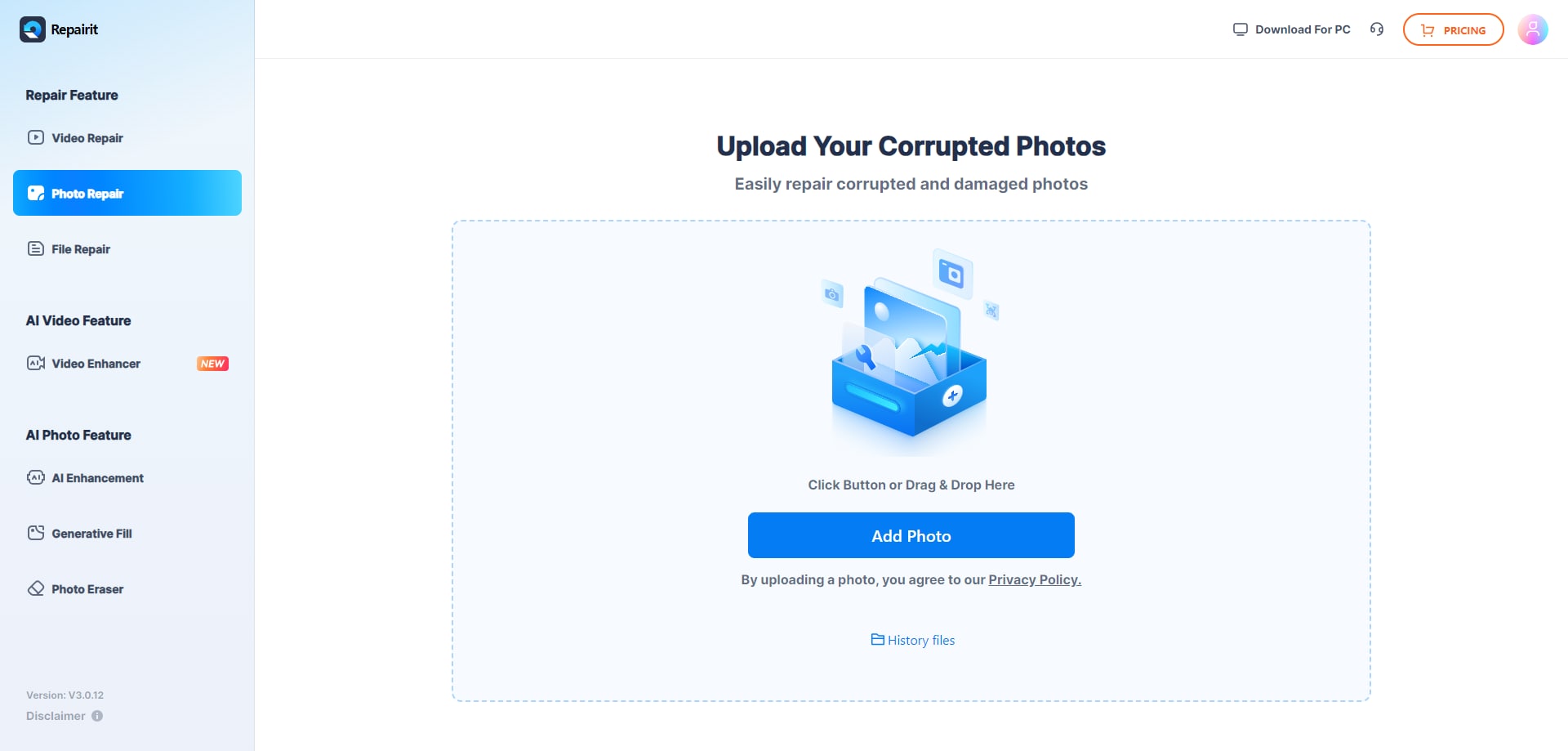
Step 1. Upload the corrupted, damaged, or unreadable photos you want to repair through Repairit Photo Repair Online.
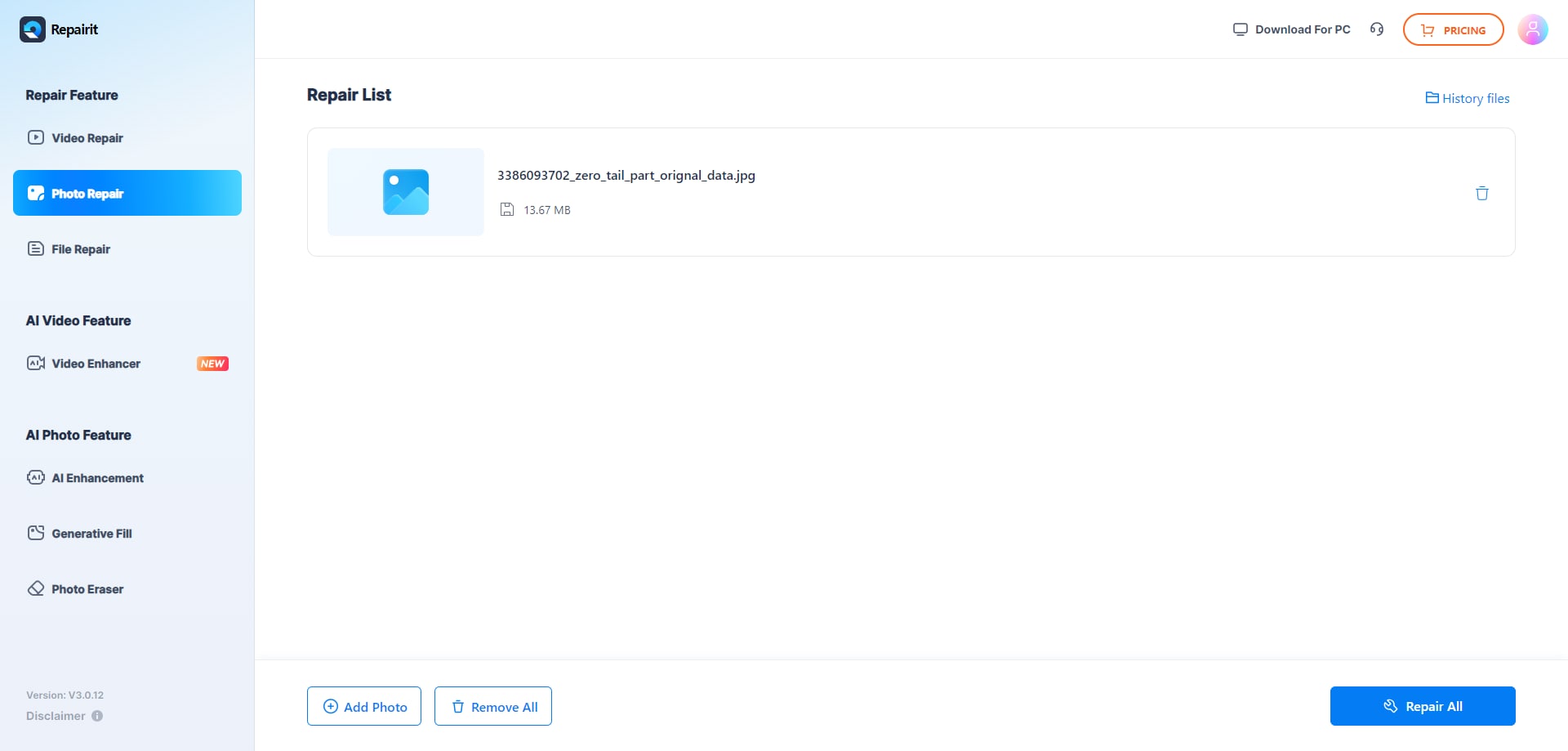
Step 2. Start the online repair process and let Repairit Photo Repair Online analyze the damaged photo files.
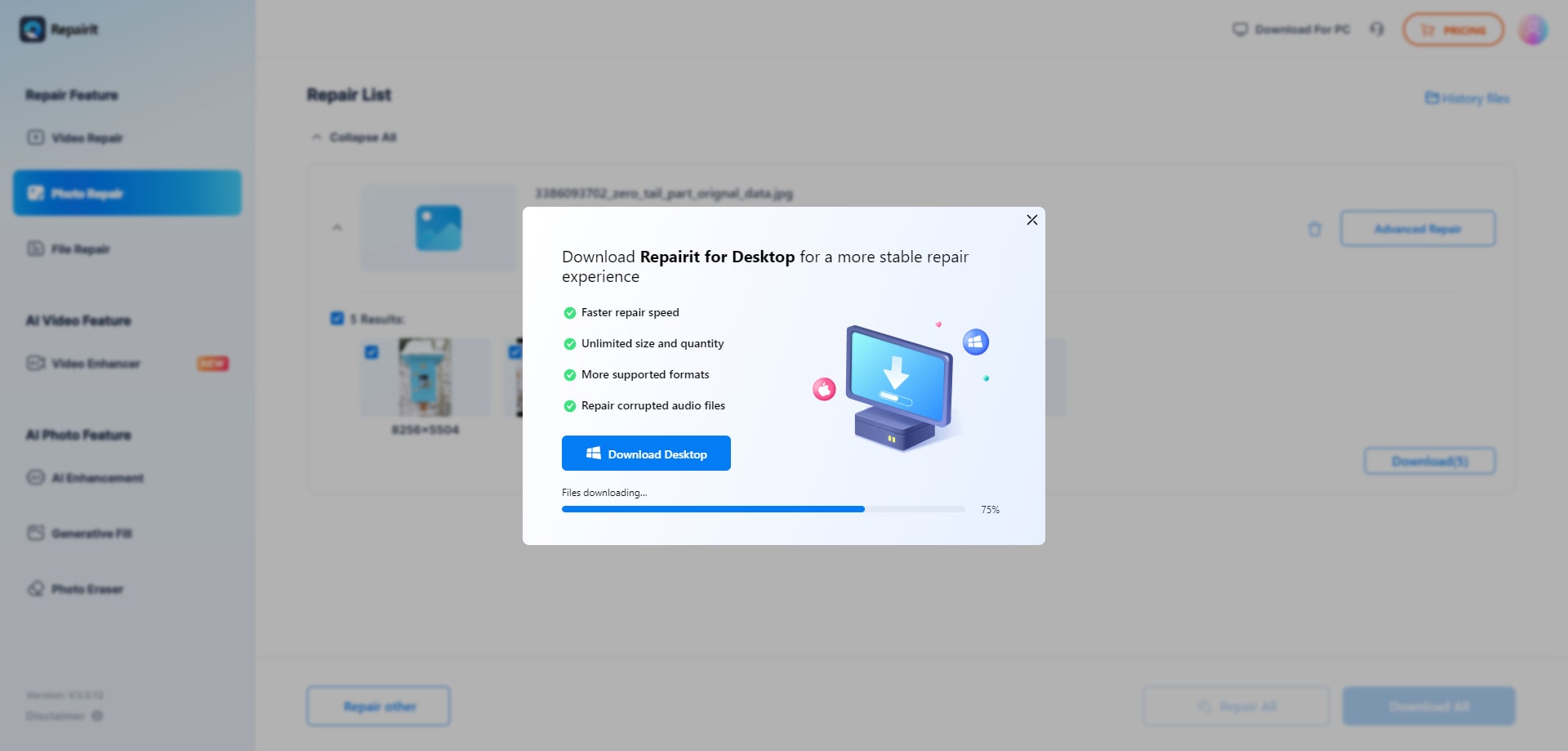
Step 3. Preview the repaired photo result when available, then save the repaired photos to your device.
Final Verdict
The overall conclusion is that Repairit Photo Repair Online is better aligned with users who face serious corruption or unreadable camera images, while Soouya Photo Repair Online suits users with lighter damage who value an ultra simple workflow. Neither tool replaces the other; they simply prioritize different types of online photo repair needs.
Repairit Photo Repair Online makes more sense if you are handling corrupted RAW style files, broken headers, or photos that will not open, and you are comfortable with a guided browser process. Soouya Photo Repair Online may be enough if you are a casual user with mildly damaged images and just want to see quickly whether a web based repair attempt helps.
In many real world cases, users start with a lightweight tool for moderate issues and then move to a more structured service like Repairit Photo Repair Online when simple options fail. Thinking about file condition, repair depth, workflow complexity, and privacy will help you choose the right order to try them.
Next: Repairit Photo Repair Online vs Pokecut Image Repair Online
FAQ
-
1. Which is better for repairing severely corrupted photos, Repairit Photo Repair Online or Soouya Photo Repair Online?
Repairit Photo Repair Online is generally more suitable when files are badly corrupted or unreadable, because it focuses on deeper corrupted photo repair in many real world cases. Soouya Photo Repair Online is better matched to lighter damage where photos still open and only show limited problems. -
2. Is Soouya Photo Repair Online enough for casual users with broken JPG or PNG files?
Soouya Photo Repair Online may be enough if you are a casual user with slightly damaged JPG or PNG files and you want a simple upload and repair workflow. If the images refuse to open or remain badly broken, you may then want to try Repairit Photo Repair Online for a more repair focused online process. -
3. What is the difference between corrupted photo repair, photo restoration, and image enhancement?
Corrupted photo repair focuses on fixing unreadable or broken image files so they open again, which is what tools like Repairit Photo Repair Online and Soouya Photo Repair Online are mainly used for. Photo restoration usually targets visual cleanup such as fading or scratches, while image enhancement adjusts quality or style, and these are different from repairing corrupted file structures. -
4. How should I choose between Repairit Photo Repair Online and Soouya Photo Repair Online for browser based repair?
You should check how badly your photos are damaged and what kind of workflow you prefer. If you have casual images with minor issues, Soouya Photo Repair Online offers a quick, simple path, while Repairit Photo Repair Online is more suitable when files are corrupted, fail to open, or come from cameras and RAW style formats that need a guided repair process. -
5. Can browser based photo repair handle every corrupted image file?
No online photo repair tool can guarantee to fix every file, because severe corruption, missing data, or heavily damaged metadata may be beyond repair. Services like Repairit Photo Repair Online and Soouya Photo Repair Online can improve many damaged photos, but users should view them as attempts to salvage what is still available rather than assured fixes.




