
This comparison explains how Repairit Photo Repair Online and Pokecut Image Repair Online handle damaged images directly in the browser so users can repair broken photos without installing desktop tools.
One focuses more on corrupted, broken, or unreadable files, while the other leans toward fixing visible defects and AI-style reconstruction on images that still open but look wrong or incomplete.
By separating true corrupted photo repair from general visual cleanup, you can choose the tool that better matches your file damage, workflow expectations, and comfort level with online uploads.
In this article
- Repairit Photo Repair Online vs Pokecut Image Repair Online: Quick Verdict
- Repairit Photo Repair Online vs Pokecut Image Repair Online: Key Differences
- Repairit Photo Repair Online vs Pokecut Image Repair Online: Comparison Table
- What Repairit Photo Repair Online and Pokecut Image Repair Online Are Best For
- Repairit Photo Repair Online vs Pokecut Image Repair Online: Photo Repair Capabilities
- Repairit Photo Repair Online vs Pokecut Image Repair Online: Supported Image Formats and Repair Scenarios
- Repairit Photo Repair Online vs Pokecut Image Repair Online: Upload Workflow and Ease of Use
- Repairit Photo Repair Online vs Pokecut Image Repair Online: Cloud Repair, Privacy, and File Handling
- Repairit Photo Repair Online vs Pokecut Image Repair Online: Repair Quality and Limitations
- Who Should Choose Repairit Photo Repair Online
- Who Should Choose Pokecut Image Repair Online
- Pros and Cons of Repairit Photo Repair Online and Pokecut Image Repair Online
- How to Repair Corrupted Photos Online After Choosing the Right Tool
Repairit Photo Repair Online vs Pokecut Image Repair Online: Quick Verdict
The quick verdict is that Repairit Photo Repair Online is more suitable when your photos are corrupted, broken, or unreadable, while Pokecut Image Repair Online may be enough if your photos still open but show visual glitches or partial damage.
In many real-world cases, the key decision is whether you need to repair the file structure or only improve how the damaged image looks in the browser.
- Choose Repairit Photo Repair Online when images will not open, show errors, or display broken previews that hint at structural corruption.
- Choose Pokecut Image Repair Online when the image opens but parts look distorted, missing, or visually broken and you mainly want online cleanup.
- Both run fully online, so users should consider cloud processing, privacy expectations, and how comfortable they are with uploading sensitive photos.
Repairit Photo Repair Online vs Pokecut Image Repair Online: Key Differences
The key difference is that Repairit Photo Repair Online focuses on corrupted photo repair for unreadable or structurally damaged files, whereas Pokecut Image Repair Online leans toward visible restoration and AI-style reconstruction on photos that still open.
This matters if you are troubleshooting why a photo will not open at all versus why it opens but looks obviously wrong.
- Repair depth: Repairit Photo Repair Online aims at structural issues like broken data or unreadable content, while Pokecut Image Repair Online is oriented toward what you can see on screen.
- File condition: Repairit Photo Repair Online is a stronger choice for files that refuse to open; Pokecut Image Repair Online is more aligned with partially broken but still viewable photos.
- Workflow focus: Repairit Photo Repair Online offers a guided repair flow; Pokecut Image Repair Online keeps the browser workflow very simple with minimal controls.
- Use-case boundary: Using Pokecut Image Repair Online for a completely unreadable file can be limiting, while using Repairit Photo Repair Online just for minor visual defects may be more than you need.
Repairit Photo Repair Online vs Pokecut Image Repair Online: Comparison Table
This comparison table summarizes how Repairit Photo Repair Online and Pokecut Image Repair Online differ across repair focus, workflow, and typical strengths.
| Dimension | Repairit Photo Repair Online | Pokecut Image Repair Online |
|---|---|---|
| Best for | Users who need guided online workflows to repair corrupted, broken, or unreadable photo files and bring them back to a viewable state. | Users fixing visually damaged or partially broken images that still open but look wrong or incomplete. |
| Online workflow | Browser-based upload and repair with a step-by-step flow designed around corrupted photo repair tasks. | Simple upload and online image repair flow focused on visible defects and AI cleanup in the browser. |
| Repair capability | Aims to address structural photo problems such as corruption, broken data, or unreadable image content, depending on damage severity. | Leans more toward visual restoration and AI reconstruction instead of deep corrupted file repair or unreadable image recovery. |
| Ease of use | Designed as a guided online photo repair experience that walks users through uploading, repairing, and downloading. | Very straightforward browser workflow where users upload damaged images and repair online with minimal steps. |
| Privacy and file handling | Uses a cloud-based browser workflow; users should review general online storage and deletion practices before uploading sensitive photos. | Also uses an online upload-and-fix process; users typically consider that images are processed remotely in the cloud. |
| Strengths | Strong fit for repairing corrupted photos online when images refuse to open or show errors but still contain repairable data. | Easy browser workflow and image cleanup support that can improve photos with visible damage or partial breakage. |
| Weaknesses | Results can be limited when corruption is extreme, metadata is heavily damaged, or file data is largely missing. | May not handle deep corruption repair or fully unreadable files because it leans more toward visual restoration than structural repair. |
What Repairit Photo Repair Online and Pokecut Image Repair Online Are Best For
Repairit Photo Repair Online is best for users who need to repair corrupted photos online when files are broken or unreadable, while Pokecut Image Repair Online is best for visually damaged photos that still open.
Users often notice that choosing the wrong type of tool wastes time, especially if they use a visual cleanup service for a file that will not open at all.
- Repairit Photo Repair Online is a stronger choice for: photos that refuse to open, show error messages, or display only partial or broken previews.
- Pokecut Image Repair Online can be a better fit for: images that open but contain visible artifacts, glitches, or missing portions that need online repair.
- If you are unsure, start by checking whether your image viewer can open the file; unreadable files typically point toward Repairit Photo Repair Online.
Repairit Photo Repair Online vs Pokecut Image Repair Online: Photo Repair Capabilities
Both services help with online photo repair, but their capabilities point in different directions: Repairit Photo Repair Online is oriented toward corrupted photo repair, whereas Pokecut Image Repair Online focuses more on visual restoration and AI-style fixes.
Understanding this split helps avoid using a purely visual tool when what you really need is to repair unreadable image data.
How Repairit Photo Repair Online approaches photo repair
- Helps repair corrupted photos online when files refuse to open or show broken or incomplete previews, depending on corruption severity.
- Targets damaged or unreadable image data so users can attempt to fix broken JPG, PNG, RAW, or HEIC photos in a guided browser workflow.
- Focuses on bringing structurally damaged or broken image files back to a viewable state instead of simple enhancement or cosmetic edits.
How Pokecut Image Repair Online approaches photo repair
- Used by many users to fix visually damaged or partially broken images that still open but contain glitches or missing areas.
- Provides an easy browser workflow and image cleanup support that may reconstruct or smooth damaged visual content.
- Leans more toward visual restoration than deep corruption repair, so it is more suited to fixing what you can see rather than unreadable files.
Repairit Photo Repair Online vs Pokecut Image Repair Online: Supported Image Formats and Repair Scenarios
Both tools are commonly used with JPG, PNG, and sometimes RAW or HEIC photos, but they tend to show up in different repair scenarios.
In many real-world cases, the same format may require a different tool depending on whether the file opens or not.
- Repairit Photo Repair Online: often chosen when JPG, PNG, RAW, or HEIC files become corrupted or unreadable and need structural repair, such as invalid image data or broken previews.
- Pokecut Image Repair Online: more often used when those same formats still open but look visually damaged or partially broken and users want online cleanup rather than deep file repair.
- This means two JPG files might need completely different workflows: one for corruption-focused repair, one for visual glitch repair.
Users should think first about file condition (unreadable vs visibly broken) before worrying about the exact image format.
Repairit Photo Repair Online vs Pokecut Image Repair Online: Upload Workflow and Ease of Use
Both tools use a browser-based upload workflow, but Repairit Photo Repair Online emphasizes a guided repair process, while Pokecut Image Repair Online emphasizes speed and simplicity for visible issues.
This affects how comfortable non-technical users feel when repairing corrupted or damaged photos online.
- Repairit Photo Repair Online workflow: focuses the upload process around corrupted photo repair, guiding users through selecting damaged files, starting repair, and downloading results.
- Pokecut Image Repair Online workflow: offers an easy browser flow with image cleanup support, letting users quickly send visually damaged or partially broken images for AI-driven fixes without complex settings.
- For users who want more hand-holding through the repair of unreadable files, the guided approach of Repairit Photo Repair Online can feel more reassuring.
Repairit Photo Repair Online vs Pokecut Image Repair Online: Cloud Repair, Privacy, and File Handling
Both services rely on cloud-based processing, which means your photos are uploaded to remote servers while the repair runs in the browser.
This matters if you work with sensitive or client images and need to understand how files are handled online.
- Repairit Photo Repair Online: uses a cloud-based browser workflow; users should review general online storage and deletion practices before uploading confidential photos.
- Pokecut Image Repair Online: also uses an upload-and-fix process with remote processing, so users should assume images are handled in the cloud for the duration of the repair.
- For either option, users should check each service documentation for details on storage length, deletion behavior, and any account-level controls that may apply.
Repairit Photo Repair Online vs Pokecut Image Repair Online: Repair Quality and Limitations
Repair quality for both tools depends heavily on how damaged the photo is before upload, and neither can fully rebuild an image if critical data is missing.
A common limitation is that some images are simply too corrupted or incomplete for any browser-based repair to restore completely.
- Repairit Photo Repair Online: may handle deeper corruption, but severe corruption, damaged metadata, incomplete image data, or heavily broken image structures can still limit results.
- Pokecut Image Repair Online: works better when the file opens but looks wrong; because it leans more toward visual restoration, fully unreadable or heavily corrupted photos may not repair as well.
- Users should manage expectations: lightly corrupted or partially broken files stand a better chance than photos with major data loss.
Who Should Choose Repairit Photo Repair Online
Repairit Photo Repair Online is more suitable when your main problem is corruption and unreadable photos rather than simple visual flaws.
It is designed for users who want a guided online photo repair workflow dedicated to fixing broken image files.
- Users dealing with corrupted photos that will not open or show clear error messages.
- People who need a guided online workflow specifically aimed at repairing damaged image files, not just enhancing them.
- Users who want to attempt to repair broken JPG, PNG, RAW, or HEIC photos directly in the browser.
- Anyone prioritizing structural repair of unreadable or partially corrupted images over simple visual cleanup.
If this describes your situation, visiting Repairit Photo Repair Online can be a practical next step before trying more complex options.
Who Should Choose Pokecut Image Repair Online
Pokecut Image Repair Online may be enough if your images still open but look visually damaged or partially broken, and you mainly want an easy online cleanup flow.
This makes it a reasonable fit for users whose main concern is what they can see on the screen rather than low-level file corruption.
- Users whose photos still open but contain visible glitches, artifacts, or partial breakage.
- People who want an easy browser workflow and image cleanup support without learning complex repair options.
- Users primarily focused on visual damage or AI reconstruction rather than deep corrupted file repair.
- Anyone who needs quick online fixes for partially broken images rather than intensive repair of unreadable files.
Pros and Cons of Repairit Photo Repair Online and Pokecut Image Repair Online
The pros and cons below highlight how each option balances repair depth, ease of use, and typical damage types in a browser-based environment.
Comparing them helps clarify whether you should prioritize corrupted file repair or visual-level fixes.
Repairit Photo Repair Online Pros and Cons
Pokecut Image Repair Online Pros and Cons
How to Repair Corrupted Photos Online After Choosing the Right Tool
After comparing Repairit Photo Repair Online and Pokecut Image Repair Online, the next step is actually repairing your corrupted, damaged, or unreadable photos in the browser.
For users whose images will not open or clearly show corruption, Repairit Photo Repair Online offers a practical guided workflow to upload, repair, preview, and save repaired photos without installing extra software.
Key Features
The main features of Repairit Photo Repair Online are built around practical corrupted photo repair needs rather than cosmetic changes.
- Online photo repair designed for corrupted, broken, or unreadable images rather than cosmetic edits.
- Support for repairing commonly used photo formats in a browser-based workflow, depending on file condition.
- Preview-driven process so users can check repaired results before deciding what to save.
Step-by-step guide
Follow these steps to repair corrupted photos online using Repairit Photo Repair Online once you have identified corruption as the main issue.
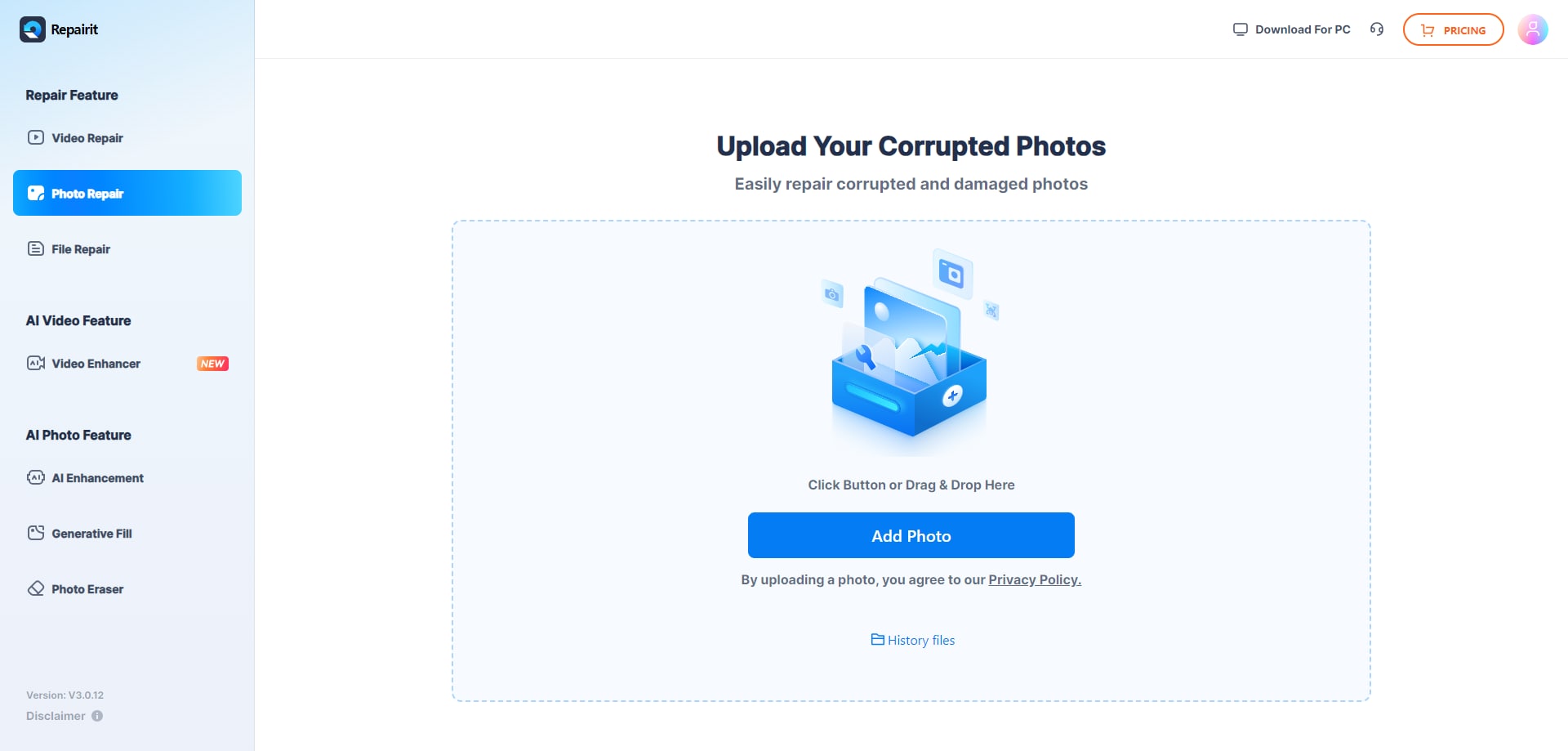
Step 1. Upload the corrupted, damaged, or unreadable photos you want to repair through Repairit Photo Repair Online.
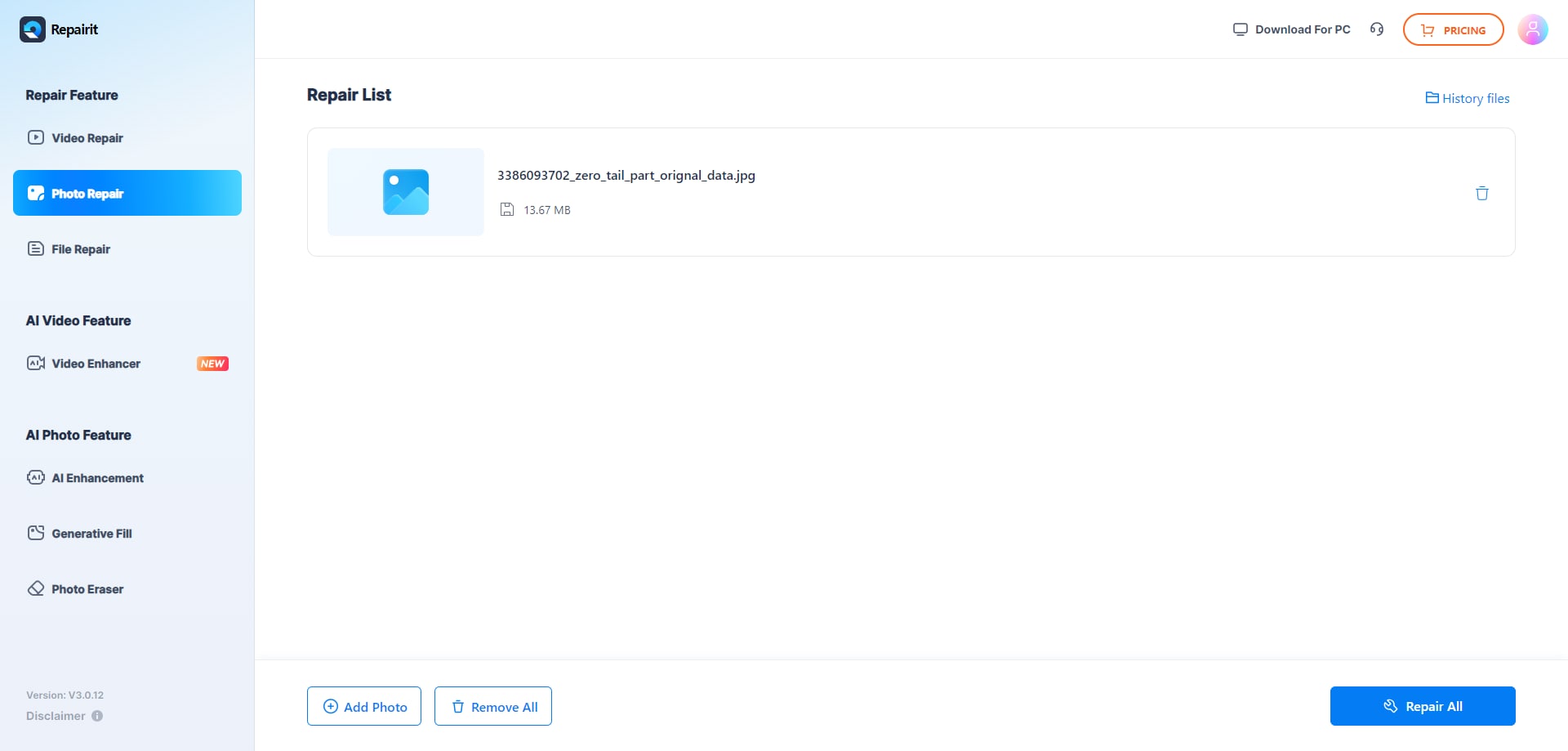
Step 2. Start the online repair process and let Repairit Photo Repair Online analyze the damaged photo files.
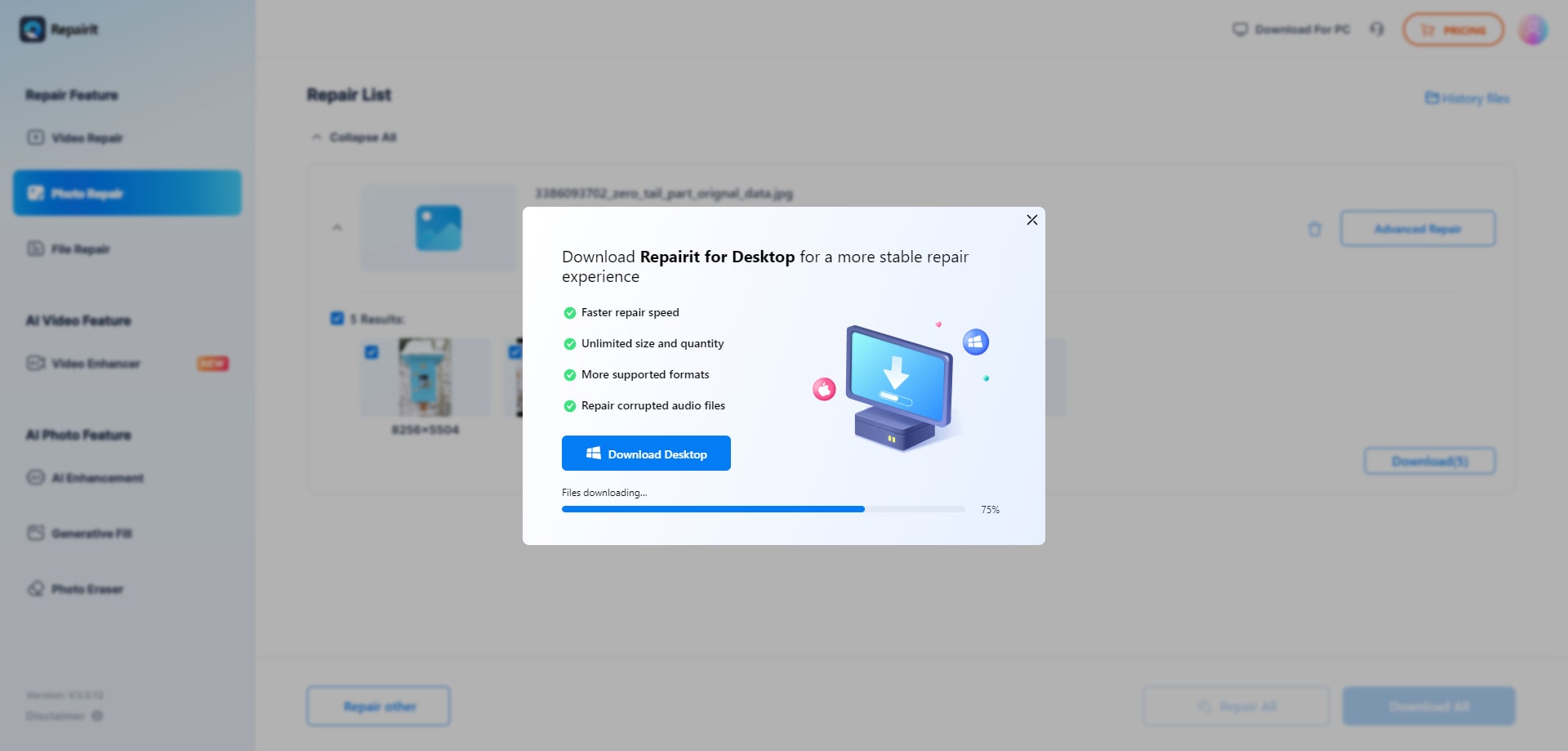
Step 3. Preview the repaired photo result when available, then save the repaired photos to your device.
Final Verdict
The overall verdict is that Repairit Photo Repair Online is more suitable when your main problem is corruption and unreadable image files, while Pokecut Image Repair Online may be enough when files open but look visually damaged.
Repairit Photo Repair Online focuses on repairing the damaged image file itself, which matters if you need to fix unreadable photos rather than simply tidy up visible flaws.
Pokecut Image Repair Online aligns better with scenarios where photos still open but show partial breakage, glitches, or missing areas, and you mainly want an easy browser workflow with image cleanup support.
In many real-world cases, users may even combine approaches: try corrupted photo repair first when the file is unreadable, then use visual-level tools like Pokecut Image Repair Online on photos that still display but do not look right.
Next: Repairit Photo Repair Online vs Magic Leopard Photo Repair
FAQ
-
1. Is Repairit Photo Repair Online better than Pokecut Image Repair Online for corrupted photos?
Repairit Photo Repair Online is generally more suitable when you need to repair corrupted or unreadable photos, while Pokecut Image Repair Online is better aligned with visually damaged images that still open. The right choice depends on whether your issue is file-level corruption or mostly visible defects on an otherwise readable photo. -
2. When should I use Pokecut Image Repair Online instead of Repairit Photo Repair Online?
You should consider Pokecut Image Repair Online if your image opens but looks partially broken, has visual glitches, or needs AI-based cleanup. If the file is unreadable or clearly corrupted and will not open, Repairit Photo Repair Online is usually a more appropriate first step. -
3. What is the difference between corrupted photo repair, photo restoration, and image enhancement?
Corrupted photo repair focuses on fixing damaged or unreadable image files so they open again and display content. Photo restoration usually targets age-related issues such as fading or scratches, and image enhancement mainly adjusts how a picture looks, such as colors or sharpness, without necessarily fixing structural file corruption. -
4. Can I repair broken JPG or PNG files online with these tools?
In many cases you can attempt to repair broken JPG or PNG files directly in the browser using these services. Repairit Photo Repair Online is aimed at corrupted or unreadable versions of these formats, while Pokecut Image Repair Online is more suited to files that still open but show visible damage or partial breakage. -
5. How do I decide which online photo repair tool to try first?
Start by checking whether the image can be opened by your usual viewer; if it cannot open or shows an error, Repairit Photo Repair Online is typically the first option to try. If the file opens but looks wrong, you can use either Repairit Photo Repair Online for corruption-focused repair or Pokecut Image Repair Online for visual cleanup, depending on how serious the damage appears.




