
When a photo will not open or shows broken blocks, glitches, or unreadable previews, you need a way to repair corrupted photos online directly in your browser. This comparison looks at Repairit Photo Repair Online and Magic Leopard Photo Repair side by side so you can see how each one handles corrupted, damaged, or broken photos.
We focus on how each tool processes damaged or unreadable images, what the upload and repair workflow feels like, and where realistic limits appear when corruption is severe. In many real-world cases, the better choice depends on your file formats, how broken the photos are, and whether you prefer a guided flow or a very quick AI run.
Use this guide to decide which online service better matches your photo issues, your patience level, and the way you like to work in a browser.
In this article
- Repairit Photo Repair Online vs Magic Leopard Photo Repair: Quick Verdict
- Repairit Photo Repair Online vs Magic Leopard Photo Repair: Key Differences
- Repairit Photo Repair Online vs Magic Leopard Photo Repair: Comparison Table
- What Repairit Photo Repair Online and Magic Leopard Photo Repair Are Best For
- Repairit Photo Repair Online vs Magic Leopard Photo Repair: Photo Repair Capabilities
- Repairit Photo Repair Online vs Magic Leopard Photo Repair: Supported Image Formats and Repair Scenarios
- Repairit Photo Repair Online vs Magic Leopard Photo Repair: Upload Workflow and Ease of Use
- Repairit Photo Repair Online vs Magic Leopard Photo Repair: Cloud Repair, Privacy, and File Handling
- Repairit Photo Repair Online vs Magic Leopard Photo Repair: Repair Quality and Limitations
- Who Should Choose Repairit Photo Repair Online
- Who Should Choose Magic Leopard Photo Repair
- Pros and Cons of Repairit Photo Repair Online and Magic Leopard Photo Repair
- How to Repair Corrupted Photos Online After Choosing the Right Tool
Repairit Photo Repair Online vs Magic Leopard Photo Repair: Quick Verdict
The quick verdict is that Repairit Photo Repair Online suits users who want a guided browser workflow for repairing corrupted, damaged, or unreadable photos, while Magic Leopard Photo Repair may be enough if you mainly fix broken JPEG, PNG, and RAW photos in smaller batches.
Repairit Photo Repair Online focuses on step-by-step online photo repair that walks you through upload, repair, preview, and download with minimal guesswork. Magic Leopard Photo Repair focuses on letting you upload corrupted image files, run an AI based reconstruction, and quickly see whether your broken photos become viewable again.
In many real-world cases, users try both tools on a few corrupted files, then keep using the one that handles their mix of formats and corruption severity more reliably.
Repairit Photo Repair Online vs Magic Leopard Photo Repair: Key Differences
The key difference is that Repairit Photo Repair Online emphasizes a clearly guided online experience, while Magic Leopard Photo Repair leans on an AI powered reconstruction workflow tuned to broken JPEG, PNG, and RAW photos.
This matters if you are not technical and want the interface to steer you through every step from upload to saving the repaired file, because a guided flow can reduce mistakes when handling important but unreadable images. If you mainly care about quickly testing AI reconstruction on a few obviously corrupted files, the streamlined upload and wait experience of Magic Leopard Photo Repair can feel faster.
Users should also consider that Magic Leopard Photo Repair has free tier limitations for batch usage, while Repairit Photo Repair Online is described more around general online sessions without focusing on batch caps, which may influence how suitable each one is for large sets of damaged photos.
Repairit Photo Repair Online vs Magic Leopard Photo Repair: Comparison Table
This comparison table summarizes how the two browser-based tools differ on typical decision factors like workflow, repair focus, and ease of use.
| Dimension | Repairit Photo Repair Online | Magic Leopard Photo Repair |
|---|---|---|
| Best for | Users who want a guided AI workflow to repair corrupted, damaged, or unreadable photos directly in the browser. | Users repairing broken JPEG, PNG, and RAW files who want an AI powered corrupted image repair workflow with simple controls. |
| Online workflow | Web-based upload, AI analysis, repair, then preview and download in a structured step-by-step flow. | Upload corrupted image files and repair online in a streamlined browser-based process focused on fast AI reconstruction. |
| Repair capability | Designed for corrupted photo repair, with AI-driven reconstruction that may handle a range of visible and structural issues. | Leans on strong AI based repair and reconstruction, especially for broken JPEG, PNG, and RAW images, depending on damage. |
| Ease of use | Typically presents a guided interface that walks users through upload, repair, and download with minimal manual tuning. | Very straightforward: upload, let the AI run, and download; well suited to users who want minimal configuration. |
| Privacy and file handling | Runs as a browser-based service, so files are uploaded to the cloud; users should review general online service practices. | Also browser-based, requiring uploads of corrupted photos; users should consider usual online tool privacy trade-offs. |
| Strengths | Guided online repair flow that focuses on corrupted, damaged, or unreadable photos rather than cosmetic editing. | Strong AI based repair and reconstruction workflow, particularly aimed at broken JPEG, PNG, and RAW files. |
| Weaknesses | May still struggle with extreme corruption, missing image data, or files that no longer open at all. | Free tier limitations for batch usage, so heavy users may hit caps when repairing large sets of corrupted photos. |
What Repairit Photo Repair Online and Magic Leopard Photo Repair Are Best For
Repairit Photo Repair Online is more suitable when you want a guided browser-based workflow dedicated to repairing corrupted, damaged, broken, or unreadable photos, while Magic Leopard Photo Repair is best when you primarily repair broken JPEG, PNG, and RAW images and prefer a quick AI reconstruction run.
According to the overview description, both tools are positioned for online photo repair rather than for cosmetic image changes, but they emphasize different strengths. Repairit Photo Repair Online focuses on making the flow easy for non-technical users, and Magic Leopard Photo Repair is often chosen for its AI based reconstruction of broken image data.
- Choose Repairit Photo Repair Online if your main issue is that photos refuse to open or show obvious corruption and you want clear guidance.
- Choose Magic Leopard Photo Repair if most of your problems are broken JPEG, PNG, or RAW files and you want to quickly see if AI reconstruction produces an acceptable visual result.
- In many cases, users run a sample set of damaged photos through both tools and then commit to the one that fits their repair habits and file mix.
Repairit Photo Repair Online vs Magic Leopard Photo Repair: Photo Repair Capabilities
Both tools aim to repair corrupted photos online, but Repairit Photo Repair Online leans toward a guided experience, while Magic Leopard Photo Repair leans toward AI reconstruction of broken image data.
The summary of capabilities explains that real-world success often depends more on corruption severity than on which tool you pick. A mildly damaged file that still opens with glitches tends to be easier to fix than a file that will not open at all or has missing chunks of image data.
- Repairit Photo Repair Online capabilities:
- Offers a structured online flow to repair corrupted, damaged, broken, or unreadable photos without installing software.
- Focuses on corrupted photo repair rather than image enhancement or creative editing, which matters if files will not open.
- May handle a range of corruption symptoms, such as unreadable files or visible glitches, depending on how severe the damage is.
- Magic Leopard Photo Repair capabilities:
- Uses a strong AI based repair and reconstruction workflow aimed at broken JPEG, PNG, and RAW photos.
- Designed for users who mainly need to repair corrupted image files through a simple upload and repair online process.
- May reconstruct visual content in many cases, though results can vary when image data or structure is heavily damaged.
In many real-world cases, the main difference is how much handholding you want during the process versus how quickly you want to test AI reconstruction on a few stubborn files.
Repairit Photo Repair Online vs Magic Leopard Photo Repair: Supported Image Formats and Repair Scenarios
For supported formats and scenarios, Repairit Photo Repair Online is generally used for corrupted JPG or PNG files and sometimes RAW or HEIC, while Magic Leopard Photo Repair is explicitly positioned for broken JPEG, PNG, and RAW photos.
The provided description for Repairit Photo Repair Online notes that it typically covers common digital photo formats and is often used to repair broken JPG or PNG files, and in some cases RAW or HEIC photos where support applies. This makes it a flexible choice if you deal with mixed camera and phone images that have turned unreadable or glitchy.
Magic Leopard Photo Repair is described as tuned to broken JPEG, PNG, and RAW files, especially where AI reconstruction can help with unreadable or partially damaged images. In either tool, a common limitation is that success depends more on how much usable image data is still present than on the label of the file format.
Repairit Photo Repair Online vs Magic Leopard Photo Repair: Upload Workflow and Ease of Use
Both tools rely on a browser-based upload and repair workflow, but Repairit Photo Repair Online emphasizes guided steps while Magic Leopard Photo Repair emphasizes a minimal, fast flow.
With Repairit Photo Repair Online, you generally add your corrupted photos, let the online engine analyze them, then preview and download the repaired versions in a clearly structured order. Users often notice that a step-by-step layout reduces confusion when handling many damaged files at once.
Magic Leopard Photo Repair matches this with a simple upload corrupted image files and repair online model that keeps user interaction light: you upload, let the AI run, and then download. This can be more comfortable for users who dislike configuring options and just want to see if a broken image becomes viewable again.
Repairit Photo Repair Online vs Magic Leopard Photo Repair: Cloud Repair, Privacy, and File Handling
Both Repairit Photo Repair Online and Magic Leopard Photo Repair use cloud processing, so your corrupted photos must be uploaded from the browser to remote servers for repair.
The cloud-based design is typical for online photo repair and makes it easy to work from different devices without installing software, but it also means you should think about privacy, especially for sensitive images. Users should review each service s general approach to handling uploads, deletion, and account options where available.
For everyday corrupted vacation photos or camera shots, many users accept this trade off because the convenience of instant, device-agnostic repair outweighs concerns, but anyone handling confidential material should be more selective and possibly avoid uploading highly sensitive content.
Repairit Photo Repair Online vs Magic Leopard Photo Repair: Repair Quality and Limitations
In terms of repair quality, both tools can often fix damaged image files that still contain enough intact data, but both face limitations when corruption is very severe.
The description notes that incomplete image data, badly damaged metadata, or heavily broken image structures can limit what AI based repair can reconstruct. In those situations, users may see partial repair, visible artifacts, or no usable photo at all, regardless of which service they choose.
Repairit Photo Repair Online aims to guide users through this process so they can clearly see which photos are fixable, while Magic Leopard Photo Repair adds strong AI reconstruction but has free tier limitations for batch usage. This means heavy users may find Repairit Photo Repair Online more comfortable for larger sets, while occasional users may be fine with Magic Leopard Photo Repair s caps.
Who Should Choose Repairit Photo Repair Online
Repairit Photo Repair Online is a stronger choice for users who value a guided browser experience focused squarely on repairing corrupted, damaged, broken, or unreadable photos.
- Users who want a clearly guided browser-based workflow to fix unreadable or corrupted photos.
- People who need an online tool focused on corrupted photo repair rather than visual enhancement.
- Users dealing with a mix of broken JPG or PNG files that still open but show glitches or artifacts.
- Anyone who values previewing repaired results before saving without relying on complex settings.
This becomes important when you have many damaged images from different sources and want a consistent, easy-to-follow repair flow rather than a bare-bones interface.
Who Should Choose Magic Leopard Photo Repair
Magic Leopard Photo Repair may be enough if your main priority is applying strong AI based reconstruction to a smaller number of clearly broken JPEG, PNG, or RAW photos.
- Users who mainly repair broken JPEG, PNG, and RAW files and want strong AI based reconstruction.
- People who only need to repair a small number of corrupted photos and can work within a limited free tier.
- Photographers or hobbyists who want a simple upload-and-wait browser workflow with minimal steps.
- Anyone testing AI powered corrupted image repair and comparing results across different damaged files.
This tool is well suited to users who care more about quick AI testing on individual files than about long, guided sessions across large batches.
Pros and Cons of Repairit Photo Repair Online and Magic Leopard Photo Repair
The pros and cons of each tool highlight the trade offs between guided workflows, AI reconstruction focus, batch usage, and cloud upload requirements.
Repairit Photo Repair Online Pros and Cons
Magic Leopard Photo Repair Pros and Cons
How to Repair Corrupted Photos Online After Choosing the Right Tool
After comparing Repairit Photo Repair Online and Magic Leopard Photo Repair, the next step is actually running your corrupted, damaged, or unreadable photos through an online repair workflow.
For users who prefer a guided browser experience with clear steps, Repairit Photo Repair Online offers a practical way to upload broken photos, let an online engine attempt repair, and then preview the results before saving them. The goal is not to enhance or edit images, but to make otherwise unreadable files open and look normal again.
Key Features
- Guided online photo repair flow focused on corrupted or unreadable images.
- AI assisted analysis that may rebuild visual content when structure is still partially intact.
- Preview of repaired photos in the browser before you download the fixed files.
Step-by-step guide
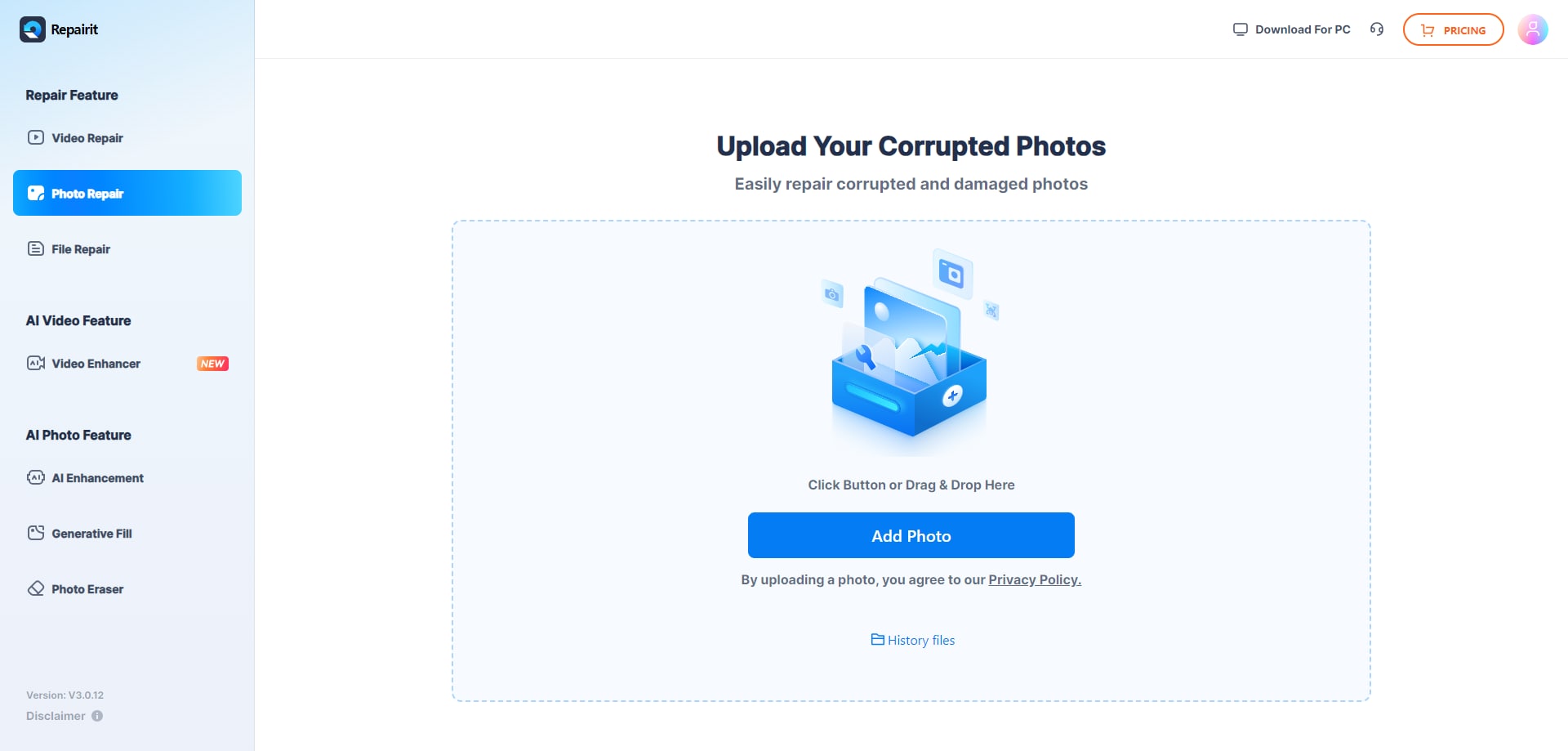
Step 1. Upload the corrupted, damaged, or unreadable photos you want to repair through Repairit Photo Repair Online.
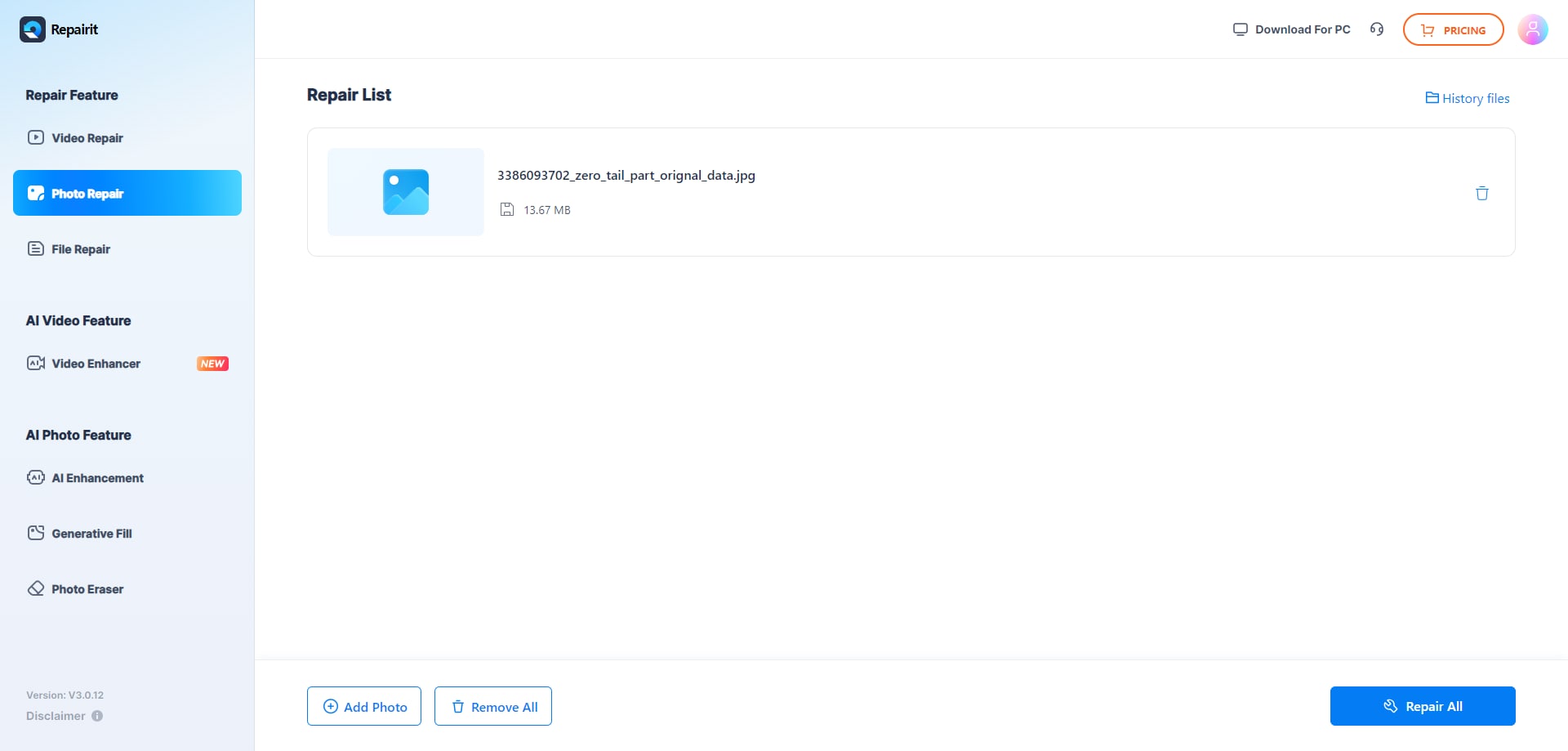
Step 2. Start the online repair process and let Repairit Photo Repair Online analyze the damaged photo files.
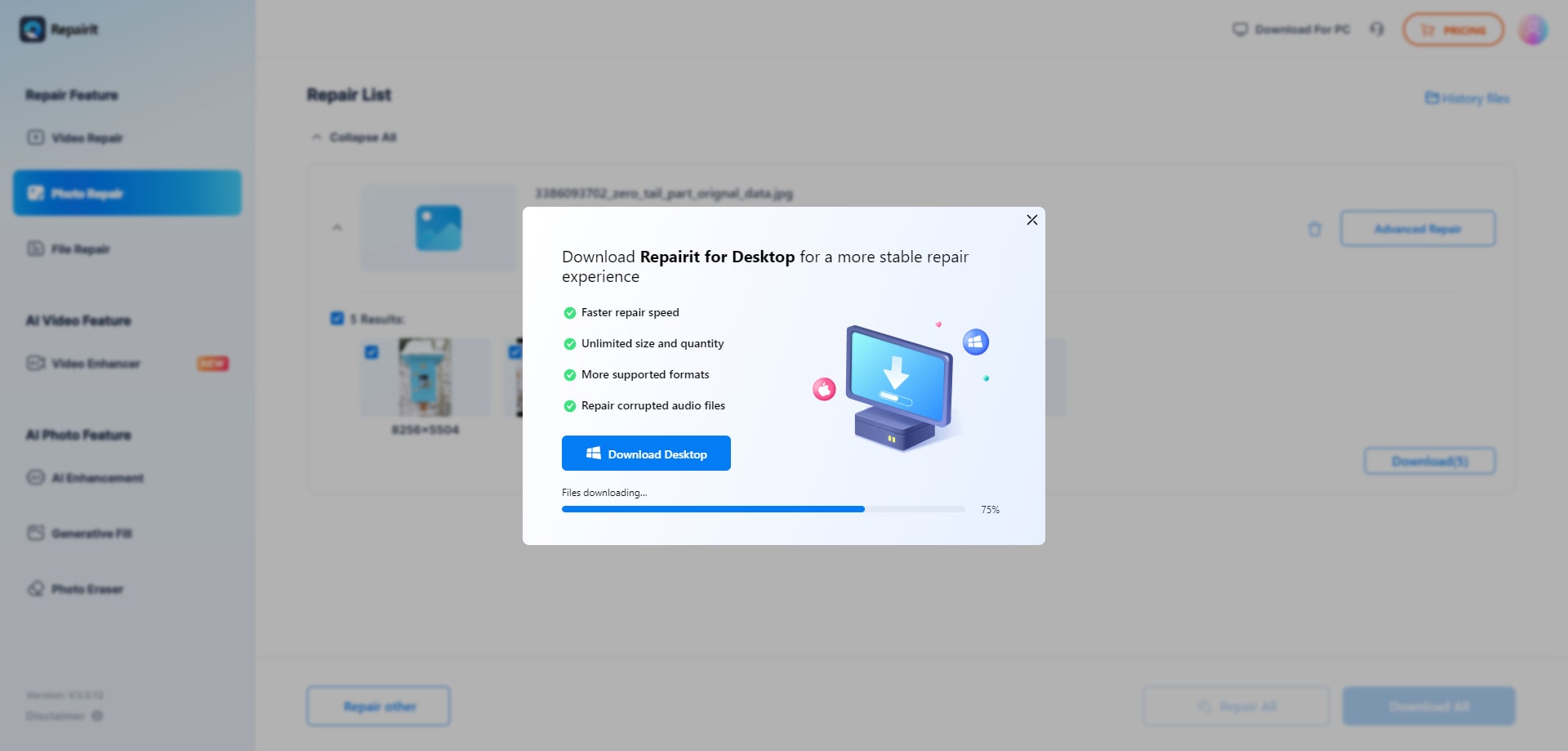
Step 3. Preview the repaired photo result when available, then save the repaired photos to your device.
Final Verdict
The final verdict is that Repairit Photo Repair Online is more suitable when you want a guided, browser-based workflow dedicated to repairing corrupted, damaged, broken, or unreadable photos, while Magic Leopard Photo Repair may be enough if you mostly repair broken JPEG, PNG, and RAW files within a limited batch size.
Repairit Photo Repair Online fits users who care more about fixing file-level problems and following clear steps from upload to preview and download than about tweaking visual looks. Magic Leopard Photo Repair is a better fit when you are comfortable with a straightforward upload-and-wait flow and want to see how its AI reconstruction behaves on a few problematic files.
In many real-world cases, a practical approach is to test the same corrupted photo in both tools, compare how well each one repairs visible glitches or unreadable data, and then keep using the service that most consistently restores your images to a usable state.
Next: Repairit Photo Repair Online vs Imyfone Ultrarepair Online
FAQ
-
1. Is Repairit Photo Repair Online better than Magic Leopard Photo Repair for corrupted photos?
Neither tool is automatically better in every case. Repairit Photo Repair Online is more suitable if you want a guided workflow that focuses on corrupted, damaged, or unreadable photos, while Magic Leopard Photo Repair may be enough if you mostly repair broken JPEG, PNG, and RAW files and prefer a quick AI reconstruction with minimal steps. -
2. How do Repairit Photo Repair Online and Magic Leopard Photo Repair handle severely corrupted images?
Both tools may struggle when corruption is extreme, metadata is badly damaged, or image data is missing. In such cases, you might see partial repair, heavy artifacts, or no usable result, so many users test a couple of photos in each tool to see which one gives a more acceptable outcome for their specific damage. -
3. What is the difference between corrupted photo repair, photo restoration, and image enhancement?
Corrupted photo repair focuses on fixing unreadable, broken, or damaged image files so they can open properly. Photo restoration usually targets old or faded but still readable photos, and image enhancement adjusts colors, sharpness, or noise. Repairit Photo Repair Online and Magic Leopard Photo Repair are mainly about corrupted photo repair, not about cosmetic restoration or enhancement alone.




