
When you need to repair corrupted photos online, your real concern is whether the tool can handle damaged, broken, or unreadable image files without forcing you to install software or learn complex settings. This comparison looks at Repairit Photo Repair Online and iMyFone UltraRepair Online from the point of view of users trying to fix corrupted, damaged, or unreadable photos directly in a browser.
You will see how each tool approaches online photo repair, which formats and scenarios they may handle, what the workflows look like, and where repair quality can struggle when files are severely damaged. In many real-world cases, the decision comes down to how guided you want the online workflow to be and how broken your images actually are.
Use this guide to match each service to your own corrupted image issues, whether that is repairing a single broken JPG that will not open or repeatedly fixing unreadable RAW and HEIC photos from cameras and phones.
In this article
- Introduction
- Repairit Photo Repair Online vs iMyFone UltraRepair Online: Quick Verdict
- Repairit Photo Repair Online vs iMyFone UltraRepair Online: Key Differences
- Repairit Photo Repair Online vs iMyFone UltraRepair Online: Comparison Table
- What Repairit Photo Repair Online and iMyFone UltraRepair Online Are Best For
- Repairit Photo Repair Online vs iMyFone UltraRepair Online: Photo Repair Capabilities
- Repairit Photo Repair Online vs iMyFone UltraRepair Online: Supported Formats and Scenarios
- Repairit Photo Repair Online vs iMyFone UltraRepair Online: Upload Workflow and Ease of Use
- Repairit Photo Repair Online vs iMyFone UltraRepair Online: Cloud Repair, Privacy, and File Handling
- Repairit Photo Repair Online vs iMyFone UltraRepair Online: Repair Quality and Limitations
- Who Should Choose Repairit Photo Repair Online
- Who Should Choose iMyFone UltraRepair Online
- Pros and Cons of Repairit Photo Repair Online and iMyFone UltraRepair Online
- How to Repair Corrupted Photos Online After Choosing the Right Tool
Repairit Photo Repair Online vs iMyFone UltraRepair Online: Quick Verdict
The quick verdict is that Repairit Photo Repair Online is more suitable when you want a guided, step-by-step browser-based workflow to repair corrupted, damaged, or unreadable photos, while iMyFone UltraRepair Online may be enough if you prefer a simpler upload-and-go flow for moderately corrupted image files.
Both tools are designed for browser-based photo repair, but they lean toward different user preferences. Repairit Photo Repair Online emphasizes clear stages of upload, repair, preview, and download, whereas iMyFone UltraRepair Online focuses on a minimal, consumer-friendly online experience.
This matters if you are unsure how to approach broken JPG or PNG files or if you frequently repair corrupted RAW or HEIC photos and benefit from more structure in each online session.
Repairit Photo Repair Online vs iMyFone UltraRepair Online: Key Differences
The key difference is that Repairit Photo Repair Online provides a more guided online repair journey, while iMyFone UltraRepair Online leans toward a quick upload damaged image files and repair online approach. This affects how comfortable beginners feel and how clearly each step is explained.
- Workflow style: Repairit Photo Repair Online walks you through uploading, online repair, previewing, and saving, which can help when dealing with multiple corrupted or unreadable photos. iMyFone UltraRepair Online focuses on getting you from upload to repaired download with minimal decisions.
- Repair focus: Repairit Photo Repair Online is framed specifically around repairing corrupted, broken, or unreadable photos in a browser, whereas iMyFone UltraRepair Online is presented as a simple online option that can work well for common formats and moderate corruption.
- Severity handling: Both tools can struggle with severely corrupted images, but users who want clearer guidance when results are partial or limited often find the structured flow of Repairit Photo Repair Online more helpful.
Repairit Photo Repair Online vs iMyFone UltraRepair Online: Comparison Table
This comparison table summarizes how each tool handles online corrupted photo repair across common decision points like workflow, repair capability, and privacy considerations.
| Dimension | Repairit Photo Repair Online | iMyFone UltraRepair Online |
|---|---|---|
| Best for | Users wanting a guided browser-based workflow to repair corrupted or unreadable photo files with clear steps. | Users repairing unreadable or corrupted image files who want a straightforward online option that supports several common formats. |
| Online workflow | Web-based tool focused on step-by-step upload, repair, preview, and download in the browser. | Upload damaged image files and repair online in a simple, consumer-focused web interface. |
| Repair capability | Designed for corrupted, damaged, or broken photo files where users need structured online repair. | Can handle multiple common image formats, but repair depth may vary depending on file damage and corruption severity. |
| Ease of use | Emphasizes a guided flow, which may help beginners understand each repair step. | Beginner-friendly for users who just want to upload, run repair, and download without many extra decisions. |
| Privacy and file handling | Uses a browser-based upload and cloud processing flow; users should treat it like any online file upload service. | Also uses online uploading and processing; users should consider typical cloud handling when sending personal photos. |
| Strengths | Clear, guided workflow and dedicated focus on repairing corrupted or unreadable photos online. | Supports multiple common image formats in a consumer online photo repair setting with simple upload-and-repair steps. |
| Weaknesses | Results can still be limited when photos are severely corrupted, incomplete, or missing critical data. | Repair depth varies depending on file damage, so heavily corrupted or badly broken photos may not fully recover. |
What Repairit Photo Repair Online and iMyFone UltraRepair Online Are Best For
Repairit Photo Repair Online is best for users who want a clearly guided online workflow to repair corrupted, damaged, or unreadable photos, whereas iMyFone UltraRepair Online is best for users who mainly need a straightforward way to fix typical unreadable images in common formats. This distinction is important if you rely on step-by-step guidance versus a lighter, one-shot repair attempt.
According to the overview, both tools target consumers who want to repair corrupted photos online with a browser, without diving into technical repair details. iMyFone UltraRepair Online fits users who prefer a simple upload-and-fix process for unreadable or corrupted image files in common formats.
Repairit Photo Repair Online leans into a more guided workflow that can better support beginners or repeat users who often repair broken JPG, PNG, RAW, or HEIC photos and want predictable steps each time.
Repairit Photo Repair Online vs iMyFone UltraRepair Online: Photo Repair Capabilities
Both tools can help repair corrupted or unreadable photos online, but Repairit Photo Repair Online focuses on guided repair of damaged image files, while iMyFone UltraRepair Online emphasizes a flexible online flow for multiple common formats. The repair depth for each tool still depends heavily on how damaged the original file is.
The summary notes that Repairit Photo Repair Online and iMyFone UltraRepair Online both help users repair corrupted photos online, yet they differ in guidance, depth, and how they handle more severely damaged files. In many real-world cases, this difference appears when an image is partially visible, has artifacts, or throws file errors instead of opening cleanly.
- Repairit Photo Repair Online capabilities:
- Offers a guided browser-based flow for repairing corrupted, damaged, or broken image files.
- Focuses on fixing unreadable photos where the file still opens or partially displays but shows errors or artifacts.
- May handle a range of everyday corruption issues, though very severe damage can still limit the final result.
- iMyFone UltraRepair Online capabilities:
- Lets users upload damaged image files and repair them online in a consumer-friendly web flow.
- Supports multiple common image formats, so it may work for typical JPG, PNG, or similar photo files.
- Repair depth varies depending on file damage, so it often suits moderate corruption more than heavily broken photos.
Repairit Photo Repair Online vs iMyFone UltraRepair Online: Supported Image Formats and Repair Scenarios
Both services are mainly used for fixing broken JPG and PNG files, with users often also trying RAW, HEIC, or TIFF photos when cameras or phones produce unreadable images. The main difference is that Repairit Photo Repair Online is presented as practical for common consumer camera and smartphone formats, while iMyFone UltraRepair Online focuses on multiple common image formats with better results when corruption is not extreme.
In practice, users bring photos that will not open, previews that show gray bands or color blocks, or files flagged as invalid images. Both tools can be used against these issues, but the outcome depends on whether enough file structure and image data remain to be repaired.
Because exact format lists and limits are not detailed, users should assume both tools are suitable for everyday JPG and PNG issues and then test other formats like RAW, HEIC, or TIFF case by case, especially when dealing with mixed camera and phone libraries.
Repairit Photo Repair Online vs iMyFone UltraRepair Online: Upload Workflow and Ease of Use
The main workflow difference is that Repairit Photo Repair Online emphasizes a guided upload, repair, preview, and download process, while iMyFone UltraRepair Online offers a quicker upload damaged image files and repair online experience. This affects how much control and clarity you feel as you move through the online repair.
iMyFone UltraRepair Online follows a straightforward workflow where you upload damaged image files and repair online, which suits beginners who want minimal steps and do not need much explanation at each stage. It is aimed at users who prefer to select files, run repair, and then download results without fine-tuning.
Repairit Photo Repair Online also runs fully in the browser but typically guides you through uploading corrupted photos, starting the repair, and then previewing results before saving. Users who value a step-by-step feel and want to check each repaired photo before download often lean toward this style.
Repairit Photo Repair Online vs iMyFone UltraRepair Online: Cloud Repair, Privacy, and File Handling
Both tools rely on browser-based uploads and cloud processing, so the main consideration is whether you are comfortable sending personal or client photos to an online service for repair. Neither option avoids uploading; they simply differ in workflow style.
The cloudPrivacyAndFileHandling description explains that your photos leave your device temporarily for repair, which matters if you handle sensitive images. Any cloud tool may involve storage and processing on remote servers, and users should avoid sending highly confidential photos when possible.
Instead of assuming specific encryption, retention, or data-handling guarantees, users should treat both Repairit Photo Repair Online and iMyFone UltraRepair Online like typical online file services and rely on general online safety practices and the providers own public information.
Repairit Photo Repair Online vs iMyFone UltraRepair Online: Repair Quality and Limitations
Repair quality for both services is generally good for moderately corrupted files, but neither tool can fully repair every severely damaged photo, especially when key data is missing or file structures are heavily broken. This common limitation is important when expectations are high for badly damaged images.
In many real-world cases, both tools can repair corrupted photos when the file structure is mostly intact but certain parts are broken. Users often see improvement when images show partial previews, banding, or error messages but still contain most of their underlying data.
However, the input notes that iMyFone UltraRepair Online openly faces a limitation where repair depth varies depending on file damage, so severely corrupted photos may not fully recover. Repairit Photo Repair Online may also struggle when metadata is missing, image data is incomplete, or internal structures are heavily broken, leading to partial or limited repair outcomes.
Who Should Choose Repairit Photo Repair Online
Repairit Photo Repair Online is more suitable when you want a guided, browser-based repair workflow for corrupted, damaged, or unreadable photos and often deal with repeated image issues from cameras or phones. This matters for beginners and frequent users who benefit from consistent steps and previews.
- Users who want a guided browser-based workflow to repair corrupted, damaged, or unreadable photos.
- Beginners who feel more confident when they can preview and step through each repair stage online.
- People handling mixed issues like broken JPG headers or partially visible PNG files from phones or cameras.
- Users who frequently repair corrupted RAW or HEIC photos and prefer a structured online tool for repeat use.
In these situations, the more detailed flow of Repairit Photo Repair Online can help you understand what is happening to your broken files and make it easier to reject unsatisfactory results before saving.
Who Should Choose iMyFone UltraRepair Online
iMyFone UltraRepair Online may be enough if your photos are saved in common formats, show only moderate corruption, and you prefer a quick upload-and-go online repair rather than a more guided experience. This often fits users who just need a fast first attempt at fixing unreadable images.
- Users repairing unreadable or corrupted image files who want a simple online solution without many settings.
- People whose photos are saved in common formats and only show moderate corruption or basic opening errors.
- Beginners who like a quick upload damaged image files and repair online flow with minimal decisions.
- Anyone testing lightweight browser-based repair first before moving to deeper or more specialized repair options.
For these use cases, the streamlined design of iMyFone UltraRepair Online can be convenient, especially when you are not dealing with extremely damaged image files.
Pros and Cons of Repairit Photo Repair Online and iMyFone UltraRepair Online
The pros and cons below highlight how each tool balances guided workflow, ease of use, and limitations when facing severe corruption, helping you choose based on how broken your photos are and how much structure you want.
Repairit Photo Repair Online Pros and Cons
iMyFone UltraRepair Online Pros and Cons
How to Repair Corrupted Photos Online After Choosing the Right Tool
After comparing Repairit Photo Repair Online and iMyFone UltraRepair Online, the next step is actually running your corrupted or unreadable photos through an online repair workflow. Once you know whether you prefer a guided experience or a quick upload-and-go approach, you can set realistic expectations and move from theory to practical repair.
For users who want a structured browser-based process, Repairit Photo Repair Online offers a practical way to upload damaged images, run cloud-based repair, and preview results before saving. The focus stays on repairing corrupted, damaged, broken, or unreadable photos online without bringing in separate tasks like deleted image recovery or visual enhancement.
Key Features
In many real-world cases, users appreciate that Repairit Photo Repair Online keeps the focus on fixing broken image files rather than adding extra editing tasks. Its main strengths for online photo repair are simple but practical.
- Browser-based repair process for corrupted or unreadable photo files without installing software.
- Guided online workflow that walks users through uploading, repairing, and saving repaired images.
- Practical for repairing a mix of common camera and smartphone photo formats used in everyday shooting.
Step-by-step guide
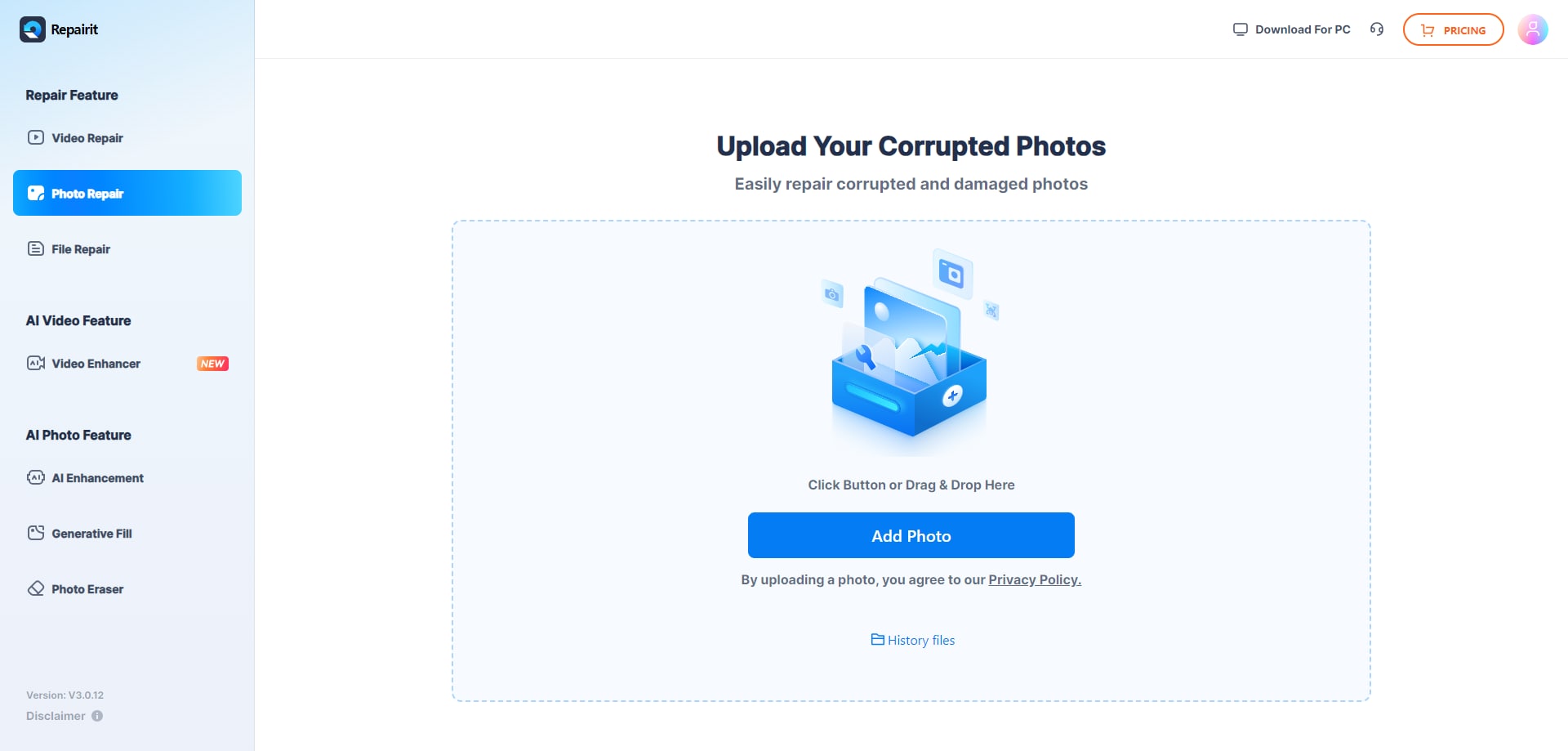
Step 1. Upload the corrupted, damaged, or unreadable photos you want to repair through Repairit Photo Repair Online.
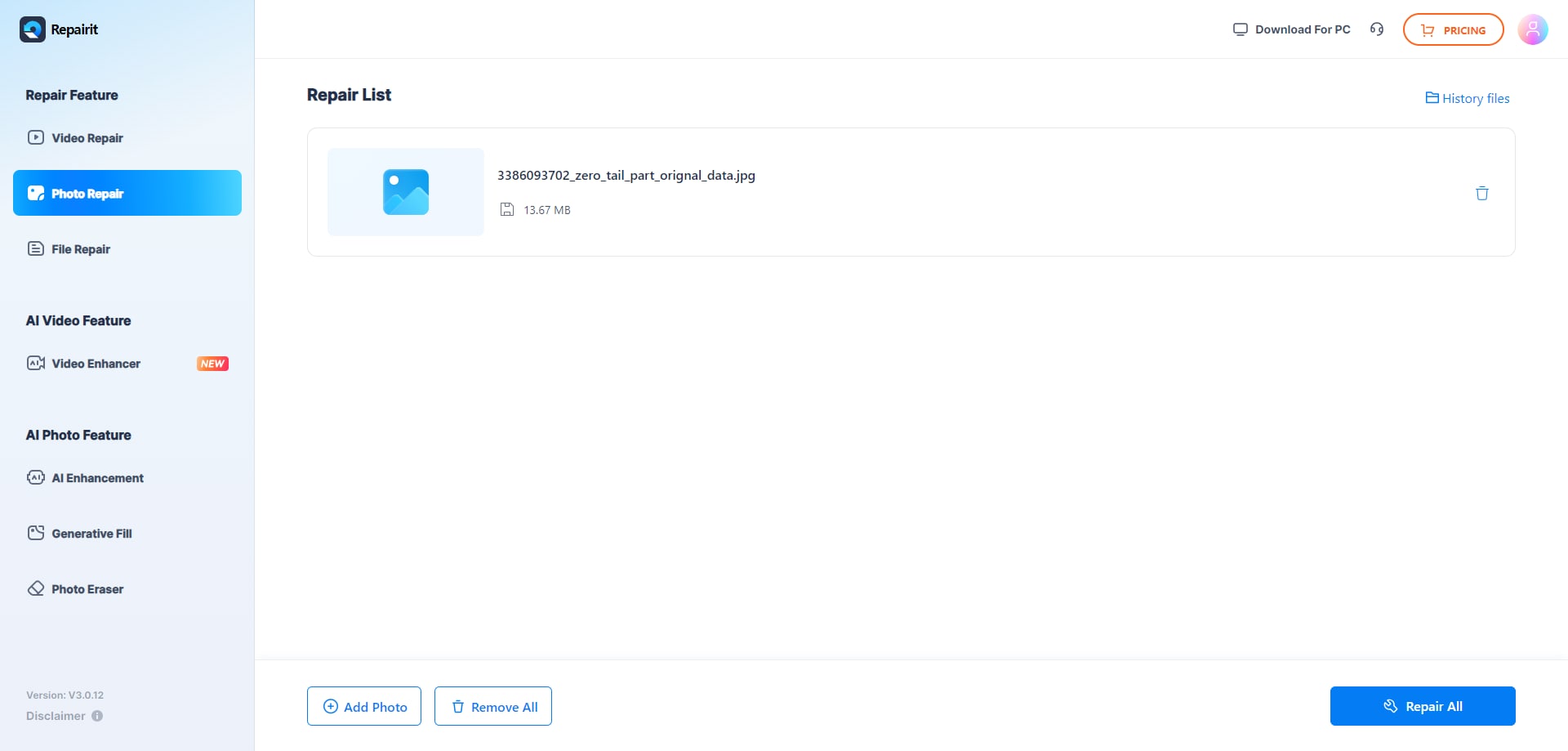
Step 2. Start the online repair process and let Repairit Photo Repair Online analyze the damaged photo files.
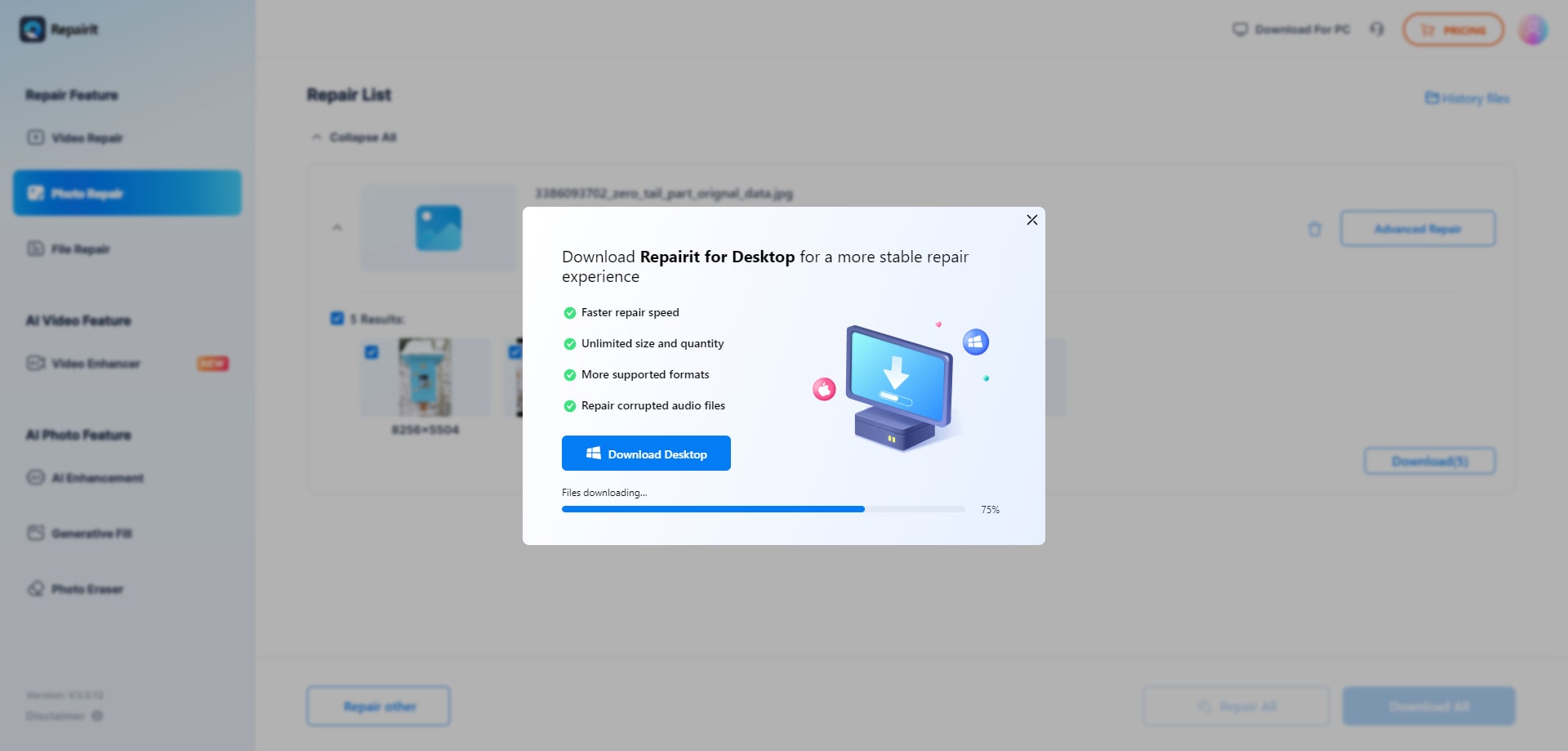
Step 3. Preview the repaired photo result when available, then save the repaired photos to your device.
Final Verdict
The final verdict is that Repairit Photo Repair Online is more suitable when you want a guided, repair-focused online workflow for corrupted, damaged, or unreadable photos, while iMyFone UltraRepair Online may be enough if you mostly deal with moderate corruption in common formats and prefer a simpler upload-and-fix experience. Neither tool is universally better; each fits different expectations and file conditions.
The conclusion from the input makes this clear: Repairit Photo Repair Online is more comfortable when corruption is deeper or you want a more structured flow, especially for repeated issues with broken JPG, PNG, RAW, or HEIC photos. iMyFone UltraRepair Online can be a good first stop for lighter corruption where you just need a quick online attempt.
Whichever option you choose, remember that severely corrupted photos with missing or heavily damaged data might only repair partially or not at all. Managing expectations and testing a few sample files is often the best way to see how each service handles your particular corrupted images.
Next: Repairit Photo Repair Online vs Filerepairtool Photo Repair
FAQ
-
1. Which is better for repairing corrupted photos online: Repairit Photo Repair Online or iMyFone UltraRepair Online?
Neither tool is universally better for every scenario. Repairit Photo Repair Online is more suitable if you want a guided, step-by-step online repair flow, while iMyFone UltraRepair Online may be enough if you just need a simple way to repair unreadable or moderately corrupted image files in common formats. -
2. Can both tools repair broken JPG or PNG files that will not open?
In many real-world cases, both Repairit Photo Repair Online and iMyFone UltraRepair Online can attempt to repair broken JPG or PNG files that refuse to open. Results depend heavily on how badly the files are corrupted and whether key image and metadata are still present. -
3. What is the difference between corrupted photo repair, photo restoration, and image enhancement?
Corrupted photo repair, as done by tools like Repairit Photo Repair Online and iMyFone UltraRepair Online, focuses on fixing damaged file structures so images can open correctly. Photo restoration usually targets old or faded prints and their visual quality, while image enhancement improves aspects like sharpness or color without necessarily fixing broken or unreadable files. -
4. When will iMyFone UltraRepair Online not be enough and I should try Repairit Photo Repair Online?
If your images are severely corrupted, only partially visible, or you want clearer guidance through each online repair step, Repairit Photo Repair Online is more suitable. iMyFone UltraRepair Online may be enough for lighter corruption, but once damage is deeper, users often prefer a more structured repair-focused workflow. -
5. Can these tools repair deleted photos or only corrupted image files?
Both Repairit Photo Repair Online and iMyFone UltraRepair Online are described here in the context of repairing corrupted, damaged, broken, or unreadable image files that you already have. Deleted image recovery is a different task and typically requires separate tools, so you should not treat these online services as deleted photo recovery solutions.




