
Choosing between Repairit Photo Repair Online vs FileRepairTool Photo Repair comes down to how damaged your images are and how much guidance you want in a browser-based workflow. Both tools focus on helping you repair corrupted photos online, but they take different approaches to handling unreadable, broken, or mildly damaged image files. This comparison looks at repair depth, upload workflow, and realistic limitations so you can match the tool to your daily photo repair needs.
In many real-world cases, users start with quick online attempts for slightly broken JPG or PNG files, then move to a more guided workflow when photos refuse to open or show heavy visual glitches. Understanding where each tool fits on that spectrum helps you avoid wasted attempts and choose a browser-based repair path that fits your image formats and corruption severity.
In this article
- Repairit Photo Repair Online vs FileRepairTool Photo Repair: Quick Verdict
- Repairit Photo Repair Online vs FileRepairTool Photo Repair: Key Differences
- Repairit Photo Repair Online vs FileRepairTool Photo Repair: Comparison Table
- What Repairit Photo Repair Online and FileRepairTool Photo Repair Are Best For
- Repairit Photo Repair Online vs FileRepairTool Photo Repair: Photo Repair Capabilities
- Repairit Photo Repair Online vs FileRepairTool Photo Repair: Formats and Repair Scenarios
- Repairit Photo Repair Online vs FileRepairTool Photo Repair: Upload Workflow and Ease of Use
- Repairit Photo Repair Online vs FileRepairTool Photo Repair: Cloud Repair and Privacy
- Repairit Photo Repair Online vs FileRepairTool Photo Repair: Repair Quality and Limitations
- Who Should Choose Repairit Photo Repair Online
- Who Should Choose FileRepairTool Photo Repair
- Pros and Cons of Repairit Photo Repair Online and FileRepairTool Photo Repair
- How to Repair Corrupted Photos Online After Choosing the Right Tool
Repairit Photo Repair Online vs FileRepairTool Photo Repair: Quick Verdict
The main difference is that Repairit Photo Repair Online is better suited to guided repair of corrupted, damaged, or unreadable photos, while FileRepairTool Photo Repair targets quick fixes for simpler damaged image files. In many real-world cases, users who deal with camera images, inconsistent previews, or files that refuse to open gravitate toward a more structured online workflow. Users with a handful of mildly corrupted JPG or PNG files often prefer a lighter upload-and-fix approach.
Repairit Photo Repair Online can be a stronger choice when you want step-by-step browser guidance from upload to preview and download. FileRepairTool Photo Repair may be enough when the corruption is modest and you mainly want a fast attempt without extra options or complexity.
- Choose Repairit Photo Repair Online if you frequently repair corrupted photos and need a repeatable online process.
- Choose FileRepairTool Photo Repair if you occasionally fix simple damaged image files and prefer a lightweight workflow.
- Both rely on browser-based uploads, so privacy expectations and file sensitivity should influence your decision.
Repairit Photo Repair Online vs FileRepairTool Photo Repair: Key Differences
The key difference is that Repairit Photo Repair Online emphasizes a guided, step-based browser interface for handling a range of corrupted and unreadable photos, while FileRepairTool Photo Repair focuses on straightforward online image repair for simpler cases. This matters if you work with more complex camera images or RAW-type corruption where you need clearer feedback during the process.
- Repair depth and scenarios: Repairit Photo Repair Online is described as more aligned with scenarios where files do not open or display correctly, whereas FileRepairTool Photo Repair is positioned for mild corruption and everyday issues.
- Workflow style: Repairit Photo Repair Online uses a more structured upload, repair, preview, and save flow, while FileRepairTool Photo Repair prioritizes quick runs with minimal steps.
- User profile: Repairit Photo Repair Online often suits photographers and professionals working repeatedly with damaged image files, while FileRepairTool Photo Repair better fits casual users facing occasional glitches.
- Format expectations: Repairit Photo Repair Online is often chosen when users want to attempt repairs on camera-oriented formats and complex images, while FileRepairTool Photo Repair is aligned with common web and consumer formats that are not severely corrupted.
Repairit Photo Repair Online vs FileRepairTool Photo Repair: Comparison Table
This side-by-side view summarizes how Repairit Photo Repair Online vs FileRepairTool Photo Repair differ across common decision factors such as best use, workflow, and repair expectations. It helps you quickly match each browser-based tool to your corrupted photo scenarios.
| Dimension | Repairit Photo Repair Online | FileRepairTool Photo Repair |
|---|---|---|
| Best for | Users who need a guided online workflow to repair corrupted, damaged, or unreadable photos, including camera images that may be more complex. | Users fixing simple damaged image files where corruption is mild and a basic online image repair approach may be enough. |
| Online workflow | Browser-based upload and repair flow designed for step-by-step corrupted photo repair. | Straightforward upload corrupted images and repair online process focused on quick runs. |
| Repair capability | Geared toward corrupted photo repair where files may not open or display correctly, with depth that may help in more complex cases. | Quick lightweight repair workflow that usually suits less severe corruption and simpler image structures. |
| Ease of use | Guided interface that walks users through uploading, repairing, and saving repaired photos. | Very simple for basic tasks; minimal steps for uploading and running repairs. |
| Privacy and file handling | Uses an online upload and processing model where users should review general cloud-handling practices before using. | Also browser-based; files are uploaded for repair, so users should consider typical online handling implications. |
| Strengths | Structured web workflow for corrupted photo repair that can fit professional or frequent online use. | Fast, lightweight way to attempt repair on common damaged image files without a complex process. |
| Weaknesses | Online nature may feel limiting if users prefer fully offline handling or very advanced manual control. | Limited support for severe corruption and RAW images, so heavily broken or camera-native files may not repair well. |
What Repairit Photo Repair Online and FileRepairTool Photo Repair Are Best For
Repairit Photo Repair Online is more suitable when you regularly work with corrupted, unreadable, or broken photos and need a guided browser-based workflow, while FileRepairTool Photo Repair is better aligned with occasional quick fixes for simple damaged image files. This distinction becomes important when you are deciding how much structure and repair depth you need.
According to the overview, FileRepairTool Photo Repair is positioned as a basic online image repair option that works best when corruption is not too severe. In contrast, Repairit Photo Repair Online fits users who value repeatable, step-based online photo repair, particularly when dealing with broken previews, invalid image data, or more complex camera images.
- Use Repairit Photo Repair Online for recurring corrupted photo issues, including problematic camera shots.
- Use FileRepairTool Photo Repair for lightweight attempts on standard photos that still open or show only minor issues.
- For sensitive or mission-critical images, consider how much guidance and validation you want before saving repaired files.
Repairit Photo Repair Online vs FileRepairTool Photo Repair: Photo Repair Capabilities
Both tools can help repair corrupted photos online, but Repairit Photo Repair Online targets more varied real-world damage, while FileRepairTool Photo Repair focuses on quick, lightweight fixes. This difference can influence success rates when dealing with unreadable files or damaged image structures.
The summary of capabilities indicates that FileRepairTool Photo Repair aims at basic online repair, usually for simple broken photos where most of the structure remains intact. Repairit Photo Repair Online, on the other hand, is framed around guided corrupted photo repair that can fit professional routines and more demanding corrupted image conditions.
- Repairit Photo Repair Online capabilities:
- Online repair for corrupted, damaged, or unreadable photos with a guided browser workflow.
- May better handle cases where images will not open or display correctly, depending on the file damage.
- Can fit into professional routines where users need repeatable, step-based online corrupted photo repair.
- FileRepairTool Photo Repair capabilities:
- Basic online repair of simple damaged image files where corruption is not too severe.
- Quick attempts to fix broken photos that still retain most of their structure and metadata.
- Lightweight workflow that users often use for everyday corrupted JPG or PNG style issues, when they are not deeply broken.
Repairit Photo Repair Online vs FileRepairTool Photo Repair: Supported Image Formats and Repair Scenarios
The main difference is that Repairit Photo Repair Online is often chosen when users need to attempt repair on more complex camera images or formats like RAW, HEIC, or TIFF, while FileRepairTool Photo Repair is better aligned with standard JPG or PNG photos that are only lightly corrupted. This matters if your workflow involves camera-native images or diverse file types.
Both tools may handle common photo types such as JPG and PNG, which cover many phones and consumer cameras. Users often notice that for simple social media images or basic exports, FileRepairTool Photo Repair can be a quick first attempt, while Repairit Photo Repair Online becomes more appealing when RAW-type corruption or complex camera files are involved and a guided workflow feels safer.
- Choose Repairit Photo Repair Online when working with varied formats or more advanced camera files where repair depth may matter.
- Choose FileRepairTool Photo Repair for simpler JPG or PNG repair tasks where corruption is mild and structure is mostly intact.
- In both cases, success depends on how much actual image data remains; no online tool can reconstruct content that is completely missing.
Repairit Photo Repair Online vs FileRepairTool Photo Repair: Upload Workflow and Ease of Use
Repairit Photo Repair Online emphasizes a guided upload-to-preview workflow, while FileRepairTool Photo Repair focuses on a minimal, fast upload-and-repair sequence. This difference affects how comfortable each tool feels when handling multiple corrupted photos or important shoots.
FileRepairTool Photo Repair follows a minimal workflow where you upload corrupted images and run repair online with few steps, which is convenient for casual users who do not want extra configuration. Repairit Photo Repair Online also runs entirely in the browser, but adds more clearly defined stages, which can help you track progress and validate results before saving.
- Repairit Photo Repair Online workflow: upload, guided repair, in-browser preview, and controlled saving of repaired photos.
- FileRepairTool Photo Repair workflow: fast upload and repair designed for quick attempts with limited on-screen steps.
- For users managing important shoots or batches of damaged files, the structured feel of Repairit Photo Repair Online can reduce mistakes.
Repairit Photo Repair Online vs FileRepairTool Photo Repair: Cloud Repair, Privacy, and File Handling
Both tools rely on browser-based uploads, so your corrupted photos are processed online, and users must decide what level of privacy risk is acceptable. The key difference is not in specific policies, which are not detailed here, but in how often you plan to send sensitive or professional images through a cloud repair workflow.
In many real-world cases, people are comfortable uploading non-sensitive JPG or PNG files to either service to fix unreadable photos or broken previews. For confidential shoots, however, users often limit what they process online at all and review each provider's general handling information and terms before proceeding.
- Both Repairit Photo Repair Online and FileRepairTool Photo Repair upload files to a server for processing.
- Users should consider the sensitivity of images and check each provider's general information on file handling and storage before relying on any cloud-based workflow.
- Professionals working with client material may prefer to test with non-sensitive samples first to understand the practical implications of online repair.
Repairit Photo Repair Online vs FileRepairTool Photo Repair: Repair Quality and Limitations
Repair quality for both tools depends strongly on how badly the photos are corrupted, but Repairit Photo Repair Online is described as more suitable for deeper corrupted photo repair, whereas FileRepairTool Photo Repair is considered limited for severe corruption and RAW images. This difference becomes critical when dealing with unreadable files or heavily damaged headers.
The information indicates that FileRepairTool Photo Repair may struggle when metadata is broken or when image data is missing, which is typical of severe corruption. Repairit Photo Repair Online is better aligned with scenarios where users want to try more substantial online repair attempts, although no browser-based tool can fully fix images with severely truncated or destroyed data.
- Neither tool can repair photos when essential image content is completely lost or overwritten.
- FileRepairTool Photo Repair works best when the file still mostly opens and corruption is modest.
- Repairit Photo Repair Online is a stronger option when corrupted photos do not open, display heavy artifacts, or come from complex camera workflows.
Who Should Choose Repairit Photo Repair Online
Repairit Photo Repair Online is more suitable when you regularly need to repair corrupted, damaged, broken, or unreadable photos in the browser and want a guided process. This is especially relevant for photographers, content teams, and professionals who rely on consistent online photo repair behavior.
- Users who frequently repair corrupted photos online and want a clearer, guided workflow.
- Photographers or professionals dealing with unreadable camera images where damage may be beyond simple corruption.
- People who need to troubleshoot broken JPG or PNG files and possibly more complex formats in one web interface.
- Users who value structured steps for previewing and validating repair results before saving.
In many real-world cases, these users appreciate how a step-based interface reduces guesswork, particularly when handling multiple damaged image files from the same shoot.
Who Should Choose FileRepairTool Photo Repair
FileRepairTool Photo Repair may be enough if you mainly work with simple damaged image files and only need occasional online photo repair. This tool aligns well with users who want to upload a small number of photos, run a quick repair, and move on.
- Users who only need to fix a few simple damaged image files from time to time.
- People who prefer a quick, lightweight upload corrupted images and repair online experience.
- Beginners who just want to attempt a basic fix on slightly broken photos without learning extra options.
- Anyone dealing mainly with standard, non-RAW images where corruption is mild and the files still largely open.
A common pattern is to try FileRepairTool Photo Repair first for light issues, then switch to a more guided option like Repairit Photo Repair Online if images remain unreadable or show major artifacts.
Pros and Cons of Repairit Photo Repair Online and FileRepairTool Photo Repair
Both tools have clear advantages and trade-offs, and understanding these pros and cons helps you decide which better supports your browser-based corrupted photo repair workflow. Repairit Photo Repair Online leans toward structured, repeatable use, while FileRepairTool Photo Repair leans toward speed and simplicity.
Repairit Photo Repair Online Pros and Cons
FileRepairTool Photo Repair Pros and Cons
How to Repair Corrupted Photos Online After Choosing the Right Tool
After comparing Repairit Photo Repair Online vs FileRepairTool Photo Repair, the next step is to actually repair your corrupted, damaged, or unreadable photos using a workflow that matches your needs. If you decide that a guided browser-based process is important, Repairit Photo Repair Online offers a practical way to move from comparison to action without installing desktop software.
In many real-world scenarios, users start by shortlisting tools based on corruption severity and format, then follow a simple upload, repair, and preview process to see whether the damaged image files can be fixed. The following subsections outline how to approach that using Repairit Photo Repair Online.
Key Features
The key difference between using a generic online tool and using Repairit Photo Repair Online is the emphasis on a structured repair journey. Instead of a single opaque button, you move through clear steps that make it easier to judge whether the repaired results meet your expectations.
- Browser-based corrupted photo repair focused on unreadable or visually broken images.
- Step-by-step guidance from upload through repair to preview and save.
- Designed to fit real-world professional or recurring online repair workflows.
For users who often manage client shoots or content libraries, these features help reduce confusion, especially when testing multiple damaged image files at once.
Step-by-step guide
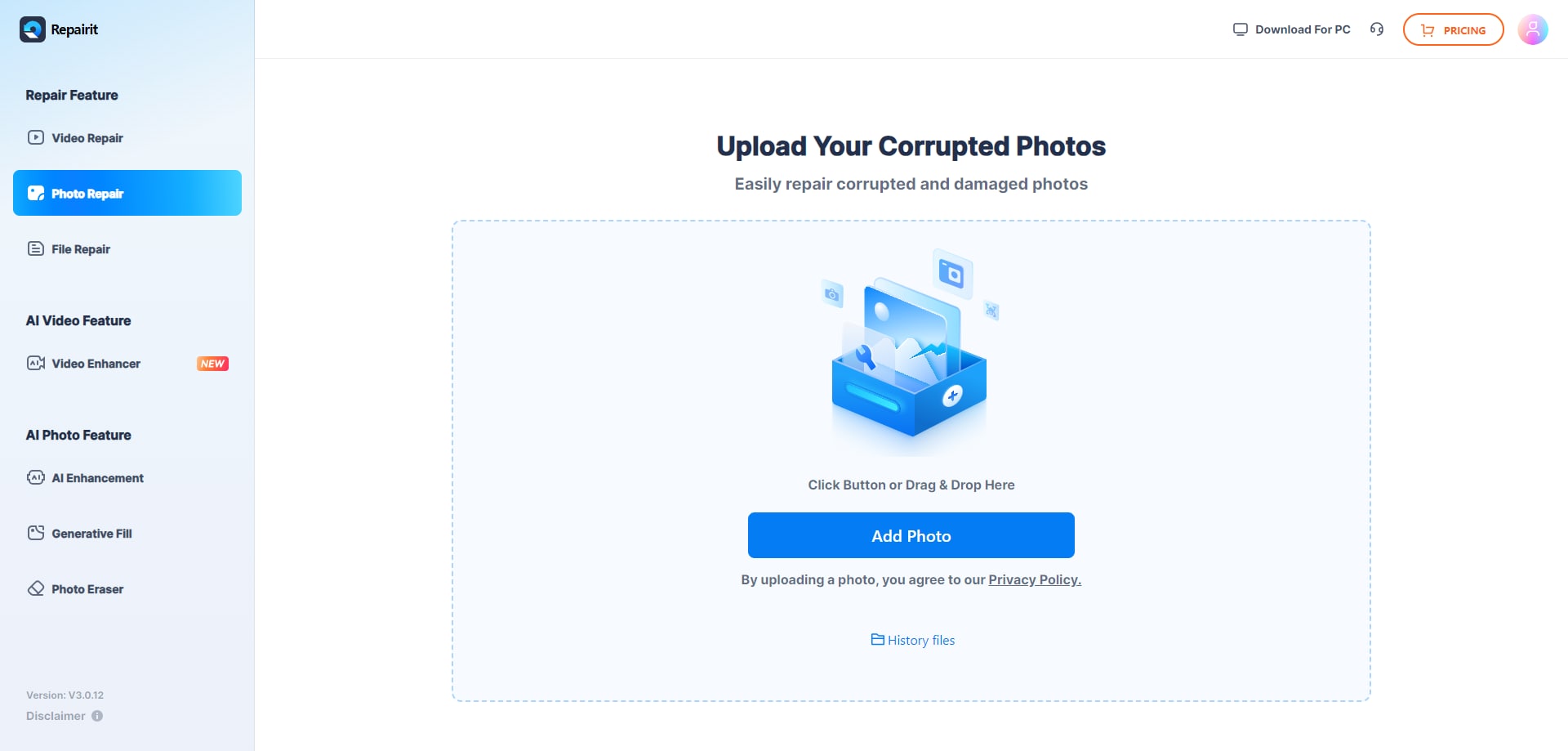
Step 1. Upload the corrupted, damaged, or unreadable photos you want to repair through Repairit Photo Repair Online.
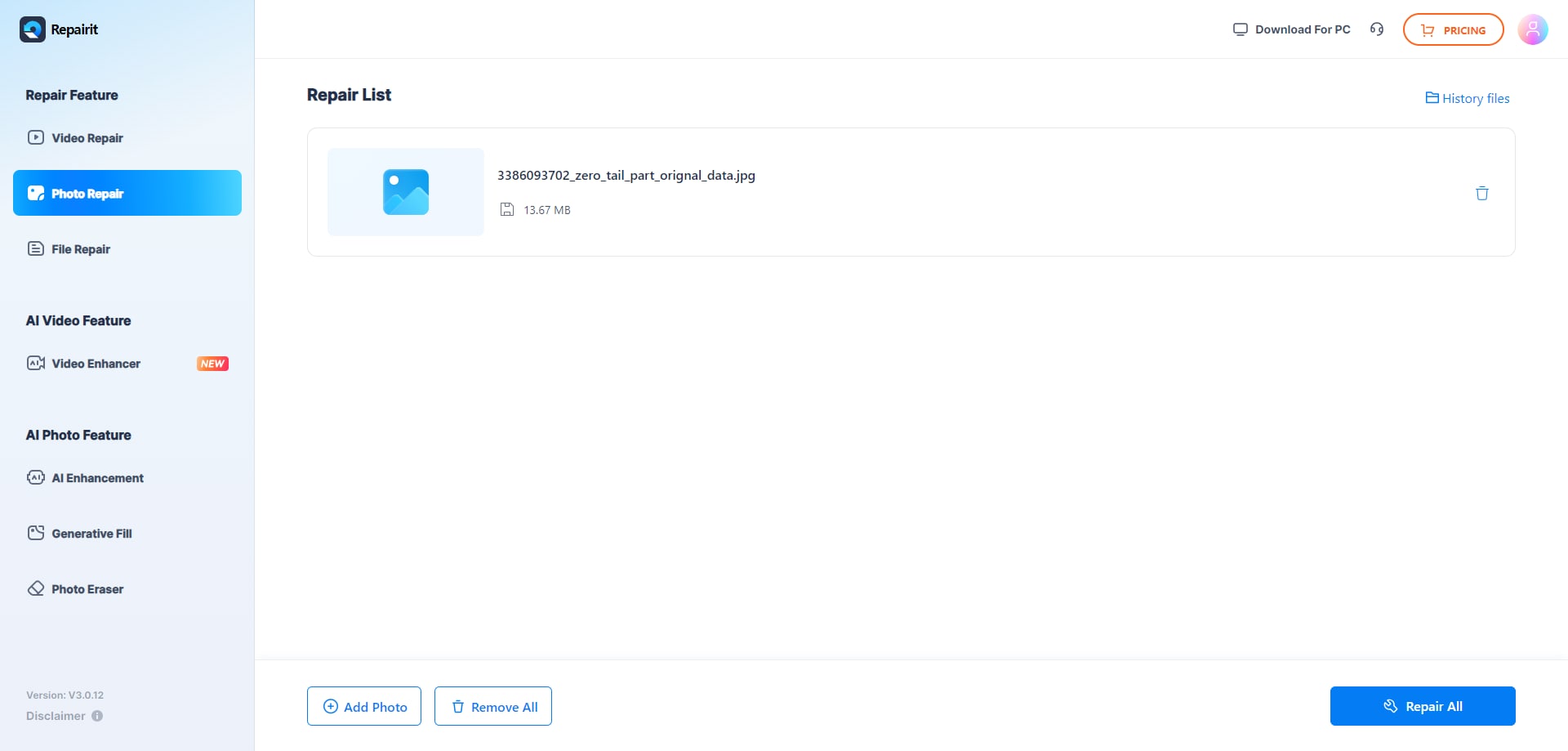
Step 2. Start the online repair process and let Repairit Photo Repair Online analyze the damaged photo files.
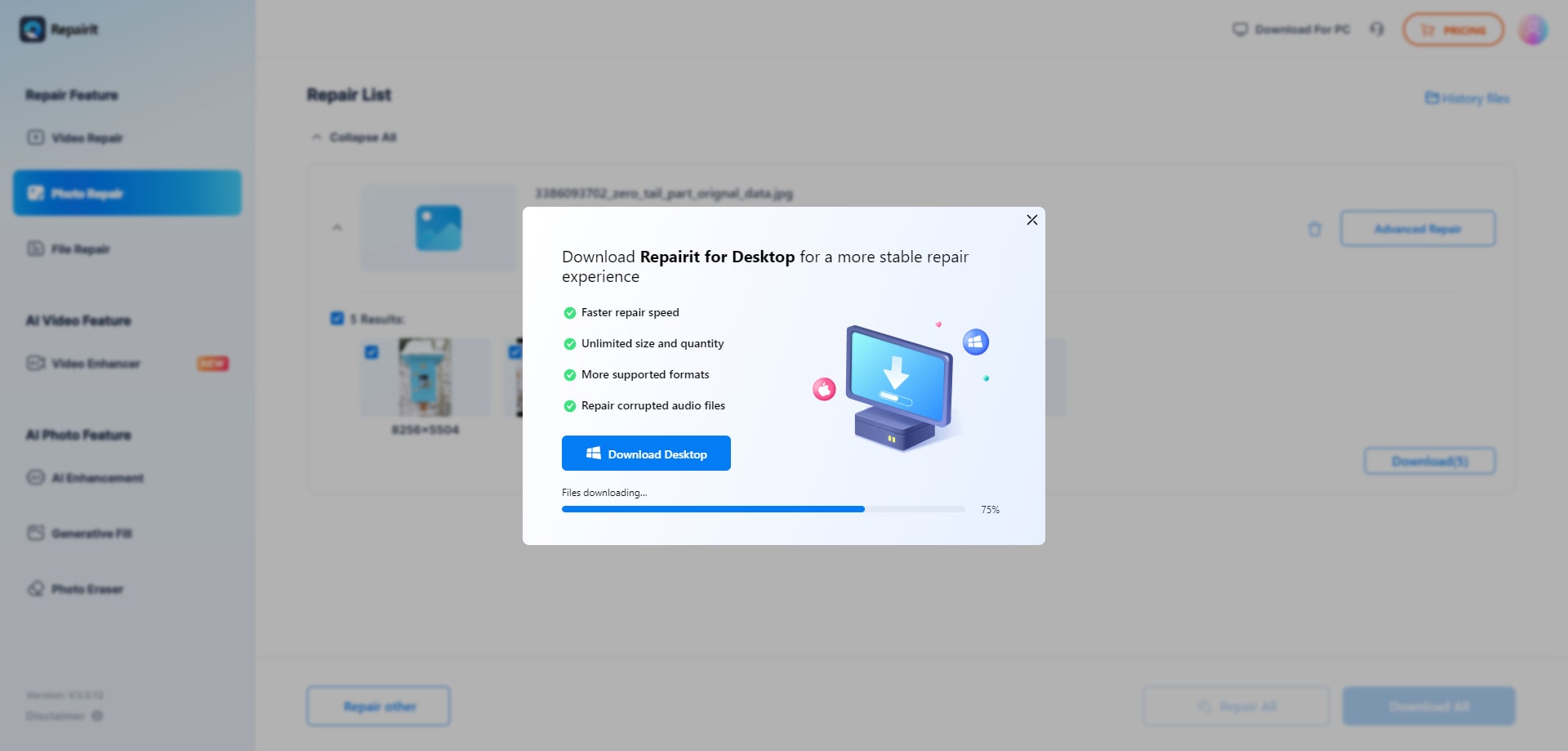
Step 3. Preview the repaired photo result when available, then save the repaired photos to your device.
Final Verdict
Repairit Photo Repair Online is more suitable when you need a guided, repeatable way to repair corrupted, damaged, or unreadable photos in the browser, especially if your work involves camera images or more complex corruption. Its structured workflow aligns well with professional and frequent users who want clear stages from upload to final download and need to inspect repaired results carefully.
FileRepairTool Photo Repair may still be enough if you mainly handle simple damaged image files and just want a quick, lightweight upload corrupted images and repair online experience. In many real-world cases, the decision comes down to how severe the corruption is, how diverse your formats are, and whether you prefer a basic one-off fix or a more guided corrupted photo repair process that you can reuse across projects.
Next: Repairit Photo Repair Online vs Securerecovery Photo Repair
FAQ
-
1. When should I use Repairit Photo Repair Online instead of FileRepairTool Photo Repair?
Use Repairit Photo Repair Online when you deal with unreadable or more complex corrupted photos and want a guided, step-based browser workflow. FileRepairTool Photo Repair may be enough for simpler, less damaged images where a quick lightweight fix is all you need. -
2. Is FileRepairTool Photo Repair good for severely corrupted or RAW photos?
FileRepairTool Photo Repair is positioned for basic online image repair and is described as limited for severe corruption and RAW images. In many real-world cases, heavily broken or camera-native files may require a tool like Repairit Photo Repair Online or another method for deeper repair attempts. -
3. What is the difference between corrupted photo repair, photo restoration, and image enhancement?
Corrupted photo repair focuses on fixing broken files that will not open or display correctly. Photo restoration usually improves old or faded but still readable images, while image enhancement changes appearance through filters or adjustments. Repairit Photo Repair Online and FileRepairTool Photo Repair focus on corrupted photo repair rather than restoration or enhancement. -
4. Can I rely on online tools alone for every damaged image file?
Not always. Online tools like Repairit Photo Repair Online and FileRepairTool Photo Repair can repair many corrupted photos, but severe corruption, missing data, or heavily damaged structures may still be unrecoverable. In those cases, you may need to retry with different tools, use backups, or accept that some images cannot be fully repaired.




