
Repairit Photo Repair Online vs JPG.Repair is a practical comparison for anyone trying to repair corrupted, damaged, broken, or unreadable JPEG photos directly in a browser. This guide compares Repairit Photo Repair Online with JPG.Repair for repairing unreadable JPG files, broken camera photos, and damaged image structures without installing software. We focus on how each service approaches online photo repair, handles possible metadata issues, and which workflow is easier for everyday jobs before you upload any damaged photos.
In this article
- Repairit Photo Repair Online vs JPG.Repair: Quick Verdict
- Repairit Photo Repair Online vs JPG.Repair: Key Differences
- Repairit Photo Repair Online vs JPG.Repair: Comparison Table
- What Repairit Photo Repair Online and JPG.Repair Are Best For
- Repairit Photo Repair Online vs JPG.Repair: Photo Repair Capabilities
- Repairit Photo Repair Online vs JPG.Repair: Supported Image Formats and Repair Scenarios
- Repairit Photo Repair Online vs JPG.Repair: Upload Workflow and Ease of Use
- Repairit Photo Repair Online vs JPG.Repair: Cloud Repair, Privacy, and File Handling
- Repairit Photo Repair Online vs JPG.Repair: Repair Quality and Limitations
- Who Should Choose Repairit Photo Repair Online
- Who Should Choose JPG.Repair
- Pros and Cons of Repairit Photo Repair Online and JPG.Repair
- How to Repair Corrupted Photos Online After Choosing the Right Tool
Repairit Photo Repair Online vs JPG.Repair: Quick Verdict
The quick verdict is that Repairit Photo Repair Online is more suitable when you want a guided online workflow for mixed corrupted photos, while JPG.Repair may be enough if your main problem is broken JPG and camera image files. In many real-world cases, users find that Repairit Photo Repair Online fits everyday browser-based photo repair, and JPG.Repair fits situations where JPEG structure issues are clearly the core problem. Choosing between them comes down to file types, corruption severity, and how much you want to think about JPEG internals.
- Repairit Photo Repair Online aims at users who have various corrupted, damaged, or unreadable photos and want step-by-step browser guidance.
- JPG.Repair focuses on users who know they are dealing with broken JPG and camera JPEG/RAW files and want more specialized JPEG reconstruction routines.
- Many users can benefit from trying both, starting with the tool that best matches their photo formats and visible corruption patterns.
Repairit Photo Repair Online vs JPG.Repair: Key Differences
The key difference is that Repairit Photo Repair Online targets general online photo repair with a guided interface, while JPG.Repair is positioned as a specialized corrupted JPEG repair service. This matters if you are unsure what kind of corruption you have, or if you mainly deal with severe JPG structure problems from cameras.
- Focus: Repairit Photo Repair Online covers a range of corrupted, damaged, or unreadable photos, whereas JPG.Repair concentrates on broken JPG and related camera files.
- Repair depth vs breadth: JPG.Repair is described as having strong JPEG and RAW reconstruction capability, while Repairit Photo Repair Online emphasizes broader, more general damaged photo repair scenarios.
- User skill level: Repairit Photo Repair Online is aimed at non-technical users with clear prompts and simplified decisions, while JPG.Repair suits users who understand they are working mainly with JPEG-related issues.
- Use-case mix: For folders containing only camera JPGs with serious structural corruption, JPG.Repair may be enough; for mixed JPG, PNG, or possibly RAW/HEIC issues, Repairit Photo Repair Online is usually more convenient.
Repairit Photo Repair Online vs JPG.Repair: Comparison Table
This comparison table summarizes how Repairit Photo Repair Online vs JPG.Repair differ across common decision factors like workflow, repair capability, and privacy considerations. It helps you quickly align each service with your typical corrupted photo scenarios and skill level.
| Dimension | Repairit Photo Repair Online | JPG.Repair |
|---|---|---|
| Best for | Users who want a guided online workflow to repair various corrupted, broken, or unreadable photos in one place. | Users focused on repairing broken JPG and camera image files with specialized JPEG routines. |
| Online workflow | Web-based interface that typically leads users step by step from upload to preview and download. | Browser-based upload where users send a damaged image and the service rebuilds the corrupted JPEG structure online. |
| Repair capability | Designed for general corrupted photo repair and may cover multiple image types with different corruption patterns. | Specialized in strong JPEG and RAW reconstruction, especially when the JPEG structure is broken or unreadable. |
| Ease of use | Aimed at non-technical users who prefer clear prompts and simplified decisions during repair. | Best suited to users who understand they are working mainly with JPEG-related repair and can adjust expectations accordingly. |
| Privacy and file handling | Uses online uploads; users should review general cloud and browser-based handling practices before using. | Also relies on uploading damaged files; users should consider usual online repair and transfer considerations. |
| Strengths | Broad online photo repair approach that may fit mixed folders of corrupted photos and varied damage types. | Strong JPEG and RAW reconstruction capability, particularly for broken JPEG structures from cameras. |
| Weaknesses | May not always reach deeply into highly specialized JPEG structure repair that some niche tools target. | Focused mainly on JPEG-related repair, so it may feel narrow for users with many non-JPEG corrupted files. |
What Repairit Photo Repair Online and JPG.Repair Are Best For
Repairit Photo Repair Online is a stronger choice for users who need one browser-based place to repair different kinds of corrupted photos, while JPG.Repair is best for users who mainly handle damaged JPG and camera files. Understanding what each tool is optimized for prevents frustration when facing specific corruption patterns.
- Repairit Photo Repair Online is well suited for:
- Corrupted, damaged, or unreadable photos across several common formats in one workflow.
- Users who prefer step-by-step guidance instead of tuning JPEG-specific settings.
- Everyday online photo repair where images show glitches, partial rendering, or fail to open.
- JPG.Repair is well suited for:
- Broken JPG and camera image files with structure-level issues.
- Photographers with unreadable camera JPEG or RAW images when file data is still present.
- Users who know their problem is mainly corrupted JPEG rather than a mix of formats.
In many real-world cases, users combine both approaches, using JPG.Repair for severe JPEG structure damage and Repairit Photo Repair Online for broader corrupted photo repair jobs.
Repairit Photo Repair Online vs JPG.Repair: Photo Repair Capabilities
Both tools aim to repair corrupted photos online, but JPG.Repair concentrates more on deep JPEG structure problems while Repairit Photo Repair Online guides users through general damaged photo scenarios. This becomes important when deciding whether you are tackling file-structure-level errors or a mix of lighter corruption issues.
Repairit Photo Repair Online capabilities include:
- Repairing corrupted, damaged, or broken photos through a guided browser-based workflow instead of manual JPEG tuning.
- Helping users fix unreadable photos that may suffer from visible glitches, partial rendering, or metadata-related issues.
- Possibly handling different photo types in one session, which is helpful when a batch of images shows various corruption patterns.
JPG.Repair capabilities as described include:
- Targeting corrupted JPEG repair with a focus on broken image structure in JPG camera files.
- Offering strong JPEG and RAW reconstruction capability for unreadable camera photos when JPEG data is still available.
- Using an upload-and-rebuild online workflow that concentrates mainly on JPEG-related repair rather than broad format coverage.
If your files fail to open due to severe JPEG structure damage, JPG.Repair may be enough, but if you see mixed symptoms across different formats, Repairit Photo Repair Online is more suitable.
Repairit Photo Repair Online vs JPG.Repair: Supported Image Formats and Repair Scenarios
The main difference is that Repairit Photo Repair Online is described as handling corrupted photos across several common formats, while JPG.Repair focuses primarily on JPG and related camera files. This matters if your library mixes JPG, PNG, RAW, HEIC, or other formats with different damage levels.
According to the given information, Repairit Photo Repair Online is designed to repair corrupted photos online across common formats such as JPG, PNG, or possibly RAW or HEIC, depending on the case. That makes it useful for folders that contain multiple image types with inconsistent corruption.
By contrast, JPG.Repair focuses on JPG and closely related camera image files, with strong JPEG and RAW reconstruction when the underlying JPEG structure is damaged. In many situations, users might:
- Use JPG.Repair first when the issue is clearly a broken camera JPEG or RAW file.
- Use Repairit Photo Repair Online when they need a broader service that can address other damaged image formats in the same session.
For users who work with mixed-format photo collections, Repairit Photo Repair Online is generally more convenient, while JPG.Repair is more targeted.
Repairit Photo Repair Online vs JPG.Repair: Upload Workflow and Ease of Use
Repairit Photo Repair Online is more suitable when you want a step-based browser workflow, while JPG.Repair may be enough if you are comfortable uploading specific JPEG problem files to a more specialized service. Workflow and ease of use are crucial because they affect how quickly you can test repairs on multiple photos.
With JPG.Repair, users upload the damaged image and let the service rebuild the corrupted JPEG structure online. This is straightforward for people who already know they are dealing with JPEG-specific issues and want the service to perform structure-level reconstruction.
Repairit Photo Repair Online usually guides users from upload to preview in a general, step-based way. Typical advantages for non-technical users include:
- Clear upload prompts that avoid confusion about file types.
- A guided sequence from online repair start to preview and download.
- Less need to understand JPEG structure details or RAW internals.
Users often notice that this guided approach makes it easier to handle multiple corrupted photos in one browser session without separate tuning for each file.
Repairit Photo Repair Online vs JPG.Repair: Cloud Repair, Privacy, and File Handling
Both Repairit Photo Repair Online and JPG.Repair rely on uploading files through the browser, so users should treat them similarly regarding cloud processing, privacy, and file handling. The key difference is not in detailed policies but in how you manage risk when sending damaged photos online.
Because both services are browser-based, practical precautions include:
- Avoid uploading extremely sensitive images when possible.
- Keeping local backups of all corrupted and repaired photos.
- Reviewing each provider s general guidance on retention and handling before starting a large repair job.
For most everyday corrupted photo repair tasks, this online transfer is a reasonable trade-off for not installing software. Users who frequently handle client or confidential material should double-check each service s documentation rather than relying on assumptions.
Repairit Photo Repair Online vs JPG.Repair: Repair Quality and Limitations
In many real-world cases, both tools can make corrupted photos viewable again, but repair quality depends heavily on how badly the file is damaged. The main difference is that JPG.Repair specializes in tough JPEG structure issues, while Repairit Photo Repair Online is geared toward a range of damaged photo scenarios.
As summarized, JPG.Repair s specialization in JPEG-related repair helps when:
- The JPEG structure is broken, but the underlying data is still largely present.
- Camera-produced JPG or RAW files suddenly become unreadable or show major structure errors.
Repairit Photo Repair Online is often more convenient when:
- Damage levels vary, from light glitches to photos that fail to open.
- You have multiple formats and do not want separate tools for each type.
A common limitation with both approaches is that severe corruption, missing data, or heavily broken metadata can prevent successful repair. Users should expect that some files may remain unreadable if key image data is lost rather than just structurally damaged.
Who Should Choose Repairit Photo Repair Online
Repairit Photo Repair Online is more suitable when you need a guided, browser-based workflow that supports various corrupted or unreadable photos without demanding deep JPEG knowledge. It aligns well with users who value simplicity and format flexibility over narrowly focused JPEG tuning.
- Users who want a guided, browser-based workflow for fixing general corrupted or unreadable photos.
- People with mixed folders of JPG, PNG, or other formats where corruption levels vary.
- Non-technical users who prefer clear steps instead of thinking about JPEG structure details.
- Anyone who wants to repair damaged image files online without focusing only on JPEG-specific repair.
When your priority is quick, straightforward online photo repair for everyday issues like photos not opening or showing broken previews, Repairit Photo Repair Online is a strong fit.
Who Should Choose JPG.Repair
JPG.Repair may be enough if your main challenge is repairing broken JPG and camera image files where JPEG structure issues are the obvious cause. It is better suited to users who are comfortable working in a JPEG-focused environment and do not need broader format coverage.
- Users repairing broken JPG and camera image files as their main task.
- Photographers facing unreadable JPEGs where structure-level reconstruction may help.
- People who understand that their problem is mainly corrupted JPEG rather than other formats.
- Users comfortable with a tool focused mainly on JPEG-related repair instead of broad image coverage.
If nearly all of your damaged photos come from cameras in JPEG or JPEG-based RAW formats, JPG.Repair can be a practical, focused option.
Pros and Cons of Repairit Photo Repair Online and JPG.Repair
The pros and cons for each service highlight whether you value broad online photo repair coverage or deeper JPEG specialization. Reviewing them side by side makes it easier to match each tool to your exact corrupted photo situation.
Repairit Photo Repair Online Pros and Cons
JPG.Repair Pros and Cons
How to Repair Corrupted Photos Online After Choosing the Right Tool
After comparing Repairit Photo Repair Online vs JPG.Repair, the next step is actually repairing your corrupted or unreadable photos in the browser. Once you know whether you prefer a broad guided workflow or a JPEG-focused approach, you can move from evaluation to practical repair. For users who want a simple, step-based experience, Repairit Photo Repair Online offers a clear online path from upload to preview and save.
Key Features
Key capabilities of Repairit Photo Repair Online for real-world corrupted photo repair include:
- Online photo repair focused on fixing corrupted, broken, or unreadable photos in common image formats.
- Step-by-step browser workflow from upload to preview and download, suitable for non-technical users.
- Support for typical corruption patterns such as partial display, visual artifacts, or photos that fail to open properly.
These features mean you can handle a variety of damaged image files with one online service instead of juggling multiple tools for each format or symptom.
Step-by-step guide
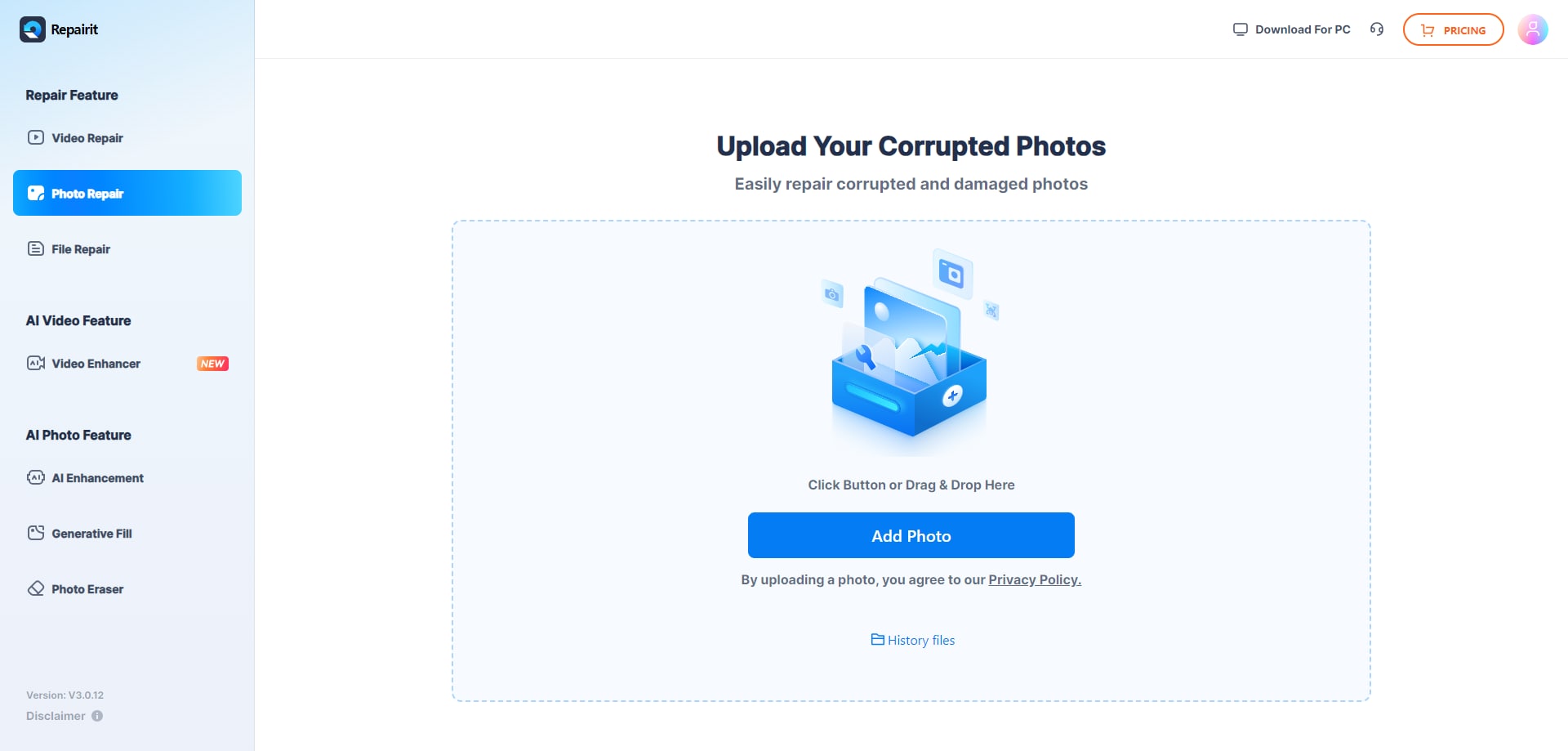
Step 1. Upload the corrupted, damaged, or unreadable photos you want to repair through Repairit Photo Repair Online.
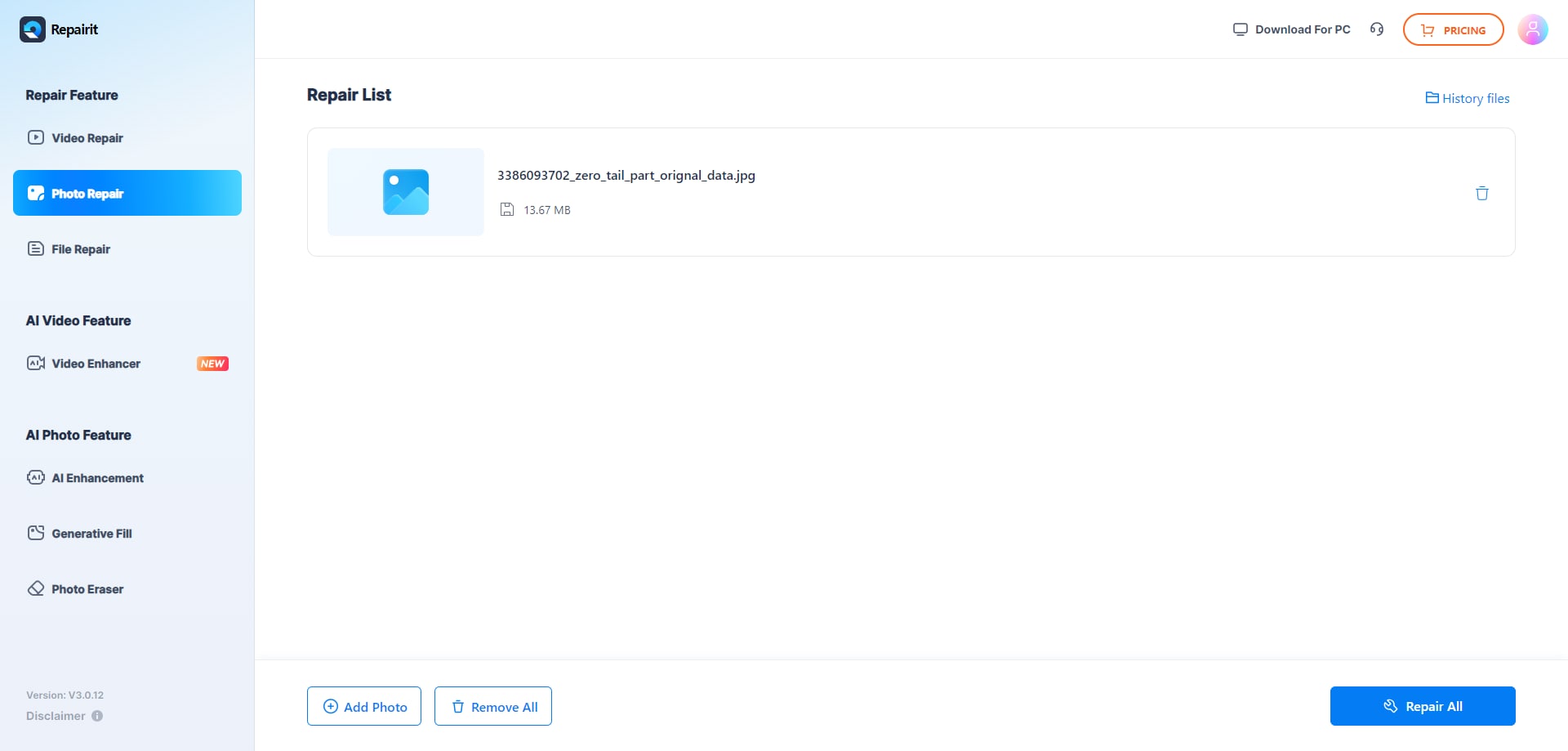
Step 2. Start the online repair process and let Repairit Photo Repair Online analyze the damaged photo files.
Step 3. Preview the repaired photo result when available, then save the repaired photos to your device.
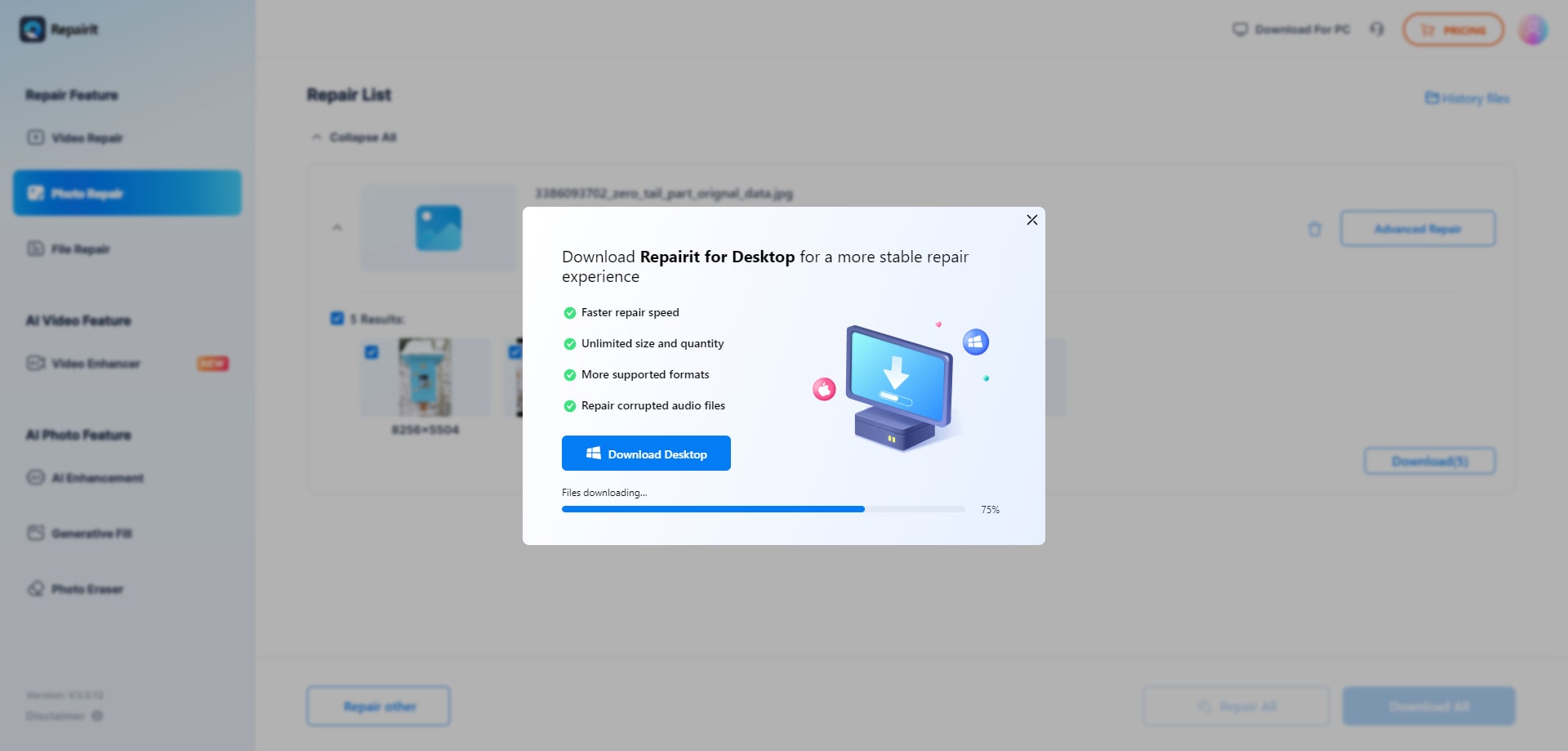
In many real-world workflows, this simple upload, repair, preview, and save loop is enough to get previously unreadable photos back into a usable state without manual low-level adjustments.
Final Verdict
The overall verdict is that Repairit Photo Repair Online is more suitable when you need a guided, browser-based workflow for a mix of corrupted photo types, while JPG.Repair may be enough if your main concern is broken JPG and camera image files. Neither tool is universally better; they simply fit different real-world repair priorities.
Repairit Photo Repair Online is more suitable when you want to repair damaged image files and fix unreadable photos in as few steps as possible, across several common formats. JPG.Repair fits better when you are facing tough JPEG and RAW structure issues and you are comfortable focusing on JPEG-specific repair rather than broad coverage.
Many users may start with JPG.Repair for serious camera JPEG problems, then rely on Repairit Photo Repair Online for ongoing everyday online photo repair across mixed folders and formats. Choosing based on your file types, corruption severity, and preferred workflow will usually deliver the most consistent results.
Next: Repairit Photo Repair Online vs 4ddig Online Photo Repair
FAQ
-
1. Is Repairit Photo Repair Online better than JPG.Repair for fixing corrupted JPEGs?
Neither tool is universally better, because JPG.Repair focuses on specialized JPEG and RAW reconstruction for broken JPG and camera files, while Repairit Photo Repair Online is more suitable when you want a guided online workflow that can handle various corrupted photos, not just JPEG-specific issues. -
2. When should I use JPG.Repair instead of Repairit Photo Repair Online?
You may prefer JPG.Repair when your main issue is heavily corrupted JPG or camera image files where the JPEG structure is broken and you want a tool that concentrates on strong JPEG and RAW reconstruction instead of broad format support. -
3. What is the difference between corrupted photo repair, photo restoration, and image enhancement?
Corrupted photo repair focuses on making damaged or unreadable image files open again, such as fixing broken JPG structures, while photo restoration works on visible defects in already viewable photos and image enhancement adjusts quality or style; Repairit Photo Repair Online and JPG.Repair are aimed at corrupted photo repair, not general enhancement or restoration tasks. -
4. Can I repair different image formats online with the same tool?
In many real-world cases, users rely on Repairit Photo Repair Online when they need to repair corrupted photos online across common formats in one place, and they use JPG.Repair mainly when the problem is clearly a broken JPEG or camera JPG, so combining both depending on file type and corruption often gives the most flexibility. -
5. Do these tools recover deleted photos or only fix corrupted files?
Repairit Photo Repair Online and JPG.Repair are described as services for repairing corrupted, damaged, broken, or unreadable image files, and they are not positioned as tools for recovering deleted photos, image enhancement, old photo restoration, or image upscaling.




