
Repairit Photo Repair Online vs 4DDiG Online Photo Repair is a practical comparison for users who need to repair corrupted, damaged, broken, or unreadable photos directly in a browser. This guide focuses on how each online photo repair tool fits real workflows where camera files fail to open, previews break, or JPG and RAW images become unreadable. In many real-world cases, the choice comes down to how severe the corruption is, which formats are involved, and how much step-by-step guidance you want while repairing photos online.
This comparison looks at Repairit Photo Repair Online and 4DDiG Online Photo Repair for fixing corrupted, broken, or unreadable photos directly in a browser. The focus is on how each tool fits professional and serious users who need to repair damaged camera files, deal with unreadable JPG or RAW images, and manage realistic limitations when corruption is severe. Use this guide to decide which online photo repair workflow better matches your file issues and comfort level.
In this article
- Repairit Photo Repair Online vs 4DDiG Online Photo Repair: Quick Verdict
- Repairit Photo Repair Online vs 4DDiG Online Photo Repair: Key Differences
- Repairit Photo Repair Online vs 4DDiG Online Photo Repair: Comparison Table
- What Repairit Photo Repair Online and 4DDiG Online Photo Repair Are Best For
- Repairit Photo Repair Online vs 4DDiG Online Photo Repair: Photo Repair Capabilities
- Repairit Photo Repair Online vs 4DDiG Online Photo Repair: Supported Image Formats and Repair Scenarios
- Repairit Photo Repair Online vs 4DDiG Online Photo Repair: Upload Workflow and Ease of Use
- Repairit Photo Repair Online vs 4DDiG Online Photo Repair: Cloud Repair, Privacy, and File Handling
- Repairit Photo Repair Online vs 4DDiG Online Photo Repair: Repair Quality and Limitations
- Who Should Choose Repairit Photo Repair Online
- Who Should Choose 4DDiG Online Photo Repair
- Pros and Cons of Repairit Photo Repair Online and 4DDiG Online Photo Repair
- How to Repair Corrupted Photos Online After Choosing the Right Tool
Repairit Photo Repair Online vs 4DDiG Online Photo Repair: Quick Verdict
The quick verdict is that Repairit Photo Repair Online is more suitable when you want a guided, step-based browser workflow, while 4DDiG Online Photo Repair may be enough if you are dealing with severely damaged photos across multiple formats. Instead of one tool being universally better, the decision depends on how damaged your image files are and how much structure you want in the online repair process.
- Repairit Photo Repair Online fits users who need clear instructions to repair corrupted photos online and prefer a focused, non-technical experience.
- 4DDiG Online Photo Repair is framed around handling more severely corrupted photos and multiple damaged image formats in a straightforward upload-and-repair session.
- Both rely on browser-based uploads and cloud processing, so your choice should consider privacy comfort level and network reliability.
Repairit Photo Repair Online vs 4DDiG Online Photo Repair: Key Differences
The key difference is that Repairit Photo Repair Online emphasizes a guided repair flow for corrupted, broken, or unreadable photos, while 4DDiG Online Photo Repair focuses on severe corruption cases and mixed image formats. This distinction matters if you regularly handle client images or camera files with varying damage levels.
- Repair depth and focus: Repairit Photo Repair Online is designed for users who want to repair corrupted photos online without worrying about technical details, whereas 4DDiG Online Photo Repair positions itself for more severely damaged files and multiple formats.
- Guidance vs. direct workflow: Repairit Photo Repair Online offers clear steps that walk you through uploading, repairing, and saving, while 4DDiG Online Photo Repair uses a more direct upload corrupted photos and repair online approach.
- Use-case emphasis: Repairit Photo Repair Online appeals to photographers, freelancers, and non-technical users who value process clarity, while 4DDiG Online Photo Repair is better aligned with users who already expect to handle tougher corruption across various devices.
- Access to advanced options: 4DDiG Online Photo Repair notes that some advanced repair features may require paid access, which can matter if you frequently handle complex damage.
Repairit Photo Repair Online vs 4DDiG Online Photo Repair: Comparison Table
This comparison table summarizes how Repairit Photo Repair Online vs 4DDiG Online Photo Repair differ across the main decision factors for repairing corrupted photos online.
| Dimension | Repairit Photo Repair Online | 4DDiG Online Photo Repair |
|---|---|---|
| Best for | Users who want a guided browser-based workflow to repair corrupted, damaged, or unreadable photos online. | Users fixing severely damaged or corrupted photos, especially when multiple damaged image formats are involved. |
| Online workflow | Fully online workflow focused on uploading broken images, repairing in the cloud, then downloading results. | Upload corrupted photos and repair online, keeping the process contained in a browser session. |
| Repair capability | Aims to repair corrupted photos online, including unreadable or broken image files, with guided steps. | Designed for severely damaged or corrupted photos, with support for multiple damaged image formats. |
| Ease of use | Suitable for users who prefer clear, step-by-step repair guidance on the web page. | Appeals to users comfortable with a straightforward upload-and-repair process for multiple corrupted files. |
| Privacy and file handling | Uses cloud-based processing; users should review general online upload and retention terms before using. | Also uses browser-based uploads; users should consider how long files may be stored and how they are handled. |
| Strengths | Guided online repair flow that helps non-technical users focus on corrupted photo repair rather than editing. | Supports multiple damaged image formats and targets severely corrupted photos with an online process. |
| Weaknesses | May not fully repair photos with extremely damaged data or missing image content; internet connection required. | Some advanced repair features require paid access and the results still depend heavily on corruption severity. |
What Repairit Photo Repair Online and 4DDiG Online Photo Repair Are Best For
Repairit Photo Repair Online is best for users who want guided online photo repair, while 4DDiG Online Photo Repair is best for users facing severe corruption across different formats. Knowing which situation you are in helps you avoid unrealistic expectations when sending damaged images through a browser.
According to its overview, 4DDiG Online Photo Repair is positioned as an AI assisted online photo repair tool for users fixing severely damaged or corrupted photos. It emphasizes support for multiple damaged image formats and works through a simple upload-and-repair browser workflow, with some advanced repair features requiring paid access.
- Choose Repairit Photo Repair Online if you mainly handle photos that fail to open, show broken previews, or display artifacts, and you want a web page that walks you through each step.
- Use 4DDiG Online Photo Repair when you often receive severely damaged or partially broken image files from many devices and do not mind testing advanced options that may require payment.
- In many real-world cases, photographers keep both in mind and test a few critical files in each to see which handles their specific corruption pattern better.
Repairit Photo Repair Online vs 4DDiG Online Photo Repair: Photo Repair Capabilities
Both tools focus on repairing corrupted photos online, but Repairit Photo Repair Online leans on guided steps while 4DDiG Online Photo Repair positions itself more for severe corruption and varied formats. This difference can affect how confident you feel when sending important broken JPG or RAW files through a browser.
As summarized in the photo repair capabilities data, both tools are browser-based, yet they approach repair depth and guidance differently.
- Repairit Photo Repair Online capabilities:
- Helps repair corrupted photos online, including broken or unreadable image files that fail to open normally.
- Provides a guided, step-driven repair sequence so users can focus on fixing damaged photos rather than manual editing.
- May handle mixed corruption issues such as partially loading images or visible artifacts, depending on damage severity.
- 4DDiG Online Photo Repair capabilities:
- Targets severely damaged or corrupted photos where files may be unreadable or partially broken.
- Supports multiple damaged image formats, which can help when different cameras or devices are involved.
- Uses an upload corrupted photos and repair online flow that may be suitable for sets of damaged files in one session.
In practice, users often notice that both services can repair a subset of unreadable photos, but extremely damaged files remain hard to fix regardless of the tool.
Repairit Photo Repair Online vs 4DDiG Online Photo Repair: Supported Image Formats and Repair Scenarios
Repairit Photo Repair Online and 4DDiG Online Photo Repair both aim to repair corrupted image files rather than simply enhance them, but 4DDiG Online Photo Repair emphasizes multiple damaged formats while Repairit Photo Repair Online focuses on practical browser workflows for common scenarios. This matters if you frequently switch between JPG, PNG, and camera formats such as RAW or HEIC.
Both tools are designed to repair corrupted photos online rather than simply enhance them. 4DDiG Online Photo Repair is noted for supporting multiple damaged image formats, which in many cases may include common types such as JPG, PNG, or certain camera RAW or HEIC photos. Repairit Photo Repair Online is also typically used for repairing broken JPG or PNG files and corrupted RAW scenarios, especially when users need a guided web-based repair flow.
- When you mostly deal with broken JPG or PNG files and typical camera images, Repairit Photo Repair Online offers a focused way to try bringing them back to an openable state.
- If you frequently see mixed-format failures from different cameras and devices, 4DDiG Online Photo Repair may be a more natural fit because of its emphasis on multiple damaged image formats.
- For niche or less common formats, users should test sample files in both tools and not assume full compatibility without checking.
Repairit Photo Repair Online vs 4DDiG Online Photo Repair: Upload Workflow and Ease of Use
Repairit Photo Repair Online focuses on a guided upload and repair experience, while 4DDiG Online Photo Repair leans into a straightforward upload corrupted photos and repair online model. For many users, ease of use is just as important as repair depth when dealing with broken client images under time pressure.
4DDiG Online Photo Repair follows a clear upload corrupted photos and repair online approach, which suits users who want a quick browser session for severely damaged files. Repairit Photo Repair Online also relies on a straightforward web upload, cloud repair, and download process.
- Repairit Photo Repair Online workflow characteristics:
- Guided prompts explaining each step of the repair sequence.
- Suitable for non-technical users who are nervous about handling broken RAW or HEIC photos.
- Helps keep the focus on corrupted photo repair instead of other image tasks.
- 4DDiG Online Photo Repair workflow characteristics:
- Straightforward, session-based approach where you upload, repair, and download.
- Appeals to users who already understand what corrupted photos look like and just need a quick online pass.
- Can be convenient when repairing multiple damaged files in a single browser session.
Users often compare how many clicks are needed, how clearly errors are explained, and how easily they can repeat the repair on several corrupted photos in a row.
Repairit Photo Repair Online vs 4DDiG Online Photo Repair: Cloud Repair, Privacy, and File Handling
Both Repairit Photo Repair Online and 4DDiG Online Photo Repair depend on browser uploads and online processing, so privacy and file handling are important to evaluate before sending sensitive images. In many cases, the right choice is the tool whose terms and handling you are more comfortable with for your specific projects.
Both Repairit Photo Repair Online and 4DDiG Online Photo Repair use browser-based uploads and online processing, so your images leave your local machine during repair. Users should consider whether they are comfortable uploading sensitive photos, check general terms on how long files may be retained, and avoid assuming strict privacy or encryption guarantees.
- Repairit Photo Repair Online considerations:
- Cloud-based processing means a stable connection is required for large or multiple corrupted files.
- Users should review the general online upload and retention terms before sending client or confidential images.
- 4DDiG Online Photo Repair considerations:
- Also uses browser-based uploads, with similar concerns about how long files may be stored.
- Important for agencies or studios that must comply with client privacy agreements.
This becomes important when working with commercial shoots, confidential scenes, or personal images where any online upload needs to be carefully justified.
Repairit Photo Repair Online vs 4DDiG Online Photo Repair: Repair Quality and Limitations
Repairit Photo Repair Online and 4DDiG Online Photo Repair can both repair many unreadable photos, but neither can bypass fundamental file damage such as missing data or heavily broken structures. Realistic expectations are key, especially when dealing with critical one-of-a-kind shots.
In many real-world cases, both tools can repair unreadable or broken image files, but results depend heavily on how badly data is corrupted. 4DDiG Online Photo Repair includes some advanced repair features that may require paid access, and even then severe corruption or incomplete data can limit outcomes. Repairit Photo Repair Online may also struggle with files where metadata is damaged, image content is missing, or the file structure is heavily broken, so expectations should remain realistic.
- When Repairit Photo Repair Online tends to fit:
- Photos that fail to open or show artifacts but still contain most of their data.
- Broken JPG or PNG files where the goal is to make them readable again, not to enhance or edit.
- When 4DDiG Online Photo Repair may help:
- More severely corrupted files where the structure appears badly damaged or partially broken.
- Scenarios involving multiple damaged image formats from different devices in the same case.
- Common limitation for both:
- Neither service can fully reconstruct images when the underlying data is missing or beyond repair.
Who Should Choose Repairit Photo Repair Online
Repairit Photo Repair Online is more suitable when you want a clear, repeatable browser workflow to repair corrupted, broken, or unreadable photos without diving into complex settings. It is especially friendly to users who regularly handle problematic JPG, PNG, or camera images but do not want to install heavy software first.
- Users who want a guided online workflow to repair corrupted or unreadable photos step by step.
- Photographers and freelancers who frequently fix broken JPG or RAW photos without installing desktop tools first.
- Non-technical users who prefer clear instructions over manual tweaking or complex repair settings.
- Anyone who values a focused corrupted photo repair process rather than broad enhancement or editing features.
In many cases, Repairit Photo Repair Online becomes a go-to browser bookmark for quickly testing whether a damaged file can be made readable again.
Who Should Choose 4DDiG Online Photo Repair
4DDiG Online Photo Repair may be enough if you frequently handle severely corrupted photos across multiple damaged image formats and are comfortable with a direct upload-and-repair web interface. It is geared toward users who already know they are dealing with tough file issues.
- Users fixing severely damaged or corrupted photos across multiple damaged image formats.
- People who already use 4DDiG tools and want a similar online photo repair experience in the browser.
- Users comfortable with paying for extra capabilities when advanced repair features are needed.
- Those who prefer a straightforward upload corrupted photos and repair online workflow for serious file issues.
This option can be a better fit when your main concern is damage severity rather than hand-holding through each repair step.
Pros and Cons of Repairit Photo Repair Online and 4DDiG Online Photo Repair
The pros and cons for each tool highlight how Repairit Photo Repair Online favors guided workflows, while 4DDiG Online Photo Repair emphasizes support for severe corruption and multiple formats. Reviewing these trade-offs can help you quickly decide where to upload your damaged photos first.
Repairit Photo Repair Online Pros and Cons
4DDiG Online Photo Repair Pros and Cons
How to Repair Corrupted Photos Online After Choosing the Right Tool
After comparing Repairit Photo Repair Online and 4DDiG Online Photo Repair, the next step is actually uploading your corrupted or unreadable photos and attempting a repair in the browser. Once you have a sense of which tool fits your damage level and workflow preferences, you can follow a clear sequence to test whether the images can be made readable again.
For users who want a structured repair experience, Repairit Photo Repair Online provides a practical guided online option that keeps things simple: upload, repair, preview, and save. The following subsections outline how this works in more detail.
Key Features
The main features of Repairit Photo Repair Online are organized around making corrupted photo repair accessible to a wide range of users.
- Browser-based workflow to repair corrupted photos online with no local installation needed.
- Guided repair steps that help users focus on fixing broken or unreadable images rather than editing.
- Support for common corrupted scenarios such as photos that will not open or display visual artifacts, depending on file damage.
Step-by-step guide
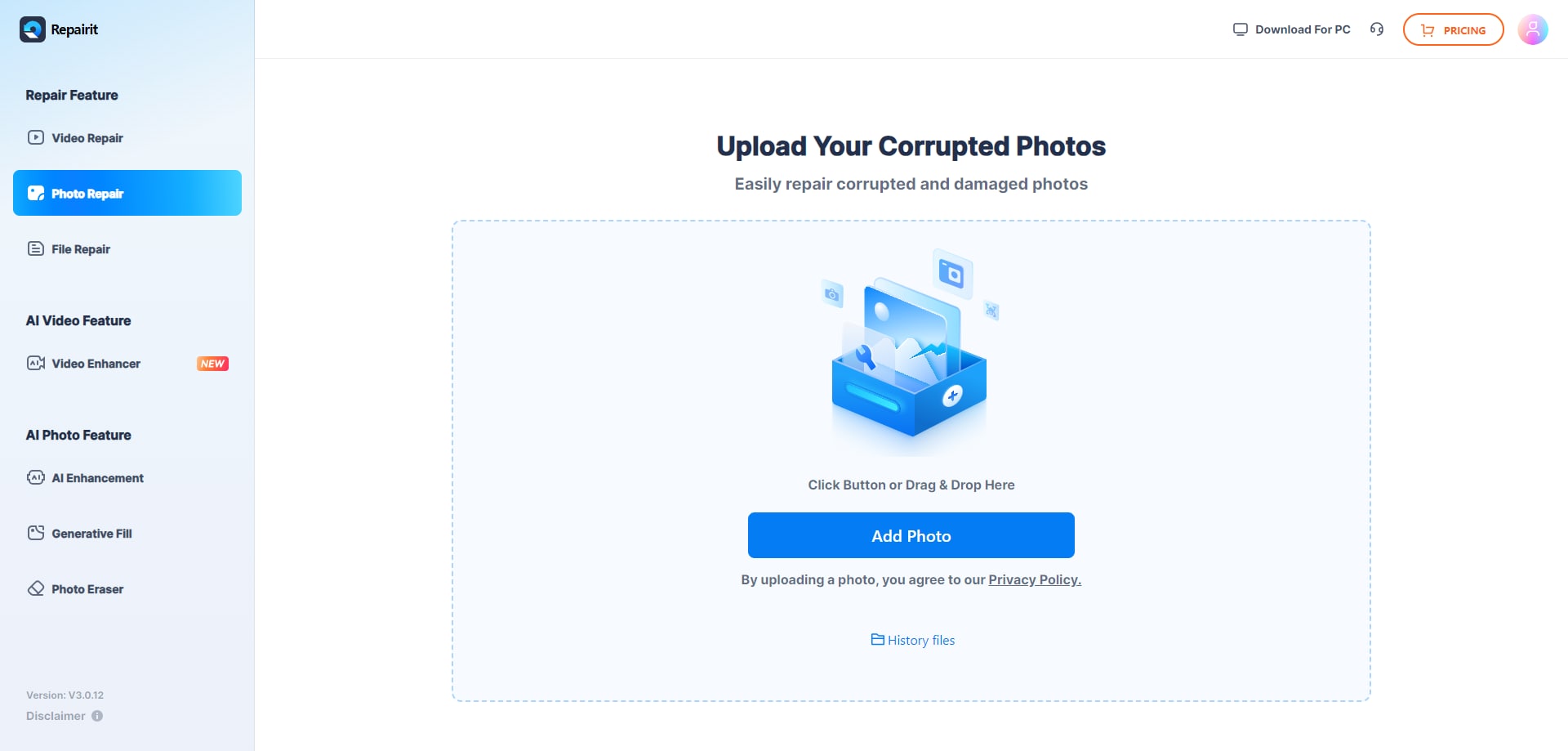
Step 1. Upload the corrupted, damaged, or unreadable photos you want to repair through Repairit Photo Repair Online.
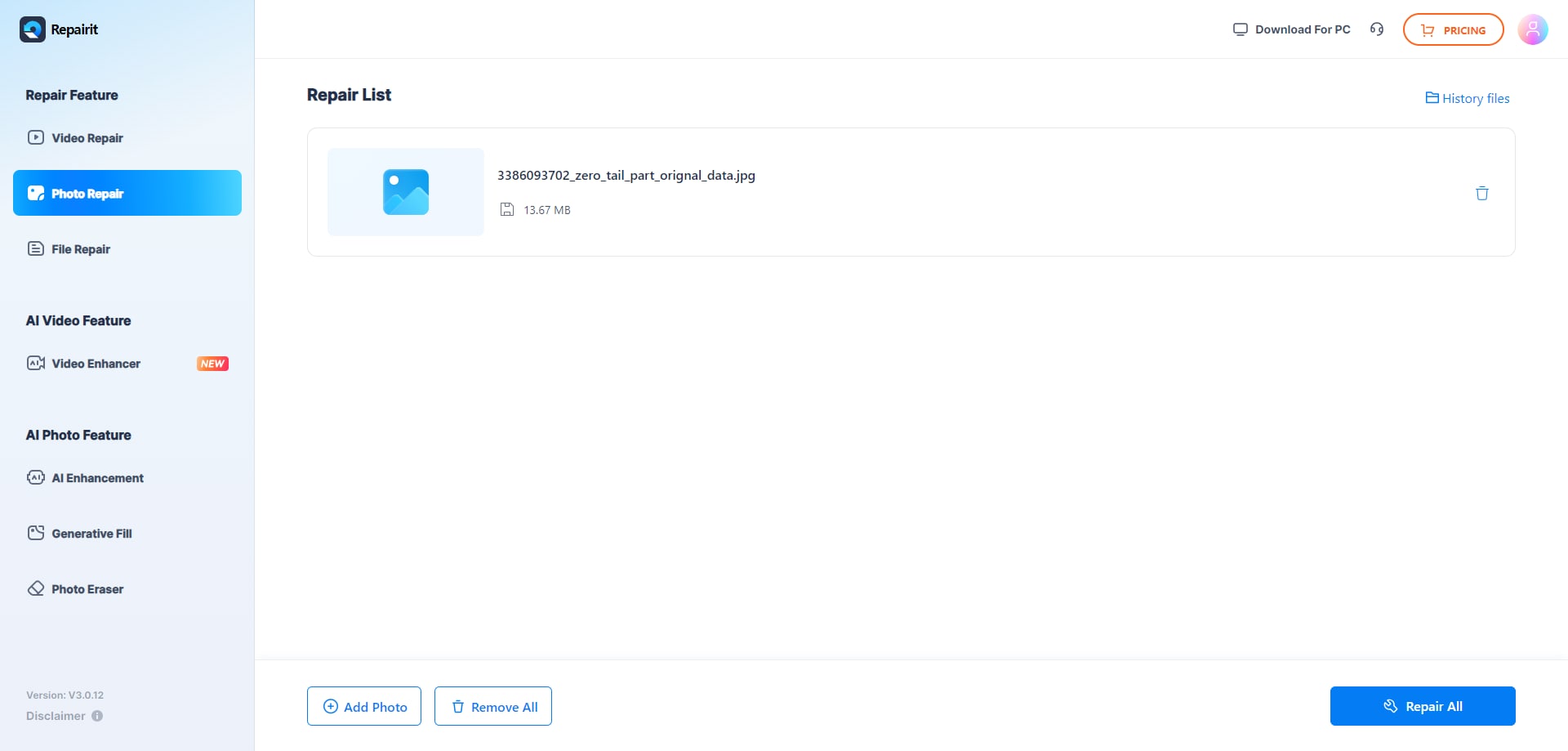
Step 2. Start the online repair process and let Repairit Photo Repair Online analyze the damaged photo files.
Step 3. Preview the repaired photo result when available, then save the repaired photos to your device.
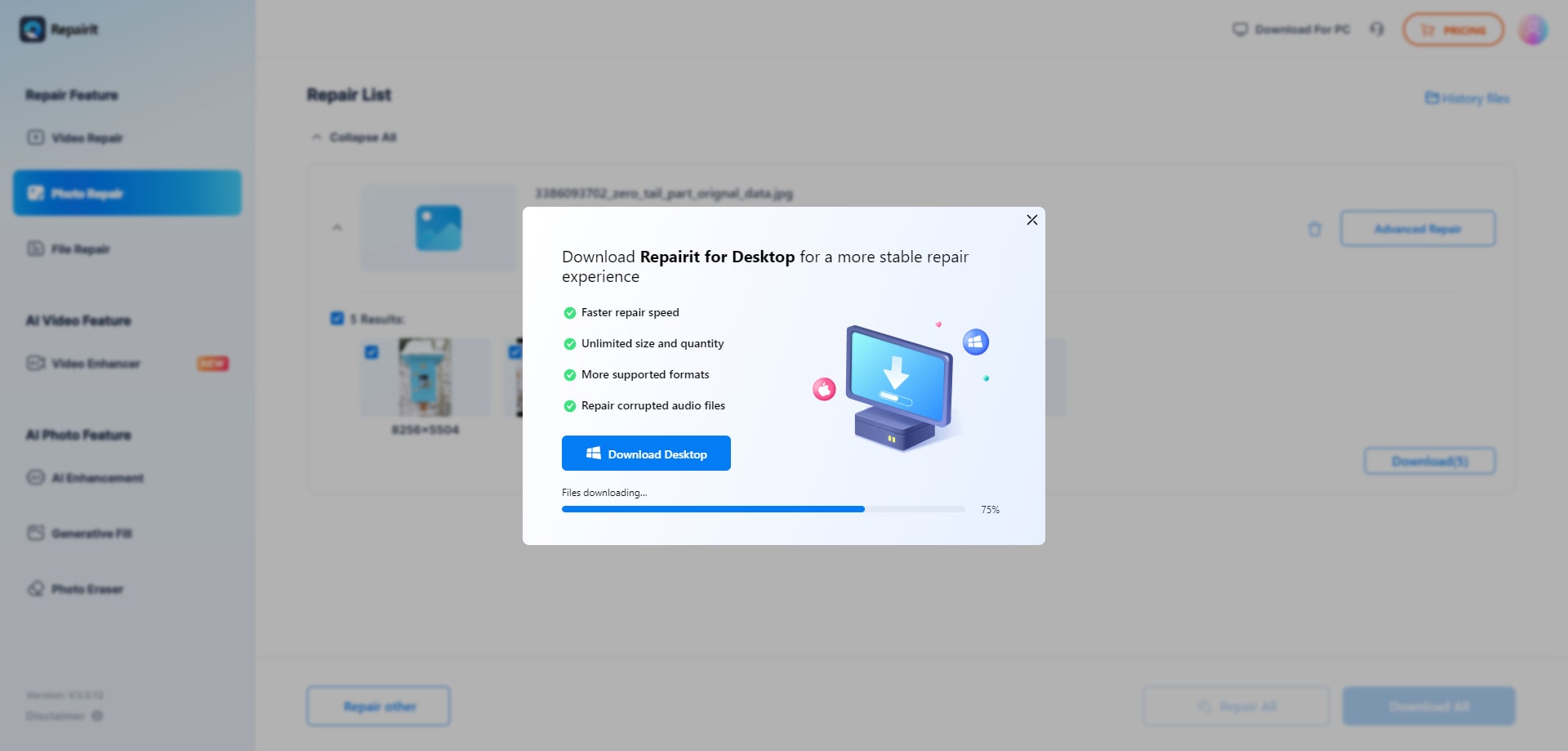
In many real-world cases, this simple upload, repair, preview, and save flow is enough to decide whether an image can still be used or whether you need to inform a client that the corruption is beyond repair.
Final Verdict
The overall verdict is that Repairit Photo Repair Online is more suitable when you want a guided, step-based browser workflow to repair corrupted photos, while 4DDiG Online Photo Repair may be enough when severe damage and multiple formats are your main concerns Neither tool is universally better, but each aligns with different real-world photo repair needs.
Repairit Photo Repair Online is more suitable when you want a guided, step-based browser workflow to repair corrupted, broken, or unreadable photos, especially if you often deal with problematic JPG, PNG, or camera files and prefer clear instructions over manual settings. It fits users who care about process clarity and repeated online repairs rather than one-off emergencies only.
4DDiG Online Photo Repair may be enough if your main priority is handling severely damaged or corrupted photos across multiple damaged image formats and you are comfortable using online tools where some advanced features require paid access. In practice, many users keep both approaches in mind and choose based on how severe the corruption is, how many formats are involved, and how much guidance they want during repair.




