
When a JPG or JPEG photo will not open, shows errors, or looks partially broken, choosing the right online repair tool can decide whether the image becomes usable again. This comparison looks at Repairit Photo Repair Online vs ImageOnline Repair JPG, focusing on browser-based JPG repair, broken image structures, unreadable camera photos, and metadata issues. The aim is to match your real-world corruption level and online workflow with the tool that fits your specific damaged or unreadable photos.
In many real-world cases, users only discover corruption when a viewer refuses to open a JPG or a gallery shows a gray thumbnail. At that moment, the choice between a lightweight browser-based JPG repair page and a more guided online photo repair workflow becomes important. Understanding how Repairit Photo Repair Online and ImageOnline Repair JPG differ will help you set realistic expectations before you upload any damaged image files.
In this article
- Repairit Photo Repair Online vs ImageOnline Repair JPG: Quick Verdict
- Repairit Photo Repair Online vs ImageOnline Repair JPG: Key Differences
- Repairit Photo Repair Online vs ImageOnline Repair JPG: Comparison Table
- What Repairit Photo Repair Online and ImageOnline Repair JPG Are Best For
- Repairit Photo Repair Online vs ImageOnline Repair JPG: Photo Repair Capabilities
- Repairit Photo Repair Online vs ImageOnline Repair JPG: Supported Image Formats and Repair Scenarios
- Repairit Photo Repair Online vs ImageOnline Repair JPG: Upload Workflow and Ease of Use
- Repairit Photo Repair Online vs ImageOnline Repair JPG: Cloud Repair, Privacy, and File Handling
- Repairit Photo Repair Online vs ImageOnline Repair JPG: Repair Quality and Limitations
- Who Should Choose Repairit Photo Repair Online
- Who Should Choose ImageOnline Repair JPG
- Pros and Cons of Repairit Photo Repair Online and ImageOnline Repair JPG
- How to Repair Corrupted Photos Online After Choosing the Right Tool
Repairit Photo Repair Online vs ImageOnline Repair JPG: Quick Verdict
The quick verdict is that Repairit Photo Repair Online is more suitable when you need a guided online workflow for corrupted, damaged, or unreadable photos, while ImageOnline Repair JPG may be enough if you only face light JPG corruption or small metadata issues. The main difference is how deeply each tool is oriented to broader damaged photo repair versus quick fixes for mostly intact JPG files.
In many real-world cases, users dealing with multiple broken camera shots or unreadable image files benefit from the additional structure in Repairit Photo Repair Online. When you only have a few JPGs that refuse to open because of minor structure errors, ImageOnline Repair JPG can be a simpler way to repair the image online with minimal steps.
Repairit Photo Repair Online vs ImageOnline Repair JPG: Key Differences
The key difference between Repairit Photo Repair Online vs ImageOnline Repair JPG is the depth and breadth of online corrupted photo repair they are built around. Repairit Photo Repair Online is positioned as a broader damaged photo repair workflow, while ImageOnline Repair JPG is framed as a lightweight browser-based JPG repair page for minor issues.
- Repair depth: Repairit Photo Repair Online focuses on corrupted or unreadable photos, including broken image structures across many everyday scenarios, whereas ImageOnline Repair JPG focuses on smaller JPG structure and metadata glitches.
- Workflow style: Repairit Photo Repair Online offers a more guided upload, repair, preview, and save flow, while ImageOnline Repair JPG provides a minimal upload-and-fix experience.
- Use-case focus: Repairit Photo Repair Online is more suitable when you suspect deeper corruption or have multiple damaged files, and ImageOnline Repair JPG can be a better fit for quick, lightweight JPG repairs.
- Format orientation: ImageOnline Repair JPG centers on JPG or JPEG repair, while Repairit Photo Repair Online is described as handling corrupted JPG alongside other common photo formats when applicable.
Repairit Photo Repair Online vs ImageOnline Repair JPG: Comparison Table
This comparison table summarizes how Repairit Photo Repair Online vs ImageOnline Repair JPG differ across typical decision factors such as best use case, online workflow, and repair capability. It helps you quickly see which online photo repair tool aligns with your current corrupted JPG situation.
| Dimension | Repairit Photo Repair Online | ImageOnline Repair JPG |
|---|---|---|
| Best for | Users needing guided online repair for corrupted, broken, or unreadable photos, including more general damaged image workflows. | Users fixing minor JPEG corruption and metadata issues with a simple browser-based JPG repair tool. |
| Online workflow | Structured web-based flow with guided steps to upload, repair, preview, and save corrupted photos. | Lightweight browser based JPG repair where users quickly upload a corrupted JPG and repair the image online. |
| Repair capability | Designed for broader corrupted photo repair scenarios and broken image structures across many everyday damage cases. | Focused on fast, minor JPG structure and metadata fixes rather than severe corruption handling. |
| Ease of use | Simple, guided interface that may feel clearer for users not familiar with corrupted photo repair. | Very straightforward for quick JPG uploads when users know they only need lightweight browser based JPG repair. |
| Privacy and file handling | Online repair through a cloud-based web page where users upload photos temporarily for processing. | Browser-based uploads that typically keep the workflow minimal, with users managing downloads immediately after repair. |
| Strengths | Stronger general damaged photo repair workflow and options to handle more complex unreadable photo issues. | Fast browser based repair process that suits small JPG glitches and simple corruption cases. |
| Weaknesses | Still may not fully recover photos with extremely damaged or missing image data. | Limited support for severe corruption or heavily broken JPG files where deeper repair is needed. |
What Repairit Photo Repair Online and ImageOnline Repair JPG Are Best For
Repairit Photo Repair Online is best for users who need a more general online photo repair workflow that can deal with corrupted, damaged, or unreadable photos beyond tiny glitches. ImageOnline Repair JPG is best suited to users whose files are mostly intact but blocked by minor JPG structure or metadata issues.
According to the overview, ImageOnline Repair JPG is positioned as a lightweight browser based JPG repair tool, ideal when you need a fast upload-and-fix experience for a few damaged JPEG files. Repairit Photo Repair Online, by contrast, is built as a broader online photo repair service that may better handle a wider range of corrupted or broken image files in practical situations.
- Choose Repairit Photo Repair Online if several photos from a camera shoot are unreadable, not just one file.
- Choose ImageOnline Repair JPG if you only see small glitches or minor corruption in a couple of JPGs and want a quick browser-based fix.
- Consider how often you handle corrupted photos; frequent issues usually benefit from a more guided repair flow.
Repairit Photo Repair Online vs ImageOnline Repair JPG: Photo Repair Capabilities
Both tools aim to repair corrupted JPG photos online, but they focus on different corruption levels and workflows. The main difference is that Repairit Photo Repair Online is structured for broader damaged photo repair, while ImageOnline Repair JPG focuses on lighter JPG issues.
The summary explains that ImageOnline Repair JPG targets minor JPEG problems, whereas Repairit Photo Repair Online is organized around more general damage, including broken image structures and unreadable photos. This matters when your images show severe artifacts, missing areas, or repeated errors across several files.
- Repairit Photo Repair Online capabilities:
- Targets corrupted photos with broken image structures and unreadable camera shots in many everyday scenarios.
- Focuses on repairing damaged image files online rather than simple visual enhancement or editing.
- Provides a guided flow that helps users move from upload to preview when dealing with confusing corruption errors.
- ImageOnline Repair JPG capabilities:
- Suited to repairing minor JPEG corruption where the file is mostly intact but will not open correctly.
- Often used to correct smaller metadata issues that can stop some viewers from reading JPG files.
- Workflow focuses on quickly uploading a corrupted JPG and repairing image structure in a lightweight browser-based way.
Repairit Photo Repair Online vs ImageOnline Repair JPG: Supported Image Formats and Repair Scenarios
The key difference in formats is that ImageOnline Repair JPG centers on JPG or JPEG repair, while Repairit Photo Repair Online is positioned as a more general online photo repair tool that may work with multiple image types. This becomes important if your corrupted files include formats beyond JPG.
The provided information notes that ImageOnline Repair JPG is best matched to JPG or JPEG only. Repairit Photo Repair Online, on the other hand, is described as supporting corrupted JPG alongside other common formats such as PNG, RAW, HEIC, or TIFF, depending on the specific case and level of file damage, without promising universal support.
- For single-format JPG issues, ImageOnline Repair JPG can be a focused, simple choice.
- For mixed folders containing JPG, PNG, RAW, HEIC, or TIFF photos with errors, Repairit Photo Repair Online is more suitable when you need one guided workflow.
- Users should still test individual files, because severe damage or missing data can limit repair results in any format.
Repairit Photo Repair Online vs ImageOnline Repair JPG: Upload Workflow and Ease of Use
The main workflow difference is that Repairit Photo Repair Online offers a structured, guided process, while ImageOnline Repair JPG emphasizes a very lightweight upload-and-fix flow. This choice matters if you are unsure what is wrong with your corrupted photos.
With ImageOnline Repair JPG, users upload a corrupted JPG and repair the image online through a minimal browser interface that focuses on speed and simplicity. Repairit Photo Repair Online also runs entirely in the browser but adds clearer steps for upload, repair, preview, and save, which can reduce guesswork for less technical users.
- Repairit Photo Repair Online workflow: Better when you want guidance through each stage of repairing unreadable or broken photos.
- ImageOnline Repair JPG workflow: Better when you know the issue is likely small and just want to upload, fix, and download quickly.
- Users often notice that a guided interface is helpful when many photos fail at once or show different error messages.
Repairit Photo Repair Online vs ImageOnline Repair JPG: Cloud Repair, Privacy, and File Handling
Both tools handle corrupted photos via browser-based uploads, so your images are processed online rather than entirely on your local device. The main difference is in how structured the online workflow feels, not in whether the files are uploaded at all.
The cloud and privacy notes explain that, in many real-world cases, users upload, repair, and then promptly download their fixed images. For sensitive photos, users should review each service in general terms, avoid unnecessary uploads, and remove downloaded files from shared or public computers after repair.
- Repairit Photo Repair Online uses an online workflow where you upload photos temporarily for processing and follow a guided sequence.
- ImageOnline Repair JPG relies on browser-based uploads but keeps the process minimal so you can manage downloads immediately after repair.
- Regardless of the tool, it is wise to limit uploads of confidential or private content and to clean up files on any shared devices.
Repairit Photo Repair Online vs ImageOnline Repair JPG: Repair Quality and Limitations
Repair quality in both tools generally depends on how badly the JPG or other photo file is corrupted, and neither can guarantee full repair for severely damaged images. The key difference is that Repairit Photo Repair Online is oriented to deeper corrupted photo repair, while ImageOnline Repair JPG is more tuned to lighter issues.
The information provided notes that ImageOnline Repair JPG works well for lighter JPG corruption but reaches its limits with severe corruption, heavily damaged metadata, or incomplete image data. Repairit Photo Repair Online is designed to go further with corrupted and unreadable photos, yet extremely broken image structures, partially overwritten data, or missing content can still lead to partial or failed repairs for both tools.
- In many real-world cases, mildly corrupted JPGs with intact data see better outcomes than files with missing regions.
- Users should expect that no online photo repair tool can fix images where large portions of data are gone.
- Testing the same file in both tools can help clarify which handles that particular corruption pattern better.
Who Should Choose Repairit Photo Repair Online
Repairit Photo Repair Online is more suitable when you are facing multiple corrupted, damaged, or unreadable photos and want a guided browser-based repair workflow. It is designed for situations where issues go beyond simple JPG metadata glitches.
- Users dealing with multiple corrupted photos from cameras or phones, not just one mildly damaged JPG.
- People who want a guided, step-by-step online photo repair flow instead of a bare-bones interface.
- Users facing unreadable photo errors, broken previews, or more complex damage than small metadata glitches.
- Anyone needing an online tool that may handle damaged image files across more than just simple JPG fixes.
In many real-world scenarios, this makes Repairit Photo Repair Online a practical option for album-wide issues, travel shoots, or event photos where several images show broken structures at once.
Who Should Choose ImageOnline Repair JPG
ImageOnline Repair JPG may be enough if you only need lightweight browser based JPG repair for a few damaged JPEG files. It is better suited to users who know their problem is likely minor.
- Users who only need lightweight browser based JPG repair for a few damaged JPEG files.
- People facing minor image corruption or small metadata issues where the photo is mostly intact.
- Those who prefer a very fast, minimal upload-and-fix workflow without extra options.
- Anyone repairing straightforward JPG errors rather than severe corruption or missing image regions.
This makes ImageOnline Repair JPG a reasonable first stop when you see only subtle problems, such as a viewer refusing to open a file that still looks structurally complete.
Pros and Cons of Repairit Photo Repair Online and ImageOnline Repair JPG
Both tools have trade-offs that influence which one will feel better for your corrupted photo situation. Repairit Photo Repair Online generally favors guided, broader damaged image repair, while ImageOnline Repair JPG favors speed and simplicity for lighter JPG issues.
Repairit Photo Repair Online Pros and Cons
ImageOnline Repair JPG Pros and Cons
How to Repair Corrupted Photos Online After Choosing the Right Tool
After comparing Repairit Photo Repair Online vs ImageOnline Repair JPG, the next step is actually repairing your corrupted or unreadable photo online. Once you know whether you are dealing with minor JPG glitches or more complex damaged image files, you can pick the workflow that matches your situation.
For users who want a structured, guided experience to handle various corrupted photos, Repairit Photo Repair Online provides a practical browser-based option. It focuses on moving you from upload to repair to preview without requiring deep technical knowledge of image file structures.
Key Features
The key features of Repairit Photo Repair Online are aimed at handling corrupted or unreadable images in a browser. While specific technical details may vary by file, the overall focus stays on guiding users through common damage scenarios.
- Online photo repair focused on corrupted or unreadable images rather than simple enhancement.
- Guided upload, repair, and preview steps that reduce guesswork for non-technical users.
- Support for repairing damaged image files from common real-world shooting situations, depending on corruption level.
Step-by-step guide
Once you select Repairit Photo Repair Online as your tool, you can follow a straightforward online process to handle corrupted, damaged, or unreadable photos.
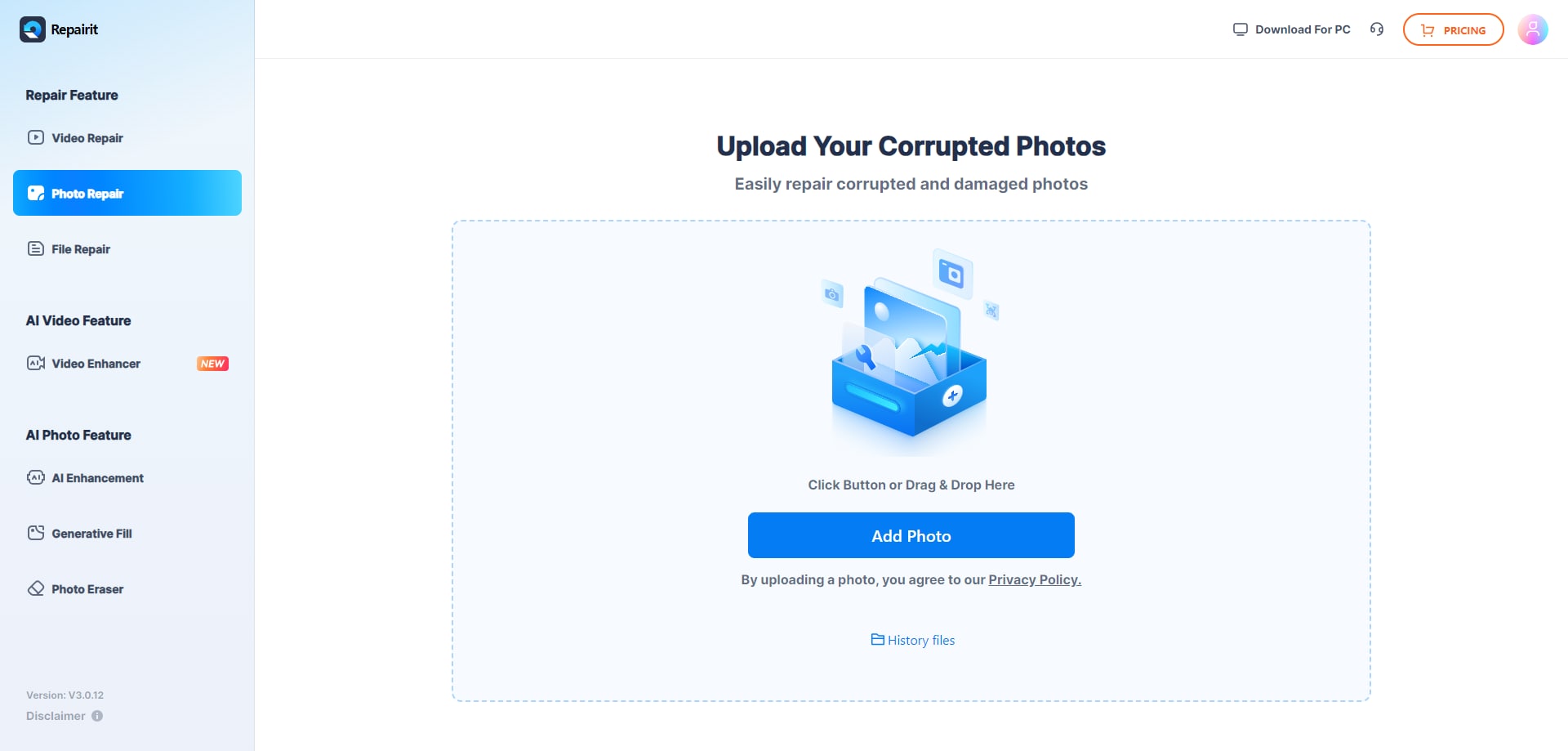
Step 1. Upload the corrupted, damaged, or unreadable photos you want to repair through Repairit Photo Repair Online.
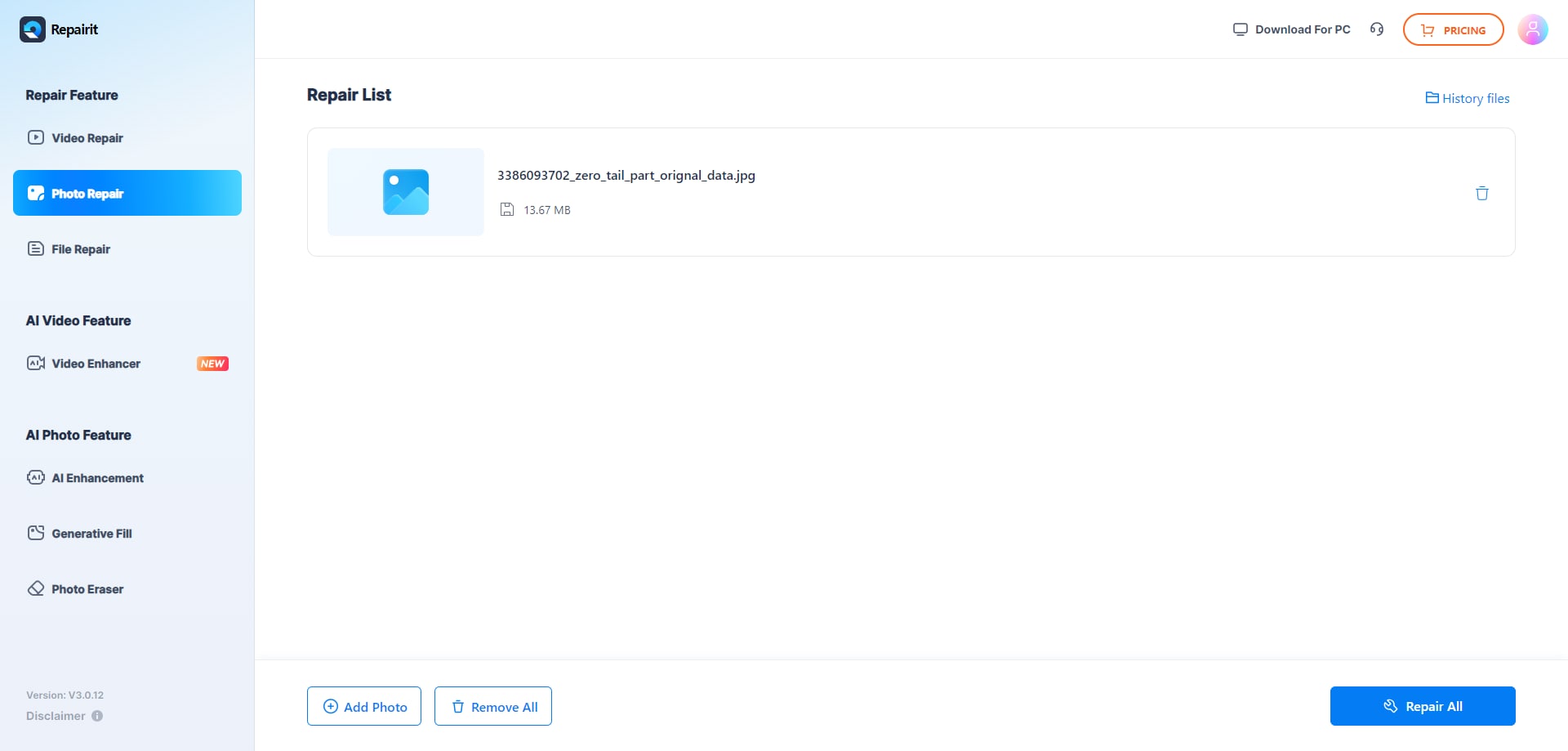
Step 2. Start the online repair process and let Repairit Photo Repair Online analyze the damaged photo files.
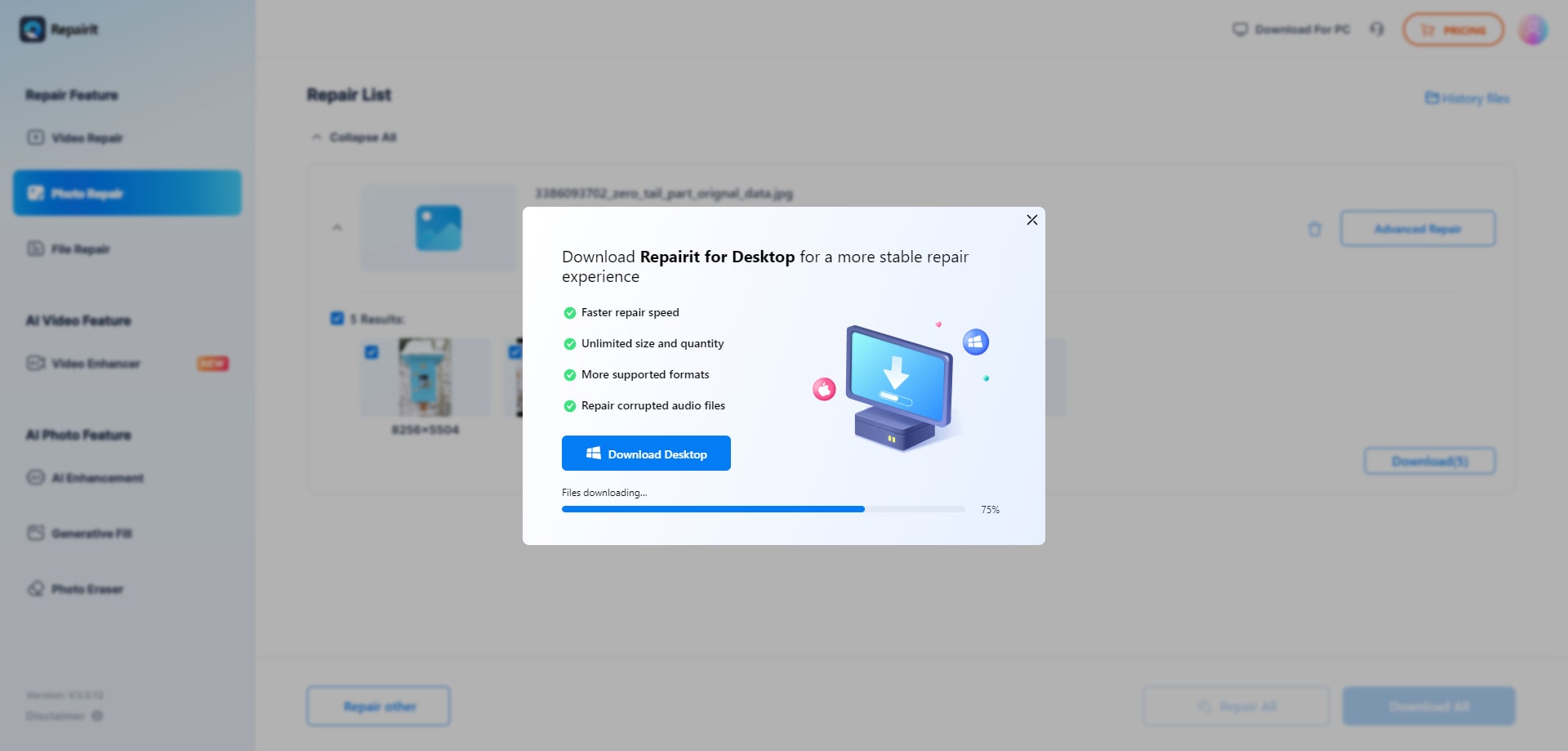
Step 3. Preview the repaired photo result when available, then save the repaired photos to your device.
Final Verdict
The final verdict is that Repairit Photo Repair Online is more suitable when you need a guided, browser-based workflow for repairing corrupted, damaged, or unreadable photos, especially if you suspect issues beyond minor JPG metadata glitches. It is geared toward handling broken image structures, unreadable camera shots, and multiple damaged files in one place.
ImageOnline Repair JPG may be enough if you only have a few JPG or JPEG files with light corruption or small metadata problems and you want a very simple upload-and-fix experience. In practice, many users start with lightweight browser based JPG repair for quick checks, then move to Repairit Photo Repair Online when the corruption is deeper, affects several images, or extends beyond straightforward JPG scenarios.
Next: Repairit Photo Repair Online vs Officerecovery Pixrecovery Online
FAQ
-
1. Is Repairit Photo Repair Online better than ImageOnline Repair JPG for every corrupted photo?
No. Repairit Photo Repair Online is more suitable when you need a guided, general damaged photo repair workflow, while ImageOnline Repair JPG can be enough for minor JPG corruption and metadata issues that need a quick browser-based fix. The right choice depends on how severe your corruption is and how many files are affected. -
2. When should I use ImageOnline Repair JPG instead of Repairit Photo Repair Online?
You should use ImageOnline Repair JPG when you only have a few JPG files with light damage, such as small structure or metadata issues, and you want a very lightweight browser based JPG repair process without extra options. If those quick fixes do not help, moving to Repairit Photo Repair Online can make sense for deeper damaged photo repair. -
3. What is the difference between corrupted photo repair, photo restoration, and image enhancement?
Corrupted photo repair focuses on fixing damaged image files that will not open or show broken structures. Photo restoration usually deals with improving old or faded photos, and image enhancement adjusts color or sharpness. Repairit Photo Repair Online and ImageOnline Repair JPG focus on corrupted photo repair, not general editing, old photo restoration, or beautification workflows. -
4. Can either tool fully repair severely corrupted JPG files?
Both tools can improve many corrupted JPG files, but neither can guarantee full repair for severely damaged photos. When image data is missing, overwritten, or structures are heavily broken, results may be partial or unsuccessful, regardless of whether you use Repairit Photo Repair Online or ImageOnline Repair JPG. -
5. Do I need technical skills to repair corrupted photos online with these tools?
In most cases, you do not need deep technical skills to use either tool because both work through the browser. However, Repairit Photo Repair Online offers a more guided sequence, which can feel easier for users unfamiliar with image file structures, while ImageOnline Repair JPG expects you to know that your issue is likely a minor JPG problem.




