
 TL;DR:
⚡ Quick Choice: Repairit Photo Repair Online vs OfficeRecovery PixRecovery Online
● Choose Repairit for Stronger Online Repair: Repairit Photo Repair Online now offers upgraded repair capabilities aligned with its desktop-level technology, making it a stronger choice for corrupted, damaged, broken, or unreadable photos.
● Repair Common Photo Issues More Easily: Repairit helps fix photos that fail to open, show broken previews, contain invalid image data, or have damaged metadata in formats like JPG, PNG, RAW, HEIC, and TIFF.
● Preview Before Saving: Repairit follows a clear upload, repair, preview, and save workflow, helping users confirm whether the repaired photo is usable before downloading.
Ask AI for a summary
 ChatGPT
 Perplexity
 Gemini
 Claude
 Grok
Grok
The comparison between Repairit Photo Repair Online and OfficeRecovery PixRecovery Online comes down to how each service repairs corrupted, damaged, broken, or unreadable photos directly in the browser. Both aim to fix image files that no longer open correctly, but they differ in workflow, guidance, and how technical the process feels. This matters if you need to repair PSD, JPG, PNG, TIFF, or RAW photos online and want the right balance between repair depth and ease of use.
This comparison looks at Repairit Photo Repair Online and OfficeRecovery PixRecovery Online for repairing corrupted or unreadable image files directly in the browser. If you work with PSD, JPG, PNG, TIFF, or RAW photos and need a technical online repair workflow, the differences in repair depth, interface design, and complexity matter. Below, we focus on how each service handles damaged files, what the upload process feels like, and when one tool may be more suitable than the other.
In this article
- Repairit Photo Repair Online vs OfficeRecovery PixRecovery Online: Quick Verdict
- Repairit Photo Repair Online vs OfficeRecovery PixRecovery Online: Key Differences
- Repairit Photo Repair Online vs OfficeRecovery PixRecovery Online: Comparison Table
- What Repairit Photo Repair Online and OfficeRecovery PixRecovery Online Are Best For
- Repairit Photo Repair Online vs OfficeRecovery PixRecovery Online: Photo Repair Capabilities
- Repairit Photo Repair Online vs OfficeRecovery PixRecovery Online: Supported Image Formats and Repair Scenarios
- Repairit Photo Repair Online vs OfficeRecovery PixRecovery Online: Upload Workflow and Ease of Use
- Repairit Photo Repair Online vs OfficeRecovery PixRecovery Online: Cloud Repair, Privacy, and File Handling
- Repairit Photo Repair Online vs OfficeRecovery PixRecovery Online: Repair Quality and Limitations
- Who Should Choose Repairit Photo Repair Online
- Who Should Choose OfficeRecovery PixRecovery Online
- Pros and Cons of Repairit Photo Repair Online and OfficeRecovery PixRecovery Online
- How to Repair Corrupted Photos Online After Choosing the Right Tool
Repairit Photo Repair Online vs OfficeRecovery PixRecovery Online: Quick Verdict
The quick verdict is that Repairit Photo Repair Online is usually more comfortable for users who want a guided browser-based way to repair corrupted or unreadable photos, while OfficeRecovery PixRecovery Online is better aligned with more technical users handling a broad mix of damaged image formats. The main difference is how simple or technical the online repair flow feels when you are under time pressure. In many real-world cases, your choice will depend on whether you prefer a modern guided interface or a more structured, technically oriented layout.
- Repairit Photo Repair Online suits users who want a straightforward upload, repair, and preview approach for fixing broken JPG or PNG files and other common photos.
- OfficeRecovery PixRecovery Online tends to fit people who often work with PSD, TIFF, and RAW alongside JPG and PNG and do not mind an older style interface.
- Both rely on browser-based processing, so users should weigh repair depth against privacy and file-handling considerations for their specific projects.
Repairit Photo Repair Online vs OfficeRecovery PixRecovery Online: Key Differences
The key difference between Repairit Photo Repair Online and OfficeRecovery PixRecovery Online is how each tool balances guidance versus technical control when repairing corrupted photo files online. Repairit Photo Repair Online focuses on a clean, guided interface, while OfficeRecovery PixRecovery Online emphasizes broad damaged format coverage in a more technical workflow. This matters if you rarely repair photos and want clarity, or if you regularly manage complex PSD, JPG, PNG, TIFF, and RAW repair tasks.
- Workflow style: Repairit Photo Repair Online guides you through upload, online repair, and preview steps; OfficeRecovery PixRecovery Online feels more manual and structured.
- User skill level: Repairit Photo Repair Online is friendlier for less technical users, whereas OfficeRecovery PixRecovery Online assumes more comfort with technical repair concepts.
- Interface age: Repairit Photo Repair Online uses a cleaner, modern web layout; OfficeRecovery PixRecovery Online uses an older interface that may slow down new users.
- Format emphasis: Repairit Photo Repair Online focuses on common corrupted camera-style images, while OfficeRecovery PixRecovery Online is positioned for workflows that mix PSD, JPG, PNG, TIFF, and RAW files.
- Use under pressure: When clients are waiting, the clearer guidance in Repairit Photo Repair Online can help reduce mistakes, while OfficeRecovery PixRecovery Online may reward users who already understand its technical flow.
Repairit Photo Repair Online vs OfficeRecovery PixRecovery Online: Comparison Table
This comparison table summarizes how Repairit Photo Repair Online and OfficeRecovery PixRecovery Online differ across typical online photo repair decision factors. It highlights who each service is best for, how the web workflow behaves, and what to expect in terms of ease of use and strengths.
| Dimension | Repairit Photo Repair Online | OfficeRecovery PixRecovery Online |
|---|---|---|
| Best for | Users who want a guided browser based workflow to repair corrupted or unreadable photos with minimal technical setup. | More technical users repairing damaged PSD, JPG, PNG, TIFF, and RAW image files who do not mind an older style interface. |
| Online workflow | Web based upload, automatic online repair, and simple preview steps designed for non technical users. | Upload corrupted image files and attempt repair online in a more manual, technically oriented flow. |
| Repair capability | Focuses on repairing corrupted photo structures and fixing unreadable files in a guided way, depending on damage level. | Supports many damaged image formats and may suit structured repair of PSD, JPG, PNG, TIFF, and RAW files. |
| Ease of use | Typically easier to navigate, with clearer steps for browser based corrupted photo repair. | Older interface and more technical workflow that may feel complex for casual users. |
| Privacy and file handling | Browser based uploads; users should review general online file handling practices before using any cloud repair. | Also relies on uploading files to an online service; users should consider typical online privacy and retention factors. |
| Strengths | Guided online repair, straightforward steps, and practical for fixing broken JPG or PNG files and other common photos. | Supports many damaged image formats and may handle a wide mix of PSD, JPG, PNG, TIFF, and RAW files in one place. |
| Weaknesses | Results still depend heavily on corruption severity; extremely damaged files may remain partially or fully unreadable. | Older interface, more technical workflow, and a learning curve for users who are not used to structured repair tools. |
What Repairit Photo Repair Online and OfficeRecovery PixRecovery Online Are Best For
Repairit Photo Repair Online is best for users who want a clear, browser-based way to repair corrupted photos, while OfficeRecovery PixRecovery Online is best for more technical workflows involving many damaged formats. The main difference is whether you prioritize guided simplicity or format-oriented technical control.
- Repairit Photo Repair Online: A strong fit when you need to fix unreadable JPG or PNG camera images quickly and appreciate step-by-step guidance.
- OfficeRecovery PixRecovery Online: Positioned for users who routinely handle damaged PSD, JPG, PNG, TIFF, and RAW files in one project and accept a more complex flow.
- In many real-world cases, teams use a guided tool like Repairit Photo Repair Online for day-to-day browser-based photo repair, and keep a more technical tool for occasional edge cases.
Repairit Photo Repair Online vs OfficeRecovery PixRecovery Online: Photo Repair Capabilities
Both Repairit Photo Repair Online and OfficeRecovery PixRecovery Online focus on repairing corrupted, damaged, or unreadable image files online, but they differ in how guided the process is and how technical the workflow feels. This becomes important when you need to reopen broken files without digging into low-level format details. In many real-world cases, users choose based on how much guidance they want during the repair attempt.
Overall capability summary: Both services attempt to fix damaged image structures so photos can open again, but results depend heavily on the severity and nature of the corruption rather than on interface alone.
- Repairit Photo Repair Online capabilities:
- Guided online repair flow aimed at fixing corrupted or unreadable photos with clear steps.
- Designed to repair broken JPG or PNG files and other common image types directly in the browser.
- In many real world cases, helps users recover visual access to photos without deep technical knowledge.
- OfficeRecovery PixRecovery Online capabilities:
- Technical online image repair for damaged PSD, JPG, PNG, TIFF, and RAW files.
- Supports many damaged image formats, which matters when a project mixes several file types.
- Often suits users comfortable with more detailed, technically oriented repair steps.
Users often notice that Repairit Photo Repair Online reduces the risk of getting lost in options, while OfficeRecovery PixRecovery Online is more accommodating when you need one place for several complex image formats.
Repairit Photo Repair Online vs OfficeRecovery PixRecovery Online: Supported Image Formats and Repair Scenarios
Repairit Photo Repair Online and OfficeRecovery PixRecovery Online both focus on repairing corrupted photos online, but their positioning around image formats is slightly different. Repairit Photo Repair Online typically centers on common camera-style formats, while OfficeRecovery PixRecovery Online is framed as handling a wider mix including PSD and RAW. This matters if your corrupted images come from everyday cameras or from mixed-format production pipelines.
Repairit Photo Repair Online format focus and scenarios:
- Typically focuses on common corrupted photo types such as JPG, PNG, or RAW camera images.
- May also help with formats like HEIC or TIFF depending on the specific case and support.
- Used mainly when users need to repair broken JPG or PNG files and similar everyday photo issues in a browser.
OfficeRecovery PixRecovery Online format focus and scenarios:
- Described as supporting many damaged image formats.
- Best for workflows built around PSD, JPG, PNG, TIFF, and RAW files.
- Useful when projects combine layered design files, high-bit-depth images, and standard camera photos in one place.
In practice, both are used to repair corrupted photos online rather than for general editing or enhancement, so they suit teams that need broken images to open again more than they need cosmetic touch-ups.
Repairit Photo Repair Online vs OfficeRecovery PixRecovery Online: Upload Workflow and Ease of Use
The main difference in workflow is that Repairit Photo Repair Online offers a streamlined upload and repair path, while OfficeRecovery PixRecovery Online uses a more technical and older-style interface. This directly affects how quickly you can move from a corrupted file to a repaired preview, especially if you are not a technical user.
Repairit Photo Repair Online workflow and usability:
- Usually offers a straightforward browser based sequence: upload corrupted photos, start online repair, then preview and save if the result is acceptable.
- The guided layout helps users understand what is happening at each step, which reduces confusion during urgent repair tasks.
- Often easier to teach to teammates who only occasionally need to repair damaged image files.
OfficeRecovery PixRecovery Online workflow and usability:
- Follows a technical workflow where you upload corrupted image files and attempt repair online in a more manual way.
- The older interface and more technical layout can feel less intuitive, especially for casual users.
- May be more comfortable for users who already understand structured repair tools and do not mind extra clicks to reach detailed options.
This matters if you are working against a deadline: a guided interface like Repairit Photo Repair Online can speed up straightforward repairs, while OfficeRecovery PixRecovery Online may reward users willing to navigate a steeper learning curve.
Repairit Photo Repair Online vs OfficeRecovery PixRecovery Online: Cloud Repair, Privacy, and File Handling
Both Repairit Photo Repair Online and OfficeRecovery PixRecovery Online rely on uploading photos through a browser, so privacy and file handling are important considerations for sensitive imagery. Neither tool is purely local, which means organizations need to decide what kinds of projects are appropriate for cloud-based repair. In many cases, non-sensitive camera images are suitable for this type of workflow, while highly confidential content may require tighter controls.
Shared cloud and browser-based aspects:
- Both services rely on online uploads, so corrupted images travel over the network to be processed.
- Users should consider typical questions such as what images are acceptable to upload and how long files might remain on a server.
- Careful teams may choose to keep critical or confidential photos on controlled systems instead of any cloud repair service.
Repairit Photo Repair Online considerations:
- Uses browser based uploads, so users should review general online file handling practices before using any cloud repair tool.
- Well-suited to non-sensitive camera files where convenience and quick browser-based repair are the priority.
OfficeRecovery PixRecovery Online considerations:
- Also relies on uploading files to an online service, with similar privacy trade-offs.
- Best suited to teams willing to balance its technical capabilities with standard online privacy and retention concerns.
Users should check current documentation or policies from each provider for detailed handling practices rather than assuming identical behavior between the two services.
Repairit Photo Repair Online vs OfficeRecovery PixRecovery Online: Repair Quality and Limitations
Repair quality for both Repairit Photo Repair Online and OfficeRecovery PixRecovery Online depends far more on corruption severity and file condition than on branding. In many real-world cases, slightly corrupted files repair well enough to open, while heavily damaged images may remain partially unreadable in either tool. Understanding these limitations helps set realistic expectations before you upload important work.
Typical repair outcomes:
- Both tools can sometimes repair damaged image structures enough to reopen or view previously unreadable photos.
- Partially corrupted files, where headers and most data remain intact, often repair better than files with large missing sections.
- Users often notice that results vary from file to file, even within the same batch.
Common limitations affecting both tools:
- Severe corruption, missing data, heavily damaged metadata, or broken image headers can limit results regardless of the service.
- Neither tool can guarantee a full fix when the original file is heavily damaged or truncated.
- In some cases, a repaired file may open but still show visual artifacts, missing regions, or color issues depending on the damage.
Because of these constraints, many teams treat online photo repair as a practical attempt to recover usability, not as a guarantee of perfect reconstruction.
Who Should Choose Repairit Photo Repair Online
Repairit Photo Repair Online is more suitable when you want a guided browser-based workflow to repair corrupted photos without navigating a technical interface. It is geared toward users who value clarity and speed over deep manual control. This makes it appealing for individuals and teams that only occasionally repair damaged images but need to get results quickly.
- Users who want a guided, less technical way to repair corrupted photos online.
- Photographers who need to quickly fix unreadable JPG or PNG camera images in a browser.
- Teams that value a cleaner interface and step by step repair guidance over manual control.
- People who rarely do technical repair and want a clear, repeatable online process.
For these users, the modern layout and simple flow in Repairit Photo Repair Online can reduce training time and minimize mistakes when working under tight deadlines.
Who Should Choose OfficeRecovery PixRecovery Online
OfficeRecovery PixRecovery Online may be enough if you primarily care about handling a wide variety of damaged image formats and are comfortable with a technical web interface. It is oriented toward users who frequently deal with PSD, TIFF, RAW, and other formats in addition to standard JPG and PNG. This profile tends to match more technical professionals who manage complex digital imaging pipelines.
- Technically inclined users repairing damaged PSD, JPG, PNG, TIFF, and RAW files.
- Professionals who regularly handle many different image formats in one project.
- Users comfortable working with an older interface to access broader format coverage.
- Those who prioritize format diversity over ease of use in online repair tools.
For these users, the learning curve of OfficeRecovery PixRecovery Online can be acceptable if it fits into an existing structured repair workflow and matches their file-format mix.
Pros and Cons of Repairit Photo Repair Online and OfficeRecovery PixRecovery Online
The main trade-off between Repairit Photo Repair Online and OfficeRecovery PixRecovery Online is guidance versus technical breadth, and each has clear pros and cons. Understanding these helps you align the tool with your skill level, typical image formats, and urgency. In many cases, the best match is the one that minimizes friction in your common repair scenarios.
Repairit Photo Repair Online Pros and Cons
OfficeRecovery PixRecovery Online Pros and Cons
How to Repair Corrupted Photos Online After Choosing the Right Tool
After comparing Repairit Photo Repair Online and OfficeRecovery PixRecovery Online, the next step is actually repairing the corrupted or unreadable photos you care about. Once you know whether you prefer a guided interface or a more technical workflow, you can move from theory to a practical browser-based repair session. For many users, Repairit Photo Repair Online provides a straightforward way to put this comparison into action without extra setup.
Below is how a typical online repair session works when you choose Repairit Photo Repair Online as your guided option.
Key Features
When you use Repairit Photo Repair Online as your main browser-based repair tool, you get a set of features focused specifically on corrupted photo issues rather than editing or enhancement.
- Browser based corrupted photo repair with a guided, step driven interface.
- Designed to handle common damaged photo scenarios, such as broken JPG or PNG files and camera style images.
- Simple preview and download steps so users can quickly assess whether the repair is good enough.
Step-by-step guide
Here is a practical three-step flow to repair corrupted photos online using Repairit Photo Repair Online.
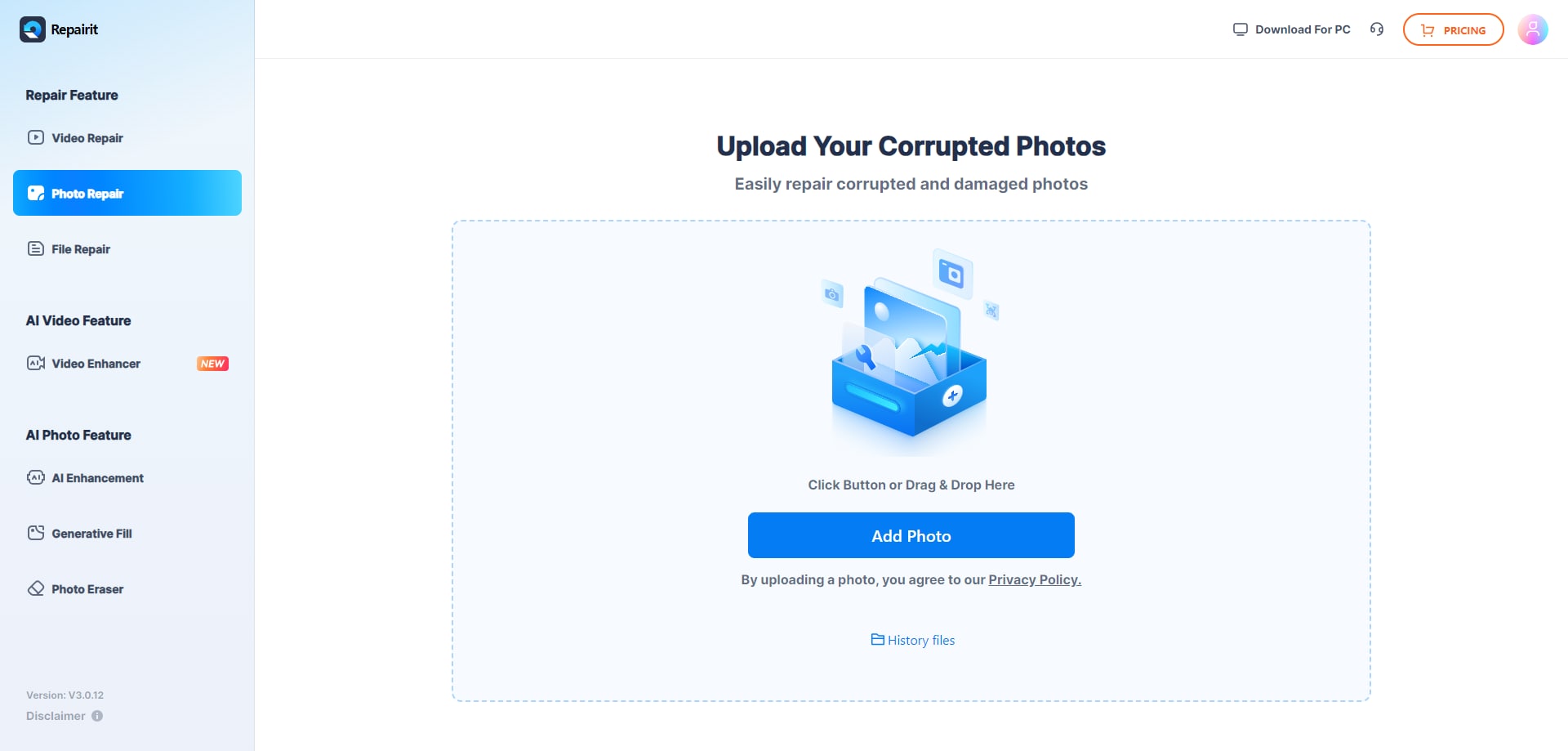
Step 1. Upload the corrupted, damaged, or unreadable photos you want to repair through Repairit Photo Repair Online.
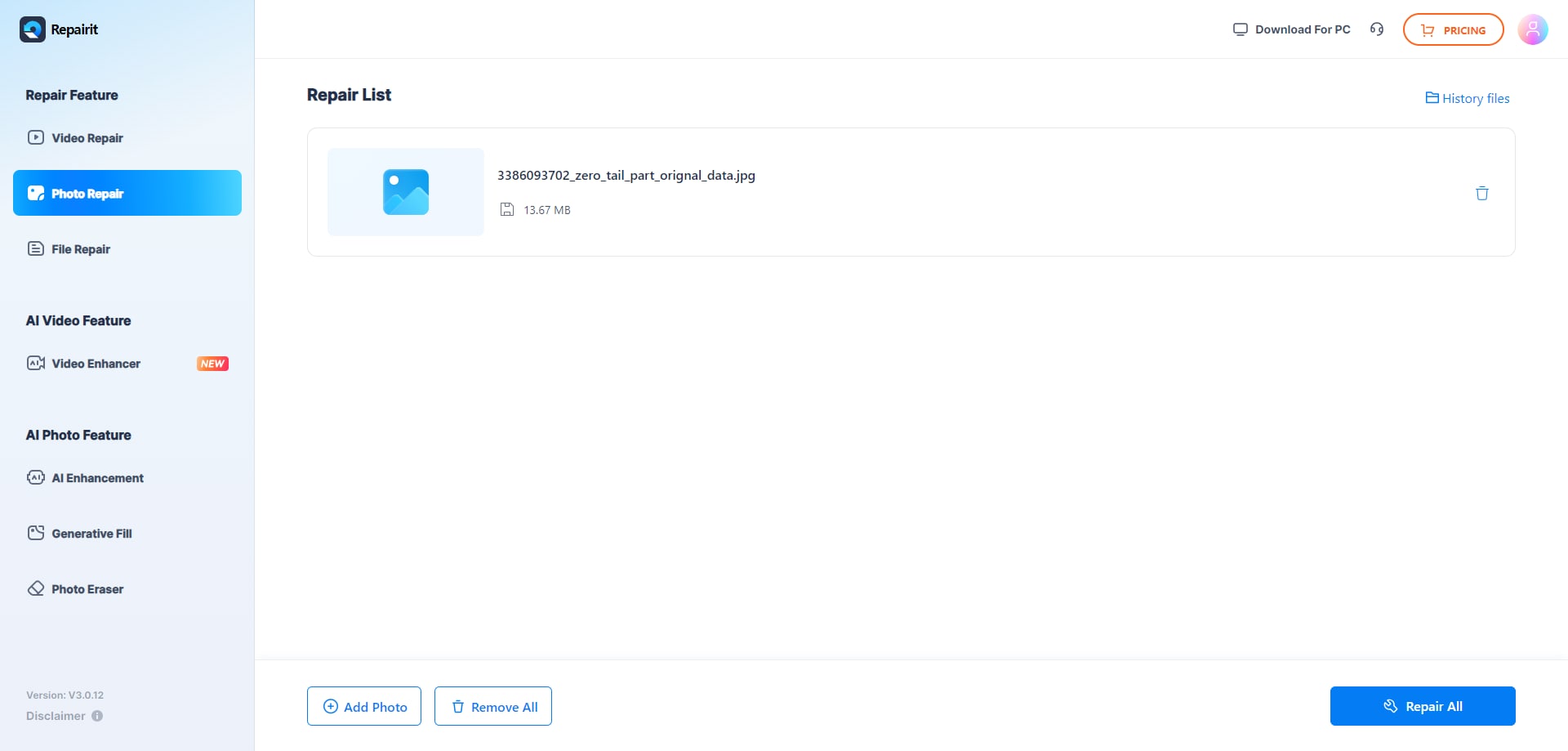
Step 2. Start the online repair process and let Repairit Photo Repair Online analyze the damaged photo files.
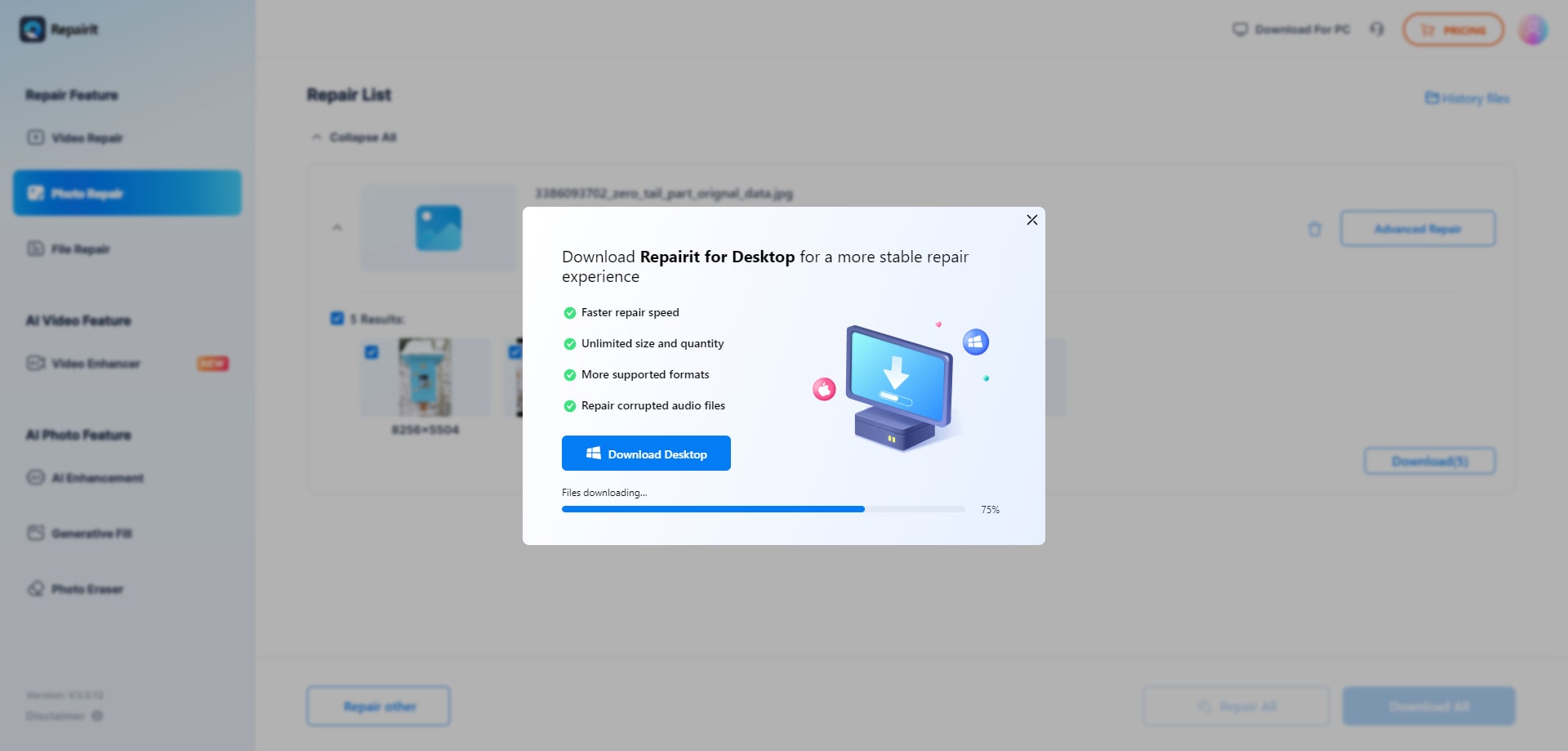
Step 3. Preview the repaired photo result when available, then save the repaired photos to your device.
In many projects, this kind of upload, repair, preview, and save loop is enough to validate whether the corrupted files are usable again or if you need to escalate to more technical workflows.
Final Verdict
The final verdict is that Repairit Photo Repair Online is more suitable when you want a guided browser based workflow to repair corrupted, damaged, or unreadable photos, while OfficeRecovery PixRecovery Online may be enough if you regularly work with PSD, JPG, PNG, TIFF, and RAW files and accept a more technical, older interface. The key difference is whether you value streamlined guidance or broad, format focused positioning. In many real-world cases, users who repair photos only occasionally lean toward Repairit Photo Repair Online, and more technical users handling varied formats may prefer OfficeRecovery PixRecovery Online.
Ultimately, both tools aim to repair corrupted photos online rather than to edit or enhance them, so your decision should revolve around repair depth, file condition, ease of use, and privacy requirements. Choosing the tool that best matches your typical files and skill level will usually have more impact on your results than minor differences in branding or interface styling.




