
Repairit Photo Repair vs Recovery Toolbox for Photoshop is a common comparison for users dealing with corrupted or damaged images, especially Photoshop PSD files. When your project files refuse to open or your photos show artifacts, blur, or strange colors, choosing suitable software can strongly influence how much quality you can bring back and how much time you spend trying different options.
When you are facing corrupted or damaged images, especially Photoshop PSD files, choosing the right repair software can save a lot of time and frustration. In this guide, we compare Repairit Photo Repair with Recovery Toolbox for Photoshop to help you decide which option fits your editing workflow, technical skills, and image formats. We look at how each tool handles PSD repair, broader photo formats, and everyday repair tasks so you can pick the most suitable way to repair corrupted photos without trial-and-error.
Repair Corrupted Photos with Repairit Photo Repair
 Security Verified. Over 7,302,189 people have downloaded it.
In this article
- Repairit Photo Repair vs Recovery Toolbox for Photoshop: Quick Verdict
- Repairit Photo Repair vs Recovery Toolbox for Photoshop: Key Differences
- Repairit Photo Repair vs Recovery Toolbox for Photoshop: Comparison Table
- What Repairit Photo Repair and Recovery Toolbox for Photoshop Are Best For
- Repairit Photo Repair vs Recovery Toolbox for Photoshop: Features and Capabilities
- Repairit Photo Repair vs Recovery Toolbox for Photoshop: Supported Formats and Compatibility
- Repairit Photo Repair vs Recovery Toolbox for Photoshop: Workflow and Ease of Use
- Repairit Photo Repair vs Recovery Toolbox for Photoshop: Pricing and Trial Options
- Who Should Choose Repairit Photo Repair
- Who Should Choose Recovery Toolbox for Photoshop
- Pros and Cons of Repairit Photo Repair and Recovery Toolbox for Photoshop
- How to Repair Corrupted Photos After Choosing the Right Tool
Repairit Photo Repair vs Recovery Toolbox for Photoshop: Quick Verdict
In most cases, Repairit Photo Repair is a better fit if you need to repair corrupted photos across several formats and care about visible quality issues such as blur, artifacts, or distortion. Repairit Photo Repair focuses on a guided, visually oriented workflow that works well for photographers and everyday users.
Recovery Toolbox for Photoshop is more narrowly focused. It concentrates on repairing damaged PSD files so they can open again in Photoshop, which can be especially useful if your main concern is preserving project structure rather than fixing a variety of image types.
Between the two, your choice generally comes down to whether you mostly handle mixed photo formats with visible defects, or primarily work inside Photoshop with PSD documents that have become corrupted.
Repairit Photo Repair vs Recovery Toolbox for Photoshop: Key Differences
The main differences between Repairit Photo Repair vs Recovery Toolbox for Photoshop revolve around the kinds of images they target, how simple they are to use, and how they fit into your editing workflow.
- Best for: Repairit suits users who handle many photo types and want to fix visual quality issues; Recovery Toolbox is better aligned with PSD-centric work.
- Ease of use: Repairit offers a more guided and visual interface that casual or non-technical users usually find straightforward. Recovery Toolbox leans more toward a technical, project-focused experience.
- Repair depth: Repairit aims to address structural issues that lead to visible problems like corruption fragments, distortion, or blur. Recovery Toolbox focuses on PSD file integrity so Photoshop can load the document again.
- Workflow: Repairit provides a standalone repair workflow around importing, repairing, previewing, and exporting photos. Recovery Toolbox is positioned as a specialist desktop utility focused on PSD structure.
- Scope: Repairit is more general-purpose across many image formats, while Recovery Toolbox stays within the narrower domain of PSD repair.
Repairit Photo Repair vs Recovery Toolbox for Photoshop: Comparison Table
| Dimension | Repairit Photo Repair | Recovery Toolbox for Photoshop |
|---|---|---|
| Best for | Users repairing a wide range of corrupted photo formats with visual defects and quality loss. | Users repairing damaged PSD files who mainly work inside Photoshop projects. |
| Ease of use | Guided, visual interface suitable for most everyday users. | More technical, desktop-focused approach that may suit experienced Photoshop users. |
| Repair depth | Designed to address structural image corruption and visible issues like distortion, blur, or artifacts. | Strong format-specific repair for PSD structure and project data integrity. |
| Workflow | Standalone photo repair workflow with simple import, scan, and export steps. | Specialist desktop workflow focused on fixing corrupted Adobe Photoshop PSD image files. |
| Strengths | Broad format support, visual previews, and options to fix common photo quality problems. | Strong format-specific repair capability for PSD files and Photoshop-centric projects. |
| Weaknesses | May feel more general-purpose than needed if you only work with PSDs. | Limited to PSD files and not designed for general photo repair across many image types. |
What Repairit Photo Repair and Recovery Toolbox for Photoshop Are Best For
Recovery Toolbox for Photoshop is a desktop repair tool for fixing corrupted Adobe Photoshop PSD image files and is best for users repairing damaged PSD files within a design or editing workflow. It is typically most helpful when your priority is to get a broken PSD document back into an openable state so you can continue working in Photoshop.
In contrast, Repairit Photo Repair aims to help you fix damaged images across multiple formats, including many common photo types. It is generally better suited if you are handling a mixture of JPEG, PNG, and other images, and you want to address issues such as visual artifacts, greyed-out photos, or pixelation.
As a result, if your main concern is a single PSD project that refuses to open, Recovery Toolbox can be a targeted option. If your concerns extend to entire photo folders with different formats and visible quality problems, Repairit tends to be the more flexible and convenient choice.
Repairit Photo Repair vs Recovery Toolbox for Photoshop: Features and Capabilities
Both tools help repair corrupted photos, but they are built with slightly different goals in mind. Repairit Photo Repair aims at general image repair, while Recovery Toolbox for Photoshop concentrates on PSD integrity. This leads to different strengths, limitations, and workflows depending on the images you handle most often.
At a basic level, their capabilities overlap in a few important ways:
- Repairit Photo Repair can import common image formats and attempt to fix visible damage or corruption.
- Recovery Toolbox for Photoshop targets corrupted PSD files and tries to restore them into an openable state.
- Both tools typically allow you to preview or validate results before saving repaired images.
When you look at more advanced usage, their focus becomes clearer:
- Repairit Photo Repair offers broader photo-focused repair for issues like distortion, artifacts, or quality loss in many formats.
- Recovery Toolbox for Photoshop provides strong format-specific repair capability tailored to PSD project files.
- Repairit Photo Repair can be more flexible when you need to fix mixed image libraries, while Recovery Toolbox for Photoshop is limited to PSD files.
In practice, this means that Repairit is often more useful for photographers, content creators, and casual users dealing with broken or low-quality photos. Recovery Toolbox is a better match for designers and Photoshop-heavy workflows where PSD structure matters more than fixing multiple image types at once.
Repairit Photo Repair vs Recovery Toolbox for Photoshop: Supported Formats and Compatibility
Supported formats are one of the clearest ways to distinguish between Repairit Photo Repair vs Recovery Toolbox for Photoshop.
Repairit Photo Repair is built to work with multiple common photo formats, making it suitable when you have damaged JPEG, PNG, or other typical image types alongside PSDs. This can be significant if you import images from different cameras, phones, and online sources, all of which may use different formats.
Recovery Toolbox for Photoshop, by contrast, concentrates on PSD files only, which is helpful if your work revolves around Photoshop documents but less convenient for mixed-format photo collections or non-PSD images.
From a compatibility perspective, both tools are designed as desktop applications, so you install them on your computer and run repairs locally. If you work primarily on a desktop or laptop, this aligns well with typical photo-editing workflows and provides a consistent environment for handling corrupted images.
Repairit Photo Repair vs Recovery Toolbox for Photoshop: Workflow and Ease of Use
Workflow and usability can make a big difference, especially when you are under time pressure to restore an important image or design.
Repairit Photo Repair offers a straightforward, guided workflow where you load damaged images, run the repair, and export fixed photos with minimal configuration. The interface focuses on clarity and visual previews, which can make it more comfortable for beginners and non-technical users who just want to fix corrupted images without dealing with complex settings.
Recovery Toolbox for Photoshop uses a more specialist desktop workflow oriented around PSD structure, which may feel familiar to technical or Photoshop-focused users but can seem more niche for casual photographers who just want to quickly fix corrupted photos. It is generally better suited to users who are comfortable thinking in terms of project files and layer-based documents.
In many situations, the smoother workflow of Repairit can make it easier to try different photos in one session, while Recovery Toolbox tends to be used more on a case-by-case basis for specific PSD problems.
Repairit Photo Repair vs Recovery Toolbox for Photoshop: Pricing and Trial Options
Repairit Photo Repair and Recovery Toolbox for Photoshop both typically offer desktop licenses, and in many cases you can try them with limited functionality before paying. Exact costs, licensing models, and trial limitations can vary over time, so it is best to check each product site directly and compare based on how often you repair images and what formats you rely on most.
When you evaluate pricing, consider factors such as:
- How frequently you expect to fix damaged images or deal with corrupted files.
- Whether you mostly handle PSDs or a mix of formats such as JPEG, PNG, and TIFF.
- Whether you prefer a one-time license, subscription, or per-file approach, depending on what each vendor currently offers.
If you only occasionally need to repair a PSD file, a lightweight, format-specific purchase may be enough. If you routinely work with large photo collections and various cameras, investing in a broader photo repair tool like Repairit may provide more ongoing value.
Who Should Choose Repairit Photo Repair
Repairit Photo Repair tends to suit users whose photo repair needs go beyond Photoshop alone. It is a practical choice for people who want a guided interface and the ability to repair several kinds of photo corruption in one place.
- Users who need to repair corrupted photos across multiple formats, not just PSD.
- Photographers and casual users who want a guided, visual workflow to fix damaged or low-quality images.
- People dealing with mixed issues like artifacts, blur, or pixelation in everyday photo libraries.
- Anyone who wants a more flexible photo repair tool for both light and moderately severe image corruption.
If you often receive images from different sources, back up photos from mobile devices, or manage archives with inconsistent formats, Repairit can help you address many issues without switching between different utilities.
Who Should Choose Recovery Toolbox for Photoshop
Recovery Toolbox for Photoshop is more narrowly aimed at users who are deeply embedded in the Photoshop ecosystem and mainly concerned with PSD integrity. It can be a compact solution if you regularly run into PSD files that refuse to open or behave unexpectedly.
- Photoshop users focused mainly on repairing damaged PSD project files.
- Designers who often encounter PSD corruption and want a format-specific repair option.
- Technical users comfortable with a specialist desktop workflow tied closely to Photoshop work.
- Teams whose repair needs are almost entirely limited to Photoshop PSD images rather than general photos.
If your photo library is relatively small, but your PSD project folder is critical to your work, a dedicated PSD tool can serve as a focused addition to your toolkit.
Pros and Cons of Repairit Photo Repair and Recovery Toolbox for Photoshop
Repairit Photo Repair Pros and Cons
Recovery Toolbox for Photoshop Pros and Cons
How to Repair Corrupted Photos After Choosing the Right Tool
Once you understand how Repairit Photo Repair vs Recovery Toolbox for Photoshop compare, the next step is actually fixing your damaged images. If you want a guided desktop workflow that can handle different photo formats and visible defects, Repairit Photo Repair offers a practical way to move from evaluation to action without changing tools later.
Key Features
In typical desktop use, Repairit focuses on several core abilities that matter when you are trying to fix damaged images quickly and consistently.
- Repairs many common image formats with an emphasis on visual quality.
- Offers previews so you can check repaired photos before saving them.
- Provides a simple, guided process suitable for everyday photo repair tasks.
Step-by-step guide
Here is a simple workflow you can follow to repair corrupted or low-quality photos on your computer using Repairit.
- Add damaged photos
Launch Repairit Photo Repair and import the damaged or corrupted photos you want to fix.
- Run the repair
Click the repair button and let the tool scan and fix the selected image files automatically.
- Preview and save
Preview the repaired results and save the fixed photos to your preferred location.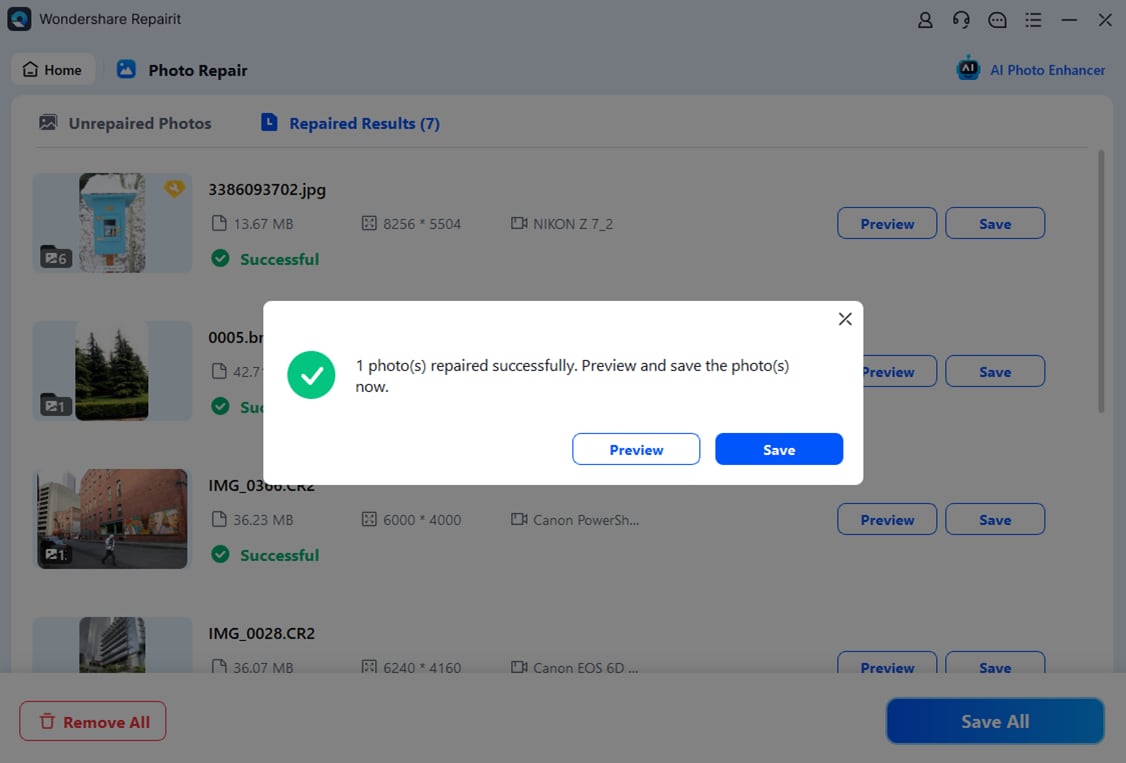
Final Verdict
When you compare Repairit Photo Repair vs Recovery Toolbox for Photoshop, the better choice depends strongly on what you are trying to fix.
When you need to fix a variety of corrupted images, including everyday photos with artifacts, blur, or quality loss, Repairit Photo Repair is generally a stronger choice thanks to its broader format support and guided workflow. It suits photographers, casual users, and anyone managing mixed image libraries.
Recovery Toolbox for Photoshop may be enough if your main problem is damaged PSD files and your work stays inside Photoshop. In that case, its specialist desktop focus on PSD repair can be a practical, format-specific complement to more general photo repair tools.
For many users, using Repairit as a primary way to repair corrupted photos, and keeping a PSD-specific utility available when you hit a difficult Photoshop document, can provide a balanced and flexible setup.
Next: Repairit Photo Repair vs Hetman File Repair
FAQ
-
1. Is Repairit Photo Repair better than Recovery Toolbox for Photoshop for everyday photo repair?
For everyday tasks involving multiple image formats, Repairit Photo Repair is usually more flexible and convenient, while Recovery Toolbox for Photoshop tends to be more suitable when you mainly deal with corrupted PSD project files. -
2. When should I choose Recovery Toolbox for Photoshop over Repairit Photo Repair?
You might choose Recovery Toolbox for Photoshop if your primary goal is to repair damaged PSD documents and keep working in Photoshop, and you rarely need to fix other types of photos. -
3. Can Repairit Photo Repair fix PSD files as well as other photo formats?
Repairit Photo Repair is designed to handle various damaged image formats, including some project-based files, but its main strength is broad photo repair across common image types rather than focusing only on PSD structure.




