
Repairit Photo Repair vs Hetman File Repair is a common comparison for users who just want to fix corrupted or blurry photos without getting lost in complex tools. Choosing between these two options can feel confusing when you simply need to repair damaged images quickly and see if the results look acceptable.
Repairit Photo Repair focuses on dedicated photo repair with guided steps and a visual preview, while Hetman File Repair is a broader desktop utility for repairing multiple file types, including image files and some RAW formats. This guide explains how each tool fits into your workflow, how they handle corrupted pictures, and when a photo-centered solution like Repairit may save you more time and frustration.
In the sections below, you will see how the tools differ in ease of use, supported formats, typical use cases, and what type of user each one tends to suit best. The goal is to help you decide which approach matches your current image repair problem rather than pushing a single tool as a one-size-fits-all answer.
Repair Corrupted Photos with Repairit Photo Repair
 Security Verified. Over 7,302,189 people have downloaded it.
In this article
- Repairit Photo Repair vs Hetman File Repair: Quick Verdict
- Repairit Photo Repair vs Hetman File Repair: Key Differences
- Repairit Photo Repair vs Hetman File Repair: Comparison Table
- What Repairit Photo Repair and Hetman File Repair Are Best For
- Repairit Photo Repair vs Hetman File Repair: Features and Capabilities
- Repairit Photo Repair vs Hetman File Repair: Supported Formats and Compatibility
- Repairit Photo Repair vs Hetman File Repair: Workflow and Ease of Use
- Repairit Photo Repair vs Hetman File Repair: Pricing and Trial Options
- Who Should Choose Repairit Photo Repair
- Who Should Choose Hetman File Repair
- Pros and Cons of Repairit Photo Repair and Hetman File Repair
- How to Repair Corrupted Photos After Choosing the Right Tool
Repairit Photo Repair vs Hetman File Repair: Quick Verdict
If your main goal is to repair corrupted photos, fix visual artifacts, or improve blurry and pixelated pictures, Repairit Photo Repair is usually a stronger fit thanks to its photo-focused workflow and guided preview-based process.
If you are dealing with a broader mix of corrupted files, including images and other document types on a desktop system, Hetman File Repair may be enough because it is positioned as a general file repair utility that includes image repair among its capabilities.
In short, choose Repairit when you want a dedicated, visual approach to photo repair. Choose Hetman when you need a more technical, multi-file repair utility and are comfortable with a utility-style interface.
Repairit Photo Repair vs Hetman File Repair: Key Differences
Although both tools can help fix damaged image files, the way they approach the task is quite different. Understanding these contrasts will make it easier to decide which one matches your situation:
- Focus and scope: Repairit centers on photo repair and restoring photo quality, whereas Hetman File Repair is oriented toward repairing multiple file categories, with images being one of them.
- Ease of use: Repairit provides a guided, visual workflow designed for non-technical users, while Hetman File Repair uses a more traditional utility layout that can feel more complex if you only care about photos.
- Repair depth for photos: Repairit emphasizes visual improvements such as fixing artifacts and certain types of distortion, while Hetman tends to focus more on structural file repair so the image opens again.
- Typical user: Repairit suits photographers and everyday users who mainly want to fix broken pictures. Hetman is more oriented toward technically inclined users managing various damaged files in a desktop environment.
- RAW and mixed-format workflows: Hetman File Repair is positioned to support RAW formats and other file types, which can be useful in mixed workflows. Repairit targets many common photo and camera image formats and is more specialized for image-only tasks.
Repairit Photo Repair vs Hetman File Repair: Comparison Table
| Dimension | Repairit Photo Repair | Hetman File Repair |
|---|---|---|
| Best for | Users focused on repairing corrupted, blurry, or pixelated photos with a photo-specific tool. | Users needing a desktop utility to fix a mix of corrupted image files and other document types. |
| Ease of use | Guided, visual workflow tailored to photo repair tasks. | More technical, utility-style interface that may require familiarity with file tools. |
| Repair depth | Designed for deeper image reconstruction and restoring photo quality in many common corruption cases. | Practical for basic structural fixes on damaged files, depending on the issue. |
| Workflow | Streamlined, step-by-step photo repair process with preview-focused flow. | Technical and utility-style workflow with more general file repair options. |
| Strengths | Strong focus on image quality, dedicated photo repair logic, user-friendly design. | Supports multiple file types and RAW formats, suitable for mixed file repair scenarios. |
| Weaknesses | Less focused on non-image file repair; dedicated mainly to photos. | Less photo-specific positioning and broader tool scope may feel complex for pure photo repair needs. |
What Repairit Photo Repair and Hetman File Repair Are Best For
The right choice depends on what kind of files you are fixing and how you prefer to work.
Repairit Photo Repair is aimed at users who mostly deal with photos. It is particularly helpful when:
- You need to repair corrupted photos that will not open or display correctly.
- You are frustrated with blurry, pixelated, or distorted images from cameras or phones.
- You prefer a clean, image-centered interface that walks you through adding, repairing, and previewing photos.
Hetman File Repair, by contrast, is positioned as a desktop file repair utility. It tends to be a better fit when:
- You want one tool to address a variety of damaged files, including images and some other document types.
- You are comfortable with more technical utilities and do not mind a less visual interface.
- You work with RAW formats and mixed content from different devices in a desktop environment.
In practice, many users who only care about photo quality find a dedicated photo repair tool more straightforward, while IT-oriented or power users may prefer the flexibility of a broader file repair utility.
Repairit Photo Repair vs Hetman File Repair: Features and Capabilities
Both tools aim to fix damaged images, but they differ in how their features are organized and what they emphasize.
Overall feature focus
Both Repairit Photo Repair and Hetman File Repair aim to fix damaged images, but they differ in focus. Repairit is tuned for photo-specific issues like distorted or pixelated pictures, while Hetman File Repair is built as a broader desktop utility that supports multiple file types and practical repair use cases. That wider scope can be helpful in mixed environments, though it may feel less specialized for photo-only work.
Core capabilities
- Repairit Photo Repair offers simple add, scan, and preview steps focused on corrupted photos.
- Hetman File Repair provides desktop-based repair for various image formats and selected other file types.
- Both tools help fix damaged image structure so files can open more reliably.
More advanced or specialized abilities
- Repairit Photo Repair can handle more severe photo corruption in many typical scenarios with targeted image repair logic.
- Hetman File Repair supports RAW image formats, which is useful for users working with camera source files and technical workflows.
- Repairit Photo Repair focuses on restoring photo quality, such as fixing visual artifacts, which benefits users dealing with blurry or pixelated images.
When deciding between them, ask whether you need specialized improvement to how your photos look, or whether your priority is simply getting a variety of corrupted files to open again.
Repairit Photo Repair vs Hetman File Repair: Supported Formats and Compatibility
Supported formats and devices can determine whether a tool fits your specific photo library or project.
Repairit Photo Repair focuses on common photo formats and many camera images, making it practical for users dealing mainly with JPEGs and similar files. This orientation tends to suit people working with phone photos, social media images, or standard camera outputs that arrive as widely used image formats.
Hetman File Repair, according to its positioning, supports multiple file types and RAW formats on desktop systems, which can be valuable for photographers and advanced users handling original camera files alongside other document types. In mixed-format environments where you encounter corrupted RAW files and documents at the same time, this broader scope may feel convenient.
For pure photo use, Repairit is more specialized, while Hetman may be more appropriate for users managing a variety of corrupted content on a desktop machine.
Repairit Photo Repair vs Hetman File Repair: Workflow and Ease of Use
The way each tool guides you through photo repair matters just as much as the underlying technology, especially if you are under time pressure.
Repairit Photo Repair offers a streamlined, guided flow that walks you from importing photos to previewing repaired images, which feels approachable even for non-technical users. The interface keeps the focus on your pictures, so you can quickly see which files you added, what is being repaired, and how the results look before saving anything.
Hetman File Repair follows a more technical and utility-style workflow, aligning with users who already work with desktop file tools and do not mind a less visual experience. You may see more generic file lists and options that apply to different data types, which can be helpful in advanced scenarios yet slightly intimidating if you just want to fix a few photos.
The key difference is that Repairit centers every step on images, while Hetman treats photos as part of a broader file repair task. If you want simplicity and visual feedback, the Repairit approach may feel more comfortable.
Repairit Photo Repair vs Hetman File Repair: Pricing and Trial Options
Both tools typically provide some form of trial or limited evaluation so you can test image repair tools on your own files before paying.
Repairit Photo Repair is usually licensed as dedicated photo repair software. Its pricing tends to reflect its specialization in photo corruption issues and the emphasis on a guided desktop workflow.
Hetman File Repair is positioned as a broader desktop utility. Its licensing often takes into account the ability to work with several file types, not just images.
Because pricing, license types, and feature limits can change over time, it is sensible to check each vendor site directly for current information. When comparing costs, think about how often you expect to repair corrupted photos, whether you also need to fix other file types, and which workflow will save you the most time in everyday use.
Who Should Choose Repairit Photo Repair
Repairit Photo Repair suits users who want a focused solution for restoring photo quality rather than a general-purpose utility. It tends to be a better fit if you recognize yourself in the points below:
- Users primarily focused on repairing corrupted, blurry, or pixelated photos.
- People who prefer a guided, visual workflow over technical file utilities.
- Photographers and everyday users needing help with more severe photo corruption in common formats.
- Anyone who values a photo-centered interface instead of a general-purpose file tool.
If your main pain point is that certain photos will not open or look heavily distorted, and you want a straightforward way to see before-and-after results, Repairit aligns closely with that scenario.
Who Should Choose Hetman File Repair
Hetman File Repair may be more attractive if your needs go beyond photos or if you are comfortable with classic desktop utilities. It is likely to suit you if:
- Users repairing broken image files after transfer or system errors on desktop systems.
- People who want one utility to handle multiple file types, not just photos.
- More technical users comfortable with a utility-style workflow and broader tool scope.
- Photographers working with RAW formats who also need to fix other document types occasionally.
If you often manage mixed data and appreciate tools that can address several file types in one place, Hetman File Repair can fit into that workflow, provided you do not mind the less photo-specific interface.
Pros and Cons of Repairit Photo Repair and Hetman File Repair
Looking at pros and cons side by side can clarify which trade-offs you are more comfortable with.
Repairit Photo Repair Pros and Cons
Hetman File Repair Pros and Cons
How to Repair Corrupted Photos After Choosing the Right Tool
Once you have compared Repairit Photo Repair vs Hetman File Repair and decided which style of tool suits you, the next step is actually fixing your corrupted or blurry images. For many users, a guided desktop workflow can make this less stressful, especially if you are not used to working with technical utilities.
In this context, Repairit Photo Repair offers a straightforward way to go from damaged files to previewing repaired results. Below is an overview of how that process works in practice.
Key Features
- Dedicated engine for repairing corrupted and distorted photos in common formats.
- Preview of repaired images before export to confirm visual quality.
- Simple workflow that guides users from import to final photo saving.
Step-by-step guide
- Add damaged photos
Launch Repairit Photo Repair and import the damaged or corrupted photos you want to fix.
- Run the repair
Click the repair button and let the tool scan and fix the selected image files automatically.
- Preview and save
Preview the repaired results and save the fixed photos to your preferred location.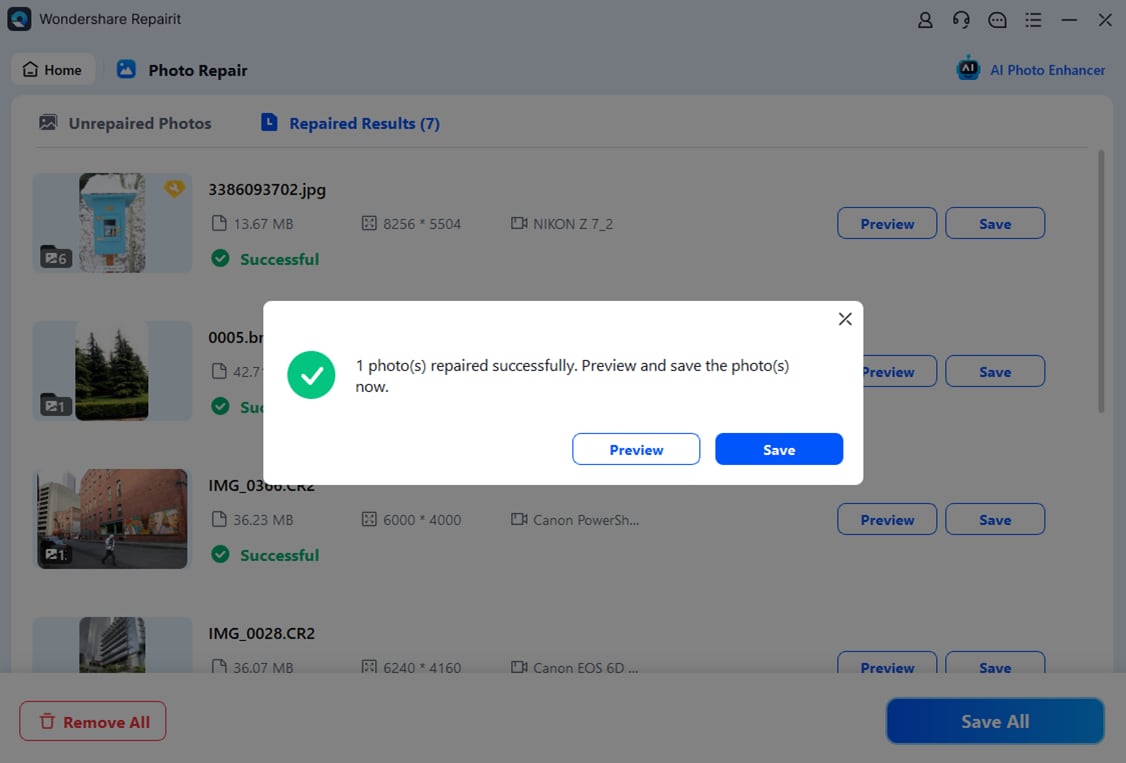
These steps keep the focus on your images, making it easier to evaluate whether the repaired files are good enough for sharing, printing, or archiving.
Final Verdict
Repairit Photo Repair is a stronger choice for users who mainly care about fixing corrupted, blurry, or pixelated photos and want a guided, image-centered workflow. Its design, previews, and focus on restoring photo quality make it suitable for a wide range of everyday and professional photo repair needs.
Hetman File Repair may still be enough if you work in a more technical environment, need to repair multiple file types, or rely on RAW formats as part of a broader desktop workflow. In that case, its utility-style design and wider scope can be useful, provided you are comfortable with a less photo-specific experience.
Ultimately, the best option depends on whether you value a specialized, easy-to-follow photo repair experience or a single desktop utility that can address several kinds of corrupted files at once.
Next: Repairit Photo Repair vs Datanumen Image Repair
FAQ
-
1. Is Repairit Photo Repair better than Hetman File Repair for fixing corrupted photos?
Repairit Photo Repair is usually a stronger choice if your main goal is repairing corrupted photos with a guided, visual workflow, while Hetman File Repair can be enough when you also need to handle other file types. -
2. When should I choose Hetman File Repair instead of Repairit Photo Repair?
Choose Hetman File Repair if you are repairing broken image files and RAW formats after transfer or system errors and also want one desktop utility that can work with various non-image files. -
3. Can both Repairit Photo Repair and Hetman File Repair handle RAW image formats?
Hetman File Repair is positioned to support RAW formats as part of its broader scope. Repairit Photo Repair can work with many camera images, but you should confirm specific RAW support on the product site for your camera model.




