
Repairit Photo Repair vs DataNumen Image Repair is a common comparison for anyone trying to fix corrupted, pixelated, or unopenable photos. Choosing between them can feel confusing when your images show distortion, strange colors, or file errors. DataNumen Image Repair is generally viewed as a more technical desktop option for tackling severely damaged image files, while Repairit Photo Repair focuses on guiding users through repairs with an approachable, step-based experience. This article breaks down how each tool handles typical and complex photo repair scenarios so you can decide which one fits your skills, workflow, and the level of damage in your images.
Repair Corrupted Photos with Repairit Photo Repair
 Security Verified. Over 7,302,189 people have downloaded it.
In this article
- Repairit Photo Repair vs DataNumen Image Repair: Quick Verdict
- Repairit Photo Repair vs DataNumen Image Repair: Key Differences
- Repairit Photo Repair vs DataNumen Image Repair: Comparison Table
- What Repairit Photo Repair and DataNumen Image Repair Are Best For
- Repairit Photo Repair vs DataNumen Image Repair: Features and Capabilities
- Repairit Photo Repair vs DataNumen Image Repair: Supported Formats and Compatibility
- Repairit Photo Repair vs DataNumen Image Repair: Workflow and Ease of Use
- Repairit Photo Repair vs DataNumen Image Repair: Pricing and Trial Options
- Who Should Choose Repairit Photo Repair
- Who Should Choose DataNumen Image Repair
- Pros and Cons of Repairit Photo Repair and DataNumen Image Repair
- How to Repair Corrupted Photos After Choosing the Right Tool
Repairit Photo Repair vs DataNumen Image Repair: Quick Verdict
If you mainly need a clear, guided way to repair corrupted photos, Repairit Photo Repair is often more comfortable, especially for beginners and casual users. When you frequently work with highly corrupted image files and are willing to manage a more technical workflow, DataNumen Image Repair can be a better match.
In practice, many people will find Repairit easier for everyday distorted, pixelated, or unopenable photos, while DataNumen may be more attractive to users who expect to tweak settings and spend more time on deep repair attempts.
Repairit Photo Repair vs DataNumen Image Repair: Key Differences
The key difference between Repairit Photo Repair vs DataNumen Image Repair lies in how they balance repair depth and usability. Repairit emphasizes an accessible, visual interface that walks you through importing, repairing, and previewing photos with minimal setup. DataNumen Image Repair leans toward a more advanced, technical style that can feel powerful but less intuitive.
From a user perspective, this affects:
- Ease of use: Repairit aims for clarity and simplicity; DataNumen tends to assume more technical comfort.
- Repair depth: Both attempt to fix corrupted or damaged images, with DataNumen positioned more for severe corruption scenarios.
- Workflow: Repairit focuses on a streamlined, step-based flow; DataNumen offers more detailed options that may require experimentation.
- Ideal audience: Repairit is suited to photographers, content creators, and general users; DataNumen may fit IT staff, power users, or anyone frequently facing complex corruption.
Repairit Photo Repair vs DataNumen Image Repair: Comparison Table
| Dimension | Repairit Photo Repair | DataNumen Image Repair |
|---|---|---|
| Best for | Users who want guided photo repair for a wide range of corrupted or visually damaged images. | Users needing deep repair for highly corrupted images and who are comfortable with technical settings. |
| Ease of use | More beginner-friendly with a straightforward, visual workflow. | Less beginner-friendly with more technical options to manage. |
| Repair depth | Strong at repairing common and advanced corruption issues for typical user scenarios. | Positioned for deeper repair attempts on severely corrupted image files. |
| Workflow | Simplified, step-based process suitable for non-technical users. | Advanced and technical workflow that can require more setup and understanding. |
| Strengths | Intuitive interface, helpful previews, and balanced repair depth for everyday and complex cases. | Strong recovery capability for severe corruption and advanced control over repair attempts. |
| Weaknesses | May feel less configurable for highly technical users who want fine-grained control. | Complex workflow and learning curve can slow down beginners or casual users. |
What Repairit Photo Repair and DataNumen Image Repair Are Best For
Both tools focus on fixing damaged image files, but they serve slightly different needs.
Repairit Photo Repair is generally best for:
- Fixing everyday corrupted, blurry, or pixelated photos from cameras, phones, or computers.
- Users who want to restore photo quality without learning complex settings.
- Situations where you need a simple way to process multiple damaged images in one go.
DataNumen Image Repair is typically best for:
- Highly corrupted image files where lighter tools struggle to open or render the photo.
- Users who do not mind a more technical, option-heavy workflow.
- Environments where you expect to experiment with more advanced repair attempts.
Repairit Photo Repair vs DataNumen Image Repair: Features and Capabilities
Core approach
Both tools aim to fix damaged images and improve their usability, but they emphasize different aspects. According to the overview, DataNumen Image Repair is positioned as advanced desktop image repair software for severely damaged files, while Repairit focuses on combining powerful repair with a guided, user-friendly experience.
Shared, basic capabilities typically include:
- Import corrupted or damaged image files for repair.
- Attempt to fix visual issues like distortion or unreadable images.
- Preview repaired photos before saving when supported.
Advanced capabilities and differences
- Repairit Photo Repair offers guided repair modes intended to handle a range of corruption levels with minimal manual tuning. It tends to streamline options so the user focuses more on selecting files and checking previews rather than configuring detailed parameters.
- DataNumen Image Repair leans toward strong repair attempts for more severe corruption and a more technical configuration style. It may appeal to users who want more control and do not mind exploring advanced options.
- In most cases, Repairit will feel faster to get started with, whereas DataNumen may invite more experimentation for edge cases or heavily corrupted images.
Overall, the choice comes down to whether you value simplicity and guidance or prefer a tool that exposes more technical knobs for in-depth repair attempts.
Repairit Photo Repair vs DataNumen Image Repair: Supported Formats and Compatibility
Both Repairit Photo Repair and DataNumen Image Repair operate as desktop programs and typically support common image formats such as JPG, JPEG, PNG, and similar widely used file types. The exact list may vary by version, so it is worth checking each vendor for detailed format support if you work with more niche image types.
From the information provided, both tools are generally aimed at standard Windows desktop environments, with Repairit also commonly available for macOS. They are designed for repairing images stored on typical devices and media, such as computers, memory cards, and cameras, rather than being tied to a particular camera brand or hardware.
If you mostly work with mainstream photo formats from phones and DSLRs, either tool is likely to cover your needs. If your workflow involves rare or proprietary formats, you may want to confirm support before committing.
Repairit Photo Repair vs DataNumen Image Repair: Workflow and Ease of Use
Workflow is one of the clearest distinctions in the Repairit Photo Repair vs DataNumen Image Repair comparison.
Repairit Photo Repair offers a simple, guided workflow designed for non-technical users:
- A step-based interface that walks you through adding, repairing, and previewing photos.
- Minimal need to adjust complex settings before starting the repair.
- Visual previews that help you quickly judge whether the repaired result meets your expectations.
DataNumen Image Repair uses a more advanced and technical workflow:
- May require more configuration and understanding of how different options influence repair attempts.
- Can feel more powerful for experienced users but less intuitive for beginners.
- Better suited to users comfortable reading technical prompts and iterating through different repair attempts.
This difference matters if you prioritize speed and clarity over granular control. Users who want to fix corrupted photos with as little friction as possible often prefer a guided experience like Repairit. Those who frequently work with severe corruption and are comfortable experimenting with settings may lean toward a technical workflow like DataNumen.
Repairit Photo Repair vs DataNumen Image Repair: Pricing and Trial Options
Both Repairit Photo Repair and DataNumen Image Repair are typically available as paid desktop applications. In many cases, you can expect some form of trial or demo mode so you can test repair results before deciding whether to purchase.
However, exact pricing and license structures can change over time. They may differ in aspects such as:
- One-time licenses versus subscription plans.
- Limitations on the number of photos or file size in the trial version.
- Whether watermarks or partial-saving restrictions apply during testing.
Because these details can vary by version and promotion, it is best to check the current offers on each vendor website. When comparing, focus on how trial limitations affect your ability to evaluate real repair quality on your own blurred, pixelated, or corrupted photos.
Who Should Choose Repairit Photo Repair
Repairit Photo Repair is likely to be a better fit if you value an intuitive experience and want to fix damaged images without dealing with technical complexity. According to the guidelines provided, it is especially suitable for:
- Users who want an intuitive, step-by-step interface to repair corrupted or visually damaged photos.
- Photographers and content creators who need a practical tool to fix multiple images without a steep learning curve.
- People who prefer guided workflows and clear previews over manual configuration.
- Anyone who occasionally works with damaged photos and values a balance of power and simplicity.
If you often share photos with clients, friends, or on social media and simply need a reliable way to clean up distorted, greyed-out, or unopenable pictures, Repairit offers a straightforward path from import to export.
Who Should Choose DataNumen Image Repair
DataNumen Image Repair may be more suitable if your typical image issues are severe and you are comfortable with a more technical repair environment. Based on the provided profile, it is best for:
- Users needing deep repair for highly corrupted images where basic tools struggle.
- Technically inclined users who do not mind an advanced and technical workflow.
- IT professionals or power users handling complex corruption scenarios on desktop systems.
- People who are comfortable spending more time configuring repairs to try extracting as much image data as possible.
If you often encounter files that fail to open or display heavy corruption artifacts and you are willing to spend extra time testing different repair passes, a tool with more advanced controls like DataNumen can make sense.
Pros and Cons of Repairit Photo Repair and DataNumen Image Repair
When deciding between Repairit Photo Repair vs DataNumen Image Repair, it helps to see their strengths and trade-offs side by side.
Repairit Photo Repair Pros and Cons
DataNumen Image Repair Pros and Cons
How to Repair Corrupted Photos After Choosing the Right Tool
Once you understand the differences between Repairit Photo Repair vs DataNumen Image Repair, the next step is actually fixing your corrupted or pixelated photos. No matter which tool you compare, you ultimately need a workflow that feels manageable and gives you clear feedback on the repaired images.
For users who prefer a guided, desktop-based process, Repairit Photo Repair offers a straightforward way to move from importing damaged images to previewing the fixed results. Below is a closer look at how that works in practice.
Key Features
- Straightforward interface with guided photo repair steps.
- Support for repairing multiple corrupted images in a single session.
- Preview of repaired photos before saving the final files.
Step-by-step guide
- Add damaged photos
Launch Repairit Photo Repair and import the damaged or corrupted photos you want to fix.
- Run the repair
Click the repair button and let the tool scan and fix the selected image files automatically.
- Preview and save
Preview the repaired results and save the fixed photos to your preferred location.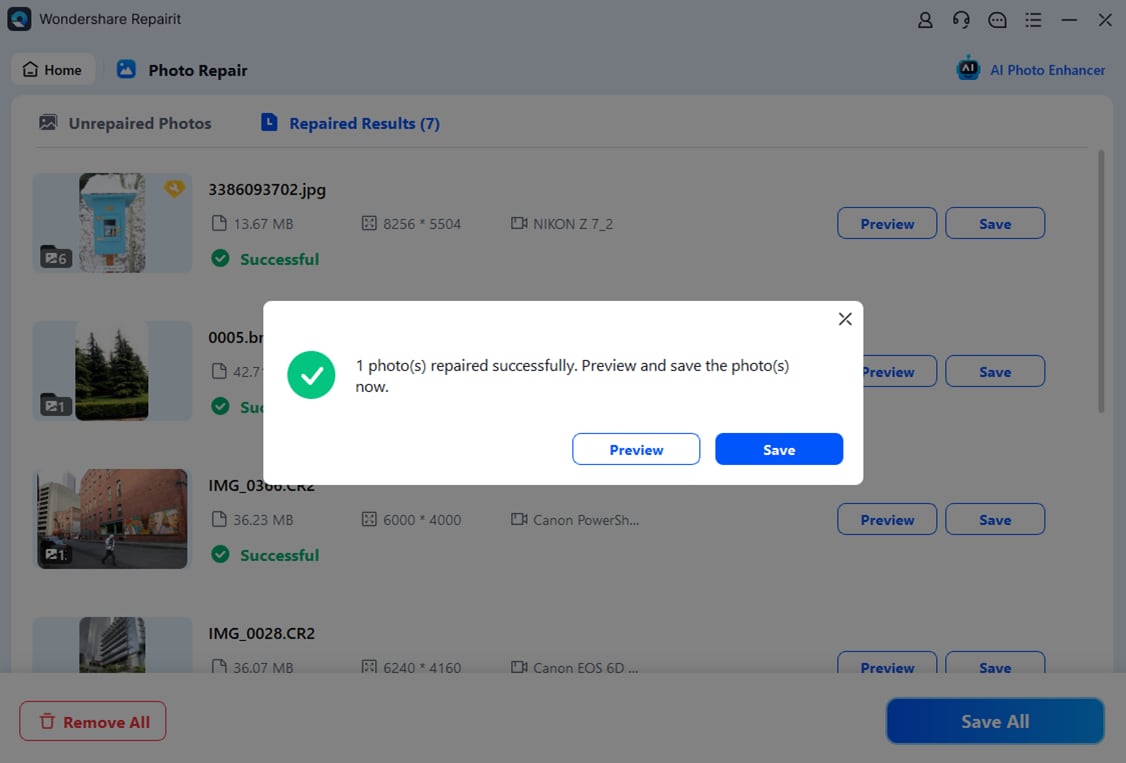
Final Verdict
When comparing Repairit Photo Repair vs DataNumen Image Repair, the right choice depends on how damaged your images are and how comfortable you are with technical workflows.
Repairit Photo Repair is a stronger choice if you want an approachable way to repair corrupted, distorted, or low-quality photos with a guided workflow. It suits users who prioritize ease of use, quick results, and clear previews over complex tuning, and who mainly deal with typical real-world image corruption.
DataNumen Image Repair can be a better fit when you regularly handle highly corrupted images and are comfortable with an advanced, technical workflow. If you prefer detailed control and do not mind a learning curve, it may match your needs for deep repair attempts.
For most people who just want to fix damaged images efficiently and with minimal friction, Repairit Photo Repair will likely feel more straightforward and less intimidating, while still offering solid repair capabilities for a wide range of problems.
Next: Repairit Photo Repair vs Sysinfo Photo Repair
FAQ
-
1. Which is easier to use, Repairit Photo Repair or DataNumen Image Repair?
Repairit Photo Repair is generally easier for most users because of its guided, step-based workflow, while DataNumen Image Repair uses a more advanced, technical process that tends to suit experienced users. -
2. When should I choose DataNumen Image Repair over Repairit Photo Repair?
Choose DataNumen Image Repair if you often handle highly corrupted images and are comfortable navigating a complex desktop workflow that may offer deeper repair attempts. -
3. Can both tools fix corrupted or pixelated photos?
Yes, both are designed to repair corrupted or visually damaged photos. Repairit focuses on an intuitive experience, while DataNumen Image Repair emphasizes advanced handling of severe corruption.




