
Choosing a reliable desktop tool to repair corrupted photos can be confusing when options look similar. In this comparison, we look at Repairit Photo Repair alongside SysInfo Photo Repair to show where each tool fits. Both aim to fix damaged or distorted images, but they differ in workflow, repair depth, and how friendly they feel for everyday users. By the end, you will see when a simple solution like SysInfo Photo Repair may be enough and when Repairit Photo Repair offers more flexibility for complex image issues.
Repair Corrupted Photos with Repairit Photo Repair
 Security Verified. Over 7,302,189 people have downloaded it.
In this article
- Repairit Photo Repair vs SysInfo Photo Repair: Quick Verdict
- Repairit Photo Repair vs SysInfo Photo Repair: Key Differences
- Repairit Photo Repair vs SysInfo Photo Repair: Comparison Table
- What Repairit Photo Repair and SysInfo Photo Repair Are Best For
- Repairit Photo Repair vs SysInfo Photo Repair: Features and Capabilities
- Repairit Photo Repair vs SysInfo Photo Repair: Supported Formats and Compatibility
- Repairit Photo Repair vs SysInfo Photo Repair: Workflow and Ease of Use
- Repairit Photo Repair vs SysInfo Photo Repair: Pricing and Trial Options
- Who Should Choose Repairit Photo Repair
- Who Should Choose SysInfo Photo Repair
- Pros and Cons of Repairit Photo Repair and SysInfo Photo Repair
- How to Repair Corrupted Photos After Choosing the Right Tool
Repairit Photo Repair vs SysInfo Photo Repair: Quick Verdict
Both Repairit Photo Repair and SysInfo Photo Repair are desktop tools focused on fixing corrupted or visually damaged image files. The better fit depends on how complex your photo issues are and how much guidance you want while repairing them.
In most cases, Repairit Photo Repair is the stronger choice for users who handle a wider variety of damaged photos, want previews, and appreciate a more guided, modern interface. SysInfo Photo Repair tends to suit users who mainly face straightforward corruption and prefer a simple, traditional layout without many extra options.
- Choose Repairit Photo Repair if you regularly work with mixed image sources, encounter more severe corruption, or want clearer guidance while you repair.
- Choose SysInfo Photo Repair if your typical cases are mild corruption in common formats and you just need a basic, repeatable repair routine.
Repairit Photo Repair vs SysInfo Photo Repair: Key Differences
The main differences between Repairit Photo Repair vs SysInfo Photo Repair come down to workflow design, repair depth, and how much control you want during the process.
- Best for: Repairit Photo Repair is aimed at users needing flexible, guided repairs for a wide mix of corrupted or severely damaged photos. SysInfo Photo Repair is better for users handling common photo corruption issues in a straightforward desktop tool.
- Ease of use: Repairit uses a modern, guided interface that walks users through each step. SysInfo uses a simpler, more traditional layout that keeps the workflow basic.
- Repair depth: Repairit is designed to handle a range of issues, from basic corruption to more complex damage in many everyday scenarios. SysInfo focuses more on standard corruption problems where basic repair is usually enough.
- Workflow: Repairit follows a streamlined add, preview, repair, and download flow with prompts. SysInfo centers on loading, scanning, and repairing images with fewer extras.
- Strengths: Repairit offers user-friendly design, flexible options, and support for many real-world corruption situations. SysInfo stands out for its straightforward, repeatable repair routine across multiple image formats.
- Weaknesses: Repairit may feel more feature heavy than necessary for very occasional fixes. SysInfo has limited advanced capabilities, which can restrict results on severely damaged photos.
Repairit Photo Repair vs SysInfo Photo Repair: Comparison Table
| Dimension | Repairit Photo Repair | SysInfo Photo Repair |
|---|---|---|
| Best for | Users needing flexible, guided repairs for a wide mix of corrupted or severely damaged photos. | Users handling common photo corruption issues in a straightforward desktop tool. |
| Ease of use | Modern, guided interface that walks users through the repair process step by step. | Simple, traditional layout that keeps the workflow basic for straightforward jobs. |
| Repair depth | Designed to handle a range of visual issues, from basic corruption to more complex damage in many cases. | Suited to typical corruption problems where only standard repair is required. |
| Workflow | Streamlined add-preview-repair-download process with clear prompts. | Simple workflow focused on loading, scanning, and repairing images with minimal extras. |
| Strengths | User-friendly design, flexible repair options, and support for many real-world corruption scenarios. | Supports multiple formats with a simple repair workflow that is easy to repeat for similar tasks. |
| Weaknesses | May feel more feature heavy than needed for occasional, very basic fixes. | Limited advanced capabilities, which can restrict results on more severely damaged photos. |
What Repairit Photo Repair and SysInfo Photo Repair Are Best For
Both tools are desktop software for repairing corrupted image files across common formats. Repairit Photo Repair focuses on guided workflows and broader repair scenarios, while SysInfo Photo Repair is best for users handling common photo corruption issues who value a simple, repeatable routine over advanced controls.
- Repairit Photo Repair is well suited for photographers, content creators, and everyday users who frequently receive images from multiple cameras or phones and sometimes face severe corruption, color issues, or visible artifacts.
- SysInfo Photo Repair tends to fit office users, home users, and support staff who mostly deal with typical image corruption, such as photos that will not open or look slightly distorted, and who prefer a minimal interface.
Repairit Photo Repair vs SysInfo Photo Repair: Features and Capabilities
Repairit Photo Repair and SysInfo Photo Repair aim to repair corrupted photos and fix damaged images, but they differ in how deep their feature sets go. Repairit leans into flexible repair options and a more guided experience, while SysInfo emphasizes a simple workflow with support for multiple formats but fewer advanced capabilities.
Basic capabilities
- Repairit Photo Repair: repair corrupted photos with a straightforward add-and-fix approach, supported by prompts and previews.
- SysInfo Photo Repair: support for multiple common image formats with a simple repair workflow centered on scanning and fixing.
- Both: focus on restoring photo quality in damaged or visually distorted files rather than recovering deleted content.
Advanced capabilities
- Repairit Photo Repair: more robust handling of challenging corruption scenarios for a wider range of users, especially when images appear heavily distorted or partially greyed out.
- Repairit Photo Repair: guided previews to help you assess results before saving fixed images, which can reduce the risk of overwriting files you still need to compare.
- SysInfo Photo Repair: light advanced options that extend beyond the most basic fixes but remain limited compared with more feature-rich tools like Repairit.
Repairit Photo Repair vs SysInfo Photo Repair: Supported Formats and Compatibility
Both Repairit Photo Repair and SysInfo Photo Repair are desktop applications designed to work with common photo and image file formats, such as widely used camera and phone outputs. Each can handle multiple formats, but Repairit generally targets a broader mix of real-world corruption issues, while SysInfo Photo Repair focuses on covering popular formats with a simpler approach.
- Repairit Photo Repair: suited to users who work with mixed image types from DSLRs, action cameras, and smartphones, and want a single tool that can often handle different corruption symptoms.
- SysInfo Photo Repair: typically adequate for users working mainly with standard image formats from everyday devices, where corruption is noticeable but not extreme.
- Desktop focus: both tools install on your computer and process images locally, which can be useful for large batches of photos or privacy-sensitive images.
Repairit Photo Repair vs SysInfo Photo Repair: Workflow and Ease of Use
SysInfo Photo Repair uses a simple workflow that keeps the process focused on loading and repairing corrupted photos with minimal steps. Repairit Photo Repair also keeps things streamlined, but layers in clearer guidance, previews, and prompts that can make it easier for less technical users to move from import to final repaired images with confidence.
- Repairit Photo Repair workflow: add corrupted photos, let the tool analyze and repair them, preview the results, and then save only the images that meet your expectations.
- SysInfo Photo Repair workflow: load damaged photos, run the scan and repair, and then export the fixed files with fewer decision points.
- User experience: if you appreciate hints, status messages, and previews, Repairit often feels more reassuring. If you favor a plain interface with few prompts, SysInfo may feel more direct.
Repairit Photo Repair vs SysInfo Photo Repair: Pricing and Trial Options
Both products are typically offered as paid desktop software, sometimes with trial or demo options that let you test repairs on a limited number of photos or with certain restrictions. Exact pricing, license types, and trial limits can change, so it is best to check each vendor site directly before deciding which tool fits your budget and repair volume.
- If you expect to repair corrupted photos regularly, investing in a more feature-rich option like Repairit Photo Repair can make sense over time.
- If you only occasionally need to fix damaged images, a simpler tool such as SysInfo Photo Repair may feel more cost-effective, as long as your issues are not too severe.
- Whenever possible, use a trial to see how each tool performs on your own sample images before committing.
Who Should Choose Repairit Photo Repair
- Users dealing with more severe or complex photo corruption on a regular basis.
- People who prefer a guided, modern interface that explains each repair step.
- Anyone repairing images from multiple sources, cameras, or devices over time.
- Users who want flexible options to preview and refine repaired photos before saving.
Because of its guided design and broader handling of everyday corruption cases, Repairit Photo Repair can be especially helpful if you often receive problematic files from clients, colleagues, or older devices where image quality varies a lot.
Who Should Choose SysInfo Photo Repair
- Users handling common photo corruption issues on desktop with minimal setup.
- People who prefer a simple workflow without many extra settings or modes.
- Those needing to repair multiple images in standard formats in a straightforward way.
- Users who rarely face severe corruption and just want a basic, dependable tool.
If your main need is to open photos that suddenly show errors or mild distortion, and you do not want to think about many configuration options, SysInfo Photo Repair can provide a practical, no-frills experience.
Pros and Cons of Repairit Photo Repair and SysInfo Photo Repair
Repairit Photo Repair Pros and Cons
SysInfo Photo Repair Pros and Cons
How to Repair Corrupted Photos After Choosing the Right Tool
Once you have compared Repairit Photo Repair vs SysInfo Photo Repair and decided which one fits your workflow, the next step is actually fixing your damaged images. Whether you chose a simple tool or a more guided option, the goal is the same: repair corrupted photos and restore visual quality without a complicated process.
To illustrate a practical, guided approach, the following steps show how you could handle a repair using Repairit Photo Repair on desktop.
Key Features
- Guided photo repair flow with clear steps from import to export.
- Support for repairing a wide range of everyday corrupted or visually damaged images.
- Preview of repaired photos so you can confirm quality before saving.
Step-by-step guide
- Add damaged photos
Launch Repairit Photo Repair and import the damaged or corrupted photos you want to fix.
- Run the repair
Click the repair button and let the tool scan and fix the selected image files automatically.
- Preview and save
Preview the repaired results and save the fixed photos to your preferred location.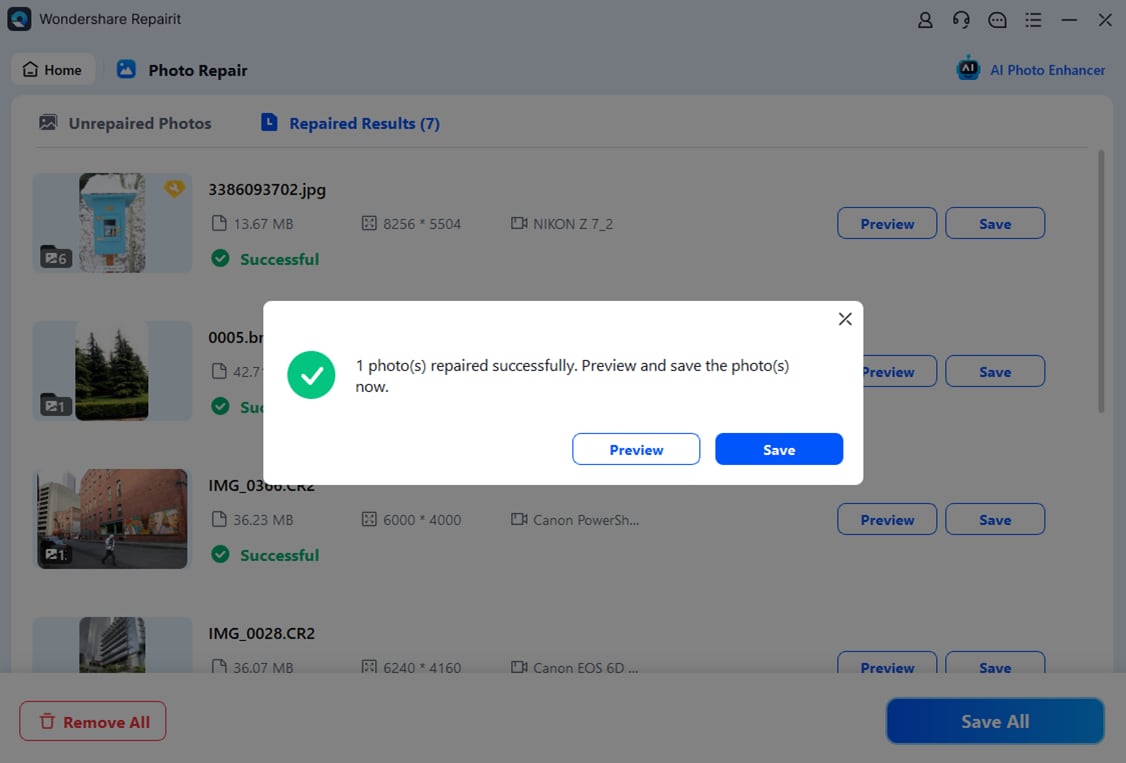
Final Verdict
Repairit Photo Repair is a stronger choice for users who frequently deal with corrupted or visually damaged photos and want a guided, flexible workflow that can handle a wider range of real-world issues. Its modern interface and preview-focused process make it especially helpful if you value clarity at each step.
SysInfo Photo Repair may still be enough if you mainly handle common, straightforward photo corruption and prefer a simple, no-frills desktop experience. For occasional, standard fixes on popular image formats, its basic feature set and simple workflow can be sufficient without the added depth of a more feature-rich solution.
FAQ
-
1. Which is better for repairing severely corrupted photos, Repairit Photo Repair or SysInfo Photo Repair?
Repairit Photo Repair is generally a stronger choice for more severe or complex corruption, while SysInfo Photo Repair is better suited to typical, less complicated issues. -
2. Is SysInfo Photo Repair good enough for basic corrupted photo fixes?
Yes, SysInfo Photo Repair can be enough for users who mostly face common corruption problems and want a simple, repeatable desktop workflow. -
3. How do the workflows of Repairit Photo Repair and SysInfo Photo Repair compare?
SysInfo Photo Repair offers a simple workflow focused on loading and repairing images, while Repairit Photo Repair adds more guidance, previews, and flexibility around each step.




