
When a critical PDF, Word report, or Excel dashboard suddenly refuses to open, you need targeted corrupted file repair, not general data recovery. This guide compares Repairit Online File Repair with SysTools File Repair so IT-focused users can match their damaged files and workflows to the right repair approach.
In this article
- Quick Verdict: Repairit Online File Repair vs SysTools File Repair
- Key Differences and Comparison Table: Repairit Online File Repair vs SysTools File Repair
- File Types and Corruption Scenarios: Repairit Online File Repair vs SysTools File Repair
- Workflow, Ease of Use, and Upload: Repairit Online File Repair vs SysTools File Repair
- Repair Quality, Preview, and Limitations: Repairit Online File Repair vs SysTools File Repair
- Privacy, File Handling, and Browser Experience
- Supported Formats and Scenarios: Repairit Online File Repair vs SysTools File Repair
- Pros and Cons of Repairit Online File Repair and SysTools File Repair
- Who Should Choose Repairit Online File Repair or SysTools File Repair
- What the Actual Repair Process Looks Like
- Final Verdict: Repairit Online File Repair vs SysTools File Repair
Both platforms focus on repairing corrupted, damaged, or unreadable documents, not restoring deleted files. They aim to make broken PDFs, Word, Excel, and similar files open again by fixing structures and content rather than scanning storage devices.
Repairit Online File Repair emphasizes a guided browser experience, while SysTools File Repair leans toward IT-led, desktop-style workflows for PST, PDF, DOCX, and XLSX. Understanding these differences helps you select the right tool for each corruption incident.
Quick Verdict: Repairit Online File Repair vs SysTools File Repair
The key difference is that Repairit Online File Repair provides a guided online file repair workflow in the browser, whereas SysTools File Repair is more suited to IT teams comfortable with desktop-style tools and structured procedures.
For occasional needs to repair corrupted PDF files, Word documents, Excel workbooks, or presentations, Repairit Online File Repair is often more convenient. SysTools File Repair may better fit managed environments handling repeated PST, PDF, DOCX, and XLSX incidents.
Key Differences and Comparison Table: Repairit Online File Repair vs SysTools File Repair
Both tools aim to repair corrupted files online or through connected workflows, but their audiences and experiences differ across formats, usability, and repair guidance.
| Dimension | Repairit Online File Repair | SysTools File Repair |
|---|---|---|
| Best for | Guided browser-based repair for common office documents. | IT users managing technical, desktop-oriented repair tasks. |
| Supported formats | May help repair corrupted PDF, Word, Excel, and PowerPoint files online. | Focus on PST, PDF, DOCX, XLSX with specialized engines. |
| Online workflow | Fully browser-based upload, analyze, repair, and download. | Upload, analyze, repair flow in mostly desktop-oriented tools. |
| Repair capability | Targets broken, unreadable, or invalid office files to restore access where possible. | Aims to repair structural damage in PST, PDF, DOCX, and XLSX. |
| Ease of use | Simple guided steps suitable for non-technical and technical users. | Better for IT users familiar with repair concepts and utilities. |
| Strengths | Online convenience and focus on everyday corrupted document problems. | Specialized repair engines for key business formats. |
| Limitations | Results depend on file damage and supported formats; complex corruption may remain. | Mostly desktop-oriented and less focused on a fully online guided flow. |
Which Tool Repairs More File Types and Corruption Scenarios?
Repairit Online File Repair focuses on practical office document issues, while SysTools File Repair targets specific business formats such as PST, PDF, DOCX, and XLSX using specialized repair engines.
According to the available information, SysTools File Repair is clearly positioned around PST, PDF, DOCX, and XLSX. Repairit Online File Repair concentrates on repairing corrupted PDF files, unreadable Word documents, damaged Excel sheets, and PowerPoint presentations that will not open or show invalid file errors.
In many real-world cases, both tools can address:
- Files that will not open after a crash or transfer issue.
- Invalid file errors when launching documents from email or cloud drives.
- Broken PDF previews in browsers or viewer apps.
- Unreadable Word documents containing critical text or comments.
- Damaged Excel workbooks with important formulas or dashboards.
- PowerPoint files that fail to load slides or media correctly.
For archive issues like ZIP extraction errors, users should check each vendor documentation to confirm whether repairing broken ZIP files or similar archives is supported in their current product versions.
Repair Workflow, Ease of Use, and Upload Experience
Both platforms follow similar stages of uploading damaged files, analyzing them, attempting repair, and then providing output, but the user experience differs notably.
Repairit Online File Repair keeps the entire process in the browser. You upload corrupted files, let the online service analyze them, and then preview and download repaired copies. This suits users who want to repair corrupted files online without installing separate utilities or managing complex configurations.
SysTools File Repair follows a more technical workflow. It uses an upload or selection step, then analysis and repair, typically in a desktop-oriented interface. This can be comfortable for IT administrators who routinely handle PST, PDF, DOCX, and XLSX repair tasks and need integration within managed desktop environments.
From an ease-of-use perspective, non-technical employees and remote workers may gravitate toward guided online tools, while IT teams may prefer desktop-style utilities with detailed options and logs. Both approaches can be effective depending on your environment and policies.
Repair Quality, Preview Experience, and Limitations
Repair quality in both tools depends heavily on the severity and nature of corruption, so no repair workflow can promise to restore every file fully.
The shared goal is to restore file structures and content enough that documents open again and become practically usable. Repairit Online File Repair often emphasizes a preview stage when available, allowing users to quickly check results before saving repaired outputs back to local or network storage.
SysTools File Repair also aims to reconstruct structures for PST, PDF, DOCX, and XLSX files. Advanced or repeated corruption, missing internal components, or incomplete file transfers may limit the level of repair either tool can achieve.
Common limitations both tools may face include:
- Files truncated during upload or transfer, leaving critical data missing.
- Severe structural damage to document headers, cross-references, or indexes.
- Unsupported file versions or highly customized content.
- Files damaged by repeated failed repairs or manual hex editing.
Users should treat online file repair as one layer in their resilience strategy, complementing version control, safe saving habits, and reliable infrastructure rather than replacing them.
Privacy, File Handling, and Browser Experience
Any tool that analyzes corrupted files, whether online or connected desktop, requires careful consideration of privacy, compliance, and internal policies.
Both Repairit Online File Repair and SysTools File Repair typically involve transferring damaged files to a repair engine, either via browser upload or through a local desktop component that may interact with the network. Users should review vendor documentation for details on file handling, retention periods, and access controls.
Good practices when using online file repair services include:
- Avoid uploading highly confidential or regulated documents without policy approval.
- Checking whether test files or redacted copies can be used during evaluation.
- Confirming how long files may be stored and how deletion works.
- Ensuring browsers and connections are up to date and secure.
Where sensitive documents are involved, highly regulated organizations may prefer desktop-oriented repair workflows controlled within their network, while less sensitive scenarios can benefit from browser-based convenience.
Supported File Formats and Common Repair Scenarios
Both tools address office-centric damage, but their format focus and typical scenarios vary, especially when repairing corrupted PDF files, spreadsheets, and presentations.
From the available information, SysTools File Repair centers on PST, PDF, DOCX, and XLSX. Repairit Online File Repair targets common office document problems, including unreadable PDFs, Word reports, Excel dashboards, and PowerPoint slides that will not open or trigger errors.
| File type | Typical corruption symptoms | Repairit Online File Repair focus | SysTools File Repair focus |
|---|---|---|---|
| broken file previews, cannot open, invalid file format warnings. | May repair corrupted PDF files so content becomes viewable again. | Supports PDF repair with specialized engines. | |
| Word (DOCX) | Unreadable Word documents, missing text, open errors. | Aims to fix unreadable files and restore accessible documents. | Targets DOCX structural repairs in many workflows. |
| Excel (XLSX) | Damaged Excel sheets, formulas failing, open or repair loop. | Attempts to repair corrupted Excel files for practical reuse. | Focuses on XLSX repair for business spreadsheets. |
| PowerPoint | Presentations failing to load or reporting corruption. | Designed to help repair corrupted PowerPoint files that will not open. | Users should check official support for specific PPT or PPTX repairs. |
| PST | Mailboxes not loading, corrupted data files in mail clients. | Users should confirm whether mailbox files are supported before use. | Emphasizes PST repair in many documentation references. |
| ZIP or other archives | ZIP extraction errors, incomplete or broken archives. | May help with some archive scenarios; check official support. | Users should verify if repairing broken ZIP files is covered. |
Because support details can change over time, users should always refer to the latest product pages or manuals for confirmed formats and version coverage.
Pros and Cons of Repairit Online File Repair and SysTools File Repair
Each platform has distinct advantages and trade-offs depending on your environment, technical comfort, and the kinds of files you need to repair most often.
Repairit Online File Repair Pros and Cons
SysTools File Repair Pros and Cons
Who Should Choose Repairit Online File Repair or SysTools File Repair?
The right choice depends on whether you prioritize online convenience or desktop-style control, and which document formats cause the most trouble in your organization.
Repairit Online File Repair may fit you if:
- You need to repair corrupted files online without installing extra utilities.
- Your main problems are corrupted PDF files, unreadable Word documents, damaged Excel workbooks, or PowerPoint slides that fail to load.
- Your team includes non-technical staff who benefit from guided repair steps.
- Remote workers or contractors must resolve document issues from various devices.
SysTools File Repair may fit you if:
- You are an IT admin or advanced user managing repeated PST, PDF, DOCX, and XLSX corruption issues.
- Your organization prefers desktop tools deployed on controlled machines.
- You want specialized engines for mailbox and document repair under supervised workflows.
- You are standardizing on one toolkit for multiple business repair scenarios.
Neither option is universally better; they simply serve different operational models and user types.
What the Actual Repair Process Looks Like
Most online file repair tools follow a similar pattern: upload corrupted documents, analyze file structures, attempt repairs, and then provide a new file for download. The main differences lie in how guided each step feels and how clearly the tool explains results.
As a practical example, Repairit Online File Repair demonstrates what a guided, browser-based workflow can look like while focusing on fixing unreadable files rather than retrieving deleted data.
Key Features
Key aspects of the Repairit Online File Repair workflow include:
- Online repair for common office files such as PDFs, Word, Excel, and PowerPoint.
- Guided workflow that leads users from upload to analysis, repair, and saving results.
- Focus on accessibility by attempting to restore structure and content for practical reuse.
- No complex setup, which helps occasional users fix unreadable files quickly.
Step-by-step guide
Step 1. Upload the corrupted, damaged, or unreadable files you want to repair through Repairit Online File Repair.
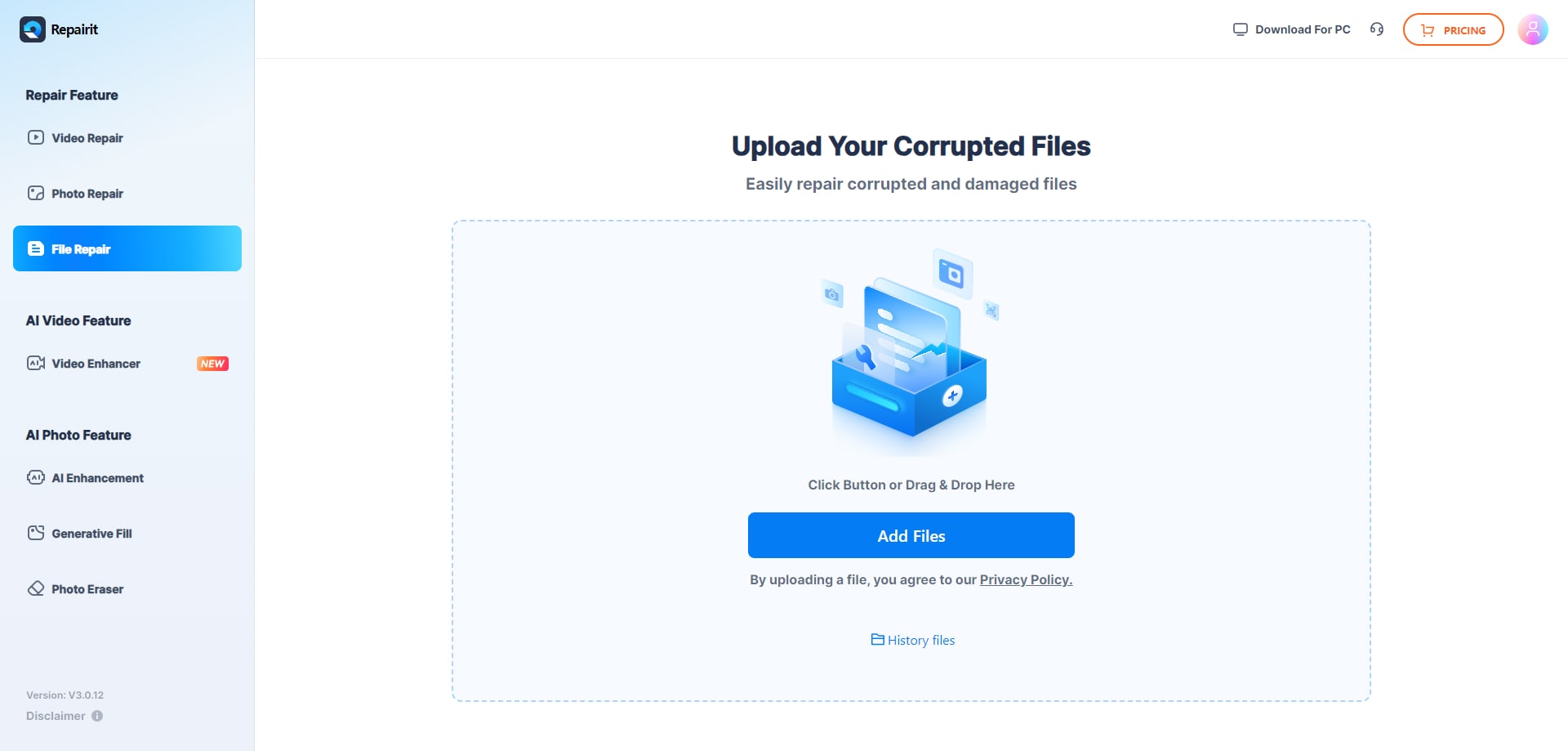
Step 2. Start the online repair process and let Repairit Online File Repair analyze the damaged files.

Step 3. Preview the repaired result when available, then save the repaired files to your device.
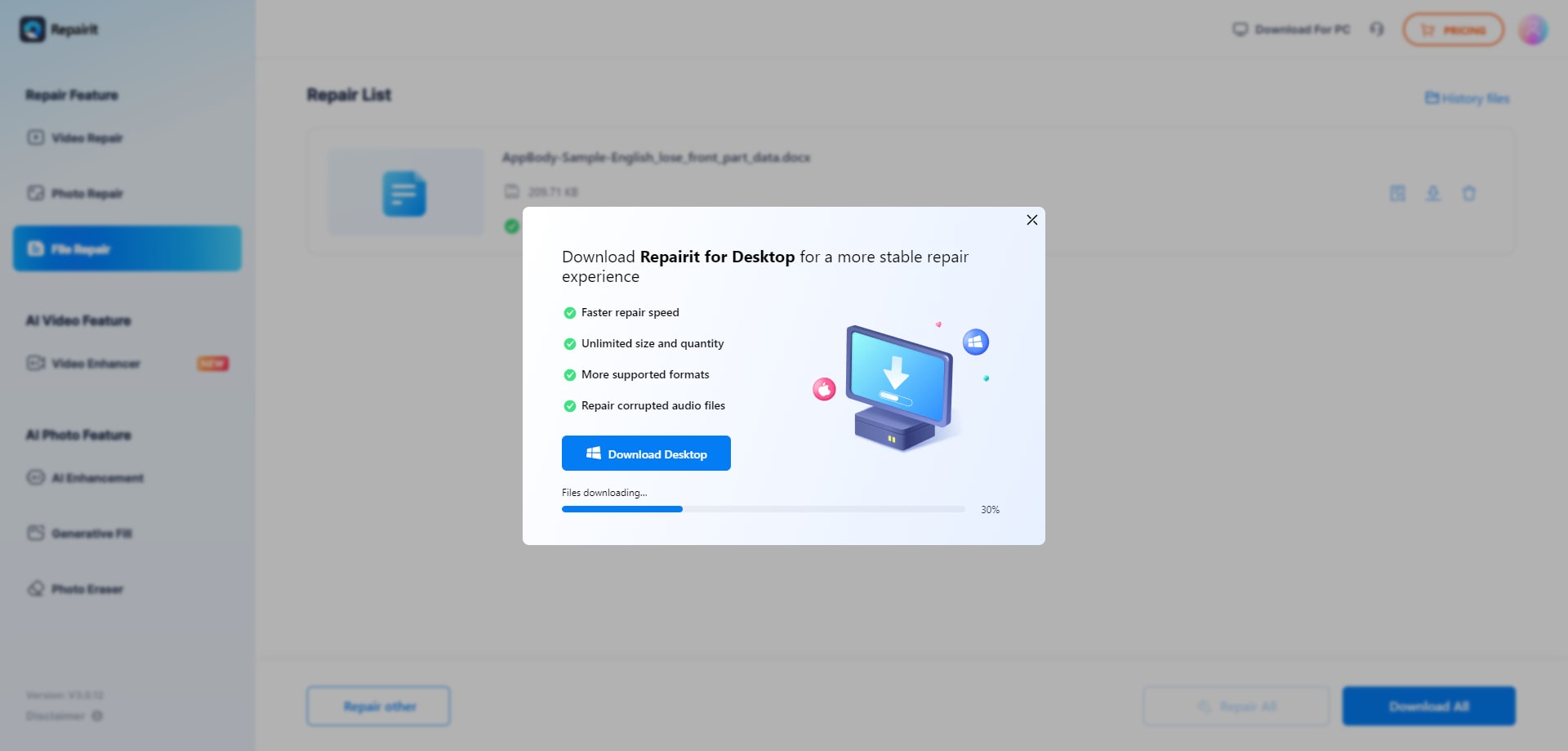
This type of process helps users repair corrupted Word documents, fix damaged Excel workbooks, and recover access to PDFs or PowerPoint files with minimal manual intervention.
Final Verdict: Repairit Online File Repair vs SysTools File Repair
Repairit Online File Repair and SysTools File Repair both focus on corrupted file repair rather than deleted file recovery or general data recovery. They aim to fix damaged structures so office files open again, with different emphases in delivery and audience.
SysTools File Repair leans toward IT teams working with PST, PDF, DOCX, and XLSX in desktop-oriented environments. Repairit Online File Repair concentrates on guided, browser-based repair for PDFs, Word, Excel, and PowerPoint, making it approachable for non-specialists and hybrid workplaces.
In many organizations, a combination of approaches may be appropriate: online tools for everyday incidents and more technical utilities for specialized workloads. The choice should be based on file types, user profiles, compliance requirements, and how often you face particular corruption issues.
Next: Repairit Online File Repair vs Datanumen Online Repair
FAQ
-
1. Is Repairit Online File Repair better than SysTools File Repair for corrupted office documents?
Neither tool is universally better. Repairit Online File Repair focuses on guided, browser-based repair of common documents, while SysTools File Repair may suit IT-led, desktop-oriented workflows for PST, PDF, DOCX, and XLSX. The right option depends on your file types, user skills, and environment. -
2. How is corrupted file repair different from deleted file recovery?
Corrupted file repair tries to fix existing files that will not open, show invalid file errors, or have damaged structures. Deleted file recovery aims to restore files removed from storage. Repairit Online File Repair and SysTools File Repair focus on repairing damaged documents, not scanning drives for deleted data. -
3. When should I choose an online repair workflow over a desktop repair tool?
Use an online workflow when you need quick, occasional fixes for corrupted PDF, Word, Excel, or PowerPoint files and prefer browser-based access. Desktop repair tools may be preferable in tightly controlled IT environments with frequent, technical repair tasks and strict internal policies.




