
Choosing between Repairit Online File Repair and DataNumen Online Repair comes down to your file types, corruption severity, and comfort with technical interfaces.
When a critical PDF, Word, Excel, or PowerPoint file becomes corrupted, you need an online file repair workflow that matches your situation. This comparison focuses on how each tool can repair corrupted files online, fix unreadable files, and handle broken archives.
The guide highlights supported formats, typical corruption scenarios, usability, and realistic limits so you can select a workflow that fits your specific damaged documents rather than relying on generic claims.
In this article
- Quick Verdict: Repairit Online File Repair vs DataNumen Online Repair
- Key Differences and Comparison Table: Repairit Online File Repair vs DataNumen Online Repair
- File Types and Corruption Scenarios: Repairit Online File Repair vs DataNumen Online Repair
- Workflow, Ease of Use, and Upload: Repairit Online File Repair vs DataNumen Online Repair
- Repair Quality, Preview, and Limitations: Repairit Online File Repair vs DataNumen Online Repair
- Privacy, File Handling, and Browser Experience
- Supported Formats and Scenarios: Repairit Online File Repair vs DataNumen Online Repair
- Pros and Cons of Repairit Online File Repair and DataNumen Online Repair
- Who Should Choose Repairit Online File Repair or DataNumen Online Repair
- What the Actual Repair Process Looks Like
- Final Verdict: Repairit Online File Repair vs DataNumen Online Repair
Quick Verdict: Repairit Online File Repair vs DataNumen Online Repair
Both tools can repair corrupted files online, but they lean toward different repair needs and user profiles.
Repairit Online File Repair centers on a guided, browser-based experience for repairing corrupted PDF files, repairing corrupted Word documents, repairing corrupted Excel files, and repairing corrupted PowerPoint files. Its workflow is designed for users who want clear prompts, previews, and minimal configuration while fixing unreadable files.
DataNumen Online Repair, by contrast, positions itself as an advanced corruption recovery platform. It may be more attractive if you often tackle heavily corrupted Office, database, or archive files and can work comfortably with a more technical, older-style website interface.
Neither service replaces deleted file recovery or general data recovery software. They focus on files that still exist but show invalid file errors, broken file previews, or incomplete structures, not on restoring files removed from storage devices.
Key Differences and Comparison Table: Repairit Online File Repair vs DataNumen Online Repair
The main differences involve supported scenarios, user guidance, and how technical the online file repair workflow feels.
This overview reflects the information provided by each vendor and should be treated as general guidance. Users should always verify detailed support and terms on each official website before relying on one tool for critical documents.
| Dimension | Repairit Online File Repair | DataNumen Online Repair |
|---|---|---|
| Best for | Guided online repair of everyday corrupted PDFs, Word, Excel, PowerPoint, and similar office files. | Users targeting highly corrupted Office, database, or archive files on an advanced recovery platform. |
| Supported formats | Common documents, images, and media for day-to-day office and personal file repair online. | Office, database, and archive formats suitable for business-oriented corruption cases. |
| Online workflow | Step-by-step browser interface with prompts for upload, repair, preview, and download. | Direct pipeline: upload file, let the recovery engine process it, then download the result. |
| Repair capability | Geared toward typical issues such as files that will not open, invalid file errors, or broken file previews. | Aim to handle more severe corruption in Office, database, and compressed archive files. |
| Ease of use | User-friendly interface aimed at non-technical users repairing unreadable files online. | May feel more technical, with an older website style that can require extra effort to navigate. |
| Strengths | Document-focused online workflows, clear guidance, and support for many everyday corrupted files. | Reputation for advanced corruption scenarios across Office, database, and archive formats. |
| Limitations | Extremely damaged or unsupported files may only partially repair or fail. | Outdated web experience; users may need to check capabilities for each file type manually. |
Overall, Repairit Online File Repair emphasizes clarity and usability, while DataNumen Online Repair emphasizes breadth of advanced corruption scenarios, especially for business data and archives.
Which Tool Repairs More File Types and Corruption Scenarios?
Each tool focuses on different file families and repair priorities, so the better fit depends on your particular corrupted files.
According to the provided information, both services can repair corrupted, damaged, or unreadable files online, but they prioritize different use cases. The summary below outlines how their repair capabilities align with everyday office work versus more specialized or complex corruption scenarios.
Repairit Online File Repair emphasizes common office and personal documents. It is particularly focused on:
- Repairing corrupted PDF files that show broken file previews or errors when opened.
- Repairing corrupted Word documents reporting invalid file errors or unreadable content.
- Repairing corrupted Excel files with damaged sheets or formulas that will not load.
- Repairing corrupted PowerPoint files when slides fail to open or presentations crash.
It can also help when you encounter ZIP archive issues, such as ZIP extraction errors or broken ZIP files tied to document workflows, although users should confirm current format coverage on the official site.
DataNumen Online Repair targets a wider mix of business-related formats. Information from the input suggests it may focus on:
- Office files with severe structural damage or incomplete file structures.
- Database formats where records or indexes have become corrupted.
- Archive formats, such as ZIP or RAR, that encounter extraction errors or damaged headers.
Because both tools handle corrupted file repair, not deleted file recovery, they work with files that still exist but have internal damage. Neither is presented as a substitute for recovering permanently deleted data or rebuilding entire storage devices.
Repair Workflow, Ease of Use, and Upload Experience
Both tools rely on an upload-and-repair model, but their interfaces guide users in different ways.
With Repairit Online File Repair, the online file repair workflow is designed to be explicit and easy to follow. You generally:
- Open the web page in a modern browser.
- Upload your corrupted PDF, Word, Excel, PowerPoint, or other supported file.
- Wait while the system analyzes the damage and attempts to reconstruct content.
- Preview the repaired result when available, then download the fixed file.
This structured approach can help non-technical users who suddenly face unreadable Word documents, broken PowerPoint decks, or Excel files that will not open and need fast, understandable guidance.
DataNumen Online Repair follows a more direct pipeline: upload the file, let the recovery engine run, then download what it produces. This approach may appeal to technically inclined users who are comfortable inferring capabilities from the interface and documentation, even if the website feels older compared to more modern web applications.
In both cases, the quality of your internet connection matters. Large or highly damaged files may require more time to upload and process, and interrupted uploads can worsen corruption or cause repair attempts to fail.
Repair Quality, Preview Experience, and Limitations
Neither Repairit Online File Repair nor DataNumen Online Repair can promise that every file will be fully restored, and understanding these limits helps set realistic expectations.
The provided information indicates that Repairit Online File Repair focuses on a smooth experience around common corruption scenarios. This includes files that suddenly refuse to open, PDFs with broken file previews, and office documents throwing invalid file errors after a system crash or transfer problem.
DataNumen Online Repair is described as an advanced corruption recovery platform that may handle more heavily damaged Office, database, and archive files. Its emphasis seems to be on robustness across difficult cases rather than a polished web design or extensive onboarding guidance.
However, several limitations apply to both services:
- If crucial data was never saved or has been overwritten, no online file repair tool can reconstruct it perfectly.
- Incomplete uploads or network interruptions may result in additional corruption or unusable outputs.
- Unsupported file types may not repair correctly, even if they share similar extensions with supported formats.
- Extremely damaged structures may produce only partial recovery, where some pages, sheets, or slides remain missing.
Users should also distinguish corrupted file repair from deleted file recovery. These tools aim to fix unreadable existing files, not restore files that have already been deleted from storage or lost due to formatting and partition issues.
Privacy, File Handling, and Browser Experience
Any online file repair workflow involves sending potentially sensitive files to remote servers, so users should evaluate confidentiality requirements carefully.
When you upload a corrupted PDF, a confidential spreadsheet, or a client presentation, the file leaves your local environment. Each provider may handle files differently, so you should review their official documentation, terms, and any available security statements before uploading sensitive or regulated data.
Practical steps to improve the experience include:
- Using a stable, secure internet connection to avoid incomplete uploads.
- Testing in a modern browser for better compatibility and responsiveness.
- Reducing file size where reasonable, while avoiding additional damage to content.
- Removing unnecessary personal information from documents when feasible.
From a usability perspective, Repairit Online File Repair aims for a modern, guided browser experience, which may feel more reassuring to less technical users. DataNumen Online Repair reportedly uses a more outdated interface, so users might need extra patience and diligence when interpreting options or support pages.
Supported File Formats and Common Repair Scenarios
Both tools cover overlapping but distinct sets of formats, especially around office documents and archives.
The information supplied suggests that Repairit Online File Repair emphasizes everyday office corruption: unreadable PowerPoint decks, broken Excel workbooks, damaged Word documents, and corrupted PDF files that fail to open. DataNumen Online Repair focuses more broadly on Office, database, and archive formats.
| File type / format | Typical corruption symptoms | Repairit Online File Repair | DataNumen Online Repair |
|---|---|---|---|
| PDF documents | Files will not open, broken preview, invalid or damaged file error. | Designed to repair corrupted PDF files for many everyday document cases. | May support corrupted PDFs; users should check official support. |
| Word documents | Unreadable content, file extension mismatch, crash on open. | Focused on repairing corrupted Word documents used for reports and contracts. | Aims to handle advanced Office corruption; confirm specific versions online. |
| Excel workbooks | Damaged sheets, formulas lost, file refusing to load. | Supports repairing corrupted Excel files for typical office spreadsheets. | May address severe spreadsheet corruption; check format and version details. |
| PowerPoint presentations | PowerPoint files fail to load or crash during slide navigation. | Helps repair corrupted PowerPoint files for business or academic decks. | Likely supports Office presentations; verify exact capabilities. |
| ZIP archives | ZIP extraction errors, broken ZIP files, invalid archive structure. | Targets some archive-related document issues; check official support. | Explicit focus on archive formats, including ZIP; RAR and others may be supported. |
| RAR and other archives | Cannot extract contents, CRC or header errors. | May support some archives; users should confirm on product pages. | Advertised focus on archive corruption; check each format type. |
| Databases | Indexes missing, tables inaccessible, query failures. | Primarily oriented toward office documents, not complex databases. | Described as handling database formats; confirm type and version. |
Because support can evolve over time, always refer to each vendor website to verify that your specific file extension and version are covered before relying on any one service in high-stakes scenarios.
Pros and Cons of Repairit Online File Repair and DataNumen Online Repair
Weighing strengths and trade-offs helps you align the tool with your technical skills, file types, and corruption patterns.
Repairit Online File Repair Pros and Cons
DataNumen Online Repair Pros and Cons
Who Should Choose Repairit Online File Repair or DataNumen Online Repair?
The right choice depends on how often you repair corrupted files online, how complex your documents are, and how technical your team feels.
You might lean toward Repairit Online File Repair if you:
- Need a clear, guided browser workflow for PDFs, Word, Excel, and PowerPoint.
- Handle invalid file errors or office documents that suddenly will not open.
- Support managers, clients, or students who frequently encounter broken presentations.
- Prefer a structured, step-by-step repair flow directly in the browser.
DataNumen Online Repair may be a stronger fit if you:
- Regularly work with highly corrupted or structurally complex files.
- Manage office documents, database files, and archives from business systems.
- Are comfortable with a more technical, less modern web interface.
- Prioritize an advanced corruption recovery platform for challenging scenarios.
In some environments, using both tools can make sense: one for everyday document emergencies and the other for rare but severe data corruption events affecting archives or databases.
What the Actual Repair Process Looks Like
Despite visual differences, most online file repair tools follow a similar pattern: upload, server-side repair, then download.
First, you select the corrupted document, such as a PDF that will not open or a PowerPoint deck that crashes. The service uploads the file to its servers, runs a repair engine against the damaged structure, and produces a new file that may open more reliably than the original.
This flow is common across many platforms, including Repairit Online File Repair and DataNumen Online Repair, although each adds its own interface and options. To illustrate the workflow in a practical way, consider how Repairit Online File Repair structures the process.
Key Features
According to the provided description, key capabilities of Repairit Online File Repair include:
- Online repair for corrupted PDF, Word, Excel, and PowerPoint files commonly used in office workflows.
- A guided interface that walks users through each repair step instead of expecting deep technical skills.
- A preview-focused experience, when available, so you can confirm whether critical pages, tables, or slides are restored before saving.
These features are tailored toward people who want to fix unreadable files quickly and safely, differentiating corrupted file repair from deleted file recovery or backup restoration tasks.
Step-by-step guide
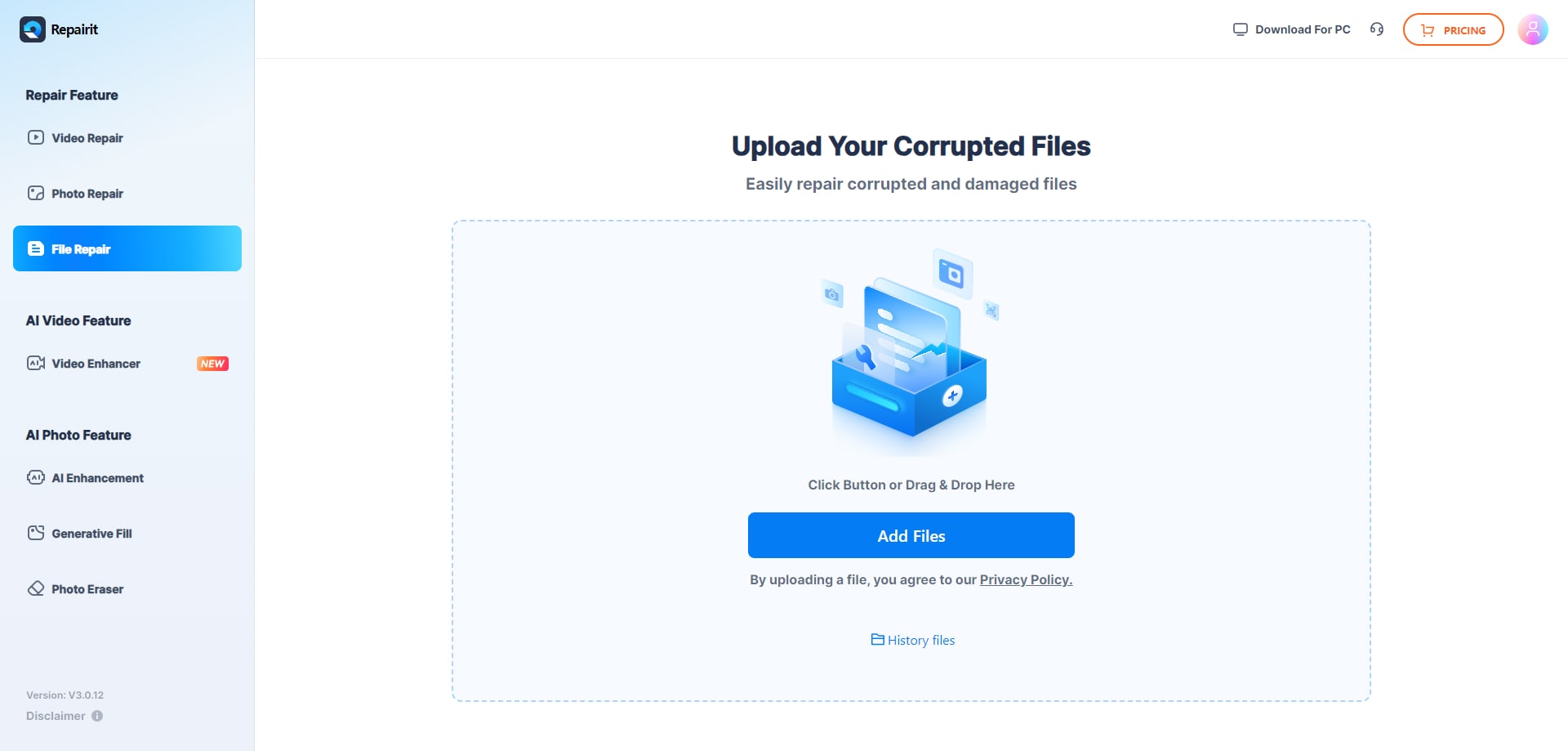
Step 1. Upload the corrupted, damaged, or unreadable files you want to repair through Repairit Online File Repair.
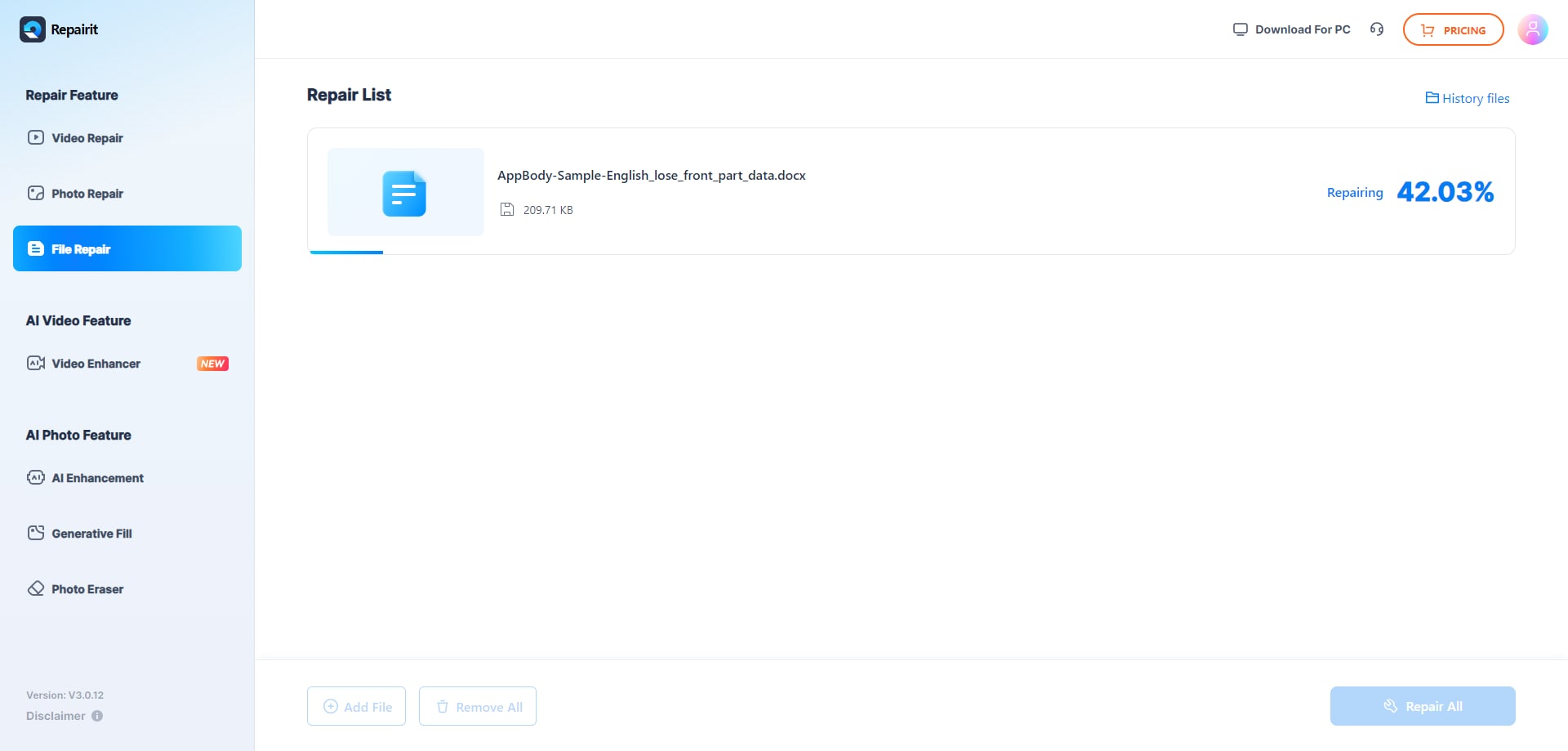
Step 2. Start the online repair process and let Repairit Online File Repair analyze the damaged files.
Step 3. Preview the repaired result when available, then save the repaired files to your device.
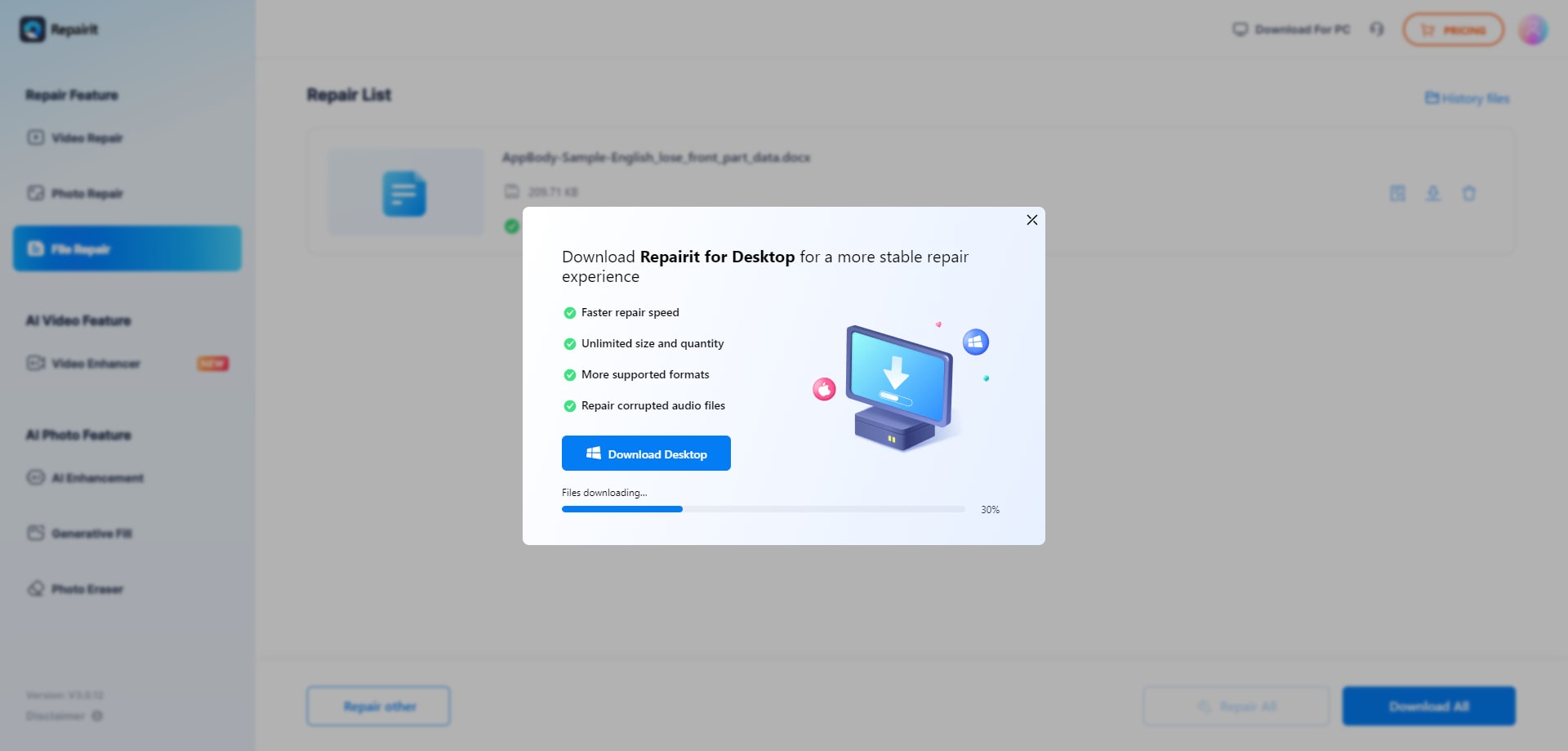
This workflow can be applied to many situations, from a single broken PDF report to multiple damaged office documents after a sudden system crash or transfer interruption.
Final Verdict: Repairit Online File Repair vs DataNumen Online Repair
Repairit Online File Repair and DataNumen Online Repair each address different parts of the online file repair landscape, so the better option depends on your context rather than a single universal answer.
If your primary need is to repair corrupted PDF files, repair corrupted Word documents, repair corrupted Excel files, or repair corrupted PowerPoint files and you prefer a straightforward browser experience, Repairit Online File Repair aligns closely with those requirements. Its guided flow and previews support quick decision-making when time is limited.
If you regularly encounter highly corrupted Office files, databases, or archives from complex systems, and you are comfortable navigating a more technical, older-style interface, DataNumen Online Repair may be appropriate. Its focus on advanced corruption scenarios can be valuable in specialized IT and business environments.
In all cases, remember that these services are for repairing existing corrupted files, not for undeleting lost data or reconstructing entire disks. Evaluating the type of corruption, file format, and urgency will help you select the workflow that offers the most practical path to recovering usable content.
Next: Repairit Online File Repair vs Securerecovery File Repair
FAQ
-
1. Which tool is better for repairing typical corrupted office documents?
For everyday corrupted PDFs, Word, Excel, and PowerPoint files, many users may find Repairit Online File Repair more comfortable because of its guided workflow and previews. DataNumen Online Repair can still be useful, especially when corruption is more severe or involves archives and databases. -
2. When should I prefer DataNumen Online Repair over Repairit Online File Repair?
You might prefer DataNumen Online Repair when you routinely handle highly corrupted Office files, business databases, or archive formats and you are comfortable with a more technical, older-style interface. In such cases, its advanced corruption focus may align better with your needs. -
3. How is corrupted file repair different from deleted file recovery?
Corrupted file repair focuses on fixing damaged, broken, or unreadable files that still exist, such as PDFs that will not open or ZIP archives with extraction errors. Deleted file recovery aims to restore files removed from storage. These two tools are designed for corrupted files, not for undeleting lost data.




