
Both Repairit Online File Repair and SecureRecovery File Repair aim to repair corrupted files online so business documents can open normally again without reinstalling software or rebuilding content from scratch.
Businesses rely on documents that must open cleanly every time. When a critical PDF, Word, Excel, PowerPoint, or ZIP turns corrupted, an online repair service can be faster than recreating files.
This comparison focuses on repairing existing but unreadable files, not on recovering deleted or missing data from drives or backups.
In this article
- Quick Verdict: Repairit Online File Repair vs SecureRecovery File Repair
- Key Differences and Comparison Table: Repairit Online File Repair vs SecureRecovery File Repair
- File Types and Corruption Scenarios: Repairit Online File Repair vs SecureRecovery File Repair
- Workflow, Ease of Use, and Upload: Repairit Online File Repair vs SecureRecovery File Repair
- Repair Quality, Preview, and Limitations: Repairit Online File Repair vs SecureRecovery File Repair
- Privacy, File Handling, and Browser Experience
- Supported Formats and Scenarios: Repairit Online File Repair vs SecureRecovery File Repair
- Pros and Cons of Repairit Online File Repair and SecureRecovery File Repair
- Who Should Choose Repairit Online File Repair or SecureRecovery File Repair
- What the Actual Repair Process Looks Like
- Final Verdict: Repairit Online File Repair vs SecureRecovery File Repair
Quick Verdict: Repairit Online File Repair vs SecureRecovery File Repair
The practical choice between Repairit Online File Repair and SecureRecovery File Repair depends on how many file types you handle and how much guidance you want during the online file repair workflow.
Repairit Online File Repair generally suits users handling mixed PDFs and office documents who value guided prompts. SecureRecovery File Repair tends to fit scenarios focused mainly on Office, ZIP, and PDF files where a straightforward upload-and-repair flow is enough.
Neither tool replaces backups or deleted file recovery software; both concentrate on fixing files that still exist but will not open correctly.
Key Differences and Comparison Table: Repairit Online File Repair vs SecureRecovery File Repair
The core difference is that Repairit Online File Repair emphasizes a guided experience for varied document types, while SecureRecovery File Repair focuses on a simple flow within a more narrowly defined set of formats.
Use the table below to compare how each service approaches common online file repair needs for business documents, spreadsheets, presentations, and ZIP archives.
| Dimension | Repairit Online File Repair | SecureRecovery File Repair |
|---|---|---|
| Best for | Users needing guided online repair for various corrupted office documents, PDFs, and everyday business files. | Users restoring damaged business files within supported Office, ZIP, and PDF formats. |
| Supported formats | Designed for common office documents and visual files, including PDFs and typical business documents. | Focuses on Office, ZIP, and PDF with comparatively limited format coverage. |
| Online workflow | Browser-based guided steps from upload to repair and download for non-technical users. | Simple two-step online flow where you upload a corrupted file and start repair. |
| Repair capability | Targets corrupted PDFs, Word, Excel, PowerPoint, and similar documents that fail to open correctly. | Aims to repair corrupted Office, ZIP, and PDF files depending on damage level. |
| Ease of use | Guided interface with clear prompts for uploading, repairing, and saving repaired files. | Minimal interface with a basic upload-and-repair sequence. |
| Strengths | Guided online experience suitable for varied document types and non-technical users. | Straightforward upload process ideal for quick business file repairs. |
| Limitations | Results may vary with severe corruption, unsupported formats, or incomplete uploads. | Limited format support and may not suit specialized or uncommon file types. |
Which Tool Repairs More File Types and Corruption Scenarios?
Repairit Online File Repair generally targets a broader mix of everyday office documents, while SecureRecovery File Repair keeps its scope closer to core Office, ZIP, and PDF formats.
According to the provided information, both services help repair corrupted, damaged, broken, or unreadable files online. They are built for files that exist but display errors or do not open, rather than for recovering deleted content.
Repairit Online File Repair may be more suitable if your team frequently handles different file types with varied corruption symptoms.
Repairit Online File Repair capabilities
- Repairs corrupted PDF files that fail to open or display content correctly in common PDF readers.
- Targets damaged Word, Excel, and PowerPoint documents that show errors or unreadable content.
- Helps restore invalid or broken business files that trigger format errors when opened.
SecureRecovery File Repair capabilities
- Repairs damaged business files within supported Office formats when they become unreadable.
- Can repair corrupted PDF files that may show errors instead of content.
- Addresses ZIP archives that encounter extraction errors or invalid file messages.
Whatever the tool, users should test with sample files where possible and confirm current format support, especially for less common extensions or specialized software outputs.
Repair Workflow, Ease of Use, and Upload Experience
Repairit Online File Repair prioritizes a guided online file repair workflow, whereas SecureRecovery File Repair focuses on a minimal upload-and-repair sequence.
Repairit Online File Repair is designed as a browser-based experience with prompts: you upload corrupted files, follow on-screen steps, and then download repaired versions. This can help non-technical staff avoid confusion when dealing with multiple file types and different error messages.
SecureRecovery File Repair usually follows a simple flow of upload corrupted file then start repair. This minimal design can be efficient if you already know which documents are damaged and do not need extra guidance.
For both tools, users should: ensure a stable connection while uploading, avoid closing the browser tab mid-process, and keep backup copies of original corrupted files in case multiple repair attempts are needed.
Repair Quality, Preview Experience, and Limitations
Neither Repairit Online File Repair nor SecureRecovery File Repair can guarantee that every corrupted document will be fully restored, especially in severe or partial-damage cases.
Repairit Online File Repair may provide preview options in some scenarios, allowing you to inspect repaired content before downloading. This can be helpful when deciding whether to keep the repaired version of an important contract, report, or spreadsheet.
Repair results for both services depend on multiple factors:
- The type of corruption, such as invalid file headers, broken internal structures, or missing data blocks.
- How much of the original content is still intact inside the corrupted file.
- Whether the file was incompletely saved or abruptly interrupted during upload or transfer.
The provided information highlights several limitations. Repairit Online File Repair may struggle with severe corruption, unsupported formats, or incomplete uploads. SecureRecovery File Repair can be constrained by its narrower format coverage and may not help with more unusual file types.
In practice, users should always work from copies, test repaired outputs, and keep realistic expectations about what any online tool can reconstruct from heavily damaged files.
Privacy, File Handling, and Browser Experience
Because both tools repair corrupted files online, your documents are uploaded from the browser to remote servers for processing, so privacy and file handling policies matter.
Users should review each vendor documentation to understand:
- How long uploaded files may be stored before removal.
- Who can access uploaded content and under what circumstances.
- Whether any logs, previews, or intermediate versions are retained for troubleshooting.
When handling sensitive business data such as contracts, financial Excel sheets, or internal presentations, consider anonymizing content where feasible. Mask names, IDs, or confidential figures when test repairs are enough to validate workflows.
From a browser experience perspective, both services aim to keep the interface straightforward. A modern browser and stable connection generally help maintain reliable uploads, especially for larger PDFs, long Word reports, or ZIP archives with many internal items.
Supported File Formats and Common Repair Scenarios
Repairit Online File Repair and SecureRecovery File Repair both focus on practical business formats, but their emphasis slightly differs, so mapping formats to repair scenarios is helpful.
According to the description, Repairit Online File Repair focuses on repairing corrupted PDFs and common business documents such as Word, Excel, and PowerPoint. SecureRecovery File Repair focuses on supported Office documents, ZIP, and PDF, especially when users face extraction errors or unreadable office files.
| File type | Typical corruption symptoms | Repairit Online File Repair | SecureRecovery File Repair |
|---|---|---|---|
| File will not open, broken PDF preview, invalid file error. | Aims to repair corrupted PDF files for many business use cases. | Aims to repair corrupted PDF files within its supported scope. | |
| Word documents | Unreadable Word documents, unexpected error on opening, garbled text. | Designed to help repair corrupted Word documents that fail to open. | May repair supported Office documents; check official support. |
| Excel spreadsheets | Damaged Excel sheets, missing cells, cannot open or repair in Excel. | Targets repair of corrupted Excel files for common business needs. | May support Excel within Office repair; verify with vendor. |
| PowerPoint presentations | PowerPoint files that fail to load or report content errors. | Helps repair corrupted PowerPoint files that no longer open. | May handle PowerPoint if listed as supported Office format. |
| ZIP archives | ZIP extraction errors, invalid archive, unexpected end of file. | May assist when archives relate to supported document scenarios; confirm support. | Explicitly addresses broken ZIP files and extraction errors. |
| Other document types | Invalid file messages, partially loading content, broken file previews. | Focuses on typical business documents and related files; check official support. | More limited; users should check supported types. |
Whenever exact support is unclear, check each provider latest documentation or test with sample files before relying on either tool in critical workflows.
Pros and Cons of Repairit Online File Repair and SecureRecovery File Repair
Both services have strengths and tradeoffs, so it is useful to weigh pros and cons side by side based on business document needs.
Repairit Online File Repair Pros and Cons
SecureRecovery File Repair Pros and Cons
Who Should Choose Repairit Online File Repair or SecureRecovery File Repair?
The better fit depends on document diversity, team skills, and how often you need to repair corrupted files online.
Who may benefit more from Repairit Online File Repair
- Users needing a guided online experience to repair mixed document types in one place.
- Teams regularly dealing with corrupted PDFs and office documents from clients or partners.
- Non-technical staff who want clear steps from upload to repaired file download.
- Businesses preferring a general-purpose online document repair workflow for recurring issues.
Who may benefit more from SecureRecovery File Repair
- Users focused mainly on repairing Office, ZIP, and PDF business files.
- Organizations that value a simple upload and repair process with minimal options.
- Teams facing recurring ZIP extraction errors alongside document corruption.
- Users who already trust SecureRecovery File Repair within its listed supported formats.
In many environments, teams might try both tools on sample corrupted files and then standardize on the service that aligns best with their real-world issues.
What the Actual Repair Process Looks Like
Most online file repair tools follow a similar pattern: you upload corrupted documents, the service analyzes the damage, and then you download a repaired version if the process succeeds.
Repairit Online File Repair uses this same approach but adds guided steps to help users understand where they are in the workflow. This can reduce confusion when dealing with unreadable Word documents, damaged Excel sheets, PowerPoint files that fail to load, or broken ZIP files.
Key Features
Repairit Online File Repair offers key capabilities aimed at everyday business repair needs.
- Guided online repair for corrupted PDFs and business documents.
- Simple steps from upload to download inside your browser.
- Support for typical scenarios like unreadable Word files or damaged Excel workbooks.
Step-by-step guide
The following example shows how a guided online file repair workflow can look in practice.
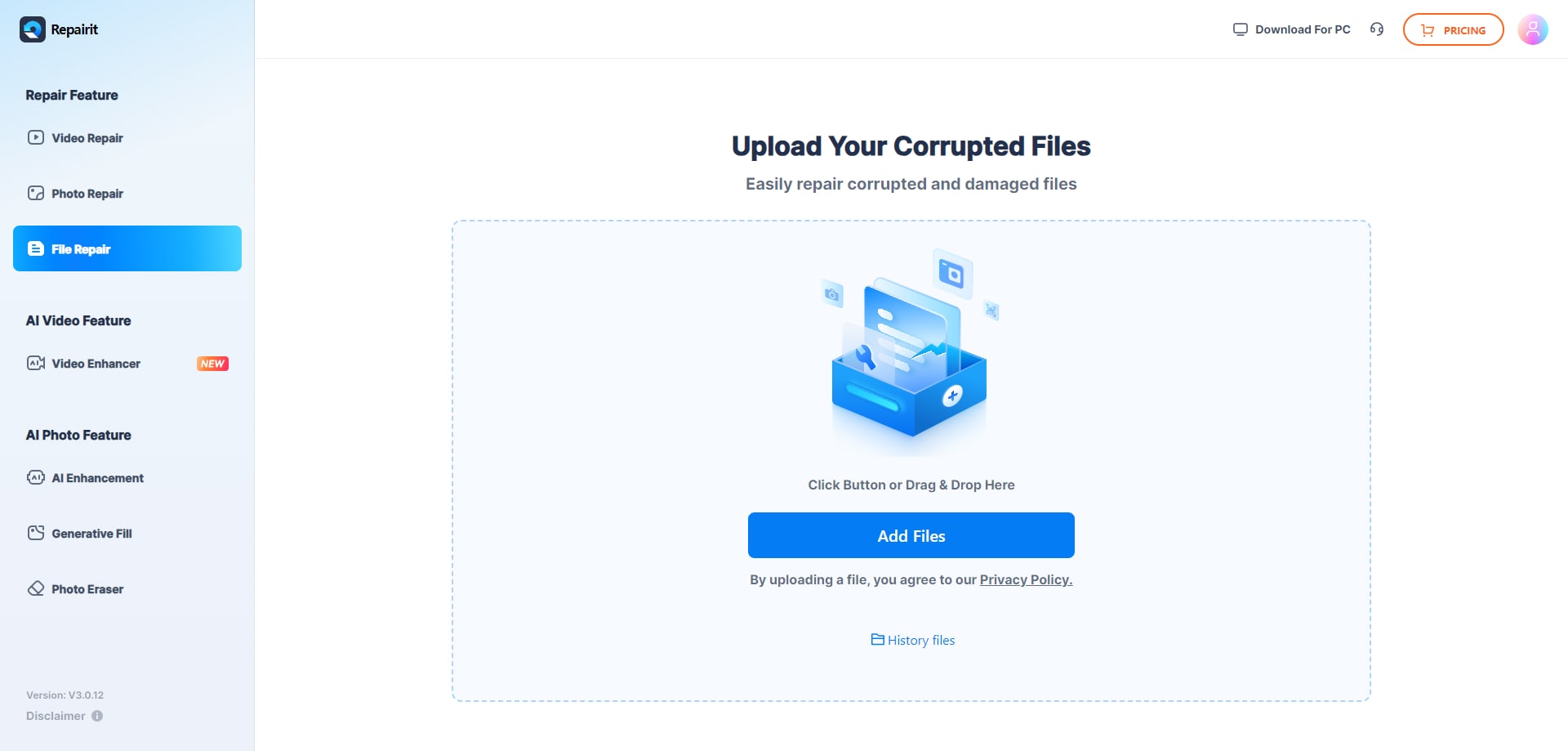
Step 1. Upload the corrupted, damaged, or unreadable files you want to repair through Repairit Online File Repair.
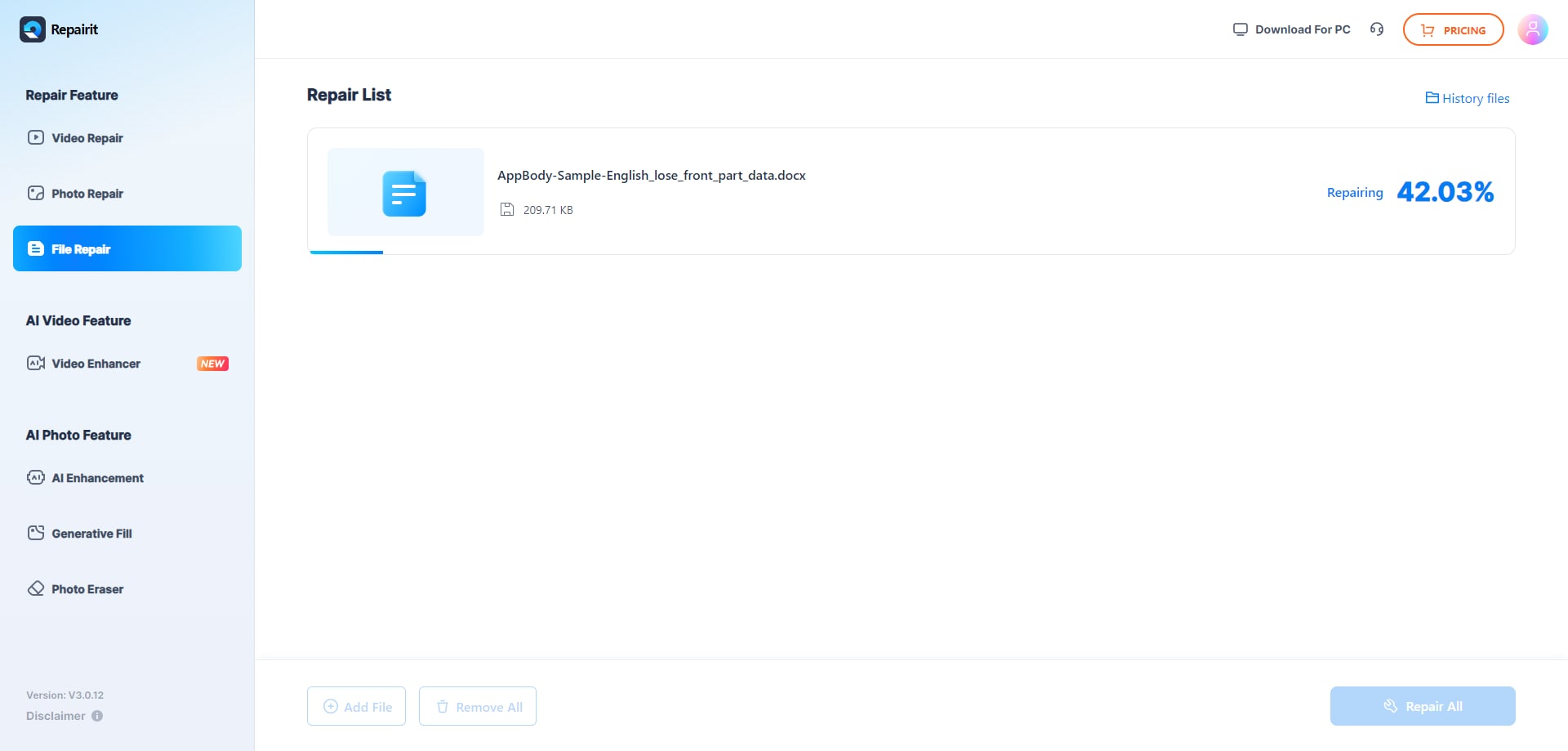
Step 2. Start the online repair process and let Repairit Online File Repair analyze the damaged files.
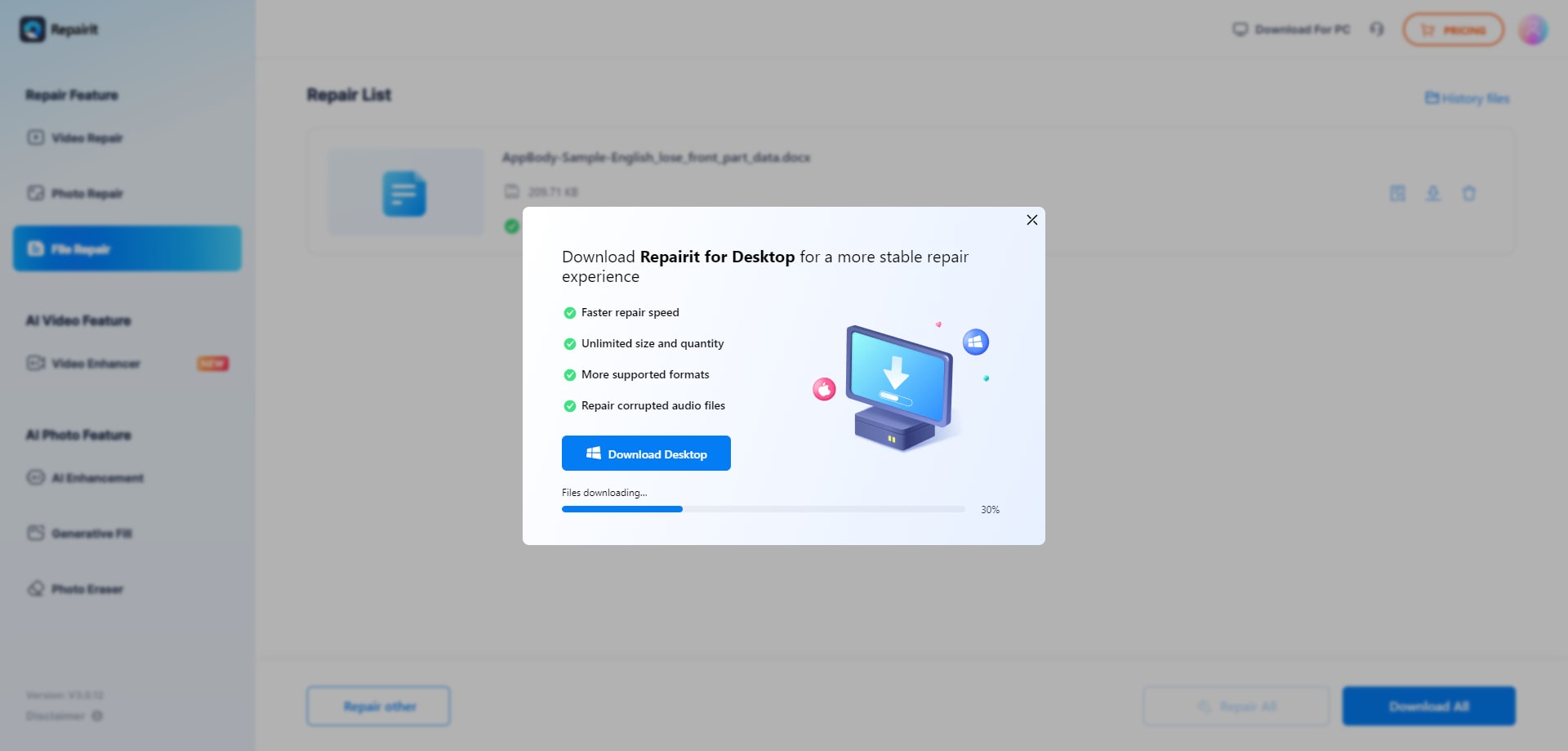
Step 3. Preview the repaired result when available, then save the repaired files to your device.
While the exact interface may evolve, most users will follow a similar upload, repair, review, and save pattern for PDFs, Word, Excel, PowerPoint, and possibly certain archive files.
Final Verdict: Repairit Online File Repair vs SecureRecovery File Repair
Both Repairit Online File Repair and SecureRecovery File Repair focus on repairing corrupted files online rather than recovering deleted data or rebuilding whole storage devices.
SecureRecovery File Repair emphasizes a simple workflow for Office, ZIP, and PDF business files. This can be appropriate if your needs are limited to those formats and you prefer a minimal interface.
Repairit Online File Repair emphasizes a more guided online experience for corrupted PDFs and office documents. This guided structure may suit teams that regularly encounter mixed file types and need clearer instructions.
In practice, the ideal choice depends on your dominant formats, typical error messages, and how much direction your users require during the repair process. Many businesses will evaluate both services on non-critical samples before choosing a standard option for ongoing use.
Next: Repairit Online File Repair vs Easeus Online File Repair
FAQ
-
1. How do Repairit Online File Repair and SecureRecovery File Repair differ for corrupted business documents?
Repairit Online File Repair focuses on a guided workflow for repairing PDFs and office documents through the browser. SecureRecovery File Repair offers a simpler upload-and-repair flow for supported Office, ZIP, and PDF files. The right option depends on your preferred guidance level and most common document types. -
2. When is Repairit Online File Repair a better choice than SecureRecovery File Repair?
Repairit Online File Repair can be preferable when you manage mixed PDFs, Word, Excel, and PowerPoint files and want clearer prompts. Its guided interface may help non-technical staff handle repeated corruption issues without guessing which steps to take next. -
3. What is the difference between corrupted file repair and deleted file recovery?
Corrupted file repair focuses on fixing existing files that open with errors, show invalid formats, or appear unreadable. Deleted file recovery aims to restore files removed from storage. Repairit Online File Repair and SecureRecovery File Repair address corruption, not full data recovery of deleted items.
"




