
When a critical PDF refuses to open or a document shows an invalid file error, online repair tools can help restore access without installing software.
When a PDF refuses to open or a key document shows an invalid file error, an online repair tool can help. This guide compares Repairit Online File Repair with PDF2Go Repair PDF so you can choose the right browser-based option for corrupted PDFs and other damaged office files.
Both tools focus on repairing corrupted files online rather than recovering deleted data. Understanding their workflows, format support, and limitations helps you pick the safer option for your situation.
In this article
- Quick Verdict: Repairit Online File Repair vs PDF2Go Repair PDF
- Key Differences and Comparison Table: Repairit Online File Repair vs PDF2Go Repair PDF
- File Types and Corruption Scenarios: Repairit Online File Repair vs PDF2Go Repair PDF
- Workflow, Ease of Use, and Upload: Repairit Online File Repair vs PDF2Go Repair PDF
- Repair Quality, Preview, and Limitations: Repairit Online File Repair vs PDF2Go Repair PDF
- Privacy, File Handling, and Browser Experience
- Supported Formats and Scenarios: Repairit Online File Repair vs PDF2Go Repair PDF
- Pros and Cons of Repairit Online File Repair and PDF2Go Repair PDF
- Who Should Choose Repairit Online File Repair or PDF2Go Repair PDF
- What the Actual Repair Process Looks Like
- Final Verdict: Repairit Online File Repair vs PDF2Go Repair PDF
Quick Verdict: Repairit Online File Repair vs PDF2Go Repair PDF
Repairit Online File Repair generally suits users handling mixed document types and more complex corruption, while PDF2Go Repair PDF focuses on quick PDF-only fixes.
Repairit Online File Repair is designed for users needing guided repair for corrupted PDFs, Word, Excel, PowerPoint, and some archives in one place. It may be more comfortable when you face invalid file errors across several formats and want a structured online file repair workflow.
PDF2Go Repair PDF is more suitable when you only need to repair corrupted PDF files quickly. If you have a single file with a broken preview or a basic open error, its lightweight upload, repair, and download flow may be enough.
Neither service can repair every file. Severely damaged files, incomplete uploads, or unsupported formats may still fail, so keep backups and realistic expectations.
Key Differences and Comparison Table: Repairit Online File Repair vs PDF2Go Repair PDF
The main differences between these tools involve supported file types, guidance level, and how they handle varied corruption scenarios.
At a high level, Repairit Online File Repair offers a broader scope across documents and archives, whereas PDF2Go Repair PDF stays focused on PDFs. Both rely on uploading files to the cloud, running automated repair, and then downloading fixed versions.
| Dimension | Repairit Online File Repair | PDF2Go Repair PDF |
|---|---|---|
| Best for | Guided repair for corrupted PDFs, Word, Excel, PowerPoint, and other key office files online. | Users fixing lightweight PDF issues directly in the browser with a simple repair action. |
| Supported formats | Corrupted PDF, Word, Excel, PowerPoint and other common document types, plus some damaged ZIP archives. | Focused on PDF repair only for documents in PDF format. |
| Online workflow | Upload corrupted files, let the tool analyze damage, repair online, then preview and download fixed versions. | Upload PDF, run repair, then download the repaired PDF in a short browser flow. |
| Repair capability | Aims to handle invalid file errors, unreadable PDFs, broken spreadsheets, and damaged presentations. | Geared to lighter PDF corruption; deeper structural issues may remain. |
| Ease of use | Guided interface with prompts, suitable for repairing multiple damaged file types together. | Very straightforward, minimal options, quick to use in most browsers. |
| Strengths | Broader document and archive coverage with a structured online file repair workflow. | Fast access to browser-based PDF repair without local installation. |
| Limitations | Severely corrupted, incomplete, or unsupported files may not be fixable. | Primarily for PDFs and lighter corruption; complex damage may persist. |
Which Tool Repairs More File Types and Corruption Scenarios?
Repairit Online File Repair typically covers more document types and error scenarios than PDF2Go Repair PDF.
Repairit Online File Repair and PDF2Go Repair PDF are both browser-based tools designed to fix corrupted documents. PDF2Go Repair PDF focuses on straightforward PDF repair, while Repairit Online File Repair offers a more guided experience across PDFs, Word, Excel, PowerPoint, and some archives.
Both tools repair corrupted files online, but they focus on different depth and variety of document issues. Repairit Online File Repair is more versatile for offices where many file types can become damaged.
Repairit Online File Repair capabilities include:
- Repair corrupted PDF files that will not open or show invalid file errors.
- Repair corrupted Word documents, Excel spreadsheets, and PowerPoint presentations that turn unreadable.
- Help with broken ZIP extraction errors and other archive-related problems in a guided flow.
PDF2Go Repair PDF capabilities typically include:
- Repair corrupted PDF files through a direct browser workflow.
- Address lightweight issues such as broken PDF previews or basic page errors.
- Provide quick access to online file repair for PDFs without any installation.
PDF2Go Repair PDF supports PDF repair only, making it suitable when just one damaged PDF needs quick fixing. Repairit Online File Repair can help with corrupted PDF files, damaged Word documents, broken Excel workbooks, unreadable PowerPoint slides, and some ZIP extraction errors or invalid file messages.
Repair Workflow, Ease of Use, and Upload Experience
Both tools rely on a similar upload, repair, and download pattern, with Repairit Online File Repair adding more guidance across formats.
PDF2Go Repair PDF uses a simple flow: upload PDF, repair, and download, which is ideal for quick browser fixes when you know the issue is limited to one document. Users can usually complete the process in a few clicks.
Repairit Online File Repair also lets you upload corrupted PDFs, Word, Excel, or PowerPoint files, runs repair online, and then offers guidance to review and save repaired versions. This can help non-technical users stay oriented when handling several damaged files.
In both cases, you work entirely in the browser. No desktop installation is required, which may be convenient on shared or managed machines where installing software is restricted.
Repair Quality, Preview Experience, and Limitations
Repair quality for each service depends heavily on how badly the file is damaged and which format you upload.
PDF2Go Repair PDF is better suited to lighter PDF corruption. For example, it may help when you see a PDF that refuses to open or shows a minor structure error. Complex issues such as missing internal objects or heavily truncated data may remain unresolved.
Repairit Online File Repair can address varied corruption across document types. It aims to restore readability when you encounter unreadable Word documents, damaged Excel sheets, PowerPoint files that fail to load, or PDFs with invalid file errors.
However, no online tool can guarantee recovery of all content. Severe corruption, missing file data, damaged file structures, incomplete uploads, or unsupported formats can limit the outcome. Users should keep backup copies and avoid overwriting important originals.
Where preview is available, Repairit Online File Repair typically allows users to inspect repaired output before saving, which helps verify if key content appears intact. Users should still manually check critical numbers, pages, or slides after download.
Privacy, File Handling, and Browser Experience
Both services require uploading your documents to remote servers, so privacy considerations are important.
Both tools require uploading documents to their servers from your browser, which means sensitive files should be handled carefully. Users should review each service s official privacy and file-handling documentation before uploading confidential content.
Organizations with strict data-handling rules should confirm whether browser-based repair aligns with internal policies. In some environments, only non-sensitive PDFs and office documents may be suitable for web-based repair tools.
From a browser experience perspective, both tools generally work in modern browsers without plug-ins. Stable internet connections help avoid incomplete uploads, which can themselves cause additional file damage or unusable repair attempts.
Supported File Formats and Common Repair Scenarios
Repairit Online File Repair supports more file categories than PDF2Go Repair PDF, which focuses on PDFs only.
Below is a high-level view of common file types and how each tool may fit different online repair scenarios. Users should always confirm current format support on the official websites before relying on any workflow.
| File type / scenario | Repairit Online File Repair | PDF2Go Repair PDF |
|---|---|---|
| PDF with invalid file error or broken preview | Repair corrupted PDF files that will not open or show structure errors. | Designed to repair corrupted PDF files through a simple online flow. |
| Unreadable Word document (.doc/.docx) | Repair corrupted Word documents when they fail to open or show unreadable content. | Not targeted to Word; users should check other tools. |
| Damaged Excel workbook (.xls/.xlsx) | Repair corrupted Excel files with broken formulas or loading failures. | Not intended for Excel; check official support. |
| PowerPoint file that fails to load (.ppt/.pptx) | Repair corrupted PowerPoint files where slides become inaccessible. | Not focused on PowerPoint repair. |
| Broken ZIP archive with extraction errors | May repair broken ZIP files and help clear some extraction issues. | ZIP is generally outside its primary scope. |
| Mixed folder of damaged PDFs and office documents | Handles multiple document types within one online file repair workflow. | Can only help with the PDF items; others need separate workflows. |
| Specialized or less common document formats | Check official support; some may not be covered. | Likely unsupported unless exported to PDF first. |
Pros and Cons of Repairit Online File Repair and PDF2Go Repair PDF
Each service has clear trade-offs between breadth of support and simplicity, so the right choice depends on your situation.
Repairit Online File Repair Pros and Cons
PDF2Go Repair PDF Pros and Cons
Who Should Choose Repairit Online File Repair or PDF2Go Repair PDF?
The right choice depends on your mix of file types, corruption severity, and need for guidance during repair.
Repairit Online File Repair is well-suited for:
- Users needing one place to repair corrupted PDFs, Word, Excel, and PowerPoint files online.
- People facing invalid file errors or unreadable office files across several formats.
- Professionals wanting a guided repair flow for important spreadsheets and presentations.
- Anyone comparing options before submitting badly damaged documents to online tools.
PDF2Go Repair PDF is more appropriate for:
- Users who only need to repair a single corrupted PDF in the browser.
- People fixing lightweight PDF issues like basic unreadable or broken pages.
- Those preferring a fast, minimal upload, repair, and download workflow for PDFs.
- Users who already rely on other tools to repair corrupted Word documents or Excel files.
If you typically receive many external documents in different formats, Repairit Online File Repair may fit better. If you occasionally encounter a single faulty PDF, PDF2Go Repair PDF may be sufficient.
What the Actual Repair Process Looks Like
Most online file repair tools follow a broadly similar pattern: upload, automated analysis, and download of repaired files.
The idea is simple. You choose one or more damaged documents, send them to the service, let the backend attempt to reconstruct readable structures, and then download fixed versions. This workflow helps when local applications fail to open files or only show partial content.
As a practical example of this approach, consider how Repairit Online File Repair structures its guidance for PDFs, Word, Excel, PowerPoint, and some archives.
Key Features
Repairit Online File Repair emphasizes accessibility and multi-format support in one browser tab.
- Guided repair for corrupted PDFs, Word, Excel, and PowerPoint files.
- Online workflow suitable for invalid or unreadable file errors in common office contexts.
- Designed to handle multiple damaged documents in one session so users can process groups of files.
These capabilities may help reduce downtime when several team members share documents that become damaged during transfer, upload, or download.
Step-by-step guide
Below is a generic example of what the Repairit Online File Repair workflow can look like in practice.
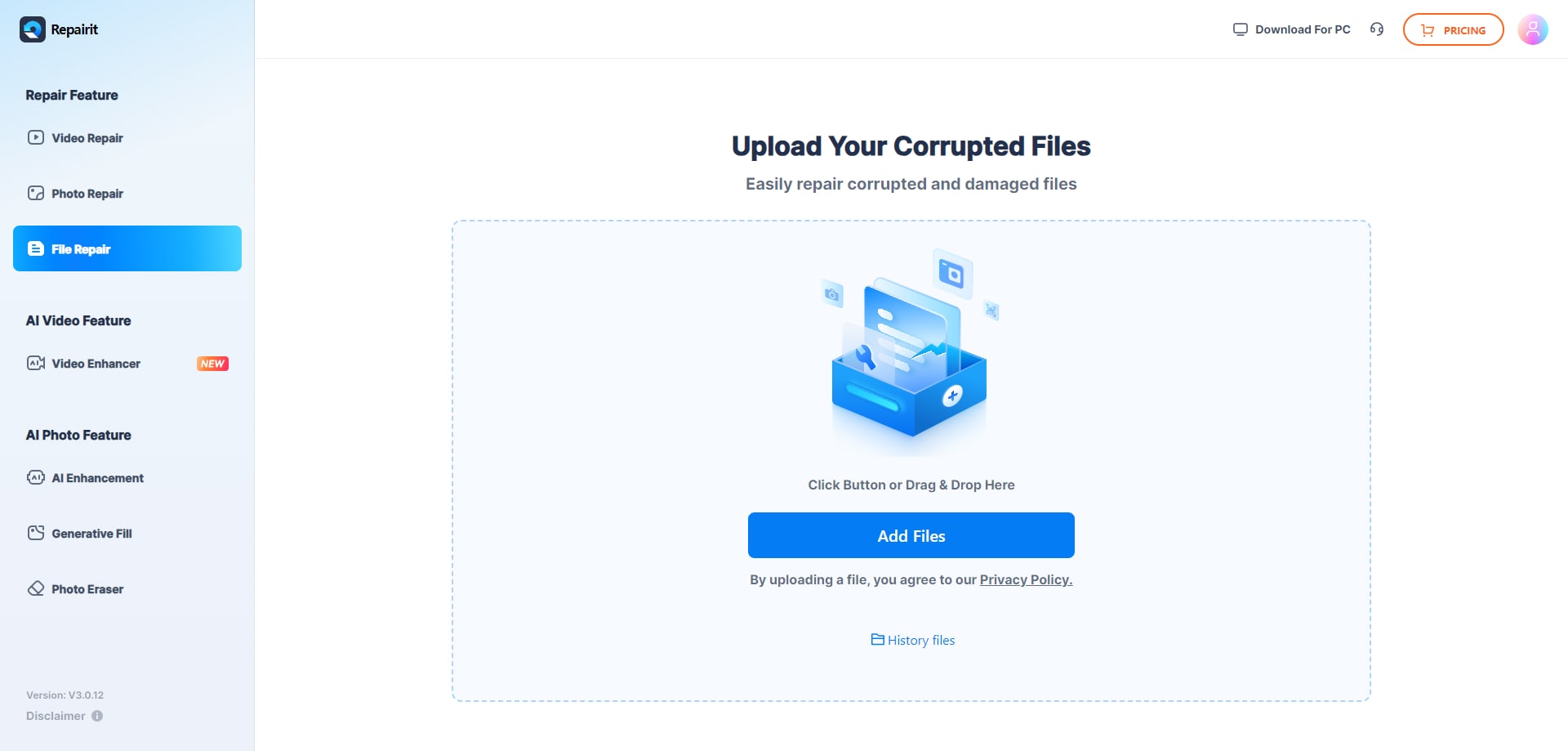
Step 1. Upload the corrupted, damaged, or unreadable files you want to repair through Repairit Online File Repair.
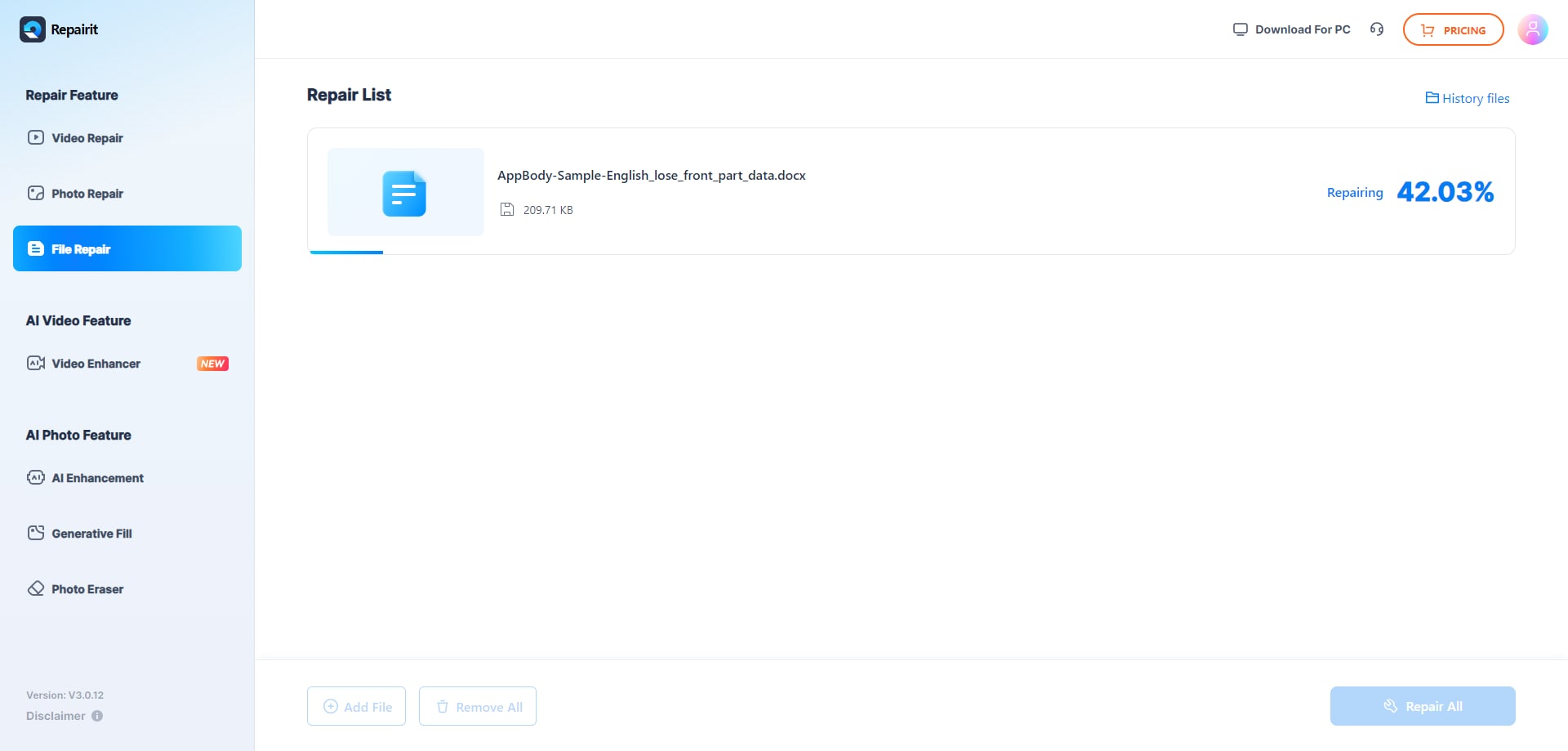
Step 2. Start the online repair process and let Repairit Online File Repair analyze the damaged files.
Step 3. Preview the repaired result when available, then save the repaired files to your device.
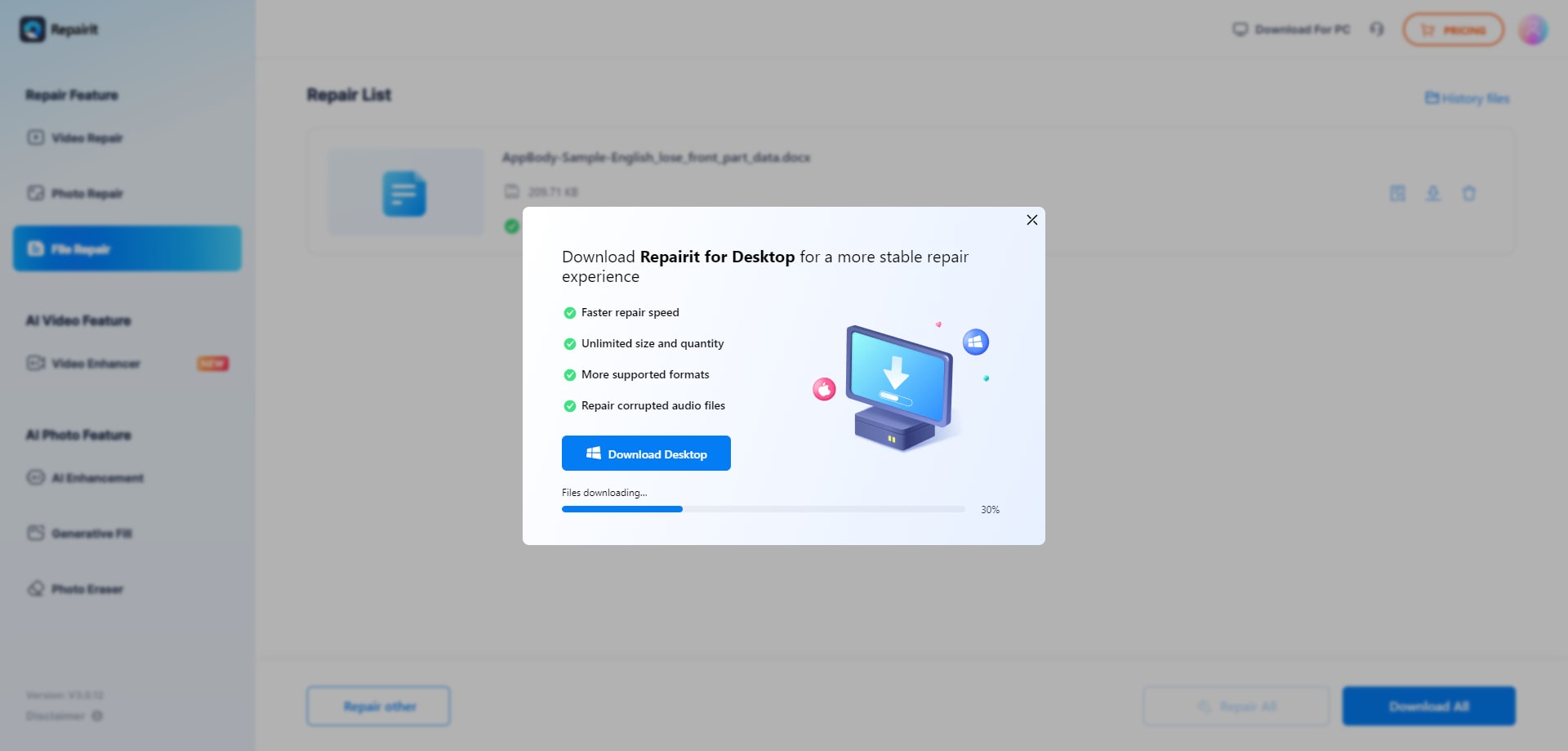
This type of structured flow keeps the focus on three actions: upload, review repair progress, and download. It also highlights the difference between corrupted file repair and other activities like deleted file recovery or data forensics, which are outside this workflow.
Final Verdict: Repairit Online File Repair vs PDF2Go Repair PDF
Repairit Online File Repair and PDF2Go Repair PDF target overlapping needs but suit different usage patterns.
PDF2Go Repair PDF suits users who want a fast, browser-based way to fix lightweight PDF corruption with minimal decisions. It is convenient when you already work in PDFs and do not need help with Word, Excel, or PowerPoint.
Repairit Online File Repair is often more suitable when you need a guided workflow and support for multiple file types, including PDFs, Word, Excel, PowerPoint, and some archives. Its wider scope can simplify managing diverse corrupted documents from different sources.
Neither tool can fix every severely damaged file, so results will vary depending on corruption level and completeness of the upload. Always keep secure backups of critical documents and verify repaired content carefully before using it in important workflows.
Next: Repairit Online File Repair vs Ilovepdf Repair Pdf
FAQ
-
1. How is Repairit Online File Repair different from PDF2Go Repair PDF for online repair?
PDF2Go Repair PDF centers on quick PDF-only repair using a simple upload and download workflow. Repairit Online File Repair provides a guided experience for corrupted PDFs plus damaged Word, Excel, PowerPoint, and some archives, so it can handle multiple formats within one browser session. -
2. When should I use Repairit Online File Repair instead of PDF2Go Repair PDF?
Use Repairit Online File Repair when you must repair multiple file types, such as corrupted PDFs, unreadable Word documents, broken Excel sheets, or damaged PowerPoint slides, and you want structured guidance rather than a single-action PDF repair. -
3. What is the difference between corrupted file repair and deleted file recovery?
Corrupted file repair focuses on fixing existing files that will not open or show errors. Deleted file recovery tries to restore data removed from storage. Repairit Online File Repair addresses corruption in available files, not deleted file recovery or broad data recovery tasks.
"




