
When a critical PDF, Word report, or Excel sheet refuses to open, choosing the right online file repair tool helps you fix unreadable files efficiently. This comparison focuses on Repairit Online File Repair and ILovePDF Repair PDF, highlighting how each service deals with corrupted, damaged, or broken documents directly in the browser.
Both tools aim to repair corrupted files online, but they focus on different document types and levels of guidance. Understanding these differences is essential before you upload sensitive contracts, budgets, or presentations for online repair.
In this article
- Quick Verdict: Repairit Online File Repair vs ILovePDF Repair PDF
- Key Differences and Comparison Table: Repairit Online File Repair vs ILovePDF Repair PDF
- File Types and Corruption Scenarios: Repairit Online File Repair vs ILovePDF Repair PDF
- Workflow, Ease of Use, and Upload: Repairit Online File Repair vs ILovePDF Repair PDF
- Repair Quality, Preview, and Limitations: Repairit Online File Repair vs ILovePDF Repair PDF
- Privacy, File Handling, and Browser Experience
- Supported Formats and Scenarios: Repairit Online File Repair vs ILovePDF Repair PDF
- Pros and Cons of Repairit Online File Repair and ILovePDF Repair PDF
- Who Should Choose Repairit Online File Repair or ILovePDF Repair PDF
- What the Actual Repair Process Looks Like
- Final Verdict: Repairit Online File Repair vs ILovePDF Repair PDF
Quick Verdict: Repairit Online File Repair vs ILovePDF Repair PDF
The quick takeaway is that Repairit Online File Repair typically suits users handling multiple broken document types, while ILovePDF Repair PDF focuses on straightforward PDF repair needs. Your choice should depend on whether you only repair corrupted PDF files or also face unreadable Word, Excel, and PowerPoint documents.
In many cases, having one tool for different document formats can simplify your online file repair workflow. However, users who only fix occasional PDF corruption may appreciate the simplicity of a single-purpose PDF repair page.
- Choose Repairit Online File Repair when dealing with mixed PDFs, Word reports, Excel sheets, and PowerPoint decks that will not open.
- Choose ILovePDF Repair PDF when you only need to repair corrupted PDF files using a minimal, casual interface.
- Both tools repair corrupted files online and are separate from deleted file recovery or disk-level data recovery utilities.
Key Differences and Comparison Table: Repairit Online File Repair vs ILovePDF Repair PDF
At a glance, the main differences involve supported formats, guidance level, and how each service approaches complex corruption. The table below summarizes how Repairit Online File Repair and ILovePDF Repair PDF compare across key dimensions that matter when your files become unreadable.
| Dimension | Repairit Online File Repair | ILovePDF Repair PDF |
|---|---|---|
| Best for | Users needing guided repair for corrupted PDFs and Office documents in one place. | Users repairing damaged PDFs quickly with a casual online tool. |
| Supported formats | May support corrupted PDF, Word, Excel, PowerPoint, and other common documents. | Focused on PDF repair only. |
| Online workflow | Upload files, follow guided steps, repair online, then preview and download. | Upload PDF, process, download in a simple flow. |
| Repair capability | Aims to address various document corruption cases and invalid file errors. | Geared toward simpler PDF corruption issues. |
| Ease of use | Step-by-step interface that can help less-technical users. | Very minimal options, beginner friendly. |
| Strengths | Versatile document coverage and guided workflow for broken office files. | Simple, focused PDF repair with ILovePDF-style experience. |
| Limitations | Results may vary with severe corruption or unsupported formats. | Limited to PDF and may struggle with heavily damaged files. |
Neither tool replaces a full data recovery suite. Instead, both target existing files that have become damaged, unreadable, or structurally inconsistent, such as broken PDF previews or spreadsheets raising invalid file errors.
Which Tool Repairs More File Types and Corruption Scenarios?
For coverage of file types and scenarios, Repairit Online File Repair generally offers broader document support, while ILovePDF Repair PDF keeps its focus specifically on PDF repair. This difference becomes important if you often work with mixed document sets or receive corrupted archives.
According to the provided capabilities summary, both tools repair corrupted, damaged, or unreadable documents online. However, the extent of support and guidance varies between them.
Repairit Online File Repair document repair capabilities
- May repair corrupted PDFs, Word documents, Excel workbooks, and PowerPoint presentations online.
- Targets errors such as files that will not open, invalid file messages, or partially readable documents.
- Uses a guided flow to help users navigate different document corruption scenarios.
ILovePDF Repair PDF document repair capabilities
- Focuses on repairing damaged or corrupted PDF files online.
- Useful when a PDF becomes unreadable, fails to open, or shows broken preview pages.
- Relies on a simple upload, processing, and download sequence with minimal configuration.
Repairit Online File Repair is described as suitable for corrupted PDF contracts, damaged Word reports, broken Excel budgets, and unreadable PowerPoint decks. It may also help when you face ZIP extraction errors containing office documents, because a single environment can attempt to repair multiple resulting files.
Repair Workflow, Ease of Use, and Upload Experience
Regarding workflow, both tools use an upload-first online file repair approach, but Repairit Online File Repair adds more guidance while ILovePDF Repair PDF keeps everything streamlined. Your comfort level with options versus simplicity should guide this choice.
Most users start with a corrupted document on their computer or in cloud storage. The next steps involve uploading, letting the tool process the file, and downloading any repaired output for verification.
Repairit Online File Repair workflow and usability
- Offers separate modules for different document categories in many cases.
- Guides users through uploading corrupted PDFs, Word documents, Excel workbooks, or PowerPoint files.
- Provides prompts or hints that can help non-technical users understand what to expect during online repair.
- May include preview features so you can quickly verify whether the repaired document looks usable.
ILovePDF Repair PDF workflow and usability
- Implements an upload PDF, process, and download pattern with minimal interaction.
- Feels casual and straightforward, similar to other ILovePDF tools.
- Aims to reduce decision-making by offering few advanced settings.
- Works well for one-off PDF issues when you just want a quick attempt at repair.
Both tools rely on your browser and network connection, so users repairing many large files or working on slower networks should proceed patiently and avoid refreshing the page while processing is underway.
Repair Quality, Preview Experience, and Limitations
In terms of repair quality, both services can help fix unreadable files, but outcomes depend heavily on how badly each file is corrupted. Neither tool can restore content that has been fully overwritten or is missing from the uploaded data.
The repair capabilities described show that Repairit Online File Repair often addresses a wider range of document behaviors, whereas ILovePDF Repair PDF concentrates on simpler PDF damage.
Repair quality considerations for Repairit Online File Repair
- Designed to handle diverse document issues, including invalid file errors and files that will not open at all.
- May better accommodate complex structures found in spreadsheets or presentations.
- Where available, preview options let you check content before downloading.
- Severe corruption, incomplete uploads, or unsupported formats can still prevent full repair.
Repair quality considerations for ILovePDF Repair PDF
- Casual, PDF-only approach that often suits moderate corruption such as damaged headers or minor structural issues.
- Limited advanced recovery for severely damaged PDFs with major structural loss.
- May not reconstruct deeply corrupted page objects, embedded fonts, or content streams.
- Users should test a sample file first and keep expectations aligned with the tool focus.
Neither service replaces a backup strategy. They are meant for existing files that became damaged, not for restoring deleted data or repairing entire storage media.
Privacy, File Handling, and Browser Experience
Because both tools operate online, they upload corrupted documents to remote servers for processing, which means privacy and connectivity are critical considerations. Users should always verify official documentation before repairing confidential material.
The description indicates that each service uses server-side repair logic, so network speed, browser stability, and upload size all influence user experience. Unexpected interruptions can lead to incomplete uploads and therefore unsuccessful repair attempts.
- Check each provider for details on file retention, deletion schedules, and access controls.
- Avoid public or shared computers when uploading sensitive contracts, financial spreadsheets, or internal presentations.
- Use secure networks and updated browsers to lower the risk of connection drops during repair.
- Consider anonymizing file names before upload, especially when handling private or regulated information.
For highly confidential files, internal policies might require using on-premises solutions instead of online tools. Always confirm that online file repair aligns with your organization compliance rules before proceeding.
Supported File Formats and Common Repair Scenarios
From a format perspective, Repairit Online File Repair is generally positioned for multiple office file types, while ILovePDF Repair PDF centers on PDFs. Actual support may evolve, so users should confirm the latest format lists on each provider site.
The scenarios below illustrate common issues for documents, spreadsheets, presentations, and archives where an online repair tool may help reconstruct working files.
| File type | Typical corruption symptoms | How Repairit Online File Repair may help | How ILovePDF Repair PDF may help |
|---|---|---|---|
| broken file previews, unreadable pages, or files that will not open. | May repair corrupted PDF files with invalid structures or damaged content. | Attempts to fix damaged PDFs and restore readable pages. | |
| Word | Unreadable Word documents, invalid file errors, or crashes on open. | May repair corrupted Word documents and reconstruct accessible text. | Check official support; tool is mainly focused on PDFs. |
| Excel | Damaged Excel sheets, missing cells, or workbook open failures. | May repair corrupted Excel files with broken workbook structures. | Not typically used for spreadsheets; check official support. |
| PowerPoint | PowerPoint files that fail to load or show corrupt slide warnings. | May repair corrupted PowerPoint files used for presentations. | Check official support; oriented to PDF repair. |
| ZIP or archives | ZIP extraction errors after transfers or incomplete downloads. | Can be used after extraction to repair individual corrupted documents. | May help only if the problem file is a PDF; otherwise limited. |
| Other formats | Files saved from third-party tools that report invalid format. | Users should check official support for additional document types. | Mainly for PDFs; other formats may not be supported. |
Because format support can change, always check whether your file type appears in each product documentation before relying on it for critical work. Test with non-confidential samples where possible.
Pros and Cons of Repairit Online File Repair and ILovePDF Repair PDF
Both tools provide useful options for repairing corrupted files online, but each comes with trade-offs. Understanding pros and cons helps you choose appropriately for your workload, team skills, and document mix.
Below are concise pros and cons lists based on the characteristics and workflows described earlier, focusing on online repair for corrupted documents rather than any form of deleted file recovery.
Repairit Online File Repair Pros and Cons
ILovePDF Repair PDF Pros and Cons
Who Should Choose Repairit Online File Repair or ILovePDF Repair PDF?
Your decision should be guided by file variety, frequency of corruption, and how much guidance you want during repair. Both services can help repair damaged documents, but they cater to different user groups and scenarios.
Think about whether your typical problem is a single broken PDF or an entire set of documents affected after syncing, transfer, or archive extraction errors.
Who may benefit most from Repairit Online File Repair
- Users managing repeated corruption across PDFs, Word, Excel, and PowerPoint documents.
- Professionals preferring a more guided, step-by-step repair process.
- Teams facing invalid file errors when sharing or syncing office documents.
- Anyone wanting a unified online tool for different broken document types.
Who may benefit most from ILovePDF Repair PDF
- People with occasional corrupted PDFs and no requirement for office file repair.
- Users comfortable with ILovePDF style interfaces and casual online tools.
- Students or home users wanting a quick fix for teachers PDFs or downloaded forms.
- Anyone prioritizing a simple upload PDF, process, and download workflow.
If your needs change over time, it can be practical to combine both approaches: use ILovePDF Repair PDF for quick PDF-only cases and rely on Repairit Online File Repair for mixed-format or more complex document repair tasks.
What the Actual Repair Process Looks Like
Most online file repair tools follow a similar pattern: you upload a corrupted file, the service analyzes and attempts to reconstruct it, and you then download the repaired version. Understanding that generic flow helps you set realistic expectations before using any specific solution.
As a guided example, Repairit Online File Repair illustrates how a structured online file repair workflow can support different document types without overwhelming users with manual repair steps or low-level file editing.
Key Features
Based on the provided description, the online file repair experience emphasizes flexibility across common office types while keeping the workflow approachable for non-experts.
- May support multiple document types, including PDFs and typical office files.
- Guided repair flow tailored to different corruption scenarios or error messages.
- Runs entirely online, reducing the need for dedicated desktop repair utilities.
- Aims to address issues such as invalid file errors, broken file previews, and files that will not open.
Step-by-step guide
The following steps show how a user might repair corrupted files online through this kind of workflow, using Repairit Online File Repair as the reference example.
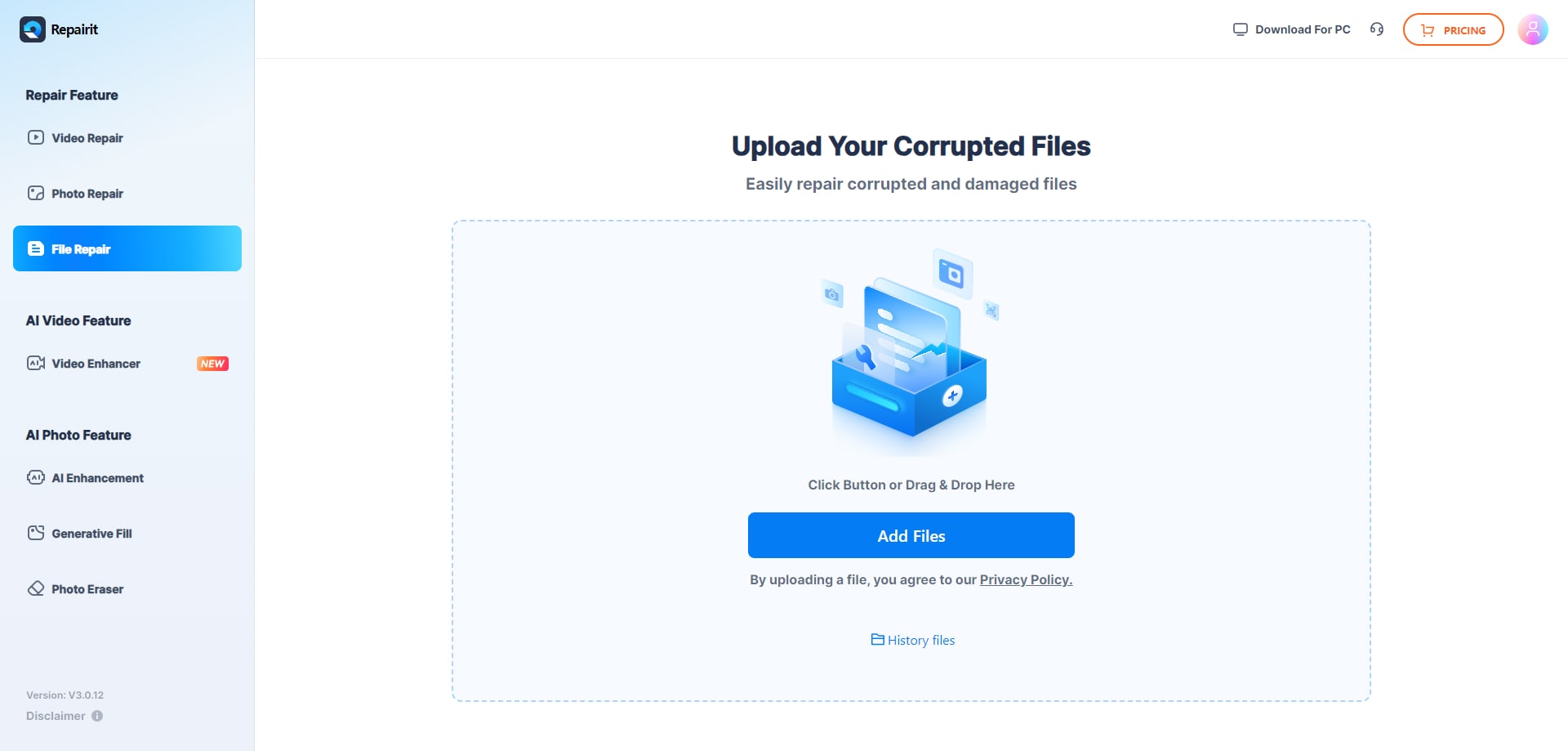
Step 1. Upload the corrupted, damaged, or unreadable files you want to repair through Repairit Online File Repair.
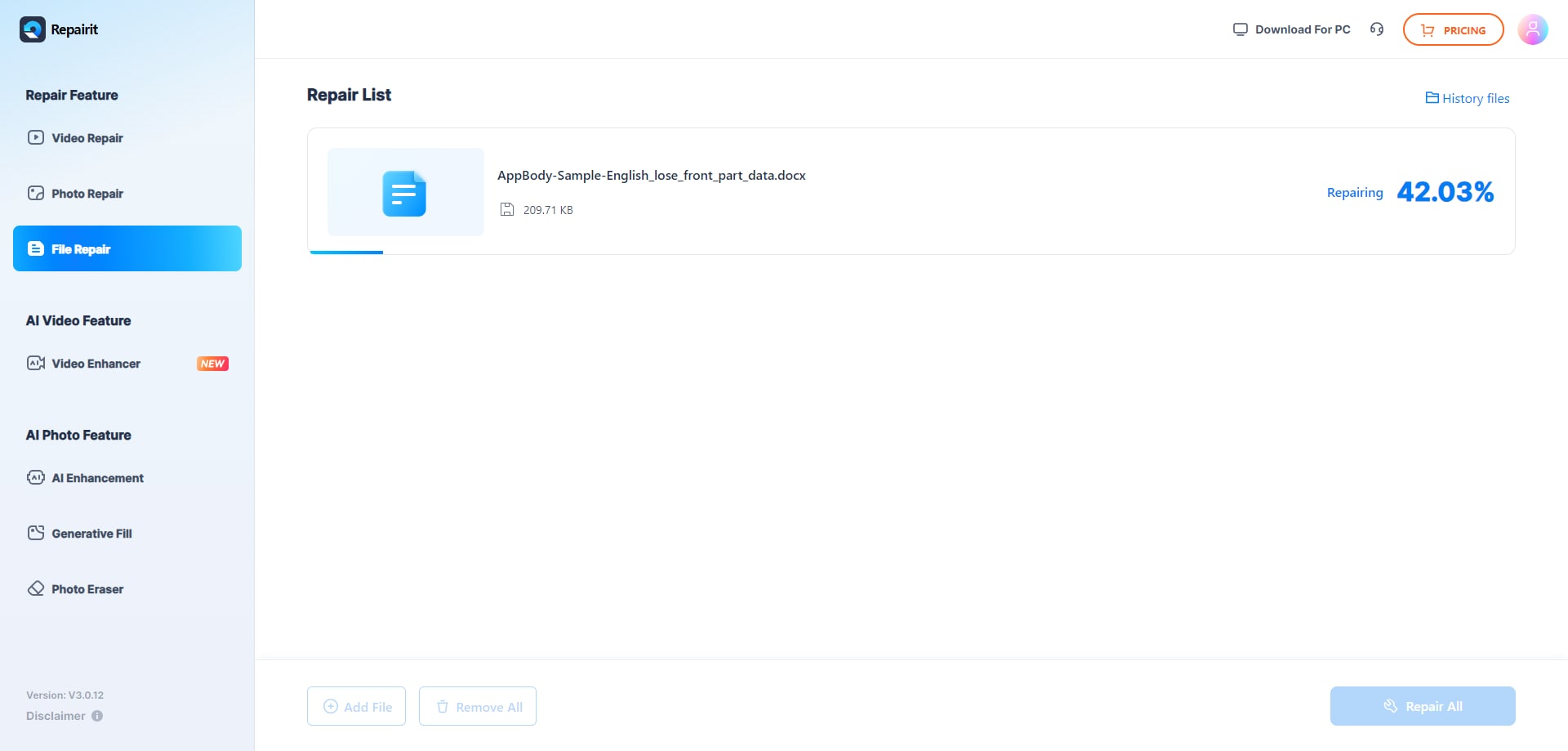
Step 2. Start the online repair process and let Repairit Online File Repair analyze the damaged files.
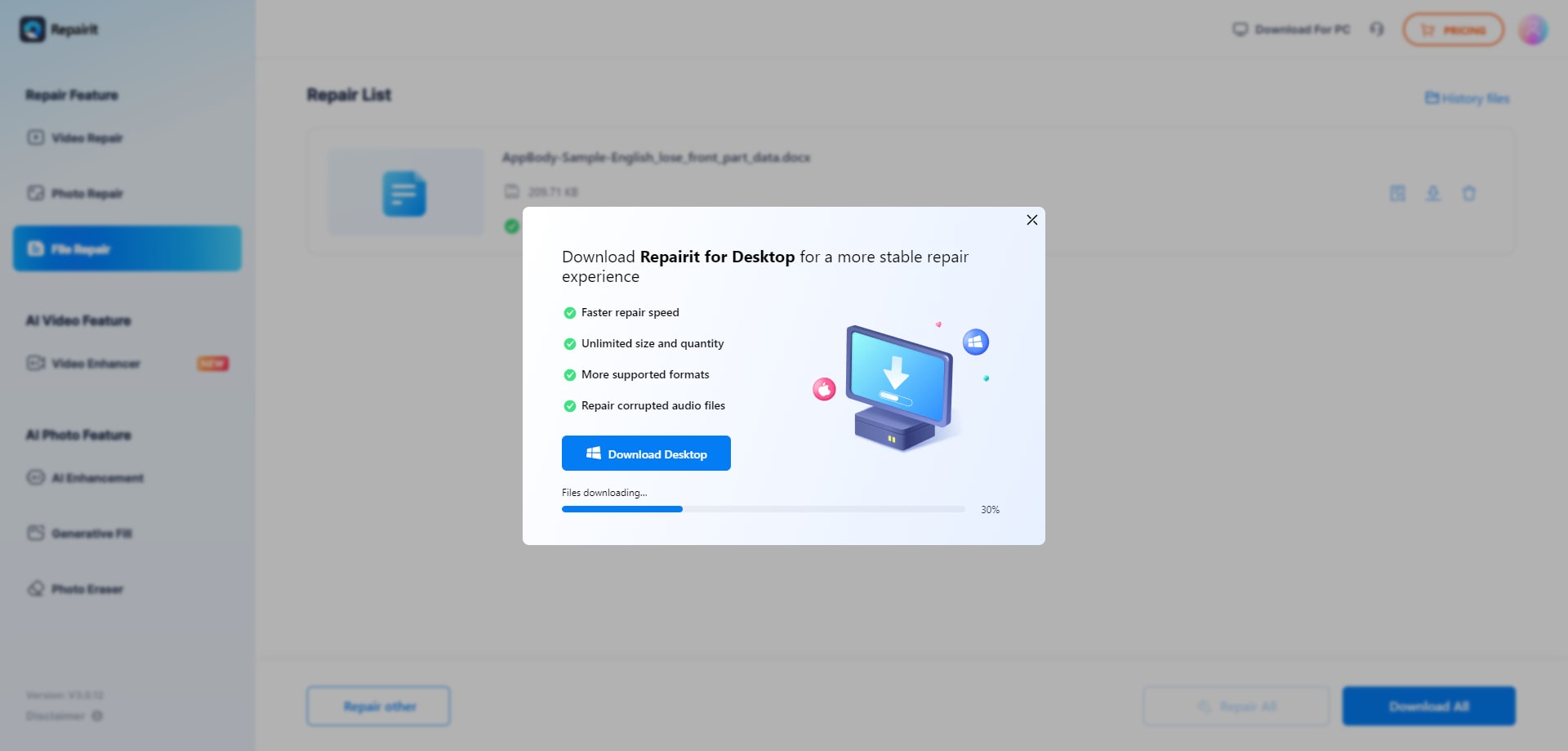
Step 3. Preview the repaired result when available, then save the repaired files to your device.
These steps are typical of many online repair tools, though specific screens and options may differ. Always keep original files separate so you can try alternative repair approaches or future tools if needed.
Final Verdict: Repairit Online File Repair vs ILovePDF Repair PDF
Overall, Repairit Online File Repair and ILovePDF Repair PDF both provide valuable options for repairing corrupted files online, but they address different priorities. ILovePDF Repair PDF focuses on quick, accessible PDF repair, while Repairit Online File Repair is oriented toward broader document coverage and a more guided repair experience.
If you mostly handle casual PDF corruption, ILovePDF Repair PDF may be sufficient. If your workflow includes recurring issues with PDFs, Word documents, Excel workbooks, and PowerPoint presentations, Repairit Online File Repair usually aligns better with those diverse needs.
Next: Repairit Online File Repair vs Cimaware Officefix
FAQ
-
1. How is Repairit Online File Repair different from ILovePDF Repair PDF?
Repairit Online File Repair is described as a guided online solution for repairing corrupted PDFs, Word, Excel, and PowerPoint files. ILovePDF Repair PDF is a casual, accessible tool centered on repairing corrupted PDF files only, with fewer options and a simpler workflow. -
2. When should I use Repairit Online File Repair instead of ILovePDF Repair PDF?
Use Repairit Online File Repair when you need to repair multiple file types, such as PDFs, Word documents, Excel sheets, and PowerPoint decks, or when you prefer step-by-step guidance through complex document corruption scenarios. -
3. What is the difference between corrupted file repair and deleted file recovery?
Corrupted file repair focuses on fixing existing files that will not open, show invalid errors, or appear structurally damaged. Deleted file recovery attempts to restore files that were removed from storage. The tools in this article address corruption, not deleted file recovery.
"




