
Business teams comparing Repairit Online File Repair with Cimaware OfficeFIX are usually trying to repair corrupted Office files online without rebuilding documents from scratch.
Business users often face corrupted PDFs, damaged Word documents, broken Excel sheets, and unreadable PowerPoint files. This guide compares Repairit Online File Repair with Cimaware OfficeFIX as enterprise-focused options to repair corrupted Office files online. Learn how each handles upload workflows, supported formats, repair quality, and where each tool fits best in your document reliability strategy.
The focus here is on repairing corrupted, damaged, broken, or unreadable files, not on recovering deleted items or general data recovery tasks.
In this article
- Quick Verdict: Repairit Online File Repair vs Cimaware OfficeFIX
- Key Differences and Comparison Table: Repairit Online File Repair vs Cimaware OfficeFIX
- File Types and Corruption Scenarios: Repairit Online File Repair vs Cimaware OfficeFIX
- Workflow, Ease of Use, and Upload: Repairit Online File Repair vs Cimaware OfficeFIX
- Repair Quality, Preview, and Limitations: Repairit Online File Repair vs Cimaware OfficeFIX
- Privacy, File Handling, and Browser Experience
- Supported Formats and Scenarios: Repairit Online File Repair vs Cimaware OfficeFIX
- Pros and Cons of Repairit Online File Repair and Cimaware OfficeFIX
- Who Should Choose Repairit Online File Repair or Cimaware OfficeFIX
- What the Actual Repair Process Looks Like
- Final Verdict: Repairit Online File Repair vs Cimaware OfficeFIX
Quick Verdict: Repairit Online File Repair vs Cimaware OfficeFIX
The key difference is that Repairit Online File Repair emphasizes a guided browser-based experience for mixed document types, while Cimaware OfficeFIX focuses on enterprise-style repair for core Microsoft Office files.
Repairit Online File Repair is often better suited when teams must repair corrupted PDF reports, unreadable Word documents, damaged Excel sheets, or PowerPoint files that fail to load using a simple online workflow.
Cimaware OfficeFIX may fit organizations with IT-managed environments and recurring corruption in Word, Excel, Access, and Outlook data files that follow structured business processes.
Neither tool covers deleted file recovery or full storage-level data recovery. Both are oriented toward repairing existing corrupted files that still reside on your systems.
Key Differences and Comparison Table: Repairit Online File Repair vs Cimaware OfficeFIX
At a high level, Repairit Online File Repair offers a visual, browser-first workflow, while Cimaware OfficeFIX leans into an enterprise repair sequence for Microsoft Office environments.
Repairit Online File Repair is a guided, browser-based service for fixing corrupted documents. Cimaware OfficeFIX is positioned as an enterprise office repair solution for core Microsoft Office files. This comparison looks at formats, workflows, repair quality, and when each option better fits business users handling damaged or unreadable files online.
| Dimension | Repairit Online File Repair | Cimaware OfficeFIX |
|---|---|---|
| Best for | Business users needing guided online repair for corrupted PDFs and Office documents. | Business users needing an enterprise office repair solution for Microsoft Office data files. |
| Supported formats | Typically supports online repair for PDF, Word, Excel, PowerPoint, and some other documents. | Focuses on Word, Excel, Access, and Outlook files in business environments. |
| Online workflow | Browser-based upload, guided analysis, preview, then download repaired files. | Structured upload → diagnose → recover sequence for Office files. |
| Repair capability | Designed to fix unreadable files and invalid file errors when damage is within repairable limits. | Enterprise-oriented repair for structured Office data, depending on corruption severity. |
| Ease of use | Visual, step-by-step interface suitable for non-technical staff. | Can feel more technical and dated due to older UI design. |
| Strengths | Simple online access and flexibility for mixed document types, including PDFs and presentations. | Strong enterprise repair focus for Word, Excel, Access, and Outlook. |
| Limitations | Repair success depends on damage level and supported formats; not a deleted-file recovery tool. | Older design and narrow format focus may limit flexibility beyond core Office files. |
Which Tool Repairs More File Types and Corruption Scenarios?
Repairit Online File Repair tends to cover a broader range of office-style documents, while Cimaware OfficeFIX concentrates on Microsoft Office data files and mailstores.
Both tools focus on repairing corrupted, damaged, broken, or unreadable Office files, not on restoring deleted content or general data recovery.
- Repair corrupted PDF files used for reports and contracts.
- Repair corrupted Word documents containing agreements or manuals.
- Repair corrupted Excel files with financial or operational data.
- Repair corrupted PowerPoint files used for sales or training decks.
- Address some archive-related issues such as ZIP extraction errors for supported formats.
Repairit Online File Repair is useful when you must repair corrupted PDF reports, damaged Word agreements, broken Excel budgets, or unreadable PowerPoint decks online. Cimaware OfficeFIX focuses on corrupted Word, Excel, Access, and Outlook files. For mixed-format projects involving Office databases and mailstores, Cimaware OfficeFIX may be attractive, while Repairit Online File Repair suits broader document sets.
Teams handling frequent broken PDF previews, files that will not open, invalid file errors, or incomplete file structures across multiple document types may appreciate the flexibility of a browser-based tool.
Repair Workflow, Ease of Use, and Upload Experience
Repairit Online File Repair emphasizes a simple, guided online file repair workflow, while Cimaware OfficeFIX follows a more traditional enterprise-style process.
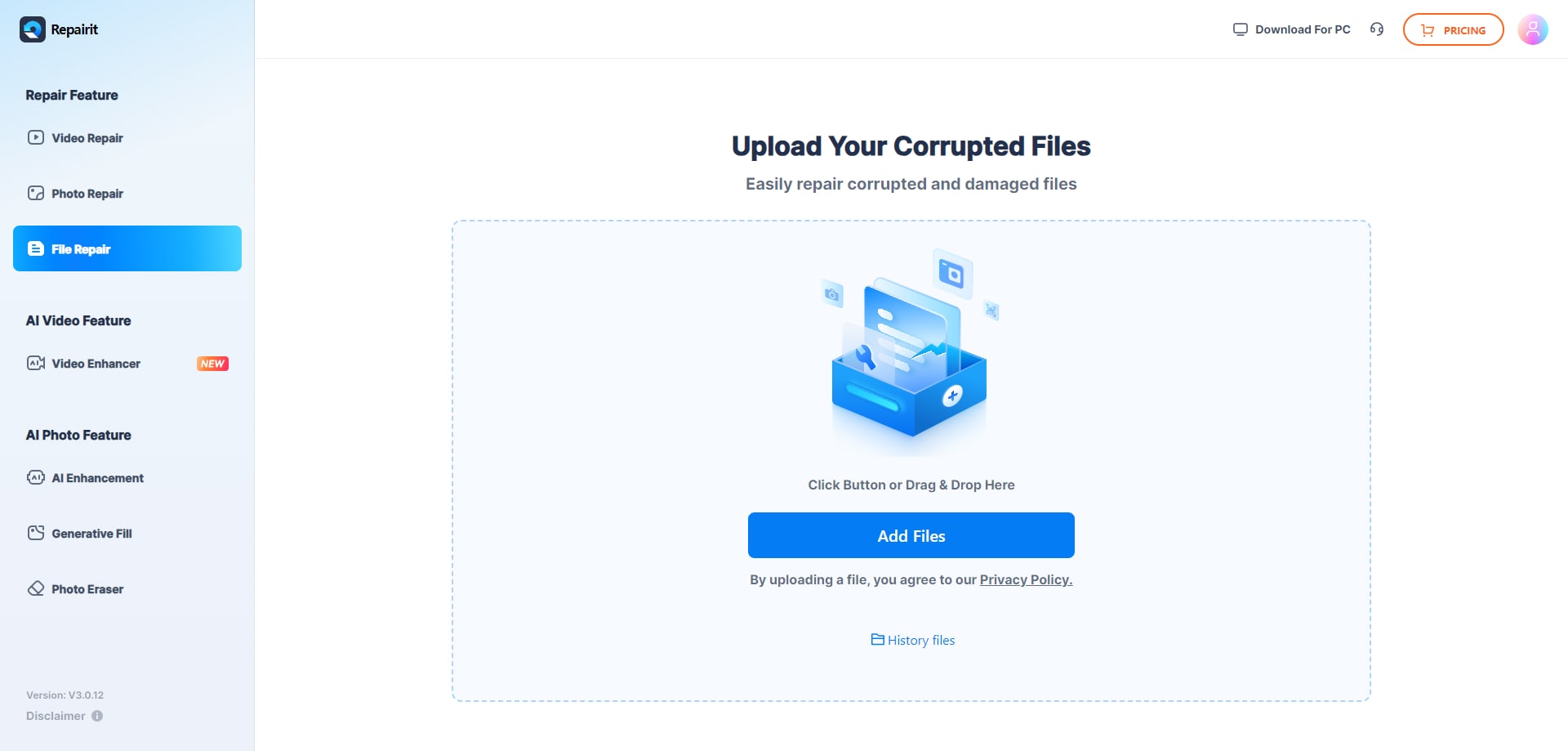
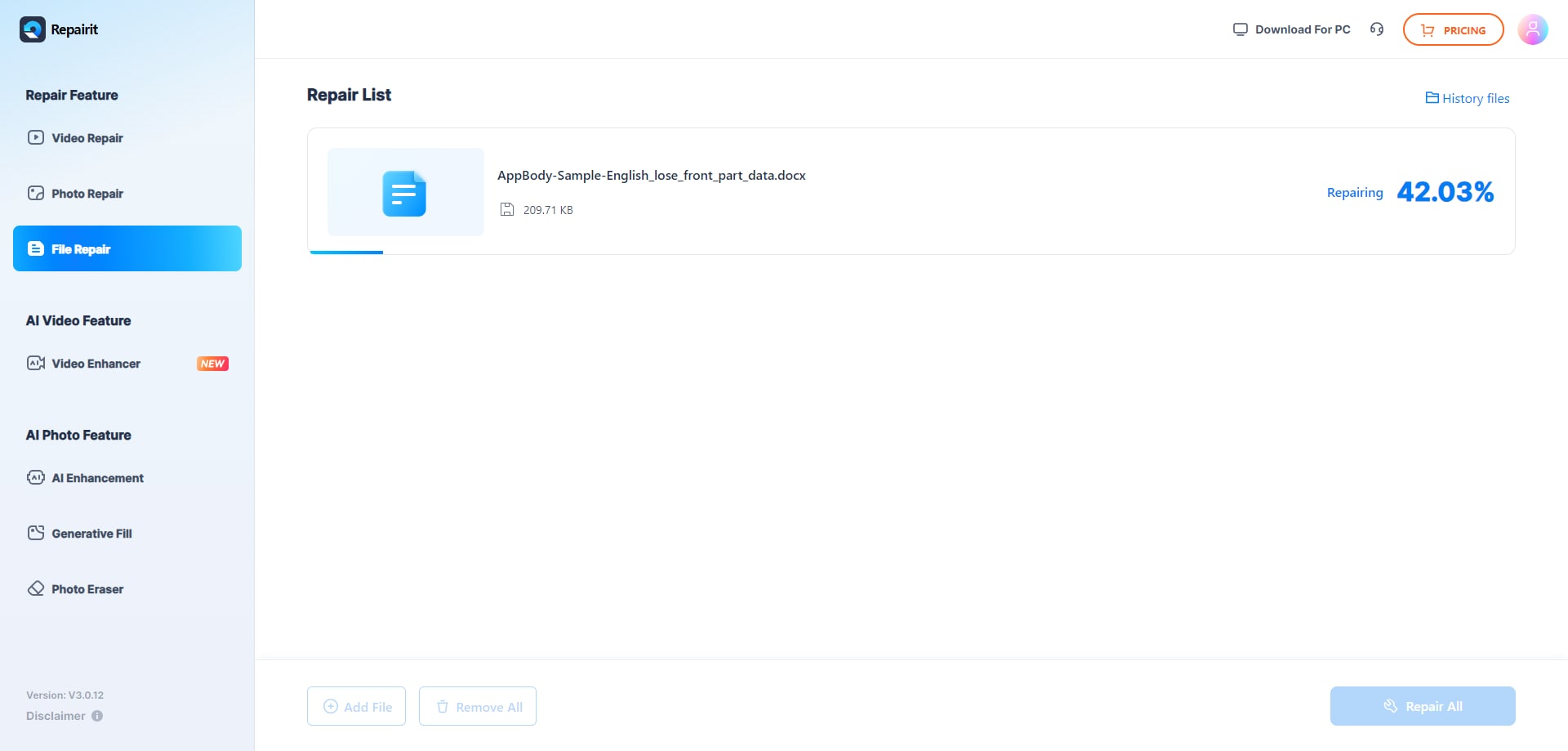
Repairit Online File Repair emphasizes a simple upload process: add corrupted files in the browser, let the service analyze, preview, then download repaired versions. It is designed so non-technical users can attempt file repair directly in the browser without configuring complex options.
Cimaware OfficeFIX uses an enterprise-style workflow of upload file → diagnose → recover, which may suit IT-managed environments. Its older UI can feel less intuitive for everyday staff who are not familiar with technical file repair concepts.
In many organizations, business users want to fix unreadable files in a few clicks, while IT teams may prefer detailed control. This difference often influences which solution is easier to adopt across departments.
Repair Quality, Preview Experience, and Limitations
Both tools aim to repair corrupted files online, but results always depend on the extent and nature of file damage.
Repair quality for both tools depends heavily on how corrupted the document is. Severe corruption, missing file data, damaged file structure, incomplete uploads, or unsupported formats may reduce success or leave files partially repaired.
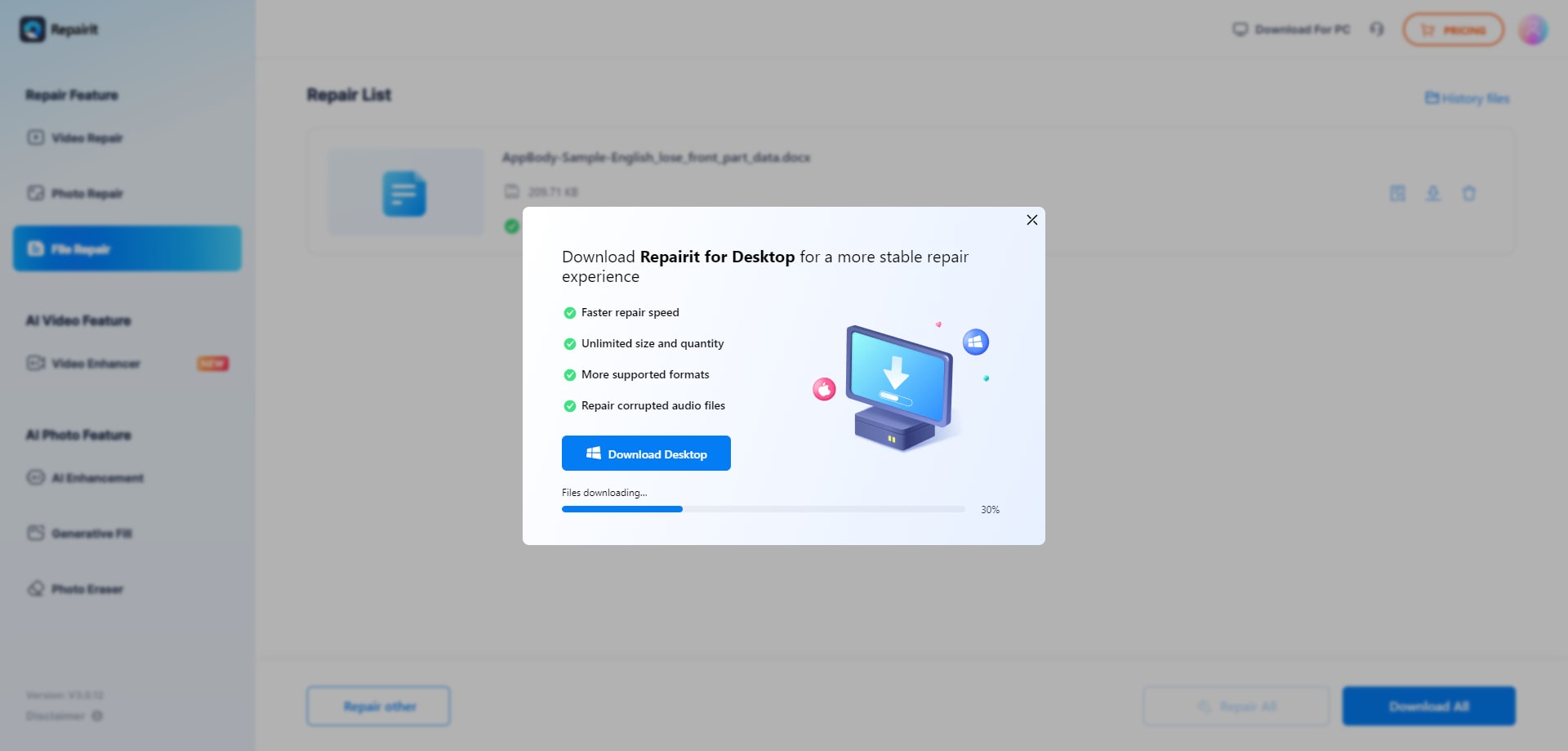
Repairit Online File Repair provides a more guided, visual experience for typical online document repair tasks. When supported, users can preview repaired content in the browser before downloading, helping them verify that unreadable Word documents or damaged Excel sheets look acceptable.
Cimaware OfficeFIXs strong enterprise repair focus helps with structured Office data, though its older UI may slow everyday use. It may work well for recurring corruption in spreadsheets, databases, or Outlook data files where organizations follow repeatable workflows.
Neither solution should be considered a replacement for solid backup practices. They are tools for addressing corrupted files that still exist, not for undoing deletion or storage failures.
Privacy, File Handling, and Browser Experience
Any online file repair workflow requires careful consideration of confidentiality, especially for contracts, finance data, and email content.
Both approaches involve sending files for processing, so teams should review each providers documentation before uploading sensitive data. This includes how files are transmitted, processed, stored temporarily, and removed.
Repairit Online File Repair runs entirely in the browser, helping users avoid complex installations and letting them repair corrupted files online from different locations or devices, subject to company policy.
Cimaware OfficeFIX follows its own handling model. In either case, confirm how uploads, temporary processing, and downloads are managed, especially for confidential contracts, financial workbooks, or email data. Legal, compliance, and security teams may need to approve any cloud or hybrid processing of internal documents.
Supported File Formats and Common Repair Scenarios
Repairit Online File Repair typically covers a wider variety of document formats, while Cimaware OfficeFIX is oriented around specific Microsoft Office components.
Below is a high-level view of common formats and scenarios that each tool may address. Users should check official support documentation for exact format lists and limitations.
| File type / scenario | Repairit Online File Repair | Cimaware OfficeFIX |
|---|---|---|
| PDF reports with broken file previews or invalid file errors | Designed to repair corrupted PDF files in many cases. | Check official support; focus is primarily on Office formats. |
| Word documents that will not open or show unreadable content | Helps repair corrupted Word documents through a browser. | Targets corrupted Word files for business workflows. |
| Excel workbooks with damaged sheets or structure errors | Aims to repair corrupted Excel files and restore access. | Repairs broken Excel files used in business processes. |
| PowerPoint presentations failing to load or crashing | Can repair corrupted PowerPoint files for many scenarios. | Check official support; emphasis is on Word, Excel, Access, Outlook. |
| Access databases with integrity or structure issues | Check official support; focus is broader document repair. | Targets corrupted Access files as part of Office repair. |
| Outlook mail data files used in enterprise email | Check official support; may not cover all mail formats. | Repairs Outlook data files in supported scenarios. |
| ZIP archives with extraction errors for documents | May help when repairing broken ZIP files for supported content. | Check official support; focus remains on Office data files. |
In practice, organizations that manage mixed document sets with PDFs, Office files, and some archives may lean toward a browser-oriented tool. Teams primarily working with Word, Excel, Access, and Outlook in structured environments may consider Cimaware OfficeFIXs focus attractive.
Pros and Cons of Repairit Online File Repair and Cimaware OfficeFIX
Each solution offers clear strengths but also trade-offs that teams should weigh before standardizing on a repair workflow.
Repairit Online File Repair Pros and Cons
Cimaware OfficeFIX Pros and Cons
Who Should Choose Repairit Online File Repair or Cimaware OfficeFIX?
Choosing between these tools usually comes down to document mix, user skills, and how centrally IT manages repair workflows.
Repairit Online File Repair often fits organizations that need quick, browser-based ways to repair corrupted files online without heavy technical involvement. Cimaware OfficeFIX may align better with IT-led environments standardizing on Microsoft Office data files.
Repairit Online File Repair is likely a good fit when:
- Teams need guided online repair for mixed file types, including corrupted PDFs and unreadable presentations.
- Remote staff prefer browser-based repair without complex enterprise-style interfaces or installs.
- Businesses handle repeated file will not open issues across many document formats.
- Non-technical users want step-by-step online repair for invalid file errors and broken attachments.
Cimaware OfficeFIX is likely a good fit when:
- Organizations standardize on Word, Excel, Access, and Outlook in enterprise workflows.
- IT teams manage recurring corruption in Office databases and mailstores.
- Businesses prioritize strong enterprise repair for core Microsoft Office files.
- Companies are comfortable working with a more traditional, older-style interface.
Neither tool is universally better. The right choice depends on whether you prioritize mixed-format browser repair or deeper focus on structured Office data.
What the Actual Repair Process Looks Like
Most online file repair tools follow a familiar pattern: upload corrupted files, let the service analyze damage, then download repaired versions when available.
This upload-and-repair flow helps teams deal with unreadable Word documents, damaged Excel sheets, broken PDF previews, and PowerPoint files that fail to load without manually editing raw file structures.
Key Features
Repairit Online File Repair focuses on making online repair accessible while still addressing a range of common damage patterns.
- Online repair for corrupted PDF, Word, Excel, and PowerPoint files.
- Guided workflow with visual progress and clear repair stages.
- Designed for business teams handling diverse document corruption.
- Addresses invalid file errors, files that will not open, and some ZIP extraction issues for supported formats.
- Supports browser-based use so staff can repair corrupted files online without installing heavy tools.
Step-by-step guide
Below is a simple example of how a typical session with Repairit Online File Repair may look in practice.
Step 1. Upload the corrupted, damaged, or unreadable files you want to repair through Repairit Online File Repair.
Step 2. Start the online repair process and let Repairit Online File Repair analyze the damaged files.
Step 3. Preview the repaired result when available, then save the repaired files to your device.
This approach helps users quickly test whether corrupted files are recoverable without editing complex file internals or relying on full data recovery suites.
Final Verdict: Repairit Online File Repair vs Cimaware OfficeFIX
Both Repairit Online File Repair and Cimaware OfficeFIX can play useful roles in a document reliability strategy, but they are optimized for different priorities.
Repairit Online File Repair and Cimaware OfficeFIX address overlapping but distinct needs. Repairit Online File Repair is a guided, browser-based choice for mixed document sets, including corrupted PDFs and presentations. Cimaware OfficeFIX focuses on strong enterprise repair for Word, Excel, Access, and Outlook.
If you need to repair corrupted files online across various document types with minimal training, Repairit Online File Repair may be the more convenient option. If your environment centers on Microsoft Office data files with IT-managed repair processes, Cimaware OfficeFIX may align better.
Neither is universally better: the right option depends on your document types, user skills, and whether you prioritize guided online workflows or enterprise-style Office repair. Many organizations may even use different tools for different departments or scenarios.
Next: Repairit Online File Repair vs Kernel Online Repair
FAQ
-
1. How do Repairit Online File Repair and Cimaware OfficeFIX differ for business users?
Repairit Online File Repair focuses on guided, browser-based repair for PDFs, Word, Excel, and PowerPoint, making it approachable for everyday staff. Cimaware OfficeFIX targets enterprise repair for Word, Excel, Access, and Outlook, which may align better with IT-managed, Microsoft Office centric workflows. -
2. When is Repairit Online File Repair a better option than Cimaware OfficeFIX?
Repairit Online File Repair can be preferable when teams must repair a mix of corrupted PDFs, Word, Excel, and PowerPoint files online and want a simple, visual browser workflow rather than a more traditional, enterprise-style interface managed by IT. -
3. What is the difference between corrupted file repair and deleted file recovery?
Corrupted file repair focuses on fixing damaged, unreadable, or invalid files that still exist, such as broken PDF previews or Excel sheets that will not open. Deleted file recovery aims to restore files removed from storage. These tools focus on repairing corrupted files, not on recovering deleted data.
"




