
Online file repair tools help business teams repair corrupted files online when important documents suddenly stop opening or show errors. Instead of recovering deleted data, these services focus on fixing existing, damaged files.
Business teams often face corrupted PDF reports, damaged Word contracts, broken Excel workbooks, and unreadable PowerPoint decks. This guide compares Repairit Online File Repair with Kernel Online Repair so you can choose the right online file repair workflow for your documents, databases, and Outlook mailboxes.
The focus here is on repairing corrupted files online, not on deleted file recovery, disk recovery, or general data recovery utilities.
In this article
- Quick Verdict: Repairit Online File Repair vs Kernel Online Repair
- Key Differences and Comparison Table: Repairit Online File Repair vs Kernel Online Repair
- File Types and Corruption Scenarios: Repairit Online File Repair vs Kernel Online Repair
- Workflow, Ease of Use, and Upload: Repairit Online File Repair vs Kernel Online Repair
- Repair Quality, Preview, and Limitations: Repairit Online File Repair vs Kernel Online Repair
- Privacy, File Handling, and Browser Experience
- Supported Formats and Scenarios: Repairit Online File Repair vs Kernel Online Repair
- Pros and Cons of Repairit Online File Repair and Kernel Online Repair
- Who Should Choose Repairit Online File Repair or Kernel Online Repair
- What the Actual Repair Process Looks Like
- Final Verdict: Repairit Online File Repair vs Kernel Online Repair
Quick Verdict: Repairit Online File Repair vs Kernel Online Repair
Repairit Online File Repair typically suits non-technical office users who want a guided online file repair workflow for everyday documents, while Kernel Online Repair often aligns with teams comfortable with enterprise-style tools and mailbox or database repair.
The key difference is how each service approaches usability and scope. One prioritizes a clear, browser-based flow; the other leans into professional utilities that may connect with broader business data tasks.
Neither option replaces deleted file recovery or full data recovery suites. Instead, both focus on repairing corrupted files online when business documents still exist but have become unreadable or unstable.
Key Differences and Comparison Table: Repairit Online File Repair vs Kernel Online Repair
Repairit Online File Repair and Kernel Online Repair differ mainly in user experience, target audience, and how they present office, mailbox, and database repair capabilities.
The following comparison table summarizes the main dimensions described in the inputs, including file types, repair workflows, and ease of use for various users.
| Dimension | Repairit Online File Repair | Kernel Online Repair |
|---|---|---|
| Best for | Users needing a guided browser-based repair flow for common business documents that will not open or show errors. | Professionals managing business documents and mailboxes who prefer enterprise-oriented tools and broader data workflows. |
| Supported formats | Online repair for typical office files like corrupted PDF, Word, Excel, PowerPoint, plus other common document issues. | Office, Outlook, and database files, focusing on professional documents and mailbox data repair tasks. |
| Online workflow | Simple browser flow: upload broken files, run online analysis, preview and download repaired documents. | Upload file → scan → repair workflow, suited to users comfortable with structured enterprise-style tools. |
| Repair capability | Targets corrupted, damaged, or unreadable documents and presentations, often handling invalid file errors and files refusing to open. | Designed for professional data and file repair, particularly for Office, Outlook, and database file corruption. |
| Ease of use | Guided, beginner-friendly interface with step-by-step online prompts suited to non-technical office users. | Interface can be complex and may require technical familiarity or documentation-reading to use confidently. |
| Strengths | Clear, focused online repair journey for broken documents with minimal setup and quick testing in a browser. | Enterprise-oriented tools that may integrate into broader workflows for mailboxes and business data files. |
| Limitations | Best for supported document types; severe corruption or unsupported formats may still fail to repair fully. | Complex interface; users may need time to learn features, and extremely damaged files may remain unrepaired. |
Which Tool Repairs More File Types and Corruption Scenarios?
Both tools address corrupted, damaged, broken, or unreadable files, but their emphasis differs by file type and business context.
According to the provided information, Repairit Online File Repair focuses on common document formats such as PDFs, Word, Excel, and PowerPoint files. It aims to repair corrupted PDF files, repair corrupted Word documents, repair corrupted Excel files, and repair corrupted PowerPoint files that show errors or will not open.
Kernel Online Repair, by contrast, is positioned around Office, Outlook, and database files. It may be more appealing for teams dealing with mailbox corruption, database-related document issues, or structured business data where Outlook PST or database files need repair.
Both solutions are designed for corrupted file repair rather than deleted file recovery. Files must generally still exist on storage, even if their structure is incomplete or returning invalid file errors in office applications.
In practice, the tool that repairs more of your files will often be the one that aligns closely with your typical formats and corruption scenarios, so checking official support documentation is recommended.
Repair Workflow, Ease of Use, and Upload Experience
The two services share an upload-and-repair structure, but they differ in how guided and beginner-friendly the experience feels.
Repairit Online File Repair runs directly in the browser with a guided upload, repair, and download flow. Non-technical users can usually follow on-screen prompts to upload broken PDF, Word, Excel, or PowerPoint files and attempt repair without navigating complex settings.
Kernel Online Repair follows an upload file → scan → repair workflow that may resemble enterprise maintenance tools. This can be comfortable for IT staff and administrators but sometimes feels overwhelming for occasional users simply trying to fix unreadable files.
The right choice often depends on who initiates repairs. Departments with self-service expectations may value a simpler layout, while IT-led environments might accept a steeper learning curve in exchange for more structured options.
Repair Quality, Preview Experience, and Limitations
Neither service can guarantee that every corrupted document will be fully restored, especially when key data is missing or the file structure is heavily damaged.
Repairit Online File Repair aims to provide a streamlined experience. It typically lets users upload corrupted documents, run an online repair, and in many cases preview repaired content before downloading. This may help verify whether broken PDF previews, unreadable Word documents, or damaged Excel sheets now open correctly.
Kernel Online Repair may expose more technical-style options that can appeal to advanced users managing complex Office or mailbox corruption. However, this can also mean more configuration and more time spent interpreting options, especially for people who rarely perform these tasks.
For both services, repair quality depends on factors such as severity of corruption, whether the file was truncated during saving, incomplete uploads, and whether the format is fully supported. Severely corrupted or partially overwritten files may remain unrepaired or only partially readable after processing.
Privacy, File Handling, and Browser Experience
Online file repair relies on uploading corrupted files to remote services, so organizations should evaluate privacy and compliance carefully before using either option.
Both tools process files in a browser workflow. Users generally select the damaged documents they want to fix and upload only those. Compliance-focused teams should review each vendor s documentation to understand where data is processed, how long it may be stored, and how access is controlled.
The Kernel website, for example, at https://www.nucleustechnologies.com/, provides information about products and may outline usage details. Similarly, users should review Repairit Online File Repair information pages before uploading confidential content.
Teams handling regulated data might favor internal test files first. Once they are confident about privacy practices and internal approvals, they can build regular usage procedures and document which file types should or should not be uploaded.
Supported File Formats and Common Repair Scenarios
Both services can help when office files become unreadable, but they emphasize slightly different format groups and scenarios.
The input information indicates that Repairit Online File Repair focuses on typical business documents, while Kernel Online Repair targets Office, Outlook, and database-related files. When exact support is unclear, users should confirm format coverage on each official site.
| File type | Typical scenarios | Repairit Online File Repair | Kernel Online Repair |
|---|---|---|---|
| Broken PDF previews, files that will not open, invalid file errors. | Aims to repair corrupted PDF files for common office scenarios. | May support PDF repair depending on specific tool; check official support. | |
| Word documents | Unreadable Word documents, random characters, open errors. | Designed to repair corrupted Word documents via online upload. | Office document repair is a focus; users should review format coverage. |
| Excel workbooks | Damaged Excel sheets, formulas missing, file cannot be opened. | Helps repair corrupted Excel files that have become unreadable. | Targets Office file corruption; verify scenarios and versions supported. |
| PowerPoint presentations | PowerPoint files that fail to load or crash on open. | Supports repairing corrupted PowerPoint files in many business cases. | Office repair may include presentations; check detailed product notes. |
| ZIP or archive files | ZIP extraction errors and incomplete file structures. | May assist with some document archives; check official format list. | Some tools may address archives; users should check documentation. |
| Outlook mailboxes | Corrupted mailbox data, PST or OST files not opening. | Focuses on document repair rather than mailbox-specific workflows. | Positions itself around Outlook file repair in professional contexts. |
| Database-related files | Business systems with damaged data files. | Primarily document-oriented; database repair is not the main emphasis. | Advertised focus on database files; suitable for some structured data. |
For both tools, reading current product pages is important, as supported formats and repair scenarios may change over time or differ between specific editions.
Pros and Cons of Repairit Online File Repair and Kernel Online Repair
Each tool offers distinct benefits and trade-offs, especially around usability, target users, and how much technical knowledge is assumed.
Repairit Online File Repair Pros and Cons
Kernel Online Repair Pros and Cons
Who Should Choose Repairit Online File Repair or Kernel Online Repair?
Choosing between the two services depends on your file types, user skills, and how you manage document and mailbox issues.
Repairit Online File Repair is typically suitable for office staff who need a guided way to repair corrupted files online without deep technical knowledge. This applies when teams need to quickly fix unreadable Word documents, broken PDF reports, damaged Excel sheets, or PowerPoint files that fail to load.
- Office workers needing a guided browser tool to fix corrupted PDF, Word, Excel, or PowerPoint files quickly.
- Teams wanting a straightforward way to repair files that will not open or show invalid file errors.
- Managers who prefer a clearly explained, stepwise online file repair workflow over complex controls.
- Consultants assisting clients remotely who need an easy online workflow for document repair without extensive configuration.
Kernel Online Repair may be a more natural fit for IT teams or organizations already familiar with enterprise utilities and mailbox maintenance.
- IT staff managing Office, Outlook, and database file corruption across business mailboxes and shared documents.
- Organizations already using enterprise utilities who are comfortable with more complex interfaces.
- Admins handling recurring mailbox or database-related file repair tasks within professional environments.
- Users who prioritize enterprise-oriented tools and workflows over highly guided, beginner-focused interfaces.
What the Actual Repair Process Looks Like
Most online file repair tools follow a similar pattern: upload the damaged file, let the service analyze and repair it, then download the result. The main differences are how clearly each step is explained and how much control users have.
In many cases, you start from a browser page, choose files that trigger invalid file errors or will not open, and wait while the service attempts to reconstruct the content. Some tools provide preview options; others go straight to download.
To illustrate a guided online file repair workflow, the following example shows how a user might repair corrupted documents using Repairit Online File Repair. This example is for educational purposes and reflects the described flow rather than a guarantee of specific results.
Key Features
Based on the provided information, Repairit Online File Repair focuses on practical online file repair tasks for day-to-day office work.
- Browser-based workflow for repairing corrupted office documents and presentations.
- Guided steps that simplify repair for non-technical business users.
- Supports scenarios like files that will not open, show errors, or appear unreadable.
Step-by-step guide
The following steps outline a typical way to repair corrupted files online using a guided browser interface.
Step 1. Upload the corrupted, damaged, or unreadable files you want to repair through Repairit Online File Repair.
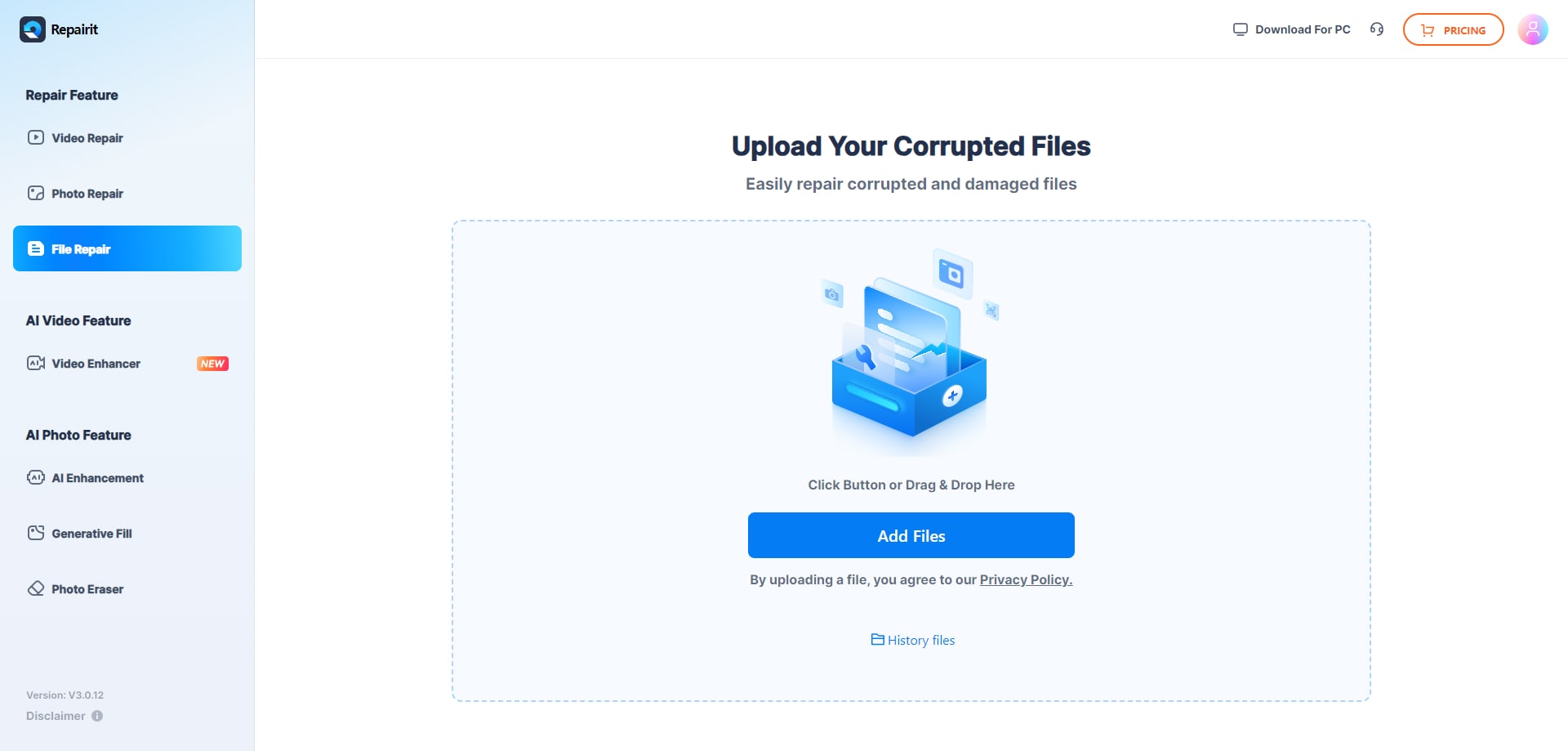
Step 2. Start the online repair process and let Repairit Online File Repair analyze the damaged files.
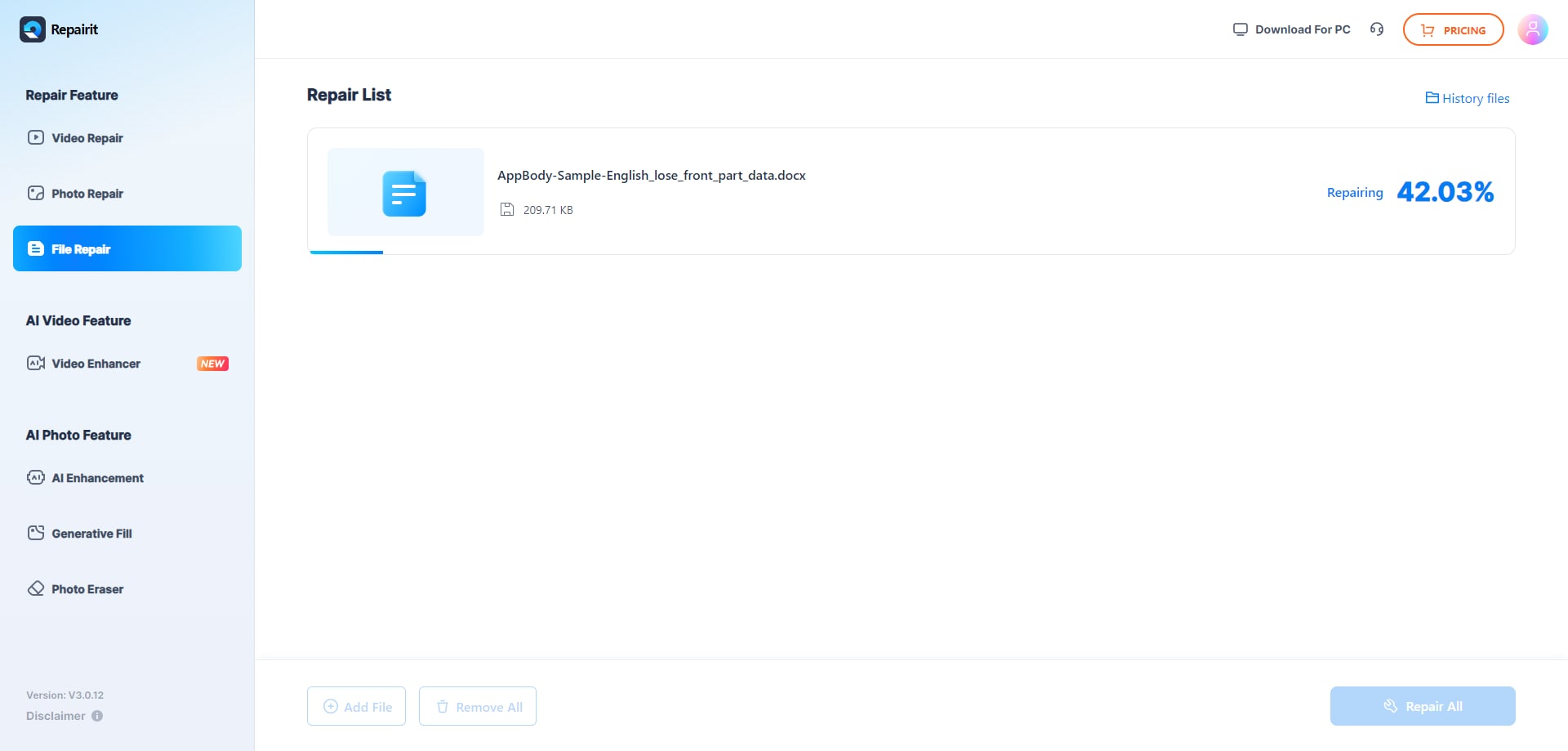
Step 3. Preview the repaired result when available, then save the repaired files to your device.
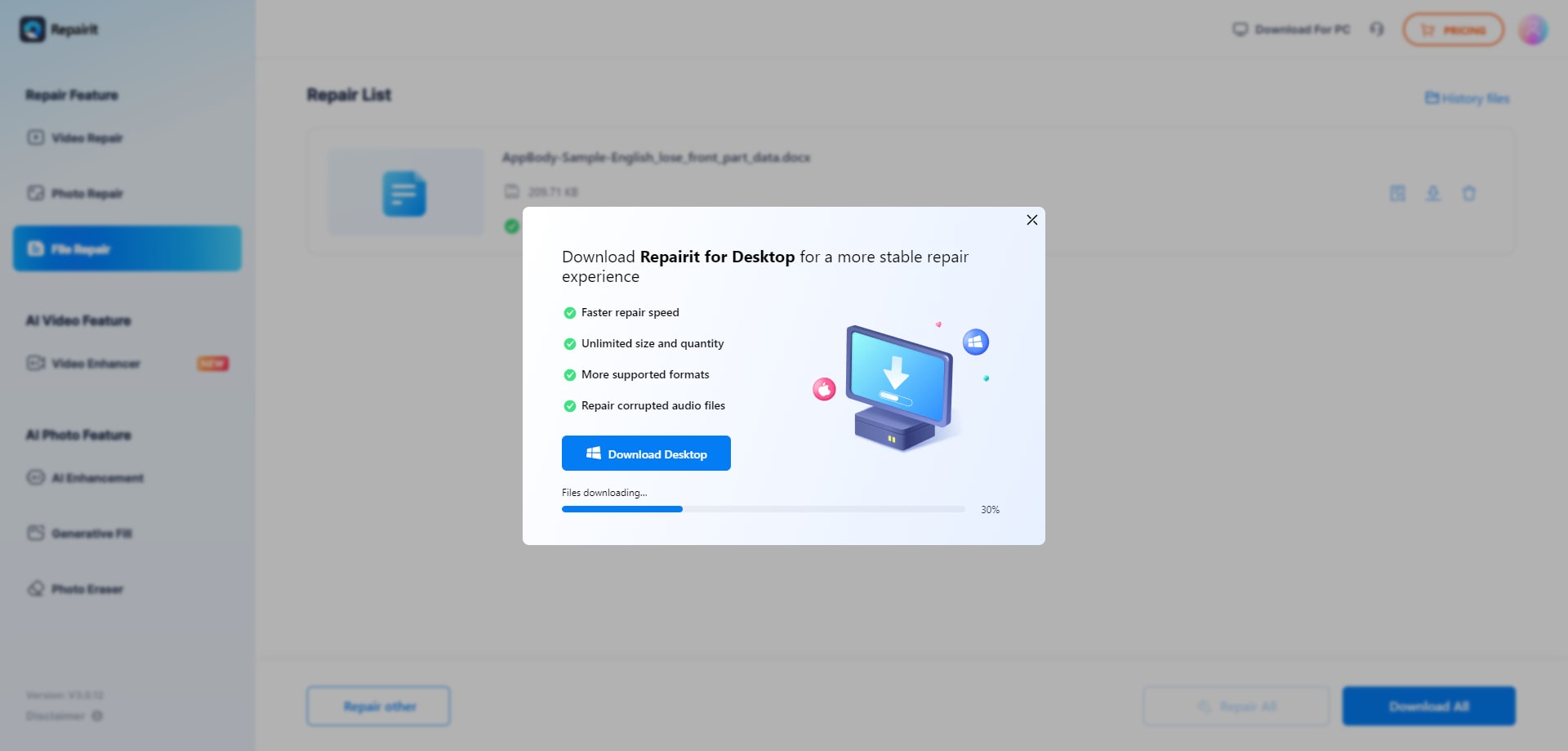
These steps apply to many corruption scenarios, including broken PDF previews, unreadable Word documents, damaged Excel workbooks, and PowerPoint files that fail to load. As always, repair success depends on file condition and supported formats.
Final Verdict: Repairit Online File Repair vs Kernel Online Repair
Repairit Online File Repair and Kernel Online Repair both concentrate on repairing corrupted, damaged, or unreadable files rather than restoring deleted data. The better fit depends on your environment, users, and typical file issues.
Repairit Online File Repair emphasizes a clear, browser-based journey that often suits office staff repairing corrupted PDF, Word, Excel, or PowerPoint files. It aims to make it easier for non-technical users to repair corrupted files online with minimal configuration.
Kernel Online Repair leans toward enterprise-style workflows, targeting Office, Outlook, and database files. It may be more comfortable for IT administrators and power users managing recurring mailbox and structured data corruption issues.
A balanced approach is to test both tools with non-sensitive sample files that reflect your real-world documents. Observe repair quality, preview options, and how easily users can navigate the interface before choosing one or combining them in your toolkit.
Next: Repairit Online File Repair vs Systools File Repair
FAQ
-
1. How do Repairit Online File Repair and Kernel Online Repair differ for fixing corrupted documents?
Repairit Online File Repair focuses on a guided browser workflow for repairing corrupted PDF, Word, Excel, and PowerPoint files. Kernel Online Repair targets professional data repair for Office, Outlook, and database files with an enterprise-style interface. Users should compare interfaces and supported formats against their actual document types. -
2. When is Repairit Online File Repair better than Kernel Online Repair for office users?
Repairit Online File Repair may suit office users when non-technical staff need an easy, clearly guided way to repair corrupted files online. It helps when documents will not open or show invalid file errors and the team prefers minimal configuration instead of navigating complex enterprise-oriented settings. -
3. What is the difference between corrupted file repair and deleted file recovery?
Corrupted file repair focuses on fixing existing files that have become damaged, unreadable, or unstable. Deleted file recovery attempts to restore files removed from storage. Repairit Online File Repair and Kernel Online Repair address corruption issues and are not positioned as deleted file recovery or general data recovery tools.
"




