
Choosing between Repairit Photo Repair vs Remo Photo Repair can feel confusing when your main goal is simply to repair corrupted, blurry, or pixelated images quickly. Both tools aim to fix damaged photos and restore photo quality, but they take slightly different approaches. Repairit Photo Repair emphasizes a guided, modern workflow for handling a range of image issues, while Remo Photo Repair focuses on a straightforward desktop experience for repairing damaged JPEG and other common image files stored locally. This guide walks through their strengths, workflows, and use cases so you can decide which approach fits your images, devices, and comfort level best.
Repair Corrupted Photos with Repairit Photo Repair
 Security Verified. Over 7,302,189 people have downloaded it.
In this article
- Repairit Photo Repair vs Remo Photo Repair: Quick Verdict
- Repairit Photo Repair vs Remo Photo Repair: Key Differences
- Repairit Photo Repair vs Remo Photo Repair: Comparison Table
- What Repairit Photo Repair and Remo Photo Repair Are Best For
- Repairit Photo Repair vs Remo Photo Repair: Features and Capabilities
- Repairit Photo Repair vs Remo Photo Repair: Supported Formats and Compatibility
- Repairit Photo Repair vs Remo Photo Repair: Workflow and Ease of Use
- Repairit Photo Repair vs Remo Photo Repair: Pricing and Trial Options
- Who Should Choose Repairit Photo Repair
- Who Should Choose Remo Photo Repair
- Pros and Cons of Repairit Photo Repair and Remo Photo Repair
- How to Repair Corrupted Photos After Choosing the Right Tool
Repairit Photo Repair vs Remo Photo Repair: Quick Verdict
If you often deal with different kinds of corrupted or low quality images, Repairit Photo Repair usually offers a more flexible, guided way to fix them. It focuses on clear steps for importing, repairing, and previewing photos, which can be especially helpful if you are not very technical or if you handle many images at once.
Remo Photo Repair, on the other hand, suits users who mainly work with locally stored corrupted photos on a computer and prefer a direct, traditional desktop layout. Its intent is simple: point it at damaged JPEG and other common image files and run a repair, without many extra workflow touches.
In most cases, the choice comes down to whether you want a more modern, guided workflow (Repairit Photo Repair) or a stable, straightforward desktop tool (Remo Photo Repair) focused on local files.
Repairit Photo Repair vs Remo Photo Repair: Key Differences
The main differences between Repairit Photo Repair vs Remo Photo Repair revolve around workflow, interface style, and how each tool approaches typical image problems.
- Best for: Repairit Photo Repair is aimed at users who want guided, flexible workflows for a wide range of corrupted or low quality photos. Remo Photo Repair is better aligned with users who store everything locally and want a straightforward desktop tool to fix damaged JPEG and similar files.
- Ease of use: Repairit offers a more modern interface with clearer prompts, while Remo uses a familiar but more traditional layout that may feel slightly dated yet predictable for long time desktop users.
- Repair depth: Repairit is designed to handle more varied and sometimes more severe corruption or quality issues across different image scenarios in many everyday cases. Remo tends to focus on common problems in JPEG and a few other frequent formats with a stable engine.
- Workflow style: Repairit emphasizes a guided journey with streamlined steps for importing, repairing, and previewing. Remo centers on direct actions against local image files without many additional workflow conveniences.
- Strengths and trade offs: Repairit brings broader, workflow oriented features that can feel powerful but may be more than some users need. Remo can feel simpler and more focused but also less modern and less flexible for complex scenarios.
Repairit Photo Repair vs Remo Photo Repair: Comparison Table
| Dimension | Repairit Photo Repair | Remo Photo Repair |
|---|---|---|
| Best for | Users who need guided, flexible workflows to repair a wide range of corrupted or low-quality photos. | Users working with locally stored corrupted photos who want a straightforward desktop repair tool. |
| Ease of use | Modern interface with clearer prompts for importing, previewing, and repairing images. | Simple, traditional desktop layout that may feel familiar but slightly dated. |
| Repair depth | Designed to handle more severe corruption and quality issues across various image types in most cases. | Stable repair engine focused mainly on fixing damaged JPEG and common image issues. |
| Workflow | Streamlined, task-focused workflow suitable for both occasional and frequent photo repair needs. | Traditional desktop workflow centered on local files and direct repair actions. |
| Strengths | Guided process, modern UI, and broader repair scenarios for damaged and low-quality photos. | Stable repair engine and clear repair intent for fixing corrupted JPEG and image files locally. |
| Weaknesses | May feel more feature rich than necessary for users with very simple, occasional repairs. | Older UI and limited innovation in workflow compared with newer photo repair tools. |
What Repairit Photo Repair and Remo Photo Repair Are Best For
Both tools target users who want to repair corrupted photos and improve damaged image quality, but their ideal scenarios differ slightly.
Repairit Photo Repair is a better fit if you:
- Need to fix a variety of image problems such as distortion, artifacts, or unreadable sections across multiple photos.
- Prefer a guided workflow that walks you from adding files to previewing and saving repaired images.
- Frequently work with mixed sets of photos from different devices and want a tool that adapts to different situations.
Remo Photo Repair works well if you:
- Mainly repair damaged JPEG and similar common image types stored on your computer.
- Like desktop software with a clear, single purpose feel and do not need many workflow extras.
- Value a stable way to run repairs on local files using a more traditional interface.
Repairit Photo Repair vs Remo Photo Repair: Features and Capabilities
At a high level, both tools share the same goal: to fix damaged images and make corrupted, blurry, or pixelated photos viewable again. However, their feature sets feel different when you actually use them.
Overall feature approach
Both Repairit Photo Repair and Remo Photo Repair aim to repair corrupted photos and restore image quality, but they differ in how modern and flexible their feature sets feel. Repairit tends to emphasize a more guided, visually clear experience, while Remo leans on a stable, traditional engine with a straightforward intent to fix damaged images locally.
Core capabilities you can expect from both
- Import corrupted JPEG and other common image files for repair.
- Repair visible issues like distortion, artifacts, or unreadable photos.
- Preview repaired images before saving them back to your device.
How they differ in practice
- Repairit Photo Repair offers more guided options for handling complex or multiple image problems in one workflow, which can be useful if you are dealing with many damaged files at once.
- Remo Photo Repair focuses on a stable engine with clear, single purpose repair actions for local files, favoring simplicity over flexibility.
- Repairit Photo Repair generally delivers a more modern, streamlined interface, whereas Remo uses an older, more traditional desktop layout that may feel more basic but familiar.
In many real world cases, these differences show up in how comfortable you feel working through repairs and how much control you want over a batch of images at the same time.
Repairit Photo Repair vs Remo Photo Repair: Supported Formats and Compatibility
Supported image types and devices are another important part of choosing between Repairit Photo Repair vs Remo Photo Repair.
Both tools focus on repairing corrupted photos such as JPEG and other frequently used image formats from computers and common devices. Repairit Photo Repair tends to support a broader variety of image scenarios and devices, while Remo Photo Repair keeps its attention on desktop based repairs for JPEG and similarly common image file types stored locally.
For users who regularly transfer photos from phones, cameras, memory cards, and different computers, this slightly broader orientation of Repairit Photo Repair can feel more adaptable. If your workflow is mostly desktop based with standard JPEGs, the difference may matter less, and a focused tool like Remo Photo Repair can still be reasonable.
Repairit Photo Repair vs Remo Photo Repair: Workflow and Ease of Use
How each tool guides you through the repair process can strongly influence which one feels more comfortable.
Remo Photo Repair workflow
Remo Photo Repair follows a traditional desktop workflow. You open the program, browse to the damaged image file on your computer, and start the repair. The process is direct and may appeal to users who prefer fewer steps and are already comfortable with older style desktop interfaces. However, the interface can feel dated if you are used to modern, highly guided software.
Repairit Photo Repair workflow
Repairit Photo Repair takes a more modern approach, with clearer on screen guidance, streamlined import and preview steps, and a layout that can feel easier for users who want a smoother journey from start to finish. It highlights where you add photos, when you start the repair, and how to preview the results, which can reduce guesswork if you are not used to this type of tool.
For users who repair photos occasionally or who manage many images in batches, this visible, step by step feel can make a practical difference in day to day use.
Repairit Photo Repair vs Remo Photo Repair: Pricing and Trial Options
Pricing can change over time, so it is best to check each vendor website for the latest details. Still, how you think about pricing should be influenced by how often you repair photos and how complex your image issues are.
Both Repairit Photo Repair and Remo Photo Repair typically offer some kind of trial or limited version so you can test the repair process before paying. In many situations, it makes sense to run the same corrupted images through both tools in trial mode to see which one provides a workflow and results you are more comfortable with.
If you frequently repair large numbers of photos or deal with severe damage, investing in a more guided and flexible tool like Repairit Photo Repair can make ongoing use more convenient. If you only occasionally fix a few damaged JPEGs stored locally, a straightforward desktop styled tool like Remo Photo Repair may feel more cost effective.
Who Should Choose Repairit Photo Repair
Repairit Photo Repair tends to be a good match if any of the following sound like your situation:
- Users who frequently deal with heavily corrupted or seriously distorted photos.
- People who prefer a modern interface with clear, guided repair steps.
- Photographers or creators needing flexible workflows for many images.
- Anyone who wants broader image repair capabilities across different scenarios.
In these situations, the more visual, guided style of Repairit Photo Repair often saves time and reduces trial and error when compared to simpler desktop utilities.
Who Should Choose Remo Photo Repair
Remo Photo Repair has its own audience where it can be a sensible choice:
- Users working with locally stored corrupted photos on a desktop computer.
- People who prefer a traditional desktop workflow without many extra options.
- Those who mainly need to repair damaged JPEG and a few common image types.
- Users who value a stable repair engine more than a modern looking interface.
If your expectation is a no frills, local file focused tool and you are comfortable with a simpler interface, Remo Photo Repair may be enough for your regular photo repair needs.
Pros and Cons of Repairit Photo Repair and Remo Photo Repair
To make the choice clearer, it helps to look at the strengths and limitations of each tool side by side.
Repairit Photo Repair Pros and Cons
Remo Photo Repair Pros and Cons
How to Repair Corrupted Photos After Choosing the Right Tool
Once you have compared Repairit Photo Repair vs Remo Photo Repair and decided which style suits you, the next step is actually repairing your corrupted or low quality images. If you prefer a guided, modern workflow, Repairit Photo Repair offers a practical way to move from damaged files on your desktop to repaired, viewable photos with clear on screen steps.
Key Features
Some practical capabilities you can expect when using Repairit Photo Repair include:
- Guided repair process for corrupted and low quality photos.
- Intuitive preview to compare original and repaired images before saving.
- Support for handling multiple damaged photos in a streamlined workflow.
Step-by-step guide
The following steps show a typical desktop workflow when you use Repairit Photo Repair to fix damaged images.
- Add damaged photos
Launch Repairit Photo Repair and import the damaged or corrupted photos you want to fix.
- Run the repair
Click the repair button and let the tool scan and fix the selected image files automatically.
- Preview and save
Preview the repaired results and save the fixed photos to your preferred location.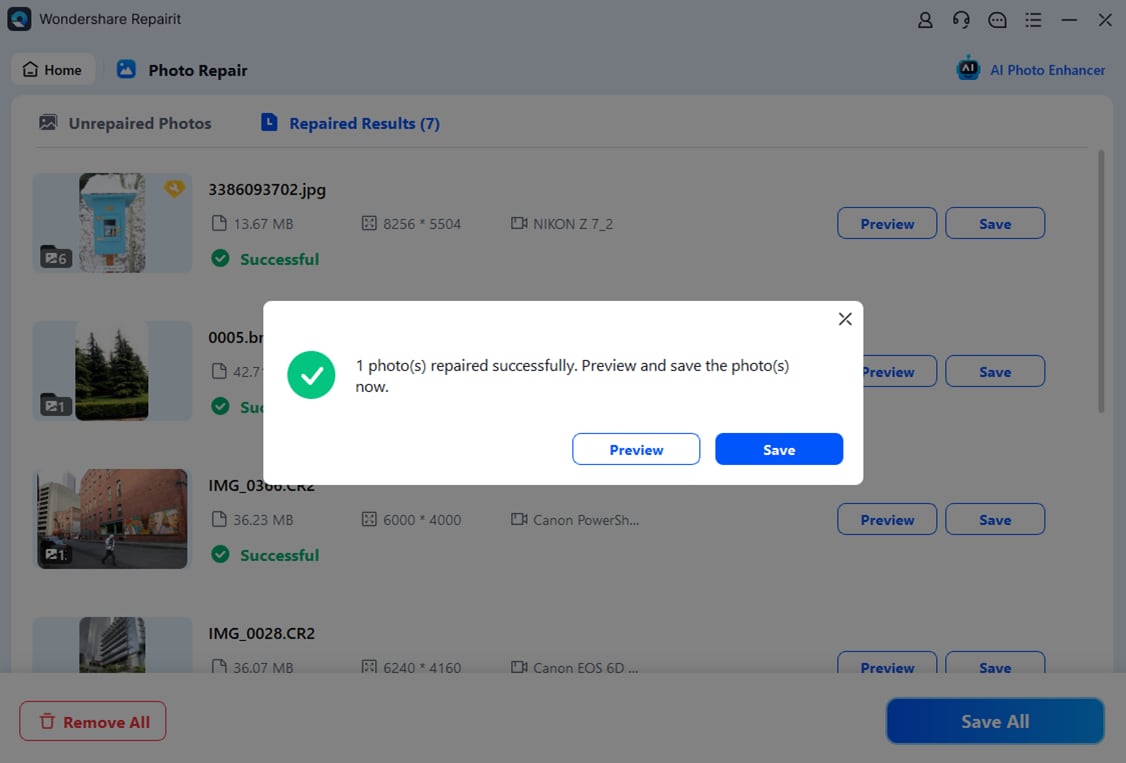
This type of guided process helps you move from damaged images to improved versions without needing to tweak complex technical settings.
Final Verdict
When you compare Repairit Photo Repair vs Remo Photo Repair, both tools share the same goal of repairing corrupted photos and improving image quality, but they serve slightly different types of users.
Repairit Photo Repair is a stronger choice for users who regularly face severe photo corruption, need clear guidance, or want a more modern interface that streamlines importing, repairing, and previewing many images. It suits photographers, content creators, and anyone who handles complex or frequent repair tasks.
Remo Photo Repair may still be enough if you mainly work with locally stored corrupted photos, prefer a traditional desktop workflow, and just need a stable engine to repair damaged JPEG and similar images without additional conveniences.
In many situations, trying both tools with their available trials is a practical way to see which workflow and results feel more comfortable for your specific photos.
Next: Repairit Photo Repair vs Kernel Photo Repair
FAQ
-
1. Which is better for everyday users, Repairit Photo Repair or Remo Photo Repair?
For most everyday users, Repairit Photo Repair can feel easier thanks to its modern, guided interface, while Remo Photo Repair suits those comfortable with a simple, traditional desktop layout and who mainly work with local JPEG files. -
2. Is Repairit Photo Repair better than Remo Photo Repair for heavily corrupted photos?
Repairit Photo Repair is generally a stronger choice for more severe or varied corruption scenarios because of its broader, guided workflows, though the final results still depend on how damaged the original files are. -
3. When is Remo Photo Repair enough compared with Repairit Photo Repair?
Remo Photo Repair may be enough if you mostly fix corrupted JPEG images stored on your desktop, prefer a straightforward tool, and do not need extra workflow features or a modern looking interface. -
4. Can I try both Repairit Photo Repair and Remo Photo Repair before deciding?
In many cases, both tools provide some form of trial or limited version, so testing them on the same corrupted photos is a practical way to see which workflow and output you prefer. -
5. Do these tools work for blurry or pixelated photos as well as corrupted files?
Both tools are designed to help improve damaged images, and in many situations they can reduce visual problems like artifacts or pixelation, but the level of improvement will depend on how severe the blur or damage is in the original photo.




