
When a video suddenly refuses to play, a fast browser-based repair can save you from re-recording or losing content. This comparison of Repairit Video Repair Online and VideoUtils Repair Video focuses on how each handles corrupted or unplayable clips, from upload workflows to repair depth and realistic limitations. By understanding how these online tools differ in ease of use, cloud handling, and typical results, you can choose the workflow that best matches your damaged files and repair goals.
In this article
- Repairit Video Repair Online vs VideoUtils Repair Video: Quick Verdict
- Repairit Video Repair Online vs VideoUtils Repair Video: Key Differences
- Repairit Video Repair Online vs VideoUtils Repair Video: Comparison Table
- What Repairit Video Repair Online and VideoUtils Repair Video Are Best For
- Repairit Video Repair Online vs VideoUtils Repair Video: Online Video Repair Capabilities
- Repairit Video Repair Online vs VideoUtils Repair Video: Supported Video Formats and Use Cases
- Repairit Video Repair Online vs VideoUtils Repair Video: Upload Workflow and Ease of Use
- Repairit Video Repair Online vs VideoUtils Repair Video: Cloud Repair, Privacy, and File Handling
- Repairit Video Repair Online vs VideoUtils Repair Video: Repair Quality and Limitations
- Who Should Choose Repairit Video Repair Online
- Who Should Choose VideoUtils Repair Video
- Pros and Cons of Repairit Video Repair Online and VideoUtils Repair Video
- How to Repair Corrupted Videos Online After Choosing the Right Tool
Repairit Video Repair Online vs VideoUtils Repair Video: Quick Verdict
The main difference is that Repairit Video Repair Online focuses on a guided, step-by-step online workflow, while VideoUtils Repair Video keeps things minimal for quick MP4 fixes. If you want more on-screen guidance, previews, and flexibility for varied corrupted clips, Repairit Video Repair Online is usually more suitable; if you mainly need to get a broken MP4 playing again with minimal steps, VideoUtils Repair Video may be enough.
In most real-world cases, users who value clarity and structure around uploading, repairing, previewing, and saving will feel more comfortable with Repairit Video Repair Online. Users who only occasionally fix a single broken MP4 and do not need much control often appreciate the lightweight browser-based flow of VideoUtils Repair Video.
Repairit Video Repair Online vs VideoUtils Repair Video: Key Differences
The key difference is how each tool approaches online video repair for corrupted, damaged, broken, or unplayable files. Repairit Video Repair Online emphasizes a cloud video repair workflow with clear steps from upload through preview, while VideoUtils Repair Video is designed as a straightforward browser utility for quick MP4 repairs.
This matters if you are choosing between a more guided process that supports a range of everyday corruption symptoms, versus a fast upload-repair-download model aimed mainly at common MP4 issues. It also affects how comfortable non-technical users feel when diagnosing why a clip will not play and deciding whether the repaired result is acceptable.
Repairit Video Repair Online vs VideoUtils Repair Video: Comparison Table
This comparison table summarizes how Repairit Video Repair Online and VideoUtils Repair Video differ across typical decision points like best use cases, workflow, and online handling of corrupted videos.
| Dimension | Repairit Video Repair Online | VideoUtils Repair Video |
|---|---|---|
| Best for | Users who want a guided online repair flow for a range of corrupted or unplayable clips, with clear steps and previews. | Users repairing broken or unplayable MP4 files quickly through a simple browser based utility. |
| Online workflow | Cloud video repair workflow with step-by-step guidance from upload to preview and download. | Very straightforward browser based video repair utility with an upload, automatic repair, and download flow. |
| Repair capability | Designed to handle a variety of common corruption symptoms in damaged online video files. | Focused on common corruption issues in MP4 clips, with limited depth for severe corruption or professional formats. |
| Ease of use | User friendly interface with clearly labeled steps for repairing corrupted videos online. | Lightweight interface and fast repair flow that prioritizes speed and simplicity over advanced options. |
| Privacy and file handling | Uses a cloud based repair approach; users should review its online terms before uploading sensitive footage. | Fully browser based upload and repair workflow; users should review its online terms before uploading sensitive footage. |
| Strengths | Guided online workflow, flexible use across many everyday scenarios, clear repair steps and preview before saving. | Lightweight interface, fast repair flow, accessible online workflow for quick MP4 fixes. |
| Weaknesses | As an online tool, results still depend on how badly the source file is corrupted and connection conditions. | Limited support for severe corruption or professional formats and less suitable for complex repair cases. |
What Repairit Video Repair Online and VideoUtils Repair Video Are Best For
Repairit Video Repair Online is more suitable when you need a guided cloud workflow to handle different corrupted, damaged, broken, or unplayable clips, while VideoUtils Repair Video may be enough if you mostly handle quick MP4 fixes.
According to its positioning, VideoUtils Repair Video is a simple browser based video repair utility built for common corruption issues, best for users who want to repair broken or unplayable MP4 files quickly. In contrast, Repairit Video Repair Online suits users who want clear steps, previews, and support for various real-world scenarios, such as phone footage, camera clips, or exported videos that suddenly stop playing.
Repairit Video Repair Online vs VideoUtils Repair Video: Online Video Repair Capabilities
The key difference is that Repairit Video Repair Online emphasizes a structured, step-by-step cloud workflow, while VideoUtils Repair Video is optimized for quick, straightforward MP4 fixes using an upload, automatic repair, and download model.
Both tools aim to repair corrupted videos online, but they guide users differently through the process and target slightly different levels of repair depth. This matters if you need help understanding what is happening with your damaged file versus simply wanting a fast attempt at making it playable again.
Repairit Video Repair Online capabilities include:
- Guided online repair flow that walks users from upload to preview, helping non-technical users fix unplayable clips.
- Cloud based workflow designed to address a variety of common corruption symptoms in broken or damaged video files.
- Preview oriented approach so users can quickly see whether the repair meets their needs before saving the file.
VideoUtils Repair Video capabilities include:
- Simple browser based video repair utility mainly aimed at common corruption issues in MP4 files.
- Fast, automatic repair process that focuses on getting a broken or unplayable clip working again quickly.
- Accessible online workflow with minimal steps, ideal for quick checks when deep, technical repair is not required.
Repairit Video Repair Online vs VideoUtils Repair Video: Supported Video Formats and Use Cases
Repairit Video Repair Online is more suitable when you need a guided workflow for a variety of corrupted or unplayable clips, while VideoUtils Repair Video may be enough if you mainly work with broken MP4 recordings that need a quick browser based fix.
Both tools focus on repairing corrupted or unplayable videos online and are typically used on common formats such as MP4, MOV, AVI, MKV, or 3GP in everyday scenarios. In most real-world cases, this covers phone recordings, camera files, or exported clips that suddenly refuse to open or throw playback errors.
Where they diverge is emphasis: Repairit Video Repair Online is framed around flexible, guided handling of different clip types and corruption symptoms, whereas VideoUtils Repair Video is described specifically around everyday MP4 repair, with limitations for severe corruption or professional formats.
Repairit Video Repair Online vs VideoUtils Repair Video: Upload Workflow and Ease of Use
The main difference is that Repairit Video Repair Online offers clearly guided steps with previews, while VideoUtils Repair Video keeps its upload and repair process as minimal as possible.
VideoUtils Repair Video relies on a very direct workflow: upload the damaged video, let the service attempt automatic repair, then download the repaired file. Repairit Video Repair Online offers a similarly simple cloud video repair workflow but with clearer, guided steps from upload through preview.
Users often notice that the main difference is how much on-screen guidance they get while fixing unplayable videos. Less technical users, or anyone handling multiple broken clips, may appreciate Repairit Video Repair Online showing them where they are in the process, while more technical or impatient users may prefer the bare-bones speed of VideoUtils Repair Video.
Repairit Video Repair Online vs VideoUtils Repair Video: Cloud Repair, Privacy, and File Handling
The key similarity is that both tools rely on a cloud video repair workflow, but the way they communicate this online handling and guide users through it can feel different.
Both services use a cloud video repair workflow where you upload corrupted files to a server, wait for processing, then download the repaired versions. Because this involves sending personal footage online, users should always review each tools upload conditions and privacy terms before submitting sensitive or confidential videos, especially when handling client work or private recordings.
Repairit Video Repair Online uses a cloud based repair approach and is positioned with clear steps, which can help users better understand what is happening with their files during upload, processing, preview, and download. VideoUtils Repair Video runs as a fully browser based upload and repair workflow that prioritizes speed, so users may see fewer prompts but should still verify its online terms before uploading important or private footage.
Repairit Video Repair Online vs VideoUtils Repair Video: Repair Quality and Limitations
The main similarity is that repair success for both tools depends heavily on the condition of the source file, but VideoUtils Repair Video is described as having tighter limits for severe corruption or professional formats.
In most real-world cases, both tools can help repair damaged video files with common corruption, such as files that suddenly stop playing or refuse to open. However, a common limitation is that severe corruption, missing metadata, interrupted recordings, or heavily damaged clips may not fully repair.
VideoUtils Repair Video is described as having limited support for severe corruption or professional formats, so those cases may require another approach or tool. Even with a guided approach like Repairit Video Repair Online, no online video repair service can guarantee full reconstruction when source files are badly compromised, so expectations should stay realistic.
Who Should Choose Repairit Video Repair Online
Repairit Video Repair Online is more suitable when you want a structured, guided experience for repairing corrupted or unplayable videos directly in your browser.
- Users who want a guided, step-by-step online workflow to repair corrupted or unplayable clips.
- People dealing with varied video types and corruption symptoms who prefer clear previews before saving.
- Less technical users who value on-screen instructions for each stage of browser based video repair.
- Anyone comparing tools who prefers a structured cloud repair process over a minimal, one-click style interface.
In practice, this means that if you often troubleshoot videos from different cameras, phones, or apps, or you simply like seeing a preview before committing to a repaired file, Repairit Video Repair Online can feel more comfortable and predictable.
Who Should Choose VideoUtils Repair Video
VideoUtils Repair Video may be enough if you primarily deal with quick MP4 repairs and do not need much guidance or advanced options.
- Users repairing broken or unplayable MP4 files quickly without needing advanced options.
- People who prefer a lightweight interface and fast repair flow for simple, everyday corruption issues.
- Those who mainly need a simple browser based video repair utility for occasional damaged clips.
- Users who understand that limited support for severe corruption or professional formats is acceptable for their needs.
This becomes important when you are comfortable with a basic upload-repair-download pattern and mainly care about getting a playable MP4 back as quickly as the connection and server allow.
Pros and Cons of Repairit Video Repair Online and VideoUtils Repair Video
This section outlines the main advantages and trade-offs of each online repair tool so you can quickly match them to your own corrupted video scenarios.
Repairit Video Repair Online Pros and Cons
VideoUtils Repair Video Pros and Cons
How to Repair Corrupted Videos Online After Choosing the Right Tool
After comparing Repairit Video Repair Online and VideoUtils Repair Video, the next step is actually repairing the corrupted, damaged, or unplayable clips you care about. Once you know whether you prefer a guided workflow or a minimal utility, you can follow a consistent online process to upload, repair, and save your videos.
For users who want more structure and on-screen guidance, Repairit Video Repair Online acts as a practical, browser-based option. It focuses on a simple sequence of uploading broken files, letting the cloud workflow attempt repair, then previewing the results so you can see whether common playback issues have been resolved.
Key Features
In most real-world cases, users choose Repairit Video Repair Online for its straightforward, guided handling of broken clips rather than complex manual settings.
- Online workflow focused on repairing corrupted or unplayable videos with clear, guided steps.
- Cloud processing that lets users handle repairs without installing software on their computer.
- Preview feature so users can quickly check repaired results before saving files back to local storage.
Step-by-step guide
This simple three-step flow shows how to repair corrupted videos online using Repairit Video Repair Online.
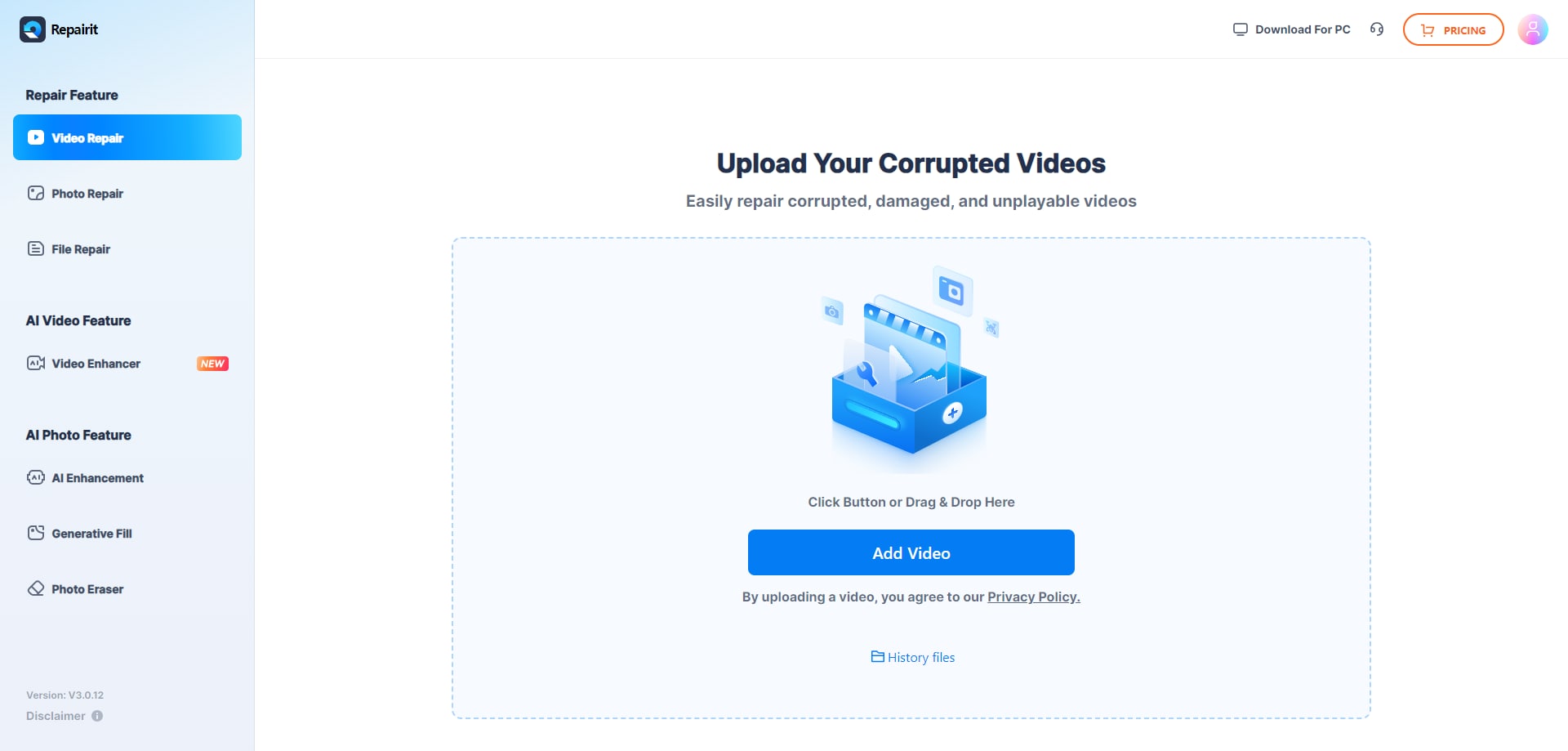
Step 1. Upload the damaged or unplayable videos you want to repair through Repairit Video Repair Online.
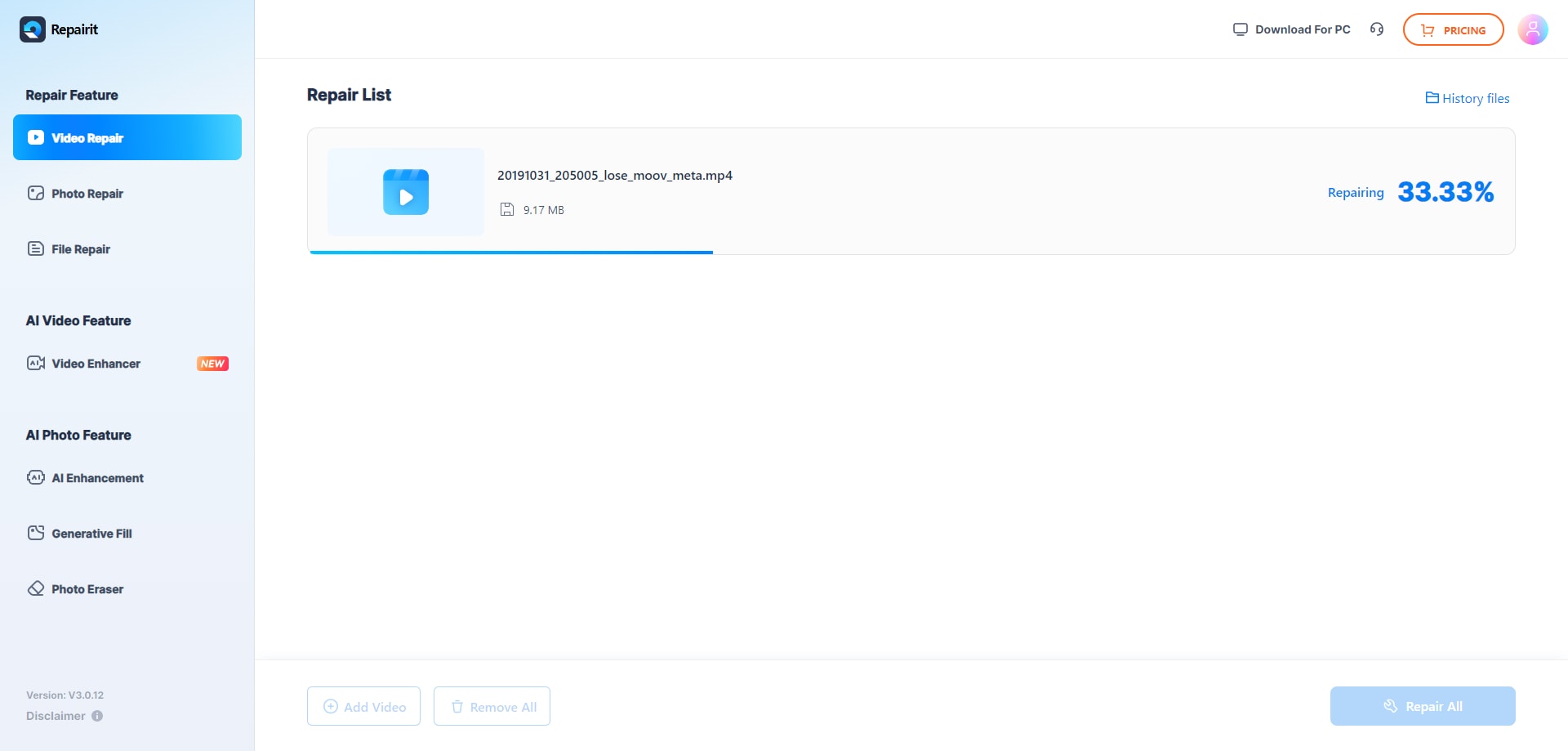
Step 2. Start the online repair process and let Repairit Video Repair Online analyze the corrupted video files.
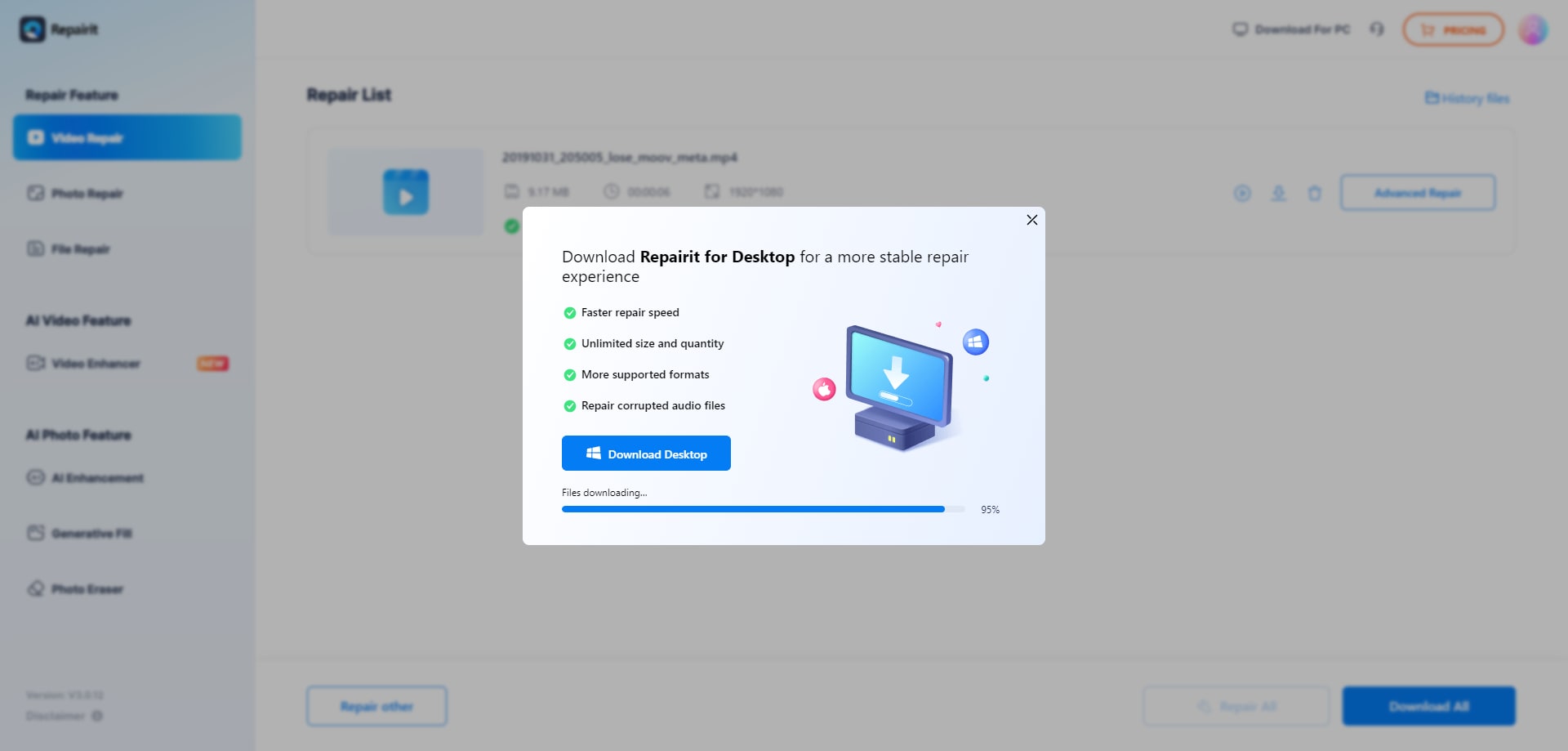
Step 3. Preview the repaired video result when available, then save the repaired videos to your device.
Final Verdict
The main difference between Repairit Video Repair Online and VideoUtils Repair Video is how structured and guided the online workflow feels, rather than a fundamental gap in their goal of fixing corrupted or unplayable videos.
Repairit Video Repair Online is more suitable when you want step-by-step cloud repair, previews, and a process that supports a range of everyday corruption scenarios. VideoUtils Repair Video may be enough if you mainly repair broken or unplayable MP4 files and prefer a lightweight browser based utility with a simple upload, automatic repair, and download flow.
Choosing between them comes down to whether you value guidance, transparency, and previews, or you prioritize speed and minimalism for straightforward MP4 issues. In both cases, results will still depend on how damaged your source files are and how realistic your expectations are for online video repair.
Next: Repairit Video Repair Online vs 4ddig Online Video Repair
FAQ
-
1. Which is better for fixing unplayable videos online: Repairit Video Repair Online or VideoUtils Repair Video?
Neither tool is universally better for all situations. Repairit Video Repair Online is more suitable when you want a guided, step-by-step workflow with previews before saving, while VideoUtils Repair Video may be enough if you mainly fix broken MP4 files quickly using a lightweight browser interface. -
2. Can both Repairit Video Repair Online and VideoUtils Repair Video repair corrupted MP4 files?
Yes, both tools are designed to help repair corrupted or unplayable MP4 files online. VideoUtils Repair Video is positioned specifically around quick MP4 fixes, while Repairit Video Repair Online focuses on a broader, guided workflow for various everyday corruption issues in different clips. -
3. What is the difference between online video repair, video recovery, and video enhancement?
Online video repair tools like Repairit Video Repair Online and VideoUtils Repair Video focus on fixing corrupted, damaged, or unplayable files you already have so they can play properly again. Video recovery deals with bringing back lost or deleted files, while video enhancement improves quality or appearance but does not fix file-level corruption that stops playback. -
4. When should I choose VideoUtils Repair Video instead of Repairit Video Repair Online?
VideoUtils Repair Video may be enough if you primarily handle broken or unplayable MP4 clips, want a simple upload-repair-download flow, and accept its limitations with severe corruption or professional formats. If you need more guidance, clearer steps, and preview features, Repairit Video Repair Online is usually the more suitable option. -
5. Does using an online repair tool guarantee that my corrupted video will be fully fixed?
No, neither Repairit Video Repair Online nor VideoUtils Repair Video can guarantee a full fix for every file. In most real-world cases, success depends on how severely the video is corrupted, whether key data is missing, and how the file was damaged, so results can vary from fully playable to only partial or unsuccessful repair.




