
When a video stops playing, becomes choppy, or shows errors, a browser-based tool can often repair it without installing heavy software. This guide compares Repairit Video Repair Online with 4DDiG Online Video Repair so you can decide which online workflow fits how you want to repair corrupted MP4 or MOV files and other common formats. We focus on ease of use, cloud video repair steps, and realistic limits when videos are severely damaged.
In this article
- Repairit Video Repair Online vs 4DDiG Online Video Repair: Quick Verdict
- Repairit Video Repair Online vs 4DDiG Online Video Repair: Key Differences
- Repairit Video Repair Online vs 4DDiG Online Video Repair: Comparison Table
- What Repairit Video Repair Online and 4DDiG Online Video Repair Are Best For
- Repairit Video Repair Online vs 4DDiG Online Video Repair: Online Video Repair Capabilities
- Repairit Video Repair Online vs 4DDiG Online Video Repair: Supported Formats and Use Cases
- Repairit Video Repair Online vs 4DDiG Online Video Repair: Upload Workflow and Ease of Use
- Repairit Video Repair Online vs 4DDiG Online Video Repair: Cloud Repair, Privacy, and File Handling
- Repairit Video Repair Online vs 4DDiG Online Video Repair: Repair Quality and Limitations
- Who Should Choose Repairit Video Repair Online
- Who Should Choose 4DDiG Online Video Repair
- Pros and Cons of Repairit Video Repair Online and 4DDiG Online Video Repair
- How to Repair Corrupted Videos Online After Choosing the Right Tool
Repairit Video Repair Online vs 4DDiG Online Video Repair: Quick Verdict
The main difference is that Repairit Video Repair Online focuses on a guided, step-by-step browser workflow, while 4DDiG Online Video Repair leans on a very simple cloud sequence of upload, repair, preview, and download. In most real-world cases, both can repair typical corrupted or unplayable videos online, but the guided prompts in Repairit Video Repair Online can feel more reassuring for users who want clear direction at every step.
For users who mainly want to fix a broken MP4 or MOV from a phone or camera without touching desktop software, either tool may be enough if the damage is not severe. Repairit Video Repair Online is more suitable when you prefer detailed on-screen guidance and frequent previews, while 4DDiG Online Video Repair may be enough if you just want a light, beginner oriented cloud workflow.
Repairit Video Repair Online vs 4DDiG Online Video Repair: Key Differences
The key difference is how each service balances guidance and simplicity in the browser-based repair process. Repairit Video Repair Online is framed around a guided online experience with clear actions for uploading, repairing, and previewing corrupted clips, whereas 4DDiG Online Video Repair emphasizes a stripped-down beginner flow aimed at quick, everyday fixes.
Another important distinction is how each tool positions its repair depth. In most everyday cases, both can help with videos that still open or partially play, but 4DDiG Online Video Repair is described as less advanced for heavily corrupted professional footage, and similar limits apply in practice to most browser tools, including Repairit Video Repair Online. This matters if you are dealing with severely corrupted recordings where deeper, more technical repair might be required.
Repairit Video Repair Online vs 4DDiG Online Video Repair: Comparison Table
This comparison table summarizes how Repairit Video Repair Online and 4DDiG Online Video Repair differ on the main decision factors that matter when repairing corrupted videos online.
| Dimension | Repairit Video Repair Online | 4DDiG Online Video Repair |
|---|---|---|
| Best for | Users wanting a guided browser-based experience to fix common corrupted or unplayable videos online. | Beginners who want a simple online repair tool for corrupted videos without using desktop software. |
| Online workflow | Web-based flow with clear prompts from upload to preview and download in the browser. | Straightforward cloud workflow of upload, online repair, preview, and download. |
| Repair capability | Designed for typical corruption issues in everyday recordings, with guided steps for online repair. | Simple cloud workflow that supports common corrupted video scenarios but is less advanced for heavily corrupted footage. |
| Ease of use | Beginner-friendly interface focused on step-by-step online repair actions. | Beginner oriented, minimal steps to repair damaged videos directly in the browser. |
| Privacy and file handling | Uses an online upload and processing model; users should review web terms before uploading sensitive clips. | Cloud-based handling of uploaded videos; users should check privacy and upload terms for important content. |
| Strengths | Guided online workflow aimed at helping users successfully complete browser-based repairs. | Simple cloud workflow that works well for many common corrupted video cases. |
| Weaknesses | Like most online tools, may be less suitable for extremely large or deeply damaged professional footage. | Less advanced when handling heavily corrupted professional footage or severe damage. |
What Repairit Video Repair Online and 4DDiG Online Video Repair Are Best For
Repairit Video Repair Online and 4DDiG Online Video Repair are best for users who want to repair corrupted or unplayable videos online without dealing with complex desktop setups. Both tools aim at everyday clips rather than rare formats or highly specialized footage.
According to the overview, 4DDiG Online Video Repair is positioned as a beginner oriented online repair tool for corrupted videos, focused on a simple cloud workflow where you upload the broken video, repair it online, preview the result, and download the fixed file. In most real-world cases, this fits users who just need to get a broken MP4 or MOV playing again. Repairit Video Repair Online is a stronger choice for users who want that same convenience but also appreciate guided prompts and a more structured browser-based path from upload to download.
Repairit Video Repair Online vs 4DDiG Online Video Repair: Online Video Repair Capabilities
The main difference in online repair capabilities is how far each tool aims to guide beginners through common corruption problems while staying fully browser-based. Both are designed to repair corrupted videos online, but their emphasis on guidance versus simplicity varies.
The summary of capabilities explains that both tools repair videos through the browser, yet 4DDiG Online Video Repair explicitly targets simple, beginner-friendly repairs through a light cloud workflow. Repairit Video Repair Online focuses on a similarly accessible experience, but with more guided, step-by-step support as you move through each stage of the repair.
For Repairit Video Repair Online, key online repair capabilities include:
- Guided browser-based flow to repair corrupted or unplayable videos without extra software.
- Designed to help beginners fix broken MP4 or MOV files and other common formats with clear on-screen steps.
- Focused on typical corruption scenarios where the video will still open or partially play, rather than deep reconstruction of severely damaged files.
For 4DDiG Online Video Repair, the described capabilities are:
- Simple cloud workflow that supports common corrupted video scenarios many beginners face.
- Good fit for users who want to repair damaged videos online without using desktop tools.
- May be less suitable when footage is heavily corrupted, professional-grade, or requires deeper technical repair.
In practice, this means both services are most useful when you can still open the file but see glitches, errors, or playback problems, rather than when the video is almost entirely unreadable.
Repairit Video Repair Online vs 4DDiG Online Video Repair: Supported Video Formats and Use Cases
The key difference in supported use cases is not about niche formats but about how each service targets everyday MP4 or MOV recordings and similar files from common devices. Both aim at practical, day-to-day online video repair needs rather than rare or highly specialized codecs.
Both Repairit Video Repair Online and 4DDiG Online Video Repair are described as tools for repairing corrupted or unplayable videos from everyday devices, such as MP4 or MOV recordings and other common formats like AVI, MKV, or 3GP. In most real-world cases, users bring in phone clips, camera footage, or screen recordings that stopped playing correctly instead of obscure professional formats.
If your main concern is a broken MP4 from a smartphone, an interrupted MOV recording from a camera, or a glitchy exported file that no longer plays smoothly, either tool can be considered. When you also want more guidance and previews during the process, Repairit Video Repair Online becomes more suitable.
Repairit Video Repair Online vs 4DDiG Online Video Repair: Upload Workflow and Ease of Use
The key difference in workflow and ease of use is that Repairit Video Repair Online emphasizes guided prompts, while 4DDiG Online Video Repair keeps the process minimal and lightweight. Both stay within the browser, which is helpful if you prefer not to install extra software.
4DDiG Online Video Repair follows a clear path: upload the broken video, let the service repair it online, preview the repaired file, and download it. Repairit Video Repair Online mirrors this style but builds in more step-by-step guidance, helping users navigate from file selection through online processing to Preview and save repaired videos.
Users often notice that both tools keep the steps minimal so beginners do not feel overwhelmed. If you prefer the fewest clicks possible, 4DDiG Online Video Repair may feel more streamlined. If you are less confident with technology and want clear labels and instructions at each stage, Repairit Video Repair Online is more suitable.
Repairit Video Repair Online vs 4DDiG Online Video Repair: Cloud Repair, Privacy, and File Handling
The main similarity is that both tools rely on a cloud video repair workflow where your corrupted videos are uploaded, processed online, and then made available for download, so privacy and file handling considerations are similar. The difference is mainly in how clearly you are guided through that cloud process.
Both Repairit Video Repair Online and 4DDiG Online Video Repair use a model where you send your video to a server for analysis and repair. This matters if you handle personal or sensitive clips, because you should always review each tool's upload, storage, and privacy terms before submitting important footage. Users typically upload non-confidential recordings that are safe to process online, such as casual phone videos or simple camera shoots.
For users who are especially privacy-conscious, the guidance in Repairit Video Repair Online can help you better understand what stage your file is at, while the straightforward cloud workflow in 4DDiG Online Video Repair keeps the number of steps low but with fewer on-screen explanations. In both cases, users should check how long files may be stored and what policies apply before relying on either tool for sensitive content.
Repairit Video Repair Online vs 4DDiG Online Video Repair: Repair Quality and Limitations
The key limitation for both tools is that online video repair tends to work best on files that are corrupted but still structurally intact, and less well on severely damaged or incomplete recordings. The difference is more about how each sets expectations than about radically different repair depths.
Online video repair works best when the file is corrupted but still intact, such as playback errors, glitches, or minor header issues. 4DDiG Online Video Repair is specifically described as less advanced for heavily corrupted professional footage, and similar constraints apply to most browser-based services, including Repairit Video Repair Online. A common limitation is that severe corruption, missing metadata, interrupted recordings, or very damaged files may not fully repair and might need desktop or specialist approaches.
In most real-world cases, if your clip still opens but refuses to play correctly, these tools can help you attempt a quick online fix. If your file will not open at all, is missing large sections, or comes from a complex production pipeline, expectations should be more cautious and you may need deeper technical options beyond simple cloud workflows.
Who Should Choose Repairit Video Repair Online
Repairit Video Repair Online is more suitable when you want a guided, browser-based process that walks you through each stage of repairing a corrupted or unplayable video online. It is particularly helpful for users who feel more comfortable with clear prompts rather than figuring out each step alone.
Based on the provided scenarios, Repairit Video Repair Online fits well if you:
- Are a user who wants a guided, step-by-step browser experience to repair corrupted or unplayable videos online.
- Need to fix broken MP4 or MOV recordings from phones, action cameras, or simple camera shoots.
- Are a beginner who prefers clear instructions and previews before downloading a repaired file.
- Want an online repair option from a dedicated video repair page without using desktop tools first.
In short, Repairit Video Repair Online can be a stronger choice if you value guidance, clarity, and a structured path when repairing broken video files in the browser.
Who Should Choose 4DDiG Online Video Repair
4DDiG Online Video Repair may be enough if you mainly need a straightforward, beginner oriented way to repair common corrupted videos online without installing anything. It suits users who prioritize simplicity over more detailed guidance.
According to the positioning, 4DDiG Online Video Repair is a good fit for users who:
- Are beginners who need a straightforward, beginner oriented online repair tool for corrupted videos.
- Specifically want to repair damaged videos without installing desktop software.
- Have common corrupted video scenarios where a simple cloud workflow is usually enough.
- Are comfortable with an upload, online repair, preview, and download sequence for quick fixes.
If you prefer to quickly run a broken MP4 or MOV through a light online workflow and you do not expect deep reconstruction on heavily damaged footage, this style of cloud repair can work well.
Pros and Cons of Repairit Video Repair Online and 4DDiG Online Video Repair
The main trade-off between the two tools is guidance versus simplicity, along with how each sets expectations around severe corruption. Looking at pros and cons side by side can clarify which aligns better with how you like to work.
Repairit Video Repair Online Pros and Cons
4DDiG Online Video Repair Pros and Cons
How to Repair Corrupted Videos Online After Choosing the Right Tool
After comparing Repairit Video Repair Online and 4DDiG Online Video Repair, the next step is actually repairing your corrupted or unplayable video through a browser. Once you know which style you prefer, it becomes easier to follow a clear sequence from upload to preview to download.
If you want a practical, guided option, Repairit Video Repair Online offers a structured upload, repair, preview, and save workflow that many beginners find easier to follow. Below is how that looks in more detail.
Key Features
The key features of Repairit Video Repair Online are designed around practical, everyday online repair tasks rather than complex manual tweaking.
- Online workflow focused on repairing corrupted videos through a simple upload, repair, preview, and download structure.
- Beginner-friendly interface that keeps technical options in the background and prioritizes clear actions.
- Designed for common corrupted MP4 or MOV files and other everyday formats from phones, cameras, and screen recordings.
Step-by-step guide
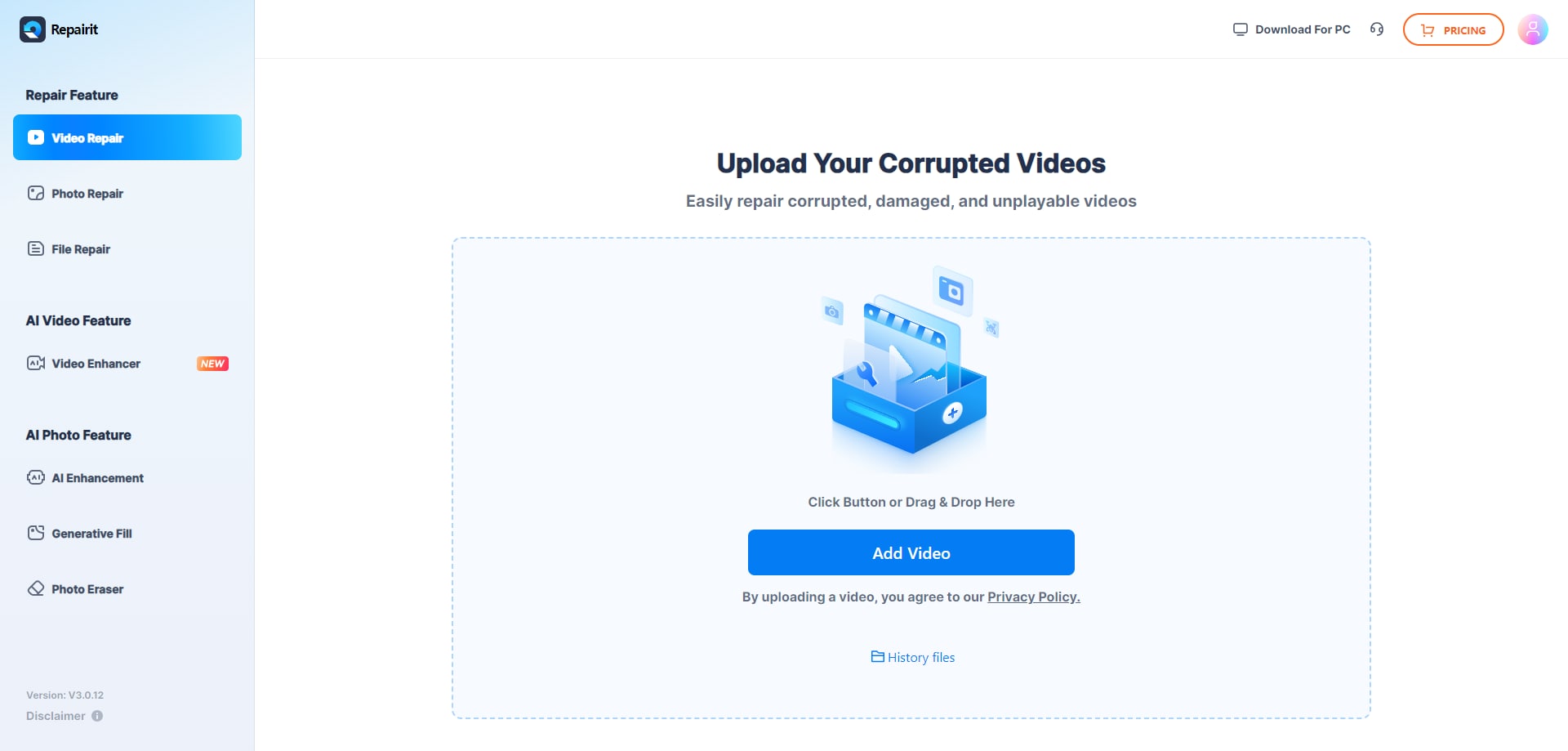
Step 1. Upload the damaged or unplayable videos you want to repair through Repairit Video Repair Online.
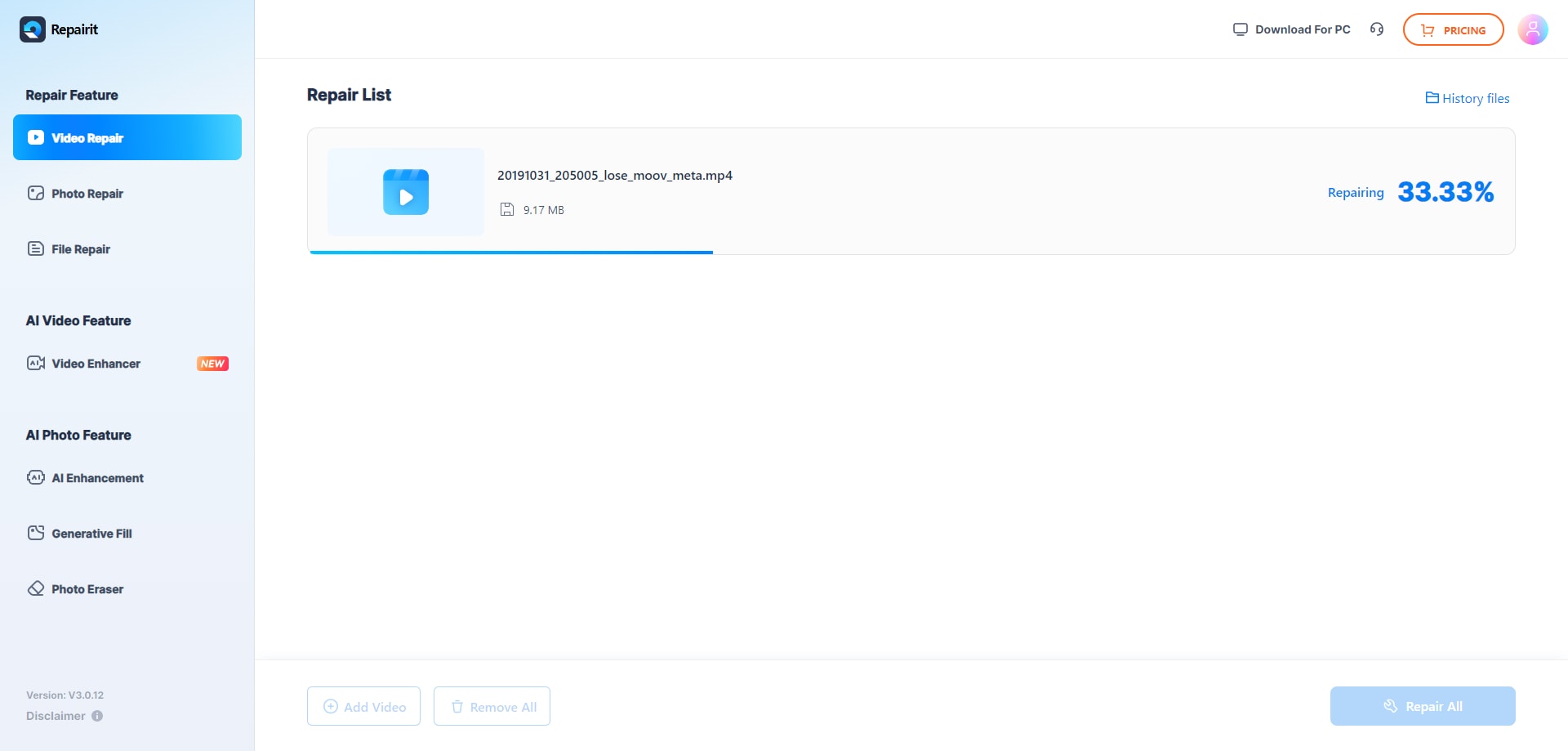
Step 2. Start the online repair process and let Repairit Video Repair Online analyze the corrupted video files.
Step 3. Preview the repaired video result when available, then save the repaired videos to your device.
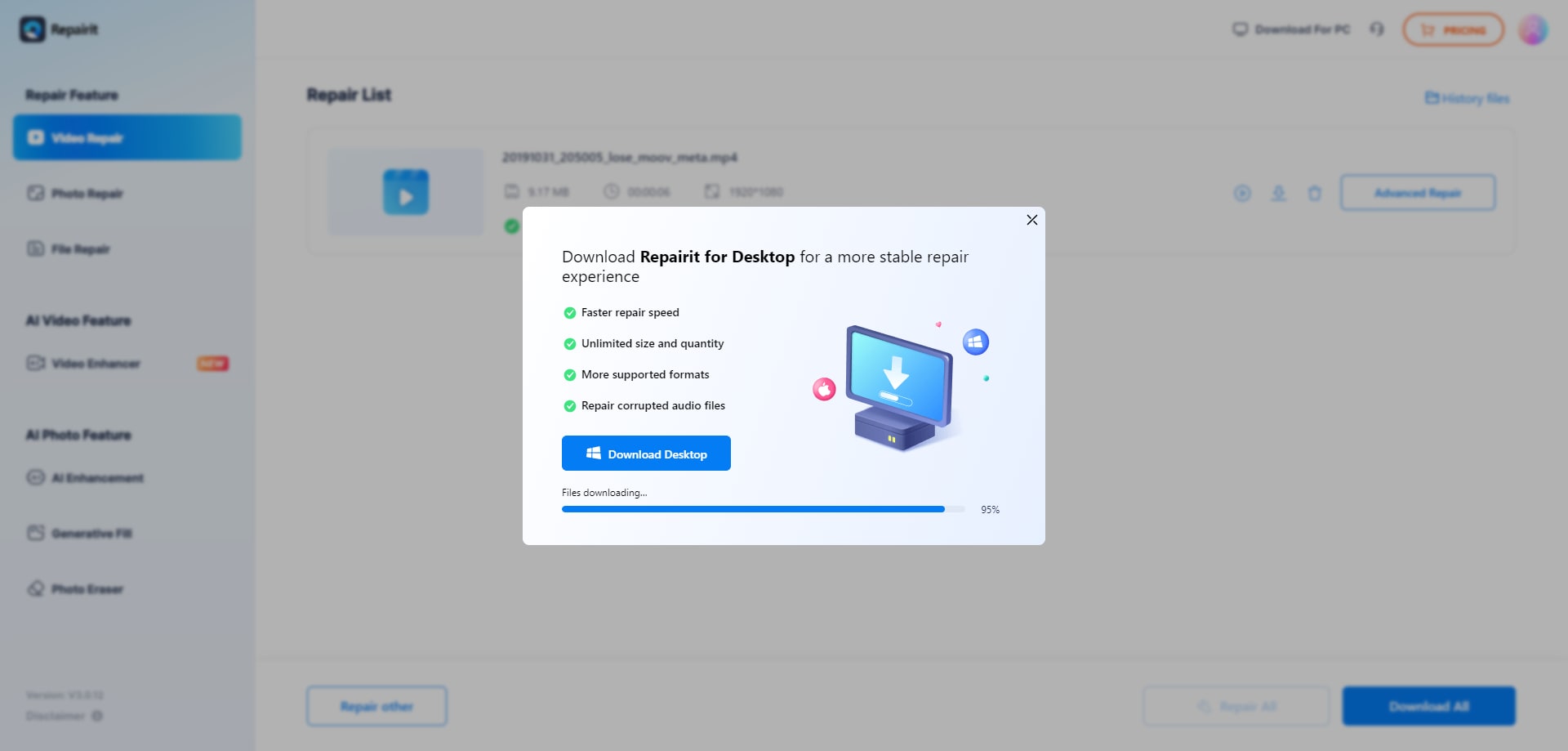
Users often notice that following these three steps keeps the process predictable: you know when the file is uploading, when the online repair is running, and when it is safe to download the output and check it locally.
Final Verdict
The main difference between Repairit Video Repair Online and 4DDiG Online Video Repair is how they guide beginners through browser-based repair rather than any dramatic gap in raw capability. 4DDiG Online Video Repair centers on a simple, beginner oriented cloud workflow that fits users who only need to handle common corrupted videos without installing desktop software and do not expect deep reconstruction.
Repairit Video Repair Online is more suitable when you want a similarly easy online process but with clear, guided steps for repairing broken MP4 or MOV files and previewing results before download. In most real-world cases, 4DDiG Online Video Repair may be enough if your footage is only mildly corrupted and you just want a quick, straightforward online fix. Repairit Video Repair Online becomes stronger when you value a guided browser experience, frequent previews, and a dedicated online environment focused on helping non-technical users successfully complete their corrupted video repairs.
Next: Repairit Video Repair Online vs Clever Online Video Repair
FAQ
-
1. Which is better for beginners, Repairit Video Repair Online or 4DDiG Online Video Repair?
Both target beginners, but the key difference is guidance. Repairit Video Repair Online emphasizes step-by-step prompts, while 4DDiG Online Video Repair focuses on a straightforward upload, repair, preview, and download flow that is also beginner oriented. -
2. Can both tools repair broken MP4 or MOV files online without desktop software?
Yes. Repairit Video Repair Online and 4DDiG Online Video Repair are designed for browser-based repair, so you can upload broken MP4 or MOV files and other common formats, let them process online, then download the repaired versions. -
3. What is the difference between online video repair, video recovery, and video enhancement?
Online video repair, as offered by Repairit Video Repair Online and 4DDiG Online Video Repair, focuses on fixing corrupted, damaged, or unplayable files. Video recovery deals with finding lost or deleted files, and video enhancement or upscaling aims to improve quality or resolution rather than repair corruption.




