
 TL;DR:
Resolve Call of Duty Modern Warfare 4 Open Beta launch failures on PC by first verifying your specific access dates (Early Access starting August 21, 2026, or Open Beta starting August 28, 2026) and installing the separate Beta package directly from Steam, Battle.net, or the Xbox app.
● Online modes mandate TPM 2.0 and Secure Boot validation; check your system status using the Windows tpm.msc and msinfo32 run commands before attempting any BIOS or UEFI adjustments.
● Avoid fully reinstalling all Call of Duty files immediately; instead, utilize your platform launcher to verify game integrity, disable background overlays, or repair the Xbox app and Gaming Services via Windows Settings.
● Wondershare Repairit cannot bypass game launch failures or anti-cheat blocks, but it is the correct tool for repairing local MP4, MOV, MKV, or AVI gameplay recordings that become corrupted if the Beta crashes.
Ask AI for a summary
 ChatGPT
 Perplexity
 Gemini
 Claude
 Grok
Grok
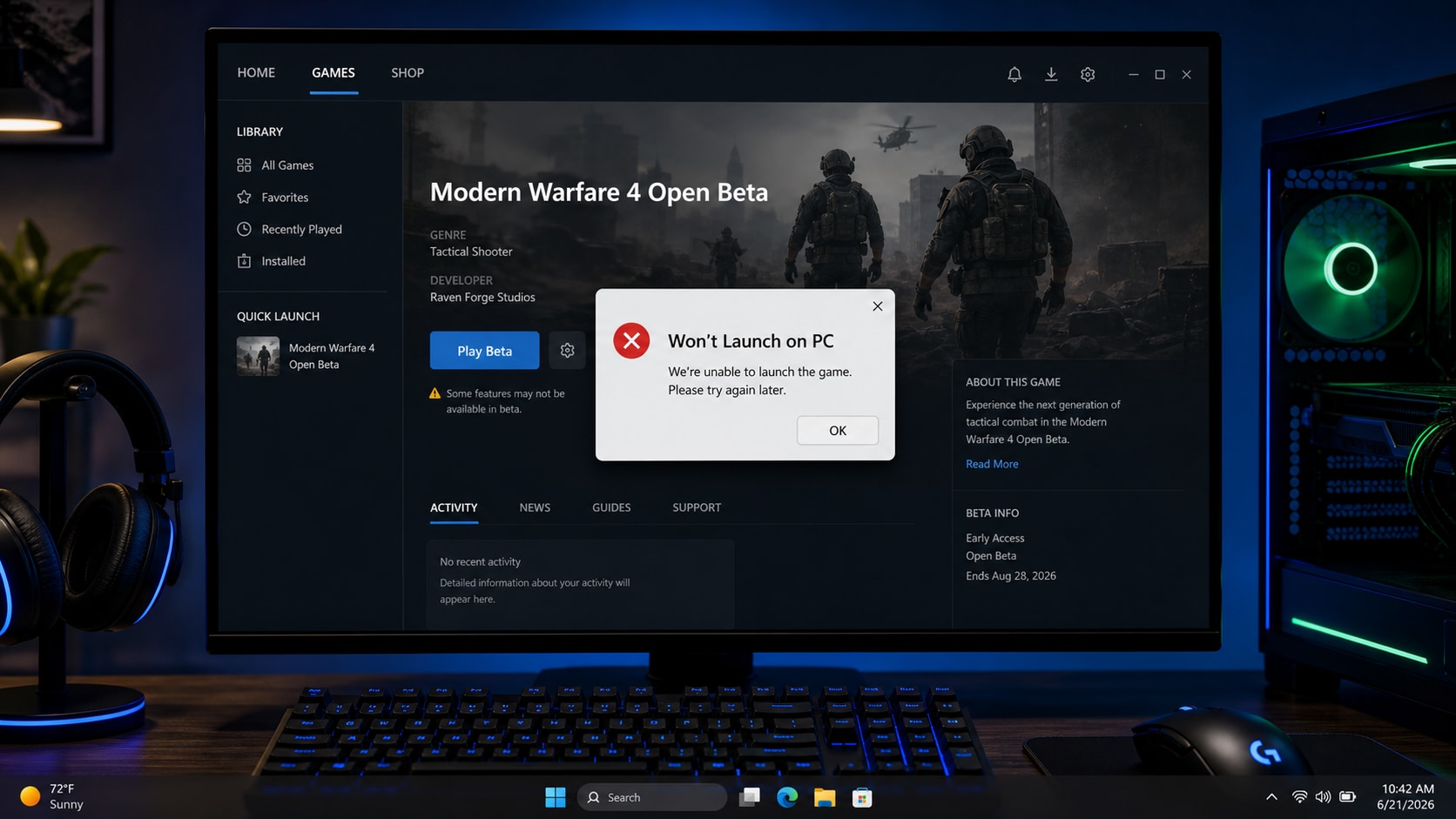
If Call of Duty Modern Warfare 4 Open Beta will not launch on PC, check the Beta access window first. On August 24, 2026, Activision's Early Access Beta is still the active PC access path, while the no-preorder Open Beta is scheduled for August 28 to September 1, 2026.
Fix Call of Duty Modern Warfare 4 Open Beta Not Launching/Won't Launch On PC by checking the right cause before reinstalling. A failed launch can come from timing, account entitlement, the wrong platform package, corrupted game files, TPM 2.0 or Secure Boot requirements, outdated drivers, overlays, launcher cache, or Windows gaming services.
This guide covers Steam, Battle.net, and Xbox on PC launch paths. It also explains where Wondershare Repairit fits: Repairit does not fix the Beta launch error, but it can help repair corrupted local gameplay videos if the Beta crashes while recording, saving, transferring, or editing footage.
Important: Repairit is a video and file repair product. It cannot fix Call of Duty servers, Activision account access, Beta entitlement, Steam, Battle.net, Xbox app, Microsoft Store, Gaming Services, TPM 2.0, Secure Boot, Windows, drivers, anti-cheat checks, or the Modern Warfare 4 Open Beta launch problem itself.
In this article
-
- Fix 1. Confirm the Beta Access Window
- Fix 2. Install the Separate Modern Warfare 4 Beta Package
- Fix 3. Verify or Scan Game Files
- Fix 4. Check TPM 2.0 and Secure Boot
- Fix 5. Update Windows and Graphics Drivers
- Fix 6. Disable Overlays and Background Tools
- Fix 7. Repair Xbox App or Microsoft Store Components
- Fix 8. Reinstall Only the Beta Package
Part 1. Why Call of Duty Modern Warfare 4 Open Beta Won't Launch on PC
The Modern Warfare 4 Open Beta can fail before gameplay for several different reasons. Some are access-related, while others are local PC, platform, or security-setting issues.
| Symptom | Possible Cause | Best First Fix |
|---|---|---|
| Beta is missing from the library | The separate Beta package is not installed, not visible yet, or not available for the account. | Check the access date, platform, and Beta package. |
| Play button does nothing | Steam, Battle.net, Xbox app, Microsoft Store, account, or launcher cache issue. | Restart the launcher and verify or repair platform files. |
| Game opens then closes | Corrupted files, driver conflict, missing components, or anti-cheat validation issue. | Verify game files, update drivers, and disable overlays. |
| Online modes are blocked | TPM 2.0 or Secure Boot is disabled or not detected correctly. | Check TPM and Secure Boot before changing BIOS settings. |
| Error appears after launch | Platform entitlement, account link, cache, or service validation issue. | Check the same account across platform apps and clear cache. |
| Black screen or startup crash | Graphics driver, overlay, shader cache, fullscreen, or recording conflict. | Update drivers and disable overlays or recording tools. |
| Gameplay recording becomes corrupted | The launch or crash issue is separate, but the local video file may be damaged. | Fix the game issue first, then repair the media file if needed. |
Use the fixes below in order. They start with entitlement and install checks, then move to file verification, security requirements, drivers, overlays, Xbox app repair, and Beta reinstall.
Part 2. Fix Call of Duty Modern Warfare 4 Open Beta Not Launching/Won't Launch On PC
Fix 1. Confirm the Beta Access Window
Before changing Windows settings, confirm whether the Beta should be playable for the account. Activision lists two key periods:
| Beta Period | Dates | Who Can Play |
|---|---|---|
| Early Access Beta | August 21 to August 25, 2026 | Players with eligible preorder, prepurchase, or Early Access code on the selected platform. |
| Open Beta | August 28 to September 1, 2026 | All players on supported platforms, with no preorder required. |
If it is before August 28, 2026 and the account does not have Early Access, the Beta may not launch because the account is not eligible yet. If a code was used, confirm that it was redeemed for the same platform being used on PC.
- Check the Activision account email and platform selection.
- Confirm the Steam, Battle.net, or Xbox account that owns access.
- Restart the platform launcher after redeeming a code or prepurchasing.
- Check the official Call of Duty or Activision status channels if the Beta is live but many players cannot launch.
Fix 2. Install the Separate Modern Warfare 4 Beta Package
The Beta may be installed separately from the main Call of Duty hub. Opening an old shortcut or the main game page may not launch the Beta content correctly.
- Open the platform client: Steam, Battle.net, or Xbox app.
- Search for Call of Duty: Modern Warfare 4 Beta.
- Choose the Beta package, not only the main Call of Duty page.
- Click Install Beta, Install, or download the Beta content pack.
- After installation, launch the Beta directly from the platform library.
- Restart the launcher if the Beta still does not appear.
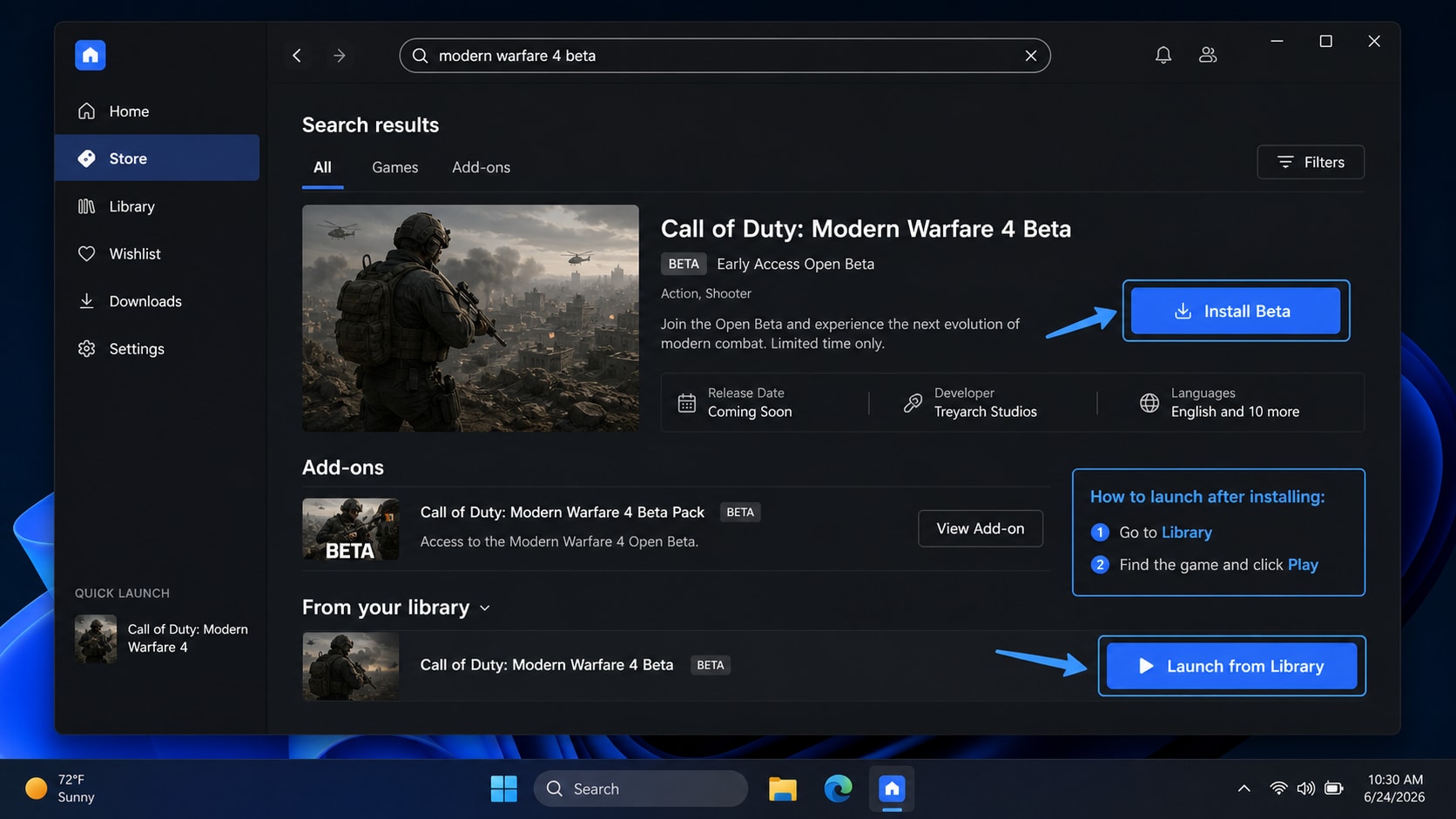
For Xbox on PC, sign in with the same Microsoft account in both Microsoft Store and the Xbox app. Account mismatch can make the Beta look missing even when access exists.
Fix 3. Verify or Scan Game Files
Damaged or incomplete files can cause Modern Warfare 4 Open Beta not launching, crash to desktop, black screen, or startup loop problems. Verify files before reinstalling the entire game.
| Platform | How to Check Files |
|---|---|
| Steam | Open Library, right-click the Beta, choose Properties, open Installed Files, then click Verify integrity of game files. |
| Battle.net | Open Battle.net, select the Beta or Call of Duty page, open the menu near Play, then choose Scan and Repair if available. |
| Xbox app on PC | Open the Beta page, check Manage or repair options if available, or repair Xbox app and Gaming Services from Windows Settings. |
Steam notes that some local configuration files may fail to validate normally. Test the Beta after verification completes instead of reinstalling immediately.
Fix 4. Check TPM 2.0 and Secure Boot
Activision states that TPM 2.0 and Secure Boot are required to play applicable Call of Duty games online on PC, including Modern Warfare 4 Beta online modes. If either setting is disabled, the game may open but fail validation, block online access, or close during startup.
| Requirement | How to Check | What to Watch For |
|---|---|---|
| TPM 2.0 | Press Win + R, type tpm.msc, press Enter, and confirm TPM is ready with specification version 2.0. | If TPM is disabled, use the official PC or motherboard guide before changing BIOS or UEFI settings. |
| Secure Boot | Press Win + R, type msinfo32, press Enter, and check Secure Boot State. | Changing boot mode or keys incorrectly can cause Windows boot issues. Do not change settings randomly. |
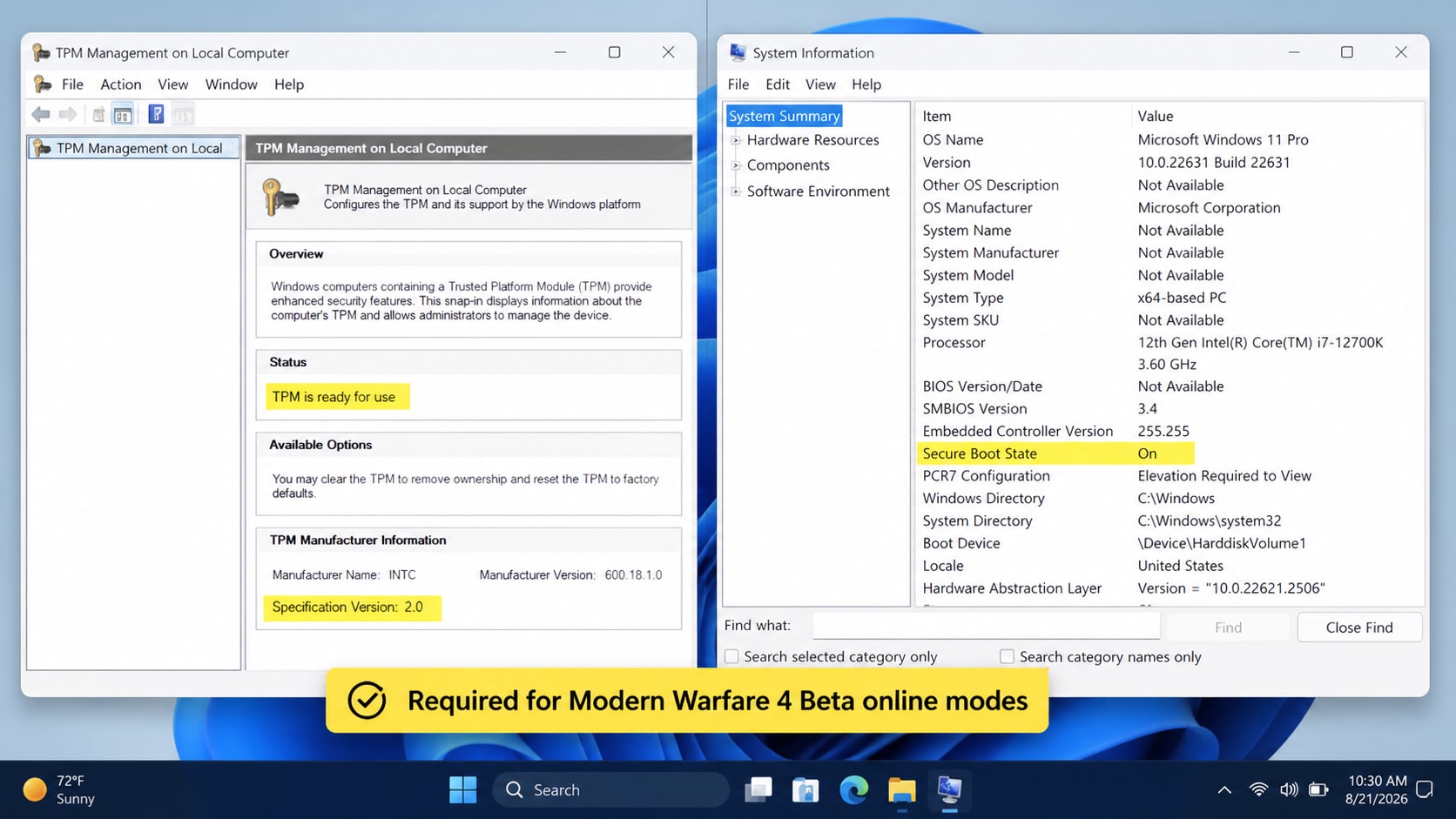
Activision also provides a Call of Duty Secure Attestation Wizard to verify whether the PC meets security requirements. Run official checks before editing BIOS settings.
Fix 5. Update Windows and Graphics Drivers
A new Beta may depend on recent Windows components, GPU drivers, shader behavior, and anti-cheat compatibility.
- Install pending Windows Update items.
- Update NVIDIA, AMD, or Intel graphics drivers from the official driver app or vendor website.
- Restart the PC.
- Launch the Beta again.
- If crashes began after a driver update, test the previous stable driver from the official vendor tool.
Also make sure the installation drive has enough free space for shader cache, updates, and temporary files.
Fix 6. Disable Overlays and Background Tools
Overlays and monitoring tools can interfere with startup, fullscreen rendering, recording, or anti-cheat checks.
- Steam Overlay.
- Battle.net overlay.
- Xbox Game Bar.
- Discord Overlay.
- NVIDIA, AMD, or Intel recording overlay.
- MSI Afterburner or RivaTuner.
- Third-party screen recorders and FPS counters.
- VPN, proxy, packet filter, or network inspection tools.
- Aggressive antivirus game shields.
Restart the launcher after disabling these tools. If the Beta launches, re-enable tools one by one to find the conflict.
Fix 7. Repair Xbox App or Microsoft Store Components
If the Beta will not open through Xbox on PC, repair Xbox app, Microsoft Store, and Gaming Services before reinstalling large game files.
- Press Win + I.
- Go to Apps > Installed apps.
- Search for Xbox.
- Open Advanced options.
- Click Repair.
- If needed, click Reset.
- Repeat for Microsoft Store and Gaming Services if those options appear.
- Restart the PC.
You can also clear Microsoft Store cache by pressing Win + R, typing wsreset.exe, and pressing Enter.
Fix 8. Reinstall Only the Beta Package
If access, files, security settings, drivers, overlays, and platform repair all check out, reinstall only the Beta package.
- Uninstall the Modern Warfare 4 Beta package.
- Restart the PC.
- Open Steam, Battle.net, or Xbox app.
- Download the Beta again from the official platform library page.
- Launch the Beta before enabling overlays, mods, screen recorders, or custom launch options.
Do not uninstall unrelated Call of Duty content unless the launcher specifically requires it. The Beta package may be the only damaged or missing part.
Part 3. Repair Corrupted Modern Warfare 4 Open Beta Videos with Repairit
Repairit does not fix Call of Duty Modern Warfare 4 Open Beta launch errors, TPM settings, Secure Boot, platform entitlement, launcher cache, drivers, anti-cheat checks, or Windows gaming services. Those issues should be handled through the fixes above.
However, if the Beta crashes while recording gameplay, saving highlights, transferring clips, or editing content, the local video file may become damaged. The clip may show a black screen, no sound, frozen frames, playback errors, or fail to open.
When Repairit Fits This Case
- A Modern Warfare 4 Open Beta recording cannot open after a crash.
- A gameplay clip has black screen, missing audio, frozen frames, or playback error.
- An MP4, MOV, MKV, or AVI file was damaged during recording, transfer, upload, or editing.
- A recording stopped suddenly and became unreadable.
- A highlight clip is needed for content creation, bug reporting, or sharing.
If the recording is deleted or missing, Repairit is not the correct tool. Check capture folders, cloud sync, platform capture tools, backup locations, or data recovery options instead.
How to Repair a Corrupted Beta Gameplay Video
Step 1. Import Damaged Modern Warfare 4 Video Recordings
Head over to the "Video Repair" tab within the tool and press the "Start" button. A new screen will appear where you can import the corrupted Modern Warfare 4 recordings.

Step 2. Repair Your Added Modern Warfare 4 Clips
Next, click the "Repair" button once all the damaged video files are imported. The software will then scan and resolve all detected issues within your recordings.

Step 3. Check the Modern Warfare 4 Recordings
After a few moments, press the "Preview" button to review the quality of each restored game clip. When everything looks good, select "Save All" to export the repaired clips to your device.


What Repairit Cannot Do
| Repairit Can Help With | Repairit Cannot Do |
|---|---|
| Repair corrupted local gameplay recordings that still exist. | Fix Modern Warfare 4 Open Beta not launching. |
| Repair damaged MP4, MOV, MKV, AVI, and other supported video files. | Repair Steam, Battle.net, Xbox app, Microsoft Store, or Gaming Services. |
| Help with black-screen video, frozen frame, missing audio, and playback errors in media files. | Bypass Activision account access, Beta entitlement, TPM, Secure Boot, or anti-cheat checks. |
| Repair media files damaged by interrupted recording, transfer, or export. | Recover deleted clips or replace official platform troubleshooting. |
Part 4. What to Avoid While Troubleshooting
Avoid risky shortcuts while fixing Modern Warfare 4 Open Beta launch problems:
- Do not change BIOS, UEFI, TPM, or Secure Boot settings randomly.
- Do not use anti-cheat bypass tools, modified launchers, or unauthorized unlockers.
- Do not download random DLL files from third-party sites.
- Do not disable antivirus permanently; use temporary testing or official exceptions if needed.
- Do not reinstall all Call of Duty content before checking the separate Beta package.
- Do not keep recording long sessions while the Beta is unstable.
- Do not overwrite corrupted gameplay clips before attempting media repair.
If the issue continues, collect the exact error message, platform, Activision account status, Windows version, GPU driver version, TPM/Secure Boot status, and file-verification results before contacting official support.
Conclusion
To Fix Call of Duty Modern Warfare 4 Open Beta Not Launching/Won't Launch On PC, first confirm the Beta date and account access. Then install the separate Beta package, verify or scan game files, update drivers, check TPM 2.0 and Secure Boot, disable overlays, repair Xbox app or Store components if using Xbox on PC, and reinstall only the Beta package if needed.
If a launch crash damages gameplay recordings or local media files, Wondershare Repairit can help repair corrupted videos after the launch issue is resolved. Keep the boundary clear: Repairit repairs damaged media files, not Call of Duty access, platform launchers, PC security settings, or the Open Beta itself.
FAQ
-
Why is Call of Duty Modern Warfare 4 Open Beta not launching on PC?
Common causes include the Beta not being live for the account, missing separate Beta package, wrong platform entitlement, corrupted game files, outdated drivers, overlays, TPM 2.0 or Secure Boot being disabled, or launcher cache issues. -
When does the Modern Warfare 4 Open Beta start?
Activision lists Early Access Beta from August 21 to August 25, 2026, and the Open Beta from August 28 to September 1, 2026. Players without Early Access may need to wait until the Open Beta window. -
Do TPM 2.0 and Secure Boot affect Modern Warfare 4 Beta on PC?
Yes. Activision states that TPM 2.0 and Secure Boot are required for applicable Call of Duty online PC experiences. Check TPM with tpm.msc and Secure Boot with msinfo32 before changing BIOS or UEFI settings. -
Can Repairit fix Modern Warfare 4 Open Beta not launching?
No. Repairit cannot fix the Beta launch error, Steam, Battle.net, Xbox app, Microsoft Store, account entitlement, TPM, Secure Boot, drivers, or anti-cheat checks. It is only relevant for corrupted local gameplay videos. -
Should I reinstall the whole Call of Duty install?
No, not as an early fix. Check the Beta access window, install the separate Beta package, verify or scan files, update drivers, repair platform apps, and reinstall only the Beta package first. -
Can Repairit repair a corrupted Modern Warfare 4 Beta recording?
Repairit can help repair corrupted local gameplay videos such as damaged MP4, MOV, MKV, or AVI files when the recording still exists. It cannot recover deleted clips or fix the game crash that damaged the recording.




