
When a critical PDF, Word, Excel, or PowerPoint file becomes unreadable, choosing the right repair tool helps you act quickly without a full data recovery workflow. This comparison looks at Repairit Online File Repair and Stellar File Repair Toolkit so you can match each solution to specific corrupted document problems and work environments.
Both options focus on repairing existing, damaged files rather than recovering deleted content. That distinction matters for users facing invalid file errors, broken file previews, or office documents that suddenly refuse to open even though the files are still present.
In this article
- Quick Verdict: Repairit Online File Repair vs Stellar File Repair Toolkit
- Key Differences and Comparison Table: Repairit Online File Repair vs Stellar File Repair Toolkit
- File Types and Corruption Scenarios: Repairit Online File Repair vs Stellar File Repair Toolkit
- Workflow, Ease of Use, and Upload: Repairit Online File Repair vs Stellar File Repair Toolkit
- Repair Quality, Preview, and Limitations: Repairit Online File Repair vs Stellar File Repair Toolkit
- Privacy, File Handling, and Browser Experience
- Supported Formats and Scenarios: Repairit Online File Repair vs Stellar File Repair Toolkit
- Pros and Cons of Repairit Online File Repair and Stellar File Repair Toolkit
- Who Should Choose Repairit Online File Repair or Stellar File Repair Toolkit
- What the Actual Repair Process Looks Like
- Final Verdict: Repairit Online File Repair vs Stellar File Repair Toolkit
Quick Verdict: Repairit Online File Repair vs Stellar File Repair Toolkit
Repairit Online File Repair better suits users who want to repair corrupted files online through a browser, while Stellar File Repair Toolkit tends to fit desktop-focused, professional environments handling more severe corruption.
For everyday broken PDFs, unreadable Word documents, or damaged Excel workbooks, a guided online file repair workflow is often enough. When organizations face complex, repeated corruption cases, a desktop toolkit may integrate more naturally into IT processes.
The most practical approach is to align each tool with file damage severity, user skills, and whether you prefer online or installed workflows for repairing corrupted PDF files and other office documents.
Key Differences and Comparison Table: Repairit Online File Repair vs Stellar File Repair Toolkit
The core differences center on access method, guidance level, and how each tool fits into daily work when you need to fix unreadable files quickly.
| Dimension | Repairit Online File Repair | Stellar File Repair Toolkit |
|---|---|---|
| Best for | Guided online repair of corrupted PDFs, Word, Excel, and PowerPoint files without installation. | Professional desktop repair of severely damaged office documents. |
| Supported formats | Focuses on common office formats like corrupted PDF, Word, Excel, and PowerPoint. | Desktop toolkit for Word, Excel, PowerPoint, and PDF files. |
| Online workflow | Fully browser-based upload, analyze, repair, and download. | Primarily desktop; any online steps usually support the local toolkit. |
| Repair capability | Aims to fix typical corruption when file structures are still partly intact. | Positioned for more severely damaged documents in professional use. |
| Ease of use | Simple, step-by-step interface designed for non-technical users. | May suit IT teams and power users comfortable with desktop suites. |
| Strengths | No installation, works from modern browsers, convenient for quick fixes. | Enterprise reputation and toolkit design for complex repair workflows. |
| Limitations | Depends on internet access and may struggle with extreme corruption or unsupported formats. | Less convenient for users who prefer to repair corrupted files online only. |
Both tools concentrate on repairing existing damaged files. Neither is marketed as a deleted file recovery or general data recovery solution, so expectations should remain focused on corruption repair rather than lost file retrieval.
Which Tool Repairs More File Types and Corruption Scenarios?
Both solutions focus on office documents, but they emphasize different repair scenarios and usage contexts.
According to the provided information, Repairit Online File Repair targets common office formats, including corrupted PDFs, damaged Word contracts, broken Excel sheets, and PowerPoint decks that fail to load. The emphasis is on repairing corrupted files online when they still exist but have become unreadable.
Stellar File Repair Toolkit is described as a professional toolkit for Word, Excel, PowerPoint, and PDF documents, especially where damage is more severe. Its desktop-centered approach may better fit environments where IT teams frequently see repeated corruption patterns across shared drives or collaboration systems.
Typical corruption scenarios where either tool may help include:
- Files that will not open after a crash or unexpected shutdown.
- Invalid file format or file is corrupted errors from office applications.
- Broken PDF previews or partially loading pages.
- Unreadable Word documents with missing or scrambled content warnings.
- Damaged Excel sheets with structure errors or missing workbook elements.
- PowerPoint slides that trigger repair prompts but still fail to load.
Neither product is presented as a general data recovery suite. If the file has been deleted, overwritten, or lost due to disk failure, separate recovery tools would usually be required before attempting document-level repair.
Repair Workflow, Ease of Use, and Upload Experience
Repairit Online File Repair and Stellar File Repair Toolkit share a similar logical sequence, but the user experience differs between browser and desktop environments.
The overall comparison can be summarized from the given description:
- Repairit Online File Repair workflow: fully online, centered on upload, automated analysis, repair, and download in a browser.
- Stellar File Repair Toolkit workflow: desktop-focused, where you open or add files within the toolkit, run analysis, and attempt repair locally.
The uploadWorkflowAndEaseOfUse description notes that Repairit Online File Repair offers a straightforward browser flow that tends to feel approachable for non-technical staff. This can help when someone simply needs to repair corrupted Word documents received from a client and does not have permission to install new software.
Stellar File Repair Toolkit, by contrast, aligns with a professional-style workflow run from an installed suite. That may be preferred by administrators or help-desk staff who routinely analyze failed office documents and need everything available on their workstation without relying on web access.
Repair Quality, Preview Experience, and Limitations
Repair quality for both options depends heavily on the nature of the corruption, the remaining file structure, and whether key data blocks are still present.
The repairQualityAndLimitations summary explains that each tool may face challenges with severe corruption, missing data, truncated files, or unsupported formats. For example, if a PDF is only partially saved or an Excel workbook was interrupted mid-write, some sheets or elements may simply not exist to reconstruct.
Repairit Online File Repair aims to guide users through repairing common issues such as:
- PDF files that trigger broken preview errors in browsers or readers.
- Word documents that show unreadable content warnings or refuse to open.
- Excel workbooks where formulas or worksheets appear inaccessible due to corruption.
- PowerPoint files that crash or stall during loading.
Stellar File Repair Toolkit is positioned around more severe cases, where multiple components inside the file format may require deeper structural repair. In many cases, desktop workflows also make it easier for IT personnel to keep logs, run repeated attempts, or test repaired files in controlled environments.
Preview capabilities vary by tool and version, and users should check current product documentation. When available, previewing repaired output before download helps confirm whether the core text, layout, or key worksheets have been restored to a usable state.
Privacy, File Handling, and Browser Experience
File handling and privacy considerations differ meaningfully between browser-based and desktop-focused repair approaches.
For Repairit Online File Repair, users upload corrupted files to an online service, which then processes them. Organizations should therefore review privacy policies, regulatory requirements, and internal data-handling rules before uploading sensitive PDFs, contracts, or financial spreadsheets. A browser-based workflow can be convenient for cross-device access and remote teams, provided governance requirements are met.
Stellar File Repair Toolkit runs primarily on local desktops. Many teams consider this layout more aligned with internal policies where documents remain within corporate infrastructure, especially when handling confidential or regulated data. Even so, users should still evaluate how temporary files, logs, and repaired outputs are stored on local systems.
In both cases, it is important to distinguish corrupted file repair from broader cyber-security or compliance measures. Repairing unreadable files does not replace proper access controls, encryption at rest, or secure sharing policies, which must be handled by other tools and processes.
Supported File Formats and Common Repair Scenarios
Both products address widely used office formats, but they do so through different delivery models and may vary in their exact format lists over time.
The supportedFileFormatsAndRepairScenarios description notes that Repairit Online File Repair is designed for common office files such as PDFs, Word, Excel, and PowerPoint documents, especially when those files become unreadable or trigger invalid file errors. Stellar File Repair Toolkit focuses on similar formats in a professional environment.
Users often encounter similar corruption symptoms across these file types, including broken PDF previews, missing Word content, or Excel workbooks that claim to be corrupted and cannot be opened. Both tools aim to repair damaged documents rather than retrieve files that were deleted from storage devices.
| File type | Typical corruption symptoms | Repairit Online File Repair | Stellar File Repair Toolkit |
|---|---|---|---|
| Broken preview, cannot open, invalid or damaged file messages. | Designed to repair corrupted PDF files through an online workflow. | Toolkit-based repair for problematic or severely damaged PDFs. | |
| Word | Unreadable documents, encoding errors, file cannot be opened prompts. | Helps repair corrupted Word documents that still exist but fail to load. | Desktop repair for damaged Word files in professional setups. |
| Excel | Sheets not accessible, file format or extension not valid, crash on open. | Aims to repair corrupted Excel files via browser upload. | Analyzes and repairs broken workbooks inside the toolkit. |
| PowerPoint | Presentation cannot be opened, missing slides, file is corrupt messages. | Online repair for corrupted PowerPoint files when they will not open. | Desktop-focused repair for damaged PowerPoint decks. |
| ZIP or archives | Extraction errors, unexpected end of archive, invalid ZIP structure. | May assist when archives are part of supported online file repair workflows; users should check official support. | Primary focus is office documents; archive support may require checking product details. |
| Other document formats | Files exist but applications report corruption or invalid structure. | May support additional document types depending on current service scope; check official support. | Desktop toolkit may handle more formats over time; confirm on vendor site. |
Because product capabilities can evolve, users should verify the latest supported formats and any format-specific limitations before relying on either solution for critical repair tasks.
Pros and Cons of Repairit Online File Repair and Stellar File Repair Toolkit
Each product has strengths that suit certain users and trade-offs that might matter less or more depending on your environment.
Repairit Online File Repair Pros and Cons
Stellar File Repair Toolkit Pros and Cons
Who Should Choose Repairit Online File Repair or Stellar File Repair Toolkit?
The right choice depends on how often you repair corrupted files, the type of corruption you face, and whether you prefer browser-based or desktop-centered workflows.
Based on the provided whoShouldChooseRepairit guidance, Repairit Online File Repair aligns well with:
- Users who want quick, online repair for corrupted PDF, Word, Excel, or PowerPoint files.
- Non-technical staff who benefit from guided, step-by-step browser instructions.
- Teams frequently receiving client documents that will not open and need a fast online fix.
- People who prioritize convenience and straightforward online file repair over installed toolkits.
From the whoShouldChooseTopic information, Stellar File Repair Toolkit may be better aligned with:
- IT departments or enterprises that regularly repair severely damaged office documents.
- Professionals who prefer a desktop ecosystem and tighter integration with local systems.
- Users managing complex corruption patterns in Word, Excel, PowerPoint, and PDF files.
- Organizations that value an established toolkit-style workflow and enterprise reputation.
In practice, some organizations may combine both options. For example, staff can repair corrupted files online for everyday incidents while IT teams handle escalated, heavily damaged documents using a desktop toolkit.
What the Actual Repair Process Looks Like
Most online file repair tools follow a similar pattern: you upload corrupted files, the service analyzes structure and content, attempts repair, then returns a downloadable version. Understanding this general flow helps set realistic expectations before you rely on any specific product.
The fileRepairCapabilities summary notes that both Repairit Online File Repair and Stellar File Repair Toolkit focus on corrupted file repair rather than deleted file recovery. The key variations lie in how guided the experience is and where the processing takes place.
Key Features
The fileRepairCapabilities and repairitSection details highlight several capabilities for Repairit Online File Repair:
- Repairs corrupted document files fully online through a browser-based workflow.
- Guides users through upload, analysis, and repair with minimal technical steps required.
- Helps restore inaccessible PDFs, Word files, Excel workbooks, and PowerPoint presentations when they fail to open.
- Focuses on practical repair for unreadable, broken, or invalid files rather than general data recovery.
This emphasis on simplicity means occasional users can attempt to fix unreadable files without deep knowledge of file formats or complex manual procedures.
Step-by-step guide
The following example illustrates how an online file repair workflow typically operates, using Repairit Online File Repair as the reference.
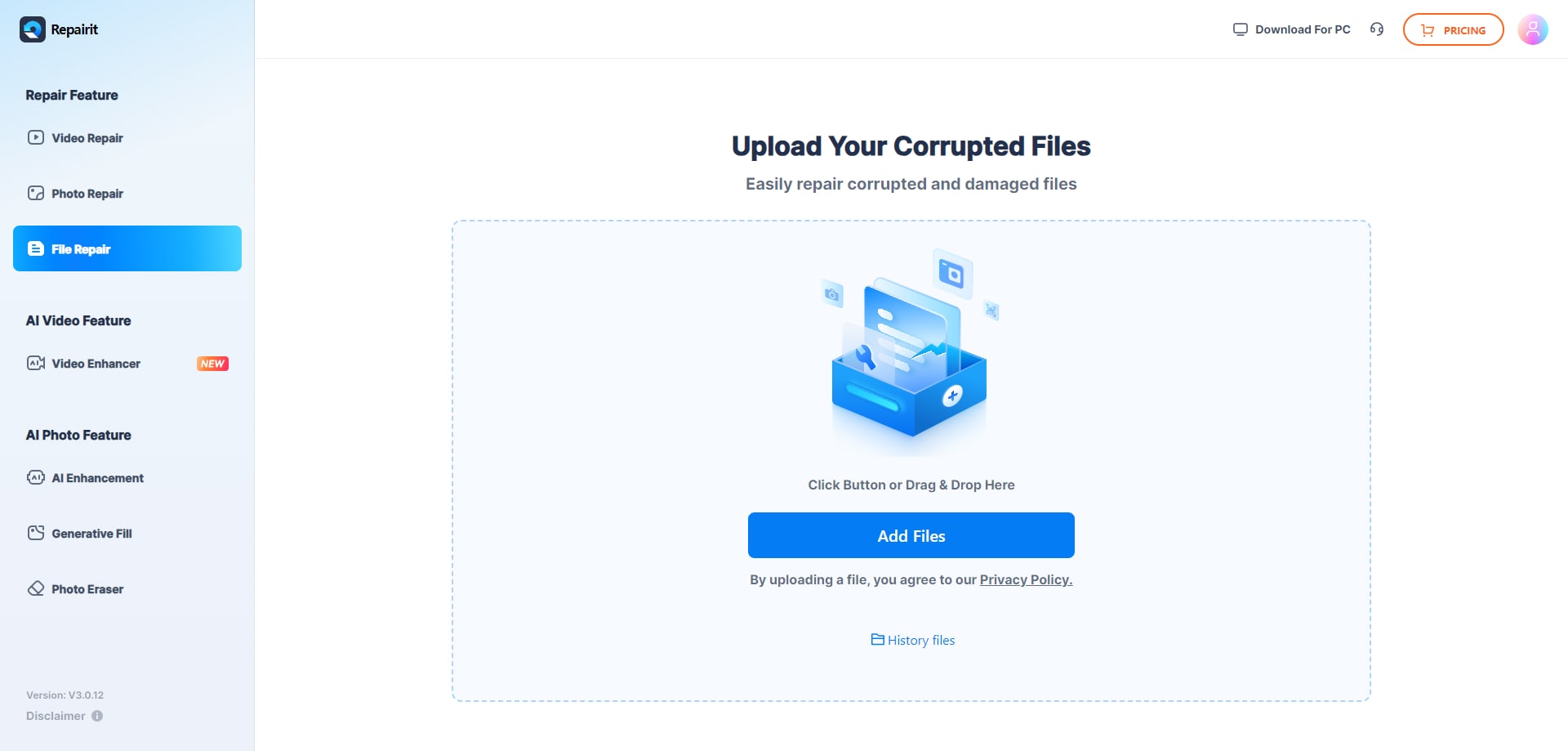
Step 1. Upload the corrupted, damaged, or unreadable files you want to repair through Repairit Online File Repair.
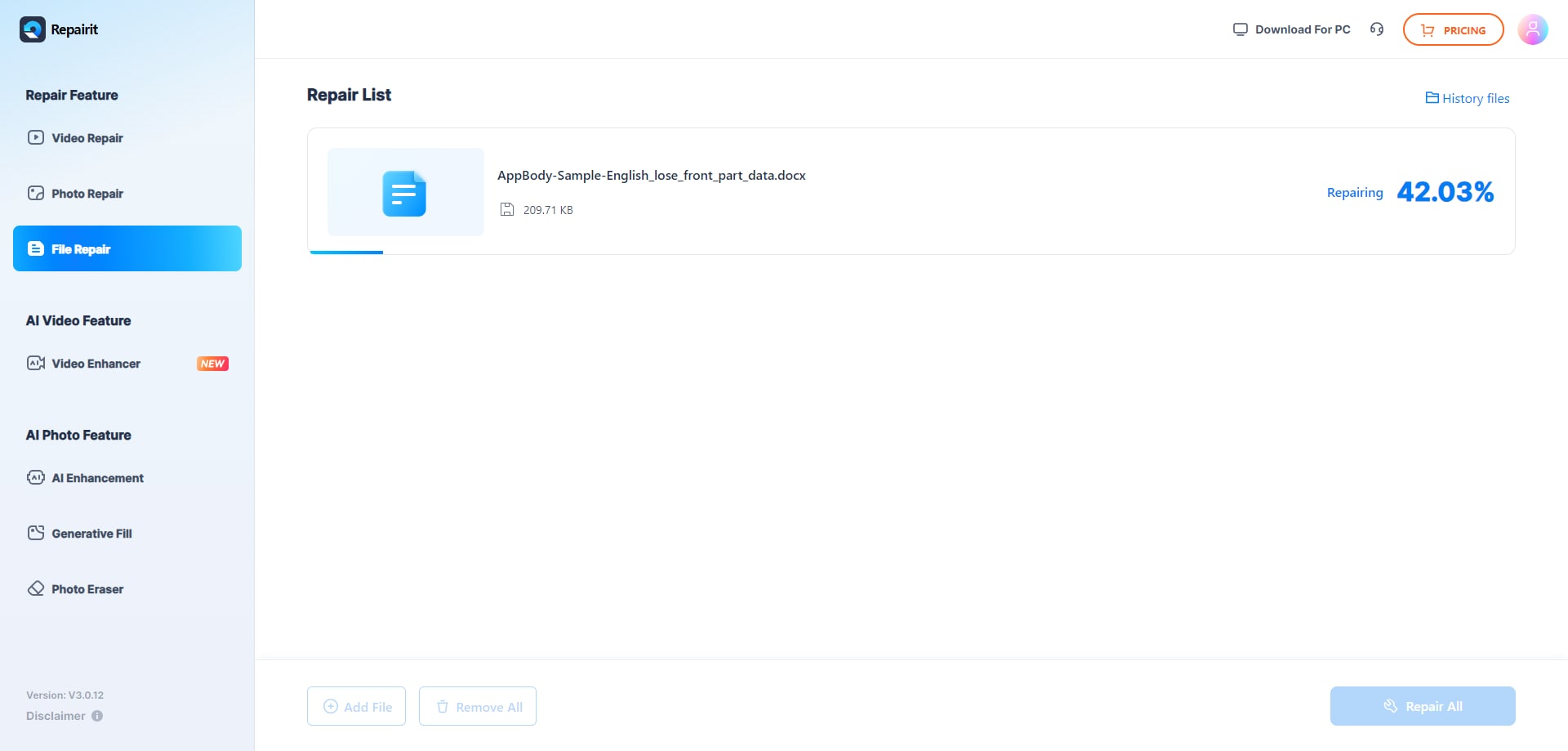
Step 2. Start the online repair process and let Repairit Online File Repair analyze the damaged files.
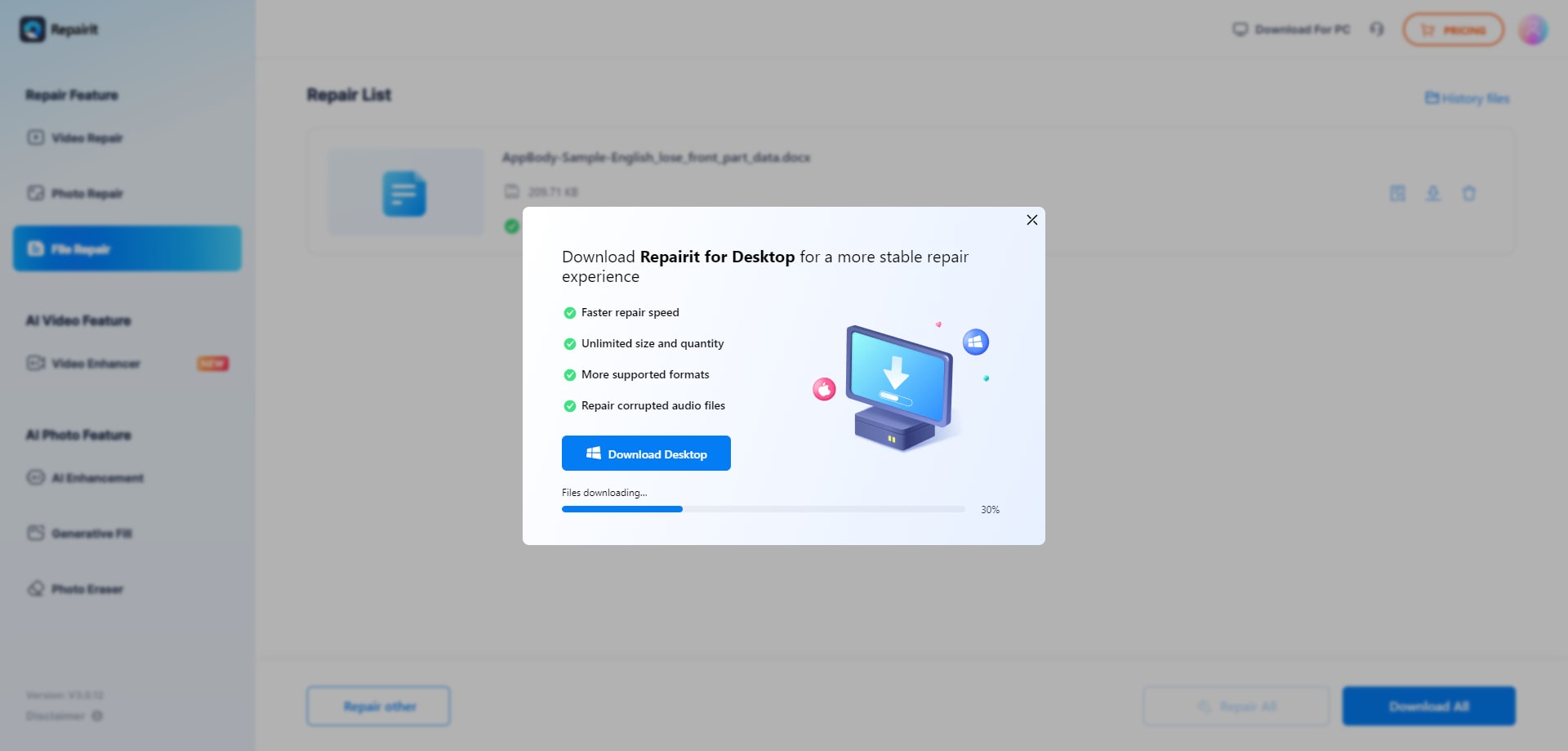
Step 3. Preview the repaired result when available, then save the repaired files to your device.
Stellar File Repair Toolkit follows a comparable logical flow but inside an installed application. You typically add corrupted files, run a repair operation, and then save or open the repaired output within your desktop environment rather than a browser.
Final Verdict: Repairit Online File Repair vs Stellar File Repair Toolkit
Both Repairit Online File Repair and Stellar File Repair Toolkit aim to repair damaged documents, but they fit different usage patterns and organizational needs.
Repairit Online File Repair is well suited for people who want to repair corrupted files online through a guided interface. It emphasizes ease of use, making it helpful for cases where a single unreadable PDF or Word document is blocking work and there is no desire to install extra software.
Stellar File Repair Toolkit, on the other hand, aligns more closely with professional, desktop-based environments that regularly see severe corruption. Its toolkit design can integrate into IT workflows that manage many files at once or require more consistent, local processing.
Many teams may benefit from a hybrid approach: try an online file repair workflow for quick issues, then escalate to a desktop toolkit when corruption is complex, repeated, or business-critical. The best choice is the one that matches your specific file types, damage levels, and governance requirements.
Next: Repairit Online File Repair vs Ziprecovery Online
FAQ
-
1. How does Repairit Online File Repair compare to Stellar File Repair Toolkit for everyday document corruption?
Repairit Online File Repair focuses on repairing corrupted files online through a guided browser interface, which suits quick fixes for PDFs, Word, Excel, and PowerPoint. Stellar File Repair Toolkit targets desktop-centric, professional workflows, where IT or power users manage more severe or frequent corruption cases within an installed toolkit. -
2. What is the difference between corrupted file repair and deleted file recovery?
Corrupted file repair works on existing but unreadable files, such as PDFs or Word documents that will not open or show invalid file errors. Deleted file recovery tries to restore missing files from storage. Repairit Online File Repair and Stellar File Repair Toolkit focus on corruption repair, not on recovering deleted or lost data. -
3. When should I choose an online repair service instead of a desktop toolkit?
Choose an online repair service when you need fast, convenient repair for a few corrupted documents from any device without installing software. A desktop toolkit is typically better for organizations that frequently encounter severe document corruption and prefer running repairs entirely within local, managed environments.
"




