
When archives or documents stop opening, choosing the right online repair service helps you avoid rework and downtime. Repairit Online File Repair and ZipRecovery Online both target corrupted files, but they approach archive repair and broader document repair differently.
When a critical archive refuses to open or throws extraction errors, choosing the right online repair tool matters. This guide compares Repairit Online File Repair with ZipRecovery Online to help you fix corrupted ZIP or RAR archives and decide when you may need broader online file repair.
In this article
- Quick Verdict: Repairit Online File Repair vs ZipRecovery Online
- Key Differences and Comparison Table: Repairit Online File Repair vs ZipRecovery Online
- File Types and Corruption Scenarios: Repairit Online File Repair vs ZipRecovery Online
- Workflow, Ease of Use, and Upload: Repairit Online File Repair vs ZipRecovery Online
- Repair Quality, Preview, and Limitations: Repairit Online File Repair vs ZipRecovery Online
- Privacy, File Handling, and Browser Experience
- Supported Formats and Scenarios: Repairit Online File Repair vs ZipRecovery Online
- Pros and Cons of Repairit Online File Repair and ZipRecovery Online
- Who Should Choose Repairit Online File Repair or ZipRecovery Online
- What the Actual Repair Process Looks Like
- Final Verdict: Repairit Online File Repair vs ZipRecovery Online
Quick Verdict: Repairit Online File Repair vs ZipRecovery Online
Repairit Online File Repair usually suits users dealing with mixed corrupted files, while ZipRecovery Online focuses on ZIP archives. Your choice depends on whether you only need archive repair or a broader way to repair corrupted files online, including office documents and archives.
Both solutions try to fix unreadable files by repairing damaged structures rather than recovering deleted data. They target issues such as ZIP extraction errors, invalid file errors, broken file previews, and office documents that will not open.
In many situations, Repairit Online File Repair is more suitable when a crash or transfer problem corrupts PDFs, Word documents, Excel workbooks, PowerPoint decks, and archives at the same time. ZipRecovery Online is more appropriate when your only priority is to repair broken ZIP files through an archive-focused workflow.
Key Differences and Comparison Table: Repairit Online File Repair vs ZipRecovery Online
The main difference is that Repairit Online File Repair covers multiple document and archive formats, while ZipRecovery Online narrows in on ZIP archive repair. This affects which corruption scenarios each service can handle and how flexible they are for everyday office work.
Use the table below to quickly compare their online file repair focus, supported formats, and typical workflows before deciding which one matches your situation.
| Dimension | Repairit Online File Repair | ZipRecovery Online |
|---|---|---|
| Best for | Users needing guided online repair for various corrupted documents, archives, and office files that refuse to open. | Users repairing broken ZIP archives with archive-focused repair on its web interface. |
| Supported formats | May handle multiple corrupted document and archive formats, including ZIP and RAR in many browser-based cases. | Primarily focused on ZIP archives; users should confirm which ZIP variants are supported. |
| Online workflow | Upload damaged files, run online repair, then preview and download repaired results where available. | Archive-centric flow: upload a ZIP archive, let it rebuild, then download the fixed archive. |
| Repair capability | Aims to repair corrupted structure so PDFs, office files, and archives open again without invalid file errors. | Designed to rebuild corrupted ZIP structure so contents may extract without errors. |
| Ease of use | Guided web interface suitable for non-technical users wanting step-by-step online file repair. | Simple form-based archive repair for users comfortable with ZIP-specific steps. |
| Strengths | Broader file support and guidance for office documents plus archives in one browser-based experience. | Archive-focused repair that targets damaged ZIP archives and extraction issues directly. |
| Limitations | Results depend on damage level and supported formats; does not restore deleted files. | Narrow archive use case; not intended for office document or media repair. |
Which Tool Repairs More File Types and Corruption Scenarios?
Repairit Online File Repair generally covers more file types and scenarios than ZipRecovery Online, especially for office documents plus archives. ZipRecovery Online concentrates its repair logic on ZIP archives, leaving non-archive files to other tools.
According to the available descriptions, both tools address corrupted files online, but with different scopes. Repairit Online File Repair aims to repair many document and archive types, while ZipRecovery Online focuses on ZIP file structure and extraction errors.
Typical capabilities of Repairit Online File Repair may include:
- Trying to repair corrupted PDF files that show broken file previews or cannot open.
- Helping repair corrupted Word documents that report invalid file errors.
- Handling damaged Excel sheets and workbooks that will not load correctly.
- Addressing PowerPoint files that fail to load due to corrupted slides.
- Working with archives such as ZIP or RAR that show extraction errors.
For ZipRecovery Online, the described capabilities are more narrowly focused:
- Targeting corrupted ZIP archives that show extraction errors in standard tools.
- Attempting to repair broken ZIP file headers or directory structures.
- Using an archive-focused approach to improve the chance of extracting archived contents.
This means Repairit Online File Repair is often a better fit when one incident corrupts several document types plus archives, while ZipRecovery Online is more suited to repeated ZIP-specific failures.
Repair Workflow, Ease of Use, and Upload Experience
Both tools rely on an upload-and-repair pattern, but Repairit Online File Repair uses a more guided interface aimed at non-technical users, while ZipRecovery Online keeps the process archive-centric and straightforward.
The described online file repair workflow for Repairit Online File Repair is:
- Open the service in a browser and upload corrupted PDFs, Word, Excel, PowerPoint, ZIP, or RAR files.
- Start the online repair so the system can analyze and attempt to rebuild damaged structures.
- Preview repaired results when available, then download files back to your device.
ZipRecovery Online follows a more focused archive repair service flow:
- Upload the problematic ZIP file through its web form.
- Let the service rebuild the ZIP structure as far as the damage allows.
- Download the repaired ZIP archive and try extraction again locally.
Repairit Online File Repair tends to be more comfortable if you are unfamiliar with archive internals and want clear guidance for multiple file types. ZipRecovery Online may feel quicker if you only need to repair broken ZIP files and already understand basic archive handling.
Repair Quality, Preview Experience, and Limitations
Neither service can guarantee full recovery for badly damaged files, but both can often help with moderate corruption such as broken headers or incomplete structures. Their effectiveness depends on how much valid data remains and whether the format is supported.
Both tools can often fix issues like:
- ZIP extraction errors caused by damaged central directories or headers.
- Office documents that trigger invalid file errors due to structural corruption.
- Broken PDF previews where the file opens partially or not at all.
- PowerPoint presentations that refuse to load specific slides.
Repairit Online File Repair may provide in-browser previews for some formats, which helps you quickly judge whether the repaired file is usable before saving it. This can be useful when you are triaging multiple unreadable files after a system crash or transfer problem.
ZipRecovery Online emphasizes ZIP rebuilding, and its quality is tied to the remaining valid data in the archive. If large chunks of the ZIP are missing, incomplete, or overwritten, repair results may be limited.
In all cases, there are important limitations:
- Neither tool is designed for deleted file recovery or general disk-level data recovery.
- Severe damage, truncated uploads, or unsupported formats may lead to partial repair or failure.
- They work on existing corrupted files; they do not recreate missing content that no longer exists in the file.
Privacy, File Handling, and Browser Experience
Both services require you to upload corrupted files or archives, so you should always evaluate privacy, security, and data handling before submitting sensitive content. Each provider publishes its own current policies that users should review directly.
Typical browser-based behavior includes:
- Uploading your corrupted documents or archives through HTTPS forms in many cases.
- Processing files on remote servers to repair damaged structures.
- Providing download links or buttons for the repaired results.
Because repairs occur online, users handling confidential or regulated information may want to:
- Test the services first with non-sensitive sample files.
- Read each website privacy statement and terms before serious use.
- Remove uploaded files and downloads from shared machines after finishing.
The browser-based experience is convenient because it avoids installing software, but it also means you depend on internet connectivity and must be comfortable with cloud-based processing for your corrupted files.
Supported File Formats and Common Repair Scenarios
Repairit Online File Repair is generally described as supporting multiple office formats and archives, while ZipRecovery Online concentrates on ZIP archives. Exact format coverage can change, so users should always check the official pages.
Repairit Online File Repair typically supports many office file types plus archives such as ZIP or RAR in online scenarios. This helps with corrupted PDFs, damaged Word or Excel files, broken PowerPoint decks, and archives showing extraction errors. ZipRecovery Online focuses on ZIP archives, particularly when users repair broken ZIP structures or recurring ZIP extraction failures.
| File type | Typical problems it may help with | Repairit Online File Repair | ZipRecovery Online |
|---|---|---|---|
| broken file previews, files that will not open, invalid PDF structure errors. | May repair corrupted PDF files so they open more reliably; check official support. | Not the main focus; check official support. | |
| Word documents | Unreadable Word documents, invalid file format or file extension errors. | Designed to help repair corrupted Word documents online. | Not intended for Word repair. |
| Excel workbooks | Damaged Excel sheets that crash or refuse to load. | May repair corrupted Excel files when supported. | Not intended for Excel repair. |
| PowerPoint presentations | PowerPoint files that fail to load or show missing slides. | Can help repair corrupted PowerPoint files in many scenarios. | Not intended for PowerPoint repair. |
| ZIP archives | ZIP extraction errors, broken central directory, incomplete file listings. | May repair broken ZIP files, especially in mixed document and archive cases. | Core focus; designed to rebuild corrupted ZIP structure. |
| RAR archives | Errors when extracting RAR files or opening multi-part archives. | May support repairing some RAR archives; users should check current details. | Generally focused on ZIP, not RAR. |
| Other office formats | Unreadable office files from transfers, crashes, or power loss. | May help, depending on supported formats; check official documentation. | Not targeted. |
Pros and Cons of Repairit Online File Repair and ZipRecovery Online
Both services have clear advantages and trade-offs. Repairit Online File Repair offers wider format coverage and guidance, while ZipRecovery Online provides a focused archive repair experience. Reviewing their pros and cons helps match tools to real-world repair needs.
Repairit Online File Repair Pros and Cons
ZipRecovery Online Pros and Cons
Who Should Choose Repairit Online File Repair or ZipRecovery Online?
Choose Repairit Online File Repair if you want one tool for multiple corrupted file types, and ZipRecovery Online if your priority is repairing ZIP archives only. Matching the service to your main repair scenario prevents unnecessary complexity.
Repairit Online File Repair is likely a good match for:
- Users needing one online tool for corrupted PDFs, Word, Excel, PowerPoint, ZIP, or RAR files.
- People facing multiple unreadable files after a crash, transfer problem, or archive extraction errors.
- Non-technical users wanting a guided, step-by-step online file repair experience across several formats.
- Anyone comparing tools before deciding whether archive-specific repair is enough for their situation.
ZipRecovery Online may be the better fit when:
- You are repairing broken ZIP archives that fail to extract or report structure errors.
- Your main need is an archive repair service instead of broad file repair coverage.
- You were directed to its website for a ZIP-specific repair workflow.
- You are comfortable handling non-archive files separately with another online file repair tool.
In some environments, it can make sense to use both approaches: Repairit Online File Repair for documents and mixed archives, and ZipRecovery Online only for particularly stubborn ZIP cases.
What the Actual Repair Process Looks Like
Most online file repair tools follow a similar pattern: you upload corrupted files, the service analyzes and repairs them on the server, and you then download the repaired versions. Understanding this flow helps you set realistic expectations and plan backup steps.
Repairit Online File Repair uses this common upload-and-repair approach but adds a more guided experience, especially helpful for users who rarely deal with file corruption. ZipRecovery Online uses the same fundamental pattern in a ZIP-focused context.
Key Features
Documented key ideas behind Repairit Online File Repair include:
- Online repair for different corrupted office documents and archives.
- Guided steps suitable for non-technical users facing broken files.
- Focus on making damaged files open and readable again.
This means you can often handle issues such as unreadable Word documents, damaged Excel sheets, PowerPoint files that fail to load, broken PDF previews, and ZIP extraction errors using one online workflow, as long as formats are supported.
Step-by-step guide
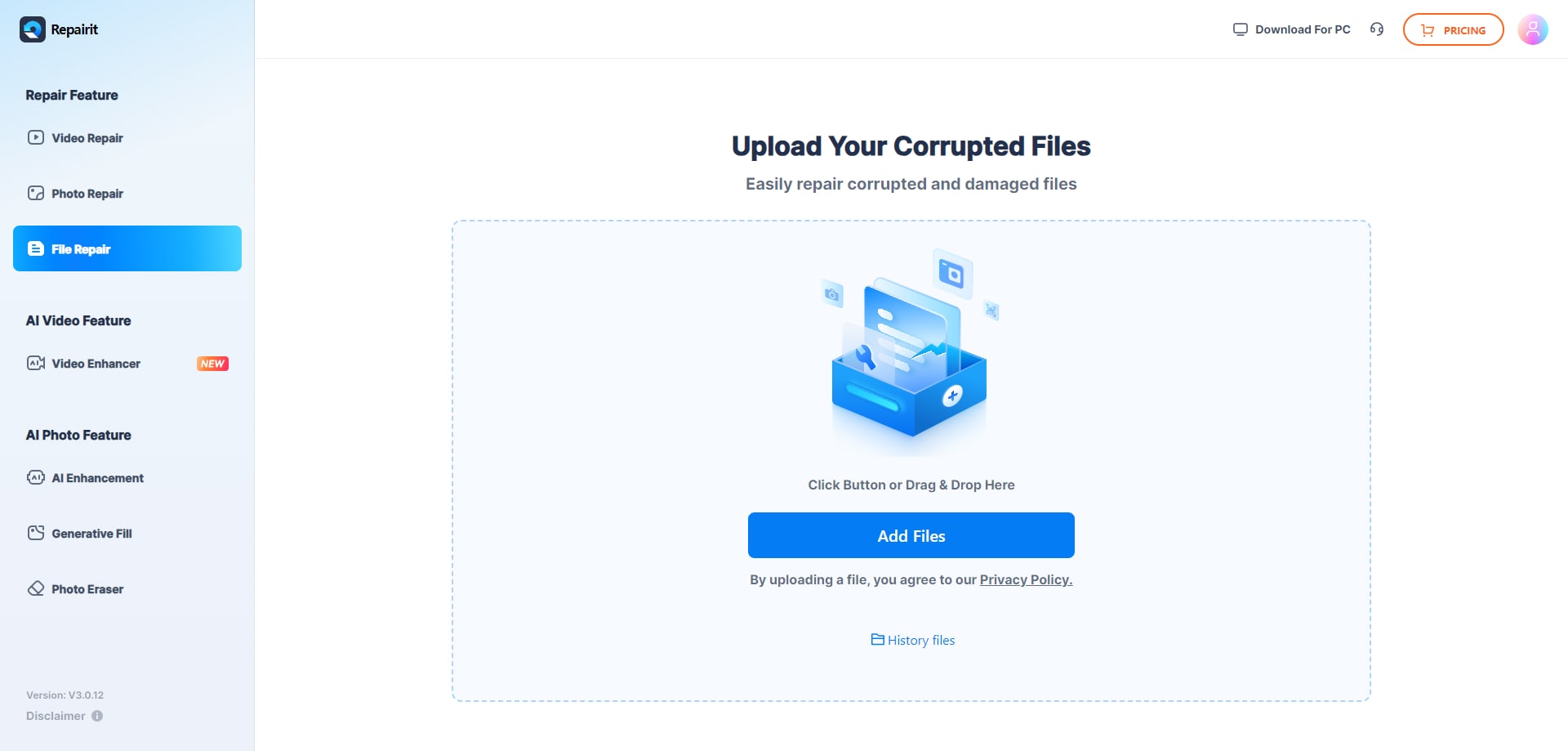
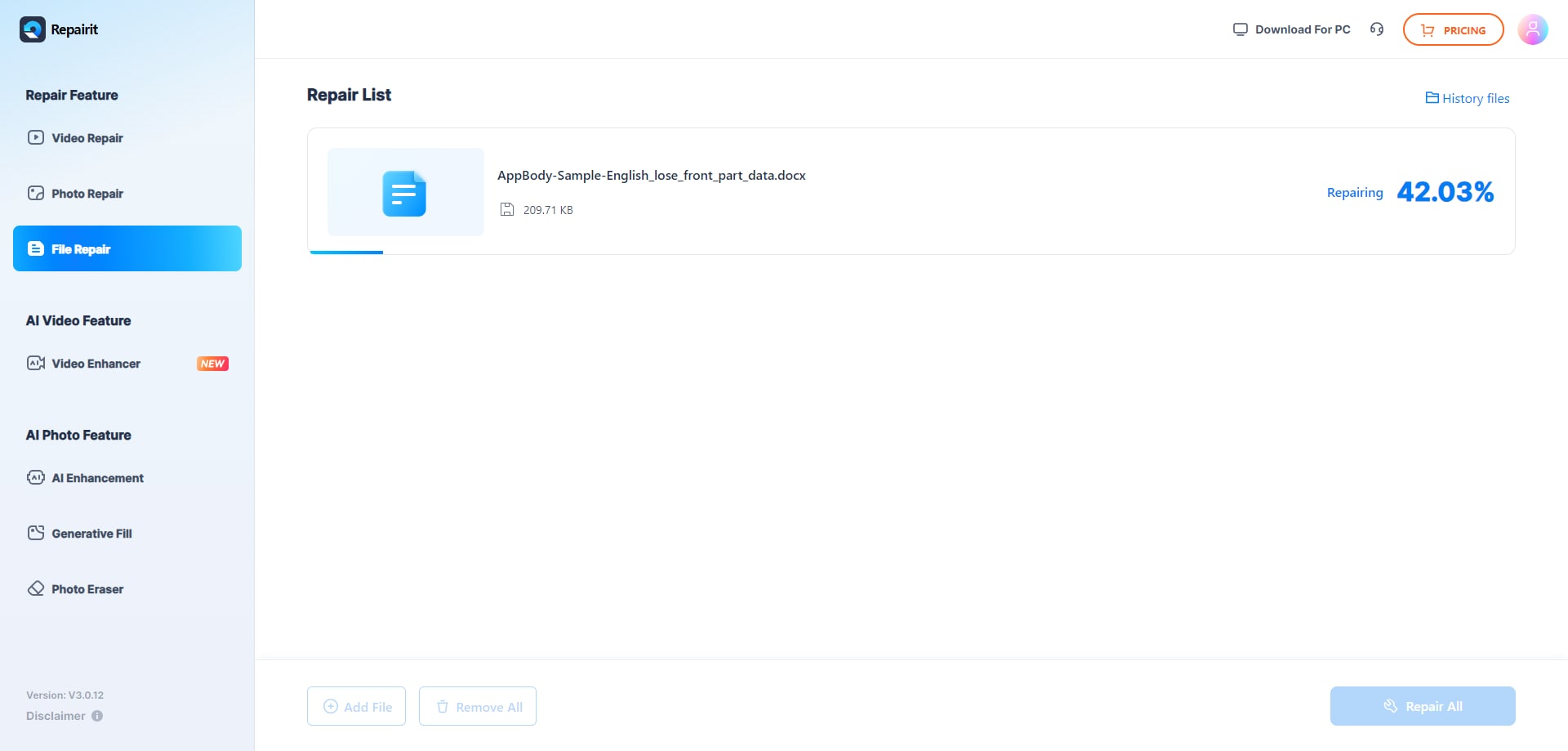
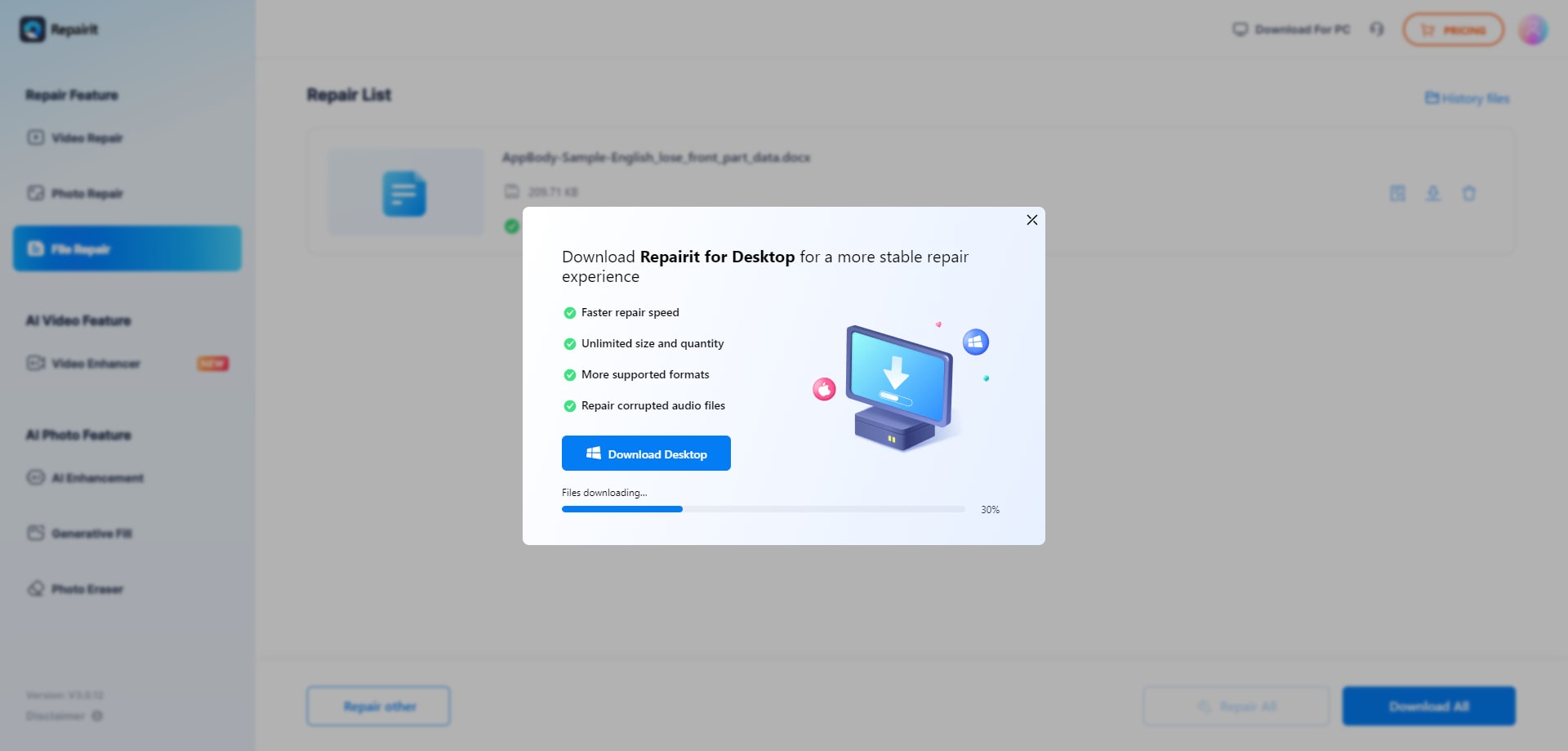
Below is an example of the kind of online file repair workflow you can expect when using Repairit Online File Repair to fix unreadable files.
Step 1. Upload the corrupted, damaged, or unreadable files you want to repair through Repairit Online File Repair.
Step 2. Start the online repair process and let Repairit Online File Repair analyze the damaged files.
Step 3. Preview the repaired result when available, then save the repaired files to your device.
This pattern is similar across many online repair tools, including ZIP-focused services such as ZipRecovery Online, although the exact interface and features differ.
Final Verdict: Repairit Online File Repair vs ZipRecovery Online
Both tools can be valuable when important archives or documents stop opening, but they serve different roles. Repairit Online File Repair provides broader coverage for office documents and archives, while ZipRecovery Online narrows in on ZIP structure repair.
Both solutions help when essential archives or documents stop opening, but they solve different problems. ZipRecovery Online concentrates on repairing broken ZIP structures through a targeted archive repair service. Repairit Online File Repair offers a broader, guided approach across office documents and archives, which helps when PDFs, Word, Excel, PowerPoint, ZIP, or RAR files become corrupted together. The right choice depends on whether you only need ZIP repair or wider online file repair coverage.
For many mixed real-world scenarios, Repairit Online File Repair may become your primary tool because it can attempt to repair corrupted PDF files, repair corrupted Word documents, fix unreadable Excel workbooks, and handle archive issues in one interface. ZipRecovery Online remains a useful option if your day-to-day challenges are strongly centered on ZIP archives.
Next: Repairit Online File Repair vs Rar Recovery Toolbox
FAQ
-
1. Is Repairit Online File Repair better than ZipRecovery Online for corrupted ZIP files?
Neither tool is universally better. ZipRecovery Online focuses on ZIP archive repair with a ZIP-specific workflow. Repairit Online File Repair may be preferable if you also need to repair corrupted PDFs, Word, Excel, PowerPoint, or RAR archives alongside ZIP files. -
2. How is corrupted file repair different from deleted file recovery?
Corrupted file repair works on existing but damaged files, such as unreadable Word documents or ZIP archives with extraction errors. Deleted file recovery aims to restore files that no longer exist on storage. Repairit Online File Repair and ZipRecovery Online both focus on corrupted file repair, not deleted data recovery. -
3. When should I use Repairit Online File Repair instead of ZipRecovery Online?
Use Repairit Online File Repair when multiple formats are affected at once, such as PDFs, Word, Excel, PowerPoint, ZIP, or RAR files. Choose ZipRecovery Online when your primary problem is repairing broken ZIP files and you plan to handle documents through another online file repair service.
"




