
When a critical archive or document will not open, online file repair tools can help repair corrupted files online rather than recover deleted data. This comparison focuses on how Repairit Online File Repair and RAR Recovery Toolbox handle corrupted RAR archives, ZIP extraction errors, and other broken files directly in the browser.
Both tools aim at fixing unreadable files, but they approach the task differently. One emphasizes multi-format online file repair, while the other concentrates on a single archive type.
In this article
- Quick Verdict: Repairit Online File Repair vs RAR Recovery Toolbox
- Key Differences and Comparison Table: Repairit Online File Repair vs RAR Recovery Toolbox
- File Types and Corruption Scenarios: Repairit Online File Repair vs RAR Recovery Toolbox
- Workflow, Ease of Use, and Upload: Repairit Online File Repair vs RAR Recovery Toolbox
- Repair Quality, Preview, and Limitations: Repairit Online File Repair vs RAR Recovery Toolbox
- Privacy, File Handling, and Browser Experience
- Supported Formats and Scenarios: Repairit Online File Repair vs RAR Recovery Toolbox
- Pros and Cons of Repairit Online File Repair and RAR Recovery Toolbox
- Who Should Choose Repairit Online File Repair or RAR Recovery Toolbox
- What the Actual Repair Process Looks Like
- Final Verdict: Repairit Online File Repair vs RAR Recovery Toolbox
Quick Verdict: Repairit Online File Repair vs RAR Recovery Toolbox
Repairit Online File Repair generally suits users who face several corrupted documents and archives, while RAR Recovery Toolbox is geared toward users focused on RAR-only issues. The right choice depends on whether your main pain point is damaged RAR archives alone or a mixture of corrupted PDFs, office files, and archive problems.
Neither option guarantees results for every damaged file, but both offer practical browser-based ways to attempt repair before exploring more complex solutions.
Key Differences and Comparison Table: Repairit Online File Repair vs RAR Recovery Toolbox
The main difference is that Repairit Online File Repair may work with multiple file types, while RAR Recovery Toolbox concentrates on RAR archives. This affects which corrupted files you can repair online, how you use each interface, and how the tools fit into a broader troubleshooting toolkit.
Use the comparison table below to quickly see how each platform approaches online archive and document repair.
| Dimension | Repairit Online File Repair | RAR Recovery Toolbox |
|---|---|---|
| Best for | Guided online repair for mixed corrupted files like PDF, Word, Excel, PowerPoint, and archives. | Users fixing corrupted RAR files with a specialized archive repair platform. |
| Supported formats | Designed for multiple document and media types, plus common archives, depending on current online support. | RAR only, as a single-format RAR archive repair platform. |
| Online workflow | Upload damaged files, run guided repair, then preview and download results in the browser. | Upload RAR, start repair, then export the fixed RAR archive when possible. |
| Repair capability | Aims to repair corrupted PDF, Word, Excel, PowerPoint, and other files that will not open or show errors. | Targets broken RAR structure, extraction errors, and unreadable RAR archives. |
| Ease of use | Structured interface built for non-technical users handling several file types. | Straightforward for users repairing only RAR archives. |
| Strengths | Broad online file repair coverage, helpful for invalid file errors across many formats. | Specialized archive repair focused on RAR, useful when generic tools fail. |
| Limitations | Dependent on supported formats and damage level; not a deleted file recovery or backup tool. | Limited to RAR; other file types require an additional online repair solution. |
Which Tool Repairs More File Types and Corruption Scenarios?
Repairit Online File Repair typically covers more file types and scenarios than RAR Recovery Toolbox, which focuses strictly on RAR archive repair. Your decision should align with whether you mostly encounter corrupted RAR files or a mix of broken documents and archives.
According to the provided information, both platforms repair existing corrupted files rather than performing deleted file recovery or disk-level data rescue.
In many cases, Repairit Online File Repair can help when you need to:
- Repair corrupted PDF files that show broken file previews or invalid file errors.
- Repair corrupted Word documents that open as unreadable content.
- Repair corrupted Excel files where sheets or formulas appear damaged.
- Repair corrupted PowerPoint files that fail to load or crash on open.
- Address ZIP or RAR extraction errors when those formats are supported online.
RAR Recovery Toolbox instead concentrates on a narrower set of scenarios:
- RAR files that refuse to open after download or transfer.
- RAR archives that trigger CRC or invalid archive messages during extraction.
- Broken multi-part RAR structures where the archive index appears corrupted.
File repair capabilities for both tools can be summarized as follows.
Overall repair scope
Both tools aim to repair corrupted files online, not to locate missing files or rebuild lost partitions. Repairit Online File Repair typically supports a broader mix of documents and archives, while RAR Recovery Toolbox is focused on RAR archive repair alone.
- Repairit Online File Repair capabilities may include:
- Repairing corrupted documents like PDFs, Word, Excel, and PowerPoint that refuse to open or display errors.
- Helping fix archive-related problems, such as ZIP or RAR extraction issues, when those formats are supported online.
- Providing a guided online experience so non-technical users can attempt repairs directly in the browser.
- RAR Recovery Toolbox capabilities may include:
- Focusing on fixing corrupted RAR files that fail to open or extract correctly.
- Attempting to repair broken RAR archive structures that cause extraction errors or invalid archive messages.
- Following a simple upload RAR, repair, and export workflow for online RAR archive repair.
Repair Workflow, Ease of Use, and Upload Experience
Both tools use an upload based online file repair workflow, but Repairit Online File Repair is more structured for multiple file types, while RAR Recovery Toolbox streamlines RAR-only tasks. Non-technical users can generally navigate either interface with minimal configuration.
Understanding the workflow helps you estimate how long it might take to troubleshoot archive or document issues in your browser.
Repairit Online File Repair workflow
Repairit Online File Repair uses an in-browser, step-based flow:
- You open the relevant repair section for documents or archives.
- You upload corrupted files such as PDFs, Word, Excel, PowerPoint, or archives.
- You start the repair process and wait as the service analyzes structures and attempts reconstruction.
- When available, you preview repaired results and download the fixed files.
This structured design tends to benefit people who juggle multiple file issues, like damaged Excel sheets plus ZIP extraction errors and unreadable Word documents.
RAR Recovery Toolbox workflow
RAR Recovery Toolbox follows a narrower flow aimed at archive repair:
- Upload the corrupted RAR file through the web interface.
- Run the repair to analyze and attempt to rebuild the archive structure.
- Export or download the resulting RAR or recovered contents when possible.
This simplicity works well if your only task is to fix unreadable RAR archives without switching between document types or complex settings.
Repair Quality, Preview Experience, and Limitations
Repair quality for both platforms depends heavily on file damage, format support, and whether key data is still present. Neither tool can promise to fully restore every broken archive or document.
Users should treat these services as best effort online repair options that may restore accessibility, but cannot reconstruct files when core data is missing or overwritten.
Repair quality and preview for Repairit Online File Repair
Repairit Online File Repair is designed to repair damaged documents and archives sufficiently for opening or partial use. When available, preview features allow you to verify content before saving.
- Useful for checking whether text, tables, or slides appear readable.
- May help confirm whether repairing broken ZIP files restored the archive structure.
- Provides a way to evaluate repaired results without committing them as final versions.
Repair quality and focus for RAR Recovery Toolbox
RAR Recovery Toolbox focuses strictly on repairing RAR archives. Its quality depends on how much of the archive index and data blocks remain intact.
- Helpful when standard decompression tools fail on a slightly damaged RAR.
- Less effective if large segments of the archive are missing or truncated.
- Does not address PDFs, office documents, or ZIP archives directly.
Shared limitations
Both tools have similar constraints that users should understand:
- Severely corrupted files may remain unreadable despite attempts.
- Unsupported formats might not be processed at all.
- Incomplete or partially downloaded archives can limit repair outcomes.
- These platforms focus on existing files, not deleted file recovery or disk repair.
Privacy, File Handling, and Browser Experience
Both platforms require uploading corrupted files to remote servers for processing, so users should consider confidentiality and network security before starting any repair. For sensitive materials, reviewing provider documentation is particularly important.
The browser based experience can feel convenient, but it also means you depend on internet connectivity and responsible data handling by each vendor.
Cloud upload and processing
For both solutions, typical steps include:
- Selecting files from your device or cloud storage.
- Sending them to the online service for analysis and repair.
- Downloading repaired results through the browser once processing finishes.
Because actual storage, retention, and deletion practices can vary, users should check the respective service documentation and terms when evaluating suitability for confidential archives or internal documents.
Security conscious usage tips
- Use secure, private networks when uploading important files.
- Avoid repairing highly sensitive archives on shared or public computers.
- Read available documentation on data retention and handling policies.
- Consider anonymizing file names where practical to reduce exposure.
Supported File Formats and Common Repair Scenarios
Repairit Online File Repair may support a broader range of documents and archives, while RAR Recovery Toolbox focuses on RAR only. The scope of supported formats should align with your typical corruption scenarios, such as broken PDF previews, damaged office documents, or archive extraction errors.
When in doubt about a particular format, users should check each tool s official information before relying on it for critical workloads.
| File type or scenario | Repairit Online File Repair | RAR Recovery Toolbox |
|---|---|---|
| PDF documents | May repair corrupted PDF files that will not open or show invalid file errors. Check official support. | Not targeted; focuses on RAR archives, not documents. |
| Word documents | May repair corrupted Word documents that appear unreadable or partially damaged. Check official support. | Not designed for DOC or DOCX repair. |
| Excel spreadsheets | May repair corrupted Excel files with damaged sheets or formulas when supported. | Not intended for spreadsheet repair. |
| PowerPoint presentations | May repair corrupted PowerPoint files that fail to load or crash on open. | Does not handle PPT or PPTX corruption. |
| ZIP archives | May help repair broken ZIP files and extraction errors when ZIP support is available online. | Not focused on ZIP; specializes only in RAR. |
| RAR archives | May assist with RAR extraction issues when supported as part of archive repair. | Specialized for corrupted RAR archives and invalid RAR structures. |
| Other formats | Can sometimes handle additional document or media types. Check official support. | Limited strictly to RAR archive repair. |
In practice, users facing mixed broken file scenarios often lean toward a multi-format solution like Repairit Online File Repair, supplementing it with specialized tools when deeper archive work is needed.
Pros and Cons of Repairit Online File Repair and RAR Recovery Toolbox
Both tools have strengths and trade-offs that matter in real repair situations. This section highlights practical pros and cons based on their described capabilities, not blanket claims of superiority.
Understanding where each platform fits helps you design a realistic troubleshooting flow for damaged documents and archives.
Repairit Online File Repair Pros and Cons
RAR Recovery Toolbox Pros and Cons
Who Should Choose Repairit Online File Repair or RAR Recovery Toolbox?
Repairit Online File Repair tends to fit users with varied file issues, while RAR Recovery Toolbox fits those dealing mainly with RAR corruption. The right choice depends on your everyday files and how often you encounter multi-format problems versus archive-only failures.
Below are practical profiles for each option, using conditional language where support may vary.
Who may prefer Repairit Online File Repair
- Users repairing many file types, from corrupted PDFs to unreadable Word, Excel, or PowerPoint files.
- People facing recurring ZIP or RAR extraction errors alongside broken office documents.
- Teams wanting a guided, browser-based repair flow for different corrupted files.
- Users who understand they need file repair for existing items, not deleted file recovery or backup restoration.
Who may prefer RAR Recovery Toolbox
- Users whose primary problem is corrupted RAR files from downloads, transfers, or storage errors.
- People wanting a specialized RAR archive repair platform without extra document focused features.
- Users comfortable running a narrow, RAR-only online file repair workflow.
- Anyone who already uses other solutions to repair corrupted PDF files, documents, or ZIP archives.
What the Actual Repair Process Looks Like
Most online file repair tools share a similar structure: you upload the corrupted file, the service analyzes and attempts to fix it, and you download the repaired version. This upload and repair pattern applies whether you are dealing with broken archives or damaged documents.
To make this more concrete, the following example uses Repairit Online File Repair to illustrate a typical guided online file repair workflow.
Key Features
Key capabilities of Repairit Online File Repair, based on the provided description, include:
- Online repair for multiple corrupted file categories and archives, depending on current support.
- A guided, step-based interface suitable for non-technical users.
- A preview-oriented flow so users can check repaired results before saving when previews are available.
Step-by-step guide
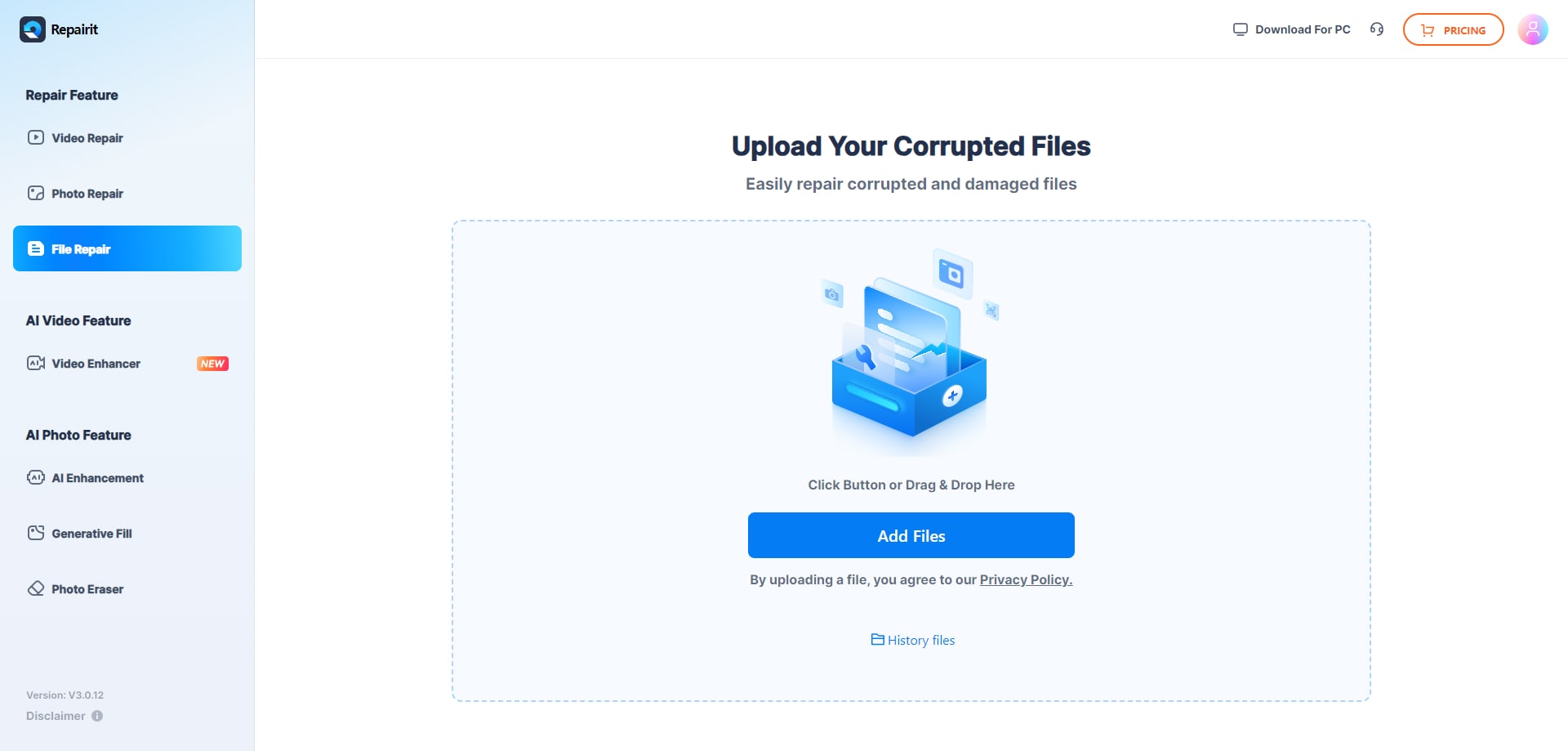
Step 1. Upload the corrupted, damaged, or unreadable files you want to repair through Repairit Online File Repair.
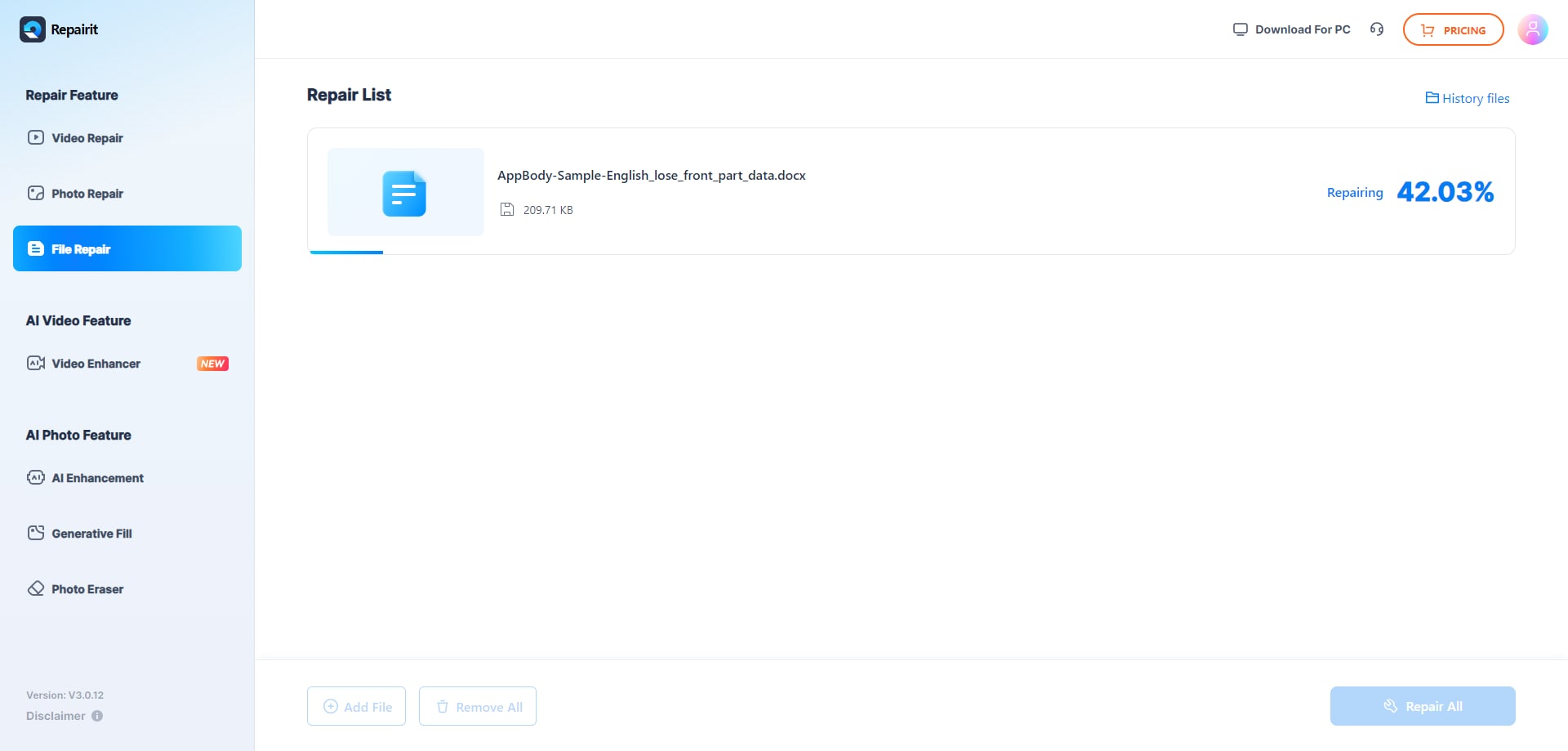
Step 2. Start the online repair process and let Repairit Online File Repair analyze the damaged files.
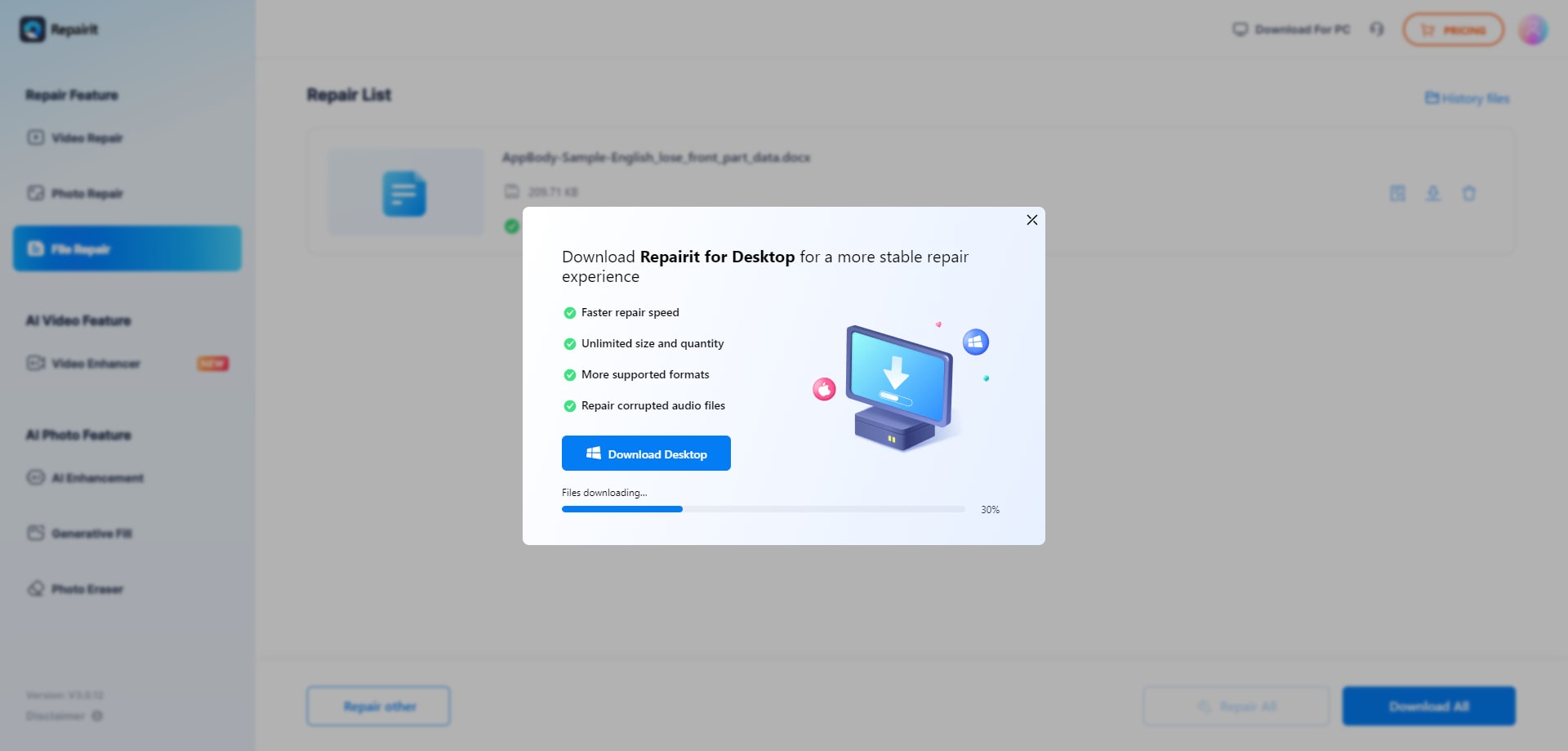
Step 3. Preview the repaired result when available, then save the repaired files to your device.
This workflow mirrors how many online repair tools operate, including archive focused platforms like RAR Recovery Toolbox, which typically follow an upload, repair, and download cycle tailored specifically to RAR archives.
Final Verdict: Repairit Online File Repair vs RAR Recovery Toolbox
Repairit Online File Repair and RAR Recovery Toolbox serve related but distinct roles in online file repair. RAR Recovery Toolbox is oriented toward RAR-only corruption, while Repairit Online File Repair may support a mix of office documents and archives.
Neither tool is universally better; the practical choice depends on whether you mainly fix unreadable RAR archives or regularly repair damaged documents, spreadsheets, presentations, and archives together.
If your typical day involves repairing broken ZIP files, invalid PDF errors, unreadable Word documents, and occasional RAR or ZIP extraction issues, a multi-format platform like Repairit Online File Repair may fit more naturally. If you mostly handle RAR-specific corruption, a focused archive repair environment can be appropriate.
Next: Repairit Online File Repair vs Pdf2go Repair Pdf
FAQ
-
1. How do Repairit Online File Repair and RAR Recovery Toolbox differ for archive issues?
RAR Recovery Toolbox focuses exclusively on corrupted RAR archives and extraction errors. Repairit Online File Repair is broader, aiming to repair broken documents and, when supported, archive issues such as ZIP or RAR errors alongside office files. Users dealing only with RAR may favor specialization, while mixed scenarios often benefit from multi-format coverage. -
2. When should I use Repairit Online File Repair instead of RAR Recovery Toolbox?
Use Repairit Online File Repair when you frequently repair corrupted PDF files, Word documents, Excel spreadsheets, PowerPoint presentations, and archives together. Choose RAR Recovery Toolbox when your main concern is repairing corrupted RAR archives and you already rely on other tools for documents or ZIP related problems. -
3. What is the difference between corrupted file repair and deleted file recovery?
Corrupted file repair focuses on existing files that will not open, show invalid file errors, or have damaged structures. Deleted file recovery aims to retrieve files removed from storage or lost after formatting. Repairit Online File Repair and RAR Recovery Toolbox work on corrupted files; they are not intended for deleted or lost data recovery.
"




