
When a corrupted PDF, unreadable Word report, or broken Excel budget refuses to open, you need an online repair tool that fits your skills and file type. This guide compares Repairit Online File Repair with Recovery Toolbox Online so you can pick the right platform for repairing damaged office files quickly and safely in your browser.
In this article
- Quick Verdict: Repairit Online File Repair vs Recovery Toolbox Online
- Key Differences and Comparison Table: Repairit Online File Repair vs Recovery Toolbox Online
- File Types and Corruption Scenarios: Repairit Online File Repair vs Recovery Toolbox Online
- Workflow, Ease of Use, and Upload: Repairit Online File Repair vs Recovery Toolbox Online
- Repair Quality, Preview, and Limitations: Repairit Online File Repair vs Recovery Toolbox Online
- Privacy, File Handling, and Browser Experience
- Supported Formats and Scenarios: Repairit Online File Repair vs Recovery Toolbox Online
- Pros and Cons of Repairit Online File Repair and Recovery Toolbox Online
- Who Should Choose Repairit Online File Repair or Recovery Toolbox Online
- What the Actual Repair Process Looks Like
- Final Verdict: Repairit Online File Repair vs Recovery Toolbox Online
Repairit Online File Repair and Recovery Toolbox Online both allow you to repair corrupted files online, but they target slightly different users and scenarios. Understanding those differences helps you match each tool to your specific corrupted documents and comfort level.
The core focus for both platforms is repairing corrupted, damaged, broken, or unreadable files that still exist. They do not focus on deleted file recovery or broad data recovery from disks or partitions.
Both services can be helpful when you face issues such as files that will not open, invalid file errors, broken PDF previews, unreadable Word documents, damaged Excel sheets, or PowerPoint files that fail to load in your browser.
Quick Verdict: Repairit Online File Repair vs Recovery Toolbox Online
The quick distinction is that Repairit Online File Repair focuses on guided, user friendly repair for common office documents, while Recovery Toolbox Online appeals more to technical users handling diverse or specialized formats.
Repairit Online File Repair is well suited to repairing corrupted PDF files, Word documents, Excel sheets, and PowerPoint decks through a structured online file repair workflow. It emphasizes clarity, explanations, and simple decision points for non experts.
Recovery Toolbox Online may fit better when you manage advanced corruption in a wide range of formats, including DWG, PSD, AI, Outlook, PDF, and Excel. Its interface is more utilitarian and may resonate with users who are comfortable interpreting technical messages.
Neither platform replaces backups or dedicated data recovery tools for deleted items. They are intended for files that you still have, but that have become unreadable or generate errors when opened.
Key Differences and Comparison Table: Repairit Online File Repair vs Recovery Toolbox Online
The main differences lie in target users, supported categories, and the level of guidance each tool provides throughout the online file repair workflow.
Repairit Online File Repair focuses on a streamlined, modern browser experience that walks you through uploading, repairing, previewing, and saving. Recovery Toolbox Online offers a broader format selection and a more direct, technical style of interaction.
| Dimension | Repairit Online File Repair | Recovery Toolbox Online |
|---|---|---|
| Best for | Guided online repair of common office documents and images. | More technical users handling advanced corruption and specialized formats. |
| Supported formats | Popular office, image, and document types such as PDF, Word, Excel, PowerPoint. | DWG, PSD, AI, Outlook, PDF, Excel and more for varied professional workflows. |
| Online workflow | Step by step browser workflow designed for non technical users. | Upload to recovery engine then export, with fewer guided explanations. |
| Repair capability | Optimized for typical day to day corruption in documents and presentations. | Aims at advanced corruption across many professional file structures. |
| Ease of use | Modern interface, clear instructions, and simple navigation. | Functional but older look that may feel less intuitive to some users. |
| Strengths | Guided steps, clarity, and focus on typical office document repair. | Wide format coverage and technical orientation for complex cases. |
| Limitations | Less geared toward niche or highly specialized file types. | Less hand holding and potentially overwhelming for beginners. |
Which Tool Repairs More File Types and Corruption Scenarios?
Recovery Toolbox Online may cover more different file categories overall, while Repairit Online File Repair concentrates on the most common business document formats used every day.
According to the available information, Recovery Toolbox Online works with formats such as DWG, PSD, AI, Outlook, PDF, and Excel. This broadens its use for design, mail, and mixed office environments where multiple professional applications are involved.
Repairit Online File Repair aims at practical, frequent scenarios: repair corrupted PDF files, repair corrupted Word documents, repair corrupted Excel files, and repair corrupted PowerPoint files that users exchange with clients, colleagues, and stakeholders.
Both tools target corrupted, damaged, broken, or unreadable files. They are intended for issues like files that will not open, incomplete file structures, or content that appears garbled after an interruption or software crash.
Neither platform is designed for finding lost files, rebuilding partitions, or accessing data from damaged storage. Users needing those services should look into dedicated data recovery solutions instead of online file repair.
Repair Workflow, Ease of Use, and Upload Experience
Both platforms use a similar upload and analyze model, but Repairit Online File Repair focuses more on guidance while Recovery Toolbox Online tends to feel more direct and technical.
Repairit Online File Repair emphasizes a clear browser experience: you upload corrupted files, follow on screen steps, and then review any repair results. This structure suits users who appreciate reassurance during each stage of the repair process.
Recovery Toolbox Online typically follows a shorter sequence: upload file, let its recovery engine attempt to rebuild data, then export or download results. Technical users may prefer this straightforward flow, especially if they already understand file corruption concepts.
In both cases, you repair corrupted files online by sending them from your browser to remote servers. There is no need to install desktop software for the core repair steps, which can help when you are working on a locked down or shared machine.
Repairit Online File Repair usually stands out for interface clarity, whereas Recovery Toolbox Online focuses more on getting technical repair tasks done across many types of files.
Repair Quality, Preview Experience, and Limitations
Repair quality for both tools depends heavily on the nature and severity of the corruption, and no online service can promise to fix every damaged file.
Repairit Online File Repair emphasizes usability and understanding. Where possible, it helps you see what parts of a repaired document are available through previews or structured download options, such as checking key pages or slides before finalizing.
Recovery Toolbox Online is oriented toward technical recovery workflows. For complex file formats like DWG, PSD, AI, or Outlook data, this positioning may help in cases where file structures are intricate, although results still vary by corruption level and supported format features.
Typical limitations for both platforms include severely truncated files, files corrupted by hardware failure, archives with missing parts, or documents saved only partially. In such cases, the tools may recover some data, or they may return an error if the structure is too damaged.
Users should treat any online repair output as a working copy to review. Checking formulas, layouts, and content after repair is important to confirm that critical information survived the process.
Privacy, File Handling, and Browser Experience
Both tools rely on uploading your damaged documents to remote servers, so users should review each service website for current privacy and security details before sending sensitive data.
When you repair corrupted files online, your files leave your local device temporarily. This is standard for browser based repair services, but it means compliance and confidentiality requirements should be considered, particularly for legal contracts, financial spreadsheets, or regulated client records.
Repairit Online File Repair and Recovery Toolbox Online each maintain their own approaches to handling uploaded files, including retention time and access controls. Because these practices can change, users should consult the respective privacy pages rather than rely on third party summaries.
From a browser experience perspective, Repairit Online File Repair often presents a more modern interface with clear clickable areas and status messages, while Recovery Toolbox Online may look more utilitarian and text oriented.
Supported File Formats and Common Repair Scenarios
Both platforms cover a range of document and office formats, but they emphasize different breadth and depth of support. The scenarios below illustrate how each tool may fit particular file problems.
Repairit Online File Repair focuses on everyday office scenarios: corrupted PDF contracts, damaged Word reports, broken Excel budgets, unreadable PowerPoint decks, or ZIP extraction errors. Recovery Toolbox Online supports formats such as DWG, PSD, AI, Outlook, PDF, and Excel for more specialized repair situations.
| File type or category | Typical corruption scenario | Repairit Online File Repair | Recovery Toolbox Online |
|---|---|---|---|
| PDF documents | Broken PDF previews, invalid file errors, or PDFs that will not open. | Aims to repair corrupted PDF files used in contracts, eBooks, or reports. | Can repair many corrupted PDF files; users should check official support. |
| Word documents | Unreadable Word documents or files stuck in a repair loop. | Designed to repair corrupted Word documents for business and personal use. | May support Word document repair via specific modules; check official support. |
| Excel spreadsheets | Damaged Excel sheets, missing cells, or formula errors after corruption. | Helps repair corrupted Excel files such as budgets and financial models. | Supports Excel repair among other spreadsheet focused tools. |
| PowerPoint presentations | PowerPoint files that fail to load or crash on open. | Targets repair of corrupted PowerPoint files for meetings and training. | May offer PowerPoint repair; users should confirm supported versions. |
| ZIP archives | ZIP extraction errors or incomplete archive structures. | Can help repair broken ZIP files in some scenarios; check feature details. | May support archive repair modules; consult official documentation. |
| Design formats (DWG, PSD, AI) | Project files that show invalid file errors in design software. | Less focused on these specialized design formats. | Positions itself for DWG, PSD, AI, and similar technical file repair. |
| Outlook and email data | Mail files that have become unreadable or corrupted. | Primarily focused on documents and common office files. | Includes tools that may repair certain Outlook data files. |
Users should always verify the latest supported formats and versions on each official site, especially for niche or less common file types where support can vary.
Pros and Cons of Repairit Online File Repair and Recovery Toolbox Online
Each tool comes with trade offs. Repairit Online File Repair focuses on structured guidance for common office documents, while Recovery Toolbox Online emphasizes format diversity and technical workflows.
Repairit Online File Repair Pros and Cons
Recovery Toolbox Online Pros and Cons
Who Should Choose Repairit Online File Repair or Recovery Toolbox Online?
Choosing between these tools depends on your file types, corruption complexity, and comfort with technical interfaces rather than on one product being universally superior.
Repairit Online File Repair tends to suit users who work primarily with office documents and prefer a structured, supportive interface. Recovery Toolbox Online may be a better match when you routinely manage specialized design or email files and are ready for a more technical workflow.
Repairit Online File Repair is a good fit for:
- Users needing a guided web tool to repair corrupted PDF, Word, Excel, and PowerPoint files.
- Small teams wanting simple, repeatable steps to fix unreadable files for clients or management.
- Non technical users who may be confused by older, more technical repair interfaces.
- People comparing tools who prioritize clarity and explanations over broad but complex format coverage.
Recovery Toolbox Online is a good fit for:
- Users handling advanced corruption in DWG, PSD, AI, Outlook, PDF, Excel, or similar specialized files.
- Technical users comfortable interpreting logs, status codes, and less guided messages.
- Professionals who frequently mix design, email, and office formats in their daily workflow.
- Environments where large or varied format coverage may outweigh the need for a modern interface.
What the Actual Repair Process Looks Like
Most online file repair tools follow a similar pattern: you upload damaged files, a server side engine attempts to rebuild them, and then you download any recoverable output. Understanding this flow makes it easier to evaluate different platforms.
Typically, the process starts when you choose the file type or tool module, then drag and drop or browse to your corrupted document. The service analyzes the internal structure, tries to fix unreadable sections, and offers a preview or download if repair is possible.
Repairit Online File Repair provides a clear example of a guided online file repair workflow. It focuses on documents, spreadsheets, and presentations, and structures each stage so that non experts understand what is happening to their files.
Key Features
Repairit Online File Repair focuses on online document repair, combining simplicity with targeted support for common office formats.
- Web based repair for commonly corrupted office and document formats such as PDF, Word, Excel, and PowerPoint.
- Guided workflow designed for non technical and busy users who need to fix unreadable files quickly.
- Preview oriented process in many cases so users can understand which content was successfully repaired before saving.
These features align well with organizations that share many documents by email or cloud services and often encounter broken files after transfers, system crashes, or inconsistent software versions.
Step-by-step guide
Below is a conceptual three step overview of how an online repair workflow can look when using Repairit Online File Repair as the example.
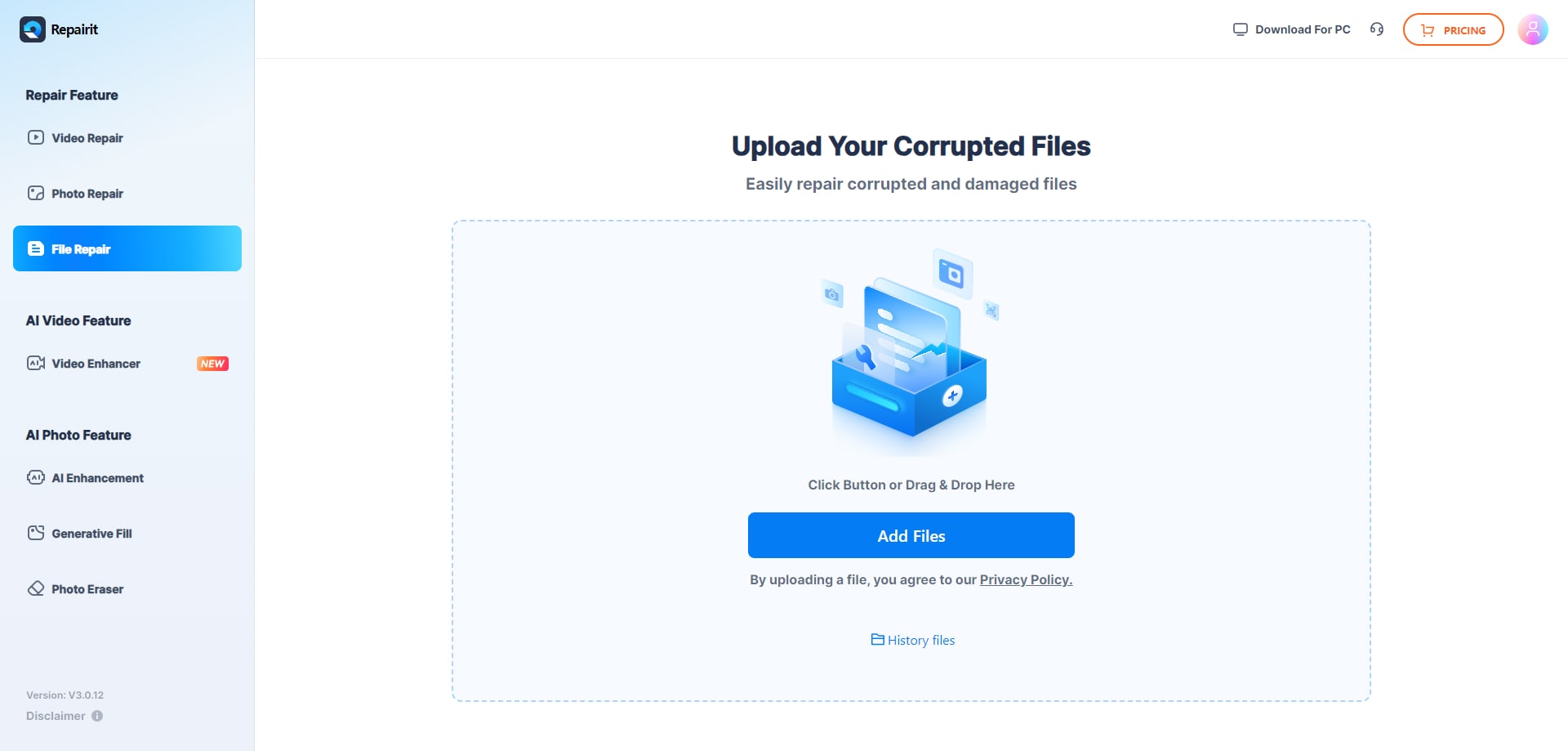
Step 1. Upload the corrupted, damaged, or unreadable files you want to repair through Repairit Online File Repair.
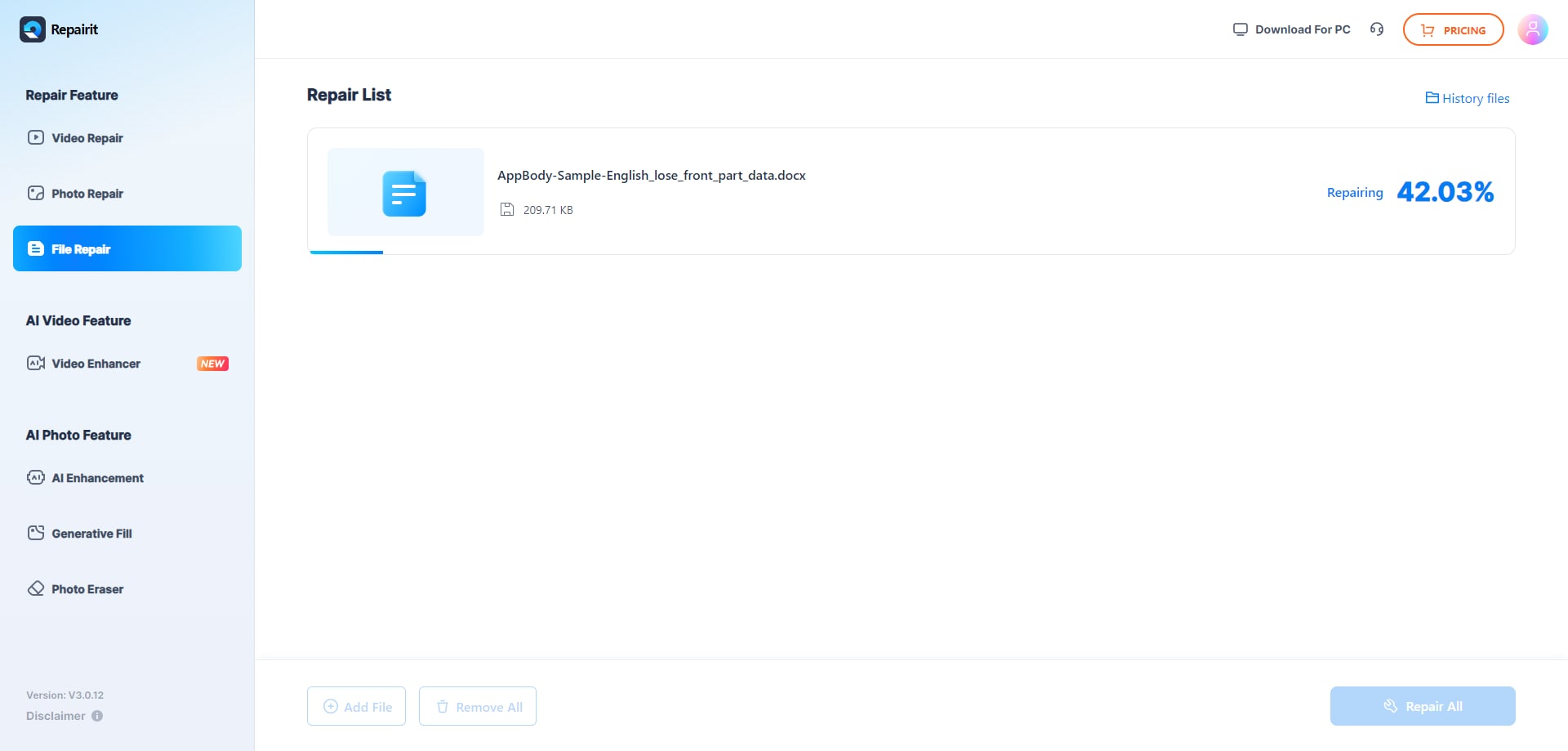
Step 2. Start the online repair process and let Repairit Online File Repair analyze the damaged files.
Step 3. Preview the repaired result when available, then save the repaired files to your device.
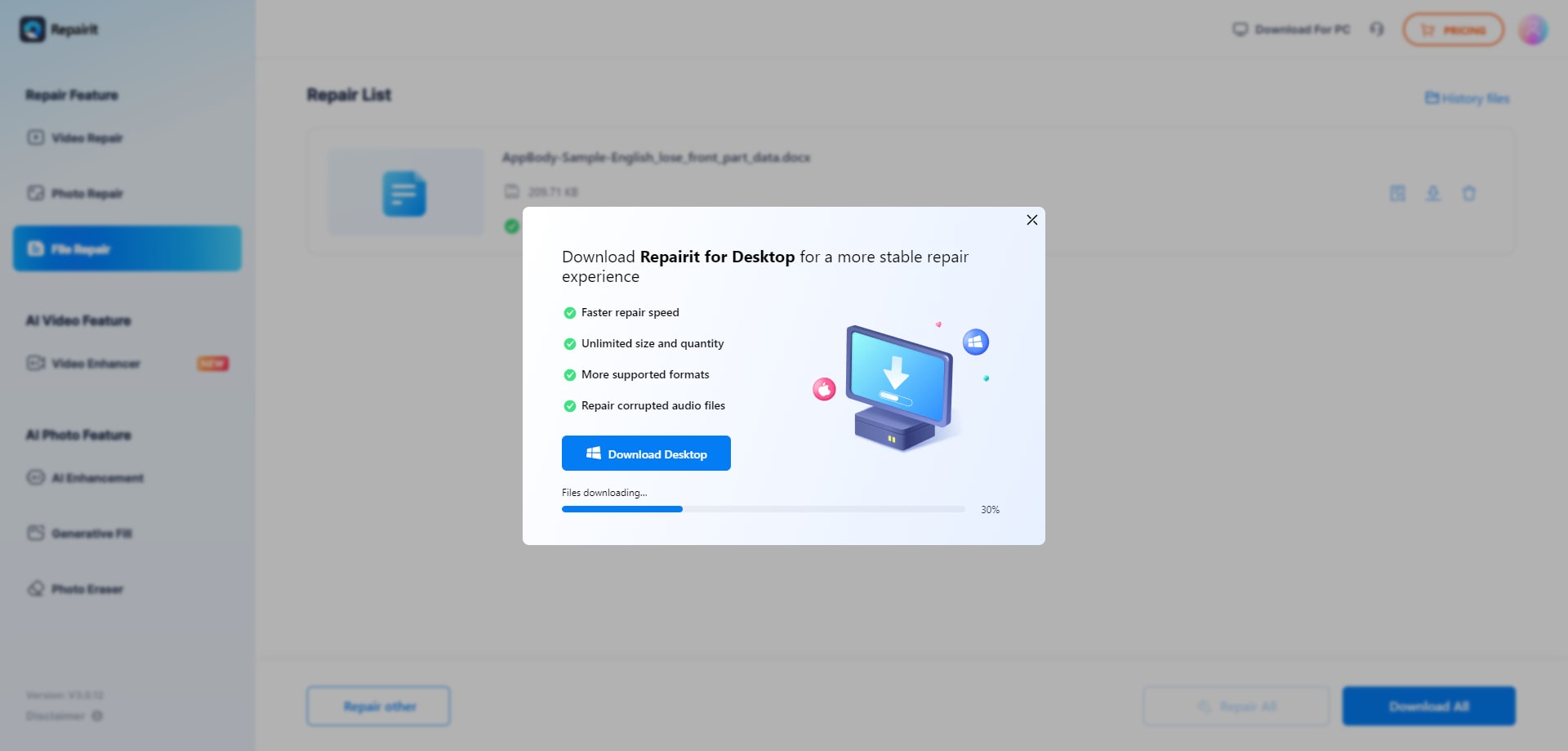
This pattern is similar across many online services: upload, repair, preview, and save. The differences lie in how much guidance is provided, which formats are supported, and how clearly each step is explained.
Final Verdict: Repairit Online File Repair vs Recovery Toolbox Online
Both tools address the same core need of repairing corrupted files online, but they serve different priorities. Repairit Online File Repair focuses on helping non experts repair damaged documents through a guided, browser based experience.
Recovery Toolbox Online, by contrast, positions itself as a technical platform for advanced corruption and a wider range of formats, including DWG, PSD, AI, Outlook, PDF, and Excel. This can be appealing in mixed professional environments with diverse file types.
For teams that mostly manage office documents and presentations, Repairit Online File Repair often aligns better with everyday workflows. It streamlines tasks like repairing corrupted Excel files, fixing unreadable PowerPoint decks, and recovering content from broken PDF previews.
For power users who frequently troubleshoot design and email data alongside office documents, Recovery Toolbox Online can be a valuable option. Its older but functional interface may be a reasonable trade off for broader format coverage.
Many organizations may benefit from knowing how to use both approaches: a guided document centric tool for most cases, and a technical, format rich service for exceptional incidents where specialized files become unreadable.
Next: Repairit Online File Repair vs Restorecorrupt
FAQ
-
1. How do Repairit Online File Repair and Recovery Toolbox Online differ for everyday office file corruption?
Repairit Online File Repair emphasizes a guided, user friendly workflow for corrupted PDFs, Word, Excel, and PowerPoint documents. Recovery Toolbox Online takes a more technical approach and supports additional formats, which may appeal more to users who are comfortable with less guided online tools. -
2. When is Recovery Toolbox Online a better choice than Repairit Online File Repair?
Recovery Toolbox Online may be preferable when dealing with advanced corruption or specialized formats such as DWG, PSD, AI, Outlook, PDF, and Excel. Technical users who prioritize format coverage and can navigate a more utilitarian interface may find it suitable for complex repair tasks. -
3. What is the difference between corrupted file repair and deleted file recovery?
Corrupted file repair focuses on fixing existing files that will not open, show invalid file errors, or appear partially readable. Deleted file recovery seeks to restore files removed from storage. Repairit Online File Repair and Recovery Toolbox Online specialize in repairing corrupted files, not recovering deleted data.
"




