
Choosing between Repairit Online File Repair and RestoreCorrupt depends on whether you want guided self-service repairs or expert-driven handling for corrupted files.
Repairing corrupted PDFs, damaged Word files, broken Excel sheets, or unreadable PowerPoint decks online can be confusing. This guide compares both services so you can fix unreadable or damaged files more confidently using an appropriate online file repair workflow.
Both tools focus on corrupted file repair, not broad deleted-data recovery. Understanding their workflows, supported formats, and strengths helps you decide which fits your situation and urgency.
In this article
- Quick Verdict: Repairit Online File Repair vs RestoreCorrupt
- Key Differences and Comparison Table: Repairit Online File Repair vs RestoreCorrupt
- File Types and Corruption Scenarios: Repairit Online File Repair vs RestoreCorrupt
- Workflow, Ease of Use, and Upload: Repairit Online File Repair vs RestoreCorrupt
- Repair Quality, Preview, and Limitations: Repairit Online File Repair vs RestoreCorrupt
- Privacy, File Handling, and Browser Experience
- Supported Formats and Scenarios: Repairit Online File Repair vs RestoreCorrupt
- Pros and Cons of Repairit Online File Repair and RestoreCorrupt
- Who Should Choose Repairit Online File Repair or RestoreCorrupt
- What the Actual Repair Process Looks Like
- Final Verdict: Repairit Online File Repair vs RestoreCorrupt
Quick Verdict: Repairit Online File Repair vs RestoreCorrupt
Repairit Online File Repair generally suits users who want a guided browser workflow to repair corrupted files online, while RestoreCorrupt may appeal to those preferring expert review and a no-fix-no-fee approach.
Repairit Online File Repair offers a self-service path for corrupted PDF, Word, Excel, and PowerPoint documents, plus many images, videos, and archives. RestoreCorrupt instead emphasizes professional handling of Office, ZIP, image, and files through a case-by-case repair service.
Your choice comes down to urgency, volume of corrupted files, and how comfortable you are driving the repair steps yourself versus waiting for expert feedback.
Key Differences and Comparison Table: Repairit Online File Repair vs RestoreCorrupt
The main differences between Repairit Online File Repair and RestoreCorrupt involve who controls the repair steps, how quickly you can attempt repairs, and how each service approaches complex corruption.
Repairit Online File Repair focuses on an automated online file repair workflow. RestoreCorrupt relies more on specialists, which may help with some difficult cases but usually extends turnaround and requires more communication.
| Dimension | Repairit Online File Repair | RestoreCorrupt |
|---|---|---|
| Best for | Users wanting guided online repairs for many common corrupted documents and media. | Users who prefer a professional corrupted file repair service with no-fix-no-fee. |
| Supported formats | Corrupted PDF, Word, Excel, PowerPoint, plus common image, video, and archive formats, depending on damage. | Office, ZIP, image, and video formats based on service assessment. |
| Online workflow | Self-service in the browser: upload, repair in cloud, then preview or download. | Upload file, then experts attempt repair and return a result when possible. |
| Repair capability | Aims at files that will not open, invalid file errors, and broken file previews. | Expert team may handle more complex structural damage in some cases. |
| Ease of use | Very direct; minimal decisions beyond upload and starting repair. | Simple upload but added steps for communication and waiting. |
| Strengths | Guided online experience and fast self-service for many everyday corrupted files. | No-fix-no-fee model and professional review of each submitted file. |
| Limitations | Results depend on corruption level and supported formats. | Slower turnaround and success still depends on file damage and structure. |
Which Tool Repairs More File Types and Corruption Scenarios?
Repairit Online File Repair and RestoreCorrupt both cover common office and media formats, but they emphasize different use cases and workflows when you repair corrupted files online.
According to the available descriptions, Repairit Online File Repair focuses on corrupted PDF, Word, Excel, and PowerPoint files, plus common images, videos, and archives. RestoreCorrupt positions itself around Office documents, ZIP archives, images, and videos, typically after an expert assessment.
Both can be used when files will not open, show invalid file errors, or present broken file previews, but success depends heavily on format, corruption level, and the completeness of your uploads.
Repair Workflow, Ease of Use, and Upload Experience
Repairit Online File Repair is typically easier for self-directed, repeated online repairs, while RestoreCorrupt may feel more like submitting a job to a specialist.
With Repairit Online File Repair, you follow a straightforward browser flow: upload the damaged file, start repair, then preview or download if the service reconstructs the content. This works well if you need to test several corrupted PDFs, unreadable Word documents, or damaged Excel sheets quickly.
RestoreCorrupt uses an upload file to expert repair model. You send the corrupted file, specialists analyze it, and you receive feedback or a repaired version if they can reconstruct the data. This can be reassuring for a few high-value files but is less immediate for testing many documents.
Repair Quality, Preview Experience, and Limitations
Both services can sometimes rescue broken documents, but neither can guarantee full recovery for every corrupted or unreadable file.
Repair quality depends on how badly the file is corrupted, whether the format is supported, and whether the uploaded copy is complete. Repairit Online File Repair emphasizes quick, automated repair attempts and may provide browser previews when a file repairs successfully.
RestoreCorrupt uses a slower, expert-driven repair process. This may help for complex structural corruption, such as heavily damaged Excel workbooks or archive files with intricate internal layouts, but outcomes still depend on file integrity and available data.
In both services, severe corruption, truncated files, unsupported formats, or incomplete uploads may lead to partial repair or no usable output, so it is sensible to manage expectations and test critical files early.
Privacy, File Handling, and Browser Experience
Both tools rely on online uploads, so users should treat privacy, browser stability, and network reliability as important factors when repairing corrupted files online.
Each provider may handle uploaded data differently, so it is wise to review their official terms and privacy information before sending confidential content. Many online repair tools remove files after some time, but exact details can vary and should be confirmed on the provider websites.
Using a stable connection and up-to-date browser helps reduce issues like interrupted uploads, which can cause incomplete file structures and may worsen repair outcomes in either service.
Supported File Formats and Common Repair Scenarios
Repairit Online File Repair and RestoreCorrupt both focus on everyday office and archive corruption issues, but users should still verify specific format support before uploading.
The following table summarizes typical categories and scenarios mentioned or reasonably associated with each service. For niche formats, users should check official support pages or contact the provider directly.
| File type or category | Typical corruption scenarios | Repairit Online File Repair | RestoreCorrupt |
|---|---|---|---|
| PDF documents | Files that will not open, broken PDF previews, invalid file errors. | Focus on repairing corrupted PDF files through an online workflow. | May accept PDFs depending on service scope. Check official support. |
| Word documents | Unreadable Word documents, incorrect encoding, open failures. | Online repair of corrupted Word documents that fail to load. | Handles Office documents with opening errors in many cases. |
| Excel workbooks | Damaged Excel sheets, formula corruption, structure issues. | Can attempt to repair corrupted Excel files online. | Targets complex Office file issues based on expert review. |
| PowerPoint presentations | PowerPoint files that fail to load or crash on open. | Designed for corrupted PowerPoint files that will not open. | May handle Office presentations after assessment. |
| ZIP and similar archives | ZIP extraction errors, incomplete archives, invalid headers. | May help repair broken ZIP files, depending on specific damage. | Focuses on Office and ZIP archives that desktop tools cannot extract. |
| Images | Files that show as invalid or only partially display. | Supports damaged images with broken file previews in many situations. | Accepts image files for professional corrupted file repair. |
| Videos | files that will not play or trigger format errors. | May support common video formats through the online workflow. | Supports file repairs after expert evaluation. |
| Other formats | Specialized documents or archives with structure errors. | Users should check official support for niche formats. | Users should consult RestoreCorrupt about specialized cases. |
Pros and Cons of Repairit Online File Repair and RestoreCorrupt
Both services have meaningful advantages and tradeoffs, so it helps to weigh pros and cons against your repair priorities and timelines.
Repairit Online File Repair Pros and Cons
RestoreCorrupt Pros and Cons
Who Should Choose Repairit Online File Repair or RestoreCorrupt?
Repairit Online File Repair is often better suited to self-directed users handling multiple corrupted documents, while RestoreCorrupt may fit those prioritizing expert service and a no-fix-no-fee model.
Consider the following profiles when choosing how to repair corrupted files online.
Choose Repairit Online File Repair if you:
- Need a guided, self-service way to repair multiple corrupted PDFs, Word, Excel, or PowerPoint files online.
- Prefer an intuitive browser tool instead of repeated email exchanges with support teams.
- Want quick attempts at repair and the ability to preview recovered content when files become unreadable.
- Are comparing different repair tools and want a straightforward baseline option before specialist services.
Choose RestoreCorrupt if you:
- Prefer a professional corrupted file repair service instead of fully automated tools.
- Have a few critical Office, ZIP, image, or files where expert review may be valuable.
- Appreciate a no-fix-no-fee model to limit cost when repair outcomes are uncertain.
- Are comfortable with slower turnaround in exchange for more hands-on handling.
What the Actual Repair Process Looks Like
Most online file repair tools follow a similar pattern: upload corrupted files, let a service analyze them, then download repaired results if the reconstruction works.
Some platforms automate this workflow end-to-end in the browser, while others add expert review in the middle. Repairit Online File Repair is a practical example of a guided, self-service process that fits many common scenarios such as invalid file errors, unreadable Word documents, and ZIP extraction issues.
Using a tool like Repairit Online File Repair can help you understand what typical online file repair steps look like before committing to a more complex or slower process.
Key Features
Repairit Online File Repair focuses on online repair flows that help users fix unreadable files with minimal manual effort.
- Online repair for many corrupted PDF, Word, Excel, and PowerPoint documents that fail to open cleanly.
- Support for damaged images, videos, and archives that show invalid file errors or appear as broken file previews.
- Guided upload, repair, and download process suitable for frequent or batch-like repairs.
- Self-service design that lets users quickly test different corrupted files without waiting for expert responses.
Step-by-step guide
Below is an example of how an online file repair workflow can look using Repairit Online File Repair as a reference.
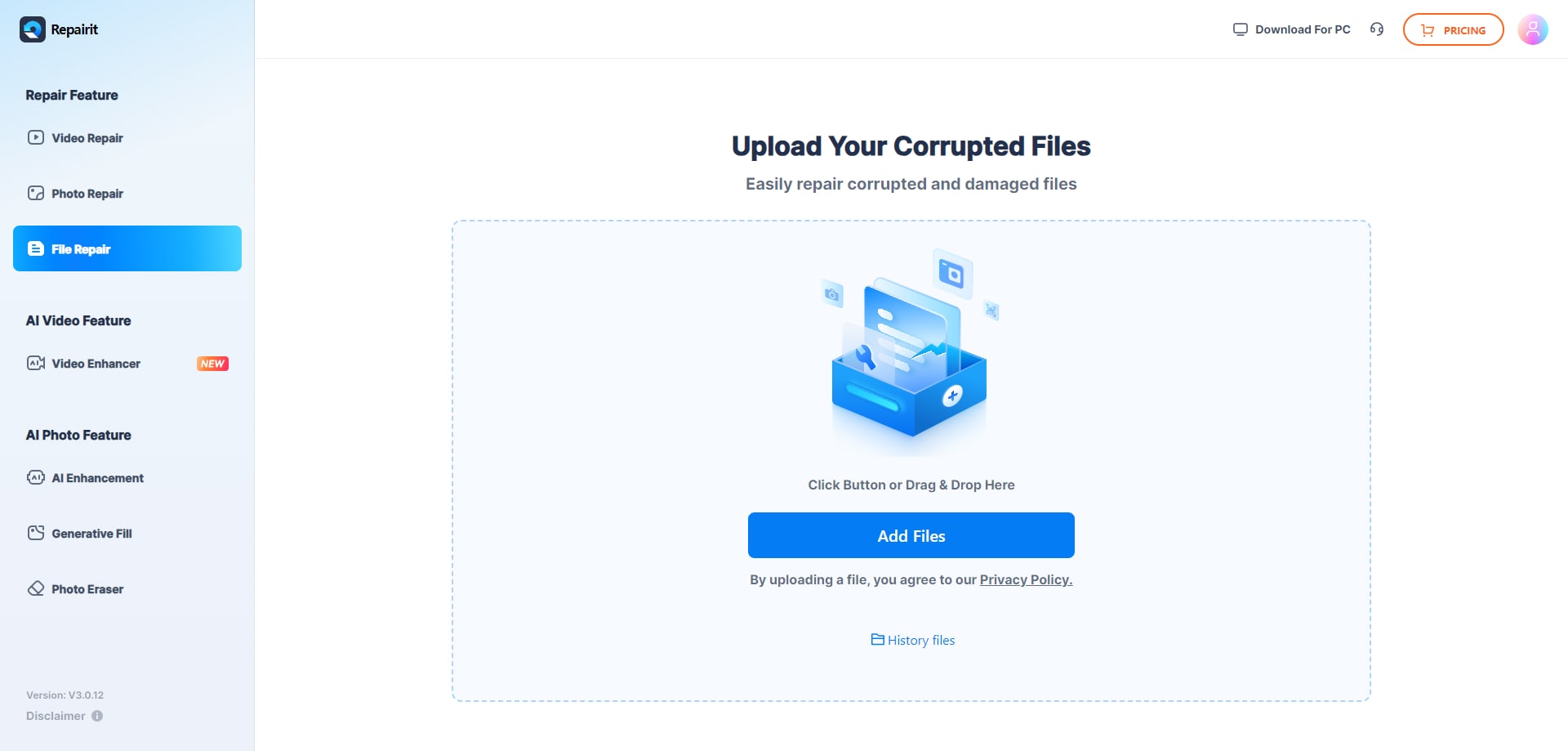
Step 1. Upload the corrupted, damaged, or unreadable files you want to repair through Repairit Online File Repair.
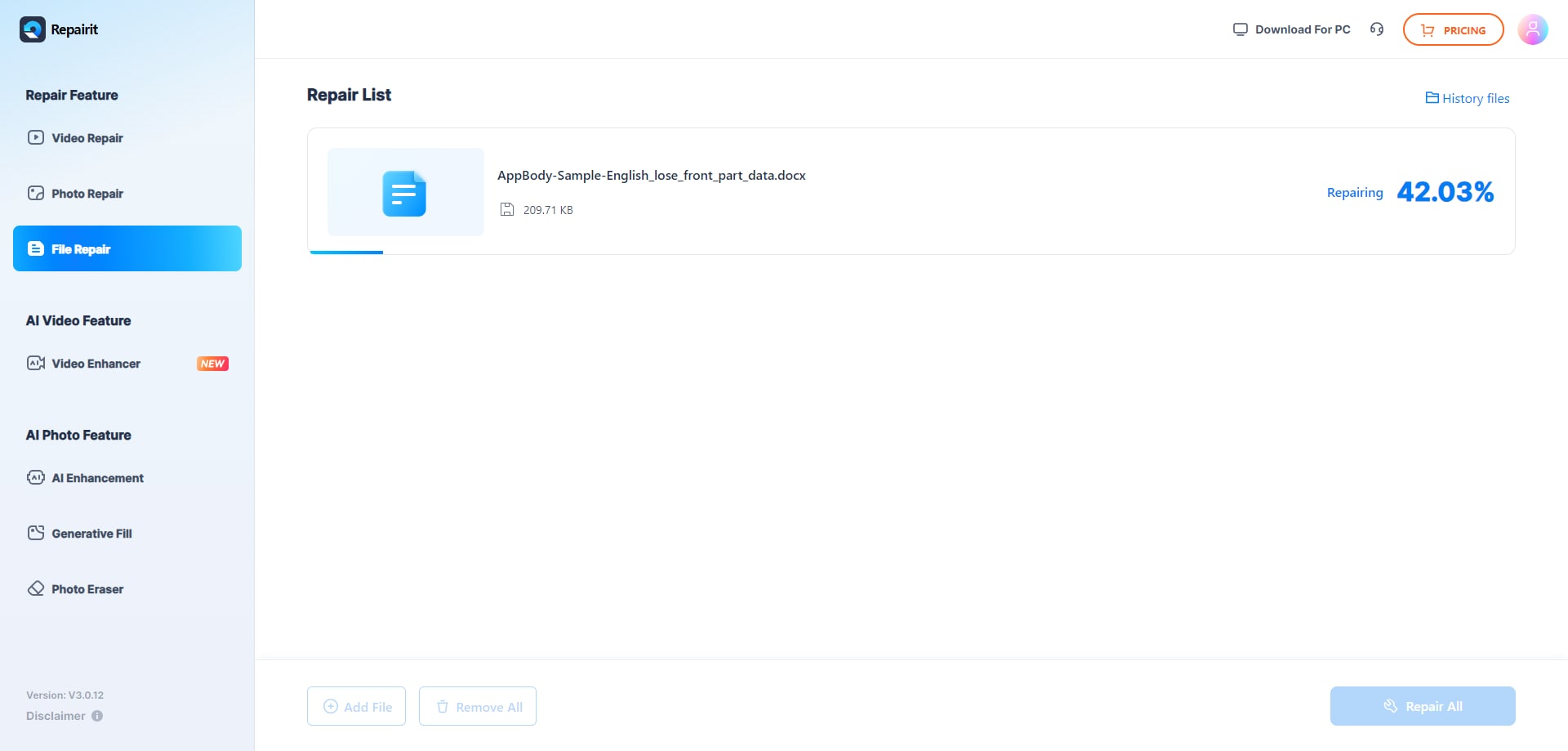
Step 2. Start the online repair process and let Repairit Online File Repair analyze the damaged files.
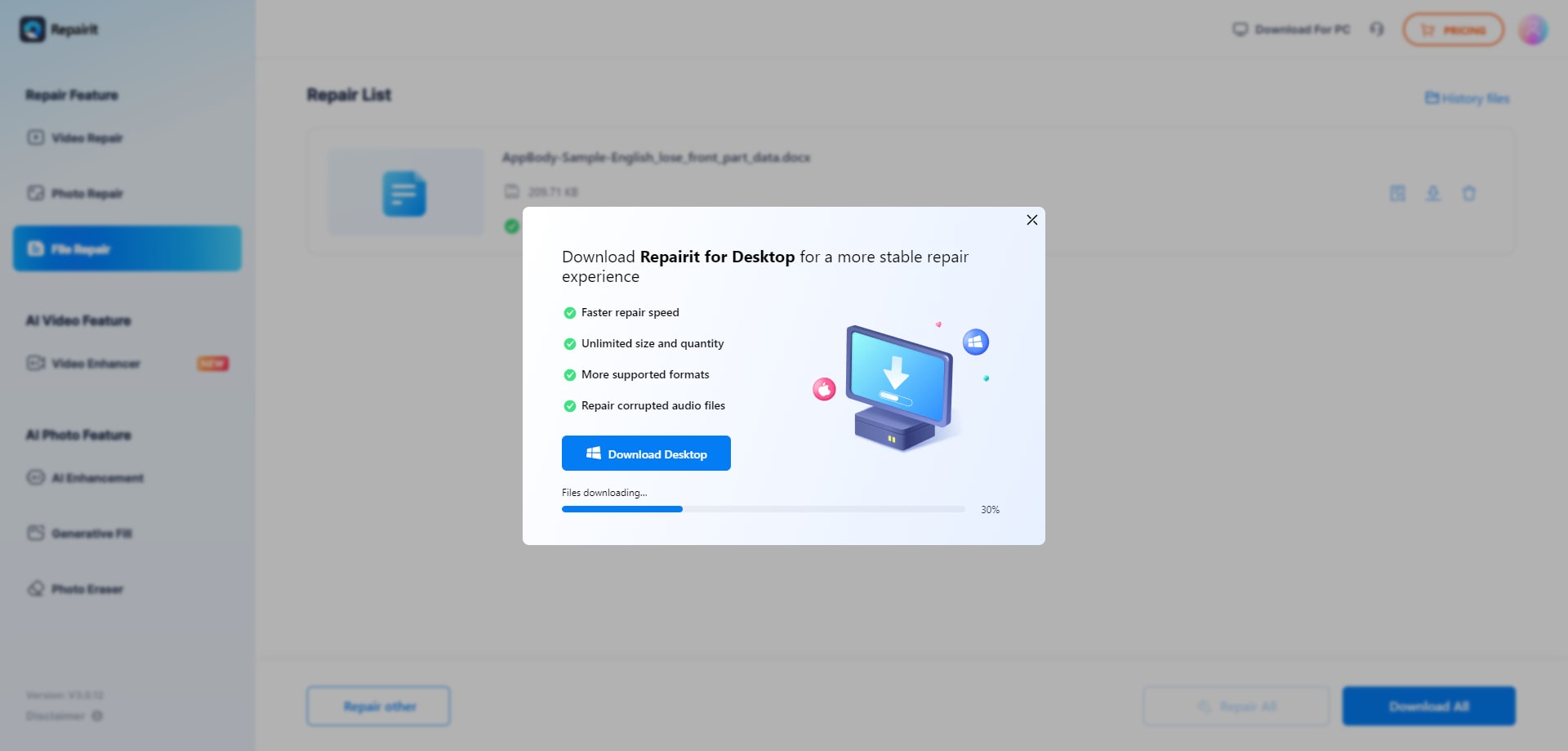
Step 3. Preview the repaired result when available, then save the repaired files to your device.
While details can vary between providers, most reputable online repair tools follow comparable steps. The biggest differences usually involve how automated the repair is, whether previews are provided, and how long you wait for results.
Final Verdict: Repairit Online File Repair vs RestoreCorrupt
Repairit Online File Repair and RestoreCorrupt both focus on repairing corrupted, damaged, or unreadable files, but they do so with different philosophies: automated self-service versus expert-driven case handling.
Repairit Online File Repair is often a good starting point when you want to repair corrupted PDF files, repair corrupted Word documents, repair corrupted Excel files, or repair corrupted PowerPoint files through a quick browser workflow. It works especially well if you have several files to test and need immediate feedback.
RestoreCorrupt leans toward a professional service model. It may be more appealing if you have a small number of critical files, such as complex Office documents or archives with ZIP extraction errors, and prefer a no-fix-no-fee structure even with slower turnaround.
For many users, trying Repairit Online File Repair first can provide a clear baseline. If automated repairs cannot reconstruct the most important content, you can then evaluate whether an expert-driven service like RestoreCorrupt aligns with your risk tolerance and timelines.
Next: Repairit Online File Repair vs Filelazarus
FAQ
-
1. How do Repairit Online File Repair and RestoreCorrupt differ for fixing corrupted documents?
Repairit Online File Repair uses a guided, self-service browser workflow to repair corrupted PDF, Word, Excel, and PowerPoint files. RestoreCorrupt relies on a professional corrupted file repair service where experts review Office, ZIP, image, and files individually before returning any repaired output. -
2. When is Repairit Online File Repair better than RestoreCorrupt for unreadable files?
Repairit Online File Repair is often preferable when you want immediate, guided attempts on several corrupted PDFs, Word documents, Excel sheets, or PowerPoint decks. RestoreCorrupt may suit a few high-value files where you are comfortable with slower turnaround and prefer detailed expert handling. -
3. What is the difference between corrupted file repair and deleted file recovery?
Corrupted file repair targets existing files that will not open, show invalid file errors, or appear damaged. Deleted file recovery aims to restore files removed from storage. Repairit Online File Repair and RestoreCorrupt focus on corruption repair, not broad deleted-data or disk recovery workflows.
"




