
Choosing between Repairit Online File Repair and FileLazarus matters when a key document or archive suddenly stops opening. Both tools focus on repairing corrupted files online, but they differ in guidance, interface, and supported scenarios.
When a critical PDF, Word, Excel, or PowerPoint file becomes unreadable, you typically see invalid file errors, broken file previews, or applications that refuse to load the content. Online file repair services try to reconstruct these damaged structures so the files open again.
This comparison focuses on how each service handles corrupted documents, archives, and media files, along with workflow, ease of use, and limitations. The aim is to help you match the right online file repair workflow to your actual damage scenario.
In this article
- Quick Verdict: Repairit Online File Repair vs FileLazarus
- Key Differences and Comparison Table: Repairit Online File Repair vs FileLazarus
- File Types and Corruption Scenarios: Repairit Online File Repair vs FileLazarus
- Workflow, Ease of Use, and Upload: Repairit Online File Repair vs FileLazarus
- Repair Quality, Preview, and Limitations: Repairit Online File Repair vs FileLazarus
- Privacy, File Handling, and Browser Experience
- Supported Formats and Scenarios: Repairit Online File Repair vs FileLazarus
- Pros and Cons of Repairit Online File Repair and FileLazarus
- Who Should Choose Repairit Online File Repair or FileLazarus
- What the Actual Repair Process Looks Like
- Final Verdict: Repairit Online File Repair vs FileLazarus
Quick Verdict: Repairit Online File Repair vs FileLazarus
Repairit Online File Repair generally suits users who want guided, browser-based steps for repairing corrupted documents, while FileLazarus focuses more on an automated engine for mixed file types.
Repairit Online File Repair emphasizes stepwise help for repairing corrupted PDF files, unreadable Word documents, damaged Excel sheets, and PowerPoint files that fail to load. It is geared toward users who prefer clear instructions and structured online file repair workflow.
FileLazarus, by contrast, follows a more minimal upload and wait approach. It may suit users facing difficult corruption with Office files, archives, and certain media formats who are comfortable with a simpler, older interface and less guidance during the process.
Neither service replaces deleted file recovery or broad data recovery platforms. Both focus on repairing corrupted files online that still exist but do not open properly.
Key Differences and Comparison Table: Repairit Online File Repair vs FileLazarus
The main differences between these tools are the guided experience, the range of formats highlighted, and how each handles tough corruption.
Repairit Online File Repair centers on online document repair with a modern, guided interface. FileLazarus provides an automatic repair engine for Office, archives, and media files, relying on users to understand their own formats and damage scenarios.
| Dimension | Repairit Online File Repair | FileLazarus |
|---|---|---|
| Best for | Guided online repair for everyday users handling corrupted PDFs and office documents. | Automatic repair platform for difficult corruption cases with minimal manual control. |
| Supported formats | Focus on corrupted documents and common file types uploaded in the browser. | Office, archives, and media; users should confirm specific versions and formats. |
| Online workflow | Browser upload with guided steps and a structured repair flow. | Simple upload and automated repair with little interaction. |
| Repair capability | Aims to fix corrupted, damaged, or unreadable office files online. | Automated engine tuned for challenging corruption, depending on damage and type. |
| Ease of use | Walks users through upload, repair, and download clearly. | Older but straightforward interface with basic controls. |
| Strengths | Clear process for corrupted PDFs, Word, Excel, PowerPoint, and similar documents. | Engine designed to tackle hard corruption in Office, archives, and media. |
| Limitations | Results depend on remaining intact data and supported online types. | Older design and limited guidance; severe damage or unsupported formats may fail. |
In summary, the choice often comes down to whether you prioritize a guided interface for document repair or an automated engine for broader file categories.
Which Tool Repairs More File Types and Corruption Scenarios?
FileLazarus may cover a wider spread of file categories, while Repairit Online File Repair focuses deeply on document-oriented corruption scenarios.
The overview of both tools shows that Repairit Online File Repair and FileLazarus specialize in repairing corrupted files rather than searching for deleted data. They try to reconstruct damaged content so documents, archives, and some media files become readable or openable again.
Repairit Online File Repair is positioned around:
- Repairing corrupted PDF files that show invalid file errors or broken file previews.
- Repairing corrupted Word documents that will not open or warn about content damage.
- Repairing corrupted Excel files with unreadable sheets or structure errors.
- Repairing corrupted PowerPoint files that freeze or fail during loading.
FileLazarus, in many cases, aims to handle:
- Damaged Office files across common document formats.
- Problematic archives, such as broken ZIP files that stop extracting.
- Media files that have become unreadable, depending on support.
Users should still confirm exact support for specific formats or versions on each official site before relying on either tool for rare or specialized file types.
Repair Workflow, Ease of Use, and Upload Experience
Repairit Online File Repair offers a more guided upload and repair flow, while FileLazarus stays closer to a simple upload and wait model.
Repairit Online File Repair provides a step-by-step browser process that helps users move from upload to repair and finally to download. The interface is built for non-technical users who want to repair corrupted files online without tuning detailed settings.
Typical Repairit Online File Repair workflow characteristics include:
- Clear prompts to choose corrupted documents from your computer or device.
- On-screen indications of progress while the service analyzes and repairs files.
- Guidance around previewing and saving repaired outputs when available.
FileLazarus generally follows an upload to automated repair pipeline. Users typically select the broken Office file, archive, or media file and let the engine attempt reconstruction with little extra input.
This approach can be efficient for experienced users but may feel less supportive to beginners who want more detailed instructions, status messages, or warnings about partial repairs and unsupported scenarios.
Repair Quality, Preview Experience, and Limitations
Neither Repairit Online File Repair nor FileLazarus can guarantee full restoration for every corrupted file, and both are constrained by the remaining data inside each file.
Repair quality in any online service largely depends on how much valid structure and content is still present. If crucial internal segments are missing or overwritten, even advanced algorithms may only recover part of the document or none at all.
Repairit Online File Repair emphasizes clarity and guidance during and after repair. When previews are available, they can help you check whether repaired PDF pages, Word paragraphs, Excel ranges, or slides look usable before you save the result.
FileLazarus uses an automated repair engine that aims to tackle difficult corruption, especially in Office files and archives. Its older interface may not highlight as many details about what was fixed, which can leave more trial and error when reviewing results.
Common limitations affecting both tools include:
- Severe corruption where key file headers or internal tables are destroyed.
- Files truncated by incomplete downloads or interrupted transfers.
- Unsupported format variants or password-protected documents and archives.
- Cases where the file is actually zero bytes or nearly empty.
In all cases, these tools focus on repairing corrupted files online that still exist. They do not scan drives or partitions for deleted items, which falls under data recovery rather than file repair.
Privacy, File Handling, and Browser Experience
Both tools require uploading files to remote servers, so users should evaluate privacy and connectivity before relying on them for sensitive documents.
Because the repair engines run in the cloud, unreadable PDFs, Office documents, and broken ZIP archives must be transmitted from your browser to each service. Users should review official documentation, terms, and settings for their data-handling expectations.
Typical considerations include:
- Network stability, since failed or partial uploads may worsen repair chances.
- Whether your organization permits third-party tools for confidential files.
- Internal approval requirements before using external online repair platforms.
A stable browser session is important: large or heavily corrupted files that drop mid-upload may arrive incomplete, causing new structural errors. In practice, running test repairs on non-sensitive documents first can help you understand how each tool behaves.
Supported File Formats and Common Repair Scenarios
Repairit Online File Repair concentrates on online document repair, while FileLazarus extends coverage to additional archives and media formats.
According to the provided information, Repairit Online File Repair focuses on PDFs, Word, Excel, PowerPoint, and related document types that show errors or refuse to open. FileLazarus supports Office, archives, and certain media files, which may help with broken ZIP extraction or unreadable clips.
Because exact support lists can change, users should always verify compatibility on each official website, especially for niche formats or newer office versions.
| File type | Typical corruption scenario | Repairit Online File Repair | FileLazarus |
|---|---|---|---|
| Broken PDF previews, invalid file errors, pages not loading. | Focus on repairing corrupted PDF files online for readability. | May support PDF repair; check official support. | |
| Word documents | Unreadable documents, application crashes on open. | Targets repair of corrupted Word documents through a guided flow. | Designed to handle damaged Office files; confirm versions. |
| Excel workbooks | Damaged Excel sheets, unreadable cell ranges, structure errors. | Aims to repair corrupted Excel files so sheets open again. | Office repair engine may address Excel corruption. |
| PowerPoint presentations | Files that fail to load or stop at a certain slide. | Helps repair corrupted PowerPoint files via browser upload. | May repair PPT or PPTX depending on implementation. |
| ZIP archives | ZIP extraction errors, reports of corrupt or missing entries. | Focuses more on documents; check official support for archives. | Supports archives, including repairing broken ZIP files in many cases. |
| RAR and other archives | Archive cannot be opened or partially extracts. | Check official support. | May handle additional archive types; verify on site. |
| Media files | Unreadable or partially playable media files. | Primarily document oriented; confirm any media support. | Designed to include some media repair; details vary. |
Whichever tool you use, always keep a copy of the original corrupted file. Repair attempts should work on duplicates to avoid accidental overwriting.
Pros and Cons of Repairit Online File Repair and FileLazarus
The strengths and trade-offs of each tool can help you decide which online file repair workflow fits your situation.
Repairit Online File Repair Pros and Cons
FileLazarus Pros and Cons
Who Should Choose Repairit Online File Repair or FileLazarus?
Repairit Online File Repair tends to suit users seeking clarity and structure, whereas FileLazarus may appeal more to those prioritizing a broad automatic engine.
You might lean toward Repairit Online File Repair if you:
- Want structured help repairing corrupted PDFs, Word, Excel, and PowerPoint files online.
- Need a repeatable workflow for frequent office document corruption issues.
- Prefer a modern, guided browser experience over minimal interfaces.
- Focus primarily on document repair rather than complex archive or mixed media tasks.
You might consider FileLazarus if you:
- Regularly face difficult corruption across Office files, archives, and media.
- Value an automated engine even if the interface feels older.
- Are comfortable working with limited on-screen guidance.
- Want one place that may address documents, archives, and some media repairs.
In many environments, teams may use more than one service, trying one tool and then another if the first attempt does not yield an acceptable result.
What the Actual Repair Process Looks Like
Most online file repair services follow a similar pattern: upload the corrupted file, let the server analyze it, then download any repaired output.
In general, the flow looks like this:
- You choose a file that will not open, such as a PDF, DOCX, XLSX, PPTX, or ZIP.
- The service uploads and inspects internal structures for damage.
- It attempts to rebuild missing references or content and returns a new file.
Repairit Online File Repair offers a clear example of this online file repair workflow, using prompts and previews to reduce guesswork.
Key Features
Key characteristics of the Repairit Online File Repair workflow include:
- Online repair for common office and document formats.
- Stepwise guidance from upload to download, suitable for non-specialists.
- Attention to invalid file errors and unreadable documents that still exist on disk.
- Preview options in many cases, enabling quick assessment of repair quality.
These features make it easier to identify whether a repaired document is usable enough for work, study, or compliance tasks.
Step-by-step guide
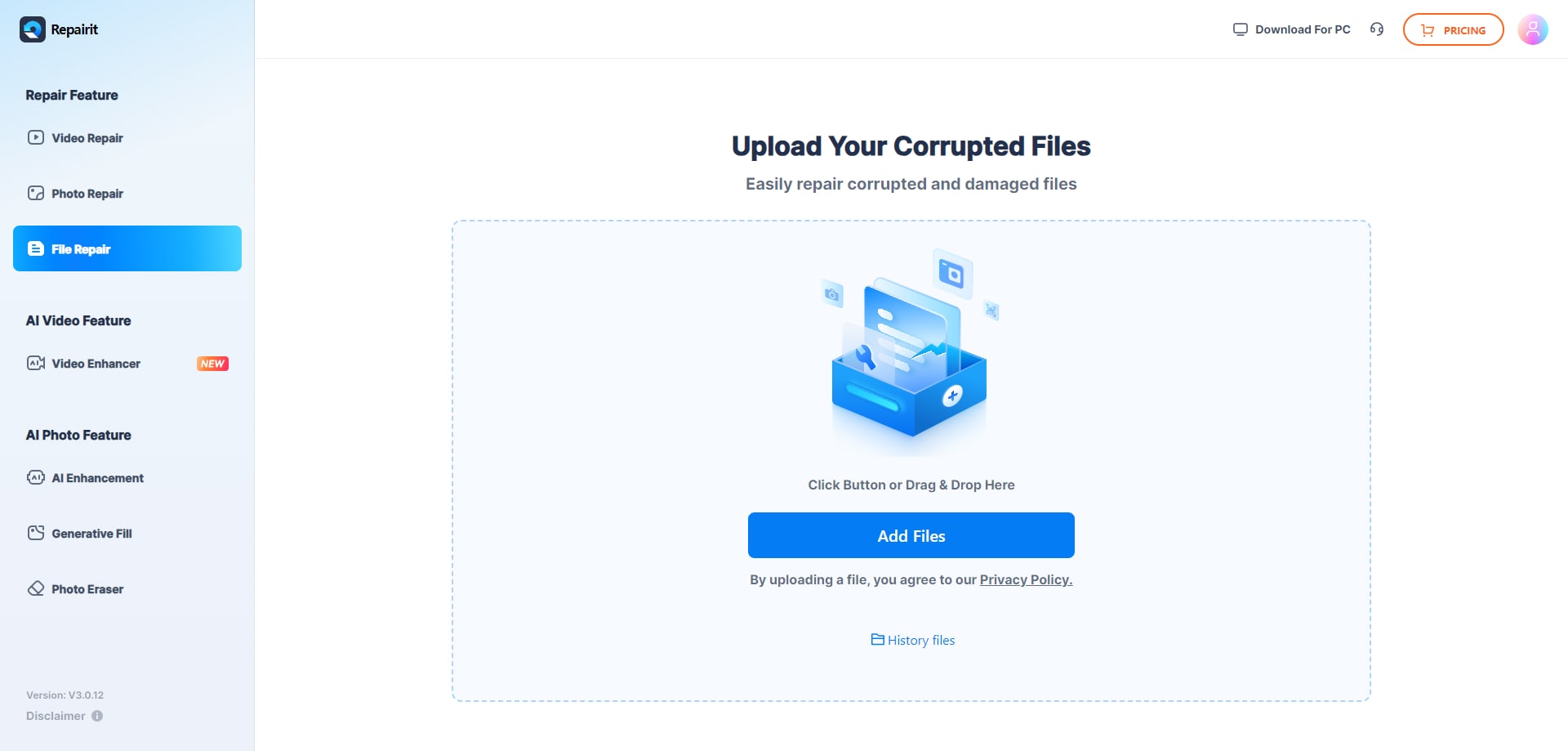
Step 1. Upload the corrupted, damaged, or unreadable files you want to repair through Repairit Online File Repair.
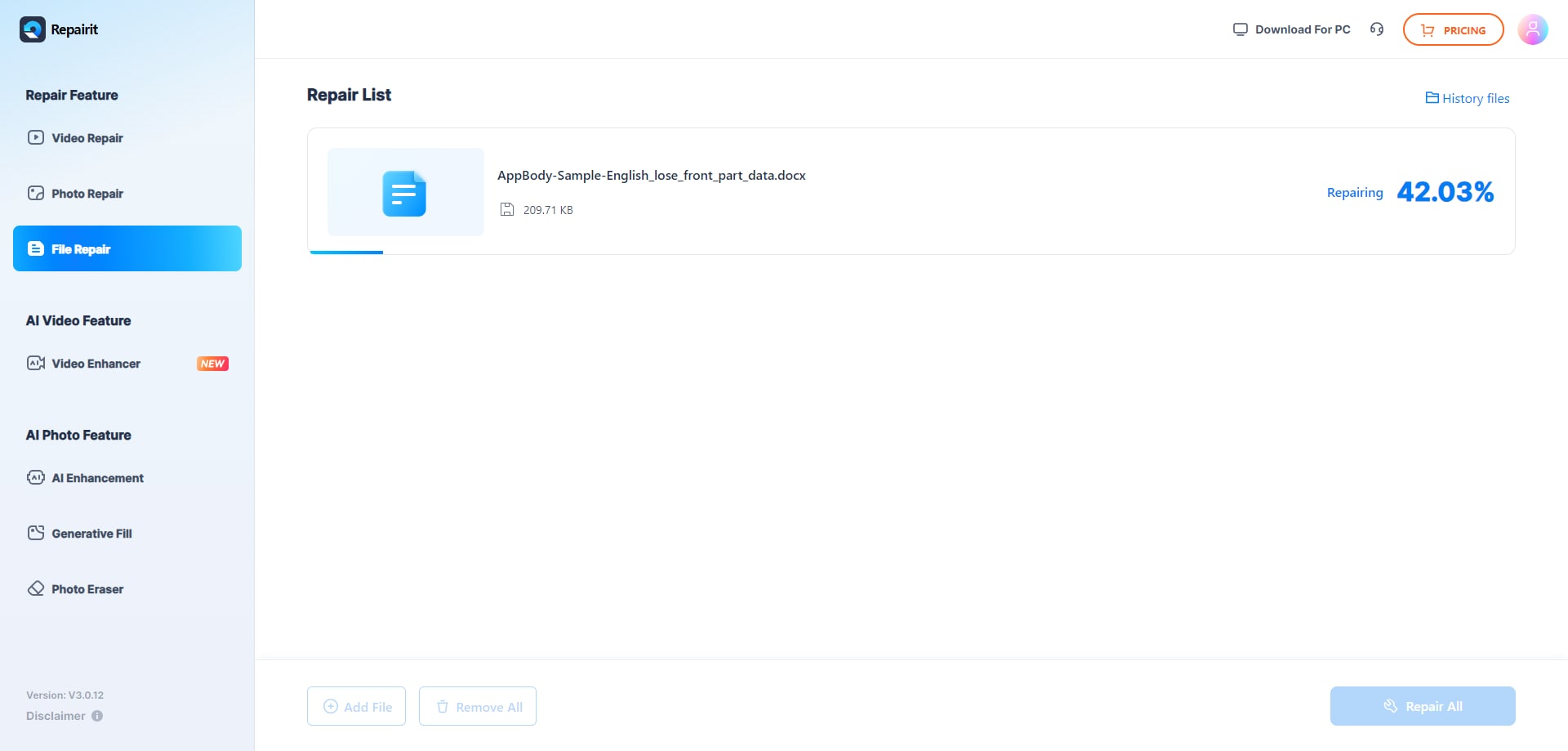
Step 2. Start the online repair process and let Repairit Online File Repair analyze the damaged files.
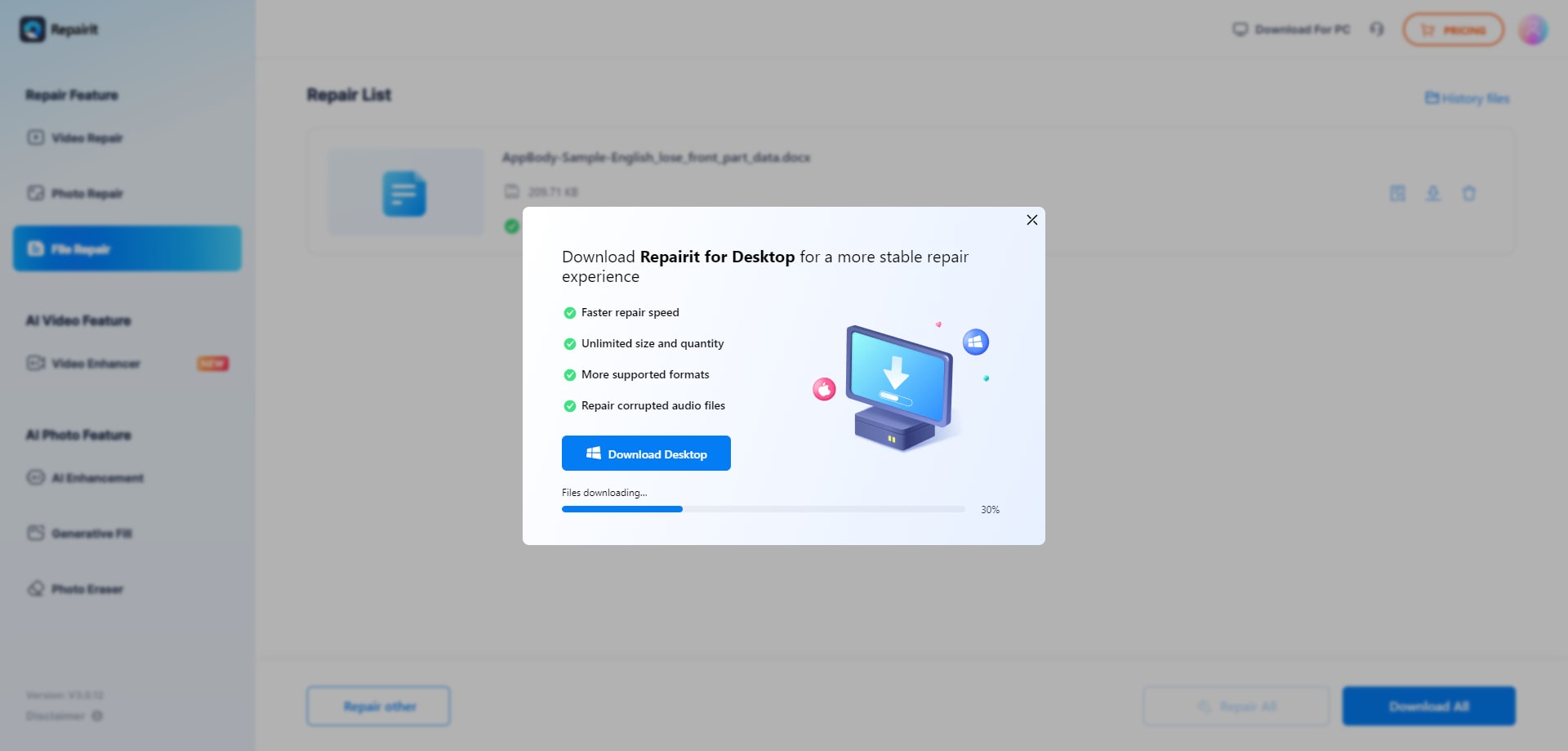
Step 3. Preview the repaired result when available, then save the repaired files to your device.
This flow stays focused on corrupted file repair rather than deleted file recovery, disk recovery, or general editing. You work with uploaded copies of files that already exist but fail to open or behave unpredictably.
Final Verdict: Repairit Online File Repair vs FileLazarus
Repairit Online File Repair and FileLazarus both address the same core problem: fixing corrupted files so they open again, but they approach it differently.
Repairit Online File Repair emphasizes a guided experience for repairing common office documents in the browser. It may be particularly suitable when you regularly repair corrupted PDF files, Word documents, Excel workbooks, and PowerPoint decks and want predictable steps.
FileLazarus provides an automatic engine that spans Office, archives, and media files, paired with a more traditional interface. It can be attractive for users dealing with varied file types, broken ZIP archives, and occasional media corruption, as long as they are comfortable with less on-screen guidance.
Your decision should consider:
- The primary file types you repair (documents versus archives and media).
- How severe and frequent your corruption issues usually are.
- Whether you prefer step-by-step instructions or a minimal workflow.
- Organizational policies regarding cloud-based handling of corrupted documents.
In practice, many users try one tool and, if needed, test another on a copy of the same corrupted file to maximize the chance of getting a readable result.
Next: Repairit Online File Repair vs Filerepairtool
FAQ
-
1. How do Repairit Online File Repair and FileLazarus differ for corrupted PDFs and Office documents?
Repairit Online File Repair uses a guided browser workflow tailored to corrupted PDFs, Word, Excel, and PowerPoint files. FileLazarus relies on an automated engine that targets difficult corruption across Office formats with fewer step-by-step prompts and an older interface, which some users may still find straightforward. -
2. When is Repairit Online File Repair better than FileLazarus for online file repair?
Repairit Online File Repair can be a better fit when you want clearly labeled steps to repair corrupted PDFs, Word, Excel, and PowerPoint files online. FileLazarus may be preferable when you prioritize an automated engine handling challenging corruption across Office documents, archives, and some media formats. -
3. What is the difference between corrupted file repair and deleted file recovery?
Corrupted file repair focuses on fixing damaged, broken, or unreadable files that still exist, such as invalid PDFs or Excel workbooks showing errors. Deleted file recovery searches storage for removed items on disks or partitions. Repairit Online File Repair and FileLazarus specialize in corrupted file repair, not deleted file recovery.




