
When your PDF, Word report, Excel sheet, or PowerPoint deck becomes unreadable, online repair can help restore access. This comparison of Repairit Online File Repair and FileRepairTool focuses on how they repair corrupted files online, handle uploads, support everyday formats, and when each online tool may fit your document repair needs.
In this article
- Quick Verdict: Repairit Online File Repair vs FileRepairTool
- Key Differences and Comparison Table: Repairit Online File Repair vs FileRepairTool
- File Types and Corruption Scenarios: Repairit Online File Repair vs FileRepairTool
- Workflow, Ease of Use, and Upload: Repairit Online File Repair vs FileRepairTool
- Repair Quality, Preview, and Limitations: Repairit Online File Repair vs FileRepairTool
- Privacy, File Handling, and Browser Experience
- Supported Formats and Scenarios: Repairit Online File Repair vs FileRepairTool
- Pros and Cons of Repairit Online File Repair and FileRepairTool
- Who Should Choose Repairit Online File Repair or FileRepairTool
- What the Actual Repair Process Looks Like
- Final Verdict: Repairit Online File Repair vs FileRepairTool
Both tools focus on repairing corrupted, damaged, broken, or unreadable files so they open again, rather than performing deleted file recovery or broad data recovery. They aim to repair corrupted files online when you see invalid file errors, broken PDF previews, unreadable Word documents, damaged Excel sheets, or PowerPoint files that fail to load.
The following sections compare workflows, supported formats, file repair scenarios, pros and cons, and which tool may better match your online document repair tasks.
Quick Verdict: Repairit Online File Repair vs FileRepairTool
The main difference is that Repairit Online File Repair emphasizes a guided, step-based browser workflow, while FileRepairTool offers a very lightweight upload and repair flow for straightforward cases. Neither tool replaces full data recovery; they focus on repairing corrupted documents so they open without errors when damage is within manageable limits.
Which option fits you depends on how much guidance you want, your file types, and how severe the corruption appears to be.
Key Differences and Comparison Table: Repairit Online File Repair vs FileRepairTool
At a high level, Repairit Online File Repair may suit users needing guidance through each repair step, while FileRepairTool can appeal to those who prefer a minimal online file repair workflow with fewer on-screen options.
| Dimension | Repairit Online File Repair | FileRepairTool |
|---|---|---|
| Best for | Users wanting a more guided online process to repair everyday corrupted documents and media files in the browser. | Users fixing simple corrupted files who prefer a lightweight, straightforward online repair tool. |
| Supported formats | Common office documents, PDFs, and other frequently used file types for online repair scenarios. | Focuses on Office documents, PDF, and ZIP archives for basic online repair needs. |
| Online workflow | Step-based guided repair with clear prompts for upload, processing, and downloading repaired files online. | Very simple: upload file → repair, with minimal steps or extra options. |
| Repair capability | Designed to handle common corruption causing files not to open or showing errors, within typical damage limits. | Best suited for light to moderate corruption rather than deeply damaged files or complex scenarios. |
| Ease of use | User-friendly interface with guidance that helps non-technical users understand each repair step. | Extremely simple interface aimed at fast, no-frills file uploads and repairs. |
| Strengths | Guided browser experience, clear repair steps, and support for varied everyday corrupted document scenarios. | Lightweight tool, simple repair workflow, and focused support for common office and PDF issues. |
| Limitations | Results may vary for severely damaged files, unsupported formats, or incomplete uploads via unstable connections. | Limited advanced repair; may struggle with severe corruption or complex file structure damage. |
Which Tool Repairs More File Types and Corruption Scenarios?
Both tools focus on repairing corrupted files so they open again, not on recovering deleted data or reconstructing missing content from storage media. They mainly address structural problems, such as incomplete file structures, invalid headers, or damaged elements that block normal opening.
In many office environments, you may see errors like invalid file messages, broken PDF previews, unreadable Word documents, damaged Excel workbooks, or PowerPoint decks that refuse to load. Both tools aim to reduce those issues.
Repairit Online File Repair capabilities
According to the available description, Repairit Online File Repair targets common business document formats and everyday corruption symptoms.
- Repair corrupted PDF files that will not open or show broken preview errors.
- Repair corrupted Word documents that return invalid file or unreadable content messages.
- Repair corrupted Excel files where sheets appear damaged or blocked by corruption warnings.
- Repair corrupted PowerPoint files that fail to load or crash on opening.
- Address damaged document structures so files become readable again when damage is not too severe.
- Provide a guided browser workflow for uploading, repairing, and downloading fixed files.
FileRepairTool capabilities
FileRepairTool is described as a lightweight solution for common document and archive problems rather than complex recovery projects.
- Provide basic repair for corrupted Office documents and PDFs that fail to open.
- Attempt to repair broken ZIP files that trigger ZIP extraction errors.
- Focus on resolving invalid file errors and simple structural damage for supported formats.
- Use a straightforward upload file → repair process suited to one-off issues.
Neither solution is positioned as a universal answer for every corruption case; highly damaged, truncated, or partially overwritten files may remain unrecoverable, and users should manage expectations realistically.
Repair Workflow, Ease of Use, and Upload Experience
Both tools use browser-based uploads and server-side processing, but they differ in how much guidance is provided. Repairit Online File Repair emphasizes a clear sequence of steps, while FileRepairTool keeps the online file repair workflow minimal.
Repairit Online File Repair workflow
Repairit Online File Repair offers a guided process that may help non-technical users avoid confusion when dealing with unreadable files.
- Open the Repairit Online File Repair page in your browser.
- Select corrupted PDFs, Word, Excel, or PowerPoint files you want to repair.
- Upload the files through the on-page interface.
- Start the repair process and wait while the service analyzes file structures.
- Preview and download repaired documents when results are available.
This step-by-step approach can be useful when you handle multiple damaged documents or when less technical team members need instructions on-screen.
FileRepairTool workflow
FileRepairTool typically focuses on a compact sequence, aiming at speed and simplicity.
- Upload the damaged document or archive.
- Trigger the repair action, often via a single button.
- Download the repaired file if processing is successful.
This approach may benefit users who already understand online repairs and prefer fewer prompts or options, especially for simple cases like occasional invalid file errors.
Repair Quality, Preview Experience, and Limitations
Repair quality for both tools depends heavily on how the file was damaged and how much valid structure remains. These services do not perform magic reconstruction where core data is missing or overwritten.
Repair quality and preview for Repairit Online File Repair
Repairit Online File Repair is designed to address frequent online document corruption scenarios instead of complex forensic tasks.
- May repair corrupted PDF files with damaged headers or cross-reference issues.
- May restore access to Word documents that previously returned unreadable content warnings.
- May fix Excel files with structural errors so sheets open again.
- May repair PowerPoint files that were previously stuck on loading.
- May provide preview options in the browser before final download, depending on file type and result.
However, severe corruption, missing chunks of data, or unsupported formats can still lead to partial or unsuccessful repair results.
Repair quality and limitations for FileRepairTool
FileRepairTool focuses on everyday problems but may not handle advanced corruption scenarios.
- Often oriented around light to moderate damage in Office, PDF, and ZIP files.
- May repair broken ZIP files that previously caused extraction errors.
- May restore some documents that show basic invalid file messages.
- May struggle when file structures are deeply destroyed, truncated, or heavily modified.
In both tools, unreliable network connections and incomplete uploads can also affect repair outcomes, so users should ensure stable connectivity and full file transfers.
Privacy, File Handling, and Browser Experience
Since both tools repair corrupted files online using remote servers, users should pay close attention to privacy and file handling policies, especially when working with sensitive business or personal documents.
Cloud processing and file handling
When you upload a corrupted PDF, Word, Excel, PowerPoint, or ZIP file, the service typically processes it on remote infrastructure and then provides a download link or direct file response.
- Files travel over the network, so users should evaluate the security of their connection.
- Each provider may have different retention periods for uploaded and repaired files.
- There may be specific recommendations on using updated browsers for smoother uploads.
Users should review the official websites for Repairit Online File Repair and FileRepairTool to confirm details such as how long files are stored, whether manual deletion options exist, and any restrictions on confidential or regulated data.
Browser experience
Repairit Online File Repair aims to guide users with prompts and possibly on-page progress indicators, while FileRepairTool generally keeps the interface lighter with fewer controls. In either case, using a modern browser and stable connection typically improves the reliability of uploads and downloads.
Supported File Formats and Common Repair Scenarios
Both tools focus on common business formats rather than niche file types. They target situations where documents still exist but will not open or behave unpredictably because of structural damage, invalid headers, or formatting issues.
The following table summarizes typical file categories and repair scenarios. Users should still check official support pages for precise format lists.
| File type | Typical corruption symptoms | Repairit Online File Repair focus | FileRepairTool focus |
|---|---|---|---|
| Broken preview, cannot open, invalid or corrupted file messages. | Repair corrupted PDF files so they open and render pages again, where structure allows. | Repair everyday PDF issues such as invalid file errors for supported cases. | |
| Word documents | Unreadable files, content error prompts, crashes on open. | Repair corrupted Word documents that fail to open or show unreadable content warnings. | Repair corrupted Word files in many light to moderate corruption scenarios. |
| Excel spreadsheets | Damaged sheets, file format and extension mismatch errors. | Repair corrupted Excel files to restore access to sheets when structure is partly intact. | Handle basic Excel corruption affecting everyday office workbooks. |
| PowerPoint presentations | Files that will not start, fail to load, or freeze during opening. | Repair corrupted PowerPoint files that previously could not be opened in the viewer. | May support common PowerPoint corruption; users should check official support. |
| ZIP archives | ZIP extraction errors, archive cannot be opened or partially extracts. | May assist with archive scenarios in some cases; users should check official support. | Repair broken ZIP files in many common business scenarios. |
| Other office formats | Files that open with errors or partial content. | Target frequently used document formats for online repair; check official support. | Focus on practical office file types documented on the site. |
While both tools cover PDFs and popular Office formats, you should verify whether less common extensions or specialized business formats are supported before relying on online repair.
Pros and Cons of Repairit Online File Repair and FileRepairTool
Each tool has advantages and trade-offs. Repairit Online File Repair provides more guidance through the process, while FileRepairTool focuses on a fast, minimal approach. Your choice may depend on user experience expectations, technical comfort, and corruption severity.
Repairit Online File Repair Pros and Cons
FileRepairTool Pros and Cons
Who Should Choose Repairit Online File Repair or FileRepairTool?
Repairit Online File Repair tends to suit users who value guidance and repeatable workflows, while FileRepairTool is attractive when you only need a quick, minimal repair of simple corruption. Neither solution should be viewed as a replacement for specialist data recovery where storage media is failing.
When Repairit Online File Repair may be a better fit
- Users who want guided, step-by-step online repair for unreadable PDFs and Office documents.
- Non-technical users needing clear instructions while fixing corrupted files that will not open.
- People comparing multiple corrupted documents and wanting a consistent browser experience across them.
- Teams that frequently repair damaged office files and value structured, repeatable online workflows.
When FileRepairTool may be a better fit
- Users who prefer a very lightweight online file repair tool with minimal steps.
- People fixing simple corrupted Office, PDF, or ZIP files without needing advanced options.
- Users comfortable with a quick upload file → repair workflow for one-off issues.
- Those who mainly face mild corruption, like occasional invalid file or ZIP extraction errors.
What the Actual Repair Process Looks Like
Most online file repair tools follow a similar pattern: you upload damaged files, the service analyzes and attempts repairs on its servers, and then you download the repaired versions. The specifics vary, but the core idea is to repair corrupted files online without installing heavy software locally.
Repairit Online File Repair provides a clear example of this typical workflow, adding extra guidance so users understand what is happening at each stage.
Key Features
In the context of everyday office work, the key aspects of Repairit Online File Repair include its guided workflow and focus on common corruption symptoms.
- Guided online workflow for repairing corrupted office and PDF documents.
- Designed to fix common invalid file and unreadable file errors.
- Browser-based experience without complicated technical configuration.
- Focus on making damaged, broken, or unreadable documents open again where file structure allows.
Step-by-step guide
The following example illustrates how you might repair corrupted documents through Repairit Online File Repair.
Step 1. Upload the corrupted, damaged, or unreadable files you want to repair through Repairit Online File Repair.
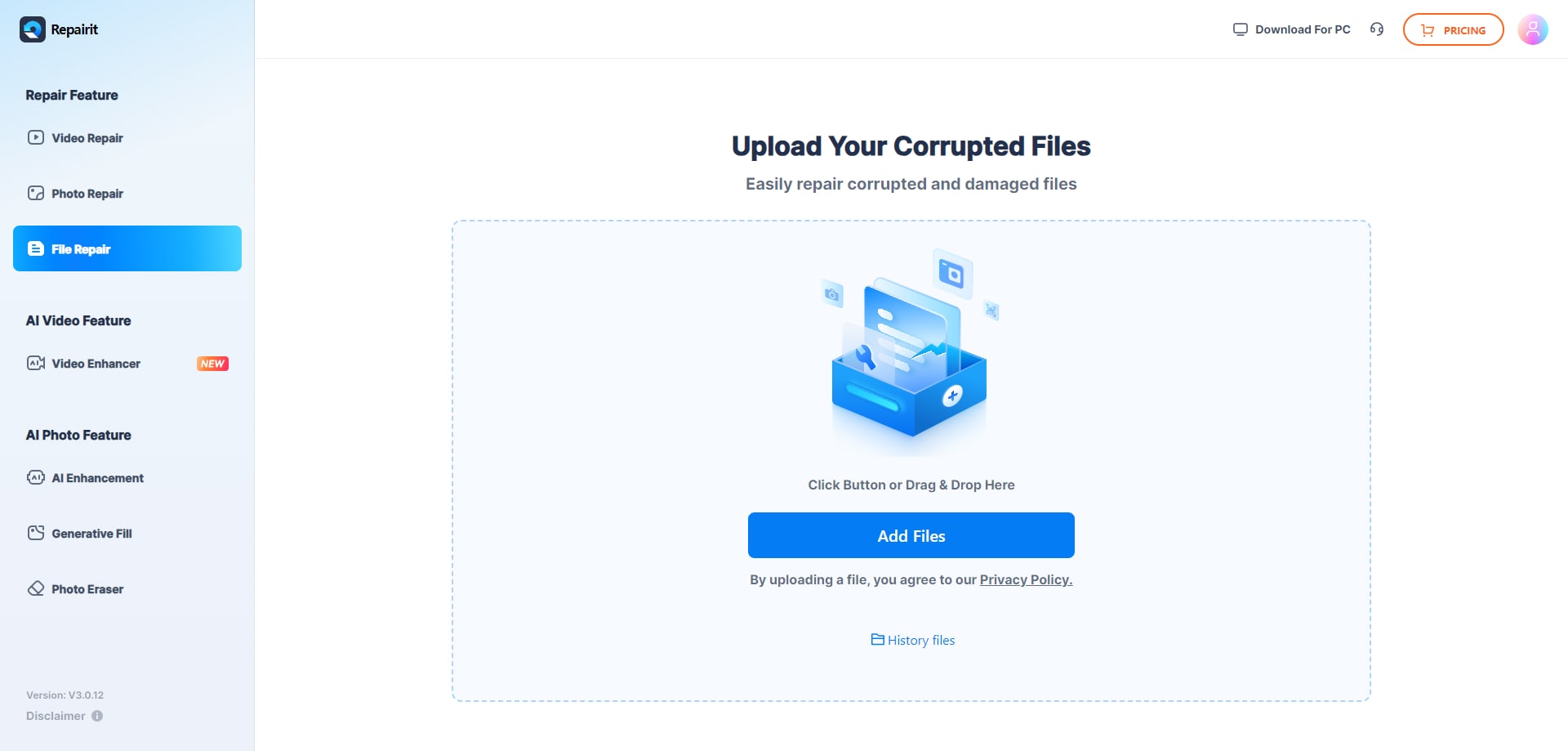
Step 2. Start the online repair process and let Repairit Online File Repair analyze the damaged files.

Step 3. Preview the repaired result when available, then save the repaired files to your device.
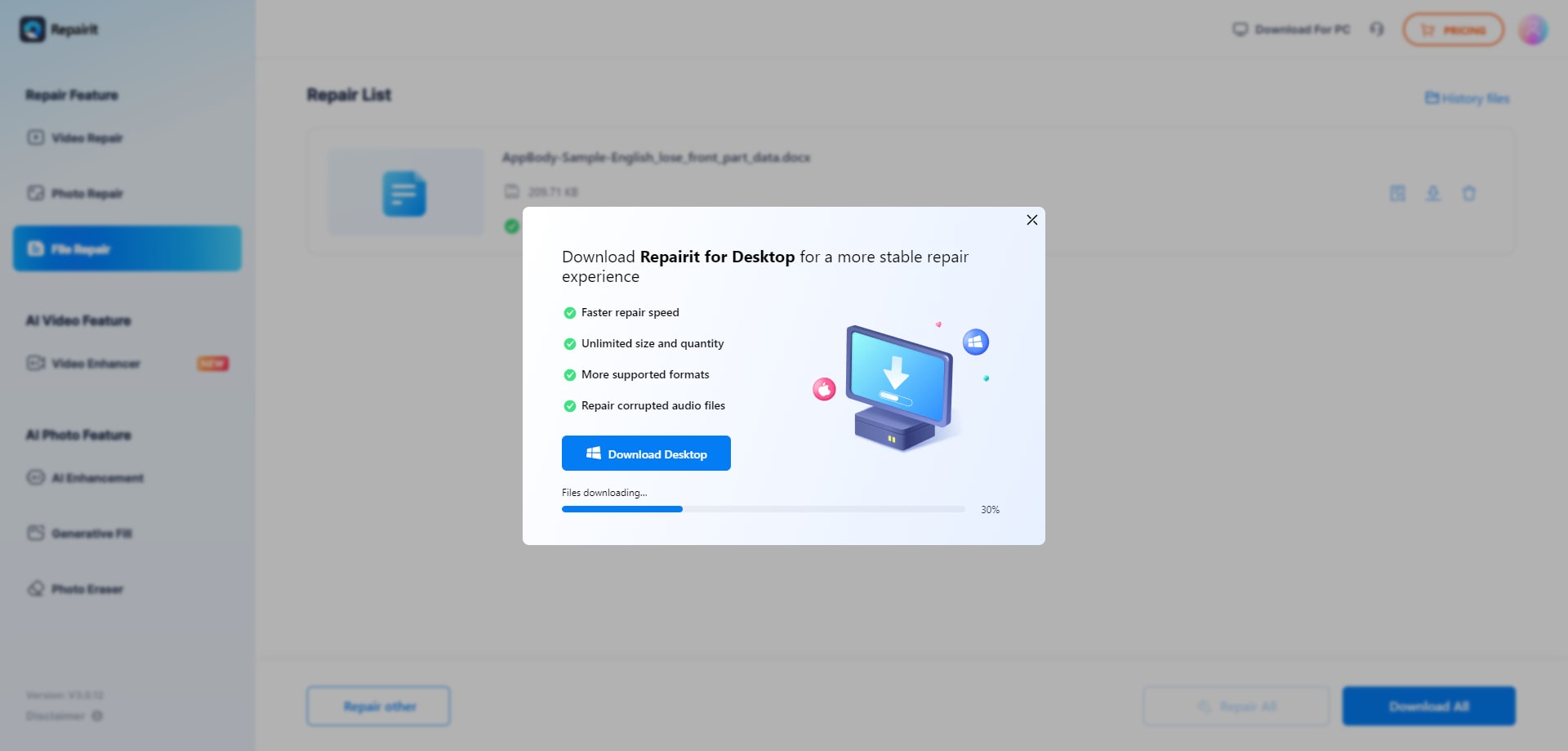
This general flow mirrors what many online repair tools offer: upload, analyze, and download. The difference is how much explanation and structure you receive during those steps.
Final Verdict: Repairit Online File Repair vs FileRepairTool
Both FileRepairTool and Repairit Online File Repair concentrate on bringing corrupted documents back to a readable state, not on undeleting lost files or rescuing damaged disks. FileRepairTool suits quick tasks where you want a lightweight tool for simple Office, PDF, and ZIP problems. Repairit Online File Repair is more suitable when you want a step-based, guided experience.
Neither online tool is universally better. Instead, users should consider factors such as file types, corruption severity, sensitivity of data, and how comfortable they are with more or less on-screen guidance.
Next: Repairit Online File Repair vs Anyrecover File Repair
FAQ
-
1. How does Repairit Online File Repair compare to FileRepairTool for corrupted PDFs and Office documents?
Both tools aim to repair corrupted PDF, Word, Excel, and PowerPoint files so they open again. FileRepairTool offers a very simple upload file → repair flow. Repairit Online File Repair adds a more guided, step-based experience that may help non-technical users follow each stage of the online file repair workflow. -
2. When should I choose a guided tool like Repairit Online File Repair instead of FileRepairTool?
Choose Repairit Online File Repair when you want clearer instructions, previews where available, and a structured workflow, especially for multiple corrupted documents. Choose FileRepairTool when your files seem lightly damaged and you prefer a fast, minimal upload and repair process without many additional options. -
3. What is the difference between corrupted file repair and deleted file recovery?
Corrupted file repair focuses on existing files that will not open, show invalid file errors, or have damaged structures. Deleted file recovery aims to restore files removed from storage devices. Repairit Online File Repair and FileRepairTool both focus on corrupted file repair, not on recovering deleted or lost data.
"




