
When PDFs, Word reports, Excel sheets, or client presentations stop opening, online tools that repair corrupted files can prevent serious disruption. This comparison focuses on how Repairit Online File Repair and AnyRecover File Repair handle corrupted documents, archives, and media through a browser-based workflow.
Both platforms aim to fix unreadable files rather than recover deleted data. Understanding their differences helps you choose a practical option for everyday office and project work.
In this article
- Quick Verdict: Repairit Online File Repair vs AnyRecover File Repair
- Key Differences and Comparison Table: Repairit Online File Repair vs AnyRecover File Repair
- File Types and Corruption Scenarios: Repairit Online File Repair vs AnyRecover File Repair
- Workflow, Ease of Use, and Upload: Repairit Online File Repair vs AnyRecover File Repair
- Repair Quality, Preview, and Limitations: Repairit Online File Repair vs AnyRecover File Repair
- Privacy, File Handling, and Browser Experience
- Supported Formats and Scenarios: Repairit Online File Repair vs AnyRecover File Repair
- Pros and Cons of Repairit Online File Repair and AnyRecover File Repair
- Who Should Choose Repairit Online File Repair or AnyRecover File Repair
- What the Actual Repair Process Looks Like
- Final Verdict: Repairit Online File Repair vs AnyRecover File Repair
Quick Verdict: Repairit Online File Repair vs AnyRecover File Repair
Repairit Online File Repair tends to suit users who want a more guided online file repair workflow, while AnyRecover File Repair may appeal to those preferring a quicker, less-structured upload and repair approach across multiple file types.
For many office and project teams, the decision comes down to whether detailed on-screen guidance or a minimal interface feels more comfortable when trying to fix unreadable files under time pressure.
Key Differences and Comparison Table: Repairit Online File Repair vs AnyRecover File Repair
Both tools aim to repair corrupted files online, but they prioritize guidance, interface style, and user reassurance in slightly different ways. The table below summarizes the main distinctions based on publicly available descriptions.
| Dimension | Repairit Online File Repair | AnyRecover File Repair |
|---|---|---|
| Best for | Users wanting a guided repair flow for mixed documents, images, videos, and archives. | Users repairing multiple damaged file types with a straightforward upload and smart repair flow. |
| Supported formats | Online repair for common Office documents, PDFs, images, videos, and archives, depending on corruption. | Office, PDF, ZIP, video, and image files, covering many everyday corruption issues. |
| Online workflow | Browser-based, step-by-step guidance from upload to repaired download. | Simple two-step path: upload file then start smart repair, with fewer guidance elements. |
| Repair capability | Focus on reconstructing corrupted, damaged, or broken files that still exist but will not open correctly. | Designed to fix several file types, with results varying by damage severity and file structure. |
| Ease of use | Emphasizes explanatory instructions, helpful for users unfamiliar with file corruption. | Very simple interaction, though with less detailed hand-holding during repair. |
| Strengths | Acts as a web repair hub for office documents and media, using a structured online process. | Supports many formats in one place, useful for varied corruption across document types. |
| Limitations | Results depend on corruption level and supported formats and do not extend to deleted files. | Smaller repair reputation; severe corruption or missing data may limit outcomes. |
Which Tool Repairs More File Types and Corruption Scenarios?
Repairit Online File Repair and AnyRecover File Repair both target a broad mix of document and media types, so the difference lies more in how they approach each scenario than in one tool clearly handling more formats.
According to their positioning, both tools focus on corrupted files that still exist, not on recovering erased or missing data from drives or cloud storage.
Overall repair focus
Each service aims to make damaged files readable again. That often includes cases where the file:
- Will not open at all in its usual app
- Shows invalid file or cannot-open errors
- Displays broken file previews or missing pages
- Contains unreadable characters or distorted formatting
Repairit Online File Repair capabilities
- Repairs corrupted PDFs, Word, Excel, and PowerPoint files that fail to open or show unreadable content.
- Can handle damaged images, videos, and archive files that trigger errors or partial loading.
- Provides a guided workflow so users receive clearer steps during online repair.
AnyRecover File Repair capabilities
- Targets multiple corrupted file types, including Office documents and PDFs that will not open properly.
- Handles ZIP archives showing extraction errors and media files flagged as broken or unreadable.
- Uses an upload file and smart repair approach to attempt automated fixes.
In daily use, both tools may handle similar corruption categories, particularly for online document repair, ZIP issues, and common media problems, while results will vary depending on how incomplete or damaged each file is.
Repair Workflow, Ease of Use, and Upload Experience
For non-technical users, the way an online file repair workflow is presented can be just as important as the underlying repair engine.
The two tools follow broadly similar steps, but they differ in how much guidance and explanation they display around each action.
Repairit Online File Repair workflow
Repairit Online File Repair offers a browser-based experience designed to walk users through upload, analysis, preview, and download with clear labels. This can be particularly helpful when repairing corrupted Word documents, damaged Excel sheets, or PowerPoint files that fail to load.
- Guided repair types for PDF, Office documents, images, videos, and archives
- Explanations for common invalid file messages or broken preview symptoms
- Preview steps where available, so you can check repaired content before saving
AnyRecover File Repair workflow
AnyRecover File Repair favors a simpler interface, often described as upload file then start smart repair. Many users may appreciate this minimal flow when they only need a quick way to repair corrupted PDF files or fix unreadable documents without extra options.
- Reduced on-screen elements for faster decision-making
- Unified entry point for documents, archives, and media
- Less detailed explanation during each repair stage
When deciding between them, consider whether team members are comfortable interpreting unclear error messages or whether they would benefit from more descriptive guidance as they repair corrupted files online.
Repair Quality, Preview Experience, and Limitations
Repair outcomes for both services depend heavily on how much of the original document structure and content still exist inside the corrupted file.
Neither platform can fully reconstruct what has been completely overwritten, truncated, or never saved, so expectations should stay realistic for heavily damaged content.
Repair quality considerations
- Files with minor header or index damage may repair more cleanly than those with missing pages.
- Office files that still open but show garbled text might be partially recoverable.
- ZIP archives with a damaged directory may repair better if the internal data blocks remain intact.
Preview and validation
Repairit Online File Repair emphasizes a preview-oriented flow in many scenarios. That means users may be able to inspect repaired PDFs, spreadsheets, or decks before downloading them back to local storage, helping them avoid saving unusable results.
AnyRecover File Repair also aims to make output accessible but may focus more on the overall upload and repair sequence than detailed preview guidance.
Limitations for both platforms
Both services operate within important boundaries:
- They repair existing corrupted files rather than performing deleted file recovery.
- Severe corruption or incomplete file structures can still lead to unsuccessful repairs.
- Unsupported formats or encrypted content may require other specialized tools.
- Users should always test with copies to avoid further complications.
AnyRecover File Repair is sometimes described as having a smaller repair reputation compared with better-known repair-focused brands, while Repairit Online File Repair positions itself as a more guided alternative for online repairs.
Privacy, File Handling, and Browser Experience
Because both tools rely on online processing, you should evaluate their file handling practices and your own risk tolerance before uploading sensitive content.
From an EEAT perspective, it is important to understand that cloud repair always involves sending data over the internet, even if only temporarily.
Online upload implications
- Files leave your local environment to be processed on remote servers.
- Browser sessions may involve caching or temporary storage in transit.
- Network conditions can affect upload stability for large or complex files.
Guidance for confidential material
- Avoid uploading highly sensitive legal contracts or medical records unless you are fully comfortable with the service.
- Review each providers current documentation and terms directly on their sites.
- Consider anonymizing or redacting non-essential data when possible.
Repairit Online File Repair and AnyRecover File Repair both position themselves as online tools, so browser compatibility, connection quality, and organization policies should factor into your decision-making process.
Supported File Formats and Common Repair Scenarios
Both services highlight coverage for a wide range of everyday file types, especially common business and project formats. Still, users should confirm specific extensions and edge cases on each official site.
The scenarios below reflect typical use cases rather than an exhaustive or guaranteed list of supported formats.
| File type | Typical corruption symptoms | Repairit Online File Repair focus | AnyRecover File Repair focus |
|---|---|---|---|
| Broken preview, cannot-open errors, blank pages, or garbled text. | Aims to repair corrupted PDF files so pages and text become readable again. | May attempt to restore PDF structure for files that refuse to open. | |
| Word documents | Unreadable content messages, invalid file format errors, random symbols. | Targets repair of corrupted Word documents used for reports and contracts. | Designed to help with DOC or DOCX files that no longer open correctly. |
| Excel spreadsheets | Workbook cannot be opened, missing sheets, or formula errors from corruption. | Can repair corrupted Excel files to restore access to tables and data where possible. | Attempts structural fixes when Excel flags the file as broken or unreadable. |
| PowerPoint | Slides failing to load, incomplete slide lists, or damaged embedded content. | Helps repair corrupted PowerPoint files used for meetings and client decks. | Supports presentation repair for files that crash or halt on open. |
| ZIP archives | CRC errors, cannot extract, or missing directory entries. | Focuses on repairing broken ZIP files so contained documents become accessible. | Handles ZIP-based extraction errors for archives containing office or media files. |
| Images | Cannot-open messages, partial thumbnails, or color distortions. | Online workflow for damaged image files that fail to render properly. | Supports file repair for common formats; users should check official support. |
| Video | Playback errors, corrupted headers, or unrecognized file format alerts. | Provides online repair attempts for files that refuse to play. | Includes video formats among its repair targets for broken playback. |
| Other archives | Unexpected end of archive, invalid format messages. | May assist with some archive types beyond ZIP; users should check documentation. | May support additional archive variants; always confirm official support. |
In many cases, both tools will address similar situations, such as invalid file errors in office apps or broken ZIP extractions. Actual results will depend on the underlying damage rather than the file extension alone.
Pros and Cons of Repairit Online File Repair and AnyRecover File Repair
Each platform has strengths and trade-offs that may matter differently depending on your workload, urgency, and comfort with technical detail.
Repairit Online File Repair Pros and Cons
AnyRecover File Repair Pros and Cons
Who Should Choose Repairit Online File Repair or AnyRecover File Repair?
The right online repair tool depends on your workload, need for guidance, and tolerance for experimenting with different services on tricky corruption cases.
Considering both tools alongside your existing processes can clarify which fits your expectations for clarity, control, and speed.
Who may prefer Repairit Online File Repair
- Users wanting a clearly guided path for mixed PDFs, Word, Excel, and PowerPoint issues.
- Professionals handling client files who value structured explanations during repair.
- Non-technical users who feel unsure when vague format errors appear.
- Teams repairing various office and media files regularly with consistent browser workflows.
Who may prefer AnyRecover File Repair
- Users repairing several damaged file types who want a straightforward upload flow.
- Individuals with mixed Office, PDF, ZIP, and image issues needing a single web tool.
- People comfortable working with fewer on-screen instructions.
- Users primarily focused on quick fixes for document and archive corruption.
In practice, some organizations may try both tools on sample files and then standardize on whichever aligns better with their teams comfort level and typical corruption patterns.
What the Actual Repair Process Looks Like
Most online file repair tools follow a similar pattern: you upload corrupted files, the service analyzes structures, attempts to rebuild content, and then offers a repaired version to download. The main differences lie in how clearly each step is described and how much control users have.
Repairit Online File Repair provides a good example of this general approach with extra guidance for users unfamiliar with file corruption.
Key Features
- Guided online steps tailored to common corruption errors and invalid file messages.
- Support for office documents, PDFs, media files, and some archives in one interface.
- Preview-oriented flow in many cases so users can validate content before saving.
- Simple upload, repair, preview, and save pattern that avoids complex manual actions.
Step-by-step guide
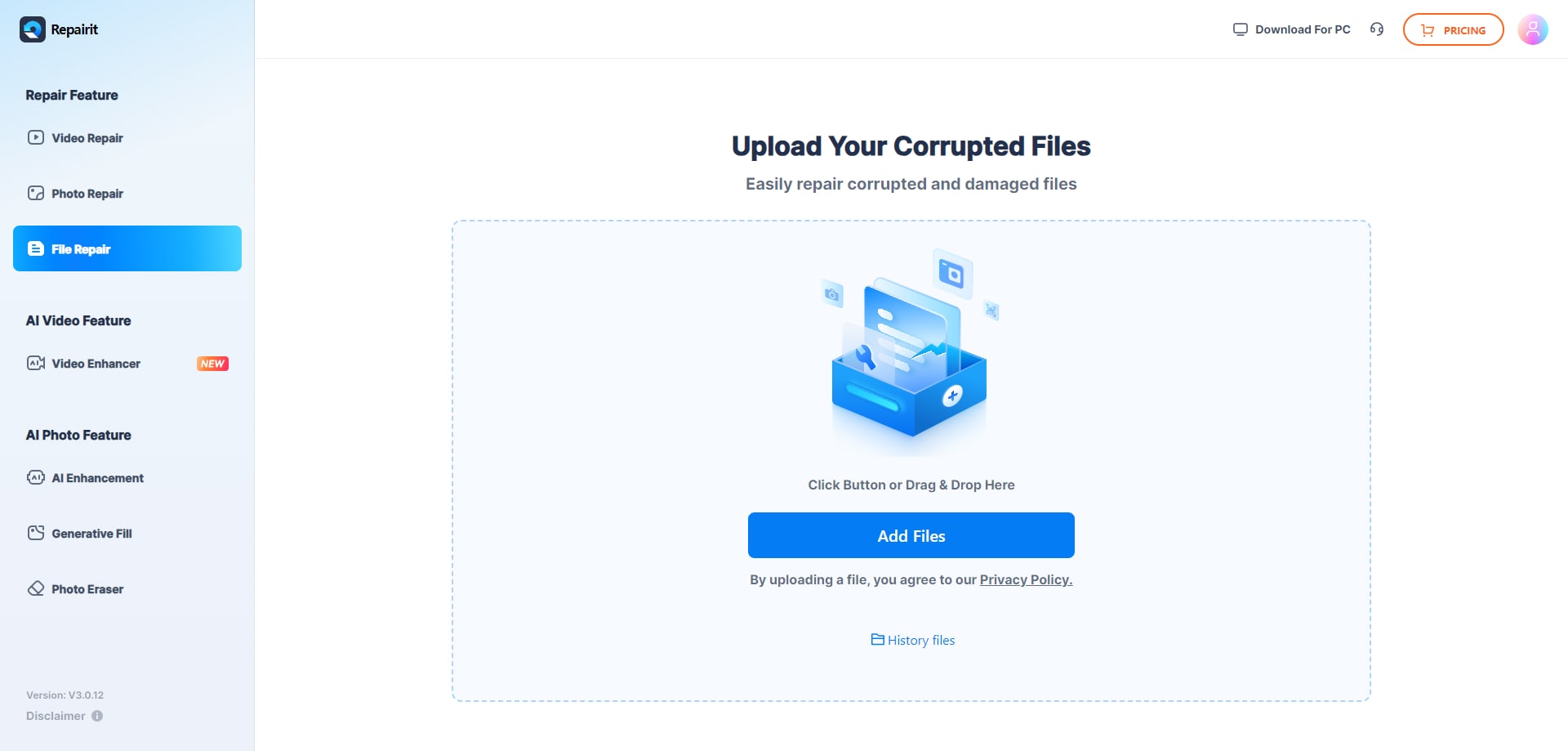
Step 1. Upload the corrupted, damaged, or unreadable files you want to repair through Repairit Online File Repair.
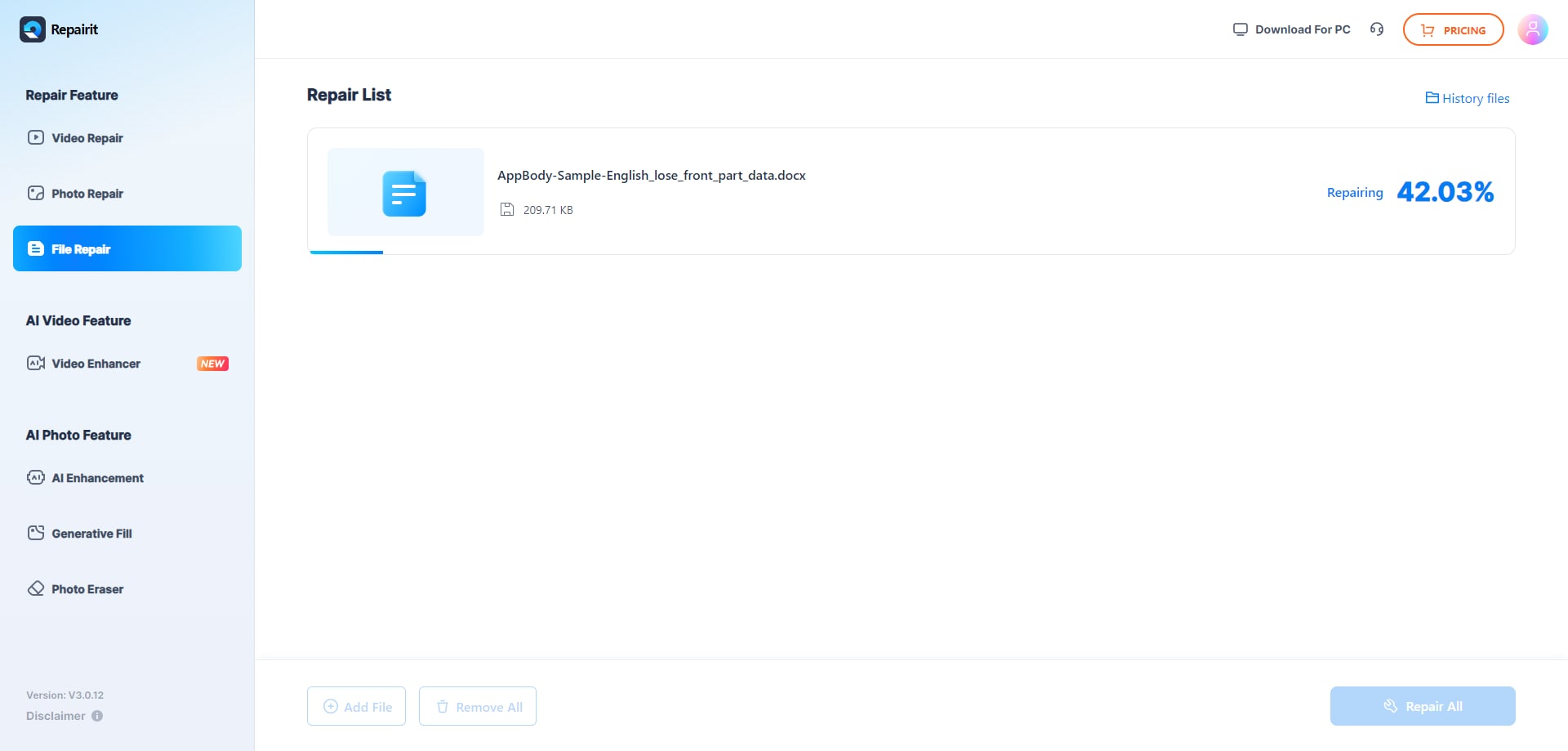
Step 2. Start the online repair process and let Repairit Online File Repair analyze the damaged files.
Step 3. Preview the repaired result when available, then save the repaired files to your device.
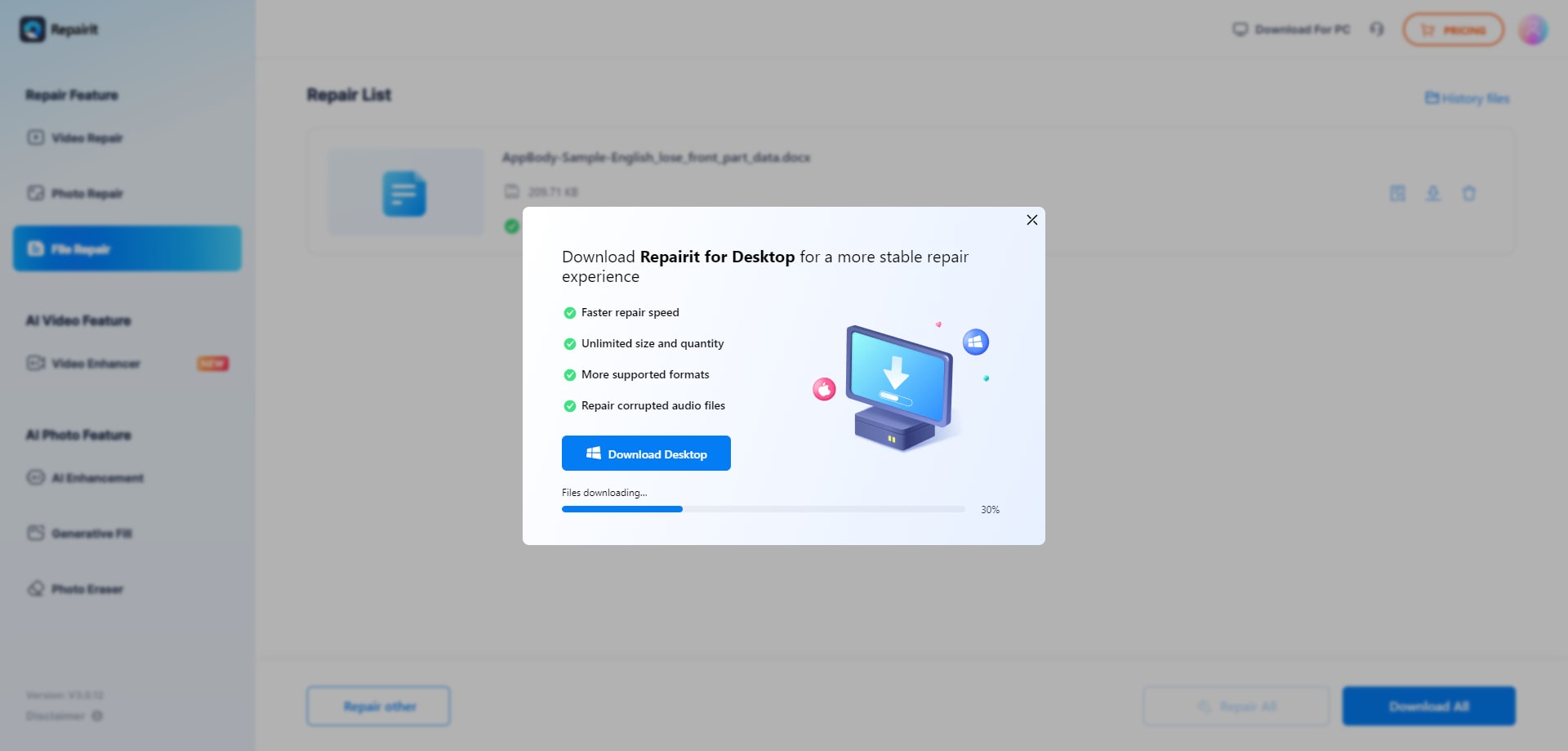
This sequence reflects how many online file repair tools operate. The added guidance in Repairit Online File Repair can make it easier to interpret what is happening while you fix unreadable files.
Final Verdict: Repairit Online File Repair vs AnyRecover File Repair
Both AnyRecover File Repair and Repairit Online File Repair address the same core challenge: existing files that have become corrupted, unreadable, or impossible to open in their native applications.
AnyRecover File Repair focuses on an all-in-one platform with a simple upload and smart repair flow. Repairit Online File Repair adds more structure and explanation, which may be helpful for users who want guidance while dealing with broken documents or archives.
The better choice for you will depend on factors such as:
- Whether you value detailed guidance or a minimal interface
- The mix of PDFs, Office files, images, videos, and archives you handle
- How often you encounter invalid file errors or ZIP extraction problems
- Your comfort with testing multiple tools for complex corruption cases
For many teams, starting with a guided tool can reduce confusion, especially when time-sensitive reports, proposals, or financial spreadsheets suddenly stop opening.
Next: Repairit Online File Repair vs Imyfone Ultrarepair
FAQ
-
1. How do these tools handle corrupted PDF and Office documents?
Repairit Online File Repair emphasizes a guided approach when repairing corrupted PDF files and Office documents, offering step explanations and previews where possible. AnyRecover File Repair highlights a simpler upload and smart repair flow across Office, PDF, and related formats, which may suit users who prioritize quick, minimal-interaction repair attempts. -
2. When is Repairit Online File Repair likely a better choice than AnyRecover File Repair?
Repairit Online File Repair is often suitable when you want clear instructions while you repair corrupted Word documents, Excel workbooks, or decks that refuse to open. If error messages feel confusing or you support less technical colleagues, its structured guidance can make the online file repair workflow easier to follow. -
3. How is corrupted file repair different from deleted file recovery?
Corrupted file repair focuses on files that still exist but are damaged, such as PDFs or spreadsheets that show invalid file errors or will not open. Deleted file recovery aims to restore data that has been removed from storage devices. Repairit Online File Repair and AnyRecover File Repair are oriented toward corrupted file repair, not full data recovery.




