
Repairit Online File Repair and iMyFone UltraRepair both aim to repair corrupted files online so everyday documents and media open again without complex tools.
When a crucial PDF, Word, Excel, or PowerPoint file suddenly refuses to open, an online repair service can be more convenient than installing software. This comparison focuses on typical office document corruption, broken file previews, and unreadable files, showing how each tool handles repair workflows for non-technical users.
You will also see how these tools differ from deleted file recovery or deep data recovery utilities, which serve different purposes.
In this article
- Quick Verdict: Repairit Online File Repair vs iMyFone UltraRepair
- Key Differences and Comparison Table: Repairit Online File Repair vs iMyFone UltraRepair
- File Types and Corruption Scenarios: Repairit Online File Repair vs iMyFone UltraRepair
- Workflow, Ease of Use, and Upload: Repairit Online File Repair vs iMyFone UltraRepair
- Repair Quality, Preview, and Limitations: Repairit Online File Repair vs iMyFone UltraRepair
- Privacy, File Handling, and Browser Experience
- Supported Formats and Scenarios: Repairit Online File Repair vs iMyFone UltraRepair
- Pros and Cons of Repairit Online File Repair and iMyFone UltraRepair
- Who Should Choose Repairit Online File Repair or iMyFone UltraRepair
- What the Actual Repair Process Looks Like
- Final Verdict: Repairit Online File Repair vs iMyFone UltraRepair
Quick Verdict: Repairit Online File Repair vs iMyFone UltraRepair
Repairit Online File Repair tends to suit users focused on corrupted office documents in the browser, while iMyFone UltraRepair often fits those handling a mix of photos, videos, and documents.
Both services are designed to repair corrupted files online, not to bring back deleted items. The better fit depends on the types of files you repair most often, how damaged they are, and whether you prefer a guided web-based experience or a broader media-oriented tool.
For broken PDFs, unreadable Word documents, damaged Excel sheets, and failing PowerPoint files, Repairit Online File Repair offers a document-centric online workflow. For routine fixes across images, clips, and office files, iMyFone UltraRepair focuses on an easy upload, repair, and export process.
Key Differences and Comparison Table: Repairit Online File Repair vs iMyFone UltraRepair
The main differences between Repairit Online File Repair and iMyFone UltraRepair lie in their primary focus, online file repair workflow, and how they guide non-technical users through everyday corruption issues.
Below is a concise comparison based on publicly described capabilities, focusing on online repair of corrupted, damaged, or unreadable files rather than deleted file recovery.
| Dimension | Repairit Online File Repair | iMyFone UltraRepair |
|---|---|---|
| Best for | Guided online repair for common corrupted office documents and other files. | Users repairing daily corrupted file, video, and office document files with a consumer-friendly solution. |
| Supported formats | Common document types like PDF, Word, Excel, PowerPoint, plus other corrupted files depending on version. | Photo, video, and office documents such as PDFs and Microsoft Office files. |
| Online workflow | Browser-based: upload corrupted file, repair online, then download the fixed version. | Simple flow: upload file, repair, and export, suitable for repeated daily fixes. |
| Repair capability | Designed to fix unreadable, broken, or invalid files so they open and content becomes accessible again. | Focuses on everyday corruption and may offer less advanced repair depth on severely damaged files. |
| Ease of use | Guided steps that walk non-technical users through repair in the browser. | Very easy workflow for beginners who need quick, repeatable repairs. |
| Strengths | Guided browser experience for corrupted PDFs, Office docs, and other unsupported-opening files. | Beginner-friendly interface and clear upload, repair, export process for daily file issues. |
| Limitations | Results may be limited for severely corrupted, partially uploaded, or unsupported files. | Less advanced repair depth and may struggle with heavy structural damage or missing data. |
Neither tool is positioned as a full data recovery suite. Both concentrate on taking an existing damaged file and attempting to restore its structure so it becomes readable again.
Which Tool Repairs More File Types and Corruption Scenarios?
Repairit Online File Repair focuses more on office documents, while iMyFone UltraRepair often covers additional media formats alongside documents.
According to available descriptions, Repairit Online File Repair is tuned for document-centric issues such as:
- repair corrupted PDF files that refuse to open or show broken file previews
- repair corrupted Word documents with invalid file errors
- repair corrupted Excel files after application crashes
- repair corrupted PowerPoint files that fail to load slides
iMyFone UltraRepair is introduced as a consumer-friendly repair tool that may handle:
- everyday corrupted files and videos
- office documents such as PDF, Word, Excel, and PowerPoint
- files that will not open, appear distorted, or show partial content
Both tools aim to fix unreadable files rather than undelete removed data. Users dealing mainly with office documents may lean toward Repairit Online File Repair, while mixed media and office scenarios could make iMyFone UltraRepair more attractive.
Repair Workflow, Ease of Use, and Upload Experience
Both tools rely on a simple online file repair workflow where you upload damaged files, let the service process them, and then download repaired copies.
Repairit Online File Repair usually follows this style of process:
- open the service in a browser
- upload the corrupted document or other supported file
- start online repair and wait for processing
- preview and download the fixed result when available
iMyFone UltraRepair focuses on an equally straightforward path: upload, repair, and export. This can be helpful when users run the same routine on multiple photos, videos, or documents every day without needing complex options.
Both aim to be approachable for non-technical users, reducing the need to understand low-level file structures or manual repair techniques.
Repair Quality, Preview Experience, and Limitations
Repair quality for both services depends strongly on how corrupted the original files are and whether key data is still present.
Repairit Online File Repair is designed to repair damaged documents and other files by targeting structural problems. It may help when you see:
- invalid file errors when opening PDFs or Office files
- broken PDF previews in browser or viewer
- unreadable Word documents after power loss
- damaged Excel sheets that crash spreadsheet software
- PowerPoint files that freeze or stop at a certain slide
iMyFone UltraRepair focuses on everyday issues and may handle mild to moderate corruption for mixed file types. However, its information suggests it may offer less advanced depth for heavily corrupted or partially overwritten files.
Both services can face limitations with:
- severe structural damage or incomplete file structures
- files truncated during download or transfer
- unsupported formats or encrypted proprietary files
Users should manage expectations: some files may only be partially recoverable, and some may not be fixable at all.
Privacy, File Handling, and Browser Experience
Both tools require uploading your corrupted files to process them, so file sensitivity and privacy considerations are important.
According to general practice for online repair services, users should:
- avoid uploading highly confidential documents unless policies are reviewed carefully
- check how long repaired and original files may be retained
- confirm options for deleting uploaded files after the repair session
- use secure, trusted networks when uploading business or personal documents
Because repairs happen via the browser, connection stability and device security can affect your overall experience. Regardless of tool, reviewing the official documentation and privacy terms before uploading sensitive materials is recommended.
Supported File Formats and Common Repair Scenarios
Repairit Online File Repair and iMyFone UltraRepair both focus on making corrupted, damaged, or unreadable files open again, not on restoring deleted content.
In summary, both tools focus on fixing corrupted files so they become readable again, not on recovering deleted data or lost partitions. Below is a format and scenario overview with conditional wording where support can vary by version.
| File type | Repairit Online File Repair scenarios | iMyFone UltraRepair scenarios |
|---|---|---|
| May repair corrupted PDF files that will not open, show invalid file errors, or display broken pages. | May fix PDF documents that fail to open or render correctly alongside other document types. | |
| Word (DOC/DOCX) | Designed to repair corrupted Word documents after crashes or power loss so text becomes readable again. | May help when Word files open with errors or partially missing content. |
| Excel (XLS/XLSX) | Targets damaged Excel workbooks and sheets that refuse to load or crash spreadsheet software. | May repair everyday issues in Excel files that still contain most of their data. |
| PowerPoint (PPT/PPTX) | Helps repair corrupted PowerPoint files that freeze or fail to load slides. | May repair basic corruption in presentations used with other office files. |
| Images | May handle some common image formats depending on version; users should check official support. | Promoted for repairing daily corrupted file files that will not display correctly. |
| Videos | May support some file repair workflows depending on current offering; check official details. | Positioned as handling corrupted file clips along with documents and images. |
| ZIP and archives | May repair broken ZIP files or archives with extraction errors where supported; users should confirm. | Archive repair is not always emphasized; users should check official support. |
| Other formats | Support can vary by update; check documentation for the latest supported file list. | Additional formats may be supported; users should review the official feature page. |
Because supported formats can change over time, always consult the latest official information before relying on either tool for a specific extension or niche format.
Pros and Cons of Repairit Online File Repair and iMyFone UltraRepair
Each service has strengths and trade-offs. Understanding these helps you pick the online tool that aligns with your everyday file repair needs.
Repairit Online File Repair Pros and Cons
iMyFone UltraRepair Pros and Cons
Who Should Choose Repairit Online File Repair or iMyFone UltraRepair?
Your choice should depend on file types, how often you repair them, and whether you want a document-focused browser experience or a broader media mix.
Repairit Online File Repair may be a good fit for:
- users wanting guided, online steps to repair corrupted PDF, Word, Excel, and PowerPoint files
- non-technical users facing occasional unreadable documents after crashes or invalid file errors
- people who prefer repairing files directly in the browser instead of installing extra utilities
- users comparing multiple corrupted documents and wanting a structured, repeatable workflow
iMyFone UltraRepair may suit:
- users repairing daily corrupted files across images, clips, and office documents
- beginners who want an easy upload, repair, export workflow for routine file issues
- people frequently fixing mildly corrupted media and documents that still contain most data
- users who value a consumer-friendly interface over granular, low-level repair controls
Neither option is inherently superior; they simply emphasize different repair patterns and file collections.
What the Actual Repair Process Looks Like
Most online file repair tools follow a similar pattern: upload the corrupted file, let the service analyze and repair it, and then download a new version that may open correctly.
This general upload-and-repair flow helps non-technical users avoid manual hex editing or advanced document forensics. Instead, the web service attempts to rebuild damaged structures, headers, or internal indexes so common editors can open the file again.
Key Features
From a workflow perspective, these characteristics stand out for Repairit Online File Repair:
- browser-based repair for corrupted office documents and other files
- guided steps suitable for users without technical expertise
- designed to address invalid file errors and unreadable documents
- focus on repairing corrupted files online rather than deep data recovery
These features aim to make document repair approachable for office staff, students, and freelancers who mainly want their files to open again.
Step-by-step guide
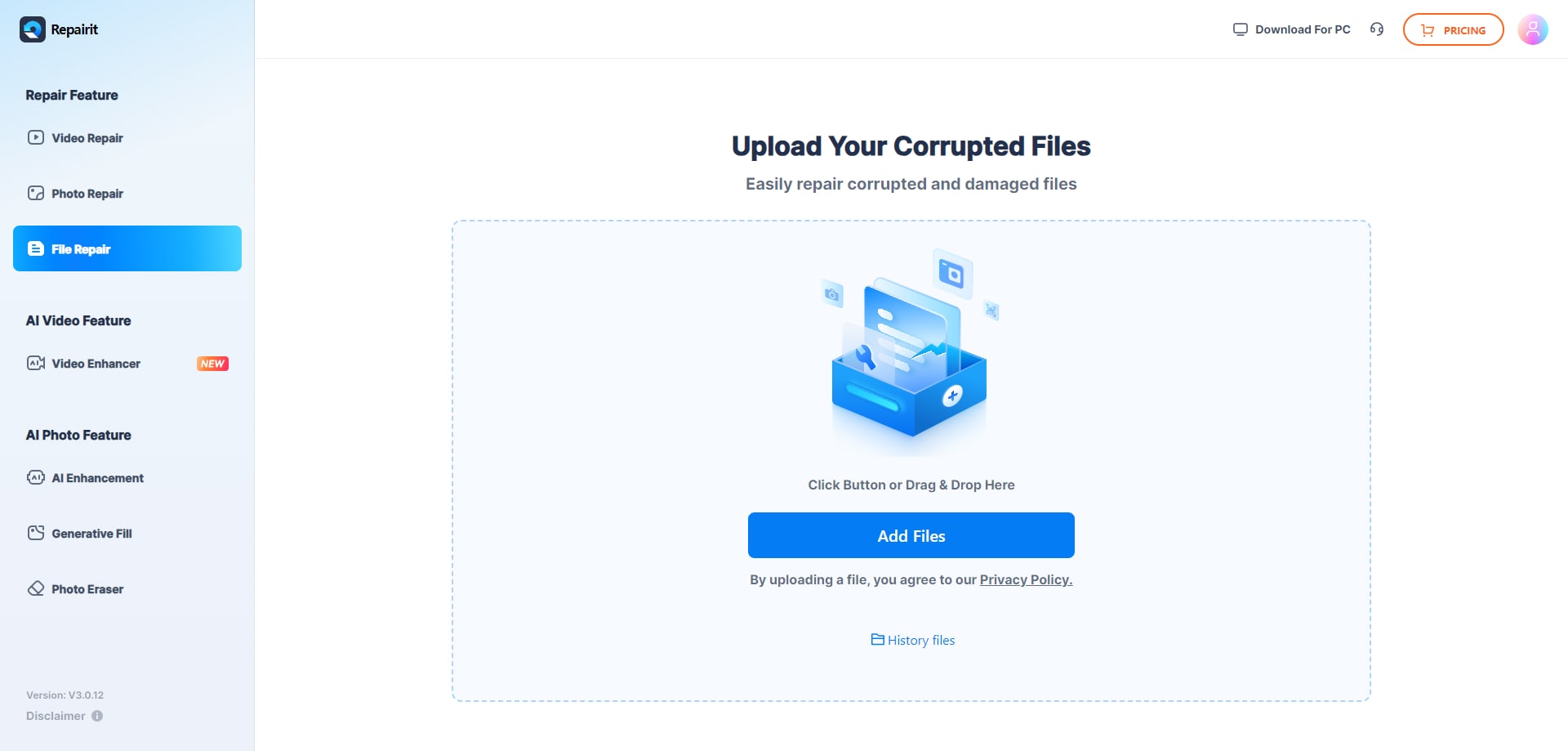
Step 1. Upload the corrupted, damaged, or unreadable files you want to repair through Repairit Online File Repair.
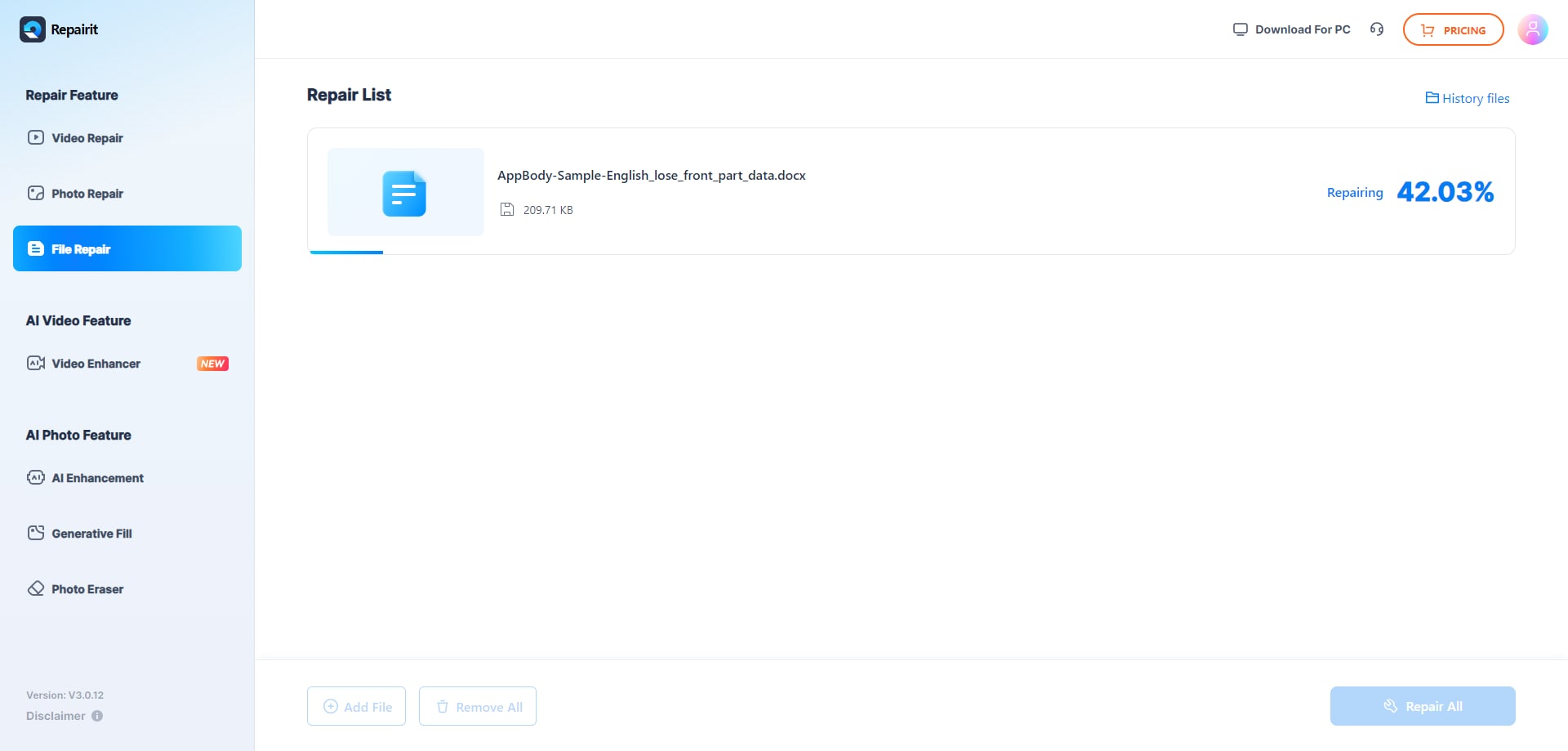
Step 2. Start the online repair process and let Repairit Online File Repair analyze the damaged files.
Step 3. Preview the repaired result when available, then save the repaired files to your device.
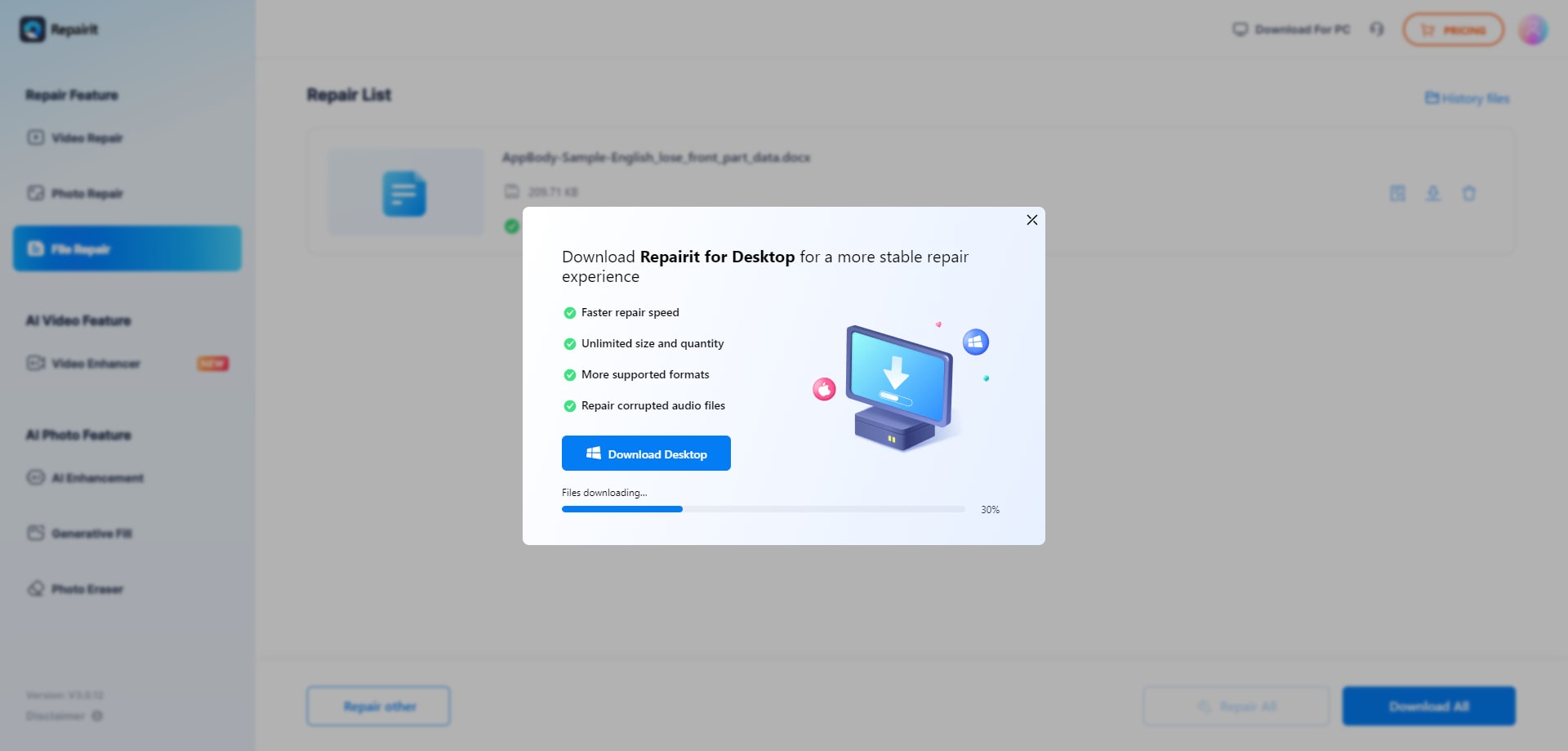
This sequence reflects what many users experience when they repair corrupted Excel files, fix unreadable files, or handle broken presentations through an online tool.
Final Verdict: Repairit Online File Repair vs iMyFone UltraRepair
Both Repairit Online File Repair and iMyFone UltraRepair attempt to solve the same core problem: taking existing corrupted, damaged, or unreadable files and making them open again.
They do not function as deleted file recovery utilities or full data recovery suites. Instead, they sit in a practical middle ground, useful when documents or media fail after crashes, power loss, transfer issues, or software errors.
Repairit Online File Repair tends to be the more guided option for users primarily focused on documents such as PDFs, Word reports, Excel budgets, and presentation decks. Its browser-based design allows quick access from different machines without installing extra tools.
iMyFone UltraRepair, in contrast, may appeal to users handling mixed content: daily batches of photos, videos, and office documents that occasionally become corrupted. Its workflow is intentionally simple for repetitive repair tasks.
In many cases, the decision comes down to:
- whether your priority is document repair versus mixed media repair
- how comfortable you are working entirely in the browser
- how severe the underlying corruption appears to be
- which interface feels clearer for your regular workload
For heavily damaged files or critical business records, some users also test both tools to see which produces more readable results, understanding that neither can guarantee complete recovery.
Next: Repairit Online File Repair vs Stellar File Repair Toolkit
FAQ
-
1. How do Repairit Online File Repair and iMyFone UltraRepair differ for corrupted document repair?
Repairit Online File Repair focuses on a guided online flow for repairing corrupted PDF, Word, Excel, and PowerPoint files in the browser. iMyFone UltraRepair offers a consumer-friendly workflow for daily corrupted files, videos, and office documents, using a similar upload, repair, and export approach. -
2. Is corrupted file repair the same as deleted file recovery?
No. Corrupted file repair works on existing files that show errors, appear broken, or will not open, such as damaged PDFs or unreadable Word documents. Deleted file recovery targets files already removed from storage. Repairit Online File Repair focuses on corruption, not undeleting lost data. -
3. When should I choose Repairit Online File Repair over iMyFone UltraRepair?
Choose Repairit Online File Repair when you mainly need a browser-based, guided experience to repair corrupted PDF, Word, Excel, and PowerPoint files. iMyFone UltraRepair may fit better if you frequently fix daily corrupted files, videos, and documents with a simple, repeatable workflow.




