
When PDFs, Word reports, or Excel workbooks suddenly refuse to open, an online file repair workflow can often restore access without complex tools. This comparison focuses on how Repairit Online File Repair and OfficeRecovery Online help repair corrupted files online rather than recover deleted data.
Both services target corrupted, damaged, broken, or unreadable files. They aim to fix structures so documents can open again, instead of scanning drives for missing items like traditional data recovery tools.
This article explains supported formats, common corruption scenarios, workflows, limitations, and which users each service may suit best for real-world business documents and archives.
In this article
- Quick Verdict: Repairit Online File Repair vs OfficeRecovery Online
- Key Differences and Comparison Table: Repairit Online File Repair vs OfficeRecovery Online
- File Types and Corruption Scenarios: Repairit Online File Repair vs OfficeRecovery Online
- Workflow, Ease of Use, and Upload: Repairit Online File Repair vs OfficeRecovery Online
- Repair Quality, Preview, and Limitations: Repairit Online File Repair vs OfficeRecovery Online
- Privacy, File Handling, and Browser Experience
- Supported Formats and Scenarios: Repairit Online File Repair vs OfficeRecovery Online
- Pros and Cons of Repairit Online File Repair and OfficeRecovery Online
- Who Should Choose Repairit Online File Repair or OfficeRecovery Online
- What the Actual Repair Process Looks Like
- Final Verdict: Repairit Online File Repair vs OfficeRecovery Online
Quick Verdict: Repairit Online File Repair vs OfficeRecovery Online
Repairit Online File Repair usually suits users who want a guided, modern interface to repair everyday corrupted files online, while OfficeRecovery Online tends to appeal more to technical or enterprise users handling severely corrupted business documents.
Instead of treating one as universally better, it is more helpful to match each service to your file types, corruption level, and comfort with technical tools.
- Repairit Online File Repair focuses on step-by-step guidance for corrupted PDF, Word, Excel, and PowerPoint files.
- OfficeRecovery Online emphasizes deep repair logic for complex Office and enterprise file structures.
- Both target corrupted file repair, not deleted file recovery or disk-level recovery.
Key Differences and Comparison Table: Repairit Online File Repair vs OfficeRecovery Online
The main differences center on target users, interface style, and how each service approaches repairing damaged documents and complex business files.
| Dimension | Repairit Online File Repair | OfficeRecovery Online |
|---|---|---|
| Best for | Guided, user-friendly online repair for common documents and media. | Technical users repairing severely corrupted business files. |
| Supported formats | Common Office documents, some media and archives for corrupted files. | Office, PSD, PNG, RAW, DBF and similar enterprise formats. |
| Online workflow | Guided upload, repair, and download with clear prompts. | Technical flow: upload, analyze, then recover. |
| Repair capability | Aims to repair corrupted PDF, Word, Excel, and PowerPoint online. | Deep repair logic for severely corrupted enterprise documents. |
| Ease of use | Modern, beginner-friendly browser interface. | Utilitarian interface that may suit experts more. |
| Strengths | Practical for everyday files that will not open or show errors. | Enterprise-oriented logic for complex, damaged file structures. |
| Limitations | Results vary with corruption level and format support. | Outdated interface and steeper learning curve for some. |
In many organizations, both tools can play complementary roles: one for routine office issues, the other for more severe, technical corruption cases.
Which Tool Repairs More File Types and Corruption Scenarios?
Both tools focus on corrupted file repair, but they emphasize different file families and scenario depths rather than a simple count of extensions.
According to available information, both services specialize in repairing damaged files that still exist but are unreadable, instead of recovering deleted items from drives or partitions.
Shared goal: fix unreadable files by repairing damaged structures so the original application can open them again.
- Repairit Online File Repair targets corrupted PDF, Word, Excel, and PowerPoint files that refuse to open or display errors.
- OfficeRecovery Online focuses on Office, PSD, PNG, RAW, DBF, and similar formats often used in enterprise workflows.
- Neither tool is positioned as a general-purpose photo-only, video-only, or audio-only repair solution in this comparison.
File type coverage may change over time, so users should check each official site for the newest compatibility lists before starting a repair project.
Repair Workflow, Ease of Use, and Upload Experience
Most users will notice the greatest differences between these tools in how the online file repair workflow feels from upload through download.
Repairit Online File Repair emphasizes clarity. Its guided browser interface is designed for non-technical users who simply need to upload a damaged file, start repair, and then save a usable result.
OfficeRecovery Online offers a more technical sequence: upload the corrupted document, let the service analyze the file, and then review whatever content it can reconstruct, which may appeal more to experienced users.
Key usability points to consider include:
- How clearly each step explains what will happen to your corrupted file.
- Whether you can easily see which repair option matches your file type.
- How the service presents repaired content for review before you integrate it back into production work.
Repair Quality, Preview Experience, and Limitations
Repair quality with both services depends heavily on how badly the file is damaged, how complete its structure remains, and whether the format is fully supported.
Repairit Online File Repair aims to help with everyday scenarios: invalid file errors in Word, broken PDF previews, corrupted Excel files that refuse to load, or PowerPoint files that fail to open properly.
OfficeRecovery Online positions itself toward deeper repair attempts for severely corrupted or structurally complex enterprise files, though this may come with a more technical feel.
In many cases, limitations for either tool may involve:
- Incomplete file structures caused by partial downloads or failed transfers.
- Files that are truncated, zero-filled, or largely overwritten.
- Unsupported or uncommon file subtypes and custom extensions.
- Situations where original content is missing rather than just structurally damaged.
Preview capabilities, when available, can help users quickly check whether key content has been restored before relying on the repaired output in production workflows.
Privacy, File Handling, and Browser Experience
Both services work online, which means you upload files from your browser to their servers, where repair processes typically run.
For sensitive business data, such as contracts, financial spreadsheets, HR records, or client presentations, users should carefully review each providers documentation before uploading.
- Check how long files may be stored after repair is completed.
- Review any available information about access controls and sharing.
- Confirm whether you can remove repaired files when you are done.
From a browser-experience perspective, Repairit Online File Repair presents a more modern interface, while OfficeRecovery Online may appear older but functional. Both approaches can be effective if they clearly indicate progress and next steps during the repair.
Supported File Formats and Common Repair Scenarios
Both tools support a range of file types, but they focus on different real-world use cases rather than simply listing every extension.
Repairit Online File Repair is suited to corrupted PDFs, damaged Word reports, broken Excel spreadsheets, unreadable PowerPoint decks, and other everyday documents that users frequently share by email or store in cloud drives.
OfficeRecovery Online is designed around Office, PSD, PNG, RAW, DBF, and similar enterprise files where business data or visuals may be severely corrupted, including internal application data and structured documents.
| File type | Typical corruption symptoms | Repairit Online File Repair | OfficeRecovery Online |
|---|---|---|---|
| broken file previews, cannot open, invalid or damaged file errors. | Designed to repair corrupted PDF files for everyday business use. | May assist with PDF issues; check official support. | |
| Word (DOC/DOCX) | Unreadable Word documents, strange characters, files that will not open. | Aims to repair corrupted Word documents online via guided steps. | Targets Office documents, including heavily corrupted Word files. |
| Excel (XLS/XLSX) | Damaged Excel sheets, data areas missing, workbook will not load. | Supports online attempts to repair corrupted Excel files. | Designed for deep repair of Office spreadsheets in many cases. |
| PowerPoint (PPT/PPTX) | PowerPoint files that fail to load or show invalid file errors. | Helps repair corrupted PowerPoint files used in daily presentations. | Supports Office presentations for technical recovery workflows. |
| Images (e.g., PNG) | Thumbnails visible but full image fails, header errors. | May support some images as part of its online repair offering; check official support. | Lists PSD, PNG and similar professional image formats. |
| Raw camera / design files | Projects will not open in native software, preview failures. | Support depends on format category; users should check documentation. | Mentions RAW and PSD, often used in professional workflows. |
| Databases (e.g., DBF) | Application cannot read data, index corruption, structural errors. | Better suited to documents and common business files than databases. | Focuses on DBF and similar structured business data formats. |
| ZIP, RAR archives | ZIP extraction errors, missing or partially extracted files. | May help repair broken ZIP files and similar archives; confirm support. | Archive support may vary; check official list. |
Because support levels can change, the safest approach is always to confirm current format coverage on each tools official site before relying on it for a critical repair.
Pros and Cons of Repairit Online File Repair and OfficeRecovery Online
Each service has strengths and trade-offs, and the right fit usually depends on how technical your team is and how severe the file damage appears.
Repairit Online File Repair Pros and Cons
OfficeRecovery Online Pros and Cons
Who Should Choose Repairit Online File Repair or OfficeRecovery Online?
Choosing between these tools usually comes down to whether you prioritize a guided interface or deep, technical repair logic for complex files.
Repairit Online File Repair may suit:
- Users who want a clear online file repair workflow for corrupted PDFs, Word, Excel, and PowerPoint documents.
- Business teams handling everyday invalid file errors or documents that will not open.
- Non-technical staff who prefer straightforward browser instructions over advanced options.
- Organizations that value usability as much as repair depth for broken office files.
OfficeRecovery Online may suit:
- IT teams working with severely corrupted Office files and complex enterprise documents.
- Businesses dealing with PSD, PNG, RAW, DBF and similar technical formats.
- Technical users comfortable with utilitarian, less guided web interfaces.
- Organizations focusing on deep repair of critical, structurally damaged business files.
In some environments, it can be practical to start with a guided solution and escalate to a technical repair service if the corruption proves severe or highly specialized.
What the Actual Repair Process Looks Like
Most online file repair tools follow a similar pattern: upload, analyze, repair, then download. Understanding this generic workflow helps set realistic expectations for any service.
Typically, you upload the corrupted file from your browser, the service inspects the damaged structures, attempts to reconstruct a valid version, and then provides a repaired output for you to download or preview.
To make the process more concrete, the following example shows how a guided service such as Repairit Online File Repair can structure this experience.
Key Features
According to available descriptions, Repairit Online File Repair focuses on making online document repair accessible and streamlined.
- Online repair for corrupted PDF, Word, Excel, and PowerPoint files that show errors or fail to open.
- Guided steps designed so non-technical and busy users can follow the process with minimal friction.
- Focus on addressing unreadable, broken, or invalid file errors via a clear browser workflow.
Step-by-step guide
Below is an illustrative three-step process for using Repairit Online File Repair to repair corrupted files online.
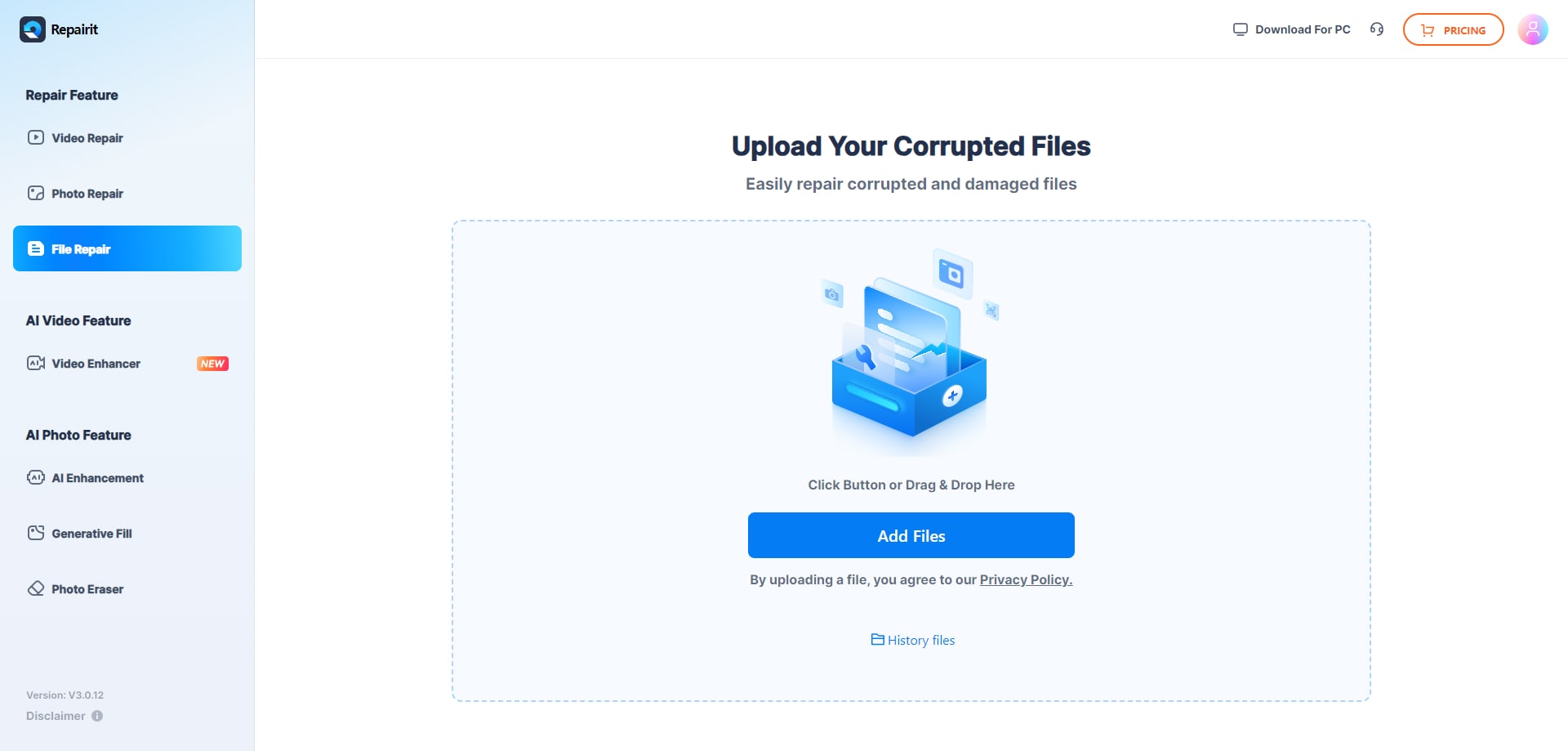
Step 1. Upload the corrupted, damaged, or unreadable files you want to repair through Repairit Online File Repair.
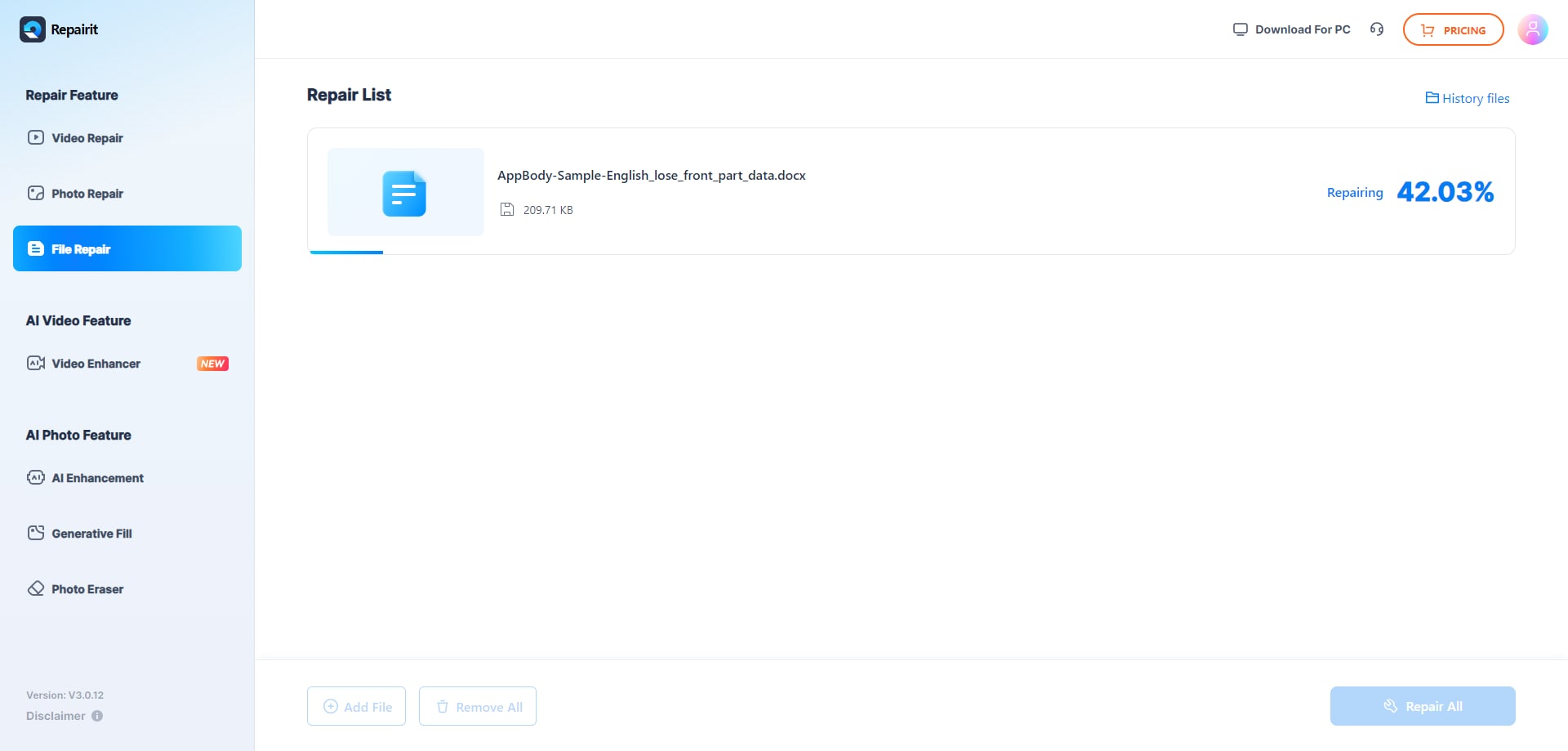
Step 2. Start the online repair process and let Repairit Online File Repair analyze the damaged files.
Step 3. Preview the repaired result when available, then save the repaired files to your device.
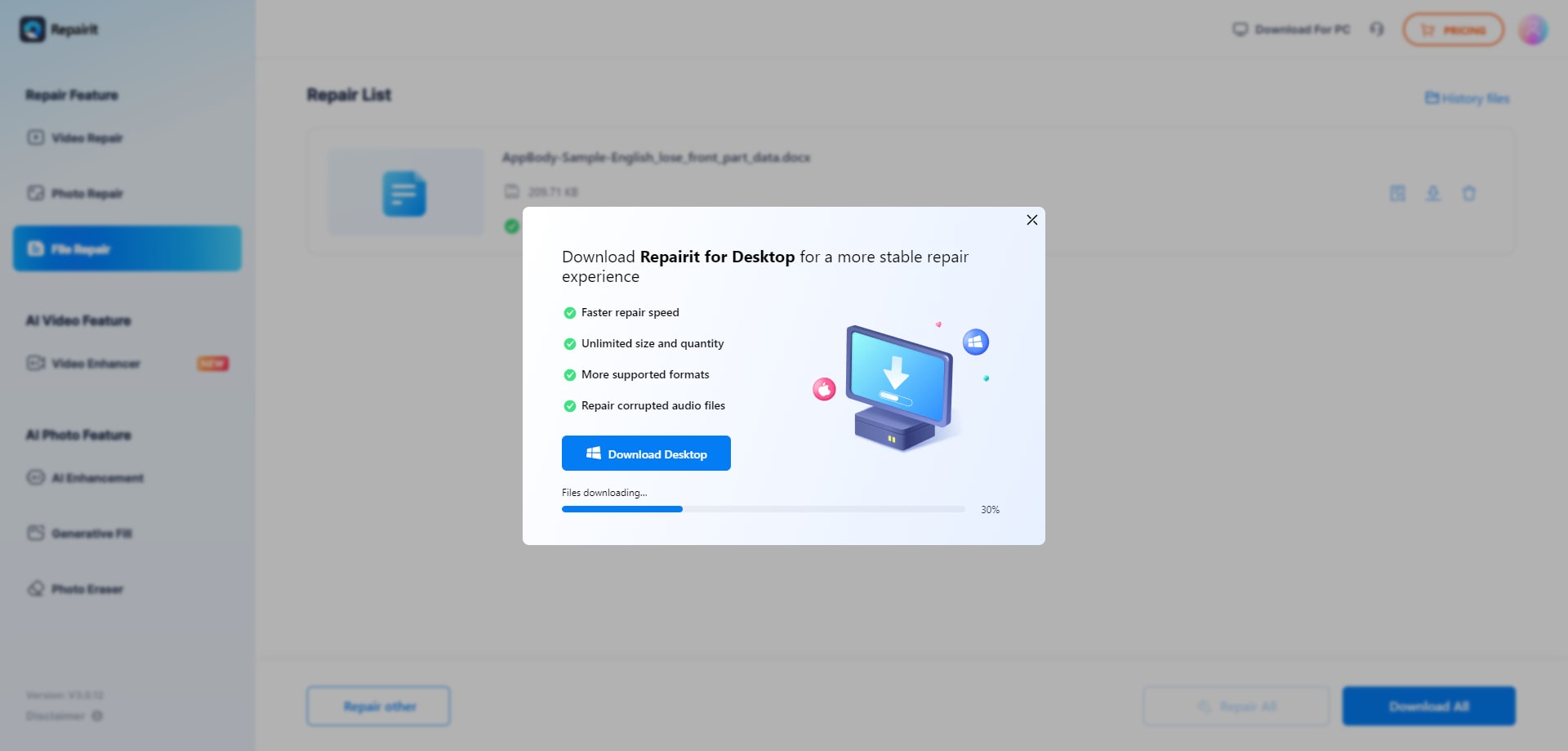
This flow illustrates how online tools can reduce dependence on complex manual repair steps by guiding users through upload, processing, and validation.
Final Verdict: Repairit Online File Repair vs OfficeRecovery Online
Both Repairit Online File Repair and OfficeRecovery Online specialize in repairing corrupted, damaged, broken, or unreadable files online, not in recovering deleted items or lost partitions.
OfficeRecovery Online leans toward technical, enterprise-grade repair of severely corrupted Office, PSD, PNG, RAW, and DBF files, where internal structures may be heavily damaged and deeper logic is needed.
Repairit Online File Repair focuses on a guided, modern interface suited to fixing corrupted PDF files, unreadable Word documents, damaged Excel spreadsheets, PowerPoint files that fail to load, and similar everyday documents.
The right tool for you depends on three main factors:
- Which formats you need to repair and how specialized they are.
- How severe the corruption appears, from small header issues to deeply broken structures.
- Whether your team prefers a guided browser experience or a more technical workflow.
Many users start with a user-friendly workflow for common issues and consider a technical, enterprise-facing tool when faced with extremely corrupt or specialized files.
Next: Repairit Online File Repair vs Recovery Toolbox Online
FAQ
-
1. Is Repairit Online File Repair better than OfficeRecovery Online for corrupted PDFs and Office documents?
Neither tool is universally better. Repairit Online File Repair offers a guided workflow for repairing corrupted PDF, Word, Excel, and PowerPoint files. OfficeRecovery Online focuses more on severely corrupted, enterprise-grade Office and related formats. Choose based on how damaged your files seem, which formats matter most, and how comfortable you are with technical interfaces. -
2. What is the difference between corrupted file repair and deleted file recovery?
Corrupted file repair focuses on fixing existing files that will not open, show errors, or appear invalid because their structures are damaged. Deleted file recovery tries to restore missing files from storage devices. Tools like Repairit Online File Repair and OfficeRecovery Online are aimed at repairing corruption, not recovering deleted or lost files from disks. -
3. When should I pick a guided service like Repairit Online File Repair instead of OfficeRecovery Online?
Consider Repairit Online File Repair when you need clear online steps to repair corrupted PDFs, Word, Excel, or PowerPoint files and prefer a modern interface. OfficeRecovery Online may be a better fit when you handle severely corrupted Office or enterprise formats and are comfortable with a more technical, utilitarian workflow.
"




