
Choosing between Repairit Photo Repair and SysTools Mac Photo Repair Software comes down to how you prefer to repair corrupted, damaged, or distorted photos on your Mac. Both tools focus on fixing broken image files, but they differ in how broad their audience is, how simple the workflow feels, and how they guide you through the process. This comparison walks through features, supported formats, ease of use, and ideal use cases so you can pick the option that fits your everyday photo repair work, whether you handle a few family images or regular client projects.
In this guide, you will see how Repairit Photo Repair compares with a Mac-focused option like SysTools Mac Photo Repair Software, so you can match each tool to your real-world tasks instead of relying on generic promises.
Repair Corrupted Photos with Repairit Photo Repair
 Security Verified. Over 7,302,189 people have downloaded it.
In this article
- Repairit Photo Repair vs SysTools Mac Photo Repair Software: Quick Verdict
- Repairit Photo Repair vs SysTools Mac Photo Repair Software: Key Differences
- Repairit Photo Repair vs SysTools Mac Photo Repair Software: Comparison Table
- What Repairit Photo Repair and SysTools Mac Photo Repair Software Are Best For
- Repairit Photo Repair vs SysTools Mac Photo Repair Software: Features and Capabilities
- Repairit Photo Repair vs SysTools Mac Photo Repair Software: Supported Formats and Compatibility
- Repairit Photo Repair vs SysTools Mac Photo Repair Software: Workflow and Ease of Use
- Repairit Photo Repair vs SysTools Mac Photo Repair Software: Pricing and Trial Options
- Who Should Choose Repairit Photo Repair
- Who Should Choose SysTools Mac Photo Repair Software
- Pros and Cons of Repairit Photo Repair and SysTools Mac Photo Repair Software
- How to Repair Corrupted Photos After Choosing the Right Tool
Repairit Photo Repair vs SysTools Mac Photo Repair Software: Quick Verdict
If you need to repair corrupted photos on Mac and also expect to switch between devices or platforms, Repairit Photo Repair is usually the more flexible choice. It offers a guided workflow that can feel reassuring when you are dealing with different types of image damage, from simple glitches to more noticeable corruption.
If your work happens mainly on a single Mac, and you prefer a straightforward desktop app that keeps everything local, SysTools Mac Photo Repair Software can be a practical fit. It focuses on everyday Mac photo repair tasks without adding many extra layers of complexity.
For users with mixed environments, shared projects, or evolving needs, Repairit tends to offer more room to grow. For dedicated Mac users repairing files on one machine, SysTools aligns with a tighter, Mac-only workflow.
Repairit Photo Repair vs SysTools Mac Photo Repair Software: Key Differences
The key differences between Repairit Photo Repair vs SysTools Mac Photo Repair Software revolve around audience, workflow, and repair depth:
- Audience and platforms: Repairit is designed for users who may work across different operating systems or devices, while SysTools focuses specifically on Mac users who prefer a native-style desktop experience.
- Ease of use: Repairit emphasizes a guided interface that walks you through each step, which can help beginners or mixed-skill teams. SysTools keeps things simple and direct for users already comfortable with classic Mac desktop apps.
- Repair depth: In many day-to-day scenarios, both can handle common corruption. Repairit is generally positioned as more adaptable to varied and sometimes more severe photo issues, while SysTools tends to align with typical corruption problems in regular Mac image libraries.
- Workflow style: Repairit offers a more flexible workflow that scales from quick fixes to deeper sessions, while SysTools centers on load, scan, and export in a streamlined Mac desktop flow.
- Best fit: Repairit suits users who expect their needs to change over time or span multiple systems. SysTools suits users who plan to stay within a Mac-only setup and mainly repair local photos.
Repairit Photo Repair vs SysTools Mac Photo Repair Software: Comparison Table
| Dimension | Repairit Photo Repair |
|---|---|
| Best for | Users who need a versatile photo repair tool for different platforms and mixed environments. |
| Best for (SysTools) | Mac users who want a focused desktop Mac photo repair tool for local image repair. |
| Ease of use | Guided interface designed to walk beginners through each repair step. |
| Ease of use (SysTools) | Simple, straightforward Mac-style interface for users comfortable with basic desktop apps. |
| Repair depth | Stronger choice for tackling more severe corruption and a wider range of photo issues in most cases. |
| Repair depth (SysTools) | Suited to typical corruption problems Mac users encounter in everyday photos. |
| Workflow | Flexible workflow that can scale from quick fixes to more detailed repair sessions. |
| Workflow (SysTools) | Simple desktop workflow centered on loading, scanning, and exporting repaired photos on Mac. |
| Strengths | Broad use cases, cross-platform appeal, and guided repair process for different damage levels. |
| Strengths (SysTools) | Mac-specific workflow, clear photo-repair use case, and a simple step-by-step process for local files. |
| Weaknesses | Can feel more feature-heavy than necessary for users with very light or occasional needs. |
| Weaknesses (SysTools) | Mac-focused positioning makes it less universal for mixed Windows or cross-platform teams. |
What Repairit Photo Repair and SysTools Mac Photo Repair Software Are Best For
SysTools Mac Photo Repair Software is positioned as a desktop Mac photo repair tool for corrupt, damaged, or distorted image files, best for Mac users repairing corrupted photos locally instead of using browser tools. Compared with Repairit Photo Repair, it leans into a focused Mac environment, while Repairit targets broader scenarios, including users who may switch devices or need a bit more guidance when dealing with a variety of broken photos.
In general:
- Choose Repairit Photo Repair if you expect to handle different types of damage, move photos between devices, or share work with people on other systems.
- Choose SysTools Mac Photo Repair Software if you mostly fix photos on one Mac and value a simple, local workflow over cross-platform flexibility.
Repairit Photo Repair vs SysTools Mac Photo Repair Software: Features and Capabilities
Both Repairit Photo Repair and SysTools Mac Photo Repair Software focus on repairing corrupted photos and improving damaged or distorted images, but they approach this with slightly different scopes. Repairit leans into broader, more guided usage, while SysTools keeps a tight focus on Mac users and a straightforward, local workflow.
Core capabilities you can expect from either tool include:
- Repair corrupted photos that fail to open or display correctly.
- Fix damaged images that show visual glitches, artifacts, or distortion.
- Restore photo quality for everyday personal and work images.
Where they start to diverge is in how far they go beyond the basics:
- Repairit offers more flexible workflows that can support a wider variety of damage scenarios in most cases, which helps when you are not sure how bad the corruption is before you begin.
- SysTools Mac Photo Repair Software emphasizes a Mac-specific workflow for users who prefer native-style desktop tools and do not need a lot of extra configuration.
- Repairit is generally better suited for users who expect to handle more complex or frequent repair tasks over time, especially in mixed-device environments.
Repairit Photo Repair vs SysTools Mac Photo Repair Software: Supported Formats and Compatibility
Both tools aim to support common photo formats used on cameras, phones, and desktops, focusing on widely used image file types rather than obscure formats. This usually covers the kinds of photos you capture on consumer cameras, smartphones, and shared creative projects.
Repairit Photo Repair is built to fit mixed environments where users may move photos between different devices. That is useful if you import on Mac today, but tomorrow you are storing or sharing from another operating system.
SysTools Mac Photo Repair Software stays centered on Mac usage and local image libraries, which works well when your photos live mainly in macOS folders or external drives connected to a Mac.
For teams using both Mac and non-Mac systems, Repairit typically offers a more flexible path, while SysTools makes the most sense for workflows that are firmly anchored to Mac machines.
Repairit Photo Repair vs SysTools Mac Photo Repair Software: Workflow and Ease of Use
SysTools Mac Photo Repair Software focuses on a simple desktop workflow where Mac users load corrupted photos, run a repair process, and then save fixed images locally. The process is direct, which can be appealing if you just want to open an app, fix a few damaged images, and move on.
Repairit Photo Repair also keeps the workflow straightforward, but adds more guided steps and flexibility so beginners and advanced users can manage simple or more challenging damage within a single, consistent interface. Guidance can be especially helpful if you do not work with photo tools regularly.
In most situations:
- Repairit will feel familiar to users who like clear, step-by-step prompts and the ability to preview results carefully before saving.
- SysTools will feel natural to Mac users who prefer a minimal interface and already understand how to manage files and folders in macOS.
Repairit Photo Repair vs SysTools Mac Photo Repair Software: Pricing and Trial Options
Both Repairit Photo Repair and SysTools Mac Photo Repair Software are usually available under standard desktop software licensing models, with options that may include free trials or limited test modes so you can evaluate basic repair results.
Because pricing and packaging can change over time, it is best to:
- Check each vendor s official website for current license types, subscription options, or one-time purchase models.
- Verify whether there is a free trial, and if so, which features or export limits apply.
- Consider how many devices you need to activate and whether you are working alone or as part of a team.
Using a trial first is often the safest way to see how each tool handles your real, corrupted photos before committing to a paid plan.
Who Should Choose Repairit Photo Repair
You might lean toward Repairit Photo Repair if your needs extend beyond a single Mac or if you expect your photo repair tasks to become more demanding over time. Repairit is particularly suitable for:
- Users who want a photo repair tool that fits both Mac and non-Mac workflows over time.
- People dealing with a mix of minor glitches and more severe photo corruption.
- Teams that need a guided interface suitable for different skill levels.
- Users who expect their repair needs to grow beyond a single Mac-only setup.
In these scenarios, the extra flexibility and guidance in Repairit can provide more confidence, especially when you are handling client work or irreplaceable personal photos.
Who Should Choose SysTools Mac Photo Repair Software
SysTools Mac Photo Repair Software is likely to be more appealing if you are firmly rooted in the Mac ecosystem and simply want a focused desktop app to fix typical issues with local images. It may be a good match for:
- Mac users who prefer a simple, local desktop tool and rarely leave the Mac ecosystem.
- Photographers who mainly repair corrupted photos stored on a single Mac machine.
- People who do not want to rely on browser-based tools for fixing damaged images.
- Small teams that work primarily on Mac and value a Mac-specific workflow for photo repair.
When these points describe your setup, SysTools can feel less cluttered, since it concentrates on a single platform and a narrower set of use cases.
Pros and Cons of Repairit Photo Repair and SysTools Mac Photo Repair Software
Repairit Photo Repair Pros and Cons
SysTools Mac Photo Repair Software Pros and Cons
How to Repair Corrupted Photos After Choosing the Right Tool
After comparing Repairit Photo Repair vs SysTools Mac Photo Repair Software, the next step is actually repairing your corrupted or damaged photos. Once you know which tool matches your workflow, you can focus on getting your images back into usable shape instead of juggling options.
If you prefer a guided, desktop-centered experience that works across different environments, Repairit Photo Repair can be a practical way to repair corrupted photos, fix damaged images, and restore photo quality without relying on browser-based services. Below is how that process typically looks in practice.
Key Features
- Guided photo repair workflow suitable for different skill levels.
- Support for repairing a variety of common image issues and corruption types.
- Desktop-focused design that keeps photo repair off the browser and under your control.
Step-by-step guide
- Add damaged photos
Launch Repairit Photo Repair and import the damaged or corrupted photos you want to fix.
- Run the repair
Click the repair button and let the tool scan and fix the selected image files automatically.
- Preview and save
Preview the repaired results and save the fixed photos to your preferred location.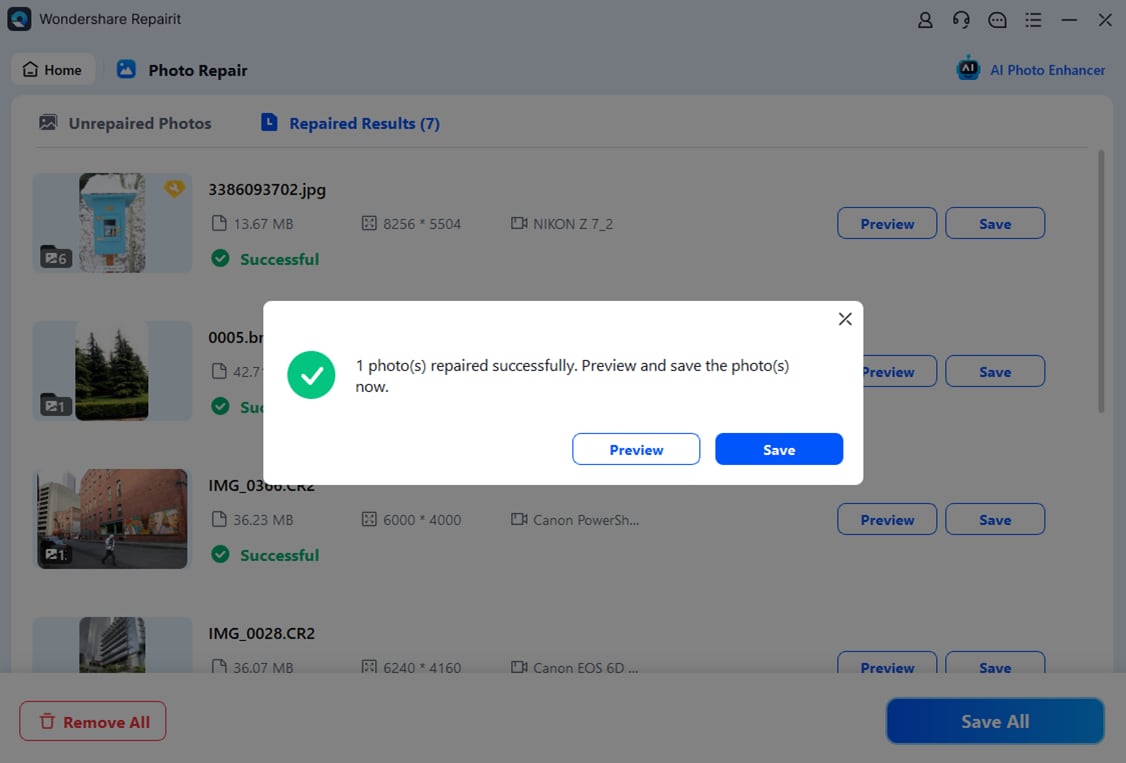
Final Verdict
If you need a tool that can grow with you, handle a range of corrupted photo issues, and support different devices or workflows, Repairit Photo Repair is generally a stronger choice, especially when you want guided steps and flexible repair depth. It suits users who expect to deal with both everyday glitches and more complex damage over time.
SysTools Mac Photo Repair Software may still be enough if you are a dedicated Mac user who wants a compact, desktop Mac photo repair tool for corrupt, damaged, or distorted images, and you primarily repair photos locally on one machine. In that scenario, its Mac-specific workflow and simple process can fit well without adding extra complexity.
Ultimately, the better option depends on whether you value cross-platform flexibility and guided workflows (where Repairit usually stands out) or a Mac-only, streamlined experience (where SysTools can be a solid match).
Next: Repairit Photo Repair VS Sysinfo Photoshop Recovery Tool
FAQ
-
1. Which is better for Mac users, Repairit Photo Repair or SysTools Mac Photo Repair Software?
For Mac-only users who value a focused, local workflow, SysTools Mac Photo Repair Software can be sufficient. If you might use other systems or want more flexible guidance for different corruption levels, Repairit Photo Repair is typically a stronger fit. -
2. Does Repairit Photo Repair fix more severely corrupted photos than SysTools Mac Photo Repair Software?
Repairit Photo Repair is generally positioned to handle a broader range of corruption scenarios, which can make it a better option for tougher cases, although results still depend on how badly each image file is damaged. -
3. Is SysTools Mac Photo Repair Software only for Mac?
SysTools Mac Photo Repair Software is aimed specifically at Mac users, so it works best in environments where photo repair happens mainly on a Mac or within a Mac-based team rather than across mixed operating systems. -
4. When should I choose SysTools Mac Photo Repair Software instead of Repairit Photo Repair?
Choose SysTools Mac Photo Repair Software if you work only on Mac, prefer a simple desktop workflow, and mainly repair typical corrupted or distorted photos stored locally, without needing cross-platform flexibility. -
5. Can I try Repairit Photo Repair before buying a license?
In many cases you can access a trial or limited mode of Repairit Photo Repair to test how it repairs your photos. Check the official Repairit website to confirm the latest trial availability and any feature limitations.




