
Choosing between Repairit Photo Repair vs SysInfo Photoshop Recovery Tool comes down to how you handle damaged images and Photoshop files day to day. Repairit Photo Repair focuses on fixing corrupted, blurry, or pixelated photos across common formats, while SysInfo Photoshop Recovery Tool is positioned as a desktop PSD and PSB repair utility aimed mainly at damaged Adobe Photoshop project files. Understanding how each tool fits your workflow makes it easier to decide which one should handle your next image repair task.
In the sections below, you will see how these tools differ in supported formats, ease of use, repair depth, and ideal use cases, so you can match the software to your actual repair needs rather than choosing on name alone.
Repair Corrupted Photos with Repairit Photo Repair
 Security Verified. Over 7,302,189 people have downloaded it.
In this article
- Repairit Photo Repair vs SysInfo Photoshop Recovery Tool: Quick Verdict
- Repairit Photo Repair vs SysInfo Photoshop Recovery Tool: Key Differences
- Repairit Photo Repair vs SysInfo Photoshop Recovery Tool: Comparison Table
- What Repairit Photo Repair and SysInfo Photoshop Recovery Tool Are Best For
- Repairit Photo Repair vs SysInfo Photoshop Recovery Tool: Features and Capabilities
- Repairit Photo Repair vs SysInfo Photoshop Recovery Tool: Supported Formats and Compatibility
- Repairit Photo Repair vs SysInfo Photoshop Recovery Tool: Workflow and Ease of Use
- Repairit Photo Repair vs SysInfo Photoshop Recovery Tool: Pricing and Trial Options
- Who Should Choose Repairit Photo Repair
- Who Should Choose SysInfo Photoshop Recovery Tool
- Pros and Cons of Repairit Photo Repair and SysInfo Photoshop Recovery Tool
- How to Repair Corrupted Photos After Choosing the Right Tool
Repairit Photo Repair vs SysInfo Photoshop Recovery Tool: Quick Verdict
When you compare Repairit Photo Repair vs SysInfo Photoshop Recovery Tool, the right choice depends on whether you mainly fix everyday image files or damaged Photoshop projects.
Repairit Photo Repair is typically a stronger choice for users who manage broad photo libraries and need to repair corrupted, blurry, or pixelated photos in formats like JPG or PNG. Its guided workflow and general-purpose image support make it easier for photographers, casual users, and mixed-media teams.
SysInfo Photoshop Recovery Tool may be more relevant if your work revolves around PSD and PSB files and you mostly need to fix Photoshop project structures so those files can open again in Adobe Photoshop. In those Photoshop-heavy scenarios, its focus on project files can be useful.
Repairit Photo Repair vs SysInfo Photoshop Recovery Tool: Key Differences
The core difference between these tools is what they prioritize: Repairit Photo Repair concentrates on common image formats and visible photo quality issues, while SysInfo Photoshop Recovery Tool concentrates on PSD and PSB file structures.
Here is how that plays out in practice based on the key dimensions from the comparison data:
- Best for: Repairit suits users repairing corrupted or low-quality photos across multiple formats; SysInfo is oriented to users working primarily with Photoshop project files.
- Ease of use: Repairit is designed with a straightforward, guided interface, while SysInfo leans more toward users who already feel comfortable with desktop Photoshop workflows.
- Repair depth: Repairit focuses on visible image damage such as distortion, artifacts, and pixelation; SysInfo aims at PSD and PSB structure-level issues that affect layered Photoshop files.
- Workflow: Repairit provides a simple flow of import, analyze, preview, and export; SysInfo follows a specialist project file handling approach aligned with desktop Photoshop use.
- Strengths and weaknesses: Repairit offers breadth across many photo formats, whereas SysInfo offers depth within a narrow Photoshop file niche, which may feel too limited for general photo repair.
Repairit Photo Repair vs SysInfo Photoshop Recovery Tool: Comparison Table
| Dimension | Repairit Photo Repair | SysInfo Photoshop Recovery Tool |
|---|---|---|
| Best for | General photo repair across common image formats, including fixing corruption and quality issues in everyday photos. | Users repairing corrupted Photoshop project files (PSD, PSB) rather than general photo libraries. |
| Ease of use | Designed for straightforward, guided photo repair with an accessible interface for most users. | More specialist feel that suits users already comfortable managing desktop Photoshop workflows. |
| Repair depth | Aims to handle a range of visible photo damage, corruption, and quality problems on standard images. | Focused repair depth around PSD and PSB structure issues within damaged Photoshop files. |
| Workflow | Streamlined, step-based photo repair workflow that focuses on importing, analyzing, and exporting fixed images. | Specialist desktop workflow closely aligned with Adobe Photoshop project handling. |
| Strengths | Broad image format support, user-friendly flow, and suitable for mixed photo collections and diverse repair tasks. | Format-specific repair focus that can be useful for PSD and PSB workflows in Photoshop-heavy environments. |
| Weaknesses | Less narrowly tuned to advanced Photoshop project internals compared with specialist PSD tools. | Too narrow for general image repair comparisons outside Photoshop-heavy use cases and non-PSD images. |
What Repairit Photo Repair and SysInfo Photoshop Recovery Tool Are Best For
The two tools are built for different primary goals, which shapes which one will feel more natural in your workflow.
Repairit Photo Repair is best for users who need to:
- Repair corrupted or unreadable images from cameras, phones, or computers in widely used formats such as JPG, JPEG, or PNG.
- Fix visible issues like distortion, artifacts, or pixelation that make photos look damaged or low quality.
- Handle mixed-format image collections without worrying about whether each file is a Photoshop project.
SysInfo Photoshop Recovery Tool, by contrast, is best for users who:
- Primarily work with PSD and PSB Photoshop files and need a way to open damaged project files again.
- Spend most of their time inside Adobe Photoshop, where layered project structures matter more than finished photo exports.
- Need a format-specific desktop utility that fits into an established Photoshop-driven workflow.
This difference explains why Repairit tends to suit more general photo libraries, while SysInfo aligns better with design teams and Photoshop-centric environments.
Repairit Photo Repair vs SysInfo Photoshop Recovery Tool: Features and Capabilities
At a high level, Repairit Photo Repair is built around repairing corrupted or visually damaged photos in common image formats, while SysInfo Photoshop Recovery Tool concentrates on PSD and PSB repair for Photoshop workflows. SysInfos strength lies in its format-specific focus, which can be useful in design studios, but that same specialization can be limiting if you need to repair a wide variety of everyday photos.
Looking at the core capabilities:
- Repairit Photo Repair offers import, analysis, and export options for many common corrupted photo formats.
- SysInfo Photoshop Recovery Tool targets opening and repairing damaged PSD and PSB project files on desktop.
- Both tools seek to restore image usability so files can be opened and edited again.
For more advanced scenarios:
- Repairit Photo Repair provides broader coverage for visible photo issues such as distortion, artifacts, or pixelation in standard images.
- SysInfo Photoshop Recovery Tool emphasizes PSD and PSB structure-level repair, which can support Photoshop layer-based workflows in many cases.
- Repairit Photo Repair can be used across diverse situations, from camera shots to social photos, while SysInfo fits more technical, Photoshop-heavy environments.
Repairit Photo Repair vs SysInfo Photoshop Recovery Tool: Supported Formats and Compatibility
Supported formats are one of the clearest distinctions in this comparison.
Repairit Photo Repair generally focuses on widely used image formats such as JPG, JPEG, PNG, and similar photo types. That makes it suitable for varied image collections spread across desktops or laptops, regardless of whether you are a professional photographer or a casual user managing personal albums.
SysInfo Photoshop Recovery Tool is oriented toward PSD and PSB Photoshop files on desktop systems. If your workflow is dominated by layered Photoshop projects and you rarely touch non-PSD images, this narrow focus can be an advantage. However, if you mainly work with standard photos instead of PSD or PSB, Repairit typically aligns better with what you actually need to repair.
Repairit Photo Repair vs SysInfo Photoshop Recovery Tool: Workflow and Ease of Use
Workflow and usability can affect how quickly you can get from a corrupted image to a usable file again.
Repairit Photo Repair is built around a straightforward, guided process:
- You load damaged photos into the software.
- You run the repair, letting the tool analyze and attempt to fix structural and visual issues.
- You preview results and then export the repaired images.
This style tends to be approachable even for users who do not spend much time with advanced editing tools.
SysInfo Photoshop Recovery Tool follows a more specialist desktop workflow. It can feel natural for experienced Photoshop users who already manage PSD or PSB files regularly, but the interface and options may appear more technical to casual users who only occasionally need to fix damaged images. If you are used to handling Photoshop projects, this may not be a concern; if you just want to fix a batch of everyday photos, Repairits guided steps may feel more comfortable.
Repairit Photo Repair vs SysInfo Photoshop Recovery Tool: Pricing and Trial Options
Both Repairit Photo Repair and SysInfo Photoshop Recovery Tool are typically offered as paid desktop utilities. In many cases, there are trial or demo options so you can test how well they repair your files before buying a license.
Because exact pricing, license types, and demo limitations can change over time, it is best to check each vendors website for up-to-date details. When comparing costs, consider:
- How many photos or PSD files you expect to repair over time.
- Whether you need cross-platform use on both Windows and Mac.
- If a subscription or one-time license is more suitable for your workload.
Weighing these factors against the kind of files you repair most often will help decide whether a general-purpose photo repair tool or a niche PSD repair utility offers better overall value.
Who Should Choose Repairit Photo Repair
You may want to choose Repairit Photo Repair if your day-to-day image work looks like one or more of the scenarios below:
- Users with mixed-format photo libraries who need to repair corrupted or low-quality images from different sources.
- People who prefer a guided, user-friendly photo repair process without dealing with complex Photoshop project structures.
- Photographers or casual users who primarily work with JPG, JPEG, PNG, and similar standard image formats.
- Anyone who wants a versatile photo repair tool that can support broader repair needs beyond Photoshop files alone.
In most cases, if you do not live inside Photoshop and simply want a reliable way to repair damaged images, Repairit is likely to feel more intuitive and widely applicable.
Who Should Choose SysInfo Photoshop Recovery Tool
SysInfo Photoshop Recovery Tool can be a practical choice when your needs are tightly focused on layered Photoshop projects rather than mixed photo collections. It is more likely to suit you if:
- You are a designer or studio that frequently repairs corrupted PSD and PSB Photoshop project files.
- Your workflow revolves around Adobe Photoshop and layered project files more than standard exported photos.
- Your team needs a format-specific tool for PSD and PSB repair within a specialist desktop environment.
- Your main priority is bringing damaged project files back to an editable state, not fixing everyday photos.
If that describes your environment, a PSD-centric utility may integrate more directly with your existing processes, even if it is not designed for general-purpose photo repair.
Pros and Cons of Repairit Photo Repair and SysInfo Photoshop Recovery Tool
Looking at pros and cons side by side can clarify which tool matches your expectations and limitations.
Repairit Photo Repair Pros and Cons
SysInfo Photoshop Recovery Tool Pros and Cons
How to Repair Corrupted Photos After Choosing the Right Tool
Once you have compared Repairit Photo Repair vs SysInfo Photoshop Recovery Tool and decided which one matches your workflow, the next step is actually repairing your damaged images. For many users who work mostly with standard photo formats, a guided tool like Repairit offers a straightforward way to move from comparison to action without needing to learn complex repair procedures.
Key Features
- Repairs corrupted or unreadable image files in popular photo formats.
- Helps improve visibly damaged photos, including issues like distortion, artifacts, or pixelation in many cases.
- Provides a preview-based workflow so you can check repaired photos before saving them.
Step-by-step guide
- Add damaged photos
Launch Repairit Photo Repair and import the damaged or corrupted photos you want to fix.
- Run the repair
Click the repair button and let the tool scan and fix the selected image files automatically.
- Preview and save
Preview the repaired results and save the fixed photos to your preferred location.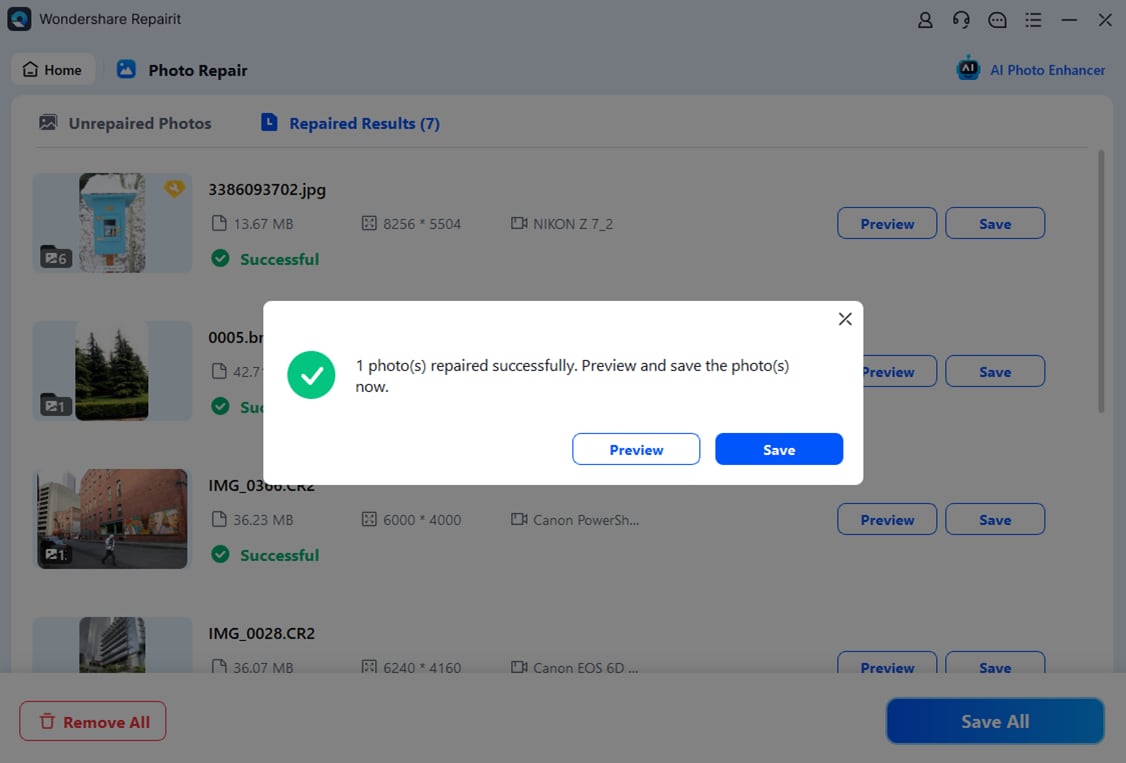
Final Verdict
Overall, Repairit Photo Repair is a stronger choice for users who handle diverse photo formats and need a straightforward way to repair corrupted, blurry, or pixelated images across entire libraries. Its guided workflow and broad image focus make it suitable for photographers, casual users, and teams that do not live exclusively inside Photoshop.
SysInfo Photoshop Recovery Tool may still be enough when your main concern is repairing damaged PSD or PSB project files within a specialist desktop workflow. If your environment is heavily Photoshop-centric and general photo repair is secondary, its format-specific focus can be appropriate.
In most mixed photo scenarios, however, where you are dealing with standard images from cameras, phones, or shared folders, Repairit Photo Repair is likely the more versatile option for fixing damaged images and restoring photo quality.
FAQ
-
1. What is the main difference between Repairit Photo Repair and SysInfo Photoshop Recovery Tool?
The key difference is focus: Repairit Photo Repair targets general photo repair across common image formats, while SysInfo Photoshop Recovery Tool concentrates mainly on PSD and PSB Photoshop project files. -
2. Which is better for repairing everyday corrupted photos?
For everyday corrupted photos in formats like JPG or PNG, Repairit Photo Repair is typically the stronger choice because it is designed around standard image libraries rather than only PSD or PSB files. -
3. When should I choose SysInfo Photoshop Recovery Tool over Repairit Photo Repair?
You may choose SysInfo Photoshop Recovery Tool if you primarily work with PSD and PSB files, rely heavily on Photoshop, and mostly need to repair corrupted project files instead of general photos. -
4. Can I use both tools in the same workflow?
Yes, some users may use Repairit Photo Repair for broad image repair and rely on SysInfo Photoshop Recovery Tool for PSD and PSB issues in parallel, especially in mixed photo and design environments. -
5. Do these tools guarantee that every damaged image will be fully repaired?
No repair tool can guarantee success for every file. Outcomes depend on how severely the image or project file is damaged, so it is wise to test with trial versions where available before making a final decision.




