
Choosing between Repairit Photo Repair and Stellar Repair for Photo can be confusing if you work with damaged or heavily corrupted images. Both tools aim to repair corrupted photos and restore photo quality, but they differ in workflow, depth of repair, and how beginner-friendly they feel. In this guide, we compare Repairit Photo Repair with Stellar Repair for Photo so you can pick the option that fits your repair needs, skill level, and typical projects without guesswork.
Repair Corrupted Photos with Repairit Photo Repair
 Security Verified. Over 7,302,189 people have downloaded it.
In this article
- Repairit Photo Repair vs Stellar Repair for Photo: Quick Verdict
- Repairit Photo Repair vs Stellar Repair for Photo: Key Differences
- Repairit Photo Repair vs Stellar Repair for Photo: Comparison Table
- What Repairit Photo Repair and Stellar Repair for Photo Are Best For
- Repairit Photo Repair vs Stellar Repair for Photo: Features and Capabilities
- Repairit Photo Repair vs Stellar Repair for Photo: Supported Formats and Compatibility
- Repairit Photo Repair vs Stellar Repair for Photo: Workflow and Ease of Use
- Repairit Photo Repair vs Stellar Repair for Photo: Pricing and Trial Options
- Who Should Choose Repairit Photo Repair
- Who Should Choose Stellar Repair for Photo
- Pros and Cons of Repairit Photo Repair and Stellar Repair for Photo
- How to Repair Corrupted Photos After Choosing the Right Tool
Repairit Photo Repair vs Stellar Repair for Photo: Quick Verdict
If you mainly want a guided, easy-to-follow way to fix damaged images from phones and cameras, Repairit Photo Repair is usually the smoother choice. It focuses on clarity and a step-based flow, so you can import, repair, preview, and save without much setup.
Stellar Repair for Photo leans more toward a professional, repair-focused environment. It can be a better fit when you regularly handle severely corrupted photos and prefer a more detailed, tool-centric workflow, even if that means a bit more complexity.
In practice, many users find that Repairit covers most everyday and professional repair needs, while Stellar may be used when you expect particularly tough or high-value corruption cases.
Repairit Photo Repair vs Stellar Repair for Photo: Key Differences
Both tools target similar problems, but they take different approaches to usability and depth. Here is how they generally compare across the main aspects that matter when you need to repair corrupted photos and restore photo quality.
- Best for: Repairit suits users who want guided, versatile repair across common corruption issues. Stellar tends to fit professionals working on high-value, severely damaged images.
- Ease of use: Repairit offers a more approachable, step-based interface. Stellar takes a more technical, professional-style approach that can require more familiarity.
- Repair depth: Both focus on improving distorted, pixelated, or artifact-heavy images. Stellar places more emphasis on handling serious corruption, while Repairit aims to balance depth with usability.
- Workflow: Repairit streamlines setup and repair into a straightforward path. Stellar offers a heavier, detail-oriented workflow that some experts prefer.
- Strengths: Repairit stands out for its user-friendly design and broad, flexible repair options. Stellar is known for its strong repair focus and wide applicability to demanding use cases.
- Weaknesses: Repairit may feel less specialized for highly niche pipelines. Stellar can feel slower or less friendly for casual or first-time users.
Repairit Photo Repair vs Stellar Repair for Photo: Comparison Table
| Dimension | Repairit Photo Repair | Stellar Repair for Photo |
|---|---|---|
| Best for | Users who want guided, versatile photo repair for a wide range of corruption issues. | Professionals and users handling high-value or severely damaged photos where depth matters most. |
| Ease of use | More approachable interface with a straightforward, step-based repair flow. | Less beginner-friendly, with a more technical, professional-style interface. |
| Repair depth | Strong, well-balanced repair depth suitable for most everyday and professional cases. | Emphasizes strong repair depth for serious or complex image corruption. |
| Workflow | Streamlined, guided workflow focused on quick setup and repair results. | Professional and repair-focused workflow that can feel heavier and more detailed. |
| Strengths | User-friendly design, flexible repair options, and broad use cases. | Strong repair depth, wide format support, and reliability for serious corruption. |
| Weaknesses | May feel less specialized for very niche professional pipelines. | Heavier workflow and less beginner-friendly, which can slow casual users. |
What Repairit Photo Repair and Stellar Repair for Photo Are Best For
Stellar Repair for Photo positions itself as a professional desktop photo repair tool for severely corrupted image files. It is best for professionals and users handling high-value or severely damaged photos who need a focused, repair-driven environment. Compared with Repairit Photo Repair, it leans more into depth and control than simplicity, which can be an advantage in complex cases but less ideal for quick, occasional fixes.
Repairit, on the other hand, is typically a better match if you work with a mix of lightly to moderately corrupted photos and want a clear, guided process from import to export.
Repairit Photo Repair vs Stellar Repair for Photo: Features and Capabilities
Repairit Photo Repair and Stellar Repair for Photo share core capabilities like repairing corrupted photos, fixing damaged images, and improving visual quality, but they approach repair depth and usability differently. Repairit balances power with a guided interface, while Stellar Repair for Photo leans into a more professional, repair-focused experience with a heavier workflow.
At a basic level, both tools generally allow you to:
- Repair corrupted photos from common image formats in a desktop environment.
- Fix visual issues like distortion, artifacts, or pixelation in damaged images.
- Batch-handle multiple photos in one repair session for efficiency.
On the more advanced side, you can typically expect options such as:
- Deeper repair modes or options that target more complex corruption scenarios, depending on the tool.
- Preview repaired images before saving, so you can decide which files are worth keeping.
- Flexible handling of different corruption levels, from minor glitches to more serious damage.
Where they mainly differ is in how these capabilities are surfaced: Repairit tends to guide you through them, while Stellar expects you to be more comfortable working inside a professional repair interface.
Repairit Photo Repair vs Stellar Repair for Photo: Supported Formats and Compatibility
Both Repairit Photo Repair and Stellar Repair for Photo are designed to handle popular image formats commonly used by cameras and phones, along with additional formats for professional workflows. In most cases, each will cover typical JPEG and similar formats, while Stellar Repair for Photo tends to emphasize wide format support for more specialized image sets.
For everyday work with phone shots and standard camera images, either solution is usually sufficient. If you often receive files from varied or specialized sources, you may want to check each product is compatible with the specific image formats you handle most.
Repairit Photo Repair vs Stellar Repair for Photo: Workflow and Ease of Use
Repairit Photo Repair focuses on a guided, streamlined workflow that helps users move from import to export with minimal friction. This can be especially useful if you do not repair images every day or if you prefer clear on-screen steps.
Stellar Repair for Photo uses a more professional and repair-focused workflow that can feel heavier and less beginner-friendly, but may suit users who prefer a more detailed, tool-centric repair process. Over time, technical users may appreciate this structure, while casual users might find it slower to navigate.
Repairit Photo Repair vs Stellar Repair for Photo: Pricing and Trial Options
Both Repairit Photo Repair and Stellar Repair for Photo are typically offered as paid desktop tools, often with trial options that let you test repair results before committing. Exact pricing and licensing may vary by plan or promotion, so it is best to compare current offers on their official sites and evaluate them against how frequently you need to fix damaged images.
In most cases, a good approach is to:
- Download a trial version and run it on a small set of your own corrupted photos.
- Compare how easy the interface feels, how the repaired output looks, and whether the workflow fits into your daily routine.
- Choose a license model that matches your usage, whether that is occasional repairs or constant client work.
Who Should Choose Repairit Photo Repair
You may find Repairit Photo Repair a better match if your priority is a clear, guided experience that still handles a broad range of corruption issues. It tends to fit users who want to spend more time evaluating results and less time configuring settings.
- Users who want a clear, guided interface to repair corrupted photos with minimal learning curve.
- Photographers and content creators handling a mix of light to moderately severe image corruption.
- People who value a balance between repair depth and everyday usability.
- Anyone who repairs photos occasionally and wants a smooth, predictable workflow.
Who Should Choose Stellar Repair for Photo
Stellar Repair for Photo can be the better option for users whose main concern is dealing with demanding or complex damage, even if it means using a less beginner-oriented interface.
- Professionals managing high-value or client-critical photos that show severe corruption.
- Users who prioritize strong repair depth and wide format support over simplicity.
- Technical users comfortable with a heavier, repair-focused workflow on desktop.
- Studios and teams that frequently deal with seriously damaged images and need reliable results.
Pros and Cons of Repairit Photo Repair and Stellar Repair for Photo
Both tools have clear strengths and trade-offs. Looking at pros and cons side by side can clarify which one fits your way of working with corrupted photos.
Repairit Photo Repair Pros and Cons
Stellar Repair for Photo Pros and Cons
How to Repair Corrupted Photos After Choosing the Right Tool
Once you understand how Repairit Photo Repair and Stellar Repair for Photo compare, the next step is actually fixing your corrupted or distorted images. No matter which tool you end up favoring for long-term use, it helps to start with a straightforward, guided process so you can quickly see how much detail can be recovered.
Repairit Photo Repair offers a practical desktop workflow that walks you through adding damaged images, running repair, and previewing results before you save anything. This makes it a useful starting point even if you later decide to explore more specialized setups.
Key Features
- Guided repair process for corrupted and damaged photos.
- Preview of repaired images before exporting the final files.
- Support for handling multiple images in a single repair session.
Step-by-step guide
- Add damaged photos
Launch Repairit Photo Repair and import the damaged or corrupted photos you want to fix.
- Run the repair
Click the repair button and let the tool scan and fix the selected image files automatically.
- Preview and save
Preview the repaired results and save the fixed photos to your preferred location.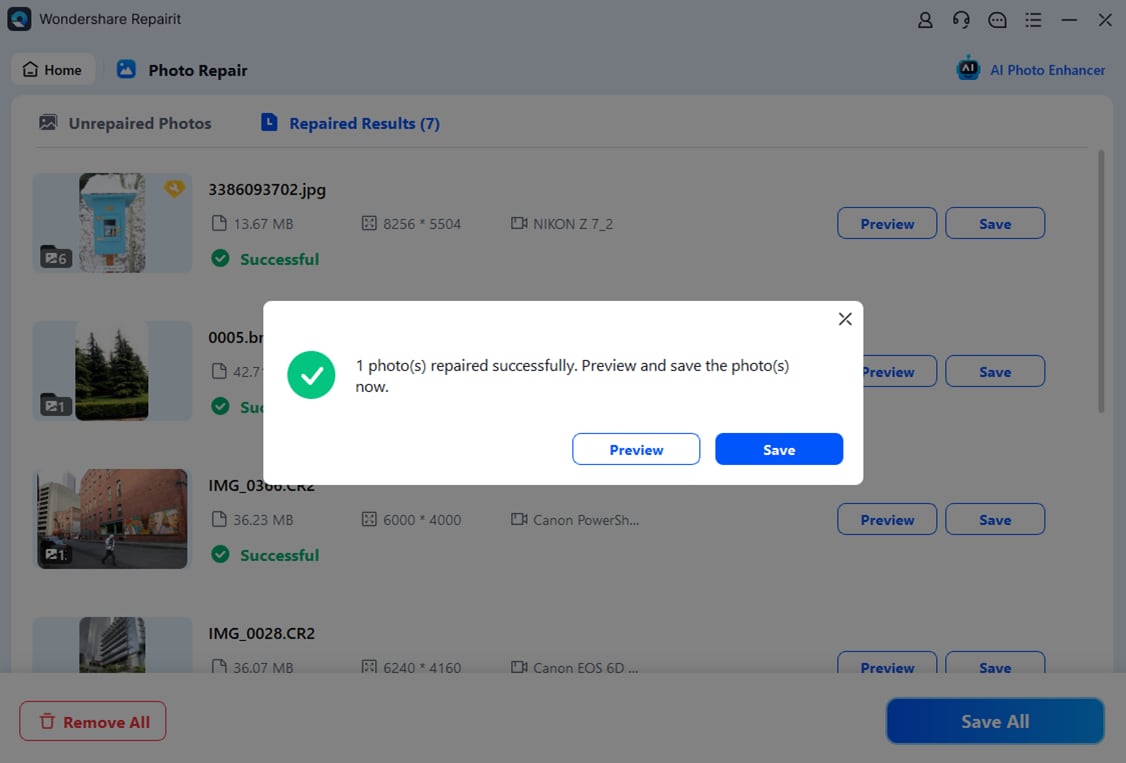
Final Verdict
Repairit Photo Repair is a stronger choice if you want a guided, easy-to-follow workflow that still handles a wide range of corruption issues. It suits users who deal with damaged images regularly but do not want a complex, technical interface slowing them down.
Stellar Repair for Photo may be enough if you are a professional or technical user handling high-value, severely corrupted photos and you prefer a more detailed, repair-focused desktop experience. In many workflows, starting with Repairit Photo Repair will cover most needs, while Stellar Repair for Photo can be considered for particularly demanding or specialized cases.
Next: Repairit Photo Repair vs Remo Photo Repair
FAQ
-
1. Is Repairit Photo Repair better than Stellar Repair for Photo for severely corrupted images?
For many severe corruption cases, both tools can help. Repairit Photo Repair emphasizes a guided workflow with strong repair capabilities, while Stellar Repair for Photo is positioned more for professionals who routinely handle seriously damaged photos. The better choice depends on whether you prioritize ease of use or a more technical repair environment. -
2. Which is easier to use, Repairit Photo Repair or Stellar Repair for Photo?
Repairit Photo Repair is generally easier to use thanks to its streamlined, step-based interface. Stellar Repair for Photo offers a more professional, repair-focused workflow that can feel heavier for beginners but may suit experienced users who like detailed control. -
3. Can I try both Repairit Photo Repair and Stellar Repair for Photo before buying?
In most cases, both tools provide some form of trial or preview so you can see how well they repair corrupted photos before purchasing. It is a good idea to test each one with your own damaged images and compare workflow comfort and visual results.




