
Repairit Photo Repair vs SoftOrbits Picture Doctor is a comparison many users make when they need to repair corrupted, blurry, or low-quality photos without getting lost in technical details. Choosing the right image repair tool is easier when you understand how each option fits your skills and workflow. In this guide, we look at Repairit Photo Repair alongside SoftOrbits Picture Doctor to see how they handle damaged or degraded photos. We will explore who each tool is best for, how simple they are to use, and what kind of repair depth you can expect so you can decide which solution matches your image repair needs.
Both tools aim to help you fix damaged images, but they approach the task differently. One leans toward more guided, flexible repair, while the other focuses on being straightforward and beginner friendly. Understanding this difference is the key to picking the right tool for your photos.
Repair Corrupted Photos with Repairit Photo Repair
 Security Verified. Over 7,302,189 people have downloaded it.
In this article
- Repairit Photo Repair vs SoftOrbits Picture Doctor: Quick Verdict
- Repairit Photo Repair vs SoftOrbits Picture Doctor: Key Differences
- Repairit Photo Repair vs SoftOrbits Picture Doctor: Comparison Table
- What Repairit Photo Repair and SoftOrbits Picture Doctor Are Best For
- Repairit Photo Repair vs SoftOrbits Picture Doctor: Features and Capabilities
- Repairit Photo Repair vs SoftOrbits Picture Doctor: Supported Formats and Compatibility
- Repairit Photo Repair vs SoftOrbits Picture Doctor: Workflow and Ease of Use
- Repairit Photo Repair vs SoftOrbits Picture Doctor: Pricing and Trial Options
- Who Should Choose Repairit Photo Repair
- Who Should Choose SoftOrbits Picture Doctor
- Pros and Cons of Repairit Photo Repair and SoftOrbits Picture Doctor
- How to Repair Corrupted Photos After Choosing the Right Tool
Repairit Photo Repair vs SoftOrbits Picture Doctor: Quick Verdict
When comparing Repairit Photo Repair vs SoftOrbits Picture Doctor, the choice usually comes down to how damaged your photos are and how much control you want over the repair process.
Repairit Photo Repair tends to suit users who often work with corrupted or heavily distorted photos and want a guided workflow that can handle different damage levels. It focuses on broader capabilities and flexible repair modes, which can help in many everyday image damage scenarios.
SoftOrbits Picture Doctor is oriented more toward casual users who just need a simple way to fix common issues in a handful of images. Its strength lies in being approachable and straightforward, rather than offering a large number of advanced options.
In many cases, Repairit is a stronger fit for ongoing or more demanding repair tasks, while SoftOrbits Picture Doctor may be enough if you mainly deal with lightly corrupted or slightly degraded photos and prefer a minimal interface.
Repairit Photo Repair vs SoftOrbits Picture Doctor: Key Differences
The main differences between these two image repair tools relate to depth of repair, workflow, and who they are aimed at.
- Best for: Repairit Photo Repair is oriented toward users dealing with deeper or varied photo damage, while SoftOrbits Picture Doctor suits casual users focusing on quick, simple fixes.
- Ease of use: Both are approachable, but Repairit includes more guided options for complex repair scenarios, whereas SoftOrbits Picture Doctor keeps its interface very simple with fewer decisions to make.
- Repair depth: Repairit usually offers more flexibility for addressing different levels of corruption and visual defects, while SoftOrbits Picture Doctor tends to align with lighter repairs and basic corrections.
- Workflow: Repairit follows a step-by-step, guided workflow that can support multiple repair scenarios. SoftOrbits Picture Doctor focuses on a shorter, more direct process from open to save.
- Strengths and weaknesses: Repairit provides broader capabilities but may feel more feature rich than some users need. SoftOrbits Picture Doctor is simple and quick for everyday tasks but may feel limited when dealing with severe damage.
Repairit Photo Repair vs SoftOrbits Picture Doctor: Comparison Table
| Dimension | Repairit Photo Repair | SoftOrbits Picture Doctor |
|---|---|---|
| Best for | Users who need deeper photo repair and more versatility across damaged image types | Casual users who want a straightforward tool to fix common image issues |
| Ease of use | Guided interface with clear options for complex repair tasks | Very user-friendly layout that suits beginners and occasional users |
| Repair depth | Designed to handle more severe corruption and quality loss in many scenarios | Better suited to lighter repairs and basic image corrections |
| Workflow | Step-by-step workflow that supports multiple repair scenarios | Simple workflow focused on quick, direct image repair actions |
| Strengths | Broad capabilities, flexible repair modes, helpful guidance | User-friendly design, simple setup, quick for casual fixes |
| Weaknesses | Can feel more complex than needed for very simple tasks | Limited depth for heavy damage or more demanding repair needs |
What Repairit Photo Repair and SoftOrbits Picture Doctor Are Best For
Both tools position themselves as photo repair software, but they lean toward different audiences and use cases.
Repairit Photo Repair focuses on broader repair capabilities and can be useful when you frequently encounter corrupted, pixelated, or visibly distorted images. It aims to guide users through different repair levels, so it often fits people who regularly need to restore photo quality in varying conditions.
SoftOrbits Picture Doctor, by contrast, is more tuned to users who have a few damaged images to fix now and then and want to keep things simple. It is a better match for quick corrections on slightly corrupted or low-quality photos where deep configuration is not required.
In practice, if your workflow includes mixed batches of photos with different damage levels, Repairit is more likely to feel comfortable. If you just want a straightforward way to fix a few problematic images without exploring many options, SoftOrbits Picture Doctor usually feels more direct.
Repairit Photo Repair vs SoftOrbits Picture Doctor: Features and Capabilities
Both tools aim to repair corrupted or visually damaged photos, but they take different approaches to features and control. Overall, Repairit Photo Repair vs SoftOrbits Picture Doctor can be seen as a choice between more flexibility and more simplicity.
Shared core capabilities
At a basic level, both tools typically support similar core functions:
- Import and scan damaged or corrupted image files for issues.
- Automatically correct common visual defects like artifacts or minor distortions.
- Preview repaired photos before saving the final version.
How Repairit Photo Repair usually goes further
Repairit Photo Repair tends to emphasize more detailed controls and repair modes:
- More options to address severe corruption or complex image defects in many cases.
- Better suited for handling larger sets of photos with varied damage levels.
- More guided controls for adjusting how aggressively images are repaired compared with a simpler approach in SoftOrbits Picture Doctor.
This does not mean Repairit is complicated, but it does mean you have more room to adapt it to different types of image issues.
Where SoftOrbits Picture Doctor fits in
SoftOrbits Picture Doctor keeps its capabilities focused on the essentials needed for mainstream damage. Instead of offering many detailed controls, it aims to make the repair process feel short and easy. Users who do not want to tweak settings may find that appealing, especially for casual repair tasks.
Repairit Photo Repair vs SoftOrbits Picture Doctor: Supported Formats and Compatibility
Both tools focus on repairing common photo formats that everyday users usually work with. In most situations, you will be dealing with image files from phones, consumer cameras, or desktop folders, and both products are designed with those scenarios in mind.
Repairit Photo Repair generally aims at broader format support and flexible use across typical desktop environments. This can be helpful if you handle photos coming from different cameras or devices and want one place to work on them. While exact format lists can change, the general idea is to cover mainstream image types rather than niche formats.
SoftOrbits Picture Doctor is positioned as a straightforward desktop tool for mainstream image types. It is typically oriented around repairing widely used formats rather than specialized or highly technical image file types. This fits its overall goal of serving users with standard photo repair needs.
For precise format lists or platform details, it is best to check each vendor directly, but in ordinary workflows both tools concentrate on popular image formats that most people use daily.
Repairit Photo Repair vs SoftOrbits Picture Doctor: Workflow and Ease of Use
Workflow and ease of use are often the deciding factors when choosing between Repairit Photo Repair vs SoftOrbits Picture Doctor. Both aim to be user friendly, but they structure the repair process differently.
Repairit Photo Repair workflow
Repairit Photo Repair offers a guided, step-based process that walks you through adding damaged images, running repairs, and previewing the results. This guided workflow can suit users who:
- Are not experts but still need to handle more serious or varied image damage.
- Prefer clear steps and on-screen guidance when working with corrupted photos.
- Often repair multiple images at once and want an organized way to manage them.
SoftOrbits Picture Doctor workflow
SoftOrbits Picture Doctor emphasizes simplicity. Its workflow is typically shorter and focuses on:
- Loading one or more images.
- Applying a repair process with minimal configuration.
- Saving the repaired versions.
This simple pattern is helpful for beginners or occasional users who want to fix damaged images quickly and do not need to adjust many settings.
In general, if you appreciate step-by-step guidance for more complex damage, Repairit tends to fit better. If you value the shortest path from damaged file to usable image and your repairs are light, the SoftOrbits workflow may feel more natural.
Repairit Photo Repair vs SoftOrbits Picture Doctor: Pricing and Trial Options
Both Repairit Photo Repair and SoftOrbits Picture Doctor are typically available as paid desktop applications, often with different license options for individual users.
It is common for tools in this category to provide free trials or limited test versions. These allow you to see whether your specific corrupted or low-quality photos can be repaired to an acceptable level before you commit to purchasing the full version.
Because pricing, discounts, and licensing models can change over time, the most reliable way to compare costs is to visit each provider directly and review the latest plans. When you do, consider how often you will use the software, whether you need it on more than one computer, and how important long-term updates and support are for your workflow.
Who Should Choose Repairit Photo Repair
Repairit Photo Repair is generally a better fit for users whose photo repair needs go beyond quick, one-off fixes. You might lean toward Repairit if you:
- Work with heavily corrupted, pixelated, or seriously distorted photos.
- Need more flexible repair options and appreciate a guided workflow for different damage levels.
- Handle mixed batches of images, where some photos are only slightly degraded while others are more seriously damaged.
- Expect to repair photos regularly, whether for personal archives, creative projects, or client work.
Because Repairit places emphasis on broader capabilities and step-by-step guidance, it can be a practical desktop solution if you want one tool to handle many everyday and moderately complex image damage scenarios.
Who Should Choose SoftOrbits Picture Doctor
SoftOrbits Picture Doctor is more suitable when your needs are simpler and you prefer not to spend time exploring extra options. You may find it a good match if you:
- Only need to fix a few damaged or low-quality photos now and then.
- Are a beginner or casual user who wants a straightforward, minimal interface.
- Value a short, simple workflow over advanced configuration.
- Deal mostly with lightly corrupted or slightly degraded images that need basic repair rather than deep reconstruction.
In these situations, SoftOrbits Picture Doctor can provide a comfortable experience without overwhelming you with choices, especially if you do not expect to repair photos frequently.
Pros and Cons of Repairit Photo Repair and SoftOrbits Picture Doctor
Comparing pros and cons helps clarify whether a tool aligns with your expectations before you commit to using it regularly.
Repairit Photo Repair Pros and Cons
SoftOrbits Picture Doctor Pros and Cons
How to Repair Corrupted Photos After Choosing the Right Tool
After comparing Repairit Photo Repair vs SoftOrbits Picture Doctor, the next step is actually repairing your corrupted, blurry, or low-quality images. Once you have a sense of which tool matches your workflow, it helps to see what the repair process looks like in practice.
To illustrate a guided desktop workflow, the following example uses Repairit Photo Repair. The goal is not to promote it over any competitor in every situation, but to show how a structured process can make repairing damaged photos feel more manageable, especially when you face multiple images with different types of issues.
Key Features
In a typical desktop environment, Repairit Photo Repair offers features that can support a range of image repair tasks:
- Multiple repair modes to address different levels of photo corruption.
- Preview of repaired images before exporting them in the desired format.
- Support for handling several damaged photos in a single session.
Step-by-step guide
Here is a simple desktop workflow for repairing corrupted photos using Repairit Photo Repair.
- Add damaged photos
Launch Repairit Photo Repair and import the damaged or corrupted photos you want to fix.
- Run the repair
Click the repair button and let the tool scan and fix the selected image files automatically.
- Preview and save
Preview the repaired results and save the fixed photos to your preferred location.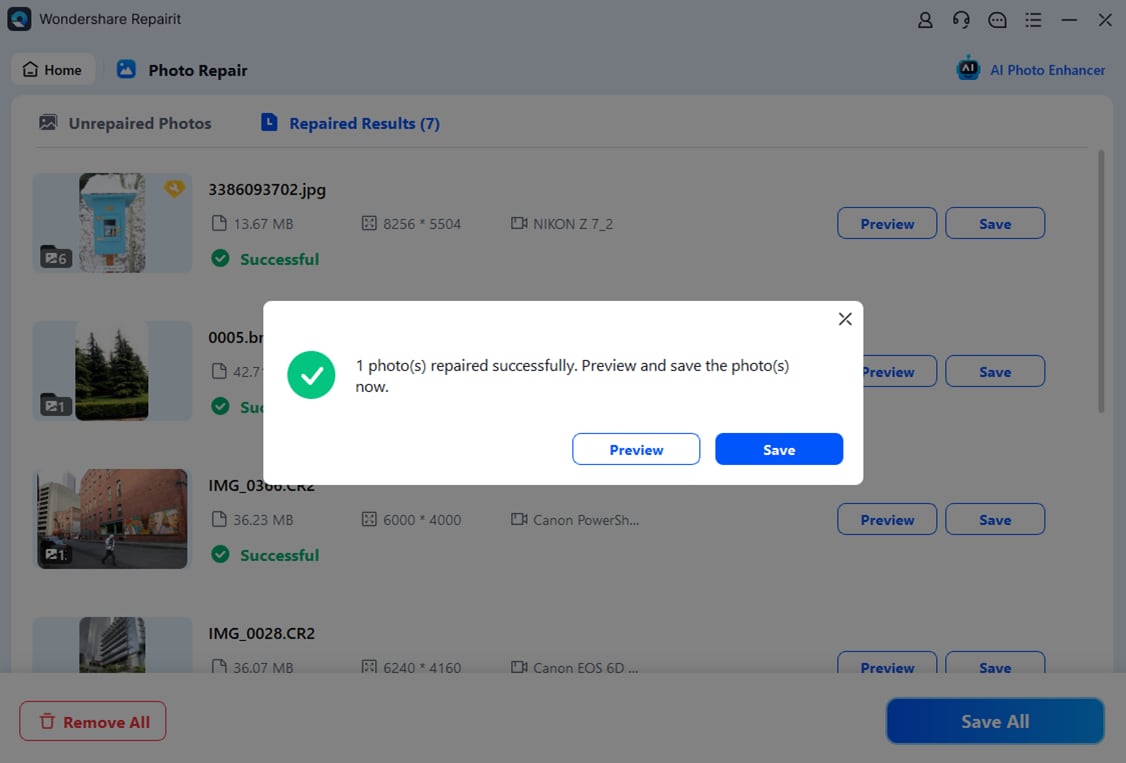
This type of workflow can help you repair corrupted photos consistently, especially when you are dealing with batches of images or more serious damage that benefits from a guided process.
Final Verdict
Choosing between Repairit Photo Repair vs SoftOrbits Picture Doctor comes down to the condition of your images and your expectations from a photo repair tool.
Repairit Photo Repair is a stronger choice if you regularly work with corrupted or heavily damaged images, prefer a guided process, and need flexibility to handle different damage levels across many photos. Its broader capabilities and more detailed workflow make it well suited to ongoing or more demanding repair tasks where consistency and control matter.
SoftOrbits Picture Doctor may be enough when you are a casual user with a few lightly damaged or low-quality photos and you prefer a very simple, user-friendly interface. If you mostly need quick fixes with minimal setup and do not plan to adjust many settings, its streamlined design can feel very comfortable.
In practice, both tools can help you repair damaged images. The key is to match the tool to your real-world use case: choose Repairit if you expect frequent or more complex repairs, and lean toward SoftOrbits Picture Doctor if you mainly want to correct occasional issues with minimal effort.
Next: Repairit Photo Repair vs Systools Image Repair
FAQ
-
1. Which is better for heavily corrupted photos, Repairit Photo Repair or SoftOrbits Picture Doctor?
For heavily corrupted or seriously distorted photos, Repairit Photo Repair is generally a stronger option because it focuses on broader repair capabilities and guided workflows. SoftOrbits Picture Doctor tends to fit lighter, everyday fixes where the damage is not too severe. -
2. Is SoftOrbits Picture Doctor easier to use than Repairit Photo Repair?
SoftOrbits Picture Doctor is very straightforward, with a simple workflow that suits beginners and casual users. Repairit Photo Repair remains user friendly but includes more options and modes, which may take a bit longer to explore if you want to fine tune how your images are repaired. -
3. When should I choose Repairit Photo Repair over SoftOrbits Picture Doctor?
Choose Repairit Photo Repair if you frequently repair photos, work with mixed levels of damage, or want a guided process that can adapt to more complex corruption and quality loss. It is also a good fit if you handle batches of images and need a consistent workflow. -
4. Is SoftOrbits Picture Doctor good enough for casual users?
Yes, SoftOrbits Picture Doctor can be a good fit for casual users who only need to repair a few slightly damaged or low-quality photos. Its simple interface and limited number of decisions make it easy to use without technical experience. -
5. Can I try these tools before paying for them?
In many cases, both Repairit Photo Repair and SoftOrbits Picture Doctor offer trial or evaluation versions so you can test how they handle your corrupted photos. Since trial conditions and pricing can change, it is best to check each vendor for the most current information.




