
Repairit Photo Repair vs SysTools Image Repair is a common comparison when you simply want to fix corrupted or damaged photos on your desktop without getting lost in technical details. Choosing between the two can feel confusing when all you really need is a reliable way to correct broken, blurry, or pixelated image files.
Both tools are desktop utilities focused on repairing corrupted photos, but they take slightly different approaches. SysTools Image Repair leans into a simple workflow and broad format support, while Repairit Photo Repair emphasizes a guided, visual repair experience that can help in more complex situations. This article walks through features, formats, ease of use, and ideal use cases so you can decide which image repair tool better fits your needs.
Whether you are dealing with everyday photo glitches or more serious corruption, understanding how these tools differ will help you pick the option that feels more comfortable for the way you work.
Repair Corrupted Photos with Repairit Photo Repair
 Security Verified. Over 7,302,189 people have downloaded it.
In this article
- Repairit Photo Repair vs SysTools Image Repair: Quick Verdict
- Repairit Photo Repair vs SysTools Image Repair: Key Differences
- Repairit Photo Repair vs SysTools Image Repair: Comparison Table
- What Repairit Photo Repair and SysTools Image Repair Are Best For
- Repairit Photo Repair vs SysTools Image Repair: Features and Capabilities
- Repairit Photo Repair vs SysTools Image Repair: Supported Formats and Compatibility
- Repairit Photo Repair vs SysTools Image Repair: Workflow and Ease of Use
- Repairit Photo Repair vs SysTools Image Repair: Pricing and Trial Options
- Who Should Choose Repairit Photo Repair
- Who Should Choose SysTools Image Repair
- Pros and Cons of Repairit Photo Repair and SysTools Image Repair
- How to Repair Corrupted Photos After Choosing the Right Tool
Repairit Photo Repair vs SysTools Image Repair: Quick Verdict
If you mostly tackle lightly corrupted images and want a straightforward desktop utility, SysTools Image Repair can be sufficient. It keeps the workflow simple and focuses on multi-format support so you can move quickly from loading to exporting repaired copies.
If you often deal with moderately or severely damaged photos, or you feel more comfortable with step-by-step guidance, Repairit Photo Repair is usually the stronger fit. Its interface is designed to walk you through importing, repairing, previewing, and saving, which can be reassuring when you are working with important images.
In short, SysTools suits users who want a basic, no-frills solution for lighter corruption, while Repairit is better aligned with users who care about visual quality and need more help with complex photo issues.
Repairit Photo Repair vs SysTools Image Repair: Key Differences
Both tools aim to fix corrupted or damaged images, but they differ in focus and depth. Here are some of the most relevant distinctions based on typical use:
- Best fit: Repairit Photo Repair suits users handling recurring or more serious corruption, while SysTools Image Repair is better for users who only occasionally fix damaged images.
- Ease of use: Repairit offers a modern, guided interface with clear prompts, whereas SysTools keeps things basic and may appeal to those who dislike extra options.
- Repair depth: Repairit is designed to help with a broad range of visual defects, including blurry, pixelated, or distorted photos in many everyday scenarios. SysTools tends to work best when corruption is lighter and closer to structural issues.
- Workflow style: Repairit encourages a step-by-step process with preview and selective saving. SysTools keeps to a minimal workflow focused on loading, scanning, and exporting.
- Feature emphasis: Repairit emphasizes visual quality and flexible repair handling, while SysTools emphasizes multi-format compatibility and simplicity.
- Ideal audience: Content creators, photographers, and users handling many images may prefer Repairit, while occasional users who just need quick, basic fixes may lean toward SysTools.
Repairit Photo Repair vs SysTools Image Repair: Comparison Table
| Dimension | Repairit Photo Repair | SysTools Image Repair |
|---|---|---|
| Best for | Users who need guided repair for moderately to severely corrupted photos and want flexible repair options. | Users fixing corrupted images who want a straightforward desktop repair tool for common issues. |
| Ease of use | Beginner-friendly with clear prompts and a modern interface. | Simple workflow with a basic, no-frills interface suited to occasional use. |
| Repair depth | Designed to handle a range of corruption levels and visual defects in many cases. | Better for lighter corruption and structure repair rather than complex visual restoration. |
| Workflow | Step-by-step process with preview and selective repair options in a streamlined flow. | Simple workflow focused on loading images, scanning, and exporting repaired copies. |
| Strengths | Guided repair, focus on visual quality, and flexible handling of different corruption scenarios. | Multi-format support on desktop and easy setup for quick, basic image fixes. |
| Weaknesses | May feel more than you need for very minor image issues or one-off tasks. | Features can feel basic for power users who need deeper control or advanced enhancement. |
What Repairit Photo Repair and SysTools Image Repair Are Best For
The two tools share the goal of repairing damaged photos, but they excel in different situations. Understanding where each shines makes it easier to decide between them.
Repairit Photo Repair is best if you:
- Frequently work with images that are visibly distorted, greyed-out, or heavily pixelated.
- Prefer a guided, visual experience that explains what is happening at each repair stage.
- Need to manage larger photo libraries or batches of images with varying corruption levels.
SysTools Image Repair is best if you:
- Mostly handle lighter corruption, such as photos that will not open or show mild glitches.
- Want a very simple desktop utility that gets from scan to output with few decisions.
- Appreciate broad image format support more than deep, fine-grained repair options.
In many real-world workflows, users who regularly care for large collections or more complex damage lean toward Repairit, while users fixing a few broken images from time to time often find SysTools adequate.
Repairit Photo Repair vs SysTools Image Repair: Features and Capabilities
At a high level, both tools provide the core abilities you would expect from image repair software. They import problematic files, attempt to correct errors, and let you export repaired versions without overwriting the originals.
Shared capabilities include:
- Import corrupted or damaged image files and attempt to restore photo quality.
- Preview repaired photos before saving to confirm improvements.
- Export fixed images as new files while keeping originals intact.
Where they differ is how deeply they work with visual issues and how much control they offer:
- Repairit Photo Repair can handle more severe image corruption scenarios in many everyday cases with a guided workflow.
- It typically offers richer visual repair options to address blurry, pixelated, or distorted photos.
- SysTools Image Repair emphasizes multi-format support but keeps advanced options limited, which can simplify setup at the cost of deep control.
If you want more nuanced handling of visible artifacts and prefer a workflow that feels like a walkthrough, Repairit tends to align better with that expectation. If you favor a minimal interface and mostly care that the files simply open and look acceptable, SysTools may be enough.
Repairit Photo Repair vs SysTools Image Repair: Supported Formats and Compatibility
Both tools are built for desktop use and focus on the most common image types people store on computers. While exact format lists can change over time, in general they target widely used photo formats rather than obscure or highly specialized ones.
According to the general positioning:
- SysTools Image Repair is known for its multi-format support, which helps when your image set comes from different cameras, phones, design tools, or editing apps.
- Repairit Photo Repair focuses on strong support for major consumer photo formats and everyday desktop workflows, so most standard photo collections are covered without extra configuration.
If your work regularly involves images from diverse professional pipelines, SysTools broader-format emphasis can be helpful. If you are mainly working with typical photo formats from phones, DSLRs, or common editing tools, both solutions are likely to meet your needs.
Repairit Photo Repair vs SysTools Image Repair: Workflow and Ease of Use
Workflow and usability are core differences between the two tools, especially for users who are not highly technical.
Repairit Photo Repair workflow generally looks like this:
- Import one or multiple corrupted images into a modern, guided interface.
- Use step-by-step prompts to start the repair, monitor progress, and preview results.
- Select which repaired photos to save and where to store them.
The focus is on clear instructions and visual feedback, which helps users understand what is happening with their photos.
SysTools Image Repair workflow is typically more streamlined:
- Load images into a simple desktop window.
- Run the repair or scan with minimal settings to adjust.
- Export the repaired versions to your chosen folder.
This stripped-down flow suits users who just want the tool to run without many choices. However, it may feel limited if you are expecting more guidance or flexible handling of complicated issues.
In summary, if you value a guided path with clear steps and previews, Repairit is likely to feel more comfortable. If you like tools that stay out of the way and do as little as possible beyond the basic task, SysTools may be more your style.
Repairit Photo Repair vs SysTools Image Repair: Pricing and Trial Options
Both Repairit Photo Repair and SysTools Image Repair are typically offered as desktop utilities with paid licenses and some form of trial or demo option. Exact pricing, subscription models, and promotional offers can change, so it is best to check the latest information on each vendor website before making a final decision.
In most cases, the choice between the two should be guided more by repair quality, workflow, and feature fit than by small price differences. Using trial versions first can help you see how each tool handles your real images and whether the interface suits the way you like to work.
Who Should Choose Repairit Photo Repair
You might lean toward Repairit Photo Repair if your situation matches one or more of the following:
- Users who frequently face moderate to severe photo corruption and visual defects.
- People who prefer a guided, step-by-step interface when repairing images.
- Photographers or content creators who need consistent visual quality across many images.
- Users who want flexible, desktop-based photo repair that fits into broader editing workflows.
Because Repairit puts emphasis on visual quality and workflow guidance, it often suits users who consider their photos important assets and want more confidence during the repair process.
Who Should Choose SysTools Image Repair
SysTools Image Repair is a more natural choice if your needs are simpler or more occasional. It is particularly suitable for users who:
- Mostly deal with common image formats and lighter corruption.
- Prefer a simple desktop repair tool with a straightforward workflow.
- Only occasionally need to fix a batch of damaged images and do not want many configuration options.
- Value multi-format support over advanced, fine-grained repair features.
For these users, the stripped-down approach can be a benefit rather than a limitation, reducing the time spent learning new software and keeping the focus on quick fixes.
Pros and Cons of Repairit Photo Repair and SysTools Image Repair
Both tools have trade-offs. Looking at pros and cons side by side can clarify which one aligns more closely with your expectations.
Repairit Photo Repair Pros and Cons
SysTools Image Repair Pros and Cons
How to Repair Corrupted Photos After Choosing the Right Tool
Once you have compared Repairit Photo Repair vs SysTools Image Repair and have a sense of which tool fits your needs, the next step is actually repairing your corrupted photos. Moving from comparison to action helps you see how the software behaves with your real-world images and whether the workflow feels comfortable.
If you decide a guided experience is important, Repairit Photo Repair offers a practical desktop workflow that walks you through importing, repairing, previewing, and saving your pictures with minimal effort. The following overview and steps show how that process typically works.
Key Features
In a typical workflow, some of the most relevant capabilities include:
- Guided repair flow to fix corrupted or visually distorted images.
- Support for common photo formats used on cameras, phones, and desktops.
- Preview of repaired photos before saving to confirm visual quality.
Step-by-step guide
- Add damaged photos
Launch Repairit Photo Repair and import the damaged or corrupted photos you want to fix.
- Run the repair
Click the repair button and let the tool scan and fix the selected image files automatically.

- Preview and save
Preview the repaired results and save the fixed photos to your preferred location.
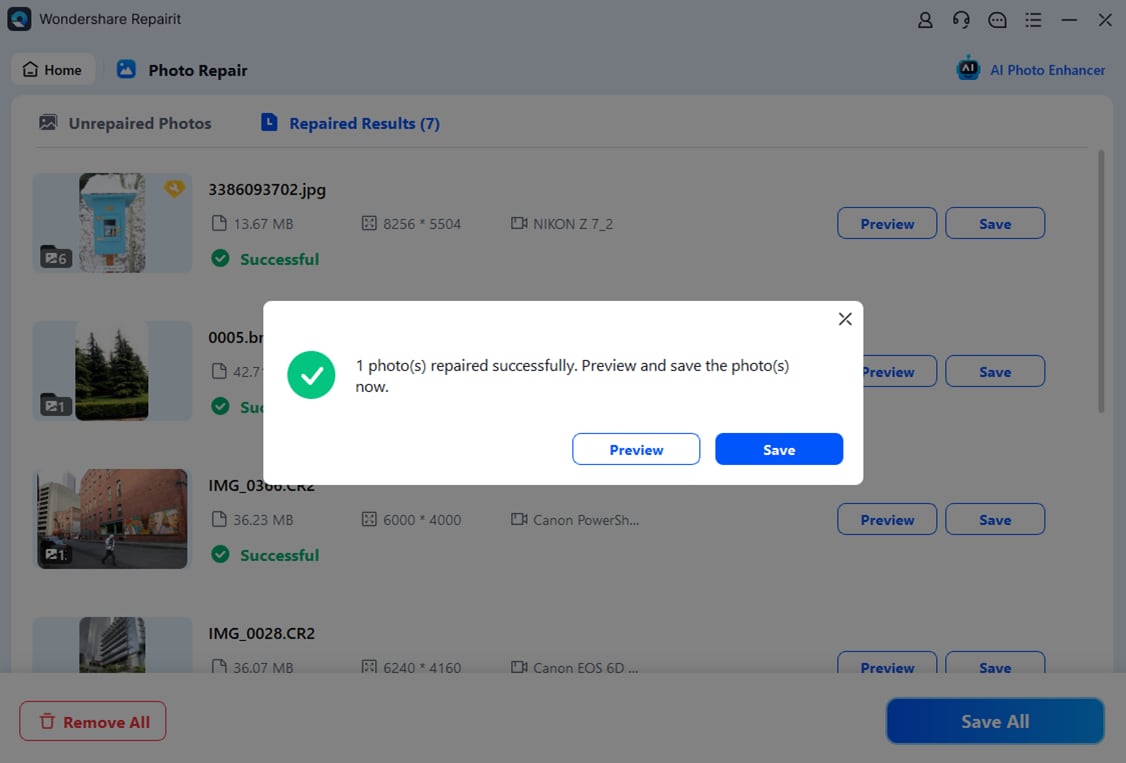
This simple desktop flow helps you move from damaged or unopenable photos to clearer, more usable images while keeping your originals intact.
Final Verdict
Both Repairit Photo Repair and SysTools Image Repair focus on fixing corrupted images on your desktop, but they appeal to slightly different users.
Repairit Photo Repair is a stronger choice for people who frequently deal with moderately or severely corrupted photos and want a guided, visually focused workflow. Its interface and repair depth can make a noticeable difference when you need more than a quick one-click fix and prefer to preview results carefully.
SysTools Image Repair, by contrast, may be enough if you mainly work with lighter damage, care about multi-format support, and prefer a very straightforward, no-frills repair tool. It fits well as a simple utility when you only occasionally need to restore photo quality.
In practice, your decision should be based on how often you repair photos, how severe the corruption tends to be, and whether you favor guidance or minimalism in your tools. Trying each option with a few sample images can quickly show which one feels more natural in your everyday workflow.
FAQ
-
1. Is Repairit Photo Repair better than SysTools Image Repair for heavily corrupted photos?
In many situations, Repairit Photo Repair can be a stronger choice for heavily corrupted or visually degraded photos because of its guided workflow and focus on image quality, while SysTools Image Repair may be more suitable for lighter corruption and basic fixes. -
2. When should I choose SysTools Image Repair instead of Repairit Photo Repair?
You may prefer SysTools Image Repair if you mostly fix mildly corrupted images, want a very simple desktop workflow, and value broad format support without needing many advanced repair options. -
3. Do both tools work with common desktop photo formats?
Yes, both Repairit Photo Repair and SysTools Image Repair focus on common desktop image formats. SysTools highlights multi-format support, while Repairit centers on reliable handling of widely used photo types in everyday workflows.




