
Choosing the right desktop tool to repair corrupted photos can be confusing when options look similar on the surface. In this guide, we compare Repairit Photo Repair vs Photo Repair Toolbox, a simple desktop utility from repairtoolbox.com, to help you understand how they differ in workflow, features, and typical use cases. Whether you only need to fix a few damaged JPEGs or you regularly handle more complex, badly corrupted images, this comparison will help you decide which solution fits your workflow and expectations.
Instead of treating one app as universally better, it is more helpful to see where each tool fits: Repairit Photo Repair as a guided, feature-rich option, and Photo Repair Toolbox as a lighter, more minimal utility.
Repair Corrupted Photos with Repairit Photo Repair
 Security Verified. Over 7,302,189 people have downloaded it.
In this article
- Repairit Photo Repair vs Photo Repair Toolbox: Quick Verdict
- Repairit Photo Repair vs Photo Repair Toolbox: Key Differences
- Repairit Photo Repair vs Photo Repair Toolbox: Comparison Table
- What Repairit Photo Repair and Photo Repair Toolbox Are Best For
- Repairit Photo Repair vs Photo Repair Toolbox: Features and Capabilities
- Repairit Photo Repair vs Photo Repair Toolbox: Supported Formats and Compatibility
- Repairit Photo Repair vs Photo Repair Toolbox: Workflow and Ease of Use
- Repairit Photo Repair vs Photo Repair Toolbox: Pricing and Trial Options
- Who Should Choose Repairit Photo Repair
- Who Should Choose Photo Repair Toolbox
- Pros and Cons of Repairit Photo Repair and Photo Repair Toolbox
- How to Repair Corrupted Photos After Choosing the Right Tool
Repairit Photo Repair vs Photo Repair Toolbox: Quick Verdict
If you regularly handle a variety of damaged or severely corrupted images and want more guidance, Repairit Photo Repair tends to be the more flexible desktop option. It offers a guided workflow, preview steps, and features that can help with different kinds of visual defects in everyday photo repair scenarios.
Photo Repair Toolbox is usually better suited to users who only need to fix corrupted photos occasionally and prefer a lightweight tool with few options. Its simpler layout can feel less overwhelming when you just want to run a quick repair on a handful of images.
In practice, your choice comes down to how complex your damaged photos are, how often you repair them, and whether you value a richer, more guided experience or a minimal, focused interface.
Repairit Photo Repair vs Photo Repair Toolbox: Key Differences
The main differences between Repairit Photo Repair vs Photo Repair Toolbox revolve around repair depth, workflow, and who each tool is designed for.
- Best for: Repairit generally fits users who see frequent or more complex corruption, while Photo Repair Toolbox is better for light, occasional fixes.
- Ease of use: Both are straightforward, but Repairit layers in more visual prompts and previews; Photo Repair Toolbox keeps choices to a minimum.
- Repair depth: Repairit is built to handle a broader mix of symptoms like artifacts, visible distortion, and general quality issues in most everyday cases; Photo Repair Toolbox typically targets simpler corruption.
- Workflow: Repairit follows a structured path of adding, analyzing, previewing, and saving; Photo Repair Toolbox keeps the flow linear with fewer steps or adjustments.
- Scalability: If you expect to repair many photos over time, Repairit’s more flexible approach can scale better; Photo Repair Toolbox is convenient when your needs remain basic.
Repairit Photo Repair vs Photo Repair Toolbox: Comparison Table
| Dimension | Repairit Photo Repair | Photo Repair Toolbox |
|---|---|---|
| Best for | Users who need to repair a wide range of corrupted or severely damaged photos with more flexible options. | Users fixing corrupted images occasionally and looking for a simple, focused desktop tool. |
| Ease of use | Beginner friendly with a guided, step-by-step interface and visual prompts. | Easy to use, with a straightforward layout but fewer on-screen hints. |
| Repair depth | Designed to handle more types of visible corruption and quality issues in most everyday scenarios. | Generally suitable for lighter corruption and basic image repair needs. |
| Workflow | Structured, guided workflow that walks users through adding, analyzing, and repairing photos. | Simple, linear workflow with fewer steps and limited customization. |
| Strengths | Versatile, guided tool for repairing multiple damaged photos with broader feature coverage. | Lightweight, easy-to-use utility that focuses on core repair actions without extra complexity. |
| Weaknesses | May feel more feature heavy than necessary for very simple one-off fixes. | Limited advanced features and options for users who need deeper or more flexible repairs. |
What Repairit Photo Repair and Photo Repair Toolbox Are Best For
Both tools exist to repair damaged images, but they target slightly different situations.
Repairit Photo Repair is typically a better fit when you:
- Deal with severely corrupted, distorted, or heavily artifacted photos more than once in a while.
- Want a guided process that walks you through importing, scanning, previewing, and saving repaired files.
- Need desktop software that can handle multiple damaged photos in one session.
Photo Repair Toolbox usually works well when you:
- Only occasionally encounter corrupted JPEGs or similar formats that will not open properly or show simple glitches.
- Prefer a lightweight utility with minimal controls and a straightforward layout.
- Do not need extra features or deeper customization for complex repair cases.
Neither option guarantees that every image can be fully restored, but matching your tool to your typical damage level can make repairs more efficient.
Repairit Photo Repair vs Photo Repair Toolbox: Features and Capabilities
Both Repairit Photo Repair and Photo Repair Toolbox focus on repairing corrupted or damaged images, but they approach this task with different levels of depth and guidance. Repairit tends to bundle more capabilities into a guided interface, while Photo Repair Toolbox keeps the experience minimal and easy to understand, with fewer advanced controls for fine-tuning difficult cases.
Common capabilities you can reasonably expect from both tools include:
- Opening and scanning corrupted or damaged image files for visible issues.
- Attempting to repair photos that will not display correctly or that show visual artifacts.
- Exporting repaired images to a new file without altering the original, so you can compare results.
Where they differ is how deeply they let you address more stubborn problems:
- Repairit Photo Repair typically offers broader handling of different corruption symptoms and visual defects such as pixelation, distortion, or greyed-out areas in many everyday scenarios.
- Repairit often makes it easier to process several damaged photos in one guided session, which can save time if you have a batch of problematic files.
- Photo Repair Toolbox focuses on a simple, guided workflow with limited advanced adjustment or configuration, trading some flexibility for speed and simplicity.
If your main goal is to quickly fix a few glitchy images, Photo Repair Toolbox may be adequate. If you routinely troubleshoot more varied damage, Repairit’s richer toolkit can offer more room to experiment with repairs.
Repairit Photo Repair vs Photo Repair Toolbox: Supported Formats and Compatibility
Both tools are desktop applications designed to work on common computer operating systems and handle widely used photo formats.
In general:
- Repairit Photo Repair aims to support a broader mix of damaged image scenarios, including issues with common formats such as JPEG and other everyday photo file types. It is designed for people who see different patterns of corruption, from images that will not open to photos with visible defects.
- Photo Repair Toolbox centers on straightforward repairs for everyday formats, focusing less on format-specific tuning and more on basic corruption fixes.
Exact format lists and platform details may depend on the current version of each product, so it is sensible to confirm compatibility with the specific image types and operating system you use most often.
Repairit Photo Repair vs Photo Repair Toolbox: Workflow and Ease of Use
Workflow is one of the clearest differences between Repairit Photo Repair vs Photo Repair Toolbox.
Repairit Photo Repair offers a clearly guided workflow that usually follows this pattern:
- Add corrupted photos into the project.
- Let the software analyze visible corruption or display issues.
- Run the repair, then preview results before saving.
This step-by-step path, with visual prompts, can be reassuring if you are newer to photo repair software or do not want to guess what to click next.
Photo Repair Toolbox also uses a guided approach but keeps the number of decisions smaller:
- Open the damaged image.
- Start the repair process with minimal configuration.
- Save the repaired file once the operation finishes.
This can feel faster when your needs are basic, though it offers fewer levers to pull if the initial repair does not meet your expectations.
Repairit Photo Repair vs Photo Repair Toolbox: Pricing and Trial Options
Both Repairit Photo Repair and Photo Repair Toolbox are typically available as paid desktop tools, and each may offer some form of limited free trial or demo mode. Trials often let you test how well the software handles your own corrupted photos before committing.
When comparing cost, consider:
- How often you expect to repair damaged images.
- How complex your typical corruption issues are.
- Whether you value more guided features and options (which may justify a richer tool like Repairit), or a minimal one-time fixer (where Photo Repair Toolbox might feel sufficient).
Instead of focusing purely on price, it is helpful to weigh how much repair depth, workflow guidance, and time savings each app can realistically offer in your situation.
Who Should Choose Repairit Photo Repair
You are more likely to benefit from Repairit Photo Repair if one or more of the following applies:
- Users who often deal with severely corrupted or heavily distorted photos.
- People who prefer a more guided, visual workflow with helpful prompts and previews.
- Anyone needing a versatile tool that can handle a wider range of image issues over time.
- Small teams or frequent editors who repair multiple damaged photos in batches and want to streamline the process.
In these situations, the additional guidance and broader feature set can make it easier to bring more problematic photos back to a usable state.
Who Should Choose Photo Repair Toolbox
Photo Repair Toolbox can be a better fit when your needs are simpler and infrequent. It is a reasonable option for:
- Users fixing corrupted images occasionally with basic repair needs.
- People who value an easy to use desktop tool with a minimal interface and a short learning curve.
- Those who do not require many advanced features or deep customization options.
- Anyone looking for a lightweight utility to quickly run basic repairs on a few files without extra steps.
If you rarely encounter damaged photos and mostly see light corruption, the simplicity of Photo Repair Toolbox may be all you need.
Pros and Cons of Repairit Photo Repair and Photo Repair Toolbox
To make the choice clearer, it helps to look at the main advantages and trade-offs of each tool side by side.
Repairit Photo Repair Pros and Cons
Photo Repair Toolbox Pros and Cons
How to Repair Corrupted Photos After Choosing the Right Tool
After comparing Repairit Photo Repair vs Photo Repair Toolbox, the next step is actually fixing your damaged images. Once you decide which tool matches your needs, you still want a clear, low-stress process for getting from a corrupted file to a viewable, higher-quality photo.
If you prefer a guided desktop experience with previews and structured steps, Repairit Photo Repair offers a practical way to handle this. Below is how that looks in more detail.
Key Features
In day-to-day use, some of the most relevant capabilities include:
- Guided photo repair workflow with clear steps and previews so you can check results before saving.
- Support for repairing multiple corrupted photos in one session, which is useful when a folder of images is affected.
- Tools aimed at fixing visual corruption, artifacts, and quality issues such as pixelation, blur, or greyed-out photos in common scenarios.
Step-by-step guide
Here is a simple desktop workflow you can follow with Repairit to repair corrupted photos once you have it installed.
- Add damaged photos
Launch Repairit Photo Repair and import the damaged or corrupted photos you want to fix.
- Run the repair
Click the repair button and let the tool scan and fix the selected image files automatically.
- Preview and save
Preview the repaired results and save the fixed photos to your preferred location.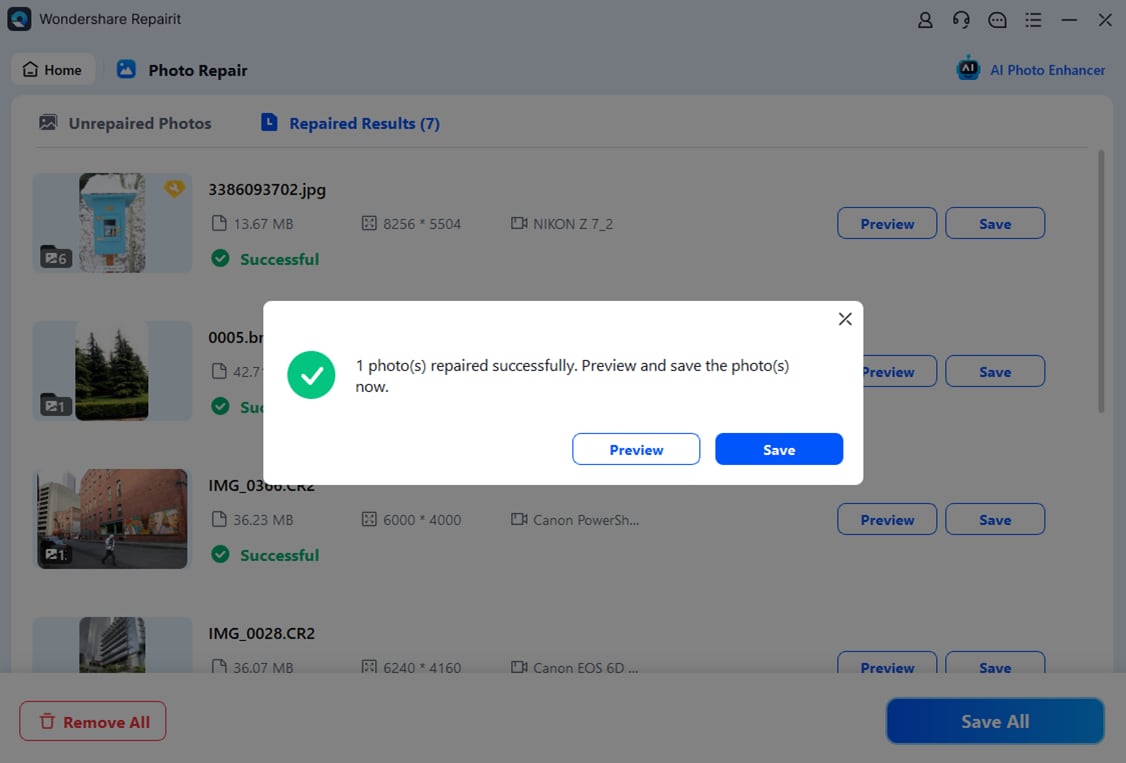
Final Verdict
Choosing between Repairit Photo Repair vs Photo Repair Toolbox comes down to how demanding your repair tasks are and how much guidance you want from your software.
Repairit Photo Repair is a stronger choice for users who frequently encounter severe corruption, multiple damaged files, or a mix of photo issues and want a guided workflow that offers more flexibility. Its broader capabilities and structured interface can make a noticeable difference when simple tools struggle.
Photo Repair Toolbox may still be enough if you only repair corrupted images occasionally, prefer a lightweight desktop utility, and are comfortable with fewer advanced options. In that case, its straightforward guided workflow can solve common problems without the extra complexity of a more feature-rich tool.
In many situations, starting with the trial or demo mode of each tool on the same set of damaged photos is a practical way to see which better matches your expectations.
FAQ
-
1. Which is better for heavily corrupted photos, Repairit Photo Repair or Photo Repair Toolbox?
For heavily corrupted or severely distorted photos, Repairit Photo Repair is generally a stronger choice because it is designed with more flexible, guided repair options that can help in complex situations. Photo Repair Toolbox is usually more suitable for lighter, everyday corruption. -
2. Is Photo Repair Toolbox good enough for basic photo repair compared to Repairit Photo Repair?
Photo Repair Toolbox can be good enough for basic repair tasks if you mainly fix lightly corrupted images and prefer an easy, minimal interface without many extra controls. If you later face more challenging damage, you may find Repairit Photo Repair more adaptable. -
3. How do workflows differ between Repairit Photo Repair and Photo Repair Toolbox?
Repairit Photo Repair uses a more detailed, guided workflow with previews and extra options, walking you through adding, analyzing, repairing, and saving photos. Photo Repair Toolbox focuses on a simpler guided workflow with fewer steps and settings, which can feel faster but less flexible.




