
Choosing between Repairit Photo Repair vs JPEG Repair Shop can feel tricky when your main goal is to repair corrupted photos quickly and get back to work. Repairit Photo Repair focuses on a guided, feature-rich repair experience that can handle a range of image issues, while JPEG Repair Shop is a lightweight JPEG repair utility aimed at quick fixes through a simple interface. This comparison explains how they differ in repair depth, workflow, and ideal use cases so you can decide which tool better fits your needs for fixing damaged or low-quality photos.
Repair Corrupted Photos with Repairit Photo Repair
 Security Verified. Over 7,302,189 people have downloaded it.
In this article
- Repairit Photo Repair vs JPEG Repair Shop: Quick Verdict
- Repairit Photo Repair vs JPEG Repair Shop: Key Differences
- Repairit Photo Repair vs JPEG Repair Shop: Comparison Table
- What Repairit Photo Repair and JPEG Repair Shop Are Best For
- Repairit Photo Repair vs JPEG Repair Shop: Features and Capabilities
- Repairit Photo Repair vs JPEG Repair Shop: Supported Formats and Compatibility
- Repairit Photo Repair vs JPEG Repair Shop: Workflow and Ease of Use
- Repairit Photo Repair vs JPEG Repair Shop: Pricing and Trial Options
- Who Should Choose Repairit Photo Repair
- Who Should Choose JPEG Repair Shop
- Pros and Cons of Repairit Photo Repair and JPEG Repair Shop
- How to Repair Corrupted Photos After Choosing the Right Tool
Repairit Photo Repair vs JPEG Repair Shop: Quick Verdict
In most cases, the choice between Repairit Photo Repair vs JPEG Repair Shop comes down to whether you need a broader photo repair toolkit or a small utility focused on JPEGs only.
- Repairit Photo Repair is a stronger choice if you want guided workflows, support for multiple image formats, and tools that can address both corruption and visible quality issues like blurriness or pixelation.
- JPEG Repair Shop may be enough if you mainly repair a few damaged JPEG photos and prefer a fast, lightweight app with a very minimal interface.
If your photo problems are varied, frequent, or extend beyond simple JPEG structure issues, Repairit Photo Repair tends to be more flexible. If your needs are occasional and JPEG-only, JPEG Repair Shop can be a straightforward fit.
Repairit Photo Repair vs JPEG Repair Shop: Key Differences
Both tools focus on repairing corrupted or damaged photos, but they are aimed at slightly different users.
- Best for: Repairit Photo Repair is better suited to users who need to repair a range of photo problems across multiple formats, while JPEG Repair Shop is centered on quick fixes for standard JPEG images.
- Ease of use: Repairit provides a modern, guided interface that walks you through each step. JPEG Repair Shop uses an extremely simple layout that may appeal to users comfortable with basic utilities.
- Repair depth: Repairit is designed to handle a wider variety of corruption and visual issues. JPEG Repair Shop generally focuses on more straightforward JPEG-related damage.
- Workflow: Repairit offers step-by-step options and previews. JPEG Repair Shop is focused on loading and repairing JPEGs with minimal decisions required.
- Scope: Repairit aims to cover more scenarios, whereas JPEG Repair Shop intentionally keeps its feature set narrow for speed and simplicity.
This difference in scope and workflow is key: the more varied your image issues and formats, the more Repairit Photo Repair can help; the more focused your JPEG tasks, the more appealing JPEG Repair Shop becomes.
Repairit Photo Repair vs JPEG Repair Shop: Comparison Table
| Dimension | Repairit Photo Repair | JPEG Repair Shop |
|---|---|---|
| Best for | Users who need to repair various photo issues, from corruption to quality loss, across multiple image formats | Users who want lightweight JPEG repair for quick fixes on a few damaged JPEG files |
| Ease of use | Modern interface with guided flows that help non-technical users through repairs | Very simple, minimal interface suited to users comfortable with a basic tool |
| Repair depth | Designed to handle more severe corruption and quality restoration in many cases | Geared toward straightforward JPEG structure fixes rather than complex multi-layer repairs |
| Workflow | Step-by-step repair process with clear options and previews | Basic workflow focused on loading and repairing JPEGs with minimal steps |
| Strengths | Broad capabilities, guided experience, and support for different photo issues | Fast and simple, lightweight JPEG repair focused on quick handling of damaged JPEGs |
| Weaknesses | May feel more complex than a tiny utility for users who only need one quick repair | Limited features and flexibility, mainly focused on narrow JPEG repair tasks |
What Repairit Photo Repair and JPEG Repair Shop Are Best For
The two tools are positioned differently, so it helps to match each one to typical repair scenarios.
Repairit Photo Repair is generally best for users who:
- Frequently work with large batches of images and want to repair multiple damaged photos in one go.
- Handle mixed-format photo libraries from different cameras, phones, or editing tools.
- Need help with corrupted, blurry, pixelated, or visually degraded photos, not just files that refuse to open.
- Prefer a clear, guided workflow with previews and easy export options.
JPEG Repair Shop is typically best for users who:
- Mainly deal with a handful of broken JPEG images from common sources.
- Want a minimal tool that focuses on JPEG structure repair rather than a full photo repair suite.
- Are comfortable with a simpler interface and fewer on-screen explanations.
- Do not need support for many image formats or advanced guidance.
In short, Repairit is better aligned with ongoing photo maintenance and varied image problems, while JPEG Repair Shop can be a practical option for straightforward JPEG-only issues.
Repairit Photo Repair vs JPEG Repair Shop: Features and Capabilities
Repairit Photo Repair vs JPEG Repair Shop differ most clearly in their feature depth and flexibility. Both aim to fix damaged images and restore photo quality, but they take different paths to get there.
Overall capabilities summary
Repairit Photo Repair and JPEG Repair Shop both aim to repair corrupted photos, but they differ in how deep they go and how many scenarios they cover. JPEG Repair Shop leans into being fast and simple with a basic workflow, while Repairit Photo Repair offers a richer toolset that can help with more complex damage and quality issues.
Core features
- Repairit Photo Repair provides core tools to repair corrupted or unreadable image files with a guided interface.
- JPEG Repair Shop offers fast and simple JPEG repair for users who want to quickly fix damaged JPEG images.
- Both tools focus on restoring photo quality so that images open and display more clearly than before.
Advanced or broader features
- Repairit Photo Repair typically includes options for handling multiple image formats and various corruption scenarios beyond simple header fixes.
- Repairit Photo Repair often provides preview and step-based guidance, which can help users understand how repairs affect their photos.
- JPEG Repair Shop stays intentionally limited in features, which can be an advantage for users who prefer a lightweight, no-frills JPEG-only workflow.
If you mainly want JPEG structure fixes, JPEG Repair Shop can be adequate. If you want a broader toolkit that can adapt to different image issues and formats, Repairit Photo Repair is usually more suitable.
Repairit Photo Repair vs JPEG Repair Shop: Supported Formats and Compatibility
Format support is an important factor when choosing between Repairit Photo Repair vs JPEG Repair Shop.
Repairit Photo Repair generally supports a wider range of photo formats, which is useful if you work with more than just JPEG images across different cameras and devices. This can matter for users with mixed libraries including JPEG and other common image file types, or when you are not sure which format a particular camera or phone produced.
JPEG Repair Shop focuses on JPEG repair and keeps its scope narrow, which is fine if most of your damaged photos are standard JPEGs from common sources. The tool is built around JPEG structure, so it fits scenarios where all problematic photos share that format.
For users handling varied photo collections or switching between devices, Repairit Photo Repair is usually more flexible. For single-format, JPEG-only work, JPEG Repair Shop may be all you need.
Repairit Photo Repair vs JPEG Repair Shop: Workflow and Ease of Use
Workflow can strongly influence how quickly you repair corrupted photos and how confident you feel during the process.
With JPEG Repair Shop, the workflow is intentionally basic. If you want a simple pipeline, JPEG Repair Shop keeps things focused: you load damaged JPEGs and run a straightforward repair process without many extra options. This can be appealing if you prefer a minimal tool and do not need much on-screen guidance.
Repairit Photo Repair uses a more guided, step-by-step workflow. You typically add images, choose or confirm repair actions, then preview and save. While there may be a short learning curve at first, many non-technical users find this approach more comfortable, especially when dealing with multiple files or a mix of corruption and quality problems.
If you value clarity and guidance, Repairit Photo Repair can feel more reassuring. If you prioritize speed and a stripped-down interface, JPEG Repair Shop can be a good fit.
Repairit Photo Repair vs JPEG Repair Shop: Pricing and Trial Options
Price and licensing are also part of choosing between Repairit Photo Repair vs JPEG Repair Shop, especially if you are on a tight budget.
Repairit Photo Repair is offered as commercial software with trial or demo options available in many regions, so you can test how it repairs your corrupted or low-quality photos before deciding on a license. For users who regularly deal with damaged images or need multi-format support, this investment may be easier to justify.
JPEG Repair Shop is typically positioned as a lightweight utility, which may come with simpler licensing or lower cost, depending on the version you use. This can be attractive for users who only need occasional JPEG fixes and want to keep costs low.
As a general rule, users on very basic, JPEG-only workflows may lean toward JPEG Repair Shop, while those managing ongoing or more varied repair tasks can find more long-term value in Repairit Photo Repair.
Who Should Choose Repairit Photo Repair
Repairit Photo Repair is usually a better fit when you expect frequent or more complex image issues rather than one-time fixes.
- Users who need to repair different image formats, not just JPEG files.
- People dealing with more severe photo corruption or repeated damage issues.
- Non-technical users who prefer a guided, visual repair workflow.
- Photographers or businesses that want a more complete photo repair toolkit.
Because it combines multi-format support, preview options, and step-based flows, Repairit Photo Repair can feel like a central hub for maintaining photo quality across many projects.
Who Should Choose JPEG Repair Shop
JPEG Repair Shop, by contrast, aims to be small and focused, so it suits users with narrower needs.
- Users who want lightweight JPEG repair focused on quick fixes.
- People who only need to repair a small number of damaged JPEG photos.
- Those who prefer a fast and simple tool with a basic workflow.
- More technical users who are comfortable working with a minimal interface and limited features.
If you rarely encounter photo issues and almost all of your damaged images are JPEGs, JPEG Repair Shop can be a pragmatic, low-friction option.
Pros and Cons of Repairit Photo Repair and JPEG Repair Shop
Understanding the trade-offs of each tool makes it easier to decide which one aligns with your workflow and expectations.
Repairit Photo Repair Pros and Cons
JPEG Repair Shop Pros and Cons
How to Repair Corrupted Photos After Choosing the Right Tool
Once you understand the differences between Repairit Photo Repair vs JPEG Repair Shop and have a sense of which one matches your workflow, the next step is actually repairing your corrupted or low-quality photos. If you prefer a guided desktop experience with previews and a structured process, Repairit Photo Repair offers a practical way to fix damaged images without needing deep technical skills.
Key Features
- Supports repairing multiple damaged photos in one go.
- Intuitive workflow with previews before saving repaired files.
- Helps fix corrupted, blurry, or pixelated images in many everyday cases.
Step-by-step guide
Here is a simple desktop workflow to repair corrupted photos with Repairit Photo Repair.
- Add damaged photos
Launch Repairit Photo Repair and import the damaged or corrupted photos you want to fix.
- Run the repair
Click the repair button and let the tool scan and fix the selected image files automatically.
- Preview and save
Preview the repaired results and save the fixed photos to your preferred location.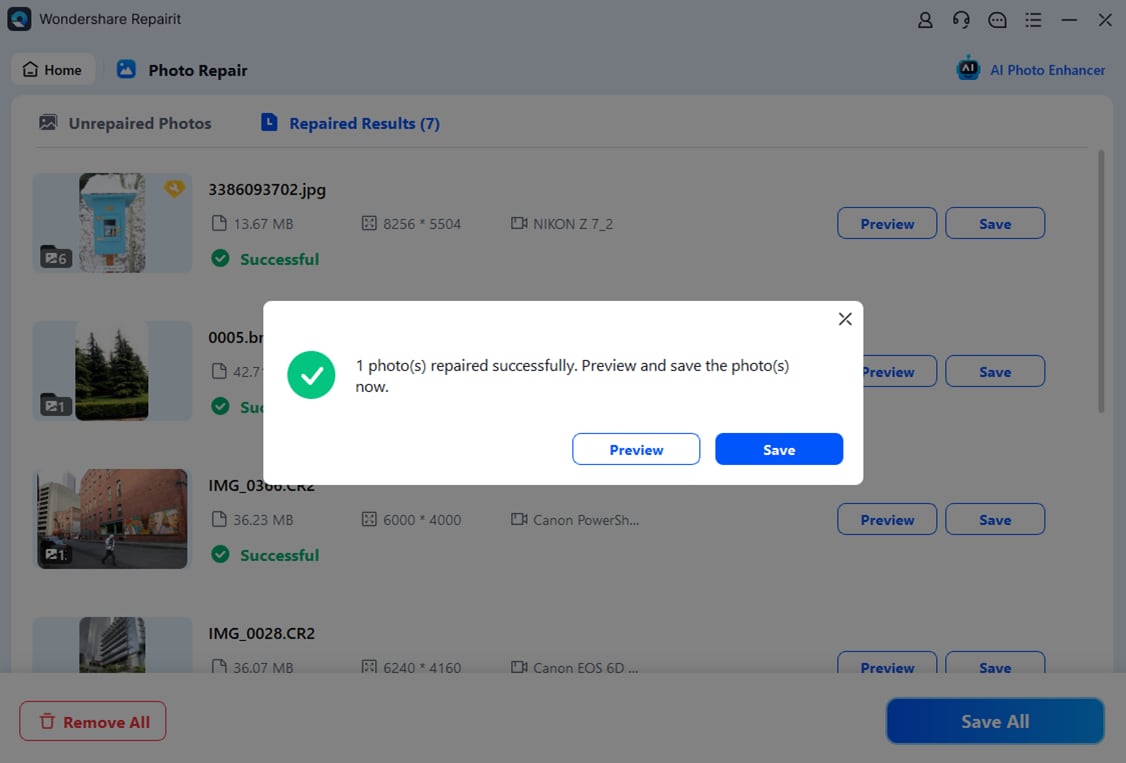
Whether you test JPEG Repair Shop first or start directly with Repairit, following a clear workflow like this helps you protect your original files and evaluate how much quality you can restore.
Final Verdict
When comparing Repairit Photo Repair vs JPEG Repair Shop, the right choice depends on your formats, the severity of your photo issues, and how often you need to repair images.
Repairit Photo Repair is a stronger choice for users who handle varied image collections, encounter more serious corruption, or simply want a guided, preview-based workflow that makes complex repairs feel approachable. Its broader capabilities and structured interface can save time if you regularly work with damaged or low-quality photos.
JPEG Repair Shop may be enough if you mostly work with standard JPEG files, face occasional corruption, and prefer a minimal utility that focuses on quick JPEG fixes. It fits users who value simplicity and do not need many extra features.
In practice, some users may even try both: JPEG Repair Shop for quick JPEG-only attempts and Repairit Photo Repair when they need multi-format support or deeper repair options. Choosing based on your real-world usage, rather than general claims, will help you get better results and a smoother experience when repairing corrupted photos.
Next: Repairit Photo Repair VS Photo Repair Toolbox
FAQ
-
1. Is Repairit Photo Repair better than JPEG Repair Shop for severely corrupted photos?
Repairit Photo Repair is generally a stronger choice for more severe or varied corruption because it offers broader capabilities and guidance, while JPEG Repair Shop focuses mainly on lighter, JPEG-only fixes. -
2. When should I choose JPEG Repair Shop instead of Repairit Photo Repair?
JPEG Repair Shop may be enough if you just need lightweight JPEG repair for a few damaged JPEG images and prefer a fast, simple tool with a very basic workflow. -
3. Can Repairit Photo Repair and JPEG Repair Shop work on the same photos?
Yes, in many cases you can try JPEG Repair Shop first for a quick JPEG fix and then use Repairit Photo Repair if the damage is more complex or involves non-JPEG formats in your library.




